( ꒪⌓꒪) ゆるよろ日記
( ゚∀゚)o彡°オパーイ!オパーイ! ( ;゚皿゚)ノシΣ フィンギィィーーッ!!!
この広告は、90日以上更新していないブログに表示しています。
Java Webフレームワーク Play!で遊んでみる - Install
バイナリのダウンロードとインストール
Page not found — Playframeworkからダウンロードしますよ。
2008/11/19現在でバージョンは1.0-stable3。
play-1.0-stable3.zipを解凍。
解凍してできたディレクトリにPATHを通します。
playコマンドをうってみると、こんな感じになります。
ozaki-MacBook:~ ozaki$ play ~ _ _ ~ _ __ | | __ _ _ _| |~ | '_ \| |/ _' | || |_|~ | __/|_|\____|\__ (_)~ |_| |__/ ~~ play! 1.0-stable3, http://www.playframework.org~~ Usage: play command [path or current directory] ~ ~ with, new Create a new application~ run Run the application in the current window~ debug Run the application under JDPA debugger~ test Run all tests~ help Show more commands~
ソウスからビルド
Play!のソウスは、bazaarというバージョン管理システムで管理されています。
bazaarはgitやmarcurialのような分散バージョン管理システムです。
なのでbazaarをインストールしないとソウスが落とせません。
自分の環境はOSX10.5なので、以下を参考にMacPortsでインストールしました。
MacPorts - wiki.bazaar.canonical.com
あとはbzrコマンドでソースを落としてきて、AntでビルドでOK。
> bzr checkout lp:play> cd play/framework> ant
アプリケーションを作る
playコマンドで play new<アプリケーション名>と入力すると、新しいアプリケーションが生成されます。
ozaki-MacBook:~ ozaki$ play new myApp~ _ _ ~ _ __ | | __ _ _ _| |~ | '_ \| |/ _' | || |_|~ | __/|_|\____|\__ (_)~ |_| |__/ ~~ play! 1.0-stable3, http://www.playframework.org~~ The new application will be created in /Users/ozaki/myApp~ What is the application name ? myApp~~ Ok, the application is created.~ Start it with : play run myApp~ Have fun !~
play run<アプリケーション名>でサーバが起動します。
ozaki-MacBook:~ ozaki$ play run myApp~ _ _ ~ _ __ | | __ _ _ _| |~ | '_ \| |/ _' | || |_|~ | __/|_|\____|\__ (_)~ |_| |__/ ~~ play! 1.0-stable3, http://www.playframework.org~~ Ctrl+C to stop~ 15:49:16,893 INFO ~ Starting /Users/ozaki/myApp15:49:16,938 WARN ~ You're running Play! in DEV mode15:49:16,939 INFO ~ Application 'myApp' is ready !15:49:17,162 INFO ~ Listening for HTTP on port 9000 ...
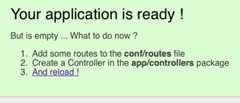
9000番ポートをlistenしているので、http://localhost:9000/にアクセスすると、こんな感じになります。