Movatterモバイル変換


[0]ホーム

URL:


Menu
×
See More 
Sign In
+1 Get Certified Upgrade Teachers Spaces Bootcamps Get Certified Upgrade Teachers Spaces Bootcamps
   ❮     
     ❯   

HTML Tutorial

HTML HOMEHTML IntroductionHTML EditorsHTML BasicHTML ElementsHTML AttributesHTML HeadingsHTML ParagraphsHTML StylesHTML FormattingHTML QuotationsHTML CommentsHTML ColorsHTML CSSHTML LinksHTML ImagesHTML FaviconHTML Page TitleHTML TablesHTML ListsHTML Block & InlineHTML DivHTML ClassesHTML IdHTML ButtonsHTML IframesHTML JavaScriptHTML File PathsHTML HeadHTML LayoutHTML ResponsiveHTML ComputercodeHTML SemanticsHTML Style GuideHTML EntitiesHTML SymbolsHTML EmojisHTML CharsetsHTML URL EncodeHTML vs. XHTML

HTML Forms

HTML FormsHTML Form AttributesHTML Form ElementsHTML Input TypesHTML Input AttributesInput Form Attributes

HTML Graphics

HTML CanvasHTML SVG

HTML Media

HTML MediaHTML VideoHTML AudioHTML Plug-insHTML YouTube

HTML APIs

HTML Web APIsHTML GeolocationHTML Drag and DropHTML Web StorageHTML Web WorkersHTML SSE

HTML Examples

HTML ExamplesHTML EditorHTML QuizHTML ExercisesHTML ChallengesHTML WebsiteHTML SyllabusHTML Study PlanHTML Interview PrepHTML BootcampHTML CertificateHTML SummaryHTML Accessibility

HTML References

HTML Tag ListHTML AttributesHTML Global AttributesHTML Browser SupportHTML EventsHTML ColorsHTML CanvasHTML Audio/VideoHTML DoctypesHTML Character SetsHTML URL EncodeHTML Lang CodesHTTP MessagesHTTP MethodsPX to EM ConverterKeyboard Shortcuts

HTMLOnline Editor


HTML Editor

With our online HTML editor, you can edit HTML, CSS and JavaScript code, and view the result in your browser.


Run »Size:

Example

<!DOCTYPE html>
<html>
<title>HTML Tutorial</title>
<body>

<h1>This is a heading</h1>
<p>This is a paragraph.</p>

</body>
</html>

This is a Heading

This is a paragraph.

Try it Yourself »

Click on the "Try it Yourself" button to see how it works.


Publish Your Code

If you want to save your HTML, CSS and JavaScript code, and create your own website, check outW3Schools Spaces.

W3Schools Spaces is a website-building tool that lets you make and share your own website.

You can change the website's look and how it works by editing the code right in your web browser.

It's easy to use and doesn't require any setup:
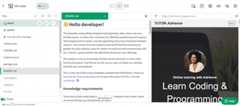
The code editor is packed with features to help you achieve more:

  • Templates: Start from scratch or use a template
  • Cloud-based: no installations required. You only need your browser
  • Terminal & Log: debug and troubleshoot your code easily
  • File Navigator: switch between files inside the code editor
  • And much more!
Learn More

Learn Faster

Practice is key to mastering coding, and the best way to put your HTML knowledge into practice is by getting practical with code.

UseW3Schools Spaces to build, test and deploy code.

The code editor lets you write and practice different types of computer languages. It includes HTML/CSS/JavaScript, but you can use it for other languages too, such as PHP, Python, Node.js, etc.

Learn More

If you don't know HTML, we suggest that you read ourHTML Tutorial from scratch.


Build Powerful Websites

You can also use the code editor inW3School Spaces to build frontend or full-stack websites from scratch.

Or you can use the 60+ templates available and save time:

Photographer website template
Blog website template
Webshop template
Tutor website template

Create your Spaces account today and explore them all!

Learn More

Share It With The World

Host and publish your websites in no time withW3School Spaces.

W3Schools subdomain and SSL certificate are included withW3School Spaces. An SSL certificate makes your website safe and secure. It also helps people trust your website and makes it easier to find it online.

Want a custom domain for your website?

You can buy a domain or transfer an existing one and connect it to your space.

Learn More

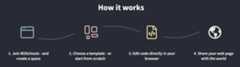
How Does It Work?

Get started in a few clicks withW3School Spaces.


×

Contact Sales

If you want to use W3Schools services as an educational institution, team or enterprise, send us an e-mail:
sales@w3schools.com

Report Error

If you want to report an error, or if you want to make a suggestion, send us an e-mail:
help@w3schools.com

W3Schools is optimized for learning and training. Examples might be simplified to improve reading and learning.
Tutorials, references, and examples are constantly reviewed to avoid errors, but we cannot warrant full correctness
of all content. While using W3Schools, you agree to have read and accepted ourterms of use,cookies andprivacy policy.

Copyright 1999-2026 by Refsnes Data. All Rights Reserved.W3Schools is Powered by W3.CSS.

-->
[8]ページ先頭

©2009-2026 Movatter.jp