How TO - Password Validation
Learn how to create a password validation form with CSS and JavaScript.
Password Validation
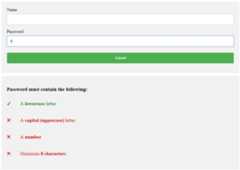
Create A Password Validation Form
Step 1) Add HTML:
Example
<div class="container">
<form action="/action_page.php">
<label for="usrname">Username</label>
<input type="text" id="usrname" name="usrname" required>
<label for="psw">Password</label>
< input type="password" id="psw" name="psw" pattern="(?=.*\d)(?=.*[a-z])(?=.*[A-Z]).{8,}" title="Must contain at least one number and one uppercase and lowercase letter, and at least 8 or more characters" required>
<input type="submit" value="Submit">
</form>
</div>
<div id="message">
<h3>Password must contain the following:</h3>
<p id="letter" class="invalid">A <b>lowercase</b> letter</p>
<p id="capital" class="invalid">A <b>capital (uppercase)</b> letter</p>
<p id="number" class="invalid">A <b>number</b></p>
<p id="length" class="invalid">Minimum <b>8 characters</b></p>
</div>
<form action="/action_page.php">
<label for="usrname">Username</label>
<input type="text" id="usrname" name="usrname" required>
<label for="psw">Password</label>
< input type="password" id="psw" name="psw" pattern="(?=.*\d)(?=.*[a-z])(?=.*[A-Z]).{8,}" title="Must contain at least one number and one uppercase and lowercase letter, and at least 8 or more characters" required>
<input type="submit" value="Submit">
</form>
</div>
<div id="message">
<h3>Password must contain the following:</h3>
<p id="letter" class="invalid">A <b>lowercase</b> letter</p>
<p id="capital" class="invalid">A <b>capital (uppercase)</b> letter</p>
<p id="number" class="invalid">A <b>number</b></p>
<p id="length" class="invalid">Minimum <b>8 characters</b></p>
</div>
Note: We use the pattern attribute (with a regular expression) inside the password field to set a restriction for submitting the form: it must contain 8 or more characters that are of at least one number, and one uppercase and lowercase letter.
Step 2) Add CSS:
Style the input fields and the message box:
Example
/* Style all input fields */
input {
width: 100%;
padding: 12px;
border: 1px solid #ccc;
border-radius: 4px;
box-sizing: border-box;
margin-top: 6px;
margin-bottom: 16px;
}
/* Style the submit button */
input[type=submit] {
background-color: #04AA6D;
color: white;
}
/* Style the container for inputs */
.container {
background-color: #f1f1f1;
padding: 20px;
}
/* The message box is shown when the user clicks on the password field */
#message {
display:none;
background: #f1f1f1;
color: #000;
position: relative;
padding: 20px;
margin-top: 10px;
}
#message p {
padding: 10px 35px;
font-size: 18px;
}
/* Add a green text color and a checkmark when the requirements are right */
.valid {
color: green;
}
.valid:before {
position: relative;
left: -35px;
content: "✔";
}
/* Add a red text color and an "x" icon when the requirements are wrong */
.invalid {
color: red;
}
.invalid:before {
position: relative;
left: -35px;
content: "✖";
}
input {
width: 100%;
padding: 12px;
border: 1px solid #ccc;
border-radius: 4px;
box-sizing: border-box;
margin-top: 6px;
margin-bottom: 16px;
}
/* Style the submit button */
input[type=submit] {
background-color: #04AA6D;
color: white;
}
/* Style the container for inputs */
.container {
background-color: #f1f1f1;
padding: 20px;
}
/* The message box is shown when the user clicks on the password field */
#message {
display:none;
background: #f1f1f1;
color: #000;
position: relative;
padding: 20px;
margin-top: 10px;
}
#message p {
padding: 10px 35px;
font-size: 18px;
}
/* Add a green text color and a checkmark when the requirements are right */
.valid {
color: green;
}
.valid:before {
position: relative;
left: -35px;
content: "✔";
}
/* Add a red text color and an "x" icon when the requirements are wrong */
.invalid {
color: red;
}
.invalid:before {
position: relative;
left: -35px;
content: "✖";
}

