HTML CanvasClipping
The clip() Method
Theclip() method turns the current path into the current clipping region.
When a region is clipped, future drawing is only visible inside the clipped region.
Theclip() method has the following parameters:
| Parameter | Description |
|---|---|
| fillrule | Is a point inside or outside the clipping region? Possible values: nonzero|evenodd |
| path | A path to use as the clipping region |
Let's look at some examples:
Example
First, create a circular clipping region. Then draw two rectangles; only those parts that lies inside the clipping region are visible:
const canvas = document.getElementById("myCanvas");
const ctx = canvas.getContext("2d");
// Create a circular clipping region
ctx.beginPath();
ctx.arc(100, 75, 70, 0, Math.PI * 2);
ctx.clip();
// Draw two rectangles
ctx.fillStyle = "blue";
ctx.fillRect(0, 0, 300, 150);
ctx.fillStyle = "red";
ctx.fillRect(0, 0, 90, 90);
</script>
Example
First, create a triangle-shaped clipping region. Then draw two rectangles; only those parts that lies inside the clipping region are visible:
const canvas = document.getElementById("myCanvas");
const ctx = canvas.getContext("2d");
// Create a triangle-shaped clipping region
ctx.beginPath();
ctx.moveTo(100,20);
ctx.lineTo(180,100);
ctx.lineTo(20,100);
ctx.lineTo(100,20);
ctx.clip();
// Draw two rectangles
ctx.fillStyle = "blue";
ctx.fillRect(0, 0, 300, 150);
ctx.fillStyle = "red";
ctx.fillRect(0, 0, 90, 90);
</script>
Example
First, create a circular clipping region. Then draw an image onto the canvas; again - only those parts that lies inside the clipping region are visible:
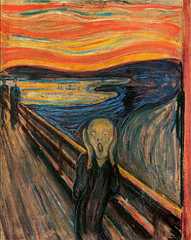
const canvas = document.getElementById("myCanvas");
const ctx = canvas.getContext("2d");
const image = document.getElementById("scream");
image.addEventListener("load", (e) => {
// Create a circular clipping region
ctx.beginPath();
ctx.arc(110, 145, 75, 0, Math.PI * 2);
ctx.clip();
// Draw image onto canvas
ctx.drawImage(image, 0, 0);
});
</script>
Example
First, we save two rectangles to a Path2D() object, this will be the clipping region. The "evenodd" rule creates a hole where the clipping rectangles intersect: If we had used the default "nonzero" rule, there would be no hole:
const canvas = document.getElementById("myCanvas");
const ctx = canvas.getContext("2d");
// Create clipping path (two rectangles)
let r = new Path2D();
r.rect(80,10, 45,130);
r.rect(40,50, 120,50);
ctx.clip(r, "evenodd");
// Draw a rectangle
ctx.fillStyle = "red";
ctx.fillRect(0, 0, 300, 150);
</script>
Example
Same example as above, but with the "nonzero" rule (does not create a hole where the clipping rectangles intersect):
const canvas = document.getElementById("myCanvas");
const ctx = canvas.getContext("2d");
// Create clipping path (two rectangles)
let r = new Path2D();
r.rect(80,10, 45,130);
r.rect(40,50, 120,50);
ctx.clip(r, "nonzero");
// Draw a rectangle
ctx.fillStyle = "red";
ctx.fillRect(0, 0, 300, 150);
</script>

