Google Sheets AVERAGEIF Function
AVERAGEIF Function
TheAVERAGEIF function is a premade function in Google Sheets, which calculates theaverage of a range based on atrue orfalsecondition.
It is typed=AVERAGEIF and has three parts:
Thecondition is referred to ascriterion, which can check things like:
- If a number isgreater than another number
> - If a number issmaller than another number
< - If a number or text isequal to something
=
The[average_range] is the range where the function calculates the average.
Note: The[average_range] is optional.
If not specified, the function calculates the average of the same range as condition.
Example AVERAGEIF function
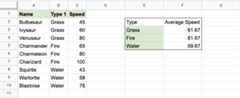
Find the average speed of Grass type Pokemon:
The condition is that the type is "Grass".
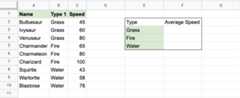
ExampleAVERAGEIF function, step by step:
- Select the cell
F3 - Type
=AVERAGEIF - Click theAVERAGEIF command
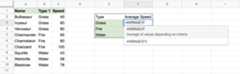
- Specify the range for the condition
B2:B10(the Type 1 values) - Type
, - Specify the criteria (the cell
E3, which has the value "Grass") - Type
, - Specify the range for the average
C2:C10(the Speed values) - Hit enter
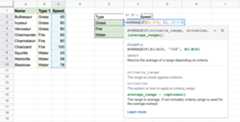
The function now calculates the average speed value of the Grass type Pokemon: Bulbasaur, Ivysaur and Venusaur.
The function can be repeated for Fire and Water type Pokemon to compare them:
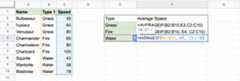
Note: You can use thefilling function for the other rows, but make sure to useabsolute references for the ranges.
Now, we can see the average speed values of each type: