ChatGPT-4 Coding
Using ChatGPT-4 to Write Code
Using ChatGPT-4 to write code is like having an experienced programmer helping you.
ChatGPT can save you a lot of time coding if you know how to ask!
Define the Task
Before using Generative AI to help you, set a clear goal for your code.
Example goals:
- Create a specific function
- Debug existing code
In general, clarity and context are important when using Generative AIs, but when using them to write code, it is even more important!
For example, write, "Create a function that counts down the number of days and hours until the next Saturday." instead of "Make code to find the closest Saturday"
Choose a Programming Language
To get even more specific, specify the programming language you need.
If you are unsure of which programming language to use, you can ask ChatGPT:
Example
With the following prompt:
A response from ChatGPT-4 could be:

Now we can further clarify our task to: "Create a JavaScript function that counts down the number of days and hours until the next Saturday."
Ask ChatGPT for Help
Now, we can use ChatGPT to write our code.
Imagine you have the following web page:
Example
<html>
<body>
<h1>My First Web Page</h1>
<p>The weekend is only <span></span>from now!</p>
</body>
</html>
Ask ChatGPT to write the code:
Example
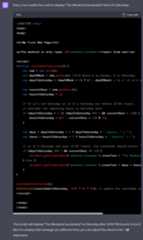
With the following prompt:
<!DOCTYPE html>
<html>
<body>
<h1>My First Web Page</h1>
<p>The weekend is only <span></span>from now!</p>
</body>
</html>
Create a JavaScript function that counts down the number of days and hours until the next Saturday.
A response from ChatGPT-4 could be:
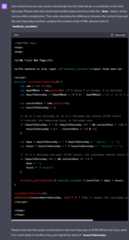
Then test it:
Example
<html>
<body>
<h1>My First Web Page</h1>
<p>The weekend is only <span></span> from now!</p>
<script>
function countdownToSaturday() {
var now = new Date();
var dayOfWeek = now.getDay(); //0-6 where 0 is Sunday, 6 is Saturday
var daysToSaturday = (dayOfWeek < 6) ? (6 - dayOfWeek) : 0; // if it's already Saturday, no days remain
var currentHour = now.getHours();
var hoursToSaturday = 0;
// If it's not Saturday or if it's Saturday but before 12:00 (noon),
// consider the remaining hours to Saturday noon
if (daysToSaturday > 0 || (daysToSaturday === 0 && currentHour < 12)) {
hoursToSaturday = (24 - currentHour + 12) % 24;
}
var days = daysToSaturday > 0 ? daysToSaturday + " day(s), " : "";
var hours = hoursToSaturday > 0 ? hoursToSaturday + " hour(s)" : "";
// if it's Saturday and past 12:00 (noon), the countdown should return 0.
if (daysToSaturday === 0 && currentHour >= 12) {
days = "";
hours = "0 hours";
}
document.getElementById('weekend_coundown').innerText = days + hours;
}
countdownToSaturday();
setInterval(countdownToSaturday, 1000 * 60 * 60); // update the countdown every hour
</script>
</body>
</html>
It works!
Iterate and Develop
You can keep working with ChatGPT to improve your code:
Example
With the following prompt:
A response from ChatGPT-4 could be: