ExcelSTDEV.S Function
STDEV.S Function
TheSTDEV.S function is a premade function in Excel, which calculates theStandard Deviation (Std) for a sample.
It is typed=STDEV.S
Note: This function ignores cells with text and logic.
Note: Standard deviation (σ) measures how far a 'typical' observation is from the average of the data (μ). You can read more about standard deviation in ourStatistics - Standard Deviation Tutorial.
Tip: There is another function calledSTDEV.P that can be used if you have the data for the entire population.
How to use the=STDEV.S function:
- Select a cell (
H5) - Type
=STDEV.S - Double click theSTDEV.S command
- Select a range (
E2:E21) - Hit enter
Let's have a look at an example!
Find the Standard Deviation for the sample of Pokemon total stats in the rangeE2:E21:
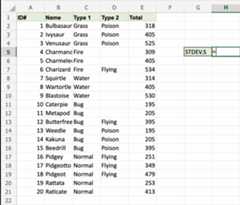
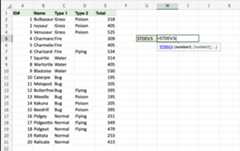
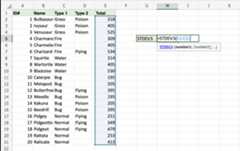
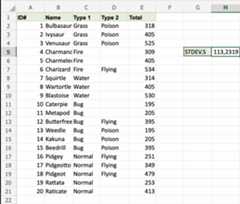
That's the way! TheSTDEV.S function has successfully returned theStandard Deviation113,2319 for the sample of Pokemons Total stats.

