How to Convert Time to Seconds using Excel
Learn how to convert time to Seconds using Excel.
Time can be converted into seconds using Excel.
The number86400 can be used to convert time to seconds.
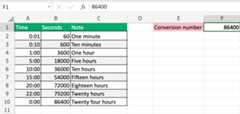
86400 Explained
Excel uses a 24-hour system.
Eachday has24 hours.
Onehour is60 minutes.
Oneminute is60 seconds.
24(hours) *60(minutes) *60 (seconds) =86400
Example
00:01 * 86400 = 60The example returns60 because one minute (00:01) is 60 seconds.
Explanation
Each day has 24 hours.
Each hour can be understood as a percentage of the total hours of the day.
- 01:00 = 1/24
- 02:00 = 2/24
- 03:00 = 3/24
- and so on.
The percentage can be used to find the seconds.
Example (15:00)
15:00 * 86400 = 54000Fifteen hours equals54000 seconds.
15:00 is 15/24 (0.625).
0.625 * 86400 = 54000Multiply to get 86400
24 (hours) * 60 (minutes) * 60 (seconds) = 86400
