CSSSyllabus
Introduction
TheW3Schools CSS Tutorial is comprehensive and beginner-friendly.
It will give you a fundamental knowledge of CSS.
It is designed for beginners and requires no prior experience with programming.
The content has been carefully made to be bite-sized, simple, and easy to understand.
The content has been proven by millions of users over the years. It is updated and improved frequently.
The syllabus outline and its sequence are structured so you can learn CSS step by step, from the introduction to creating your first application with CSS.
Learning Outcomes
- Understand how CSS is used to format and style web pages.
- Use CSS rules and syntax to define how HTML elements look.
- Use colors, fonts, and text properties to customize webpage text.
- Implement different types of selectors (e.g., class, ID, element selectors) for targeted styling.
- Use the box model properties (border, padding, and margin) to create and change the layout.
- To organize elements on the page, use the positioning properties (static, relative, absolute, and fixed).
- Use media queries to create responsive web pages.
- Style borders and backgrounds with different qualities and effects.
- Learn how to utilize CSS Flexbox to create responsive, adaptable layouts.
- Link an external CSS file to an HTML document.
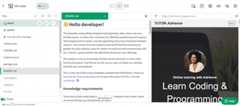
Note: Are you a teacher teaching CSS?W3Schools Academy is a toolbox of features that can help you teach. It offers classroom features such as pre-built study plans, classroom administration and much more. Read more aboutAcademy here.
Which Subjects Are CSS Relevant For?
- Web pages:
HTML is the standard markup language for creating web pages, and CSS is the language used to style them. - Computer Science (CS) / Information Technology (IT):
HTML together with CSS is fundamental to understanding the internet, web development and programming. - Digital Media:
Text, photos, and other media can be added to digital platforms using CSS together with HTML, which is essential for content creation and management. - Business / Entrepreneurship:
Understanding how to create a website is helpful for projects related to the internet. - Art and Design:
CSS supports Web Design, creativity, and visual communication ideas that are all part of web design. - STEM (Science, Technology, Engineering, Mathematics):
Building web pages with HTML and CSS is a part of technology integration in STEM projects, teaching logical thinking and problem-solving. - Career and Technical Education (CTE):
CSS together with HTML is part of the curriculum for career-focused courses, especially those related to web development, IT support, and digital marketing.
Activities
In this tutorial we offer different activities for you to learn CSS for free:
Sign in to Track Progress
You can also create an account to track your progress.
As a signed-in user, you get access to features such as:
- Learning paths
- Sandbox and lab environments
- Achievements
- And much more!
Overview of the Modules
- CSS HOME
- CSS Introduction
- CSS Syntax
- CSS Selectors
- CSS How To
- CSS Comments
- CSS Colors
- CSS Backgrounds
- CSS Borders
- CSS Margins
- CSS Padding
- CSS Height/Width
- CSS Box Model
- CSS Outline
- CSS Text
- CSS Fonts
- CSS Icons
- CSS Links
- CSS Lists
- CSS Tables
- CSS Display
- CSS Max-width
- CSS Position
- CSS Z-index
- CSS Overflow
- CSS Float
- CSS Inline-block
- CSS Align
- CSS Combinators
- CSS Pseudo-classes
- CSS Pseudo-elements
- CSS Opacity
- CSS Navigation Bar
- CSS Dropdowns
- CSS Image Gallery
- CSS Image Sprites
- CSS Attribute Selectors
- CSS Forms
- CSS Counters
- CSS Website Layout
- CSS Units
- CSS Specificity
- CSS Important
- CSS Math Functions
- CSS Rounded Corners
- CSS Border Images
- CSS Backgrounds
- CSS Colors
- CSS Color Keywords
- CSS Gradients
- CSS Shadows
- CSS Text Effects
- CSS Fonts
- CSS 2D Transforms
- CSS 3D Transforms
- CSS Transitions
- CSS Animations
- CSS Tooltips
- CSS Style Images
- CSS Centering Images
- CSS Image Filter Effects
- CSS Image Shapes
- CSS object-position
- CSS Masking
- CSS Buttons
- CSS Pagination
- CSS Multiple Columns
- CSS User Interface
- CSS Variables
- CSS @property
- CSS Box Sizing
- CSS Media Queries
- CSS MQ Examples Queries
- CSS Flexbox
- CSS Responsive Web Design
- CSS Viewport
- CSS Grid View
- CSS Media Queries (Responsive)
- CSS Responsive Images
- CSS Responsive Videos
- CSS Frameworks
- CSS Responsive Templates
- CSS Grid Layout
- CSS Grid Container
- CSS Grid Item
Sandbox and Lab Environment
CSS, like any other coding language, is best learned by working hands-on with code.
Easily try code with our "Try it Yourself" editor.
Here, you can edit CSS code and view the result:
CSS Example
background-color: lightblue;
}
h1{
color: white;
text-align: center;
}
p{
font-family: verdana;
font-size: 20px;
}
If you want to explore more and host your project, we have a feature calledSpaces that allows you to build, test and deploy static websites.
Here you get a secure sandbox environment called Spaces, where you can practice coding and test projects in real-time.
Spaces allow you to test, build, and deploy code. This includes a W3Schools subdomain, hosting, and secure SSL certificates.
Spaces require no installation and run directly in the browser.
Features include:
- Collaboration
- File navigator
- Terminal & log
- Package manager
- Database
- Environment manager
- Analytics
CSS Certification
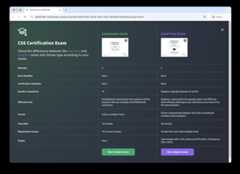
W3Schools offers an end-of-pathway certification program.
Here you can take exams to get certified.
The CSS exam is a test that summarizes the W3Schools CSS syllabus.
After passing the exam you get the "Certified CSS Developer" Certification.
There are two different types of certifications:
- Non-adaptive
- Adaptive
The non-adaptive is pass or no pass.
The adaptive certification is adaptive and graded; students will get a grade from intermediate, advanced to professional.
Are You a Teacher?
Are you interested in learning how you can useW3Schools Academy to Teach CSS?
Watch a demo ofW3Schools Academy. You'll see how it works, and discover how it can make teaching programming easier and more engaging.