Tensors
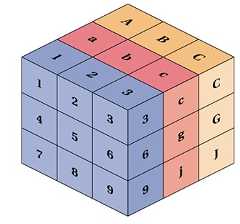
A Tensor is aN-dimensional Matrix:
- A Scalar is a 0-dimensional tensor
- A Vector is a 1-dimensional tensor
- A Matrix is a 2-dimensional tensor
ATensor is a generalization ofVectors andMatrices to higher dimensions.
| Scalar | Vector(s) | ||||||||||||||||||||||||||
| 1 |
| ||||||||||||||||||||||||||
| Matrix | Tensor | ||||||||||||||||||||||||||
|
|
Tensor Ranks
The number of directions a tensor can have in aN-dimensional space, is called theRank of the tensor.
The rank is denotedR.
AScalar is a single number.
- It has 0 Axes
- It has aRank of 0
- It is a 0-dimensional Tensor
AVector is an array of numbers.
- It has 1 Axis
- It has aRank of 1
- It is a 1-dimensional Tensor
AMatrix is a 2-dimensional array.
- It has 2 Axis
- It has aRank of 2
- It is a 2-dimensional Tensor
Real Tensors
Technically, all of the above are tensors, but when we speak of tensors, we generally speak of matrices with a dimension larger than 2 (R > 2).
Linear Algebra in JavaScript
In linear algebra, the most simple math object is theScalar:
Another simple math object is theArray:
Matrices are2-dimensional Arrays:
Vectors can be written asMatrices with only one column:
Vectors can also be written asArrays:
Tensors areN-dimensional Arrays:
JavaScript Tensor Operations
Programming tensor operations in JavaScript, can easily become a spaghetti of loops.
Using a JavaScript library will save you a lot of headache.
One of the most common libraries to use for tensor operations is calledtensorflow.js.
Tensor Addition
const tensorB = tf.tensor([[1,-1], [2,-2], [3,-3]]);
// Tensor Addition
const tensorAdd = tensorA.add(tensorB);
// Result [ [2, 1], [5, 2], [8, 3] ]
Tensor Subtraction
const tensorB = tf.tensor([[1,-1], [2,-2], [3,-3]]);
// Tensor Subtraction
const tensorSub = tensorA.sub(tensorB);
// Result [ [0, 3], [1, 6], [2, 9] ]
Learn more about Tensorflow ...

