TypeScript 1.8
Type parameters as constraints
With TypeScript 1.8 it becomes possible for a type parameter constraint to reference type parameters from the same type parameter list.Previously this was an error.This capability is usually referred to asF-Bounded Polymorphism.
Example
ts
Control flow analysis errors
TypeScript 1.8 introduces control flow analysis to help catch common errors that users tend to run into.Read on to get more details, and check out these errors in action:
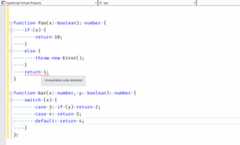
Unreachable code
Statements guaranteed to not be executed at run time are now correctly flagged as unreachable code errors.For instance, statements following unconditionalreturn,throw,break orcontinue statements are considered unreachable.UseallowUnreachableCode to disable unreachable code detection and reporting.
Example
Here’s a simple example of an unreachable code error:
ts
A more common error that this feature catches is adding a newline after areturn statement:
ts
Since JavaScript automatically terminates thereturn statement at the end of the line, the object literal becomes a block.
Unused labels
Unused labels are also flagged.Just like unreachable code checks, these are turned on by default;useallowUnusedLabels to stop reporting these errors.
Example
ts
Implicit returns
Functions with code paths that do not return a value in JS implicitly returnundefined.These can now be flagged by the compiler as implicit returns.The check is turnedoff by default; usenoImplicitReturns to turn it on.
Example
ts
Case clause fall-throughs
TypeScript can reports errors for fall-through cases in switch statement where the case clause is non-empty.This check is turnedoff by default, and can be enabled usingnoFallthroughCasesInSwitch.
Example
WithnoFallthroughCasesInSwitch, this example will trigger an error:
ts
However, in the following example, no error will be reported because the fall-through case is empty:
ts
Function Components in React
TypeScript now supportsFunction components.These are lightweight components that easily compose other components:
ts
For this feature and simplified props, be sure to use thelatest version of react.d.ts.
Simplifiedprops type management in React
In TypeScript 1.8 with the latest version of react.d.ts (see above), we’ve also greatly simplified the declaration ofprops types.
Specifically:
- You no longer need to either explicitly declare
refandkeyorextend React.Props - The
refandkeyproperties will appear with correct types on all components - The
refproperty is correctly disallowed on instances of Stateless Function components
Augmenting global/module scope from modules
Users can now declare any augmentations that they want to make, or that any other consumers already have made, to an existing module.Module augmentations look like plain old ambient module declarations (i.e. thedeclare module "foo" { } syntax), and are directly nested either your own modules, or in another top level ambient external module.
Furthermore, TypeScript also has the notion ofglobal augmentations of the formdeclare global { }.This allows modules to augment global types such asArray if necessary.
The name of a module augmentation is resolved using the same set of rules as module specifiers inimport andexport declarations.The declarations in a module augmentation are merged with any existing declarations the same way they would if they were declared in the same file.
Neither module augmentations nor global augmentations can add new items to the top level scope - they can only “patch” existing declarations.
Example
Heremap.ts can declare that it will internally patch theObservable type fromobservable.ts and add themap method to it.
ts
ts
ts
Similarly, the global scope can be augmented from modules using adeclare global declarations:
Example
ts
String literal types
It’s not uncommon for an API to expect a specific set of strings for certain values.For instance, consider a UI library that can move elements across the screen while controlling the“easing” of the animation.
ts
However, this is error prone - there is nothing stopping a user from accidentally misspelling one of the valid easing values:
ts
With TypeScript 1.8, we’ve introduced string literal types.These types are written the same way string literals are, but in type positions.
Users can now ensure that the type system will catch such errors.Here’s our newAnimationOptions using string literal types:
ts
Improved union/intersection type inference
TypeScript 1.8 improves type inference involving source and target sides that are both union or intersection types.For example, when inferring fromstring | string[] tostring | T, we reduce the types tostring[] andT, thus inferringstring[] forT.
Example
ts
ConcatenateAMD andSystem modules with--outFile
SpecifyingoutFile in conjunction with--module amd or--module system will concatenate all modules in the compilation into a single output file containing multiple module closures.
A module name will be computed for each module based on its relative location torootDir.
Example
ts
ts
Results in:
js
Support fordefault import interop with SystemJS
Module loaders like SystemJS wrap CommonJS modules and expose them as adefault ES6 import. This makes it impossible to share the definition files between the SystemJS and CommonJS implementation of the module as the module shape looks different based on the loader.
Setting the new compiler flagallowSyntheticDefaultImports indicates that the module loader performs some kind of synthetic default import member creation not indicated in the imported .ts or .d.ts. The compiler will infer the existence of adefault export that has the shape of the entire module itself.
System modules have this flag on by default.
Allow capturedlet/const in loops
Previously an error, now supported in TypeScript 1.8.let/const declarations within loops and captured in functions are now emitted to correctly matchlet/const freshness semantics.
Example
ts
is compiled to:
js
And results in
cmd
Improved checking forfor..in statements
Previously the type of afor..in variable is inferred toany; that allowed the compiler to ignore invalid uses within thefor..in body.
Starting with TypeScript 1.8:
- The type of a variable declared in a
for..instatement is implicitlystring. - When an object with a numeric index signature of type
T(such as an array) is indexed by afor..invariable of a containingfor..instatement for an objectwith a numeric index signature andwithout a string index signature (again such as an array), the value produced is of typeT.
Example
ts
Modules are now emitted with a"use strict"; prologue
Modules were always parsed in strict mode as per ES6, but for non-ES6 targets this was not respected in the generated code. Starting with TypeScript 1.8, emitted modules are always in strict mode. This shouldn’t have any visible changes in most code as TS considers most strict mode errors as errors at compile time, but it means that some things which used to silently fail at runtime in your TS code, like assigning toNaN, will now loudly fail. You can reference theMDN Article on strict mode for a detailed list of the differences between strict mode and non-strict mode.
Including.js files with--allowJs
Often there are external source files in your project that may not be authored in TypeScript.Alternatively, you might be in the middle of converting a JS code base into TS, but still want to bundle all your JS code into a single file with the output of your new TS code.
.js files are now allowed as input totsc.The TypeScript compiler checks the input.js files for syntax errors, and emits valid output based on thetarget andmodule flags.The output can be combined with other.ts files as well.Source maps are still generated for.js files just like with.ts files.
Custom JSX factories using--reactNamespace
Passing--reactNamespace <JSX factory Name> along with--jsx react allows for using a different JSX factory from the defaultReact.
The new factory name will be used to callcreateElement and__spread functions.
Example
ts
Compiled with:
shell
Results in:
js
this-based type guards
TypeScript 1.8 extendsuser-defined type guard functions to class and interface methods.
this is T is now valid return type annotation for methods in classes and interfaces.When used in a type narrowing position (e.g.if statement), the type of the call expression target object would be narrowed toT.
Example
ts
Official TypeScript NuGet package
Starting with TypeScript 1.8, official NuGet packages are available for the TypeScript Compiler (tsc.exe) as well as the MSBuild integration (Microsoft.TypeScript.targets andMicrosoft.TypeScript.Tasks.dll).
Stable packages are available here:
Also, a nightly NuGet package to match thenightly npm package is available onmyget:
Prettier error messages fromtsc
We understand that a ton of monochrome output can be a little difficult on the eyes.Colors can help discern where a message starts and ends, and these visual clues are important when error output gets overwhelming.
By just passing thepretty command line option, TypeScript gives a more colorful output with context about where things are going wrong.

Colorization of JSX code in VS 2015
With TypeScript 1.8, JSX tags are now classified and colorized in Visual Studio 2015.
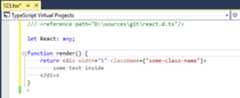
The classification can be further customized by changing the font and color settings for theVB XML color and font settings throughTools->Options->Environment->Fonts and Colors page.
The--project (-p) flag can now take any file path
The--project command line option originally could only take paths to a folder containing atsconfig.json.Given the different scenarios for build configurations, it made sense to allow--project to point to any other compatible JSON file.For instance, a user might want to target ES2015 with CommonJS modules for Node 5, but ES5 with AMD modules for the browser.With this new work, users can easily manage two separate build targets usingtsc alone without having to perform hacky workarounds like placingtsconfig.json files in separate directories.
The old behavior still remains the same if given a directory - the compiler will try to find a file in the directory namedtsconfig.json.
Allow comments in tsconfig.json
It’s always nice to be able to document your configuration!tsconfig.json now accepts single and multi-line comments.
Support output to IPC-driven files
TypeScript 1.8 allows users to use theoutFile argument with special file system entities like named pipes, devices, etc.
As an example, on many Unix-like systems, the standard output stream is accessible by the file/dev/stdout.
shell
This can be used to pipe output between commands as well.
As an example, we can pipe our emitted JavaScript into a pretty printer likepretty-js:
shell
Improved support fortsconfig.json in Visual Studio 2015
TypeScript 1.8 allowstsconfig.json files in all project types.This includes ASP.NET v4 projects,Console Application, and theHtml Application with TypeScript project types.Further, you are no longer limited to a singletsconfig.json file but can add multiple, and each will be built as part of the project.This allows you to separate the configuration for different parts of your application without having to use multiple different projects.

We also disable the project properties page when you add atsconfig.json file.This means that all configuration changes have to be made in thetsconfig.json file itself.
A couple of limitations
- If you add a
tsconfig.jsonfile, TypeScript files that are not considered part of that context are not compiled. - Apache Cordova Apps still have the existing limitation of a single
tsconfig.jsonfile, which must be in either the root or thescriptsfolder. - There is no template for
tsconfig.jsonin most project types.
The TypeScript docs are an open source project. Help us improve these pagesby sending a Pull Request ❤


Last updated: Dec 16, 2025