
What is the Architecture of Kubernetes?
A Kubernetes cluster consists of several components, working together.

Kubernetes is a complex system to understand, with many moving parts. So let’s go on a mini sightseeing adventure, through the architecture of Kubernetes, to find out how it’s put together.
Kubernetes components
Kubernetes isn’t a single executable or binary application. In fact, it’s made up of many components, which work together to run your applications in containers.
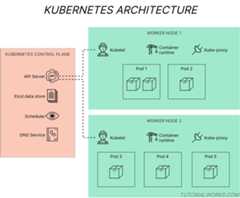
The key components in a Kubernetes cluster
Kubernetes architecture diagram byTom Donohue is licensed underCC BY-SA 4.0


Each component in Kubernetes performs a different job, whether it’s responding to your admin API requests, managing networking, deciding where to run your containers, or managing the containers themselves.
The components that make up Kubernetes are divided into two groups:
Control plane components, which manage the state of a Kubernetes cluster. These are the components like the cluster databaseetcd and the Kubernetes API server.
Worker node components, which run on every node and provide the supporting services for running containers. These are the components like thekubelet andkube-proxy.
By the way, the control plane is just a name for a set of related components, not a physical plane!
Nodes in Kubernetes
A Node in Kubernetes is a machine – which can be either physical or virtual – where the components of Kubernetes run. A Kubernetes cluster consists of one or more nodes.
You’ll often see two types of nodes in a Kubernetes cluster:
Nodes which run the control plane components, and no user apps (formerly calledmaster nodes).
Worker nodes, which run user apps.
Can the Kubernetes control plane and worker node run on the same machine?
Yep, you can run the control plane components and a worker node on the same machine, or host, although it’s not usually done in production (real) Kubernetes clusters.
But, in fact, this is actually howMinikube works. Minikube creates a virtual machine, and runs the Kubernetes control plane and worker node components inside one single VM.
Now let’s look at the components which make up the control plane, and the components which run on worker nodes.
Control plane components
The control plane is thebrain of Kubernetes. It monitors the state of the cluster, it knows which applications are running (and where), and it decides if there is capacity to launch new containers.
There are several components which make up the control plane in Kubernetes. Here’s a description of each one, and what it does.
etcd
etcd is the database of the cluster. It stores all of the objects that Kubernetes knows about; this includes objects that are included in a brand new cluster, and all of the objects that might have been created since, using the Kubernetes API. It also stores user and application configuration likeConfigMaps andSecrets.
Sinceetcd is the “single source of truth” of the state of the Kubernetes cluster, it’s protected and deployed in such a way that makes it fault-tolerant against crashes.
API Server
The API Server (kube-apiserver) exposes the Kubernetes API, which is the main gateway to the control plane.
Developers and administrators use the API to control Kubernetes. When you use thekubectl command, you are actually interacting with the API Server.
Controller Manager
controller-manager manages certain objects in the Kubernetes cluster, by constantly monitoring the state of the cluster (through the Kubernetes API) and reacting to any changes that occur.
Controllers inside the Controller Manager are dedicated to watching and reacting to changes of different types of objects.
For example: theReplicaSet controller makes sure that there is the correct number ofPods running for a given application. If an application is meant to have 2 Pods, but it currently only has 1, then the controller will create a new Pod, to take the count to 2.
Scheduler
In Kubernetes, scheduling is the act of distributing or assigning workloads to Nodes, based on the capacity that’s currently available.
The scheduler places Pods onto different nodes in the cluster. From a queue of new Pods, it picks a Pod which hasn’t yet beenscheduled, finds an available Node to run it on, and assigns it to the Node.
The scheduler is smart, and can use rules to determine where to assign workloads.For example: the scheduler might assign some workloads only to servers based in a particular location.
Find out more abouthow the scheduler works on Julia Evans’s great blog.
DNS server
Kubernetes uses DNS to resolve requests between Pods and Services, so it also includes a DNS server. The default implementation isCoreDNS, but you can swap it for another DNS server to suit your needs.
Now let’s look at the components which run on all Nodes, to support workloads in Kubernetes.
Node components
Worker nodes are the machines which run yourPods and their containers. Each node also runs a couple of tools. These provide essential services and allow apps to be monitored.
A clever daemon called theKubelet manages thecontainers running on the node, and reports their status back to the control plane.
These components run on every single node in the cluster.
kubelet
Thekubelet creates and destroys containers by interacting with the container runtime that’s running on the Node. It uses the Container Runtime Interface (CRI) API to do this.
The Kubelet is effectively an agent, reporting back status and events up to the control plane. It also responds to requests from the control plane, for example, like starting a new container (Pod) on the Node.
Kubernetes Proxy
Thekube-proxy component is a network proxy. It seamlessly handles network requests between Pods on different nodes, and from Pods to the internet.
Container runtime
Although not strictly a part of Kubernetes, thecontainer runtime on each node handles the lower-level tasks of actually creating and running containers. You can run the container runtime of your choosing, as long as it supportsKubernetes’s Container Runtime Interface (CRI) API.
Want to learn more about Kubernetes? Check out thecomponents page on the official Kubernetes website.