- Python Pandas - Home
- Python Pandas - Introduction
- Python Pandas - Environment Setup
- Python Pandas - Basics
- Python Pandas - Introduction to Data Structures
- Python Pandas - Index Objects
- Python Pandas - Panel
- Python Pandas - Basic Functionality
- Python Pandas - Indexing & Selecting Data
- Python Pandas - Series
- Python Pandas - Series
- Python Pandas - Slicing a Series Object
- Python Pandas - Attributes of a Series Object
- Python Pandas - Arithmetic Operations on Series Object
- Python Pandas - Converting Series to Other Objects
- Python Pandas - DataFrame
- Python Pandas - DataFrame
- Python Pandas - Accessing DataFrame
- Python Pandas - Slicing a DataFrame Object
- Python Pandas - Modifying DataFrame
- Python Pandas - Removing Rows from a DataFrame
- Python Pandas - Arithmetic Operations on DataFrame
- Python Pandas - IO Tools
- Python Pandas - IO Tools
- Python Pandas - Working with CSV Format
- Python Pandas - Reading & Writing JSON Files
- Python Pandas - Reading Data from an Excel File
- Python Pandas - Writing Data to Excel Files
- Python Pandas - Working with HTML Data
- Python Pandas - Clipboard
- Python Pandas - Working with HDF5 Format
- Python Pandas - Comparison with SQL
- Python Pandas - Data Handling
- Python Pandas - Sorting
- Python Pandas - Reindexing
- Python Pandas - Iteration
- Python Pandas - Concatenation
- Python Pandas - Statistical Functions
- Python Pandas - Descriptive Statistics
- Python Pandas - Working with Text Data
- Python Pandas - Function Application
- Python Pandas - Options & Customization
- Python Pandas - Window Functions
- Python Pandas - Aggregations
- Python Pandas - Merging/Joining
- Python Pandas - MultiIndex
- Python Pandas - Basics of MultiIndex
- Python Pandas - Indexing with MultiIndex
- Python Pandas - Advanced Reindexing with MultiIndex
- Python Pandas - Renaming MultiIndex Labels
- Python Pandas - Sorting a MultiIndex
- Python Pandas - Binary Operations
- Python Pandas - Binary Comparison Operations
- Python Pandas - Boolean Indexing
- Python Pandas - Boolean Masking
- Python Pandas - Data Reshaping & Pivoting
- Python Pandas - Pivoting
- Python Pandas - Stacking & Unstacking
- Python Pandas - Melting
- Python Pandas - Computing Dummy Variables
- Python Pandas - Categorical Data
- Python Pandas - Categorical Data
- Python Pandas - Ordering & Sorting Categorical Data
- Python Pandas - Comparing Categorical Data
- Python Pandas - Handling Missing Data
- Python Pandas - Missing Data
- Python Pandas - Filling Missing Data
- Python Pandas - Interpolation of Missing Values
- Python Pandas - Dropping Missing Data
- Python Pandas - Calculations with Missing Data
- Python Pandas - Handling Duplicates
- Python Pandas - Duplicated Data
- Python Pandas - Counting & Retrieving Unique Elements
- Python Pandas - Duplicated Labels
- Python Pandas - Grouping & Aggregation
- Python Pandas - GroupBy
- Python Pandas - Time-series Data
- Python Pandas - Date Functionality
- Python Pandas - Timedelta
- Python Pandas - Sparse Data Structures
- Python Pandas - Sparse Data
- Python Pandas - Visualization
- Python Pandas - Visualization
- Python Pandas - Additional Concepts
- Python Pandas - Caveats & Gotchas
Python Pandas - Density Plot
A Density Plot, also known as a Kernel Density Estimate (KDE) plot, is a non-parametric way to estimate the Probability Density Function (PDF) of a random variable.
It is commonly used to visualize the distribution of data. It is closely related to histograms, instead of using bars to represent data distribution, density plot creates a smooth curve that estimates the Probability Density Function (PDF) of a dataset by applying Gaussian kernels to smooth the data points.
In this tutorial, we will learn about creating and customizing density plots using Pandas library with different examples.
Density Plot in Pandas
In Pandas, you can easily create Density Plots using theplot.kde() orplot.density() methods available for both Series and DataFrame objects. These methods internally use Matplotlib and return either amatplotlib.axes.Axes object or NumPy arraynp.ndarray of Axes.
Syntax
Following is the syntax of the plot.kde() or plot.density() method −
plot.kde(bw_method=None, ind=None, **kwargs)
Where,
bw_method: Specifies the method to calculate the bandwidth for the kernel. This can be 'scott', 'silverman', a scalar, or callable, by default it uses the 'scott'.
ind: Specifies the evaluation points for the KDE. Can be an integer or a NumPy array for custom evaluation points. By default, 1000 equally spaced points are used.
**kwargs: Additional arguments for plot customization.
Density Plots for Series
For creating a density plot for a single Pandas Series object, you can use theseries.plot.kde() orplot.density() methods.
Example
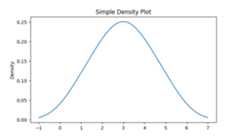
Here's an example of how to create a simple density plot for a Pandas Series object. This plot visualizes the data distribution as a smooth curve.
import pandas as pdimport matplotlib.pyplot as pltplt.rcParams["figure.figsize"] = [7, 4]# Sample dataseries = pd.Series([1, 2, 2.5, 3, 3.5, 4, 5])# Create density plotdensityplot = series.plot.kde()# Set the title and display the plotplt.title("Simple Density Plot")plt.show()Following is the output of the above code −
Density Plots for DataFrame
You can also create a density plot for an entire DataFrame or specific columns of the DataFrame by using theDataFrame.plot.kde() orDataFrame.plot.density() methods.
Example
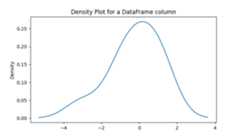
The following example demonstrates how to generate a density plot for a specific attribute of a DataFrame.
import pandas as pdimport matplotlib.pyplot as pltimport numpy as npplt.rcParams["figure.figsize"] = [7, 4]# Generate random datadf = pd.DataFrame(np.random.normal(size=(10, 4)), columns=["Col1", "Col2", "Col3", "Col4"])# Create density plot for a specific attribute of a DataFramedf.Col1.plot.kde()# Set the title and display the plotplt.title("Density Plot for a DataFrame column")plt.show()On executing the above code we will get the following output −
Multiple Density Plots on the Same Axes
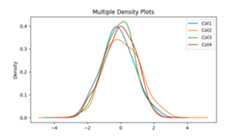
You can overlay multiple density plots on the same axes. Which is useful for comparing the distributions of multiple columns.
Example
The following example demonstrates creating a multiple density plots on the same axes using theDataFrame.plot.kde() method.
import pandas as pdimport numpy as npimport matplotlib.pyplot as pltplt.rcParams["figure.figsize"] = [7, 4]# Create a DataFramedf = pd.DataFrame(np.random.normal(size=(100, 4)), columns=["Col1", "Col2", "Col3", "Col4"])# Plot density plotsax = df.plot.kde()# Set the title and display the plotplt.title("Multiple Density Plots")plt.show()Following is the output of the above code −
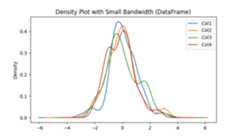
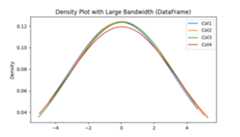
Adjusting Bandwidth of the Density Plot
Thebw_method parameter controls the smoothness of the density plot. Smaller values may lead to over-fitting, while larger values result in under-fit the data.
Example: Density plot for Small Bandwidth
This example uses thebw_method parameter to adjust the bandwidth of the density plot for small bandwidth.
import pandas as pdimport numpy as npimport matplotlib.pyplot as pltplt.rcParams["figure.figsize"] = [7, 4]# Create a DataFramedf = pd.DataFrame(np.random.normal(size=(100, 4)), columns=["Col1", "Col2", "Col3", "Col4"])# Small bandwidthdf.plot.kde(bw_method=0.3)plt.title("Density Plot with Small Bandwidth (DataFrame)")plt.show()Following is the output of the above code −
Example: Density plot for Large Bandwidth
This example uses thebw_method parameter to adjust the bandwidth of the density plot for large bandwidth.
import pandas as pdimport numpy as npimport matplotlib.pyplot as pltplt.rcParams["figure.figsize"] = [7, 4]# Create a DataFramedf = pd.DataFrame(np.random.normal(size=(100, 4)), columns=["Col1", "Col2", "Col3", "Col4"])# Large bandwidthdf.plot.kde(bw_method=3)plt.title("Density Plot with Large Bandwidth (DataFrame)")plt.show()Following is the output of the above code −
Customizing Evaluation Points
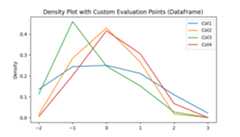
To customize the evaluation point, you can use theind parameter. This allows you to control the specific points at which the KDE is calculated.
Example
The following example demonstrates customizing the evaluation points of the density plot by using theind parameter of theplot.kde() method.
import pandas as pdimport numpy as npimport matplotlib.pyplot as pltplt.rcParams["figure.figsize"] = [7, 4]# Generate random datadf = pd.DataFrame(np.random.normal(size=(10, 4)), columns=["Col1", "Col2", "Col3", "Col4"])# Create density plotdf.plot.kde(ind=[-2, -1, 0, 1, 2, 3])plt.title("Density Plot with Custom Evaluation Points (DataFrame)")plt.show()On executing the above code we will get the following output −