
Vue Pivot Table - Blazing-Fast Vue Pivot Grid Component
- Organize and summarize pivot data in grids and charts.
- Load large volumes of data with high performance.
- Easily filter, sort, aggregate, and group pivot data.
- View detailed or abstract data using drill down or up.
- Experience seamless interaction and editing capabilities.

Trusted by the world’s leading companies

Overview
The Vue Pivot Table is a powerful control used to organize and summarize business data and display the result in a cross-table format. It includes major functionalities: data binding, drilling up and down, Excel-like filtering and sorting, editing, Excel and PDF exporting, several built-in aggregations, field lists, and calculated fields. A high volume of data can be loaded without any performance degradation by using row and column virtualization.
Why choose Syncfusion® Essential Studio® Vue Pivot Table?
High performance
A powerful data visualization tool designed for fast-paced performance when loading millions of records in just a second.
Seamless data binding
Bind data seamlessly with variouslocal and remote data sources such as JSON, OData, WCF, and RESTful web services with the help of a data manager.
Flexible editing
Users can perform actions on raw data at runtime, includingcreate, read, update, and delete. Through an interactive user interface, the control provides several edit modes, including inline, dialog, batch, and column.
Integration with charts
Users can easilyintegrate the Pivot Table with independently rendered pivot data. It has support for more than 20 chart types.
Conditional formatting
Users can easilychange a Pivot Table cell value’s appearance(background color, font color, font family, and font size) as required.
Adapts to any resolution
Pivot Table has a highly responsive layout and an optimized design for desktops, touchscreens, and smart phones. It works well on all mobile phones that use iOS, Android, or Windows OS.
Attractive, customizable themes
Cutting-edge design with several built-in themes, such as Fluent, Tailwind CSS, Bootstrap, Material, and Fabric. Utilize theonline Theme Studio tool to customize themes easily.
Globalization and localization
Enable users from different locales to use the component by formatting dates, currency, and numbering to suit preferences.
Vue Pivot Table Code example
Get started with the Vue Pivot Table using a few simple lines of Vue code, as demonstrated in the following. Also explore ourVue Pivot Table example that shows you how to render and configure the Vue Pivot Table.
<template> <div> <ejs-pivotview :dataSourceSettings="dataSourceSettings" :width="width" :height="height"> </ejs-pivotview> </div></template><script>import Vue from "vue";import { PivotViewPlugin } from "@syncfusion/ej2-vue-pivotview";Vue.use(PivotViewPlugin);export default Vue.extend({ data: () => { return { dataSourceSettings: { dataSource: getPivotData(), columns: [{ name: "Year", caption: "Year" }], values: [ { name: "Sold", caption: "Units Sold" }, { name: "Amount", caption: "Sold Amount" }, ], rows: [ { name: "Country", caption: "Country" }, { name: "Products", caption: "Products" }, ], }, width: "100%", height: 400, }; },});function getPivotData() { var pivotData = [ { Sold: 51, Amount: 86904, Country: 'France', Products: 'Mountain Bikes', Year: 'FY 2015', Quarter: 'Q2'}, { Sold: 21, Amount: 33505.5, Country: 'Germany', Products: 'Touring Bikes', Year: 'FY 2015', Quarter: 'Q1'}, { Sold: 74, Amount: 126096, Country: 'Germany', Products: 'Mountain Bikes', Year: 'FY 2015', Quarter: 'Q1'}, { Sold: 77, Amount: 131208, Country: 'United Kingdom', Products: 'Mountain Bikes', Year: 'FY 2015', Quarter: 'Q1'}, { Sold: 92, Amount: 156768, Country: 'United Kingdom', Products: 'Mountain Bikes', Year: 'FY 2015', Quarter: 'Q2'}, { Sold: 43, Amount: 73272, Country: 'United States', Products: 'Mountain Bikes', Year: 'FY 2015', Quarter: 'Q1'}, { Sold: 43, Amount: 73272, Country: 'United States', Products: 'Mountain Bikes', Year: 'FY 2015', Quarter: 'Q2'} ];return pivotData;}</script>Classic (tabular) layout
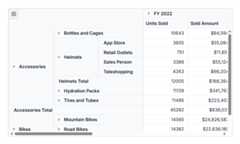
The classic (tabular) layout is designed to enhance data visibility by presenting information in a traditional table format. In this layout, each row label is displayed distinctly at various levels across separate columns, ensuring clarity and better organization. This structured approach simplifies the analysis of datasets, making it easier to interpret relationships and trends within the data through a detailed, organized, and user-friendly table format.
Pivot Chart
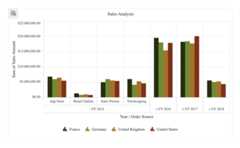
The Vue Pivot Chart can easily be integrated with pivot data rendered independently, and includes support for plotting more than 20 chart types. The end-user experience is greatly enhanced with a set of user-interaction features such as drill up, drill down, zoom, pan, crosshair, trackball, events, selection, and tooltip. Highly interactive field list options are available for generating reports from the relational data dynamically.
Virtual scrolling
Large amounts of data can be divided and displayed in the rows and columns of the current viewport using the virtual scrolling feature. Users can navigate to a desired view by scrolling the vertical and horizontal scrollbars.
Paging
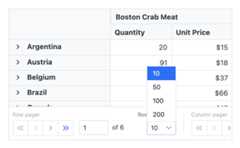
Large amounts of data can be divided and displayed page by page with the paging feature. The pager UI allows users to navigate to a desired page using the navigation buttons or an input text box. Row and column page sizes can be changed independently at runtime. Furthermore, toggle the position of the row and column pagers, modify their visibility, and visualize them using a compact view mode.
Pivot table field list and group fields
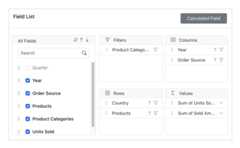
The Vue Pivot Tablefield list andgroup fields options are automatically populated with fields from the bound data source. They allow end users to drag, filter, and sort fields, and create pivot reports at runtime.

OLAP data binding
The Pivot Table can be connected to an OLAP cube, and its result can be visualized in both tabular and graphical formats.
Defer layout update
Users can refresh the control on demand instead of during every UI interaction in the Pivot Table.

Drill down and drill up
The built-in drill-down (expand) and drill-up (collapse) capabilities visualize data in detailed views and abstract views, respectively. By default, the data is displayed in a grouped manner.
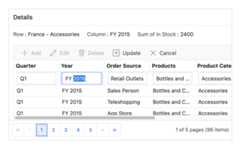
Editing and updating
Users can create, read, update, and delete operations for raw data at runtime and update their changes to the underlying data source, reflecting the information in all corresponding cells. The Pivot Table control supports various edit modes such as inline, dialog, batch, and column edit through an interactive UI.
Filtering
Built-in member filters and Excel-like filters with advanced filtering options can be used to easily filter and view data as required. It is also possible to filter data programmatically in the Pivot Table.

Member filtering
Filtering members in a pivot table allows users to filter data displayed based on values in the row or column axes.

Label filtering
Use Excel-like filtering options across column and row headers based on label text, date, or number.

Value filtering
Use Excel-like filtering options across column and row headers based on grand total values.
Sorting
Users can use sorting to order rows and columns based on labels or values.

Header sorting
Order column and row header text either in ascending or descending order.

Column sorting
Column sorting, also known as value sorting, orders the column values either in ascending or descending order. It is performed by clicking the header of the column to be sorted.

Custom sorting
Arrange field headers in column and row axes according to the user-defined order.
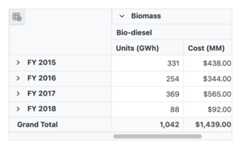
Aggregation
Users can perform calculations on a group of values using the aggregation option. By default, values are added together. The other aggregation types are average, minimum, maximum, count, distinct count, product, index, population standard deviation, sample standard deviation, population variance, sample variance, running totals, difference from, percent of difference from, and percent of grand total.
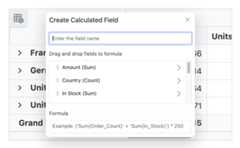
Calculated fields
Calculated or unbound fields generate unique fields with users’ calculated values by executing a simple, user-defined formula.
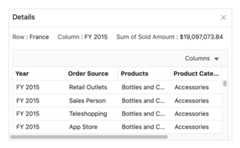
Drill through
The drill through feature easily obtains a list of raw items for a particular value cell or summary cell.
Totals
Subtotals and grand totals are calculated automatically by the pivot engine inside the control and displayed in the Pivot Table to help users make decisions more quickly. Also, users can show or hide subtotals and grand totals for rows and columns.
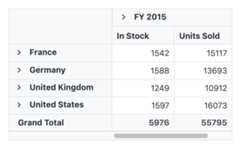

Conditional formatting
Users can define conditions that, when met, format font style, text color, background color, and font size for values and summary cells.
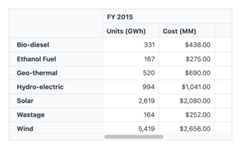
Number and date formatting
Number and date formatting help transform the appearance of the actual cell values.
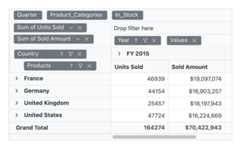
Grouping date and number
The Pivot Table control automatically groups dates and numbers, so the date type can be formatted and displayed based on year, quarter, month, day, and more. The number type can be grouped by range, such as 1-5 or 6-10.
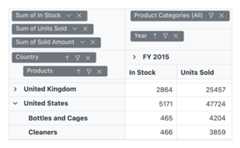
Frozen headers
Users can freeze row and column headers to compare them with cell values.
Columns and rows
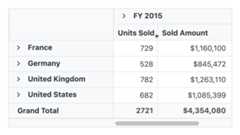
Resize
Resizing allows changing column width at runtime by simply dragging the rightmost boundary of the column header. A scroll bar will appear when the content width exceeds the control width.
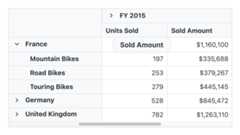
Reorder
Users can reorder columns either through user interaction or programmatically. Simply dragging and dropping a column header into the desired column position will reorder the columns.
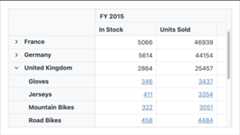
Hyperlinks
Users can retrieve information about a particular cell on clicking a hyperlink cell. It later allows them to perform custom operations programmatically.
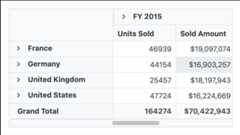
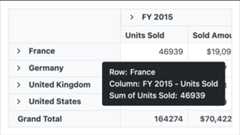
Tooltips
A tooltip provides basic information about a cell while hovering over it with the pointer.
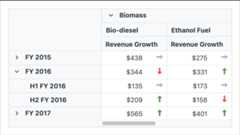
Cell template
With cell templates, users can easily add features like images, checkboxes, and text nodes to any cell.
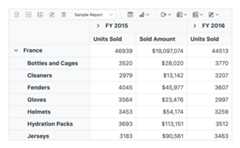
Toolbars
A toolbar enhances user interaction and provides access to frequently used features. These features include new report, save report, save as report, rename report, delete report, report list, show grid, show chart, show or hide totals, export reports, and more.
Exporting
Export the Vue Pivot Table data to Excel, PDF, and CSV formats. Users can also customize the exported document by adding header, footer, and cell properties like type, style, and position programmatically.

Export to Native Excel PivotTable
Users can export Syncfusion Pivot Table directly to Microsoft Excel’s native PivotTable format, not just as a static table or flattened data. This ensures that all interactive features are preserved, allowing users to fully utilize Excel’s PivotTable functionalities, including filtering, sorting, expanding/collapsing groups, and modifying field lists.
Key advantages:
- Native Excel PivotTable: Exports to the actual PivotTable format used by Excel, preserving rows, columns, values, and filters.
- Fully interactive in Excel: Continue to sort, filter, expand/collapse groups, and modify field lists just like in your original pivot.
- Advanced analysis tools: Leverage Excel’s built-in PivotTable capabilities for deeper insights and flexible reporting.
- Reusable layout: Save time by exporting your configured pivot layout for future use or easy sharing.
Optimized for mobile devices

Touch support
All features will work on touch devices easily. Features such as drilling up, drilling down, filtering, sorting, and report manipulation can be done on the fly.

Responsiveness
The responsive design allows the control to be viewed on various devices.
Accessibility

Keyboard navigation
The Pivot Table ensures that every cell is keyboard accessible. Major features like sorting, selection, and editing can be performed using keyboard commands alone; no mouse interaction is required. This helps create highly accessible applications using this component.

Right to left (RTL)
The Pivot Table supports RTL rendering, allowing the text and layout to be displayed from right to left.
Other supported frameworks
The Pivot Table is also available in Blazor, React, Angular, and JavaScript frameworks. Explore its platform-specific options through the following links:


Supported browser
The Vue Pivot Table works well with all modern web browsers, including Chrome, Firefox, Edge, Safari, and Opera.

Not sure how to create your first Vue Pivot Table? Our documentation can help.
I’d love to read it now145+ VUE UI COMPONENTS
Frequently Asked Questions
✅ Why should I choose Syncfusion’s Essential Studio® Vue Pivot Table?
High performance pivot engine andvirtualization that help load large volumes of data quickly.
Support for bothrelational andOLAP data sources. The relational data source can use input data via JSON, RESTful services, OData services, and WCF services, and more.
Agrid andchart can be used to organize and summarize pivot data.
Pivot data is easilyfiltered,sorted,aggregated, andgrouped.
Detailed or abstract data can be viewed usingdrill down or up.
Seamlessinteraction andediting capabilities.
Simple configuration andAPIs.
- Support for all modern browsers.
- Touch-friendly and responsive UI.
Expansive learning resources such asdemos anddocumentation to get started quickly with Vue Pivot Table.
✅ Where can I find the Syncfusion® Vue Pivot Table demo?
You can find ourVue Pivot Table demo, which demonstrates how to render and configure the Pivot Table.
✅ Can I download and utilize the Syncfusion® Vue Pivot Table for free?
No, this is a commercial product and requires a paid license. However, afree community license is also available for companies and individuals whose organizations have less than US $1 million in annual gross revenue, 5 or fewer developers, and 10 or fewer total employees.
✅ How do I get started with Syncfusion® Vue Pivot Table?
A good place to start would be our comprehensivegetting started documentation.
Our Customers Love Us


See Real Success Stories
Developers around the world trust Syncfusion’s Essential Studio to simplify complex projects and speed up delivery. With a vast library of UI controls, powerful SDKs, and reliable support, Essential Studio helps teams build enterprise-ready applications with confidence.
Explore Case StudiesIndustry
Software development
75% Cost reduction
50% Faster development

Industry
Utilities (oil and gas)

450+ hours saved
Streamlined processes and hours of development effort saved.

Advanced, flexible features
Empowered users through robust and versatile functionality.
Industry
Software and technology
1000+ of hours saved
Accelerated development with enterprise-ready UI components.

Efficient file management
Streamlined workflows with document libraries without building them from scratch.
Industry
Software and technology

2 Years of delay avoided
Two years of delays prevented with proactive planning.

On-time delivery
Projects delivered on schedule using trusted controls.
Industry
IT services and IT consulting

Improved performance
Large datasets handled with easy customization and quick debugging.

Highly customizable
Plug-and-play controls with quick template integration.
Industry
Professional services
Instant access
Quick availability of features and resources.
Reduced dependencies
Fewer dependencies for faster development.
Rated by users across the globe


Transform your applications today by downloading our free evaluation version Download Free TrialNo credit card required.
 Documentation


Awards
Greatness—it’s one thing to say you have it, but it means more when others recognize it.Syncfusion® is proud to hold the following industry awards.




