
High-performance Vue ListView Component
- Built-in support for flexible data binding, sorting, grouping, nested navigation, multiple selection, templates, and more.
- This high-performance control can load a huge amount of data on demand when scrolling down.
- Data can be elegantly visualized with cards, images, icons, avatars, and badges for better understanding.
Trusted by the world’s leading companies

Overview
The Vue ListView component is a list-like interface that allows you to select an item or multiple items. It represents data in an interactive hierarchical structure across different layouts or views.
Data binding
Powerful data binding allows data to be loaded from an array of primitive data, JSON data collections, or remote data sources. The component supports complex data with field mapping; different kinds of data services such as OData, OData V4, and Web API; and data formats such as XML, JSON, JSONP, CSV, and HTML tables.
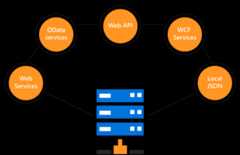
UI virtualization
The Vue ListView supports UI virtualization to provide better performance while loading huge amounts of data. This loads a fixed number of items irrespective of data volume and displays the relevant data.
Sortable list
Sort data programmatically in ascending or descending order. Also use custom sorting logic.
Group list
Group ListView data programmatically. Users can identify a group name from group headers in the view and also use custom sorting logic.
Multilevel ListView
The Vue ListView represents a nested data object structure in a list of lists. The initial screen displays the first-level list items and the next level will be displayed when interacting with it.
Selection
Single selection
When a user clicks or taps an item, ASP.NET Core ListView enables the selection of the list item by default.
Checkboxes
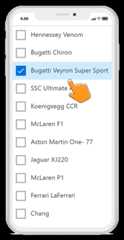
The ASP.NET Core ListView control supports multiple selection through checkboxes to the right or left of the list items. This helps users select or clear a series of items.
Manipulation
Users can disable the ListView selection by handling events. Preserve and restore the selected values in the ListView to help users continue their work from a previously saved state.
Multiline text ListView
Arrange the list item content with multiline text, icons, and avatars.
UI customization
Completely customize the ListView header, list items, and group header using template options. This helps users arrange their content in flexible formats like image view, multiline text view, and mixed mode.

Searching and filtering
Search and filter list view data based on the user input using the Data Manager.
Dual list
Design dual lists using Vue ListView to move data from one list to another.
Touch-friendly UI
The Vue ListView control responds to screen sizes and adapts its contents to fit any device. It also recognizes touch gestures, enabling items to be selected or cleared when a tap or double-tap action is performed. This provides the best user experience for phones, tablets, and desktops.
Built-in and customizable themes
Several built-in, Sass-based themes are available: Fluent, Tailwind CSS, Bootstrap 5, Bootstrap, Material, and high contrast. Users can customize these themes by either overriding the existing Sass styles or creating custom themes using the Theme Studio application.
Other supported frameworks
The ListView component is also available in our Blazor, React, Angular, and JavaScript frameworks. Check out the ListView for different platforms from these links:
Web accessibility
- Fully supportsWAI-ARIA accessibility that helps ListView be accessed by on-screen readers and assistive devices.
- Follows theWCAG 2.0 standard with design of UI visual elements such as foreground color, background color, line spacing, text, and images.
- FollowsWAI-ARIA best practices for implementing keyboard interaction.
Developer-friendly APIs
In ListView, developers can control all the UI elements and behaviors. A rich set of developer-friendly APIs provides the best user experience.
Not sure how to create your first ListView? Our documentation can help.
I’d love to read it now145+ VUE UI COMPONENTS
Our Customers Love Us


See Real Success Stories
Developers around the world trust Syncfusion’s Essential Studio to simplify complex projects and speed up delivery. With a vast library of UI controls, powerful SDKs, and reliable support, Essential Studio helps teams build enterprise-ready applications with confidence.
Explore Case StudiesIndustry
Software development
75% Cost reduction
50% Faster development

Industry
Utilities (oil and gas)

450+ hours saved
Streamlined processes and hours of development effort saved.

Advanced, flexible features
Empowered users through robust and versatile functionality.
Industry
Software and technology
1000+ of hours saved
Accelerated development with enterprise-ready UI components.

Efficient file management
Streamlined workflows with document libraries without building them from scratch.
Industry
Software and technology

2 Years of delay avoided
Two years of delays prevented with proactive planning.

On-time delivery
Projects delivered on schedule using trusted controls.
Industry
IT services and IT consulting

Improved performance
Large datasets handled with easy customization and quick debugging.

Highly customizable
Plug-and-play controls with quick template integration.
Industry
Professional services
Instant access
Quick availability of features and resources.
Reduced dependencies
Fewer dependencies for faster development.
Rated by users across the globe


Transform your applications today by downloading our free evaluation version Download Free TrialNo credit card required.
 Documentation


Awards
Greatness—it’s one thing to say you have it, but it means more when others recognize it.Syncfusion® is proud to hold the following industry awards.




