
Vue File Manager - A Lightweight & Customizable Component
- A modern user interface for easy and effective management of files and folders in the file system.
- Performs all file operations like upload, download, delete, create, sort, search, and rename along with preview images.
- Adaptive and responsive design built to be touch-friendly for easy interactions.

Trusted by the world’s leading companies

Overview
The Vue File Manager (File Explorer) is a graphical user interface component for managing the file system that allows users to perform most common file operations, like accessing, editing, and sorting files or folders. This component provides easy navigation to select a file or folder from the file system.
Why choose Syncfusion Essential Studio® Vue File Manager?
Easy to customize
Withcustomization options, the entire layout can be customized and modified easily, and initial views switched.
Built-in file operations
Provides a wide range of built-in file operations including copying, moving, renaming, and deleting files, drag-and-drop, image preview, and more.
Easy to interact
An intuitive and easy-to-interact interface that includes a toolbar, treeview, breadcrumb, and menu.
Localization
Localize the text values of the context menu and tooltips displayed in the user interface using thelocalization library.
Integration with other components
Integrate with Syncfusion’s PDF Viewer, Word Editor, and Spreadsheet component to open and view PDF, Excel, and Word files.
Connect with cloud storage services
Easily connect and manage data stored in a various storage services, including local, cloud, and database.
Adapts to any resolution
The File Manager is designed to be responsive and adaptable, with a layout that works well on devices including desktops, touch screens, and smart phones.
Attractive, customizable themes
Cutting edge design with 5+ built-in themes such as Fluent, Tailwind CSS, Bootstrap, Material, Fabric, and more. Utilize theonline Theme Studio tool to customize themes easily.
Vue File Manager Code Example
Easily get started with the Vue File Manager using a few simple lines of Vue codes as demonstrated below. Also explore ourVue File Manager Example that shows you how to render and configure a File Manager in Vue.
<template><div><divclass="control-section file-overview"><divclass="sample-container"><ejs-filemanagerid="overview_file":ajaxSettings='ajaxSettings':view='view'></ejs-filemanager></div></div></div></template><style>.file-overview.sample-container{margin:10px10px10px10px;}</style><script>importVuefrom"vue";import{FileManagerPlugin,NavigationPane,Toolbar,DetailsView,FileManagerComponent}from"@syncfusion/ej2-vue-filemanager";Vue.use(FileManagerPlugin);/** * File Manager full functionalities sample */lethostUrl='https://ej2-aspcore-service.azurewebsites.net/';exportdefaultVue.extend({data:function(){return{ajaxSettings:{url:hostUrl+'api/FileManager/FileOperations',getImageUrl:hostUrl+'api/FileManager/GetImage',uploadUrl:hostUrl+'api/FileManager/Upload',downloadUrl:hostUrl+'api/FileManager/Download'},view:"Details"};},provide:{filemanager:[NavigationPane,DetailsView,Toolbar]}});</script>
Flat JSON data binding
The File Manager component supports rendering flat JSON data objects, eliminating the need for HTTP client requests and back-end URL configuration. All file operations can be handled within the component itself through file action events.
Customizable layout design
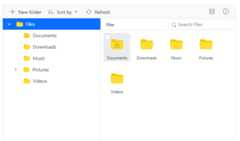
The Vue File Manager UI consists of a toolbar, navigation pane, and content pane through which the files or folders in the file system can be accessed and managed. The component’s entire layout can be customized with features like right-to-left alignment, enabling or disabling the toolbar and navigation pane, and switching between views.

Toolbar
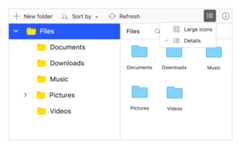
The Vue File Manager toolbar contains tools for performing various operations like upload file, download file, and switch views. The toolbar can also be configured with any custom functionality to be performed on the file system.
Navigation pane
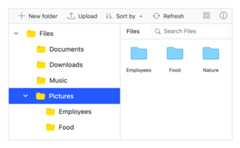
The Vue File Manager navigation pane allows quick and direct access to a file or folder in a file system where the entire folder hierarchy is listed using a tree view. This can be made visible or hidden as needed.
Content pane
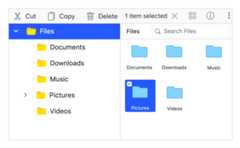
The content pane displays the files and folders in the file system. The files in the content pane can be displayed in either a large icon view or a details view.
File operations
The Vue File Manager component includes all the common operations needed for managing a file system: copy, move, upload, download, edit, create, delete, and sort.
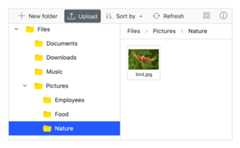
File upload and download
The Vue File Manager component enables easy file uploading and downloading in a file system.
Sorting
Files and folders in the file system can be sorted in ascending or descending order by clicking the column header. Files and folders can be sorted based on name, date created, size, and other details. The default sorting functionality can also be customized in the File Manager.

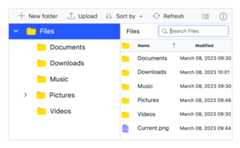
Searching
The File Manager component contains built-in search functionality that allows you to search for and access a file or folder in the current path and its child folders.
Moving files and folders with drag and drop
Files and folders can be moved within the file system by dragging and dropping them. Drag-and-drop support can be turned on or off in the File Manager.
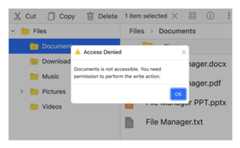
Access control restriction
Restrict access to files and folders by defining a set of rules for them. Only authorized users will be able to access them.
Restrict upload file types
You can specify the types of files that can be uploaded in the File Manager. Other file types will be restricted from uploading.

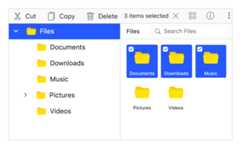
Multiple-file selection
The File Manager component has built-in support for the selection of multiple files or folders. Multiple-file selection is useful when a single operation like download or delete needs to be performed for multiple files in the file system.
Directory upload
The Vue File Manager control has support to upload a directory (folder) with its subfolders and files.
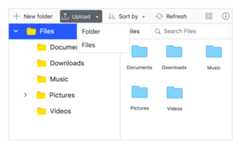

Chunk upload
The File Manager supports the chunk upload feature, which allows large files to be split into smaller chunks based on the specified chunk size and uploaded sequentially to the server. This improves reliability and performance when handling massive file uploads.
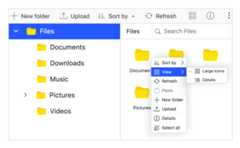
Quick access menu
The File Manager component provides a context menu to list the operations that can be performed with the files and folders. It appears when a file or folder is right-clicked. The context menu items can be customized according to user preferences.
Manage storage services
The File Manager component allows you to manage data from the following storage services.
Cloud storage
Amazon S3 bucket file provider.
Microsoft Azure file provider.
Database storage services
Network protocol services
Additional features

Keyboard navigation
The Vue File Manager component ensures that every cell is accessible using the keyboard. Major features like sort, select, and edit can be performed using keyboard commands alone; no mouse interaction is required. This helps in creating highly accessible applications using this component.

Developer-friendly APIs
Developers have control over all the UI elements and behaviors of the components to provide the best experience to end users.

Right to left (RTL)
Supports right-to-left (RTL) direction for users working in right-to-left languages like Hebrew and Arabic.
Struggling to decide on the right product?
Our comprehensive competitor comparison of Vue components will guide you to the perfect choice.
 Cloud storage integration10+ interactive demos85K+ downloads
Other supported frameworks
The File Manager is available for the Blazor, React, Angular, and JavaScript frameworks. Explore its platform-specific options through the following links:


Supported browsers
The Vue File Manager works well with all modern web browsers, including Chrome, Firefox, Edge, Safari, and Opera.

Not sure how to create your first Vue File Manager? Our documentation can help.
I’d love to read it now145+ VUE UI COMPONENTS
Frequently Asked Questions
✅ Why should you choose Syncfusion Essential Studio® Vue File Manager?
A lightweight, modernuser interface for easy and effective management in a file system.
Support for all basicfile operations, like upload, download, delete, create, sort, search, and rename, along with an out of the box option topreview images in the file system.
Support for different kinds offile system providers like physical, FTP, SQL, Node.js, Azure, Amazon S3, Firebase, and Google Drive.
- One of the best Vue File Manager components on the market, offering a feature-rich UI.
- Built-in support for access control.
- Simple configuration and API.
- Support for all modern browsers.
- Touch-friendly and responsive.
Expansive learning resources such asdemos anddocumentation to let you get started quickly with Vue File Manager.
✅ Where can I find the Syncfusion Vue File Manager demo?
You can find ourVue File Manager demo, which demonstrates how to render and configure the File Manager.
✅ Can I download and utilize the Syncfusion Vue File Manager for free?
No, this is a commercial product and requires a paid license. However, afree community license is also available for companies and individuals whose organizations have less than $1 million USD in annual gross revenue, 5 or fewer developers, and 10 or fewer total employees.
✅ How do I get started with Syncfusion Vue File Manager?
A good place to start would be our comprehensivegetting started documentation.
Our Customers Love Us


See Real Success Stories
Developers around the world trust Syncfusion’s Essential Studio to simplify complex projects and speed up delivery. With a vast library of UI controls, powerful SDKs, and reliable support, Essential Studio helps teams build enterprise-ready applications with confidence.
Explore Case StudiesIndustry
Software development
75% Cost reduction
50% Faster development

Industry
Utilities (oil and gas)

450+ hours saved
Streamlined processes and hours of development effort saved.

Advanced, flexible features
Empowered users through robust and versatile functionality.
Industry
Software and technology
1000+ of hours saved
Accelerated development with enterprise-ready UI components.

Efficient file management
Streamlined workflows with document libraries without building them from scratch.
Industry
Software and technology

2 Years of delay avoided
Two years of delays prevented with proactive planning.

On-time delivery
Projects delivered on schedule using trusted controls.
Industry
IT services and IT consulting

Improved performance
Large datasets handled with easy customization and quick debugging.

Highly customizable
Plug-and-play controls with quick template integration.
Industry
Professional services
Instant access
Quick availability of features and resources.
Reduced dependencies
Fewer dependencies for faster development.
Rated by users across the globe


Transform your applications today by downloading our free evaluation version Download Free TrialNo credit card required.
 Documentation


Awards
Greatness—it’s one thing to say you have it, but it means more when others recognize it.Syncfusion® is proud to hold the following industry awards.




