
JavaScript OTP Input Control
- Offers a rich set of features and a user-friendly experience for one-time password entry.
- Has a fully customizable appearance, including input types, styles, and separators, to meet specific application needs.
- Its responsive design adapts seamlessly to any device.
Trusted by the world’s leading companies

Overview
The JavaScript OTP Input is a versatile form control designed for entering one-time passwords (OTP) during multi-factor authentication. It accepts a single character per input field, ensuring a focused and straightforward user experience. It offers extensive customization options with several built-in features, including input types, input lengths, styling modes, placeholders, separators, and more.

Input types
The JavaScript OTP Input control has three input types:
Number: The default input type, allowing digit entries only.Text: Allows alphanumeric and special character entries for complex OTP inputs.Password: Similar to the text type, but masks input characters for privacy.

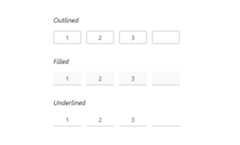
Styling modes
The built-in styling modes are as follows:
Outlined: The default styling mode, displaying a border around the input fields.Filled: Fills the input fields with a background color and includes an underline.Underlined: Highlights each input field with an underline for a sleek look.
Placeholders
Display a hint character in each input field to indicate the expected value. If defined as a single character, it will be shown in all fields; otherwise, each field will display a part of the string based on its length.
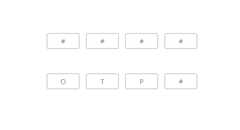

Separators
Specify a character to be placed between input fields, customized to enhance the visual separation of OTP inputs.
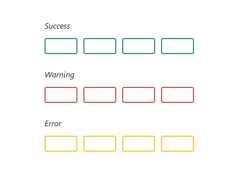
Validation state
The JavaScript OTP Input control allows you to set the validation state, displaying success, warning, or error states based on the input validation.
Customization
Customize the length of the OTP Input, styling for each field, the focusing state, and more.

Input length
Adjust the length of the input fields, with a default display of four input fields.

Rounded fields
Customize the appearance of the OTP Input with rounded fields, enhancing its visual appeal.

Field styling
Customize the color, background color, and focus color of the input fields to enhance their appearance and make them stand out.
Built-in themes
The JavaScript OTP Input supports these built-in themes: Tailwind CSS, Bootstrap 5, Bootstrap 4, Bootstrap, Material, Fabric, Fluent, and high contrast. Users can customize one of these built-in themes or create new themes to achieve their desired look and feel by simply overriding SASS variables or using our Theme Studio application.
Accessibility
- Full support forWAI-ARIA accessibility practices to work with screen readers and assistive devices.
- UI visual elements such as foreground color, background color, line spacing, text, and images are designed based onWCAG 2.0 standards.
- Right-to-left (RTL) text direction can be set for users working with RTL languages like Hebrew, Arabic, or Persian.
Developer-friendly APIs
The JavaScript OTP Input control offers APIs for customizing its appearance and behavior, as well as templates for changing its look and feel. With these APIs, developers can create a unique and highly customized OTP Input that fits seamlessly into their applications.
145+ JAVASCRIPT UI CONTROLS
Our Customers Love Us


See Real Success Stories
Developers around the world trust Syncfusion’s Essential Studio to simplify complex projects and speed up delivery. With a vast library of UI controls, powerful SDKs, and reliable support, Essential Studio helps teams build enterprise-ready applications with confidence.
Explore Case StudiesIndustry
Software development
75% Cost reduction
50% Faster development

Industry
Utilities (oil and gas)

450+ hours saved
Streamlined processes and hours of development effort saved.

Advanced, flexible features
Empowered users through robust and versatile functionality.
Industry
Software and technology
1000+ of hours saved
Accelerated development with enterprise-ready UI components.

Efficient file management
Streamlined workflows with document libraries without building them from scratch.
Industry
Software and technology

2 Years of delay avoided
Two years of delays prevented with proactive planning.

On-time delivery
Projects delivered on schedule using trusted controls.
Industry
IT services and IT consulting

Improved performance
Large datasets handled with easy customization and quick debugging.

Highly customizable
Plug-and-play controls with quick template integration.
Industry
Professional services
Instant access
Quick availability of features and resources.
Reduced dependencies
Fewer dependencies for faster development.
Rated by users across the globe


Transform your applications today by downloading our free evaluation version Download Free TrialNo credit card required.
 Documentation


Awards
Greatness—it’s one thing to say you have it, but it means more when others recognize it.Syncfusion® is proud to hold the following industry awards.




