Movatterモバイル変換


[0]ホーム

URL:


DO!MAKERS, profile picture
Uploaded byDO!MAKERS
PDF, PPTX50 views

Arduino comic v0004

This document provides an introduction to the Arduino electronics prototyping platform. It explains that Arduino is an open-source platform used to build interactive electronic projects through hardware and software. The document covers basic concepts such as inputs and outputs, digital and analog signals, circuits, and programming Arduino with a simple blink example. It also demonstrates attaching basic components like LEDs, buttons, and potentiometers to control outputs and read inputs.

Related topics:

Embed presentation

Download as PDF, PPTX
“resources that can be used, redistributed or rewritten free of charge.often software or hardware.”“technology which makes use of the controlled motion of electronsthrough different media.”“an original Form that can serve as a basis or standard for other things.”“hardware architecture with software framework on which other softwareCan run.”open source‐electronics‐Prototype‐Platform‐what is anarduino?it’s an open‐sourceelectronics prototypingplatform.what does that mean?by Jody Culkin
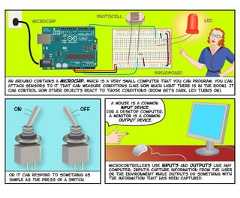
Microcontrollers use inputs and outputs Like anycomputer. Inputs capture information From the useror the environment while Outputs do something withthe information that has been captured.a mouse is a commoninput devicefor a desktop computer,a monitor is a commonoutput device.Or it can respond to something assimple as the press of a switch.ON OFFAn Arduino contains a microchip, which is a very small computer that you can program. You canattach sensors to it that can measure conditions (like how much light there is in the room). Itcan control how other objects react to those conditions (room gets dark, led turns on).microchipbreadboardledphotocell
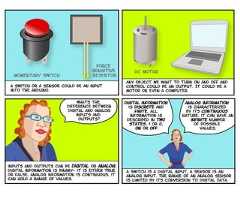
Digital informationis discrete andfinite. allinformation isdescribed in twostates, 1 or 0,on or off.Analog informationis characterizedby its continuousnature. it can have aninfinite numberof possiblevalues.a switch is a digital input, a sensor is ananalog input. the range of an analog sensoris limited by its conversion to digital data.inputs and outputs can be digital or analog.Digital information is binary‐ it is either trueor false. Analog information is continuous, itcan hold a range of values.whats thedifference betweendigital and analoginputs andoutputs?any object we want to turn on and off andcontrol could be An output. It could be amotor or even a computer.DC MotorA switch or A sensor could be An inputinto the Arduino.momentary switchforcesensitiveresisitor
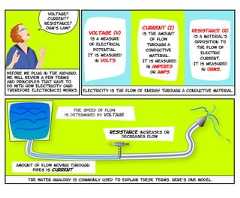
the water analogy is commonly used to explain these terms. Here’s one model.the speed of flowis determined by voltageamount of flow moving throughpipes is currentresistance increases ordecreases flowResistance (R)is a material'sopposition tothe flow ofelectriccurrent.It is measuredin ohms.Current (I)is the amountof flowthrough aconductivematerial.It is measuredin amperesor Amps.Voltage (V)is a measureof electricalpotential.It is measuredin volts.Electricity is the flow of energy through a conductive material.voltage?current?resistance?Ohm’s law?Before we plug in the Arduino,we will review a few termsand principles that have todo with how electricity (andtherefore electronics) works.
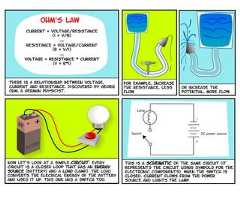
This is a schematic of the same circuit (itrepresents the circuit using symbols for theelectronic components). When the switch isclosed, current flows from the powersource and lights the lamp.DC power sourceLampSwitch+-now let’s look at a simple circuit. everycircuit is a closed loop that has an energysource (battery) and a load (lamp). The loadconverts the elecrical energy of the batteryand uses it up. this one has a switch too.or increase thepotential, more flow.for example, Increasethe resistance, lessflow.There is a relationship between voltage,current and resistance, discovered by GeorgOhm, a German physicist.OHM’s lawcurrent = voltage/resistance(i = v/r)orResistance = voltage/current(r = v/i)orVoltage = Resistance * current(v = r*i)
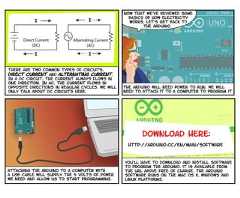
you’ll have to download and install softwareto program the arduino. it is available fromthe URL above Free of charge. the ARduinosoftware runs on the Mac os X, Windows andlinux Platforms.http://arduino.cc/en/Main/Softwaredownload here:Attaching the arduino to a computer witha usb cable will supply The 5 volts of powerwe need and allow us to start programming.The arduino will need power to run. we willneed to attach it to a computer to program it.Now that we’ve reviewed somebasics of how electricityworks, Let’s get back t0the arduino.IIAlternating Current(AC)IIDirect Current(DC)There are two Common types of circuits,Direct Current and Alternating Current.In a Dc circuit, the current always flows inone direction. In AC, the current flows inopposite directions in regular cycles. We willonly talk about Dc circuits here.
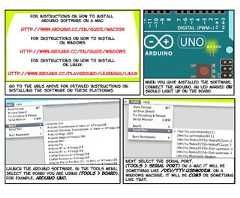
Next select the serial port.(Tools > serial port) On a mac it will besomething like /dev/tty.usbmodem. On awindows machine, it will be com3 or somethinglike that.Launch the arduino software. in the tools menu,select the board you are using (tools > board).for example, Arduino Uno.When you have installed the software,Connect the arduino. An led marked ONshould light up on the board.for instructions on how to installarduino software on a mac:http://www.arduino.cc/en/Guide/MacOSXFor Instructions on how to installon Windows:http://www.arduino.cc/en/Guide/WindowsFor Instructions on how to installon Linux:http://www.arduino.cc/playground/Learning/Linuxgo to the URLS above for detailed instructions oninstalling the software on these platforms.
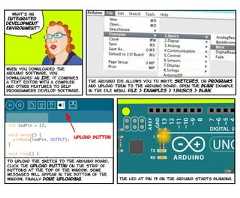
the led at pin 13 on the arduino starts blinking.int ledPin = 13;void setup() {pinMode(ledPin, OUTPUT);}void loop() {Serial.println(analogRead(A0);}To upload the sketch to the arduino board,click the upload button on the strip ofbuttons at the top of the window. somemessages will appear in the bottom of thewindow, finally Done Uploading.Upload buttonThe Arduino IDE allows you to write Sketches, or programsand upload them to the Arduino board. open the blink examplein the file menu. File > Examples > 1.Basics > Blink.When you downloaded theArduino software, youdownloaded an IDE. it combinesa text editor with a compilerand other features to helpprogrammers develop software.what’s anIntegratedDevelopmentenvironment?
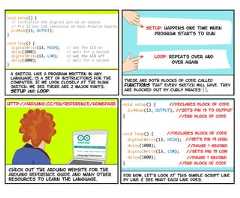
void setup() {pinMode(13, OUTPUT);}void loop() {digitalWrite(13, HIGH);delay(1000);digitalWrite(13, LOW);delay(1000);}//DeClares block of code//declares block of code//sets pin 13 to output//sets pin 13 low//sets pin 13 high//pause 1 second//pause 1 second//End block of code//End block of codeFor now, let’s look at this simple script lineby line & see what each line does.http://arduino.cc/en/Reference/HomePagecheck out the arduino website for thearduino reference guide and many otherresources to learn the language.setup: happens one time whenprogram starts to runLoop: repeats over andover againThese Are both blocks of code calledfunctions that every sketch will have. Theyare blocked out by curly Braces { }.void setup() {// initialize the digital pin as an output.// Pin 13 has LED connected on most Arduino boards:pinMode(13, OUTPUT);}void loop() {digitalWrite(13, HIGH); // set the LED ondelay(1000); // wait for a seconddigitalWrite(13, LOW); // set the LED offdelay(1000); // wait for a second}a sketch, like a program written in anylanguage, is a Set of instructions for thecomputer. If we look closely at the Blinksketch, we see there are 2 major parts,setup and loop.
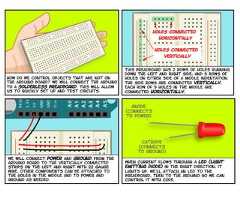
When current flows through a led (Lightemitting Diode) in the right direction, itlights up. we’ll attach an LEd to thebreadboard, then to the arduino so we cancontrol it with code.anode(connectsto power)cathode(connectsto ground)we will connect power and ground from thearduino board to the vertically connectedstrips on the left and right with 22 gaugewire. other components can be attached tothe holes in the middle and to power andground as needed.This breadboard has 2 rows of holes runningdown the left and right side, and 5 rows ofholes on either side of a middle indentation.the side rows are connected vertically,each Row of 5 holes in the middle areconnected horizontally.holes connectedverticallyholes connectedhorizontallyHow do we control objects that are not onthe arduino board? we will connect the arduinoto a solderless breadboard. This will allowus to quickly set up and test circuits.
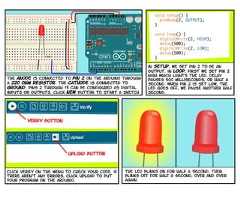
the led blinks on for half a second, thenblinks off for half a second, over and overagain.click verify on the menu to check your code. ifthere aren’t any errors, click upload to putyour program on the arduino.upload buttonverify buttonvoid setup() {pinMode(2, OUTPUT);}void loop() {digitalWrite(2, HIGH);delay(500);digitalWrite(2, LOW);delay(500);}in setup, we set pin 2 to be anoutput. in loop, first we set pin 2high which lights the led. Delaypauses 500 milliseconds, or half asecond. when pin 2 is set low, theled goes off, we pause another halfsecond.the anode is connected to pin 2 on the arduino througha 220 ohm resistor. The cathode is connected toground. pins 2 through 13 can be configured as digitalinputs or outputs. click New button to start a sketch.
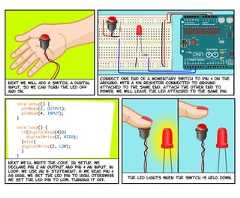
The LED lights when the switch is held down.void setup() {pinMode(2, OUTPUT);pinMode(4, INPUT);}void loop() {if(digitalRead(4)){digitalWrite(2, HIGH);}else{digitalWrite(2, LOW);}}Next we’ll write the code. In setup, wedeclare pin 2 an output and pin 4 an input. inloop, we use an if statement, if we read pin 4as high, we set the led pin to high, otherwisewe set the led pin to low, turning it off.Connect one end of a momentary switch to pin 4 on theArduino, with a 10k resistor connected to groundattached to the same end. Attach the other end topower. We will leave the LED attached to the same pin.Next we will add a switch, a digitalinput, so we can turn the LED offand on.
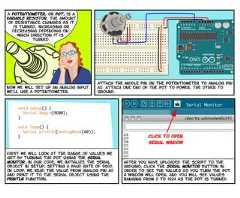
Serial Monitorclick to openserial windowafter you have uploaded the script to thearduino, click the Serial Monitor button inorder to see the values as you turn the pot.A window will open, and you will see valuesranging from 0 to 1024 as the pot is turned.void setup() {Serial.begin(9600);}void loop() {Serial.println(analogRead(A0));}First we will look at the range of values weget by turning the pot using the Serialmonitor. in our code, we initialize the serialobject in setup, setting a baud rate of 9600.In loop, We read the value from analog pin a0and print it to the serial object using theprintLn function,Attach the middle pin on the potentiometer to Analog pinA0. attach one end of the pot to power, the other toground.Now we will set up an analog input.We’ll use a potentiometer.a potentiometer, or pot, is avariable resistor. the amountof resistance changes as itis turned, increasing ordecreasing depending onwhich direction it isturned.
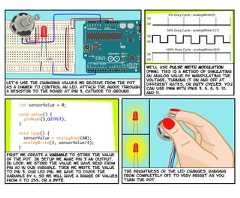
The brightness of the LED changes, rangingfrom completely off to very bright as youturn the pot.int sensorValue = 0;void setup() {pinMode(3,OUTPUT);}void loop() {sensorValue = analogRead(A0);analogWrite(3, sensorValue/4);}First we create a variable to store the valueof the pot. In setup we make pin 3 an output.In loop, we store the value we have read frompin a0 in our variable. Then we write the valueto pin 3, our led pin. we have to divide thevariable by 4, so we will have a range of valuesfrom 0 to 255, or a byte.100% Duty Cycle - analogWrite(255)5V0V50% Duty Cycle - analogWrite(127)5V0V0% Duty Cycle - analogWrite(0)5V0VWe’ll use pulse width modulation(PWM). This is a method of simulatingan analog value by manipulating thevoltage, turning it on and off atdifferent rates, or duty cycles. youcan use pwm with pins 3, 5, 6, 9, 10,and 11.Let’s use the changing values we receive from the potas a dimmer to control an LED. attach the anode througha resistor to the board at pin 3, Cathode to ground.
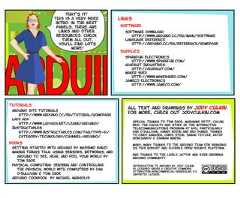
all text and drawings by Jody Culkinfor more, check out jodyculkin.comSpecial Thanks to Tom Igoe, Marianne petit, CalvinReid, The faculty and staff of the interactivetelecommunications program at nyu, particularlyDan o’sullivan, Danny rozin and Red burns. thanksto Cindy karasek, chris Stein, sarah teitler, kathygoncharov & zannah marsh.many, many thanks to the Arduino team for bringingus this robust and flexible open source platform.and thanks to the lively, active and ever growingarduino community.Introduction to Arduino by Jody Culkinis licensed under a Creative CommonsAttribution‐NonCommercial‐ShareAlike 3.0Unported License.booksTutorialsArduino site Tutorialshttp://www.arduino.cc/en/Tutorial/HomePageLady Adahttp://www.ladyada.net/learn/arduino/Instructableshttp://www.instructables.com/tag/type‐id/category‐technology/channel‐arduino/Getting Started with Arduino by Massimo BanziMaking Things Talk: Using Sensors, Networks, andArduino to see, hear, and feel your world byTom IgoePhysical Computing: Sensing and Controllingthe Physical World with Computers by DanO'Sullivan & Tom IgoeArduino Cookbook by Michael MargolisLinksSuppliesSoftwareSoftware Downloadhttp://www.arduino.cc/en/Main/SoftwareLanguage Referencehttp://arduino.cc/en/Reference/HomePageSparkfun Electronicshttp://www.sparkfun.com/Adafruit Industrieshttp://adafruit.com/Maker Shedhttp://www.makershed.com/Jameco Electronicshttp://www.jameco.com/That’s it!This is a very briefintro. in the nextPanels, there arelinks and otherresources. checkthem all out,you’ll find lotsmore!

Recommended

PPTX
Introduction to arduino
PDF
Arduino workshop sensors
PPTX
Robotics Session day 1
PPTX
Fun with arduino
PDF
Arduino Workshop Day 2 - Advance Arduino & DIY
 
PPTX
Arduino Introduction Guide 1
PPTX
Introduction to arduino!
PDF
Arduino Workshop Day 1 - Basic Arduino
 
PPTX
Basic Sensors
PPTX
Arduino Slides With Neopixels
PPT
ARDUINO AND ITS PIN CONFIGURATION
PDF
Arduino - CH 1: The Trick Switch
PDF
Lab2ppt
PDF
Getting Started With Arduino_Tutorial
PPTX
Arduino Intro Guide 2
PDF
ATTiny Light Sculpture Project - Part I (Setup)
PPTX
Arduino for beginners- Introduction to Arduino (presentation) - codewithgauri
DOCX
Basic arduino sketch example
PDF
Embedded system introduction - Arduino Course
PPTX
Arduino slides
PPTX
Arduino Workshop
KEY
Intro to Arduino
PPSX
Arduino by yogesh t s'
PDF
Arduino uno
PDF
IOTC08 The Arduino Platform
PDF
Getting startedwitharduino ch04
PPTX
PDF
02 Sensors and Actuators Understand .pdf
PPT
Intro to Arduino

More Related Content

PPTX
Introduction to arduino
PDF
Arduino workshop sensors
PPTX
Robotics Session day 1
PPTX
Fun with arduino
PDF
Arduino Workshop Day 2 - Advance Arduino & DIY
 
PPTX
Arduino Introduction Guide 1
PPTX
Introduction to arduino!
Introduction to arduino
Arduino workshop sensors
Robotics Session day 1
Fun with arduino
Arduino Workshop Day 2 - Advance Arduino & DIY
 
Arduino Introduction Guide 1
Introduction to arduino!

What's hot

PDF
Arduino Workshop Day 1 - Basic Arduino
 
PPTX
Basic Sensors
PPTX
Arduino Slides With Neopixels
PPT
ARDUINO AND ITS PIN CONFIGURATION
PDF
Arduino - CH 1: The Trick Switch
PDF
Lab2ppt
PDF
Getting Started With Arduino_Tutorial
PPTX
Arduino Intro Guide 2
PDF
ATTiny Light Sculpture Project - Part I (Setup)
PPTX
Arduino for beginners- Introduction to Arduino (presentation) - codewithgauri
DOCX
Basic arduino sketch example
PDF
Embedded system introduction - Arduino Course
PPTX
Arduino slides
PPTX
Arduino Workshop
KEY
Intro to Arduino
PPSX
Arduino by yogesh t s'
PDF
Arduino uno
PDF
IOTC08 The Arduino Platform
PDF
Getting startedwitharduino ch04
PPTX
Arduino Workshop Day 1 - Basic Arduino
 
Basic Sensors
Arduino Slides With Neopixels
ARDUINO AND ITS PIN CONFIGURATION
Arduino - CH 1: The Trick Switch
Lab2ppt
Getting Started With Arduino_Tutorial
Arduino Intro Guide 2
ATTiny Light Sculpture Project - Part I (Setup)
Arduino for beginners- Introduction to Arduino (presentation) - codewithgauri
Basic arduino sketch example
Embedded system introduction - Arduino Course
Arduino slides
Arduino Workshop
Intro to Arduino
Arduino by yogesh t s'
Arduino uno
IOTC08 The Arduino Platform
Getting startedwitharduino ch04

Similar to Arduino comic v0004

PDF
02 Sensors and Actuators Understand .pdf
PPT
Intro to Arduino
PPTX
Arduino Workshop Slides
PDF
Arduino-workshop.computer engineering.pdf
PPTX
Designers, please mind the gap! Let's get started with Arduino
PPTX
Arduino
PPT
13223971.ppt
PDF
arduino
 
PDF
Arduino spooky projects_class1
DOCX
Arduino PAPER ABOUT INTRODUCTION
PPTX
Arduino Workshop (3).pptx
DOCX
Arduino and Circuits.docx
PPT
arduino
 
PDF
Arduino experimenters guide ARDX
PDF
Ardx experimenters-guide-web
PDF
Ardx eg-spar-web-rev10
PPTX
Aurdino presentation
PPTX
Arduino
PDF
Arduino experimenters guide hq
PPTX
Introduction To Arduino-converted for s.pptx
 
02 Sensors and Actuators Understand .pdf
Intro to Arduino
Arduino Workshop Slides
Arduino-workshop.computer engineering.pdf
Designers, please mind the gap! Let's get started with Arduino
Arduino
13223971.ppt
arduino
 
Arduino spooky projects_class1
Arduino PAPER ABOUT INTRODUCTION
Arduino Workshop (3).pptx
Arduino and Circuits.docx
arduino
 
Arduino experimenters guide ARDX
Ardx experimenters-guide-web
Ardx eg-spar-web-rev10
Aurdino presentation
Arduino
Arduino experimenters guide hq
Introduction To Arduino-converted for s.pptx
 

Recently uploaded

PPTX
West Hatch High School: Year 9 Art Course
PPTX
West Hatch High School -- GCSE Geography
PPTX
Metabolism ( BIOCHEMISTRY & CLINICAL PATHOLOGY )
PDF
Schrodinger's Capital Finals (SciBiz Quiz).pdf
PPTX
Drugs modulating serotonergic system.pptx
PDF
Bishan_Singh_Presentation - Toba tek Singh
PDF
TỔNG HỢP 156 ĐỀ CHÍNH THỨC KỲ THI CHỌN HỌC SINH GIỎI TIẾNG ANH LỚP 12 CÁC TỈN...
PDF
Sharad Bisen_Soil Sterilization_Objectives_ICAR Course, Sixth Dean Committee.pdf
PPTX
Toba Tek Singh - Visualising Partition through Manto's Lens
PPTX
TLEQ4-Building Plans and Types of Building Plans Week 1.pptx
PDF
Chapter 05 Drug Acting on CNS Sedatives & Hypnotics | Antipsychotics.pdf
PPTX
Mohan - "A man of silence and authority"
PPT
West Hatch High School - GCSE History Option
PDF
Information about the author Shashi Deshpande
PDF
APPSC APPSC AEE-AE GENERAL STUDIES QUESTION PAPER.pdf
PDF
Radio Ceylon Finals (An Indian Subcontinent Quiz).pdf
PPTX
Biological source, chemical constituents, and therapeutic efficacy of the fol...
PPTX
West Hatch High School - GCSE Art Presentation
PPTX
West Hatch High School - GCSE Media Studies
PPTX
How to Create & Configure Rewards in Odoo 18 Referrals
West Hatch High School: Year 9 Art Course
West Hatch High School -- GCSE Geography
Metabolism ( BIOCHEMISTRY & CLINICAL PATHOLOGY )
Schrodinger's Capital Finals (SciBiz Quiz).pdf
Drugs modulating serotonergic system.pptx
Bishan_Singh_Presentation - Toba tek Singh
TỔNG HỢP 156 ĐỀ CHÍNH THỨC KỲ THI CHỌN HỌC SINH GIỎI TIẾNG ANH LỚP 12 CÁC TỈN...
Sharad Bisen_Soil Sterilization_Objectives_ICAR Course, Sixth Dean Committee.pdf
Toba Tek Singh - Visualising Partition through Manto's Lens
TLEQ4-Building Plans and Types of Building Plans Week 1.pptx
Chapter 05 Drug Acting on CNS Sedatives & Hypnotics | Antipsychotics.pdf
Mohan - "A man of silence and authority"
West Hatch High School - GCSE History Option
Information about the author Shashi Deshpande
APPSC APPSC AEE-AE GENERAL STUDIES QUESTION PAPER.pdf
Radio Ceylon Finals (An Indian Subcontinent Quiz).pdf
Biological source, chemical constituents, and therapeutic efficacy of the fol...
West Hatch High School - GCSE Art Presentation
West Hatch High School - GCSE Media Studies
How to Create & Configure Rewards in Odoo 18 Referrals

Arduino comic v0004

  • 1.
    “resources that canbe used, redistributed or rewritten free of charge.often software or hardware.”“technology which makes use of the controlled motion of electronsthrough different media.”“an original Form that can serve as a basis or standard for other things.”“hardware architecture with software framework on which other softwareCan run.”open source‐electronics‐Prototype‐Platform‐what is anarduino?it’s an open‐sourceelectronics prototypingplatform.what does that mean?by Jody Culkin
  • 2.
    Microcontrollers use inputsand outputs Like anycomputer. Inputs capture information From the useror the environment while Outputs do something withthe information that has been captured.a mouse is a commoninput devicefor a desktop computer,a monitor is a commonoutput device.Or it can respond to something assimple as the press of a switch.ON OFFAn Arduino contains a microchip, which is a very small computer that you can program. You canattach sensors to it that can measure conditions (like how much light there is in the room). Itcan control how other objects react to those conditions (room gets dark, led turns on).microchipbreadboardledphotocell
  • 3.
    Digital informationis discreteandfinite. allinformation isdescribed in twostates, 1 or 0,on or off.Analog informationis characterizedby its continuousnature. it can have aninfinite numberof possiblevalues.a switch is a digital input, a sensor is ananalog input. the range of an analog sensoris limited by its conversion to digital data.inputs and outputs can be digital or analog.Digital information is binary‐ it is either trueor false. Analog information is continuous, itcan hold a range of values.whats thedifference betweendigital and analoginputs andoutputs?any object we want to turn on and off andcontrol could be An output. It could be amotor or even a computer.DC MotorA switch or A sensor could be An inputinto the Arduino.momentary switchforcesensitiveresisitor
  • 4.
    the water analogyis commonly used to explain these terms. Here’s one model.the speed of flowis determined by voltageamount of flow moving throughpipes is currentresistance increases ordecreases flowResistance (R)is a material'sopposition tothe flow ofelectriccurrent.It is measuredin ohms.Current (I)is the amountof flowthrough aconductivematerial.It is measuredin amperesor Amps.Voltage (V)is a measureof electricalpotential.It is measuredin volts.Electricity is the flow of energy through a conductive material.voltage?current?resistance?Ohm’s law?Before we plug in the Arduino,we will review a few termsand principles that have todo with how electricity (andtherefore electronics) works.
  • 5.
    This is aschematic of the same circuit (itrepresents the circuit using symbols for theelectronic components). When the switch isclosed, current flows from the powersource and lights the lamp.DC power sourceLampSwitch+-now let’s look at a simple circuit. everycircuit is a closed loop that has an energysource (battery) and a load (lamp). The loadconverts the elecrical energy of the batteryand uses it up. this one has a switch too.or increase thepotential, more flow.for example, Increasethe resistance, lessflow.There is a relationship between voltage,current and resistance, discovered by GeorgOhm, a German physicist.OHM’s lawcurrent = voltage/resistance(i = v/r)orResistance = voltage/current(r = v/i)orVoltage = Resistance * current(v = r*i)
  • 6.
    you’ll have todownload and install softwareto program the arduino. it is available fromthe URL above Free of charge. the ARduinosoftware runs on the Mac os X, Windows andlinux Platforms.http://arduino.cc/en/Main/Softwaredownload here:Attaching the arduino to a computer witha usb cable will supply The 5 volts of powerwe need and allow us to start programming.The arduino will need power to run. we willneed to attach it to a computer to program it.Now that we’ve reviewed somebasics of how electricityworks, Let’s get back t0the arduino.IIAlternating Current(AC)IIDirect Current(DC)There are two Common types of circuits,Direct Current and Alternating Current.In a Dc circuit, the current always flows inone direction. In AC, the current flows inopposite directions in regular cycles. We willonly talk about Dc circuits here.
  • 7.
    Next select theserial port.(Tools > serial port) On a mac it will besomething like /dev/tty.usbmodem. On awindows machine, it will be com3 or somethinglike that.Launch the arduino software. in the tools menu,select the board you are using (tools > board).for example, Arduino Uno.When you have installed the software,Connect the arduino. An led marked ONshould light up on the board.for instructions on how to installarduino software on a mac:http://www.arduino.cc/en/Guide/MacOSXFor Instructions on how to installon Windows:http://www.arduino.cc/en/Guide/WindowsFor Instructions on how to installon Linux:http://www.arduino.cc/playground/Learning/Linuxgo to the URLS above for detailed instructions oninstalling the software on these platforms.
  • 8.
    the led atpin 13 on the arduino starts blinking.int ledPin = 13;void setup() {pinMode(ledPin, OUTPUT);}void loop() {Serial.println(analogRead(A0);}To upload the sketch to the arduino board,click the upload button on the strip ofbuttons at the top of the window. somemessages will appear in the bottom of thewindow, finally Done Uploading.Upload buttonThe Arduino IDE allows you to write Sketches, or programsand upload them to the Arduino board. open the blink examplein the file menu. File > Examples > 1.Basics > Blink.When you downloaded theArduino software, youdownloaded an IDE. it combinesa text editor with a compilerand other features to helpprogrammers develop software.what’s anIntegratedDevelopmentenvironment?
  • 9.
    void setup() {pinMode(13,OUTPUT);}void loop() {digitalWrite(13, HIGH);delay(1000);digitalWrite(13, LOW);delay(1000);}//DeClares block of code//declares block of code//sets pin 13 to output//sets pin 13 low//sets pin 13 high//pause 1 second//pause 1 second//End block of code//End block of codeFor now, let’s look at this simple script lineby line & see what each line does.http://arduino.cc/en/Reference/HomePagecheck out the arduino website for thearduino reference guide and many otherresources to learn the language.setup: happens one time whenprogram starts to runLoop: repeats over andover againThese Are both blocks of code calledfunctions that every sketch will have. Theyare blocked out by curly Braces { }.void setup() {// initialize the digital pin as an output.// Pin 13 has LED connected on most Arduino boards:pinMode(13, OUTPUT);}void loop() {digitalWrite(13, HIGH); // set the LED ondelay(1000); // wait for a seconddigitalWrite(13, LOW); // set the LED offdelay(1000); // wait for a second}a sketch, like a program written in anylanguage, is a Set of instructions for thecomputer. If we look closely at the Blinksketch, we see there are 2 major parts,setup and loop.
  • 10.
    When current flowsthrough a led (Lightemitting Diode) in the right direction, itlights up. we’ll attach an LEd to thebreadboard, then to the arduino so we cancontrol it with code.anode(connectsto power)cathode(connectsto ground)we will connect power and ground from thearduino board to the vertically connectedstrips on the left and right with 22 gaugewire. other components can be attached tothe holes in the middle and to power andground as needed.This breadboard has 2 rows of holes runningdown the left and right side, and 5 rows ofholes on either side of a middle indentation.the side rows are connected vertically,each Row of 5 holes in the middle areconnected horizontally.holes connectedverticallyholes connectedhorizontallyHow do we control objects that are not onthe arduino board? we will connect the arduinoto a solderless breadboard. This will allowus to quickly set up and test circuits.
  • 11.
    the led blinkson for half a second, thenblinks off for half a second, over and overagain.click verify on the menu to check your code. ifthere aren’t any errors, click upload to putyour program on the arduino.upload buttonverify buttonvoid setup() {pinMode(2, OUTPUT);}void loop() {digitalWrite(2, HIGH);delay(500);digitalWrite(2, LOW);delay(500);}in setup, we set pin 2 to be anoutput. in loop, first we set pin 2high which lights the led. Delaypauses 500 milliseconds, or half asecond. when pin 2 is set low, theled goes off, we pause another halfsecond.the anode is connected to pin 2 on the arduino througha 220 ohm resistor. The cathode is connected toground. pins 2 through 13 can be configured as digitalinputs or outputs. click New button to start a sketch.
  • 12.
    The LED lightswhen the switch is held down.void setup() {pinMode(2, OUTPUT);pinMode(4, INPUT);}void loop() {if(digitalRead(4)){digitalWrite(2, HIGH);}else{digitalWrite(2, LOW);}}Next we’ll write the code. In setup, wedeclare pin 2 an output and pin 4 an input. inloop, we use an if statement, if we read pin 4as high, we set the led pin to high, otherwisewe set the led pin to low, turning it off.Connect one end of a momentary switch to pin 4 on theArduino, with a 10k resistor connected to groundattached to the same end. Attach the other end topower. We will leave the LED attached to the same pin.Next we will add a switch, a digitalinput, so we can turn the LED offand on.
  • 13.
    Serial Monitorclick toopenserial windowafter you have uploaded the script to thearduino, click the Serial Monitor button inorder to see the values as you turn the pot.A window will open, and you will see valuesranging from 0 to 1024 as the pot is turned.void setup() {Serial.begin(9600);}void loop() {Serial.println(analogRead(A0));}First we will look at the range of values weget by turning the pot using the Serialmonitor. in our code, we initialize the serialobject in setup, setting a baud rate of 9600.In loop, We read the value from analog pin a0and print it to the serial object using theprintLn function,Attach the middle pin on the potentiometer to Analog pinA0. attach one end of the pot to power, the other toground.Now we will set up an analog input.We’ll use a potentiometer.a potentiometer, or pot, is avariable resistor. the amountof resistance changes as itis turned, increasing ordecreasing depending onwhich direction it isturned.
  • 14.
    The brightness ofthe LED changes, rangingfrom completely off to very bright as youturn the pot.int sensorValue = 0;void setup() {pinMode(3,OUTPUT);}void loop() {sensorValue = analogRead(A0);analogWrite(3, sensorValue/4);}First we create a variable to store the valueof the pot. In setup we make pin 3 an output.In loop, we store the value we have read frompin a0 in our variable. Then we write the valueto pin 3, our led pin. we have to divide thevariable by 4, so we will have a range of valuesfrom 0 to 255, or a byte.100% Duty Cycle - analogWrite(255)5V0V50% Duty Cycle - analogWrite(127)5V0V0% Duty Cycle - analogWrite(0)5V0VWe’ll use pulse width modulation(PWM). This is a method of simulatingan analog value by manipulating thevoltage, turning it on and off atdifferent rates, or duty cycles. youcan use pwm with pins 3, 5, 6, 9, 10,and 11.Let’s use the changing values we receive from the potas a dimmer to control an LED. attach the anode througha resistor to the board at pin 3, Cathode to ground.
  • 15.
    all text anddrawings by Jody Culkinfor more, check out jodyculkin.comSpecial Thanks to Tom Igoe, Marianne petit, CalvinReid, The faculty and staff of the interactivetelecommunications program at nyu, particularlyDan o’sullivan, Danny rozin and Red burns. thanksto Cindy karasek, chris Stein, sarah teitler, kathygoncharov & zannah marsh.many, many thanks to the Arduino team for bringingus this robust and flexible open source platform.and thanks to the lively, active and ever growingarduino community.Introduction to Arduino by Jody Culkinis licensed under a Creative CommonsAttribution‐NonCommercial‐ShareAlike 3.0Unported License.booksTutorialsArduino site Tutorialshttp://www.arduino.cc/en/Tutorial/HomePageLady Adahttp://www.ladyada.net/learn/arduino/Instructableshttp://www.instructables.com/tag/type‐id/category‐technology/channel‐arduino/Getting Started with Arduino by Massimo BanziMaking Things Talk: Using Sensors, Networks, andArduino to see, hear, and feel your world byTom IgoePhysical Computing: Sensing and Controllingthe Physical World with Computers by DanO'Sullivan & Tom IgoeArduino Cookbook by Michael MargolisLinksSuppliesSoftwareSoftware Downloadhttp://www.arduino.cc/en/Main/SoftwareLanguage Referencehttp://arduino.cc/en/Reference/HomePageSparkfun Electronicshttp://www.sparkfun.com/Adafruit Industrieshttp://adafruit.com/Maker Shedhttp://www.makershed.com/Jameco Electronicshttp://www.jameco.com/That’s it!This is a very briefintro. in the nextPanels, there arelinks and otherresources. checkthem all out,you’ll find lotsmore!

[8]ページ先頭

©2009-2026 Movatter.jp