Movatterモバイル変換


[0]ホーム

URL:


Punit Goswami, profile picture
Uploaded byPunit Goswami
PPTX, PDF4,699 views

Arduino and c programming

This document provides a comprehensive overview of the Arduino platform, including the hardware components of the Arduino board, such as microcontrollers, input/output pins, and programming interfaces. It outlines the software environment, particularly the Arduino IDE, which facilitates coding in C/C++, and explains the use of shields for enhanced functionality. Additionally, the document discusses debugging techniques and methodologies relevant to developing IoT systems with Arduino.

Embed presentation

Downloaded 488 times
INTERNET OF THINGS:ARDUINO AND CPROGRAMMINGCOMBINING THE TANGIBLE AND THE VOLATILE INTO ONEPunit Goswami
ARDUINO ENVIRONMENTTHE ARDUINO BOARD, ITS SOFTWARE COMPONENT AND OTHER ADD-ON HARDWARE
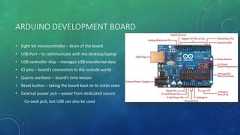
ARDUINO DEVELOPMENT BOARD• Eight bit microcontroller – brain of the board• USB Port – to communicate with the desktop/laptop• USB controller chip – manages USB transferred data• IO pins – board’s connection to the outside world• Quartz oscillator – board’s time keeper• Reset button – taking the board back to its initial state• External power jack – power from dedicated sourceCo-axial jack, but USB can also be used
INPUT/OUTPUT PINS (I/O PINS) Top and bottom rows of the board Holes in the board which we can stick wires in Holes are connected to the chips through traces on-board 14 Digital I/O pins on top [0-13]Highs – 5 volts Lows – 0 volts Max Current - 40 mA 6 Analog input pins on the bottom [A0 – A5] Power output pins on the bottom [ 5v , 3.3 v ] Reset pin to reset the board to initial state
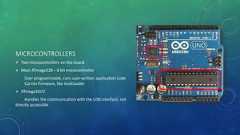
MICROCONTROLLERS Two microcontrollers on the board Main ATmega328 – 8 bit microcontrollerUser programmable, runs user-written application codeCarries firmware, like bootloader ATmega16U2Handles the communication with the USB interface, notdirectly accessible
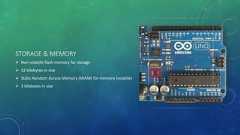
STORAGE & MEMORY Non-volatile flash memory for storage 32 kilobytes in size Static Random Access Memory (SRAM) for memory (volatile) 3 kilobytes in size
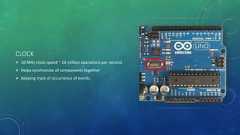
CLOCK 16 MHz clock speed ~ 16 million operations per second Helps synchronize all components together Keeping track of occurrence of events
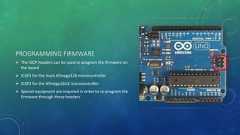
PROGRAMMING FIRMWARE The ISCP headers can be used to program the firmware onthe board ICSP1 for the main ATmega328 microcontroller ICSP2 for the ATmega16U2 microcontroller Special equipment are required in order to re-program thefirmware through these headers
SOFTWARE ENVIRONMENT• Arduino IDE – Integrated Development Environment• Can be programmed using other IDEs too, like Eclipse• Arduino IDE is more versatile• Needs no special drivers or additional components• Available for Windows, Linux and Mac• Cross compiler – compiles for a different target platform than the one being programmed on
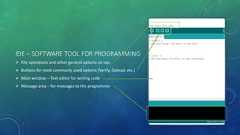
IDE – SOFTWARE TOOL FOR PROGRAMMING File operations and other general options on top Buttons for most commonly used options (Verify, Upload, etc.) Main window – Text editor for writing code Message area – for messages to the programmer
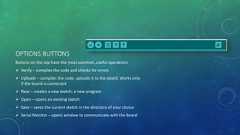
OPTIONS BUTTONSButtons on the top have the most common ,useful operations Verify – compiles the code and checks for errors Uploads – compiles the code, uploads it to the board. Works onlyif the board is connected New – creates a new sketch, a new program Open – opens an existing sketch Save – saves the current sketch in the directory of your choice Serial Monitor – opens window to communicate with the board
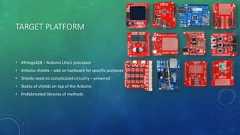
TARGET PLATFORM• ATmega328 – Arduino Uno’s processor• Arduino shields – add on hardware for specific purposes• Shields need no complicated circuitry – prewired• Stacks of shields on top of the Arduino• Prefabricated libraries of methods
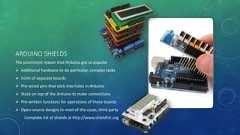
ARDUINO SHIELDSThe prominent reason that Arduino got so popular Additional hardware to do particular, complex tasks Form of separate boards Pre-wired pins that stick into holes in Arduino Stack on top of the Arduino to make connections Pre-written functions for operations of these boards Open-source designs in most of the cases, third partyComplete list of shields at http://www.shieldlist.org
OPEN SOURCE• Hardware – the board’s design is open sourcehttp://www.arduino.cc• Software – the IDE is open source, written in Java, modifiable, redistributable• Open source community – easily available codes and help on troubleshooting
SETTING UP THE ENVIRONMENTLEARNING TO CODE IN C/C++ FOR ARDUINO
RUNNING IDE ON WINDOWS Emacs or NotePad++ text editor Gcc C compiler The debugger, gdbIDE provides one-stop solution
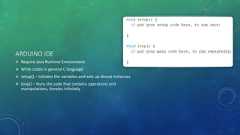
ARDUINO IDE Require Java Runtime Environment Write codes in general C language setup() – Initiates the variables and sets up device instances loop() – Runs the code that contains operations andmanipulations, iterates infinitely
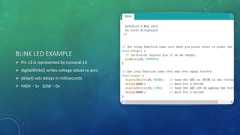
BLINK LED EXAMPLE Pin 13 is represented by numeral 13 digitalWrite() writes voltage values to pins delay() sets delays in milliseconds HIGH – 5v LOW – 0v
ARDUINO PROGRAMS AND THE BUILD PROCESSHOW IT IS SAME BUT DIFFERENT TO CODE FOR THE BOARDS
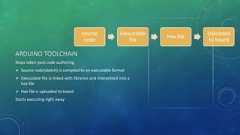
SourcecodeExecutablefileHex fileUploadedto boardARDUINO TOOLCHAINSteps taken post code authoring Source code(sketch) is compiled to an executable format Executable file is linked with libraries and interpreted into ahex file Hex file is uploaded to boardStarts executing right away
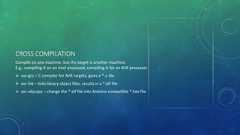
CROSS COMPILATIONCompile on one machine, but the target is another machine.E.g.: compiling it on an Intel processor, compiling it for an AVR processor avr-gcc – C compiler for AVR targets, gives a *.o file avr-lnk – links library object files, results in a *.elf file avr-objcopy – change the *.elf file into Arduino compatible *.hex file
DEBUGGING AND TROUBLESHOOTINGREMOVING ERRORS AND TAKING CARE OF REPAIR AND MAINTENANCE
DEBUGGING• Finding reasons of erroneous execution or failure of execution• Software problems• Require ‘controllability’ and ‘observability’• Controllability: the ability to control sources of data that are used by the systemAllows to do testing to test certain circumstances that might be causing a bug or triggering a bug atany rate• Observability: the ability to observe intermediate and final resultsAn oscilloscope, multi-meter, or the serial monitor could be used
REAL TIME MONITORING• Includes dynamic observation of the target and its state• Viewing data about the execution as it occurs• Not intrusive in terms of performance• Important for timing constraint IoT systems• Provides timing and functional accuracy
REMOTE DEBUGGINGRemote Debugger• Host computer acts as debugger for a code that runs on the remote target system• Host computer are also the systems that the programmer programs on• Host provides the platform to interface with the debugging environment.• Provides good run control, not good for testing timingEmbedded Debug Interface• Seen in modern processors, Arduino and its likes have trace macrocells• Built in to the processor• Hardware dedicated to do debugging directly
SERIAL PROTOCOLS FOR DEBUGGING• UART: Universal Asynchronous Receiver/Transmitter, an old protocol, still useful though.• Low hardware overhead• Transmits at 9600 baud• START and STOP buts are used for synchronization• The bits in between a START bit and the next STOP bit is the data• To distinguish, the receiver samples at 16 times higher rate than the baud rate• Serial interface can be used to both send data to and from the Arduino board

Recommended

PPS
What is Arduino ?
PPTX
Introduction to Arduino
PPTX
Introduction to Arduino
PPTX
Arduino Introduction (Blinking LED) Presentation (workshop #5)
PDF
Introducing the Arduino
PPTX
Arduino Microcontroller
PPTX
Arduino slides
PPT
Arduino presentation by_warishusain
PPTX
Introduction to Arduino Hardware and Programming
PDF
Arduino Lecture 1 - Introducing the Arduino
PPTX
Basics of arduino uno
PPTX
Embedded systems ppt
PPTX
Embedded Systems
PPTX
Embedded system design using arduino
PPTX
Lesson sample introduction to arduino
PPT
Memory & I/O interfacing
PDF
1. Introduction to Embedded Systems & IoT
PPTX
Introduction to Node MCU
PPTX
ARM Processor architecture
PDF
Ins and Outs of GPIO Programming
byICS
 
PPT
ARDUINO AND ITS PIN CONFIGURATION
PPTX
Ardui no
PPTX
Introduction to Embedded Systems
PDF
Communication Protocols (UART, SPI,I2C)
PDF
NodeMCU ESP8266 workshop 1
ODP
Introduction to Arduino
PPTX
Esp8266 NodeMCU
PPTX
Embedded system
PPT
Arduino Platform with C programming.
PDF
Oop 2014 embedded systems with open source hardware v2

More Related Content

PPS
What is Arduino ?
PPTX
Introduction to Arduino
PPTX
Introduction to Arduino
PPTX
Arduino Introduction (Blinking LED) Presentation (workshop #5)
PDF
Introducing the Arduino
PPTX
Arduino Microcontroller
PPTX
Arduino slides
PPT
Arduino presentation by_warishusain
What is Arduino ?
Introduction to Arduino
Arduino Introduction (Blinking LED) Presentation (workshop #5)
Introducing the Arduino
Arduino Microcontroller
Arduino slides
Arduino presentation by_warishusain

What's hot

PPTX
Introduction to Arduino Hardware and Programming
PDF
Arduino Lecture 1 - Introducing the Arduino
PPTX
Basics of arduino uno
PPTX
Embedded systems ppt
PPTX
Embedded Systems
PPTX
Embedded system design using arduino
PPTX
Lesson sample introduction to arduino
PPT
Memory & I/O interfacing
PDF
1. Introduction to Embedded Systems & IoT
PPTX
Introduction to Node MCU
PPTX
ARM Processor architecture
PDF
Ins and Outs of GPIO Programming
byICS
 
PPT
ARDUINO AND ITS PIN CONFIGURATION
PPTX
Ardui no
PPTX
Introduction to Embedded Systems
PDF
Communication Protocols (UART, SPI,I2C)
PDF
NodeMCU ESP8266 workshop 1
ODP
Introduction to Arduino
PPTX
Esp8266 NodeMCU
PPTX
Embedded system
Introduction to Arduino Hardware and Programming
Arduino Lecture 1 - Introducing the Arduino
Basics of arduino uno
Embedded systems ppt
Embedded Systems
Embedded system design using arduino
Lesson sample introduction to arduino
Memory & I/O interfacing
1. Introduction to Embedded Systems & IoT
Introduction to Node MCU
ARM Processor architecture
Ins and Outs of GPIO Programming
byICS
 
ARDUINO AND ITS PIN CONFIGURATION
Ardui no
Introduction to Embedded Systems
Communication Protocols (UART, SPI,I2C)
NodeMCU ESP8266 workshop 1
Introduction to Arduino
Esp8266 NodeMCU
Embedded system

Similar to Arduino and c programming

PPT
Arduino Platform with C programming.
PDF
Oop 2014 embedded systems with open source hardware v2
PPTX
Arduino
PDF
introductiontoarduino-111120102058-phpapp02.pdf
PPTX
Hands On arduino board tech and programming
PDF
Introduction to Arduino
PPTX
Internet of Things prescribed by University
PPTX
Up and running with Arduino
 
PDF
aurduino-200107075953.pdf
PPTX
Arduino: On-board components description, IDE and Programming
PPT
Embedded system programming using Arduino microcontroller
PPTX
Arduino
PPTX
Introduction to the Arduino
PPTX
Q2 Arduino Draft Q2 Arduino Draft Q2 Arduino Draft
PPT
ARDUINO_presentation_by_Ravishankar_Pati.ppt
PPT
ARDUINO_presentation
DOCX
Winter traning arduino report final
PPTX
INTRODUCTION_TO_ARDUINO uno, applications
PDF
4 Introduction to Arduino.pdf
Arduino Platform with C programming.
Oop 2014 embedded systems with open source hardware v2
Arduino
introductiontoarduino-111120102058-phpapp02.pdf
Hands On arduino board tech and programming
Introduction to Arduino
Internet of Things prescribed by University
Up and running with Arduino
 
aurduino-200107075953.pdf
Arduino: On-board components description, IDE and Programming
Embedded system programming using Arduino microcontroller
Arduino
Introduction to the Arduino
Q2 Arduino Draft Q2 Arduino Draft Q2 Arduino Draft
ARDUINO_presentation_by_Ravishankar_Pati.ppt
ARDUINO_presentation
Winter traning arduino report final
INTRODUCTION_TO_ARDUINO uno, applications
4 Introduction to Arduino.pdf

Recently uploaded

PDF
PROPOSED 5 BEDROOM DUPLEX DEVELOPMENT DRAWINGS..pdf
PDF
Chris Elwell Woburn - An Experienced IT Executive
PDF
CME397 SURFACE ENGINEERING UNIT 1 FULL NOTES
PPTX
Top 3 winning teams announcement - TechSprint
PDF
(en/zhTW)All_Roads_Lead_to_IPC_DannyJiang
PPTX
The Half-Life of Preventive Maintenance: Why PM Compliance Fails & How to Res...
PPTX
We-Optimized-Everything-Except-Decision-Quality-Maintenance-MaintWiz.pptx
PDF
10 Tips for Successfully Purchasing Twitter Accounts.pdf
PDF
Formality - Logic Equivalence Checking - Part 2
PDF
EDIH TRAINING AI FOR COMPANIES: MODULE 4
PPTX
Applications of cloud computing in education
PPTX
Speech to Text with Tone Correction.pptx
PPTX
820656155-Unit-III-Univariate-Analysis.pptx
PPTX
Electronics Device - EC25C01 - Semiconductor: Types, Conductivity,
PPT
Introduction to Concord Decorator by Stolle.ppt
PDF
FPGA Fabric and Synthesis All Parts Combined
PDF
A Newbie’s Journey: Hidden MySQL Pain Points That Vitess Quietly Solves
PDF
Brillouin zone analysis using Kronig-Penny model
PPTX
UNIT 2 _8051.pptx ,INSTRUCTION SET OF 8051,EXAMPLES OF ARITHMETIC,LOGICAL.BRA...
PPTX
AI-Agents-Concepts-Applications-and-Types.pptx
PROPOSED 5 BEDROOM DUPLEX DEVELOPMENT DRAWINGS..pdf
Chris Elwell Woburn - An Experienced IT Executive
CME397 SURFACE ENGINEERING UNIT 1 FULL NOTES
Top 3 winning teams announcement - TechSprint
(en/zhTW)All_Roads_Lead_to_IPC_DannyJiang
The Half-Life of Preventive Maintenance: Why PM Compliance Fails & How to Res...
We-Optimized-Everything-Except-Decision-Quality-Maintenance-MaintWiz.pptx
10 Tips for Successfully Purchasing Twitter Accounts.pdf
Formality - Logic Equivalence Checking - Part 2
EDIH TRAINING AI FOR COMPANIES: MODULE 4
Applications of cloud computing in education
Speech to Text with Tone Correction.pptx
820656155-Unit-III-Univariate-Analysis.pptx
Electronics Device - EC25C01 - Semiconductor: Types, Conductivity,
Introduction to Concord Decorator by Stolle.ppt
FPGA Fabric and Synthesis All Parts Combined
A Newbie’s Journey: Hidden MySQL Pain Points That Vitess Quietly Solves
Brillouin zone analysis using Kronig-Penny model
UNIT 2 _8051.pptx ,INSTRUCTION SET OF 8051,EXAMPLES OF ARITHMETIC,LOGICAL.BRA...
AI-Agents-Concepts-Applications-and-Types.pptx

Arduino and c programming

  • 1.
    INTERNET OF THINGS:ARDUINOAND CPROGRAMMINGCOMBINING THE TANGIBLE AND THE VOLATILE INTO ONEPunit Goswami
  • 2.
    ARDUINO ENVIRONMENTTHE ARDUINOBOARD, ITS SOFTWARE COMPONENT AND OTHER ADD-ON HARDWARE
  • 3.
    ARDUINO DEVELOPMENT BOARD•Eight bit microcontroller – brain of the board• USB Port – to communicate with the desktop/laptop• USB controller chip – manages USB transferred data• IO pins – board’s connection to the outside world• Quartz oscillator – board’s time keeper• Reset button – taking the board back to its initial state• External power jack – power from dedicated sourceCo-axial jack, but USB can also be used
  • 4.
    INPUT/OUTPUT PINS (I/OPINS) Top and bottom rows of the board Holes in the board which we can stick wires in Holes are connected to the chips through traces on-board 14 Digital I/O pins on top [0-13]Highs – 5 volts Lows – 0 volts Max Current - 40 mA 6 Analog input pins on the bottom [A0 – A5] Power output pins on the bottom [ 5v , 3.3 v ] Reset pin to reset the board to initial state
  • 5.
    MICROCONTROLLERS Two microcontrollerson the board Main ATmega328 – 8 bit microcontrollerUser programmable, runs user-written application codeCarries firmware, like bootloader ATmega16U2Handles the communication with the USB interface, notdirectly accessible
  • 6.
    STORAGE & MEMORYNon-volatile flash memory for storage 32 kilobytes in size Static Random Access Memory (SRAM) for memory (volatile) 3 kilobytes in size
  • 7.
    CLOCK 16 MHzclock speed ~ 16 million operations per second Helps synchronize all components together Keeping track of occurrence of events
  • 8.
    PROGRAMMING FIRMWARE TheISCP headers can be used to program the firmware onthe board ICSP1 for the main ATmega328 microcontroller ICSP2 for the ATmega16U2 microcontroller Special equipment are required in order to re-program thefirmware through these headers
  • 9.
    SOFTWARE ENVIRONMENT• ArduinoIDE – Integrated Development Environment• Can be programmed using other IDEs too, like Eclipse• Arduino IDE is more versatile• Needs no special drivers or additional components• Available for Windows, Linux and Mac• Cross compiler – compiles for a different target platform than the one being programmed on
  • 10.
    IDE – SOFTWARETOOL FOR PROGRAMMING File operations and other general options on top Buttons for most commonly used options (Verify, Upload, etc.) Main window – Text editor for writing code Message area – for messages to the programmer
  • 11.
    OPTIONS BUTTONSButtons onthe top have the most common ,useful operations Verify – compiles the code and checks for errors Uploads – compiles the code, uploads it to the board. Works onlyif the board is connected New – creates a new sketch, a new program Open – opens an existing sketch Save – saves the current sketch in the directory of your choice Serial Monitor – opens window to communicate with the board
  • 12.
    TARGET PLATFORM• ATmega328– Arduino Uno’s processor• Arduino shields – add on hardware for specific purposes• Shields need no complicated circuitry – prewired• Stacks of shields on top of the Arduino• Prefabricated libraries of methods
  • 13.
    ARDUINO SHIELDSThe prominentreason that Arduino got so popular Additional hardware to do particular, complex tasks Form of separate boards Pre-wired pins that stick into holes in Arduino Stack on top of the Arduino to make connections Pre-written functions for operations of these boards Open-source designs in most of the cases, third partyComplete list of shields at http://www.shieldlist.org
  • 14.
    OPEN SOURCE• Hardware– the board’s design is open sourcehttp://www.arduino.cc• Software – the IDE is open source, written in Java, modifiable, redistributable• Open source community – easily available codes and help on troubleshooting
  • 15.
    SETTING UP THEENVIRONMENTLEARNING TO CODE IN C/C++ FOR ARDUINO
  • 16.
    RUNNING IDE ONWINDOWS Emacs or NotePad++ text editor Gcc C compiler The debugger, gdbIDE provides one-stop solution
  • 17.
    ARDUINO IDE RequireJava Runtime Environment Write codes in general C language setup() – Initiates the variables and sets up device instances loop() – Runs the code that contains operations andmanipulations, iterates infinitely
  • 18.
    BLINK LED EXAMPLEPin 13 is represented by numeral 13 digitalWrite() writes voltage values to pins delay() sets delays in milliseconds HIGH – 5v LOW – 0v
  • 19.
    ARDUINO PROGRAMS ANDTHE BUILD PROCESSHOW IT IS SAME BUT DIFFERENT TO CODE FOR THE BOARDS
  • 20.
    SourcecodeExecutablefileHex fileUploadedto boardARDUINOTOOLCHAINSteps taken post code authoring Source code(sketch) is compiled to an executable format Executable file is linked with libraries and interpreted into ahex file Hex file is uploaded to boardStarts executing right away
  • 21.
    CROSS COMPILATIONCompile onone machine, but the target is another machine.E.g.: compiling it on an Intel processor, compiling it for an AVR processor avr-gcc – C compiler for AVR targets, gives a *.o file avr-lnk – links library object files, results in a *.elf file avr-objcopy – change the *.elf file into Arduino compatible *.hex file
  • 22.
    DEBUGGING AND TROUBLESHOOTINGREMOVINGERRORS AND TAKING CARE OF REPAIR AND MAINTENANCE
  • 23.
    DEBUGGING• Finding reasonsof erroneous execution or failure of execution• Software problems• Require ‘controllability’ and ‘observability’• Controllability: the ability to control sources of data that are used by the systemAllows to do testing to test certain circumstances that might be causing a bug or triggering a bug atany rate• Observability: the ability to observe intermediate and final resultsAn oscilloscope, multi-meter, or the serial monitor could be used
  • 24.
    REAL TIME MONITORING•Includes dynamic observation of the target and its state• Viewing data about the execution as it occurs• Not intrusive in terms of performance• Important for timing constraint IoT systems• Provides timing and functional accuracy
  • 25.
    REMOTE DEBUGGINGRemote Debugger•Host computer acts as debugger for a code that runs on the remote target system• Host computer are also the systems that the programmer programs on• Host provides the platform to interface with the debugging environment.• Provides good run control, not good for testing timingEmbedded Debug Interface• Seen in modern processors, Arduino and its likes have trace macrocells• Built in to the processor• Hardware dedicated to do debugging directly
  • 26.
    SERIAL PROTOCOLS FORDEBUGGING• UART: Universal Asynchronous Receiver/Transmitter, an old protocol, still useful though.• Low hardware overhead• Transmits at 9600 baud• START and STOP buts are used for synchronization• The bits in between a START bit and the next STOP bit is the data• To distinguish, the receiver samples at 16 times higher rate than the baud rate• Serial interface can be used to both send data to and from the Arduino board

Editor's Notes

  • #9 In circuit serial programmer

[8]ページ先頭

©2009-2026 Movatter.jp