What is USB 3?

Reviewed By:Kevin Pocock
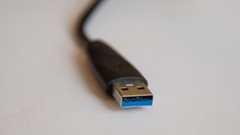
Most homes and offices have a large box filled with cables and wires, and as time goes by and technology continues to develop, more types of connections are created which leads to even more cables!
It can be a real headache, but we are here to help and let you know all that there is to know about USB 3 connectors.
We also provide a useful comparison guide to help you understand the differences between different types of USB cables, which will hopefully help you next time you need to go rummaging to find a specific type.
What Is USB 3.0?
USB 3.0 is the second-latest version of the Universal Serial Bus standard, or USB. The first USB was released many years ago in 2008. Still today, most new devices, computers, and technical gadgets support this standard.
Data Transfer Speeds
The USB 3.0 is often referred to as the SuperSpeed USB due to its superior performance to previous designs. It can transmit data at a maximum speed of 5 Gigabytes per second, or 5,120 Megabytes per second.
Deals season is here folks, and with it comes a plethora of eye-catching price cuts on some of the industry's most popular tech. Below are some of the best deals you can find right now.
- AMD Ryzen 7 9800X3D Was $479/span> Now $454
- ASUS TUF RTX 5070 Ti Was $999 Now $849
- Samsung Odyssey OLED G6 Was $899 Now $649
- LG G5 65" OLED TV Was $2,996 Now $1,996
- Samsung Odyssey G9 (G95C) Was $1,299 Now $777
- Alienware Area-51 gaming laptop Was $3,499 Now $2,799
- Samsung 77-inch OLED S95F Was $4,297 Now $3,497
*Prices and savings subject to change. Click through to get the current prices.
On average, it is believed that people would be transmitting up to 3,200 Megabytes per second.
Previous USB standards transmitted data considerably slower, with the USB 2.0 standard transferring data at 480 Megabytes per second, on a good day, and the USB 1.1 standard at its optimal performance could transfer data at a maximum of 12 Megabytes per second.
WIthin the USB 3.0 standard, there are three different designs, which transfer data at different speeds.
When they were initially released they were simply referred to as the 3.0, 3.1, and 3.2 but they have since been renamed officially as the USB 3.2 Gen 1, USB 3.2 Gen 2, and USB 3.2 Gen 2×2.
The 3.2, or USB 3.2 Gen 2×2, is the latest version of this family but it has now been replaced by the USB4 as the latest USB Standard. The USB 3.2 had a theoretical speed of 20 Gigabytes per second or 20,480 Megabytes per second.
This was an update from the USB 3.1 which transferred data at 10 Gigabytes per second or 10,240 Megabytes per second. In a world where everyone wants access to everything within moments, these speeds will continue to get even faster.
Hardware
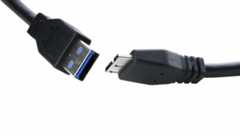
OlderUSB cables, adapters, and devices work with all USB standard cables, the difference between these cables only lies in the speed at which they transfer data. Their hardware and fittings continue to remain the same.
In the picture above you can see the USB 3.0 Type A and Type B cables. These are explained below:
- Type A:These cables are the standard rectangle shape that most people expect from a USB. They are receptacles and are compatible with previous USB Type-A designs.
- Type B:These types of USB are often found on appliances, such as printers. The USB 3.0 Type B cable is not compatible with previous designs, each Type B design is modified slightly.
There are also micro versions of the above cables, they are often used for smartphones and portable devices. While the mini cables look similar, they are not compatible, similar to their regular-sized counterparts.
Cable lengths can vary with the maximum being 10 feet. The length of a cable will not impact the transfer speed, as mentioned earlier it will be the type of USB standard that you use that will influence the speed that the data transfers.
How To Identify USB 3.0 Cables
USB 3.0 specification recommends that a blue-colored cable or coating is used to distinguish these cables from previous USB standard cables.
While not all manufacturers adhere to these specifications, they may have nods of blue somewhere within the cable design, for example, the plug.
Final Thoughts
Since the first USB Standard was used onWindows 8, USB cables have developed greatly in how they can transfer data. As technology continues to evolve we can expect more USB standards to continue to be produced to adhere to the need for instant data in the world today.
About the Author
Kevin has a broad interest and enthusiasm for consumer electronics, PCs, and all things consumer tech. And more than 17 years experience in tech journalism.
Our team of experts use a combination of independent consumer research, in-depth testing where appropriate - which will be flagged as such, and market analysis when recommending products, software and services.Find out how we test here.

Related Articles

Three NVIDIA-powered gaming PCs that should be at the top of any tech-lover’s Christmas list
Last Updated Nov 28, 2025· byAaron Ritchie
Best External Hard Drive Enclosure in 2025
Last Updated Apr 30, 2023· byAndrew KirkcaldyBest External Hard Drive For PS4 in 2025
Last Updated Apr 26, 2023· byTom Bardwell
Best external drive for PC backup in 2023
Last Updated Apr 25, 2023· byLewie Procter
PC-Doctor drive erasure: Why deleting data might not be good enough
Last Updated Feb 17, 2023· byKevin Pocock