
Request enrichment
You need to fetch data from external APIs and add extra headers with additional useful information to the origin

Requests passing through Fastly can be transformed in many useful ways, and one of the most common is to add information to a request that was not included by the client by appending additional HTTP headers before sending the request on to the backend.
Fastly exposes a variety of information automatically, such as the geolocation and network related information available in Rust via theGeo interface. This information is simple to add to a client request before passing it to an origin:
usefastly::geo::geo_lookup;usefastly::{Error,Request,Response};#[fastly::main]fnmain(mut req:Request)->Result<Response,Error>{let client_ip= req.get_client_ip_addr().unwrap();let geo=geo_lookup(client_ip).unwrap();let country_code= geo.country_code(); req.set_header("Fastly-Geo-Country", country_code);Ok(req.send("example_backend")?)}There are also countless data sources that can provide valuable information and add intelligence to your applications. If these sources expose an API, we can query it at the edge to enrich requests with the data that service provides. This might be one of your own services, like an A/B testing API, or a third-party service.
For the purpose of this tutorial, we will detect requests that contain passwords, send an API request to theHave I Been Pwned (HIBP) API to check whether the password has been leaked, and then add a header to the request before it is forwarded to the origin.
Have I Been "Pwned"?
"Have I been pwned" (HIBP) is a community service that maintains a database of compromised passwords. It provides an API endpoint that allows passwords to be checked against that database in a privacy-preserving way. This works using ak-anonymity principle, which we can invoke like this:
- Take the original, clear-text credential, such as '123456'.
- Make a SHA1 hash out of the credential, which results in a 40 character string.
- Split the hash into two strings: the first 5 characters, and the remaining 35 characters.
- Send the first 5 characters to the HIBP API.
- HIBP returns a list of all the SHA1 hashes in its database that begin with those 5 characters.
- Use the last 35 characters to determine whether the full hash is in the list.
This mechanism allows a precise trade-off to be made between information leakage and functionality. Let's see how this works using command-line tools:
$ printf '123456' | openssl sha1(stdin)= 7c4a8d09ca3762af61e59520943dc26494f8941b$ curl https://api.pwnedpasswords.com/range/7c4a8 | grep -i 'd09ca3762af61e59520943dc26494f8941b'D09CA3762AF61E59520943DC26494F8941B:24230577IMPORTANT: While it's possible to use HIBP anonymously, we strongly recommend using an API key. For production use, go to theHIBP API key page and obtain an API key.
Based on the response, we can tell that the password has been reported compromised 24,230,577 times. So '123456' turns out to be a bad idea for a password.
Set up a Rust based Compute project
This tutorial assumes that you have already have theFastly CLI installed. If you are new to the platform, read ourGetting Started guide.
Initialize a project
If you haven't already created a Rust-based Compute project, runfastly compute init in a new directory in your terminal and follow the prompts to provision a new service using thedefault Rust starter kit and with HTTPBin as a backend:
$ mkdir hibp_enrichment && cd hibp_enrichment$ fastly compute initCreating a new Compute project.Press ^C at any time to quit.Name: [hibp_enrichment]Description: Check the HIBP API for pwned passwords and send enriched information to the originAuthor: My NameLanguage:[1] Rust[2] JavaScript[4] Other ('bring your own' Wasm binary)Choose option: [1]Starter kit:[1] Default starter for Rust A basic starter kit that demonstrates routing, simple synthetic responses and overriding caching rules. https://github.com/fastly/compute-starter-kit-rust-default[2] Beacon termination Capture beacon data from the browser, divert beacon request payloads to a log endpoint, and avoid putting load on your own infrastructure. https://github.com/fastly/compute-starter-kit-rust-beacon-termination[3] Static content Apply performance, security and usability upgrades to static bucket services such as Google Cloud Storage or AWS S3. https://github.com/fastly/compute-starter-kit-rust-static-contentChoose option or paste git URL: [1]✓ Initializing...✓ Fetching package template...✓ Updating package manifest...✓ Initializing package...This will create some files for you, which you'll need to edit as you go through the rest of the tutorial:
fastly.tomldescribes your project and tells the Fastly CLI where to deploy it to.Cargo.tomlis the Rust package manifest, where you declare your dependencies.src/main.rsis the source code of your project. This will have some example code in it, which you can remove.
Create a Fastly Compute service
Create your new Compute service. Make a note of the service ID that is returned from the following command.
$ fastly service create --name my-enrichment-demoAdd the service ID into thefastly.toml file:
# This file describes a Fastly Compute package. To learn more visit:# https://www.fastly.com/documentation/reference/compute/fastly-toml/authors=[...]description="Check the HIBP API for compromised passwords and send enriched information to the origin"language="rust"manifest_version=1name="hibp_enrichment"service_id="[your_service_id]"Configure the backends
You'll need two backends for this demo: the HIBP API and your own origin server that will answer the user's request. We'll usehttpbin.org as a stand in for our backend, but feel free to substitute your own. You can add these using thefastly backend create command:
$ fastly backend create --name=api --address=api.pwnedpasswords.com --port=443 --use-ssl --service-id=[your_service_id] --version=latest$ fastly backend create --name=primary --address=httpbin.org --port=443 --use-ssl --service-id=[your_service_id] --version=latestWrite the code
Dependencies
Add these dependencies to your Cargo.toml file:
serde="1.0"serde_urlencoded="0.7"sha1_smol="^1"hex="0.4"Afterwards, import them at the top ofsrc/main.rs. If you haven't already, remove all the existing content ofmain.rs and replace it with the following:
usefastly::http::{Method,StatusCode};usefastly::{mime,Error,Request,Response};Thefastly dependency provides the SDK for the Fastly platform;percent-encoding decodes the percent-encoded password that the user submits in the login form POST; andsha1 to performs the hashing function necessary to be compatible with the HIBP API.
Set up the backends and constants
You created two backends on the Fastly service, calledapi andprimary. Since they are referenced as strings in Rust, assigning them to constants will help to avoid typos later:
// The name of the backend servers associated with this service.// This must match the backend names you configured using `fastly backend create`.constBACKEND_APP_SERVER:&str="primary";constBACKEND_SECURITY_CHECK:&str="api";// Credential prefix lengthconstPREFIX_LENGTH:usize=5;// Login form HTMLstaticLOGIN_HTML:&str=r#"<!DOCTYPE html><html lang="en"> <head> <meta charset="utf-8" /> <title>Compromised password detection demo</title> </head> <body> <form action="/post" method="post"> <div class="container"> <label for="username"><b>Username</b></label> <input type="text" placeholder="Enter Username" name="username" required /> <label for="password"><b>Password</b></label> <input type="password" placeholder="Enter Password" name="password" required /> <button type="submit">Login</button> </div> </form> </body></html>"#;Add helper functions
To find a password in the request, you'll need to be able to parse the request body and extract a field by name. In VCL, we have thesubfield function, but there's no equivalent in Rust. You can use a struct to deserialize the password instead:
// Struct to deserialize password field#[derive(serde::Deserialize)]structBodyParams{ password:Option<String>,}You'll also need to be able to compute a SHA1 hash of the password for the HIBP API. The SHA1 crate does that but it's helpful to have an easy way to get it as a string:
/// Generate SHA1 hash from string sfnhash_sha1(s:&str)->String{letmut hasher=sha1_smol::Sha1::new(); hasher.update(s.as_bytes()); hasher.digest().to_string()}Fetch enriched data from the API
A Compute program in Rust receives aRequest. Since the objective here is to create an improved (enriched) request, a good signature for the enrichment function would beRequest -> Result<Request, Error>. This enables the enrichment logic to be nicely encapsulated and can be invoked elegantly as part of processing the incoming request, in conjunction with other similar handlers.
The function will therefore take aRequest, add aFastly-Password-Status header to it, and then return it to the calling scope.
// Process login with threat checkfnprocess_credential(mut req:Request)->Result<Request,Error>{let params= req.take_body_form::<BodyParams>().unwrap();ifletSome(plain_cred)= params.password{// Generate sha1 hash of credentiallet hashed_cred=hash_sha1(&plain_cred);// Split the hash of credential to left and right part at position PREFIX_LENGTHlet hash_left=&hashed_cred[0..PREFIX_LENGTH];let hash_right=&hashed_cred[PREFIX_LENGTH..];// Prepare the request for threat check// (If you use HIBP in production please use an API key)let api_url=format!("https://api.pwnedpasswords.com/range/{hash_left}");let api_req=Request::get(api_url);// Send threat check request to API with the left-hand-side of the SHA1 hashletmut api_res= api_req.send(BACKEND_SECURITY_CHECK)?;let api_res_body= api_res.take_body_str();// Check if the response body contains the right-hand-side of the sha1 hashlet result=if api_res_body.contains(hash_right){"compromised-credential"}else{"safe-credential"};// Uncomment for debugging. For production use, avoid logging credentials// println!("Checked credential {plain_cred}, result is {result}"); req.set_header("fastly-password-status", result);}Ok(req)}First, take the request body from the request and use the helper function defined earlier to search it for a credential. For the purposes of this tutorial, we'll assume that the body isapplication/x-www-form-urlencoded and that the field name we want is alwayspassword, so a body that would match would beusername=Jo&password=123456. Special characters such as "!" and "$" are often used in passwords, but these special characters will be percent-encoded when a user submits a credential for this tutorial. Therefore, we must decode the percent-encoded password before interacting with the HIBP API.
If there's no credential found in the body, it would be very inefficient to make an unnecessary API request, so in this case, you can create a fast path by adding aFastly-Password-Status: no-credential header and returning immediately.
Where a credential is found, the other helper function defined earlier can be used to compute a SHA1 hash as a 40 character string. The HIBP API takes a 5-character prefix of that as an input, so divide the hash into a 5-characterhash_left and a 35-characterhash_right. The request to the API will return a list of 'right hand sides' of all hashes in the database that start with the supplied 'left hand side'. It's then easy enough to check whetherhash_right is in the list, and if so, conclude that the credential is compromised.
Use the enrichment function
The entry point for a Compute program is themain function. A simple scenario here is to pass every request directly to a backend, and then to return whatever the backend responds with. You need only make a small modification to this - insert a call to the enrichment function, which will modify the request, before you send it to the origin.
#[fastly::main]fnmain(mut req:Request)->Result<Response,Error>{// Pass all requests through the credential detection, which// modifies the request to enrich it with new information req=process_credential(req)?;// Send request to the primary originOk(req.send(BACKEND_APP_SERVER)?)}Commonly, backends require that theHost header sent in the backend request matches the hostname of the backend. Fastly doesn't modify theHost header by default, so you likely also want to do this.
You now have a complete Compute program, which receives aRequest, enriches it, forwards it to an origin, and then uses the returnedResponse to reply to the client.
Add a login page
Normally, your backend (theprimary backend here) would serve pages that would invite a user to submit a password somehow. But since HTTPBin (theprimary backend we are using in this tutorial) doesn't do that, you could, as a convenient way to test the demo, add a pre-canned login page to the application, and store it in your Compute program. Start by creating alogin.html page in thesrc/ directory:
Then add a section to themain() function to interceptGET requests to the/ path and return the login page instead of forwarding the request to origin.
#[fastly::main]fnmain(mut req:Request)->Result<Response,Error>{// For the demo, serve a basic login form on the root pathif req.get_method()==Method::GET&& req.get_path()=="/"{returnOk(Response::from_status(StatusCode::OK).with_content_type(mime::TEXT_HTML_UTF_8).with_body(LOGIN_HTML));}// Pass all requests through the credential detection, which// modifies the request to enrich it with new information req=process_credential(req)?;// Send request to the primary originOk(req.send(BACKEND_APP_SERVER)?)}Build and deploy
Congratulations! You now have a mechanism to see if the submitted credentials are part of the known compromised credentials.
$ fastly compute publish✓ Initializing...✓ Verifying package manifest...✓ Verifying local rust toolchain...✓ Building package using rust toolchain...✓ Creating package archive...SUCCESS: Built rust package hibp-enrichment (pkg/hibp-enrichment.tar.gz)There is no Fastly service associated with this package. To connect to an existing serviceadd the Service ID to the fastly.toml file, otherwise follow the prompts to create aservice now.Press ^C at any time to quit.Create new service: [y/N] y✓ Initializing...✓ Creating service...Domain: [random-funky-words.edgecompute.app]Backend (hostname or IP address, or leave blank to stop adding backends): api.pwnedpasswords.comBackend port number: [80] 443Backend name: [backend_1] apiBackend (hostname or IP address, or leave blank to stop adding backends): httpbin.orgBackend port number: [80] 443Backend name: [backend_1] primaryBackend (hostname or IP address, or leave blank to stop adding backends):✓ Initializing...✓ Creating domain 'random-funky-words.edgecompute.app'...✓ Creating backend 'api' (host: api.pwnedpasswords.com, port: 443)...✓ Creating backend 'primary' (host: httpbin.org, port: 443)...✓ Uploading package...✓ Activating version...Manage this service at: https://manage.fastly.com/configure/services/PS1Z4isxPaoZGVKVdv0eYView this service at: https://random-funky-words.edgecompute.appSUCCESS: Deployed package (service PS1Z4isxPaoZGVKVdv0eY, version 1)Try it out
Navigate to the URL shown under "View this service at" in the output above, and you should see the login page. When you log in, your request will be forwarded to HTTPBin, which simply echos back to you what it received. This enables you to see that the origin server has received an additional header with the credential in it.
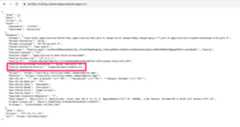
Try it with no password, with the password '123456', and with something strong and random. You should be able to trigger all three of the possible values ofFastly-Password-Status.
Next Steps
Now that you understand how to use an API request to enrich data that is sent to the origin, you could combine this with other Fastly sources such asproxy description to gain visibility into if a given client is coming from a proxy. You could also add API requests to other 3rd party sources or your own sources, and perform them in parallel.
