
Enhance your site UX with Compute
Use Fastly to give your users a better experience with edge computing.
This tutorial walks you through enhancing the user experience (UX) for a website with a Fastly Compute service. Compute can tailor your site behavior with functionality that runs closer to the user. You can code your logic in a language of your choice and compile it into WebAssembly (Wasm) where it can run quickly and securely as a serverless application on the Fastly network.
Your Compute app sits between the user device and the origin host for your site, so it can manipulate the request and response. The starter code for this tutorial adds geolocation information to the request, handles errors with synthetic content, and builds structured data into HTML.
If you aren't ready to download or install any tooling on your computer, you can try Compute in the browser by openingthe starter app in a GitHub Codespace and following the instructions in theREADME. The instructions below walk you through developing in a local environment using the same Compute app.
Set up your Fastly account
Sign up for a free Fastly account if you haven’t already.
The Compute app requires an API key - if you don't already have one, grab one from your account:
- Go toAccount >API tokens >Personal tokens.
- ClickCreate Token then fill out theCreate a Token fields as follows. If a field isn't specified, you can leave it as the default.
- Name: enter a name for your token
- Type Automation
- Role: Engineer
- Scope: Global (deselect the Read-only access box)
- Access: All services
- Expiration: Never expire
- Copy the token value and save it in a secure location. You'll need it later on.
Set up your developer environment
Create a new directory by opening a terminal window and entering the following command, changing the name to suit your project:
mkdir project_name && cd project_nameRun the following command toinstall the Fastly CLI onto your computer.
npm install -g @fastly/cli@latestCreate an environment variable named
FASTLY_API_TOKENand give it the token you copied from your account as the value.
HINT: You canauthenticate in other ways, like including your token with the commands as--token or creating a profile.
Start a new Compute app
Fastly provides SDKs to compile Rust, Go, and JavaScript to Wasm that runs on the Compute platform. This tutorial uses a JavaScript example.
HINT: Check out theavailable options for each language if you know which functionalities you need.
Install thestarter app by passing its address to the init command:
fastly compute init --from=https://github.com/glitchdotcom/hello-compute/HINT: Include the flag
--accept-defaultswith your commands if you don't want to choose all the details.Install dependencies. We're using
node, but you can useyarnif preferred:npm install
Explore your new app
Fastly will import the files for the app into your new directory. Browse them in your developer environment.
The files most worth checking out aresrc/index.js andfastly.toml:
- The
src/index.jsfile has the functionality in it - each time a request comes in to the Compute service, it tailors the response:- Adding a location cookie to the headers
- Checking the origin response for any errors and returning some synthetic HTML
- Checking for requests ending “.json” and sending the data back as HTML
- The
fastly.tomlfile contains the setup information for the service, including abackend- this is the origin website.- You can leave it as
glitchdotcom.github.ioto use the demo site (which is hosted atglitchdotcom.github.io/compute-origin/), or change the value to use your own site - If you're using a different site, make sure you change the value of
rootinindex.jsto point at the correct path, or"/"if your site is at the root of your domain
- You can leave it as
Deploy your app
Deploy your app using the Fastly CLI publish command:
fastly compute publishHINT: You can choose a different
backendduring deployment if you want to try the starter code on another origin website.Fastly will build and deploy your Compute app. The CLI output will return the address of your new app, which will end
edgecompute.app. If it doesn’t load right away, give it a minute and try again.
Test your enhanced site
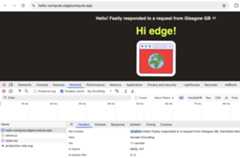
With youredgecompute.app site open in the browser, check out the difference between it and theorigin website:

If you’re using the demo site, you’ll find the location info written into the page - otherwise you can find it in your browser dev tools by opening theApplication >Cookies. Alternatively open theNetwork tab and select the homepage address, then scroll through theHeaders:
Experiment with the different paths in the site:
- Try opening a page you know doesn’t exist on the origin site, like
/ohno- you’ll receive a synthetic 404 error page Fastly built at the edge. - Open any path that returns JSON, like
/data.json- Fastly builds it into an HTML page including the structured data.

Edit your Compute code
Make a change to your functionality! In theindex.js file, the code builds the location info into a message. Find the line where the code sets the value of thegeo variable usinggetGeolocationForIpAddress and add the following on the next line:
// Let's get the time of day and find out how far from UTC it islet displayTime=newDate().getHours();let offset= geo.utc_offset;displayTime+= offset/100;// Tailor the greeting to the user time of daygreeting= displayTime>4&& displayTime<12?"Morning! ": displayTime>=12&& displayTime<18?"Afternoon! ":"Evening! ";The code changes the greeting to reflect the time of day at the user location.
Build and deploy your app again using the publish command in yourTerminal:
fastly compute publishOnce your update has deployed, check out the cookie again in the browser dev tools.
Test using Fiddle
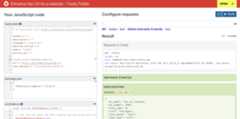
You can test your code in the browser using Fastly Fiddle.Clone the example Fiddle and update it to suit your site:
- In the
fastly.tomlsection, change thelocal_server.backends.websiteentry for bothurlandoverride_hostto your own origin site. - Paste your
index.jscode into the Fiddle. - Choose a path in theConfigure Requests field, like
/ohno. - Run and check out the response data.
- Use the button next to theRun button to browse the Fiddle result in a new tab
What to try next
You can find your service in the control panel for your Fastly account - to change the functionality it delivers, you’ll make your changes in a dev environment and build / deploy it again as above. You can include many different types of edge functionality in your Compute apps.
