- Home
- Tutorial
- API Guide
- Topics
- Community
- Tutorials and Resources
- Third Party Packages
- Contributing to REST framework
- Project management
- Release Notes
- 3.16 Announcement
- 3.15 Announcement
- 3.14 Announcement
- 3.13 Announcement
- 3.12 Announcement
- 3.11 Announcement
- 3.10 Announcement
- 3.9 Announcement
- 3.8 Announcement
- 3.7 Announcement
- 3.6 Announcement
- 3.5 Announcement
- 3.4 Announcement
- 3.3 Announcement
- 3.2 Announcement
- 3.1 Announcement
- 3.0 Announcement
- Kickstarter Announcement
- Mozilla Grant
- Jobs
- Renderers
- How the renderer is determined
- Setting the renderers
- Ordering of renderer classes
- API Reference
- JSONRenderer
- TemplateHTMLRenderer
- StaticHTMLRenderer
- BrowsableAPIRenderer
- AdminRenderer
- HTMLFormRenderer
- MultiPartRenderer
- Custom renderers
- data
- accepted_media_type=None
- renderer_context=None
- Example
- Setting the character set
- Advanced renderer usage
- Varying behavior by media type
- Underspecifying the media type
- Designing your media types
- HTML error views
- Third party packages
- YAML
- XML
- JSONP
- MessagePack
- Microsoft Excel: XLSX (Binary Spreadsheet Endpoints)
- CSV
- UltraJSON
- CamelCase JSON
- Pandas (CSV, Excel, PNG)
- LaTeX
Renderers
Before a TemplateResponse instance can be returned to the client, it must be rendered. The rendering process takes the intermediate representation of template and context, and turns it into the final byte stream that can be served to the client.
REST framework includes a number of built in Renderer classes, that allow you to return responses with various media types. There is also support for defining your own custom renderers, which gives you the flexibility to design your own media types.
How the renderer is determined
The set of valid renderers for a view is always defined as a list of classes. When a view is entered REST framework will perform content negotiation on the incoming request, and determine the most appropriate renderer to satisfy the request.
The basic process of content negotiation involves examining the request'sAccept header, to determine which media types it expects in the response. Optionally, format suffixes on the URL may be used to explicitly request a particular representation. For example the URLhttp://example.com/api/users_count.json might be an endpoint that always returns JSON data.
For more information see the documentation oncontent negotiation.
Setting the renderers
The default set of renderers may be set globally, using theDEFAULT_RENDERER_CLASSES setting. For example, the following settings would useJSON as the main media type and also include the self describing API.
REST_FRAMEWORK = { 'DEFAULT_RENDERER_CLASSES': [ 'rest_framework.renderers.JSONRenderer', 'rest_framework.renderers.BrowsableAPIRenderer', ]}You can also set the renderers used for an individual view, or viewset,using theAPIView class-based views.
from django.contrib.auth.models import Userfrom rest_framework.renderers import JSONRendererfrom rest_framework.response import Responsefrom rest_framework.views import APIViewclass UserCountView(APIView): """ A view that returns the count of active users in JSON. """ renderer_classes = [JSONRenderer] def get(self, request, format=None): user_count = User.objects.filter(active=True).count() content = {'user_count': user_count} return Response(content)Or, if you're using the@api_view decorator with function based views.
@api_view(['GET'])@renderer_classes([JSONRenderer])def user_count_view(request, format=None): """ A view that returns the count of active users in JSON. """ user_count = User.objects.filter(active=True).count() content = {'user_count': user_count} return Response(content)Ordering of renderer classes
It's important when specifying the renderer classes for your API to think about what priority you want to assign to each media type. If a client underspecifies the representations it can accept, such as sending anAccept: */* header, or not including anAccept header at all, then REST framework will select the first renderer in the list to use for the response.
For example if your API serves JSON responses and the HTML browsable API, you might want to makeJSONRenderer your default renderer, in order to sendJSON responses to clients that do not specify anAccept header.
If your API includes views that can serve both regular webpages and API responses depending on the request, then you might consider makingTemplateHTMLRenderer your default renderer, in order to play nicely with older browsers that sendbroken accept headers.
API Reference
JSONRenderer
Renders the request data intoJSON, using utf-8 encoding.
Note that the default style is to include unicode characters, and render the response using a compact style with no unnecessary whitespace:
{"unicode black star":"★","value":999}The client may additionally include an'indent' media type parameter, in which case the returnedJSON will be indented. For exampleAccept: application/json; indent=4.
{ "unicode black star": "★", "value": 999}The default JSON encoding style can be altered using theUNICODE_JSON andCOMPACT_JSON settings keys.
.media_type:application/json
.format:'json'
.charset:None
TemplateHTMLRenderer
Renders data to HTML, using Django's standard template rendering.Unlike other renderers, the data passed to theResponse does not need to be serialized. Also, unlike other renderers, you may want to include atemplate_name argument when creating theResponse.
The TemplateHTMLRenderer will create aRequestContext, using theresponse.data as the context dict, and determine a template name to use to render the context.
Note
When used with a view that makes use of a serializer theResponse sent for rendering may not be a dictionary and will need to be wrapped in a dict before returning to allow theTemplateHTMLRenderer to render it. For example:
response.data = {'results': response.data}The template name is determined by (in order of preference):
- An explicit
template_nameargument passed to the response. - An explicit
.template_nameattribute set on this class. - The return result of calling
view.get_template_names().
An example of a view that usesTemplateHTMLRenderer:
class UserDetail(generics.RetrieveAPIView): """ A view that returns a templated HTML representation of a given user. """ queryset = User.objects.all() renderer_classes = [TemplateHTMLRenderer] def get(self, request, *args, **kwargs): self.object = self.get_object() return Response({'user': self.object}, template_name='user_detail.html')You can useTemplateHTMLRenderer either to return regular HTML pages using REST framework, or to return both HTML and API responses from a single endpoint.
If you're building websites that useTemplateHTMLRenderer along with other renderer classes, you should consider listingTemplateHTMLRenderer as the first class in therenderer_classes list, so that it will be prioritized first even for browsers that send poorly formedACCEPT: headers.
See theHTML & Forms Topic Page for further examples ofTemplateHTMLRenderer usage.
.media_type:text/html
.format:'html'
.charset:utf-8
See also:StaticHTMLRenderer
StaticHTMLRenderer
A simple renderer that simply returns pre-rendered HTML. Unlike other renderers, the data passed to the response object should be a string representing the content to be returned.
An example of a view that usesStaticHTMLRenderer:
@api_view(['GET'])@renderer_classes([StaticHTMLRenderer])def simple_html_view(request): data = '<html><body><h1>Hello, world</h1></body></html>' return Response(data)You can useStaticHTMLRenderer either to return regular HTML pages using REST framework, or to return both HTML and API responses from a single endpoint.
.media_type:text/html
.format:'html'
.charset:utf-8
See also:TemplateHTMLRenderer
BrowsableAPIRenderer
Renders data into HTML for the Browsable API:
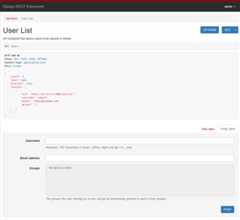
This renderer will determine which other renderer would have been given highest priority, and use that to display an API style response within the HTML page.
.media_type:text/html
.format:'api'
.charset:utf-8
.template:'rest_framework/api.html'
Customizing BrowsableAPIRenderer
By default the response content will be rendered with the highest priority renderer apart fromBrowsableAPIRenderer. If you need to customize this behavior, for example to use HTML as the default return format, but use JSON in the browsable API, you can do so by overriding theget_default_renderer() method. For example:
class CustomBrowsableAPIRenderer(BrowsableAPIRenderer): def get_default_renderer(self, view): return JSONRenderer()AdminRenderer
Renders data into HTML for an admin-like display:
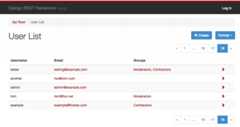
This renderer is suitable for CRUD-style web APIs that should also present a user-friendly interface for managing the data.
Note that views that have nested or list serializers for their input won't work well with theAdminRenderer, as the HTML forms are unable to properly support them.
Note
TheAdminRenderer is only able to include links to detail pages when a properly configuredURL_FIELD_NAME (url by default) attribute is present in the data. ForHyperlinkedModelSerializer this will be the case, but forModelSerializer or plainSerializer classes you'll need to make sure to include the field explicitly.
For example here we use modelsget_absolute_url method:
class AccountSerializer(serializers.ModelSerializer): url = serializers.CharField(source='get_absolute_url', read_only=True) class Meta: model = Account.media_type:text/html
.format:'admin'
.charset:utf-8
.template:'rest_framework/admin.html'
HTMLFormRenderer
Renders data returned by a serializer into an HTML form. The output of this renderer does not include the enclosing<form> tags, a hidden CSRF input or any submit buttons.
This renderer is not intended to be used directly, but can instead be used in templates by passing a serializer instance to therender_form template tag.
{% load rest_framework %}<form action="/submit-report/" method="post"> {% csrf_token %} {% render_form serializer %} <input type="submit" value="Save" /></form>For more information see theHTML & Forms documentation.
.media_type:text/html
.format:'form'
.charset:utf-8
.template:'rest_framework/horizontal/form.html'
MultiPartRenderer
This renderer is used for rendering HTML multipart form data.It is not suitable as a response renderer, but is instead used for creating test requests, using REST framework'stest client and test request factory.
.media_type:multipart/form-data; boundary=BoUnDaRyStRiNg
.format:'multipart'
.charset:utf-8
Custom renderers
To implement a custom renderer, you should overrideBaseRenderer, set the.media_type and.format properties, and implement the.render(self, data, accepted_media_type=None, renderer_context=None) method.
The method should return a bytestring, which will be used as the body of the HTTP response.
The arguments passed to the.render() method are:
data
The request data, as set by theResponse() instantiation.
accepted_media_type=None
Optional. If provided, this is the accepted media type, as determined by the content negotiation stage.
Depending on the client'sAccept: header, this may be more specific than the renderer'smedia_type attribute, and may include media type parameters. For example"application/json; nested=true".
renderer_context=None
Optional. If provided, this is a dictionary of contextual information provided by the view.
By default this will include the following keys:view,request,response,args,kwargs.
Example
The following is an example plaintext renderer that will return a response with thedata parameter as the content of the response.
from django.utils.encoding import smart_strfrom rest_framework import renderersclass PlainTextRenderer(renderers.BaseRenderer): media_type = 'text/plain' format = 'txt' def render(self, data, accepted_media_type=None, renderer_context=None): return smart_str(data, encoding=self.charset)Setting the character set
By default renderer classes are assumed to be using theUTF-8 encoding. To use a different encoding, set thecharset attribute on the renderer.
class PlainTextRenderer(renderers.BaseRenderer): media_type = 'text/plain' format = 'txt' charset = 'iso-8859-1' def render(self, data, accepted_media_type=None, renderer_context=None): return data.encode(self.charset)Note that if a renderer class returns a unicode string, then the response content will be coerced into a bytestring by theResponse class, with thecharset attribute set on the renderer used to determine the encoding.
If the renderer returns a bytestring representing raw binary content, you should set a charset value ofNone, which will ensure theContent-Type header of the response will not have acharset value set.
In some cases you may also want to set therender_style attribute to'binary'. Doing so will also ensure that the browsable API will not attempt to display the binary content as a string.
class JPEGRenderer(renderers.BaseRenderer): media_type = 'image/jpeg' format = 'jpg' charset = None render_style = 'binary' def render(self, data, accepted_media_type=None, renderer_context=None): return dataAdvanced renderer usage
You can do some pretty flexible things using REST framework's renderers. Some examples...
- Provide either flat or nested representations from the same endpoint, depending on the requested media type.
- Serve both regular HTML webpages, and JSON based API responses from the same endpoints.
- Specify multiple types of HTML representation for API clients to use.
- Underspecify a renderer's media type, such as using
media_type = 'image/*', and use theAcceptheader to vary the encoding of the response.
Varying behavior by media type
In some cases you might want your view to use different serialization styles depending on the accepted media type. If you need to do this you can accessrequest.accepted_renderer to determine the negotiated renderer that will be used for the response.
For example:
@api_view(['GET'])@renderer_classes([TemplateHTMLRenderer, JSONRenderer])def list_users(request): """ A view that can return JSON or HTML representations of the users in the system. """ queryset = Users.objects.filter(active=True) if request.accepted_renderer.format == 'html': # TemplateHTMLRenderer takes a context dict, # and additionally requires a 'template_name'. # It does not require serialization. data = {'users': queryset} return Response(data, template_name='list_users.html') # JSONRenderer requires serialized data as normal. serializer = UserSerializer(instance=queryset) data = serializer.data return Response(data)Underspecifying the media type
In some cases you might want a renderer to serve a range of media types.In this case you can underspecify the media types it should respond to, by using amedia_type value such asimage/*, or*/*.
If you underspecify the renderer's media type, you should make sure to specify the media type explicitly when you return the response, using thecontent_type attribute. For example:
return Response(data, content_type='image/png')Designing your media types
For the purposes of many Web APIs, simpleJSON responses with hyperlinked relations may be sufficient. If you want to fully embrace RESTful design andHATEOAS you'll need to consider the design and usage of your media types in more detail.
Inthe words of Roy Fielding, "A REST API should spend almost all of its descriptive effort in defining the media type(s) used for representing resources and driving application state, or in defining extended relation names and/or hypertext-enabled mark-up for existing standard media types.".
For good examples of custom media types, see GitHub's use of a customapplication/vnd.github+json media type, and Mike Amundsen's IANA approvedapplication/vnd.collection+json JSON-based hypermedia.
HTML error views
Typically a renderer will behave the same regardless of if it's dealing with a regular response, or with a response caused by an exception being raised, such as anHttp404 orPermissionDenied exception, or a subclass ofAPIException.
If you're using either theTemplateHTMLRenderer or theStaticHTMLRenderer and an exception is raised, the behavior is slightly different, and mirrorsDjango's default handling of error views.
Exceptions raised and handled by an HTML renderer will attempt to render using one of the following methods, by order of precedence.
- Load and render a template named
{status_code}.html. - Load and render a template named
api_exception.html. - Render the HTTP status code and text, for example "404 Not Found".
Templates will render with aRequestContext which includes thestatus_code anddetails keys.
Note
IfDEBUG=True, Django's standard traceback error page will be displayed instead of rendering the HTTP status code and text.
Third party packages
The following third party packages are also available.
YAML
REST framework YAML providesYAML parsing and rendering support. It was previously included directly in the REST framework package, and is now instead supported as a third-party package.
Installation & configuration
Install using pip.
$ pip install djangorestframework-yamlModify your REST framework settings.
REST_FRAMEWORK = { 'DEFAULT_PARSER_CLASSES': [ 'rest_framework_yaml.parsers.YAMLParser', ], 'DEFAULT_RENDERER_CLASSES': [ 'rest_framework_yaml.renderers.YAMLRenderer', ],}XML
REST Framework XML provides a simple informal XML format. It was previously included directly in the REST framework package, and is now instead supported as a third-party package.
Installation & configuration
Install using pip.
$ pip install djangorestframework-xmlModify your REST framework settings.
REST_FRAMEWORK = { 'DEFAULT_PARSER_CLASSES': [ 'rest_framework_xml.parsers.XMLParser', ], 'DEFAULT_RENDERER_CLASSES': [ 'rest_framework_xml.renderers.XMLRenderer', ],}JSONP
REST framework JSONP provides JSONP rendering support. It was previously included directly in the REST framework package, and is now instead supported as a third-party package.
Warning
If you require cross-domain AJAX requests, you should generally be using the more modern approach ofCORS as an alternative toJSONP. See theCORS documentation for more details.
Thejsonp approach is essentially a browser hack, and isonly appropriate for globally readable API endpoints, whereGET requests are unauthenticated and do not require any user permissions.
Installation & configuration
Install using pip.
$ pip install djangorestframework-jsonpModify your REST framework settings.
REST_FRAMEWORK = { 'DEFAULT_RENDERER_CLASSES': [ 'rest_framework_jsonp.renderers.JSONPRenderer', ],}MessagePack
MessagePack is a fast, efficient binary serialization format.Juan Riaza maintains thedjangorestframework-msgpack package which provides MessagePack renderer and parser support for REST framework.
Microsoft Excel: XLSX (Binary Spreadsheet Endpoints)
XLSX is the world's most popular binary spreadsheet format.Tim Allen ofThe Wharton School maintainsdrf-excel, which renders an endpoint as an XLSX spreadsheet using OpenPyXL, and allows the client to download it. Spreadsheets can be styled on a per-view basis.
Installation & configuration
Install using pip.
$ pip install drf-excelModify your REST framework settings.
REST_FRAMEWORK = { ... 'DEFAULT_RENDERER_CLASSES': [ 'rest_framework.renderers.JSONRenderer', 'rest_framework.renderers.BrowsableAPIRenderer', 'drf_excel.renderers.XLSXRenderer', ],}To avoid having a file streamed without a filename (which the browser will often default to the filename "download", with no extension), we need to use a mixin to override theContent-Disposition header. If no filename is provided, it will default toexport.xlsx. For example:
from rest_framework.viewsets import ReadOnlyModelViewSetfrom drf_excel.mixins import XLSXFileMixinfrom drf_excel.renderers import XLSXRendererfrom .models import MyExampleModelfrom .serializers import MyExampleSerializerclass MyExampleViewSet(XLSXFileMixin, ReadOnlyModelViewSet): queryset = MyExampleModel.objects.all() serializer_class = MyExampleSerializer renderer_classes = [XLSXRenderer] filename = 'my_export.xlsx'CSV
Comma-separated values are a plain-text tabular data format, that can be easily imported into spreadsheet applications.Mjumbe Poe maintains thedjangorestframework-csv package which provides CSV renderer support for REST framework.
UltraJSON
UltraJSON is an optimized C JSON encoder which can give significantly faster JSON rendering.Adam Mertz maintainsdrf_ujson2, a fork of the now unmaintaineddrf-ujson-renderer, which implements JSON rendering using the UJSON package.
CamelCase JSON
djangorestframework-camel-case provides camel case JSON renderers and parsers for REST framework. This allows serializers to use Python-style underscored field names, but be exposed in the API as Javascript-style camel case field names. It is maintained byVitaly Babiy.
Pandas (CSV, Excel, PNG)
Django REST Pandas provides a serializer and renderers that support additional data processing and output via thePandas DataFrame API. Django REST Pandas includes renderers for Pandas-style CSV files, Excel workbooks (both.xls and.xlsx), and a number ofother formats. It is maintained byS. Andrew Sheppard as part of thewq Project.
LaTeX
Rest Framework Latex provides a renderer that outputs PDFs using Lualatex. It is maintained byPebble (S/F Software).
[8]ページ先頭