watchOS 26
Gets you. So you
can get after it.


Get the highlights.
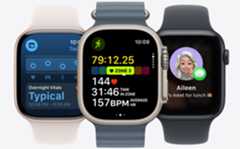
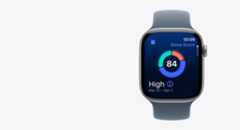
Introducing sleep score, an easy way to track and help improve the quality of your sleep.
Workout Buddy delivers personalized, audible motivation using your fitness history.1

A new design with Liquid Glass brings a fresh yet familiar look to watchOS.

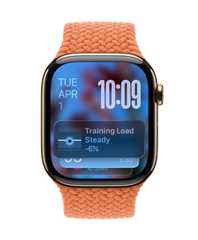
The Smart Stack now offers hints based on what’s immediately useful to you.


With the flick of a wrist, you can dismiss notifications, silence calls, and more.2


Suggested smart actions will appear in Messages based on the context of a text.3

Design
Fresh. Familiar. Phenomenal.

The new look with Liquid Glass is as intuitive as it is expressive — creating a more consistent experience across your apps and devices.
Sleek Smart Stack.
Liquid Glass brings a fresh new look and feel to your Smart Stack and beyond.
Refreshed Control Center.
Enjoy a simplified experience with Liquid Glass icons in Control Center, which provides a quick way to turn on Do Not Disturb, silence Apple Watch, and more.

Updated controls in apps.
The translucent quality of the Liquid Glass controls within apps allows you to focus more on your content.

A picture-perfect watch face.
The time looks gorgeous in Liquid Glass and lets you see even more of your photos.

Fitness
More motivation in real time.
Boost your fitness with new features like Workout Buddy. With Apple Intelligence from your iPhone, it provides you with the right encouragement based on your workout data and fitness history. As always, your data stays private.4
Go the extra mile with Workout Buddy.
A brand-new text-to-speech model generates personalized pep talks using voice data from an Apple Fitness+ trainer, so it has the right energy, style, and tone for a workout.1 Time to buddy up.


Celebrate new milestones.
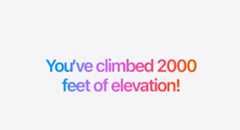
Workout Buddy lets you know when you’ve hit a new milestone — like crossing 500 miles and more.

Workout app refresh.
The new layout highlights four new corner buttons, making it even quicker to access your go-to features, like Pacer, Race Route, Custom Workout, and Workout Buddy.

Sounds to keep you moving.
Let Apple Music choose the best playlist based on the workout you’re doing and the music you love. Or simply select a playlist or podcast that’s suggested for you.5

Communication
Touch base.
Without missing a beat.
Stay connected while staying in the moment with smarter tools that translate your messages, filter your calls, and let you be more expressive with just a tap.
Live Translation.
With Apple Intelligence, Messages automatically translates texts into your preferred language.6

Backgrounds in Messages.
When you add personalized backgrounds to your chats on iPhone, you’ll see them on Apple Watch, too.

Smart actions.
When a friend requests certain information in a text, Messages can quickly suggest an action in response. For example, if they want to know where you are, Find My appears, so you can share your location with just a tap.3

Manage unwanted calls.
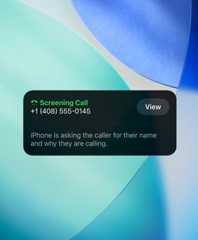
Call Screening automatically answers unknown callers without interrupting you. Once the caller shares their name and the reason for their call, your phone rings and you can decide if you want to pick up.7
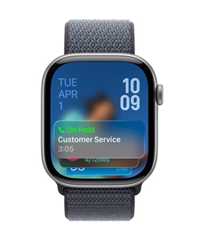
Let the Phone app wait on hold for you.
Hold Assist keeps your spot in line while you wait for a live agent and notifies you when they’re ready.8
Everyday moments
Whatever you need.
Right on hand.
watchOS 26 enhances all the ways you use your Apple Watch — from proactive Smart Stack hints to a wrist flick gesture and a new way to take a note.
Smart Stack hints.
With improved prediction algorithms that fuse on-device data and trends from your daily routine, the Smart Stack now delivers a gentle prompt when it has a suggestion that’s immediately useful for you.
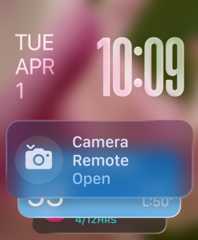

Wrist flick.
Mute incoming calls, silence timers, dismiss notifications, and more — just by rotating your wrist away from you. It’s a game changer when your hands are full.2


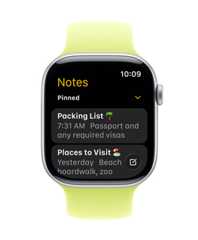
Notes comes to Apple Watch.
Create new notes or view existing ones right on your wrist in the Notes app. You can even tell Siri to start a new note when you’re on the go.
Automatic volume adjustment.
The volume of your incoming calls, notifications, and Siri now adjusts based on the ambient noise around you. For example, it’s quieter when you’re in a meeting or at the library.9

watchOS 26 featuresAnd so much more.

Featured photos shuffle.
The Photos face will now shuffle images based on featured content, so you can see your most meaningful moments every time you raise your wrist or tap the display.
Watch face gallery.
Discover new faces like Flow, which refracts a fluid orb of color with Liquid Glass numerals, Exactograph for precise timekeeping, and Waypoint on Apple Watch Ultra that dynamically shows points of interest in relation to you.
Configurable widgets.
Customize how widgets appear in the Smart Stack so you can see what’s most important for you. For example, select a home accessory you’d like quick access to in the Home widget.
Live Captions for Live Listen.
When you use Live Listen on iPhone, a transcription of what iPhone records is sent to your Apple Watch so you can read what’s being said at the same time.watchOS 26 is compatible withthese devices.
watchOS 26 requires iPhone 11 or later or iPhone SE (2nd generation or later) with iOS 26 and one of the following Apple Watch models:
Explore Apple WatchApple Watch SE 2
- Apple Watch SE 3
Apple Watch Series 6
Apple Watch Series 7
Apple Watch Series 8
Apple Watch Series 9
Apple Watch Series 10
- Apple Watch Series 11
Apple Watch Ultra
Apple Watch Ultra 2
- Apple Watch Ultra 3