Welcome toAllMusic
AllMusic is a comprehensive and in-depth resource for finding out more about the albums, bands, musicians and songs you love.
We value your opinions and are continuously working to improve the site. Browse the topics below to find answers to your questions, give suggestions, or provide feedback.
Portions of content provided by Xperi Inc. ©2026 Xperi Inc.
Featured New Releases
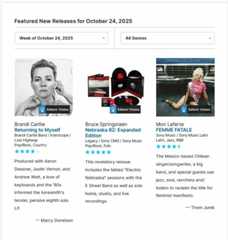
Every Friday we highlight ourFeatured New Releases for the albums that come out each week.
Editors' Choice
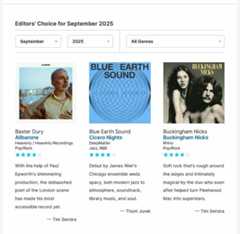
Each month, our team of writers and editors select the albums that most captured their attention. We feature these selections on ourEditors' Choice page, and with a special badge on our Featured New Releases page each week.
Weekly Newsletter
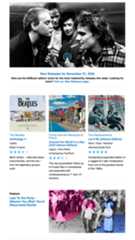
Stay up to date by getting our weekly new releases newsletter delivered to your inbox. Each Friday we mail out the list of new albums that have been released, and highlight a couple of interviews and articles from the website.
Advanced Search
Which '90s indie rock albums do AllMusic editors rate five stars? Get the answer to this and your other burning album-related questions with our advanced albums search.
AllMusic Advanced Album Search gives music fans a method to sort and filter all the different albums in our collection based on different criteria and requirements.
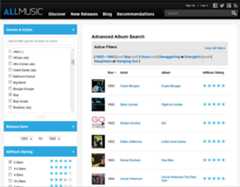
You can get to Advanced Search by clicking on the Advanced Search link at the top of each page.
Once there, you can use the filters on the left to select from the following characteristics
- Genres - The broad overall classification of the music on the album
- Styles - The more specific type of music on the album
- Release Date (or re-issue date) - When the album came out
- AllMusic Rating - 5 stars is great, 1 star...not so much.More info
- Recording Types - Filtering on Studio recordings? Live recordings?
Looking for Various Artist compilations? - Moods- Adjectives that describe the sound and feel of a song, album, or overall body of work
- Themes - Activities or events particularly suited for a song, album or overall body of work
- The Album's Main Performer - The primary artist (or artists) associated with the album
and begin to dig through the albums that represent those characteristics.
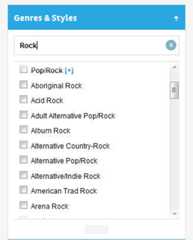
By typing in the text box within the filters, you can quickly narrow down to the type of characteristic you're looking for (for example, type "rock" into the genres & styles filter to see Pop/Rock, Acid Rock, Rockabilly, and many more).
Your active filters will appear at the top of the page. You can adjust your filters by clicking to remove them from the "Active Filters" list, by un-checking boxes in any of the individual modules on the left, or start over by clicking "Clear All" in the upper right.
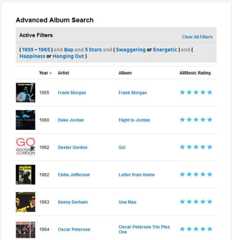
Your results can also be sorted by Year, by Album Title and by AllMusic Rating by clicking on the text at the top of each column.
Trippy five-star funk albums from the '70s? Disappointing one-star hair metal albums from the '80s? John Zorn's live albums? Grateful Dead studio recordings?
Filter away!
Staff Picks
Each day, our editors select an "Album of the Day" as a Staff Pick. This might be a hidden gem, a personal favorite, a musical oddity, or a record celebrating a milestone.
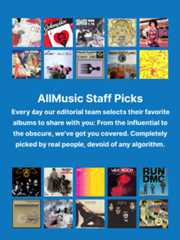
The staff picks can be found every day on the homepage, and the archive of selections going back to 2011can be found here.
Trending Artists
Every Friday we highlight ourFeatured New Releases for the albums that come out each week, and we pull the best albums each month into ourEditors' Choice page, not to mention that daily we select an "Album of the Day" in ourStaff Picks, but we don't really do much to call attention to new and up-and-coming artists.
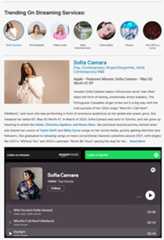
TheTrending Artists feature on AllMusic is where we highlight musicians and bands that are making waves on streaming services or trending on international music charts. Hopefully one of these acts will catch your attention and spark some interest in exploring new music.
At the top of the page we call out artists that we're seeing featured across multiple music streaming platforms. If Spotify's New Music Friday, Apple Music's home page, and other streaming services are highlighting these new musicians, maybe they're worth checking out. We've also added streaming music players to this page so curious listeners can check out the bands and artists right there.
Clicking the images will highlight a new artist and bring up their biography, styles, the reason they're selected, and set of streaming music players right on the page.
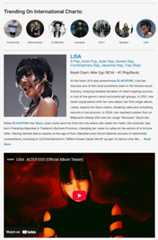
Further down the page we highlight musicians bubbling up on international charts. Singles and releases popular in Germany, Spain, Austria, Brazil, Japan, Mexico, the UK, and dozens of others are tracked by our editorial team. When artists make themselves known in those regions, we'll present them here alongside a video.
Similar to the section above, clicking the round images will pull in a new artist and another video to check out.
Hopefully this feature can highlight some up-and-coming artists (or re-emerging favorites) so curious listeners can be exposed to new music and explore sounds they're not yet familiar with. Expect to find new pop, hip-hop, metal, K-pop, jazz, and new styles not even invented yet.
You can find this Trending Artists feature in the navigation at the top of each page under the "AllMusic Recommends" header, alongside the Staff Picks and the Year In Review links.

Artists Born on This Day
A fun item that many users may not know about is our "Birthdays On This Day" feature onthe homepage of AllMusic.
Each day we highlight 15 prominent musicians who were born on this day, from rock, to jazz, to hip-hop, to classical and every genre in between.
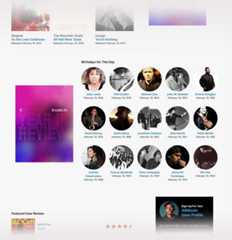
We also refresh this info throughout the day, so if you check it more than once, you may see different artists pop in there. Happy birthday to Chappell Roan, Falco, Peter Holsapple, Horace Andy, David Murray, Jon Fishman and many others.
Check back daily to see who is celebrating a birthday, and maybe send them a greeting card or a box of chocolates?
Albums Released on This Day
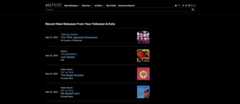
A fun item that many users may not know about is our "Albums Released On This Day" feature onthe homepage of AllMusic.
Each day we pick out albums throughout history that were released on this date, from rock, to jazz, to hip-hop, to folk and every genre in between.
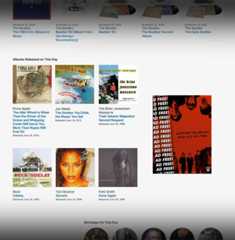
We also pull in new albums as you refresh the page, so if you check it more than once, you may see different albums appear.
It's often interesting to see which big albums were all released on the exact same day, in this case Beck'sOdelay, The Brian Jonestown Massacre's TheirSatanic Majesties' Second Request, Patti Smith'sGone Again, Lyle Lovett'sThe Road to Ensenada and Toni Braxton'sSecrets were all released on June 18, 1996.
See you tomorrow!
Streaming Widgets
Once there was a pipe dream of an infinite faucet of music that could be turned on and (nearly) every song ever recorded would be available to hungry listeners and curious audiophiles. Crate diggers and long tail explorers will always find holes in any major online music provider, but over the past several years the adoption of streaming services has expanded to surpass physical media and digital music purchases. We're happy to announce a project to add the ability to stream music directly from AllMusic album and artist pages.
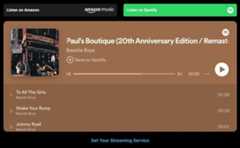
WNow on manyalbum andartist pages, you'll find embedded streaming players for Spotify and Amazon Music, where you can listen to full tracks if you are signed in to either of those services. If you are not a Spotify or Amazon Music user, you can still listen to the 30-second sound clips to better explore and get a feel for the album.
Additionally, if you are logged in, you can set a preference for your streaming service via youruser account settings. By selecting the streaming service you prefer, that playlist will display first on the album and artist pages on AllMusic.
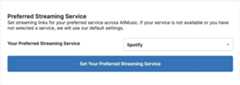
In the event that we don't have your preferred service linked, we'll fall back to whatever service we have available. Beyond Spotify and Amazon Music, we're also looking into adding other streaming partners like Apple Music and YouTube Music, but we're hampered a little bit by the ease of access to their data sets in linking our content to theirs. In the future we also hope to enable methods for users to submit links to albums we may not have linked yet, to get even more coverage of your favorite music on the site.
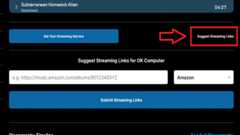
Finally, we have a way for users to submit links to albums and artists for the things we just don't have links for yet. If you are on an album or artist page that doesn't have one of the streaming services linked yet, feel free to contribute to the project.
Birthdate / Birthplace
On AllMusic we link the birthdates, birthplaces, death dates and death places of musicians and bands, and displaying other artists who were born/formed or died/disbanded in those places and on those dates.
The information is available on artist pages:
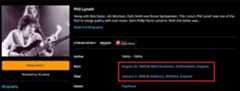
And by clicking any of these links, you'll be taken to a page that shows other artists born in that location:
https://www.allmusic.com/birthplace/birmingham-england-mz0000007266
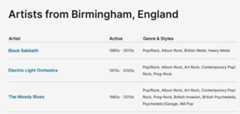
Or specific dates when artists were born and bands were formed:
https://www.allmusic.com/birthdate/1967
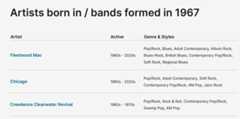
By making changes to the URL, we also can query who was born on today's date:
https://www.allmusic.com/birthdate/06-13
artists born in a certain month of a year:
https://www.allmusic.com/birthdate/1978-10
and artists who died on today's date:
https://www.allmusic.com/deathdate/06-13
Year in Review
Each year, the AllMusic editors look back through the albums that made the biggest impact, broke new ground, and just all-out moved us. Pop, rap, jazz, blues, classical and more. We begin with our overall best-of list, and will explore a different genre each weekday until the new year.
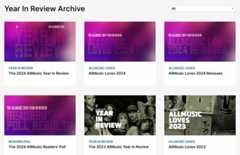
Top 10 Albums
Inyour profile you can find your Top Ten Albums list, where you can add, update and re-shuffle the albums that mean the most to you and are front-and-center in your Profile display.
To add an album to your Top 10, simply navigate to that album on AllMusic, click "Add to Custom List" then check the box that says "Top 10" in the pop-up interface, and finally click "Add to List" at the bottom.
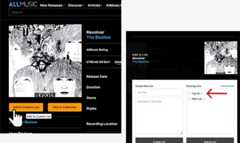
Once the album has been added, go to your Profile, find the "Edit Top 10" link on the far right side of the page and from there, you can sort, shift, remove and re-order the albums you've selected. You can add more than ten albums to your overall list, but choose carefully: Only the first ten records are displayed in the Top 10 of your Profile.
Rating Albums
Rate Your Favorite Albums
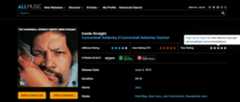
We're inviting you to tell us what you think about the albums on our site. How do you feel aboutZaireeka by the Flaming Lips? Love Lou Reed'sMetal Machine Music but hateSongs for Drella? Did D'Angelo'sVoodoo change your life? Now you can rate albums on the same five-star rating scale as our editors do.
See How Other AllMusic Users Rated Albums
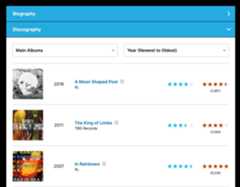
We're showing off the average user rating and the number of times users have rated an album. Find out if llMusic users agree with our editors' ratings. Sort an artist's discography by average user rating to see what our users think is the best.
Recommendations
Get Personalized Recommendations Based on Your Likes and Dislikes
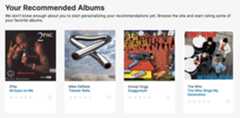
Tell us which albums you love, and a few you might hate, and we'll find ones that you may be interested in. The more albums you rate, the more precise our suggestions can become.
User Album Reviews
On AllMusic you can submit your own reviews on the albums that have changed your life, let people know what you think about a new release, or take down one of those sacred cows that you've always thought was overrated.
Reading and Writing Reviews
Now on album pages, you'll see a tab that says User Reviews. From here,logged-in users can write, edit and submit their own reviews for display on AllMusic. Give us your insights, opinions and raves to help other AllMusic users find that hidden gem that needs the spotlight. The reviews must be between 50 and 3,000 characters in length and some HTML is accepted for bold/italics/etc, but because of spam we will not be allowing hyperlinks in user-submitted reviews.
Show Your Reviews On Your AllMusic Profile
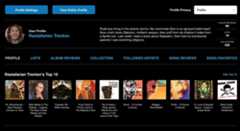
To createyour AllMusic Profile so you can display all of your reviews in one place, simply navigate to the Profile Settings page in your user account and create your unique URL. You can write a bio for yourself or remain mysterious. You can see your profile page by clicking"My Profile" at the top of the page.
Upvoting and Moderating the AllMusic Community
As a logged-in user, you have the ability to guide the AllMusic community toward the more helpful reviews. Each user review contains a pair of buttons so that logged-in users can mark the reviews they find most helpful (or downgrade a review that doesn't add value to the site). Additionally, if a review is offensive, spammy, or otherwise inappropriate, clicking the "Report Inappropriate" link will notify us that the review might need moderation or removal.
Keeping Your Friends Connected With Your Favorite Music
As music fans, we know how hard it can be to clue other people into your music knowledge, which is why we're so excited to introduce this feature that makes it easier for you to share your opinions and recent discoveries.
Follow Artists / Notifications
We know how tough it is to keep up on when new albums get released. Local record shops are becoming an endangered species and many of us miss that feeling of walking in and having the clerk say, "Oh hey, I know you like The Velvet Underground, so I stashedthis reissue behind the counter for you."
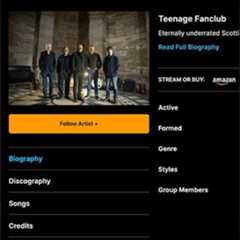
We wanted to enable our friends to keep track of the albums that come out each week by their favorite artists, so we built a way to be a bit more like that clerk behind the counter. We're probably a little less surly and judgmental, though.
Following Artists
Log in (orcreate an account if you are new at this), so you can "Follow" a band or musician on the artist page. Right under the artist's name is a button allowing you to follow an artist. Selecting this will enable AllMusic to notify you when that artist releases something new.

Notifications
If an artist you are following releases a new album or single, AllMusic will let you know about it. A notification flag will light up at the top of the site allowing you to click through to the album pages, read the reviews, hear samples of the songs, and really dig in.
Keeping You Connected With Your Favorite Music
We know better than anyone how hard it can be to keep up with new releases, which is why we're so excited to introduce this feature, and we hope it makes it easier for you to stay connected to your favorite artists. Basically, we think you're pretty cool, and you deserve cool things.
My Collection
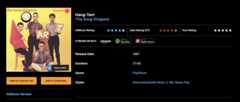
You can keep track of your personal record collection on AllMusic. All of us are music fans and many of us are collectors, meticulously tracking which albums we own. Now on AllMusic album pages you can add albums to your collection list with a single click.
Your collection is available for you to browse and sort on both the AllMusic website and on your mobile device by going into your profile area. Sort your albums by year, artist name, album title or your own rating.
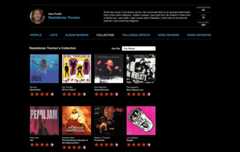
From here you can rate your albums using the same five-star rating system that our editors use, and these ratings power your albumrecommendations.
Lists
Wishlists
AllMusic adds more than a thousand new releases and reissues each week, and there isn't enough time on the clock to check out all of them. By creating a list of albums that look interesting, you can quickly set aside up to 100 records you might want to investigate later.
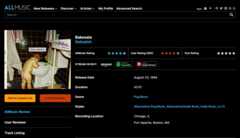
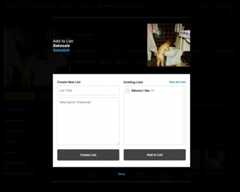
Simply navigate to an album page and click the "Add To List" button. From there you can create your first list and then add up to 100 albums to that list. Lists titles can be up to 100 characters, and the optional description can be 500 characters long.
The "Existing Lists" on this screen is always shown in order of most recently updated, so if you create a new list, that will show up at the top.
What's Your #1 Record?
Once an album is in your list, you can rank the albums into the order you prefer. This can help you zoom in on the albums you most want to check out on your next visit to the record store, or refine your desert island discs list until it is perfect.
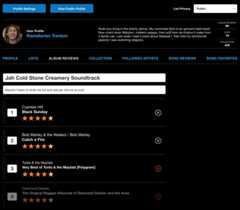
Within the lists you have a number of ways to edit the information. You can drag and drop the albums in the order that you prefer, or re-number them using the number boxes on the left (making sure you click "update list" to save any changes).
Additionally, you can rate albums or delete them from your list. If you'd like to change the title or description of the list, click the edit icon (which looks like a pencil). Lists are displayed in alphabetical order in your profile area.
Making Your Lists Public Or Keeping Them Private
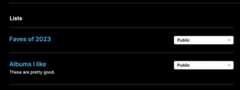
Once you've created your user profile, your public lists will be displayed in alphabetical order. Have no fear, your lists are all private by default, but by toggling them to "Public" you'll be able to let the world know your personal take on what's worth listening to.
User Song Reviews
We've seen a lot of users sharing their knowledge and perspective bywriting album reviews on AllMusic and we wanted to extend that same capability to our song pages.
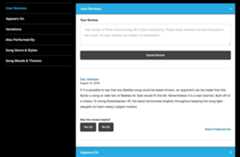
Now music fans can fill in some of the holes and share their opinions about the songs they love, simply bysearching for a track title or clicking a song within an album's tracklist to visit the song page. Whether you want to add little-known facts about the recording of a track, or where it ranks in an artist's overall recorded output, now you can tell the world the story of the songs that mean the most to you.
Song Favorites
Similar to rating albums, we have a method of keeping track of a user's favorite songs. Now on AllMusic song pages there is a button that allows you to mark a specific song as a favorite.
Additionally, if you check out a song in a tracklist on an album page, you can mark a song as a favorite right there:
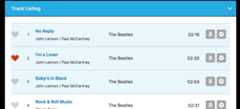
This information can help us to highlight lesser-known gems in an artist's catalog, or determine which songs are the most popular among fans.
A user's list of most recently favorited songs can be seen on theirpublic profile.
Ad-Free AllMusic Subscription
Consider supporting AllMusic and improving your browsing experience by becoming a subscriber.
Become an AllMusic subscriber for a mere $16 USD and we'll remove the ads from the site for you for an entire year. (I'm not great with math, but by my calculations that breaks down to just over a dollar a month.) Not only will the site be ad-free, but it will run faster and pages will load more quickly.
An Ad-Free Experience
As a subscriber, we'll remove ads to streamline your AllMusic experience.
Increased Site Speed and Faster Page Loads
AllMusic works with dozens of ad networks to get the most relevant ads for you whenever possible. By removing these additional calls per page, the site loads faster and information is displayed more quickly.
Say Thanks
AllMusic has been offering in-depth information to industry professionals, research institutions and music fans for over three decades. If you'd like to show your support, this is a good way to do it.
More information is available on oursubscribe page