We’ve built plugins foreverytool a developer uses while working, allowing WakaTime to accurately track coding time without any manual input. We’ve also built dedicateddesktop apps for Mac, Windows, and Linux for the times you’re working outside an IDE. Once installed, the plugin or app runs in the background and records activity based file edits and time spent actively working in the editor.
This data is securely sent to WakaTime’s servers, where it’sprocessed and displayed in your personal and team dashboards, giving you insights into your coding habits, project time allocation, meetings vs code time, and overall productivity. Everything happens seamlessly, so you don’t need to start or stop timers manually.
WakaTime’s open source plugins only track when you’re typing in your editor. Stop typing longer than yourkeystroke timeout preference, and the WakaTime plugin stops tracking your stats. Depending on the editor, reading or scrolling through code only triggers heartbeats if your cursor moves, the focused file changes, or you click around in the file. However, each editor plugin is slightly different depending on the editor’s available plugin interface. The good thing is, all WakaTime plugins areopen source on GitHub so you can check which events trigger heartbeats for yourself.
WakaTime is accurate to 1 microsecond (0.000001 seconds), but the plugins depend on you computer’s clock and operating system. On Windows, precision is only ±16 milliseconds (0.016 seconds).
To achieve this accuracy, WakaTime plugins send heartbeats from your editor when the file you’re typing in changes, when you save a file, and every 2 mins of typing in the same file. Heartbeats arejoined intodurations based on yourtimeout preference, then displayed on your dashboard.
For contractors, you might want to increase your timeout preference to capture all your billable hours. More infoin this blog post.
Yourkeystroke timeout preference is the maximum time allowed between durations when calculating your total coding activity for a day. Think of it like a granularity setting. It can’t make you code more or less, it just combines durations with more or less accuracy.
For ex, if you typed code for 2 mins, took a 13 min break, then typed code for 1 min:
A visual example of the affect on accuracy of durations:
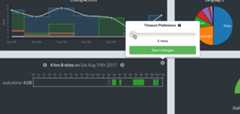
Note: Public profiles, leaderboards, and public badges always use the default 15 minute keystroke timeout. Private project badges, embedded charts, goals, insights, invoices, and your personal dashboard use your personal keystroke timeout preference.
When working offline with supported editors* your coding activity is saved in aboltdb database at$HOME/.wakatime/offline_heartbeats.bdb. The next time you use your IDE when online, your coding activity is synchronized to your WakaTime dashboard.
* All editor plugins using thewakatime-cli have support for offline coding. The Chrome extension supports working offline usingIndexedDB. The Brackets extension does not support working offline.
Daily average is the number of hours you coded on average each day. It can be seen on yourpersonal dashboard,private leaderboards, and if you make your coding activity public also on yourpublic profile andpublic leaderboard.
The formula for daily average is:
Daily Average = Hours / Days
Where:
Hours is the sum of the total number of hours you coded in the last seven days.
Days is the number of days you coded at least one minute in the last seven days.
This means daily average skips weekends or days where you didn’t code!
For example: If you wrote some code for 2 hours on Monday and 4 hours on Tuesday last week, your daily average would be(2 + 4) / 2 = 3 hours.
Also, leaderboards and public profiles use a slightly different formula than your personal dashboard.
Leaderboards and profiles calculate daily average over the last seven daysstarting from yesterday, while your personal dashboard calculates daily average from today.
Your public profile uses the default 15 minute timeout value with a time range of theLast 7 Days from Yesterday.
We also subtract languageOther from the total time on your public profile.
Leaderboards use the same formula as your public profile,Last 7 Days from Yesterday minusOther language.
Setting your preferences to the defaults, matching the leaderboardtime range, and subtracting time categorized as languageOther will show the same code time as your dashboard.
Leaderboards only update a few times per day, and always lag behind your public profile. To see when your public profile last updated, check themodified_at field from theStats API. To see when a leaderboard last updated, check themodified_at field from theLeaders API.
Note:Embeddable charts also start fromYesterday, similar to leaderboards and public profiles.
Set a custom color for your project, otherwise the default is to use a random color when displaying your project on dashboards.
Using each IDE’s icon image, we’ve extracted a list ofthe most dominant colors for each IDE. We use these colors when displaying IDEs on WakaTime dashboards.
Based off GitHub’s language colors, we’ve built a list ofcolors for each language used on all WakaTime dashboards.
Using each operating system’s logo, we’ve definedcolors for each os used on all WakaTime dashboards.
Here’s the list ofcolors for each category used on all WakaTime dashboards.
Most WakaTime plugins share a common config file,~/.wakatime.cfg. Three settings are available to customize the WakaTime status bar inside your IDE. Here they are with their default values:
status_bar_enabled = truestatus_bar_coding_activity = truestatus_bar_hide_categories = false
By default, all categories are displayed in your status bar. For ex:3 hrs coding, 42 mins compiling, 9 mins browsing. To only display the total time, your~/.wakatime.cfg would look like:
[settings]status_bar_hide_categories = true
Then, your status bar would display3 hrs 51 mins without specifying coding, compiling, or browsing.
All WakaTime plugins are open source onGitHub.
WakaTime plugins sendheartbeat events triggered fromuser actions inside your text editor to the WakaTime API.
Heartbeat events contain data such as:
* Only file paths are sent, not file contents.
** Websites are only sent if you install the WakaTime Browser extension.
Heartbeat events are sent:
Your file contents are never sent to WakaTime servers. Only thefile paths, or thelocation of the files on your machine, are sent to WakaTime servers.
All WakaTime plugins areopen source, so you’re protected by the eyes of the community.
If the file paths or project names are sensitive, you can tell WakaTime plugins to not send certain projects, files, folders, orobfuscate them before sending to WakaTime servers.
Theconfig options for privacy are:
hide_project_folder - turns/Users/username/projects/flask/src/main.py intosrc/main.pyhide_project_names - turnsflask into a random generated project name, for ex:AutumnTree43hide_branch_names - disables sending Git branch nameshide_file_names - turns/projects/flask/src/main.py intoHIDDEN.py, and disables other metadata including line counts and dependencies usedexclude - prevents sending any data on folders where the path matches a list of regex patternsinclude - used in combination withexclude to only send an allowed list of folder paths, for ex: exclude.* then include a list of allowed foldersinclude_only_with_project_file - prevents sending any data on folders which don’t contain a.wakatime-project file in the project folderAdd the line:
hide_project_folder = true
to your in your~/.wakatime.cfg file to send only relative paths to WakaTime servers.
For example,/Users/username/projects/flask/src/main.py would be sent relative to the project folderflask assrc/main.py. When no Git project can be detected, only the file name is sent.
Usehide_file_names with a list of folders in your~/.wakatime.cfg file.
Any files inside those folders will be replaced withHIDDEN.ext before they leave your computer, whereext is the original extension of the file.
For ex:
hide_file_names = /Users/username/private/ /Users/username/projects/[\d+]/
Will change/Users/username/private/secret_project/main.py and/Users/username/projects/1337/src/main.py intoHIDDEN.py before sending to WakaTime servers.
Note: That means time spent in those two files will be combined and displayed as one file on your dashboard.
Note: To obfuscate all files in all folders, usehide_file_names = true.
Note: Sublime Text users won’t have a~/.wakatime.cfg file, so create one usingthis example config.
After obfuscating, delete any past coding activity using theCoding Activity Delete Tool.
Usehide_project_names with a list of folders in your~/.wakatime.cfg file.
Any files inside those folders will have their project names replaced with a random string, for ex:
[settings]hide_project_names = /Users/username/private/ /Users/username/projects/[\d+]/
With a Git project at/Users/username/private/secret_project/, will create a.wakatime-project file at/Users/username/private/secret_project/.wakatime-project that overrides yoursecret_project project name with a randomly generated name.
After obfuscating,rename the old project to merge it with the new random project name.
Note: To obfuscate all project names, usehide_project_names = true.
Note: Sublime Text users won’t have a~/.wakatime.cfg file, so create one usingthis example config.
Your file contents are never sent to WakaTime servers. Only the filepaths, or the location of the files on your machine, are sent to WakaTime servers.
However, sometimes even the names of your projects are sensitive.
To exclude folders from WakaTime,useexclude with a list of folders in your~/.wakatime.cfg file.
[settings]exclude = /Users/username/private/ /Users/username/projects/[\d+]/
/Users/username/private/ is a regex, so any file path matching the regex is ignored by your WakaTime plugin.
Another way is exclude all folders, and only include those folders containing a `.wakatime-project` file in the project’s folder.
Add this line to your~/.wakatime.cfg file:
include_only_with_project_file = true
Then runtouch .wakatime-project inside each project you want to track. All other projects will be excluded from tracking.
After excluding folders,delete the project to remove it from your WakaTime dashboard.
Note: Use forward slash to separate folders, even on Windows.
Note: Sublime Text users won’t have a~/.wakatime.cfg file, so create one usingthis example config.
Yes, you can export all your coding activity in JSON format from youraccount settings.
There are two export options:Heartbeats orDaily Totals.
Heartbeats are a raw dump of each timestamp ping we received when you were actively coding in your IDE, and is the same format we store your code stats to power all WakaTime dashboards.
TheDaily Totals option is a sum of your total code time per day, expanded by project, file, language, etc. It’s what you see for each day’s data point on the charts from your dashboard, and great for doing analysis where you only need granularity per day.
However, for backing up your code stats or to analyze what time of day you were coding, you must select theHeartbeats export option.
Your coding activity is stored forever, even when using the Free plan. If you decide toupgrade to a paid plan* in the future, then your dashboard unlocks your historical coding activity.
* The Basic plan only adds additional features, but doesn’t unlock historical coding activity. The Premium plan and Team plans do unlock historical coding activity.
The easiest way to delete stats is clicking on the duration of time on your dashboard, click the edit icon, then clickDelete:
Or, to delete a whole project, click thedelete project item on a project’s dashboard.
Be careful, the project and all it’s code stats will be deleted permanently.
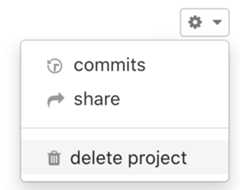
You can also delete coding activity for specific files using theCoding Activity Delete Tool.
To exclude projects in the future, add the project’s path to your$HOME/.wakatime.cfg file under theexclude setting.
As a last resort, usecustom rules*.
* Warning: Custom rules will delete matching projects from all past coding activity. Use with caution!
You candelete specific durations directly from your dashboard.
Alternatively, usingcustom rules you can delete all code stats of a specific category.
For ex, to delete all stats with categoryBrowsing:

Yes, when youdelete your account we immediately delete your code stats from our production servers.
Following ourData Security Policy, we wait 27 days and then also delete your code stats from all backups.
It’s not possible to recover deleted code stats, so make sure toexport your heartbeats before deleting your account.
No. WakaTime isnot for sale, and we’ll go one step further:WakaTime will never be for sale. That’s our promise to you.
Your trust is what matters most, and we’re here for the long haul.
WakaTime detects and creates projects for you automatically based on your coding activity.
You don’t manually create projects. Instead, use your IDE like normal and projects will appear on yourWakaTime Dashboard.
By default, WakaTime uses your Git repo folder as the project name.
You can overwrite the project name using awakatime-project file,project map config section, orcustom rules.
For more info on project detection check out thewakatime-cli docs.
To rename a project, clickrename project from the dropdown on the project’s dashboard.
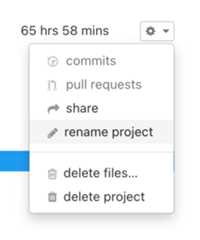
From your personal dashboard, click on aday in the chart to view the durations of time logged that day. Next, click on any file or time duration to edit the project, language, category, or branch.
As a last resort, usecustom rules*:

* Warning: Custom rules will rename projects from past coding activity. Use with caution!
From your personal dashboard, click on aday in the chart to view the durations of time logged that day. Next, click on any file or time duration to edit the project, language, category, or branch.
WakaTime is an automatic time tracker, so you shouldn’t need to manually add time. WakaTime isvery accurate,flexible, andeditable.
If you’ve already tried changing yourKeystroke Timeout and you still want to manually add time:
manually add time.For Google Calendar events, the event title and description are matched against. Google Calendar events are stored asexternal durations, with the event’s title stored in theExternalDuration.entity field and the event’s description stored in theExternalDuration.meta field.
WakaTime plugins use the Chroma syntax highlighter for language detection. See thelanguages supported by Chroma, which is also the list of languages detected by WakaTime.
First,request support for your language.
Next, you can manually override language detection usingcustom rules and file extension matching:

Custom rules modify future and past coding activity, so they’re useful for correcting languages displayed wrong on your dashboard.
However, for fixing languages going forward pleaseemail us and we’ll improve language detection for everyone.
15 minutes keystroke timeout and subtractingOther language?Other language, and make sure it’s more than thelast person on the last page of the leaderboard.To keep public leaderboards fair and even, we hide devs from public leaderboards if they havecustom rules setting alanguage for browsing and other non-coding activity.
For ex, this rule will cause you to be hidden from public leaderboards:
If category equals Browsing then change language to Python
You’ll still show up on private leaderboards, and you can always delete yourcustom rule to show up on the leaderboard again.
Also check thepublic leaderboard requirements.
WakaTime usesgeonames.org for location data, but we hide cities with less than 50k population and cities that are suburbs of a larger nearby city (PPLA3, PPLA4, etc.).
If your city is notable but hidden let us know and we might manually display it.
You have several ways to control projects on your team dashboard:
Some reasons why your personal dashboard may show different time from your team dashboard:
Yes, anyone who can view a team dashboard can also download it as JSON and CSV.
For JSON, use ourDeveloper API.
For CSV, go to your team dashboard and clickDownload from the settings menu at the top right of the page: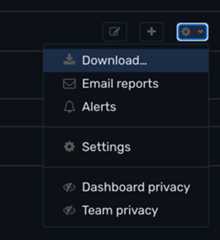
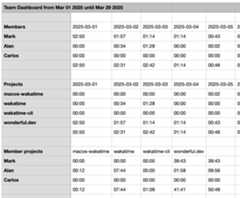
Note: You can also have the CSV file emailed to you daily, weekly, or monthly from yourdashboard settings.
| Variable | Description | Example |
|---|---|---|
{y} | Year with century. | 1999, … |
{yy} | Year without century. | 99, … |
{m} | Month, zero-padded. | 01, 02, …, 12 |
{mm} | Month. | 1, 2, …, 12 |
{mmm} | Month as 3 char string. | JAN, FEB, …, DEC |
{mmmm} | Month as string. | JANUARY, FEBRUARY, …, DECEMBER |
{d} | Day, zero-padded. | 01, 02, …, 31 |
{dd} | Day. | 1, 2, …, 31 |
{h} | Hour, 24-hour clock, zero-padded. | 00, 01, …, 23 |
{hh} | Hour, 24-hour clock. | 0, 1, …, 23 |
{hhh} | Hour, 12-hour clock, zero-padded. | 01, 02, …, 12 |
{hhhh} | Hour, 12-hour clock. | 1, 2, …, 12 |
{p} | AM or PM. | AM, PM |
{mn} | Minute, zero-padded. | 00, 01, …, 59 |
{mnn} | Minute. | 0, 1, …, 59 |
{s} | Second, zero-padded. | 00, 01, …, 59 |
{ss} | Second. | 0, 1, …, 59 |
{i}* | Invoice counter. | 1, 2, … |
{c}** | Invoice counter, per client. | 1, 2, … |
* Pad invoice counters with zeros by repeating the variable letter. For example,{iiii} will result in invoice number0001.
** Invoice IDs must be unique. Make sure to add a client prefix to your Invoice ID Format when using{c}.
The invoice id counter in your personal and team preferences tracks the current total number of invoices you’ve created. When you create new invoices, theinvoice id format replaces{i} variables with your current invoice count plus one. When deleting an invoice, the counter does not decrement. If you need to decrement your invoice counter, edit it manually in yourpersonal orteam preferences.
Make sure the plugin iscorrectly installed in your editor.( Look for a WakaTime menu under File/Tools )
Check theplugin status page for when your editor was last seen, and if a new version is available. If your editor isn’t listed or hasn’t been seen in a while, first turn on debug mode then check for errors in your log files:
WakaTime Settings menu in theTools orFile menu of your IDE.:WakaTimeDebugEnabledebug option in yourWakaTime.sublime-settingsWith debug mode on, check yourIDE log file and your$HOME/.wakatime/wakatime.log file for error messages.
If your error message contains:
won't send heartbeat due to backoffskip syncing offline activity to respect rate limit$HOME/.wakatime/wakatime-internal.cfg file to trigger an API connection and see the real error message.If you use multiple computers, find when a computer’s hostname was last heard from using theMachine Names API.
Thevalue is theHostname andip is theIP Address of your machine.
To see your recent raw coding activity, use theHeartbeats API.
Please create a new issue in the appropriateGitHub repo with any error messages.
All WakaTime plugins sharewakatime-cli for communicating with the API.
The wakatime-cli is located at~/.wakatime/wakatime-cli and logs errors to$HOME/.wakatime/wakatime.log.
If your error message containswon't send heartbeat due to backoff then delete your$HOME/.wakatime/wakatime-internal.cfg file to trigger an API connection so we can see the real error message.
Errors from the editor plugin go to your IDE’s log file:
Please create a new issue in the appropriateGitHub repo with your error messages.
Your api key is a secret code used to link coding activity from your WakaTime plugin to your personal dashboard:
Your api key is available on yourWakaTime Account Settings page.
To generate a new api key, click therefresh button.
After generating a new api key, remember to update your plugin settings with your new key:
File → WakaTime API Key orTools → WakaTime Settings in most text editors:WakaTimeApiKey command in VimYour WakaTime config file is located in your user home folder ($HOME/~/%USERPROFILE) at~/.wakatime.cfg.
Notice the filename starts with a dot, so it's considered a hiddendotfile.
The config file usesINI format.
WakaTime plugins share the same~/.wakatime.cfg config file.
For available configs and default values, seethis example config file.
Usethis form to send a confirmation email to your inbox.
WakaTime plugins have a proxy config in~/.wakatime.cfg, that should be set the same as your browser's proxy settings.
For example:
proxy = https://user:pass@host:port
SOCKS5 proxies are also supported:
socks5://user:pass@localhost:12345
NTLM LDAP proxies are also supported:
proxy = https://domain\user:pass@host:port
To use a custom CA Cert bundle file, add this line to your~/.wakatime.cfg config file:
ssl_certs_file = /path/to/cafile.pem
To disable SSL Cert verification completely (dangerous) add line:
no_ssl_verify = true
Yes, all WakaTime plugins play well together. You can switch between multiple supported editors and your coding activity will be synchronized correctly. If you userevision control software, your project will be detected even when using multiple editors.
