CMake Variants
CMake Tools introduces the concept ofCMake Variants, a way to group togetherand combine a common set of build options and give them a useful name. The maininterface for creating and building variants iscmake-variants.json, orcmake-variants.yaml.
The idea of “variants” are separate from the concept of toolchains/toolsets,which are handled viaKits.
By default, if no variants file is present, CMake Tools will load four variants,each corresponding to a default CMake build type:Release,Debug,MinSizeRel, andRelWithDebInfo. Selecting one of these variants willconfigure and build with that build type.
Note
CMake Tools does not presently respectCMAKE_CONFIGURATION_TYPES. Onlythe default four will be present. A custom variant file is required to loadthese build types.
For smaller or simple projects, providing a customcmake-variants.yaml isunnecessary, and the default CMake build types will work just fine. Largeprojects with more complex configuration options may want to specifyadditional build variants.
The variants file can be placed in the root of the project directory, or in the.vscode subdirectory for the project.
Note
CMake Tools provides a YAML validation schema, which is only checked in theeditor when using theYAML Support by Red Hat extension.
You can use eithercmake-variants.json orcmake-variants.yaml. Bothwill have the same end result.
The examples in this page will use the YAML format, but everything can bedone in the JSON format as well.
What does it look like?
A simple two-settingcmake-variants.yaml might look like this:
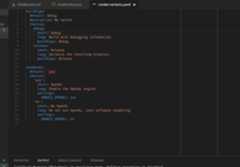
This file defines two variantsettings:buildType anduseOpenGL. Theyeach have twooptions defined by thechoices key. A combination of theoptions from a set ofsettings forms avariant.
In total, the number of possiblevariants is defined by the cartesianproduct of the possible choices. Twosettings each with twooptionscreatesfour variants. When we ask to change the build type, CMake Tools willpresent each possible combination in a quickpick:
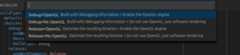
When acmake-variants.json orcmake-variants.yaml file is present, theoptions defined therein will replace the default set of variants CMake Toolswould otherwise present. This allows a project owner to define their own set ofcommon build configurations that can be distributed downstream.
The Variant Schema
The root of the variants must be an object, where each key represents atweakable variant option. In the example above, we expose abuildType optionfor what kind ofCMAKE_BUILD_TYPE we want. We also expose auseOpenGLthat controls theENABLE_OPENGL CMake option.
Variant Settings
Eachsetting in the variant is an object with only the following keys:
defaultA string to set as the defaultchoice for the variant option. The stringhere must correspond to an option from
choices.descriptionAn optional string to describe what the option controls. CMake Tools ignoresthis string.
choicesA mapping of possible options for the setting. A variant setting can have anarbitrary number of possible options. See the section below on options.
Variant Options
Variant options appear under thechoices key for a variant setting. Each isrequired to have an unique name, but the name itself is unimportant to CMakeTools.
A choice may specify any of the following options (the only requirement is theshort):
shortA short human-readable string to describe the option.
long(Optional)A lengthier human-readable string to describe the option.
buildType(Optional)An optional string to set for
CMAKE_BUILD_TYPEwhen the option isactive.linkage(Optional)Either
staticorshared. Sets the value ofCMAKE_BUILD_SHARED_LIBS. This value is optional.settings(Optional)A map of arbitrary CMake cache options to pass via the CMake command linewith
-D. Similar to thecmake.configureSettingsinsettings.json.env(Optional)A map of key-value string pairs specifying additional environment variablesto set during CMakeconfigure (not build). These environment variablestake precedence over environment variables from
settings.json, thecurrently setkit, and environment variables set by thesystem.
The above options are only valid under entries in thechoices map.
How Variants Are Applied
A variant is a specific combination of oneoption from each of the definedsettings. When CMake Tools executes the configure step, it will use thevalues from the currently active variant to determine the values to pass to theCMake process:
Properties from all active options are merged. For
envandsettings,the objects themselves are merged. The merge order is unspecified, soconflicting properties in options will result in unspecified behavior.All
settingsfrom the chosen options are passed as-Darguments tothe CMake process.The
buildTypeis used forCMAKE_BUILD_TYPE, the--configflag for the build (For multi-conf generators), and for the CTest--configflag.If
linkageistrue,BUILD_SHARED_LIBSis set toON. Iflinkageisfalse,BUILD_SHARED_LIBSis set toOFF. If notspecified,BUILD_SHARED_LIBSwill not be set on the CMake command line.The environment variables from
envare set for the CMake process.
A Big Example
Suppose the following variants file:
buildType:default:debugchoices:debug:short:Debuglong:Emit debug informationbuildType:Debugrelease:short:Releaselong:Optimize generated codebuildType:Releaseasan:short:Asanlong:Instrument with Address SanitizerbuildType:Asantsan:short:Tsanlong:Instrument with Thread SanitizerbuildType:Tsanlinkage:default:staticchoices:static:short:Staticlong:Create static librarieslinkage:staticshared:short:Sharedlong:Create shared libraries/DLLslinkage:sharedengine:default:oglchoices:ogl:short:OpenGLlong:OpenGL renderingsettings:ENGINE:OpenGLd3d:short:Direct3Dlong:Direct3D renderingsettings:ENGINE:Direct3Dvulkan:short:Vulkanlong:Vulkan renderingsetting:ENGINE:Vulkansoftware:short:Softwarelong:Software renderingsetting:ENGINE:Softwarenetwork:default:boostchoices:boost:short:Boost.Asiolong:Use Boost.Asio for networkingsetting:NETWORK:Boostasio:short:Asiolong:Use standalone-Asio for networkingsetting:NETWORK:Asionet-ts:short:NetTSlong:Use the C++ Networking TS for networkingsetting:NETWORK:net-ts
CMake Tools will present the cartesian product of all options, meaning theabove will produce 4 × 2 × 4 × 3 =ninety-six different variants:
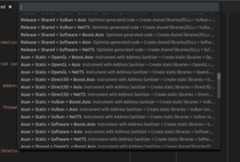
Of course this is quite a lot of possible variants, but such is the way withsome complex software. CMake Tools will readily any helpfully show allcombinations, and persist the selection between sessions.
