Target Debugging and Launching
CMake Tools removes some of the friction required in setting up debugging.Because C and C++ projects may define multiple (sometimes dozens or evenhundreds) of executables, creating alaunch.json may be difficult, tedious,and error-prone.
If you define any executable targets via CMake, CMake Tools will be aware ofthem and allow you to start a debugger on them.
Note
Debugging is only supported when usingCMake Server mode. This mode willbe enabled automatically on CMake versions at least as new as 3.7.2, but iscompletely unavailable on older CMake versions.
Target debugging used to be supported on prior versions, but was difficultand error-prone, creating more problems than it solved. If you are runningan older CMake version and wish to use target debugging, you’ll have toupdate your CMake version.
By default, the launch or debug of an executable target will cause it to bebuilt.
Note
The build on launch can be disabled with a setting, seecmake.buildBeforeRun.
Selecting a Launch Target
The “launch target” or “debug target” is initially unset. The first time you tryto run target debugging, CMake Tools will ask you to specify a target, whichwill be persisted between sessions.
The active launch target is shown in the status bar to the right of theDebugbutton:
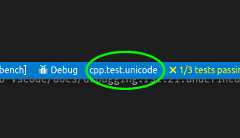
Pressing this button will show the launch target selector and lets one changethe active launch target.
Quick Debugging
Quick-debugging lets you start a debugger on a target without ever creatingalaunch.json.
Note
At the moment, only the debugger from Microsoft’svscode-cpptoolsextension is supported with quick-debugging. SeeDebugging with CMake Tools and launch.jsonbelow for usinglaunch.json and other debuggers.
Quick debugging can be started using theCMake: Debug Target command fromthe command pallette, or by pressing the associated hotkey (the default isCtrl+F5).
Note
Quick-debugging does not let you specify program arguments or otherdebugging options. SeeDebugging with CMake Tools and launch.json for more options.
Debugging with CMake Tools andlaunch.json
Sometimes, more flexibility is needed for debugging, including setting thingslike the working directory or command line arguments. In addition, one may wantto use a debugger other than the one included with Microsoft’svscode-cpptools.
All these things can be done usinglaunch.json. The primary obstacle tousinglaunch.json is that the path to the executable binary might bedifficult to know in advance. CMake Tools can help by usingCommand substitution inlaunch.json. This is already used by things likethe process selection when attaching to a running process. It works by simplyspecifying a a command-based substitution in the appropriate field oflaunch.json.
Here is a minimal example of alaunch.json that uses thecmake.launchTargetPath andcmake.launchTargetDirectory to start a debuggeron the active selected launch target:
{"version":"0.2.0","configurations":[{"name":"(gdb) Launch","type":"cppdbg","request":"launch",// Resolved by CMake Tools:"program":"${command:cmake.launchTargetPath}","args":[],"stopAtEntry":false,"cwd":"${workspaceFolder}","environment":[{// add the directory where our target was built to the PATHs// it gets resolved by CMake Tools:"name":"PATH","value":"$PATH:${command:cmake.launchTargetDirectory}"},{"name":"OTHER_VALUE","value":"Something something"}],"externalConsole":true,"MIMode":"gdb","setupCommands":[{"description":"Enable pretty-printing for gdb","text":"-enable-pretty-printing","ignoreFailures":true}]}]}
The value of theprogram attribute is resolved by CMake Tools to theabsolute path to the program to run.
Note
A successfulconfigure must be executed beforecmake.launchTargetPath andcmake.launchTargetDirectory will resolve correctly.
Running Targets Without a Debugger
Sometimes one will want to just run a target and see its output. This canbe done with theCMake: Execute the current target without a debugger command,or the associated keybinding (the default isShift+F5).
The output of the target will be shown in an integrated terminal.
