Rebuilding Git in Ruby
Git is a distributed version control system (DVCS) that we use every day tomanage our code. It is a powerful tool but have you ever wondered how it worksits magic? The Git internal docs can be intimidating, incomplete, and don’thave examples. Digging through the Git’s implementation can also beintimidating, particularly if you aren’t familiar with C.
Pulling apart the engine and putting it back together is one of the best ways tounderstand how a system works. However, instead of writing C, let’s usesomething more familiar to us as Rails developers. Let’s re-implement Git inRuby!
If you want to dig deeper into the implementation, check out theRGit source onGithub.
Git commands
Git is built in modular fashion following theUNIX philosophyof small, sharp tools. Each command is its own script file and the top levelgit command simply proxies to them. Git ships with a number of built-incommands but custom commands can be written as long as they follow a givennaming convention.
#!/usr/bin/env ruby# bin/rgitcommand,*args=ARGVifcommand.nil?$stderr.puts"Usage: rgit <command> [<args>]"exit1endpath_to_command=File.expand_path("../rgit-#{command}",__FILE__)if!File.exist?path_to_command$stderr.puts"No such command"exit1endexecpath_to_command,*argsThis script does one of three things when we call it:
- Outputs usage information if no subcommand was given
- Outputs an error message if no script for the subcommand was found
- Runs the given subcommand if it is found
Notice that we pass on any additional arguments to the subcommand.
As good UNIX citizens, we output messages to the standard error stream andreturn a non-zero exit code when errors occur.
Initializing a repository
Git stores all of its data and metadata in a.git directory in the root of therepository. Thegit init command initializes the.git directory and a fewsubdirectories as follows:
.git├── HEAD├── config├── objects│ ├── info│ └── pack└── refs ├── heads └── tagsHEAD is a file that has the hard-coded valueref: refs/heads/master. We’llneed this file later.config contains configuration for the repo. We’ll ignoreit for now in the interest of simplicity. The remaining items in the tree areempty directories.
Generating this structure is mostly a lot of calls toDir.mkdir
#!/usr/bin/env ruby# bin/rgit-initRGIT_DIRECTORY=".rgit".freezeOBJECTS_DIRECTORY="#{RGIT_DIRECTORY}/objects".freezeREFS_DIRECTORY="#{RGIT_DIRECTORY}/refs".freezeifDir.exists?RGIT_DIRECTORY$stderr.puts"Existing RGit project"exit1enddefbuild_objects_directoryDir.mkdirOBJECTS_DIRECTORYDir.mkdir"#{OBJECTS_DIRECTORY}/info"Dir.mkdir"#{OBJECTS_DIRECTORY}/pack"enddefbuild_refs_directoryDir.mkdirREFS_DIRECTORYDir.mkdir"#{REFS_DIRECTORY}/heads"Dir.mkdir"#{REFS_DIRECTORY}/tags"enddefinitialize_headFile.open("#{RGIT_DIRECTORY}/HEAD","w")do|file|file.puts"ref: refs/heads/master"endendDir.mkdirRGIT_DIRECTORYbuild_objects_directorybuild_refs_directoryinitialize_head$stdout.puts"RGit initialized in#{RGIT_DIRECTORY}"This script is calledrgit-init in keeping with the conventions expected bythergit command we built. If there is already a.rgit directory, we outputan error message and exit with a non-zero exit code. Real Git allows you tosafely “re-initialize” a repository but let’s opt out of this edge case for ourMVP.
Theinit command is a little verbose but very boring. It creates a bunch ofdirectories as well as theHEAD file.
Adding files to the staging area
Git allows capture a snapshot of the current state of a file via thegit addcommand. The set of these snapshots is called thestaging area. A list ofsnapshots and their metadata is stored at.rgit/index. Staging a filetakes a few steps:
- Create a SHA based on the file contents
- Create a blob by compressing the file contents
- Save that blob as
rgit/objects/<first-two-characters-of-sha>/<rest of sha> - Add the SHA and original file path to the index so we can retrieve it later.
The index is a binary file that has thefollowing format:
DIRC <version_number> <number of entries><ctime> <mtime> <dev> <ino> <mode> <uid> <gid> <SHA> <flags> <path><ctime> <mtime> <dev> <ino> <mode> <uid> <gid> <SHA> <flags> <path><ctime> <mtime> <dev> <ino> <mode> <uid> <gid> <SHA> <flags> <path># more entriesA lot of this metadata comes in handy for calculations done by other commands.If you try to open this file however, you will see a bunch of gibberish.
cat .git/index
bin/rgit-initTREE52 1?Ibin/rgitU?U?2???? ???C??B=????''9bin2 0?Cԣ̏k?i??`V:??3'9Z?6??赠xa?cǢbFThis is because the contents of the index file is stored as abinary formatfor performance reasons.
For simplicity and human-readability, let’s ignore most of the metadata and usea text format. We can return and add these features as they become necessary inthe future.
For now, RGit’s index format will look like:
<SHA> <path><SHA> <path><SHA> <path># more entriesLet’s look at the actual Ruby code to do all this!
#!/usr/bin/env rubyrequire"digest"require"zlib"require"fileutils"RGIT_DIRECTORY=".rgit".freezeOBJECTS_DIRECTORY="#{RGIT_DIRECTORY}/objects".freezeINDEX_PATH="#{RGIT_DIRECTORY}/index"if!Dir.exists?RGIT_DIRECTORY$stderr.puts"Not an RGit project"exit1endpath=ARGV.firstifpath.nil?$stderr.puts"No path specified"exit1endfile_contents=File.read(path)sha=Digest::SHA1.hexdigestfile_contentsblob=Zlib::Deflate.deflatefile_contentsobject_directory="#{OBJECTS_DIRECTORY}/#{sha[0..1]}"FileUtils.mkdir_pobject_directoryblob_path="#{object_directory}/#{sha[2..-1]}"File.open(blob_path,"w")do|file|file.printblobendFile.open(INDEX_PATH,"a")do|file|file.puts"#{sha}#{path}"endLet’s start versioning Rgit with Rgit! First we need to add a file to thestaging area:
rgit add bin/rgit
Our.rgit directory now looks like:
.rgit├── HEAD├── index├── objects│ ├── b3│ │ └── 02dd6f8cd2b385b170e78c14503342c0ba6ae8│ ├── info│ └── pack└── refs ├── heads └── tagsNotice that we now have a file in theobjects directory. It contains thecompressed source ofbin/rgit.
Finally, our index looks like:
cat .rgit/index
b302dd6f8cd2b385b170e78c14503342c0ba6ae8 bin/rgitCommitting files
Blobs are the contents of a particular file at a particular time. In order tocapture a snapshot of the entire project, Git bundles a bunch of these into acommit.
In order to capture the directory structure of the project, Git creates a “tree”object for each directory of a project. Each tree object contains a list of thetracked files and their associated blob as well as tree objects forsubdirectories.
This gives us a tree structure that mirrors the tracked project’s filesystem.Directories are represented by “tree” objects while files are “blobs”. Thiswhole tree structure is then tied to a “commit” object so that we can refer toit later.
The commit command does three things:
- Build the tree/blob structure
- Create a commit object that points to that structure
- Update the current branch to point to the this commit.
Because creating objects is a common task, I’ve extracted it toRGit::Object.
# lib/rgit/objectrequire"fileutils"moduleRGitRGIT_DIRECTORY="#{Dir.pwd}/.rgit".freezeOBJECTS_DIRECTORY="#{RGIT_DIRECTORY}/objects".freezeclassObjectdefinitialize(sha)@sha=shaenddefwrite(&block)object_directory="#{OBJECTS_DIRECTORY}/#{sha[0..1]}"FileUtils.mkdir_pobject_directoryobject_path="#{object_directory}/#{sha[2..-1]}"File.open(object_path,"w",&block)endprivateattr_reader:shaendendThis class handles all of the directory/path related tasks as well as openingthe file. It then yields to the given block for the actual writing of theobject’s contents.
With this refactor done, let’s take a look at the commit command:
#!/usr/bin/env ruby# bin/rgit-commit$LOAD_PATH<<File.expand_path("../../lib",__FILE__)require"digest"require"time"require"rgit/object"RGIT_DIRECTORY="#{Dir.pwd}/.rgit".freezeINDEX_PATH="#{RGIT_DIRECTORY}/index"COMMIT_MESSAGE_TEMPLATE=<<-TXT# Title## BodyTXTdefindex_filesFile.open(INDEX_PATH).each_lineenddefindex_treeindex_files.each_with_object({})do|line,obj|sha,_,path=line.splitsegments=path.split("/")segments.reduce(obj)do|memo,s|ifs==segments.lastmemo[segments.last]=shamemoelsememo[s]||={}memo[s]endendendenddefbuild_tree(name,tree)sha=Digest::SHA1.hexdigest(Time.now.iso8601+name)object=RGit::Object.new(sha)object.writedo|file|tree.eachdo|key,value|ifvalue.is_a?Hashdir_sha=build_tree(key,value)file.puts"tree#{dir_sha}#{key}"elsefile.puts"blob#{value}#{key}"endendendshaenddefbuild_commit(tree:)commit_message_path="#{RGIT_DIRECTORY}/COMMIT_EDITMSG"`echo "#{COMMIT_MESSAGE_TEMPLATE}" >#{commit_message_path}``$VISUAL#{commit_message_path} >/dev/tty`message=File.readcommit_message_pathcommitter="user"sha=Digest::SHA1.hexdigest(Time.now.iso8601+committer)object=RGit::Object.new(sha)object.writedo|file|file.puts"tree#{tree}"file.puts"author#{committer}"file.putsfile.putsmessageendshaenddefupdate_ref(commit_sha:)current_branch=File.read("#{RGIT_DIRECTORY}/HEAD").strip.split.lastFile.open("#{RGIT_DIRECTORY}/#{current_branch}","w")do|file|file.printcommit_shaendenddefclear_indexFile.truncateINDEX_PATH,0endifindex_files.count==0$stderr.puts"Nothing to commit"exit1endroot_sha=build_tree("root",index_tree)commit_sha=build_commit(tree:root_sha)update_ref(commit_sha:commit_sha)clear_indexThis file does several things:
- Exits with error code and message if there are no files to commit
- Creates all the necessary tree objects for the files in the index
- Creates a commit object pointing to the root tree object
- Updates the current branch to point to the commit
- Clears the index
Building the tree is done in two passes. First the index is converted into ahash structure representing the file tree. Secondly, this structure is convertedto tree objects on the filesystem. Both steps are done recursively.
For the commit message, we simply open a file using the user’s$VISUAL editor. Oncethe user exit their editor, we read the file an put the contents into thecommit.
Let’s see it all come togeter. Staging and committingbin/rgit andbin/rgit-add gives us the following results in.rgit:
.rgit├── COMMIT_EDITMSG├── HEAD├── index├── objects│ ├── 63│ │ └── 45493c987e6144cc68142ad2405db681b28628│ ├── 8c│ │ └── fe566596683acae588039156f40ecaff282c30│ ├── ae│ │ └── 161568392ed9aa321466446a9bb01acb111e4f│ ├── b3│ │ └── 02dd6f8cd2b385b170e78c14503342c0ba6ae8│ ├── f9│ │ └── 60e7d48c47e86289a653b0afc0b7a13a9d372e│ ├── info│ └── pack└── refs ├── heads │ └── master └── tagsIn order to find the current state, we first look up what branch we are on bychecking.rgit/HEAD. This points to.rgits/refs/heads/master, the masterbranch. The master branch points to its latest commit. The commit in turn pointsto a tree object representing the root of the project. This tree object pointsto another tree object representing thebin/ directory which in turn points totwo blob objects containing the compressed contents ofbin/rgit andbin/rgit-add at the time of the commit.
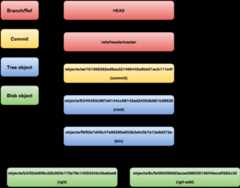
This structure of objects pointing to each other is what makes Git so powerful.By simply changing a few of these pointing files, we can switch to differentpoints in history.
Let’s build something together
Have an idea for an application? Need help refactoring an existing codebase? Want to build up your team’s programming confidence? Take a look at all the great services we offer andlet’s talk about we can help you and your organization succeed.
If you enjoyed this post, you might also like:
About thoughtbot
We've been helping engineering teams deliver exceptional products for over 20 years. Our designers, developers, and product managers work closely with teams to solve your toughest software challenges through collaborative design and development.Learn more about us.