This Vignette discusses how you can extendgolem.
Project Hooks
What it is
Thecreate_golem() function comes with aproject_hook parameter, a function run just after thegolem project creation. It can be used to modify theproject structure automatically just after its creation.
This allows you to define custom behavior when creatinggolem based app, that can be used for:
Adding a different front-end template in
R/app_ui.RChanging configuration options in
inst/golem-config.ymlCopying external files in
inst/app/wwwRemoving any file from the default template
etc.
How it works
The function is calledafter the default project hasbeen created, and is executedin the directory of the createdpackage. Here is a rough step by step of what happens when aproject is created withgolem:
- The package name is generated
- The directory that will receive the package is created
- Defaultgolem template is copied and pasted
- R moves to the directory of the newly created project, and runs the
project_hookfunction - R moves back to the previous directory, and removes comments ifneeded
- Project is open
Defining your ownproject_hook
The best way to extendgolem project hookfunctionality is by defining thisproject_hook function inan external package. This will allow this function to be used inside thegolem creation RStudio project creation widget:
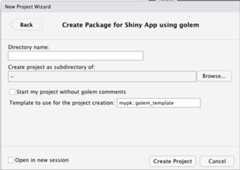
Note that inside this widget, the function should be explicitelynamespaced (pkg::fun)
Theproject_hook function takes three mandatoryparameters, which are passed fromcreate_golem:
path: the full path of the directorypackage_name: the name of the package...: further arguments that can be passed viacreate_golem
These parameters might not be used inside your own hook, butthey need to be set in the hook function skeleton, forcompatibility reasons.
Example
Here is an example of a function that can be used to remove thedev/ folder:
no_dev<-function(path,package_name,...){fs::dir_delete("dev")}create_golem("ici", project_hook=no_dev)This one will create a CSS:
new_css<-function(path,package_name,...){css_path<-fs::path_abs("inst/app/www/custom.css")fs::file_create(css_path)write_there<-function(...){write(..., file=css_path, append=TRUE)}write_there("body {")write_there(" background-color:red;")write_there("}")cli_cat_bullet("CSS generated")}create_golem("ici", project_hook=new_css)Module templates
What it is
Module templates are a way to define your own content for creatingthe module script inR/. It allows to extendgolem module template functionality by creating your owncontent inside the module file.
How it works
The function is called after the file(s) creation. Here is a step bystep of what happens when theadd_module function iscalled:
- Name is created, and so is the
R/directory ifneeded. - The fct_ and utils_ files are created if necessary
- The path to the module is generated
- If the file already exists, it opens the file
- If the file doesn’t exist, R creates it and the
module_templatefunction is called - File is generated, and potentially open
(Note that themodule_template function is not called ifthe file already exists).
Defining your ownmodule_template
You can then define your own function inside yourgolem based application, but chances are you will bedefining them into your own package.
Module template functions will receive, by default, the followingparameters fromadd_modules().
name: the name of the modulepath: the path to the file in R/export: a TRUE/FALSE set by theexportparam ofadd_module()...further arguments
These parameters might not be used inside your own function, butthey need to be set in the function skeleton, forcompatibility reasons.
Example
my_tmpl<-function(name,path,export,...){# Define a template that only write the name of the# module in the filewrite(name,path)}golem::add_module(name="custom", module_template=my_tmpl)my_other_tmpl<-function(name,path,...){# Copy and paste a file from somewhere elsefile.copy(...,path)}golem::add_module(name="custom", module_template=my_other_tmpl)JS & CSS & SASS templates
What it is
JavaScript, CSS and Sass template allow to use your own functions toadd code when creating JavaScript files, JavaScript handlers and CSS orSass files. These templates work insideadd_js_file(),add_js_handler(),add_css_file() andadd_sass_file().
How it works
The function is called after the file creation. Here is a step bystep of what happens when these functions are called:
- Name is created
- The path is generated
- If the file already exists, it opens the file
- If the file doesn’t exist, R creates it and the
templatefunction is called - File is generated, and potentially open
(Note that thetemplate function is not called if thefile already exists).
Defining your owntemplate
You can then define your own function inside yourgolem based application, but chances are you will bedefining them into your own package.
File template functions will receive, by default, the followingparameters from theadd_*() function.
path: the path to the file...further arguments
These parameters might not be used inside your own function, butthey need to be set in the function skeleton, forcompatibility reasons.
Example
my_tmpl<-function(path,...){# Define a template that only write the name of the# module in the filewrite_there<-function(...){write(..., file=path, append=TRUE)}write_there("body {")write_there(" background-color:red;")write_there("}")}golem::add_css_file(name="custom", template=my_tmpl)Turn on the maintenance mode
What it is
From time to time, you need your application to be unavailable:database update, API changes, etc. In order to keep your app running butmake it unavailable, you can use amaintenance mode.When this maintenance mode is turned on, your application will be pausedand a specific page will be displayed to your users.
golem comes with a default maintenance page, and youcan replace it with you own page.
How to set the maintenance mode
The maintenance mode will be turned on whenever the R process detectsthat theGOLEM_MAINTENANCE_ACTIVE environment variable isset to TRUE.
To visualize the maintenance page locally, you can run thefollowing:
withr::with_envvar(c("GOLEM_MAINTENANCE_ACTIVE"=TRUE),{golem::run_dev()})or
Sys.setenv("GOLEM_MAINTENANCE_ACTIVE"=TRUE)golem::run_dev()If you’re deploying on Posit Connect, you can set this variable inthe setup panel.
If in command line, you can also do
export GOLEM_MAINTENANCE_ACTIVE=TRUE && Rscript -e "mygolem::run_app()"The maintenance page
golem comes with a default maintenance page, but youcan override it and use your own custom page.
In order to use your own page, you need to pass either anhtml_document or atagList to thewith_golem_options function inrun_app.R:
run_app<-function(onStart=NULL,options=list(),enableBookmarking=NULL,uiPattern="/",...){with_golem_options( app=shinyApp( ui=app_ui, server=app_server, onStart=onStart, options=options, enableBookmarking=enableBookmarking, uiPattern=uiPattern), golem_opts=list(...), maintenance_page=tagList(fluidRow(h1("Under maintenance"),span("Coming soon..."))))}or:
run_app<-function(onStart=NULL,options=list(),enableBookmarking=NULL,uiPattern="/",...){with_golem_options( app=shinyApp( ui=app_ui, server=app_server, onStart=onStart, options=options, enableBookmarking=enableBookmarking, uiPattern=uiPattern), golem_opts=list(...), maintenance_page=shiny::htmlTemplate( filename=app_sys("custom_maintenance_page.html")))}