Installing {golem}
You can install the stable version ofgolem fromCRAN:
install.packages("golem")The development version ofgolem can be installed fromGitHub using theremotes package:
remotes::install_github("Thinkr-open/golem")Getting started
Note before usinggolem:
Agolem app is contained inside a package, soknowing how to build a package is highly recommended. On the plus side,everything you know about package development can be reused ingolem.
Agolem app works better if you are working with
shiny modules, so knowing how modules work is recommended,but not mandatory.
In the rest of the Vignettes, we’ll assume you’re working inRStudio.
Create a package
Once the package is installed, you can got toFile > NewProject… in RStudio, and choose“Package for Shiny App Usinggolem” input:
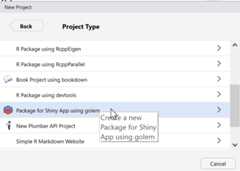
If you want to do it directly via the command line, use:
golem::create_golem(path="path/to/package")This command allows you to create “illegally-named” package (forexample,1234) by passing thecheck_nameargument toFALSE. Note that this is not recommended andshould only be done if you know what you are doing.
Once you’ve got that, a new RStudio project will be launched. Here isthe structure of this project:
#> ├── DESCRIPTION#> ├── NAMESPACE#> ├──R#> │ ├──app_config.R#> │ ├──app_server.R#> │ ├──app_ui.R#> │ └──run_app.R#> ├──dev#> │ ├──01_start.R#> │ ├──02_dev.R#> │ ├──03_deploy.R#> │ └──run_dev.R#> ├──inst#> │ ├──app#> │ │ └──www#> │ │ └── favicon.ico#> │ └── golem-config.yml#> └──man#> └── run_app.RdIf you’re already familiar with R packages, most of these files willseem very familiar to you. That’s because agolem app ISa package.
DESCRIPTION&NAMESPACE: Packagemeta-data.R/app_config.R: Used to read insidegolem config file located atinst/golem-config.yml.R/app_server.R,R/app_ui.R: Top levelUI and server elements.R/run_app.R: a function to configure and launch theapplication.dev/: Scripts that will be used along the process ofdeveloping your app. You don’t need to fill all the script beforestarting: use them as a notebook for keeping track of what you’re doingall along the project life.inst/app/www: Where you will add externaldependencies inwww(images, css, etc), notably added withthegolemfunctions used to create externalresources.man: Package documentation, to be generated by R&roxygen2.
dev/01_start.R
Once you’ve created your project, the first file that opens isdev/01_start.R. This file contains a series of commandsthat you’ll have to run once, at the beginning of the project.
Note that you don’t have to fill everything, even though it’sstrongly recommended.
Fill the DESCRIPTION
First, fill theDESCRIPTION by adding information aboutthe package that will contain your app. The first function,fill_desc(), can be used to fill yourDESCRIPTION file:
golem::fill_desc( pkg_name="shinyexample",# The name of the golem package containing the app (typically lowercase, no underscore or periods) pkg_title="PKG_TITLE",# What the Package Does (One Line, Title Case, No Period) pkg_description="PKG_DESC.",# What the package does (one paragraph). authors=person( given="AUTHOR_FIRST",# Your First Name family="AUTHOR_LAST",# Your Last Name email="AUTHOR@MAIL.COM",# Your email role=c("aut","cre"),# Your role (here author/creator) set_options=TRUE# Set the global golem options), repo_url=NULL,# The URL of the GitHub repo (optional), pkg_version="0.0.0.9000"# The version of the package containing the app)Aboutthe DESCRIPTIONfile.
Additionally,fill_desc() sets a series of recommendedglobal options ingolem-config.yml that will be reusedinsidegolem.
Set common Files
If you want to use the MIT license, README, code of conduct,lifecycle badge, a news file, etc.
## See ?usethis for more informationusethis::use_mit_license("Golem User")# You can set another license hereusethis::use_readme_rmd(open=FALSE)usethis::use_code_of_conduct()usethis::use_lifecycle_badge("Experimental")usethis::use_news_md(open=FALSE)See{usethis}for more info about these functions.
Use Recommended Packages
This will addshiny,DT,attempt,glue,htmltools,andgolem as dependencies to your package:
golem::use_recommended_deps()Add various tools
If you want to change the default favicon:
# Remove current favicongolem::remove_favicon()# Add a new onegolem::use_favicon(path="path/to/favicon")Note that you can add an URL, and the favicon will be downloaded tothe
inst/app/wwwfolder.
Note: If you are deploying your app withShinyProxy, your favicon shouldhave the
.pngextension, otherwise it is not going towork.
Utils: these two functions add two files with additional helperfunctions for yourgolem project. They can be used alongthe process of building your app:
golem::use_utils_ui(with_test=TRUE)golem::use_utils_server(with_test=TRUE)For a detailed description of the generated functions see therespective files
R/golem_utils_server.RandR/golem_utils_ui.Rfor which also default tests are addedintests/testthat(to suppress this setwith_test = FALSEin the above calls).
Try the app
To launch the app run:
golem::run_dev()You’re now set! You’ve successfully initiated the project and can gotodev/02_dev.R:
rstudioapi::navigateToFile("dev/02_dev.R")