
How can I produce the following output?

More specifically, I am not sure how to produce the matrix with the vertical line through the middle on the left of the ~ symbol.
Any help would be greatly appreciated.

- Regarding the covariance matrix (the second argument of
N(.,.): As written, it would not appear to be a symmetric matrix. Is it possible that the+symbol in the first row is superfluous or that there's a+sign missing between the terms of the second row? Please advise.Mico– Mico2013-10-19 16:02:58 +00:00CommentedOct 19, 2013 at 16:02 - @Mico, Actually the first term is T_{T-1}P_{T-1|T-1}T_{T-1}'+Q_{T-1}. The (1,2) entry is T_{T-1}P_{T-1|T-1} and the (2,1) is P_{T-1|T-1}T_{T-1}'. They are block matrices, so the transpose of the (1,2) entry is just the (2,1) entry. Perhaps there is a ' missing on the P on the (2,1) entry, but it isn't too important, I'm only interested on the LHS of the equation anyway :)TrueTears– TrueTears2013-10-19 16:11:50 +00:00CommentedOct 19, 2013 at 16:11
- Thanks. I must confess I'd missed the very discreet space between the
Q_{T-1}andT_{T-1}terms...Mico– Mico2013-10-19 16:13:37 +00:00CommentedOct 19, 2013 at 16:13 - There is an easy workaround for this inside the "array" environment... I'll edit my answer then.TheVal– TheVal2013-10-19 16:14:36 +00:00CommentedOct 19, 2013 at 16:14
3 Answers3
To address just the left-hand term of the equation: It is possible to employ amatrix environmentinside a\left( ... \middle\vert ... \right) construct. To force the item\alpha_T to be typeset flush left inside the (one-column) matrix instead of centered, just add\hfill to its right. (This works because thematrix environment builds on thearray environment; by default, the columns of amatrix environment are centered, achieved by inserting\hfil on each side of each cell. Because\hfill is "more infinite" than\hfil, the contents of that row get pushed to the far left.)

\documentclass{article}\usepackage{amsmath} % for "matrix" environment\begin{document}\[\left(\begin{matrix}\alpha_T \hfill \\ \alpha_{T-1}\end{matrix}\, \middle\vert \,y_{1,T-1},\boldsymbol{\theta}\right) \sim N \dots\]\end{document}Addendum, posted after the OP clarified the structure of the covariance matrix: Similarly, the mean vector and covariance matrix can be written withbmatrix (short for "matrix with brackets", I suppose) environments, again employing the\hfill device to set some of the items flush-left.

\dots\sim N\left(\begin{bmatrix}d_{T-1}+T_{T-1}\alpha_{T-1\mid T-1}\\\alpha_{T-1\mid T-1} \hfill\end{bmatrix},\begin{bmatrix} T_{T-1}P_{T-1|T-1}T_{T-1}'+Q_{T-1} & T_{T-1}P_{T-1|T-1} \\P_{T-1|T-1}T_{T-1}' \hfill & P_{T-1\mid T-1}\hfill\end{bmatrix}\right)\]

Since there has been some issues with the vertical spacing inside the first matrix, I've found a specific workaround that is based on the division of the two columns:
The first is considered as a separated
arrayenvironment, so the two expressions will be typeset correctly.The second is a
standarddisplayed equation that will make the third expression lie just bewteen the first two. Notice that this is achieved with the command\middle(thanks to @Mico for pointing this out).
This is the final MWE:
\documentclass{article}%\usepackage{amsmath}% This command adjusts the horizontal shrinking % between columns inside the environment.\renewcommand\arraycolsep{2pt}%\begin{document}%\begin{equation*}%% Hhere starts the first "array" environment, now the delimiters are equal because% the middle command "( | )" separates the array from the standard environment % in order to make the third expression vertically centered.\left(%\begin{array}{l} \alpha_T \\ \alpha_{T-1}\end{array}%\middle\vert%\;y_{1:T-1},\,\boldsymbol{\theta}%\right)%\sim N%% Now there is the second matrix with the delimiter setting like% ( [ ],[ ] )%\left( % starting delimiter%\left[ \begin{array}{l} d_{T-1}+T_{T-1}a_{T-1|T-1} \\ a_{T-1|T-1} \end{array}\right],% % Here is the second square delimited array.%\left[ \begin{array}{lcc} T_{T-1}P_{T-1|T-1}T’_{T-1} & + & Q_{T-1}T_{T-1}P_{T-1|T-1}\\ P_{T-1|T-1}T’_{T-1} & & P_{T-1|T-1} \end{array}\right]%\right) % Ending delimiter.%\end{equation*}%\end{document}Here is the output:

EDIT:
Since two terms inside the second square-bracketed matrix were merged, this implementation should highlight the spacing:
... \begin{array}{lcl} T_{T-1}P_{T-1|T-1}T’_{T-1}+Q_{T-1} & & T_{T-1}P_{T-1|T-1}\\ P_{T-1|T-1}T’_{T-1} & & P_{T-1|T-1} \end{array} ...Here is the correct output:


- Thanks! This is great. Just wondering, is there a way to achieve this output using the matrix environment?TrueTears– TrueTears2013-10-19 15:25:56 +00:00CommentedOct 19, 2013 at 15:25
- @TrueTears Right now I'm experimenting with my compiler, but it takes time to achieve such a result. If I find the correct solution, I'll edit the answer; until then you may want to take a look atthis discussion, it will shed some light on the function of
\hlineinside amatrixenvironmentTheVal– TheVal2013-10-19 15:29:45 +00:00CommentedOct 19, 2013 at 15:29
Doing just the left-most matrix, seeing as that was your difficulty.
\documentclass{article}\usepackage[usestackEOL]{stackengine}[2013-10-15]\def\stackalignment{l}\begin{document}\[\left(\left. \Vectorstack{\alpha_T\\\alpha_{T-1}} \right| y_{1:T-1},\theta\right) = \ldots\]\end{document}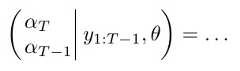

You mustlog in to answer this question.
Explore related questions
See similar questions with these tags.