Theoretical densities
One of the more useful tools for inspecting your data is to view thedensity of datapoints. There are great ways of doing this, such ashistograms and kernel density estimates (KDEs). However, sometimes youmight wonder how the density of your data compares to the density of atheoretical distribution, such as a normal or Poisson distribution. Thestat_theodensity() function estimates the necessaryparameters for a range of distributions and calculates the probabilitydensity for continuous distributions or probability mass for discretedistributions. The function uses maximum likelihood procedures throughthefitdistrplus package.
Continuous distributions
Plotting continuous distributions is straightforward enough. You justtellstat_theodensity() what distribution you’d like tofit. It automatically performs the fitting for groups separately, asshown in the example below where we artificially split up the faithfuldata.
df<-faithfuldf$group<-ifelse(df$eruptions>3,"High","Low")ggplot(df,aes(eruptions, colour=group))+stat_theodensity(distri="gamma")+geom_rug()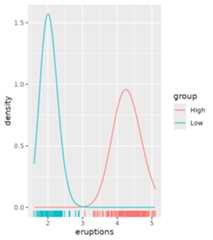
We can compare this to kernel density estimates, which are moreempirical.
ggplot(df,aes(eruptions, colour=group))+stat_theodensity(distri="gamma",aes(linetype="Theoretical"))+stat_density(aes(linetype="Kernel Estimates"), geom="line", position="identity")+geom_rug()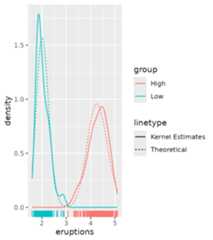
There are a few tricky distributions for which there exist nosensible starting values, such as the Student t-distribution and theF-distribution. You would have to provide a sensible-ish starting valuefor the degrees of freedom for these.
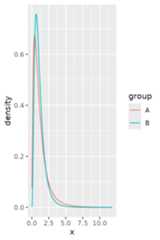
tdist<-data.frame( x=c(rt(1000, df=2),rt(1000, df=4)), group=rep(LETTERS[1:2], each=1000))ggplot(tdist,aes(x, colour=group))+stat_theodensity(distri="t", start.arg=list(df=3))fdist<-data.frame( x=c(rf(1000, df1=4, df2=8),rf(1000, df1=8, df2=16)), group=rep(LETTERS[1:2], each=1000))ggplot(fdist,aes(x, colour=group))+stat_theodensity(distri="f", start.arg=list(df1=3, df2=3))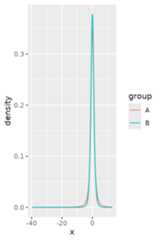
Discrete distributions
The waystat_theodensity() handles discretedistributions is similar to how it handles continuous distributions. Themain difference is that discrete distributions require whole number orinteger input.
correct<-data.frame( x=c(rpois(1000,5),rnbinom(1000,2, mu=5)), group=rep(LETTERS[1:2], each=1000))incorrect<-correct# Change a number to non-integerincorrect$x[15]<-sqrt(2)ggplot(incorrect,aes(x, colour=group))+stat_theodensity(distri="nbinom")#>Error in `stat_theodensity()`:#>! Problem while computing stat.#>ℹ Error occurred in the 1st layer.#>Caused by error in `setup_params()`:#>! A discrete 'nbinom' distribution cannot be fitted to continuous data.ggplot(correct,aes(x, colour=group))+stat_theodensity(distri="nbinom")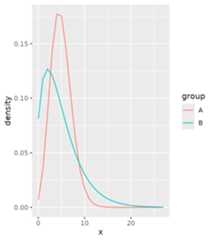
A practical difference can be seen above: using simple lines are notvery appropriate for discrete distributions, as they imply a continuitythat is not there.
Instead, one can work with centred steps:
ggplot(correct,aes(x, colour=group))+stat_theodensity(distri="nbinom", geom="step", position=position_nudge(x=-0.5))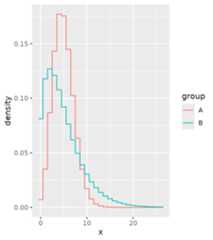
Or perhaps most appropriately, you can display the distributions asprobability masses through lollipops.
ggplot(correct,aes(x, colour=group))+stat_theodensity(distri="nbinom", geom="segment",aes(xend=after_stat(x), yend=0), alpha=0.5)+stat_theodensity(distri="nbinom", geom="point",aes(xend=after_stat(x), yend=0))#> Warning in stat_theodensity(distri = "nbinom", geom = "point", aes(xend =#> after_stat(x), : Ignoring unknown aesthetics:xend and#>yend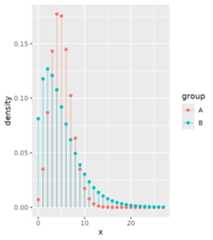
Comparing different distributions
Let’s say we are given the task of comparing how well differentdistributions fit the same data. While we can use more qualitativemethods, having a look at the distributions is still a useful tool.We’ll generate some data and see how it works. We’ll fit a normal andCauchy distribution to the data and plot their densities.
set.seed(0)df<-data.frame(x=rnorm(1000,10,1/rgamma(1000,5,0.2)))ggplot(df,aes(x))+stat_theodensity(aes(colour="Normal"), distri="norm")+stat_theodensity(aes(colour="Cauchy"), distri="cauchy")+geom_rug(alpha=0.1)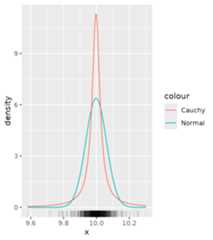
From this it is quite hard to see what distribution moreappropriately fits the data. To get a clearer view, we can use ahistogram instead of a rug plot. The problem though is that by default,histograms work with count data, whereas densities are integrated to sumto 1.
ggplot(df,aes(x))+geom_histogram(binwidth=0.01, alpha=0.5)+stat_theodensity(aes(colour="Normal"), distri="norm")+stat_theodensity(aes(colour="Cauchy"), distri="cauchy")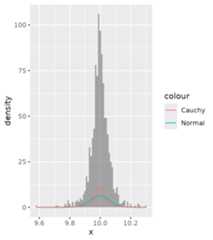
There are two possible solutions to this:
- Scale the histogram to densities.
- Scale the densities to counts.
A nice thing that ggplot2 provides is access to computed variableswith theafter_stat() function. Luckily, one of thecomputed variables in histograms already is the density.
ggplot(df,aes(x))+geom_histogram(aes(y=after_stat(density)), binwidth=0.01, alpha=0.5)+stat_theodensity(aes(colour="Normal"), distri="norm")+stat_theodensity(aes(colour="Cauchy"), distri="cauchy")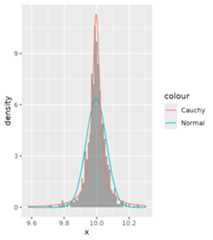
Now we can see that probably the Cauchy distribution fits better thanthe normal distribution.
Alternatively, you can also scale the densities to counts. To dothis, we must know the binwidth of the histogram. Since different layersin ggplot2 don’t communicate, we have to set these manually. Just likehistograms provide the density as computed variable, so too doesstat_theodensity() provide a count computed variable, whichis the density multiplied by the number of observations.
binwidth<-0.01ggplot(df,aes(x))+geom_histogram(alpha=0.5, binwidth=binwidth)+stat_theodensity(aes(y=after_stat(count*binwidth), colour="Normal"), distri="norm")+stat_theodensity(aes(y=after_stat(count*binwidth), colour="Cauchy"), distri="cauchy")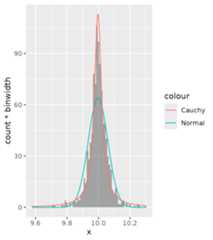
Rolling kernels
A rolling kernel is a method that generates a trend line that doesn’trequire specifying a model, but is also very bad at extrapolating. It issimilar to a rolling window, but data does not need to be equallyspaced. An attempt at illustrating the concept you’ll find below.
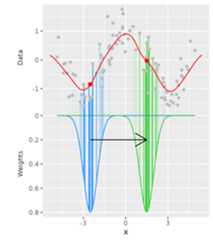
For every position on the x-axis, a kernel (above: Gaussian kernel inblue and green) determines the weight of datapoints based on theirdistance on the x-axis to the position being measured. Then, a weightedmean is calculated that determines the values on the y-axis (reddots).
Examples
Below is an example for a Gaussian kernel on thempgdataset.
ggplot(mpg,aes(displ,hwy, colour=class))+geom_point()+stat_rollingkernel()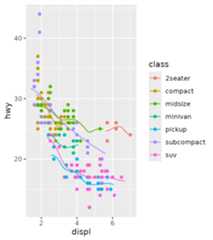
It is pretty easy to visualise areas of uncertainty by setting thealpha to scaled weights. This emphasises data-dense areas of thelines.
ggplot(mpg,aes(displ,hwy, colour=class))+geom_point()+stat_rollingkernel(aes(alpha=after_stat(scaled)))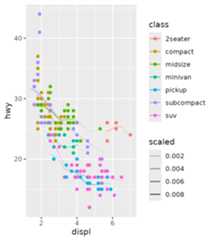
Relation to kernel density estimates
It may seem pretty trivial, but using the weights as the y positiongives something very similar to kernel density estimates. The defaultsfor the bandwidth differ slightly, so we exaggerate the similarity bysetting them equal here.
ggplot(mpg,aes(displ,hwy, colour=class))+stat_rollingkernel(aes(y=stage(hwy, after_stat=weight), linetype="Rolling\nKernel"), bw=0.3)+stat_density(aes(displ, colour=class, y=after_stat(count), linetype="KDE"), bw=0.3, inherit.aes=FALSE, geom="line", position="identity")+scale_linetype_manual(values=c(2,1))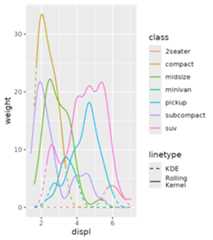
Rolling mean
As a final note on this stat, a rolling mean-equivalent can becalculated using the"mean" kernel. This is the same assetting the kernel to"unif", since it uses the uniformdistribution as kernel. Typically, this is a bit more blocky than usingGaussian kernels.
ggplot(mpg,aes(displ,hwy, colour=class))+geom_point()+stat_rollingkernel(kernel="mean", bw=1)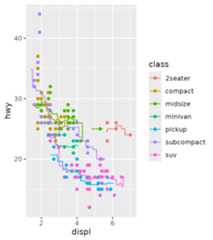
Difference
Motivation
Many people who try to illustrate the difference between two linesmight have run into the following problem. In the example below we wantto illustrate the difference between theuempmed andpsavert variables from theeconomics dataset,and change the colour of a ribbon depending on which of the variables islarger. Because the groups are inferred from the fill colour, and thereare small islands whereuempmed > psavert is true, theribbon will be drawn in an overlapping way. This makes perfect sense formany visualisations, but is an inconvenience when we just want to plotthe difference.
g<-ggplot(economics,aes(date))g+geom_ribbon(aes(ymin=pmin(psavert,uempmed), ymax=pmax(psavert,uempmed), fill=uempmed>psavert), alpha=0.8)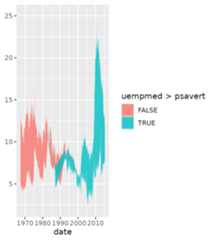
To circumvent this inconvenience,stat_difference() usesrun-length encoding to re-assign the groups and adds asignvariable to keep track which of the two variables is larger. By default,thefill is populated with thesign variable.We can control the name of the filled areas by using thelevels argument.
g+stat_difference(aes(ymin=psavert, ymax=uempmed), levels=c("More uempmed","More psavert"), alpha=0.8)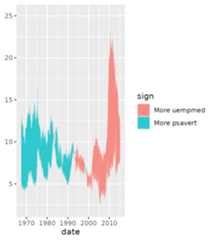
Interpolation
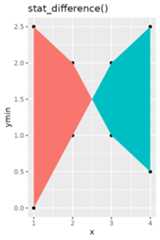
An additional nicety ofstat_difference() is that itinterpolates the cross-over points of lines. It’s not very visible inthe densely populated graph above, but we can generate some dummy datato show what we mean.
df<-data.frame( x=c(1:4), ymin=c(0,1,2,2.5), ymax=c(2.5,2,1,0.5))g<-ggplot(df,aes(x, ymin=ymin, ymax=ymax))+guides(fill='none')+geom_point(aes(y=ymin))+geom_point(aes(y=ymax))g+geom_ribbon(aes(fill=ymax<ymin))+ggtitle("Plain ribbon")g+stat_difference()+ggtitle("stat_difference()")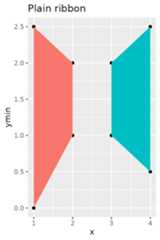
Function X, Y
Sometimes, you just want to calculate a simple function on the x- andy-positions of your data by group. That is wherestat_funxy() comes in. It takes two functions as arguments,one to be applied to the x-coordinates and one to be applied to they-coordinates. The primary limitation of this stat is that you cannotuse functions that are supposed to work on the x- and y-positionssimultaneously.
For example, it is pretty easy to combinerange andmean to construct range indicators.
df<-faithfuldf$group<-ifelse(df$eruptions>3,"High","Low")ggplot(df,aes(waiting,eruptions, group=group))+geom_point()+stat_funxy(aes(colour=group), funx=range, funy=mean, geom="line", arrow=arrow(ends="both"))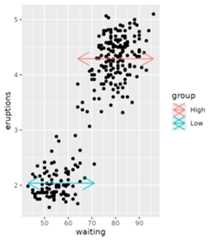
Centroids and midpoints
There are also two variations onstat_funxy() and thatarestat_centroid() andstat_midpoint(). Whilethe default function arguments instat_funxy() do nothing,the default forstat_centroid() is to take the means of x-and y-positions andstat_midpoint() takes the mean of therange. Under the hood, these are stillstat_funxy(), buthave default functions. The centroid and midpoint stats are convenientto label groups, for example.
ggplot(df,aes(waiting,eruptions, group=group))+geom_point()+stat_centroid(aes(label="Centroid"), colour="dodgerblue", geom="label")+stat_midpoint(aes(label="Midpoint"), colour="limegreen", geom="label")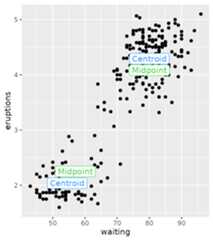
Cropping data
While for the general case the data should be cropped to the lengthsof the function outputs, you can change this behaviour by settingcrop_other = FALSE. This might be convenient when you mighthave other aesthetics that you care about, in the same group. Notcropping other data probably only makes sense if the functions youprovide return a single summary statistic though.
ggplot(df,aes(waiting,eruptions, group=group))+stat_centroid(aes(xend=waiting, yend=eruptions, colour=group), geom="segment", crop_other=FALSE)+geom_point(size=0.25)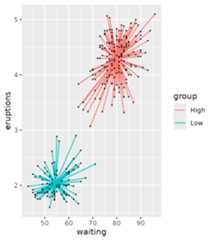
Run length encoding
Run length encoding (RLE) is useful as a data compression mechanism,but can also be useful in plotting to check if subsequent conditions arebeing fulfilled. The default behaviour ofstat_rle() is todraw rectangles in the regions where a series of values (a run) have thesame value. Let’s say I have the following series:
A-A-A-A-B-B-B-C-C-D
This series can be compacted by run length encoding, but can also beuseful to extract the following properties:
| run_id | run_value | run_length | start_id | end_id |
|---|---|---|---|---|
| 1 | A | 4 | 1 | 4 |
| 2 | B | 3 | 5 | 7 |
| 3 | C | 2 | 8 | 9 |
| 4 | D | 1 | 10 | 10 |
Examples
In the example below, we’ll use thecut() function todivide the y-values into three bins, and use thestat_rle()to draw rectangles where datapoints fall into these bins.
df<-data.frame( x=seq(0,10, length.out=100))df$y<-cos(df$x)ggplot(df,aes(x,y))+stat_rle(aes(label=cut(y, breaks=3)))+geom_point()#> Warning: The following aesthetics were dropped during statistical transformation:y.#>ℹ This can happen when ggplot fails to infer the correct grouping structure in#> the data.#>ℹ Did you forget to specify a `group` aesthetic or to convert a numerical#> variable into a factor?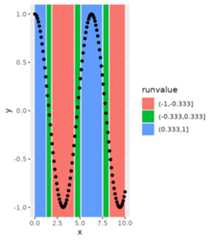
This can be made slightly more pleasing by closing gaps betweenrectangles.
ggplot(df,aes(x,y))+stat_rle(aes(label=cut(y, breaks=3)), align="center")+geom_point()#> Warning: The following aesthetics were dropped during statistical transformation:y.#>ℹ This can happen when ggplot fails to infer the correct grouping structure in#> the data.#>ℹ Did you forget to specify a `group` aesthetic or to convert a numerical#> variable into a factor?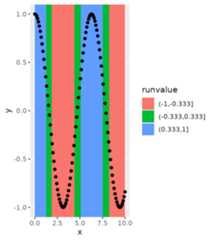
Using computed variables
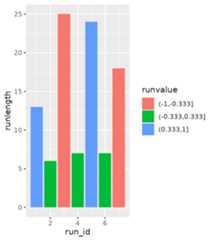
An alternative use case ofstat_rle() is to use thecomputed variables to describe a series of data. For example, if we’dlike to summarise the above graph in just it’s runs, we might beinterested in what order the runs are and how long the runs are. If wemake use of ggplot2’safter_stat() andstage()functions, we can grab this information from the stat.
ggplot(df)+stat_rle(aes(stage(x, after_stat=run_id),after_stat(runlength), label=cut(y, breaks=3), fill=after_stat(runvalue)), geom="col")