
How NAT traversal works

We covered a lot of ground in our post aboutHow TailscaleWorks. However, we glossed over how we can get through NATs(Network Address Translators) and connect your devices directly toeach other, no matter what’s standing between them. Let’s talk aboutthat now!
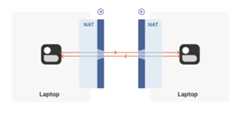
Let’s start with a simple problem: establishing a peer-to-peerconnection between two machines. In Tailscale’s case, we want to setup a WireGuard® tunnel, but that doesn’t really matter. Thetechniques we use are widely applicable and the work of many peopleover decades. For example,WebRTC uses this bag of tricks tosend peer-to-peer audio, video and data between web browsers. VoIPphones and some video games use similar techniques, though not alwayssuccessfully.
We’ll be discussing these techniques generically, using Tailscale andothers for examples where appropriate. Let’s say you’re making yourown protocol and that you want NAT traversal. You need two things.
First, the protocol should be based on UDP. Youcan do NAT traversalwith TCP, but it adds another layer of complexity to an already quitecomplex problem, and may even require kernel customizations dependingon how deep you want to go. We’re going to focus on UDP for the restof this article.
If you’re reaching for TCP because you want a stream-orientedconnection when the NAT traversal is done, consider using QUICinstead. It builds on top of UDP, so we can focus on UDP for NATtraversal and still have a nice stream protocol at the end.
Second, you need direct control over the network socket that’s sendingand receiving network packets. As a rule, you can’t take an existingnetwork library and make it traverse NATs, because you have to sendand receive extra packets that aren’t part of the “main” protocolyou’re trying to speak. Some protocols tightly integrate the NATtraversal with the rest (e.g. WebRTC). But if you’re building yourown, it’s helpful to think of NAT traversal as a separate entity thatshares a socket with your main protocol. Both run in parallel, oneenabling the other.

Direct socket access may be tough depending on your situation. Oneworkaround is to run a local proxy. Your protocol speaks to thisproxy, and the proxy does both NAT traversal and relaying of yourpackets to the peer. This layer of indirection lets you benefit fromNAT traversal without altering your original program.
With prerequisites out of the way, let’s go through NAT traversal fromfirst principles. Our goal is to get UDP packets flowingbidirectionally between two devices, so that our other protocol(WireGuard, QUIC, WebRTC, …) can do something cool. There are twoobstacles to having this Just Work: stateful firewalls and NATdevices.
Figuring out firewalls
Stateful firewalls are the simpler of our two problems. In fact, mostNAT devices include a stateful firewall, so we need to solve thissubset before we can tackle NATs.
There are many incarnations to consider. Some you might recognize arethe Windows Defender firewall, Ubuntu’s ufw (using iptables/nftables),BSD’s pf (also used by macOS) and AWS’s Security Groups. They’re allvery configurable, but the most common configuration allows all“outbound” connections and blocks all “inbound” connections. Theremight be a few handpicked exceptions, such as allowing inbound SSH.
But connections and “direction” are a figment of the protocoldesigner’s imagination. On the wire, every connection ends up beingbidirectional; it’s all individual packets flying back and forth. Howdoes the firewall know what’s inbound and what’s outbound?
That’s where the stateful part comes in. Stateful firewalls rememberwhat packets they’ve seen in the past and can use that knowledge whendeciding what to do with new packets that show up.

For UDP, the rule is very simple: the firewall allows an inbound UDPpacket if it previously saw a matching outbound packet. For example,if our laptop firewall sees a UDP packet leaving the laptop from2.2.2.2:1234 to5.5.5.5:5678, it’ll make a note that incomingpackets from5.5.5.5:5678 to2.2.2.2:1234 are also fine. Thetrusted side of the world clearly intended to communicate with5.5.5.5:5678, so we should let them talk back.
(As an aside, somevery relaxed firewalls might allow traffic fromanywhere back to2.2.2.2:1234 once2.2.2.2:1234 has communicatedwith anyone. Such firewalls make our traversal job easier, but areincreasingly rare.)
Firewall face-off
This rule for UDP traffic is only a minor problem for us, as long asall the firewalls on the path are “facing” the same way. That’susually the case when you’re communicating with a server on theinternet. Our only constraint is that the machine that’sbehind thefirewall must be the one initiating all connections. Nothing cantalk to it, unless it talks first.
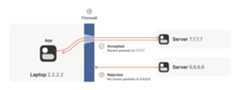
This is fine, but not very interesting: we’ve reinvented client/servercommunication, where the server makes itself easily reachable toclients. In the VPN world, this leads to a hub-and-spoke topology: thehub has no firewalls blocking access to it and the firewalled spokesconnect to the hub.
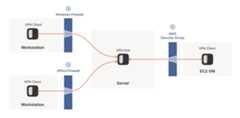
The problems start when two of our “clients” want to talkdirectly. Now the firewalls are facing each other. According to therule we established above, this means both sides must go first, butalso that neither can go first, because the other side has to gofirst!

How do we get around this? One way would be to require users toreconfigure one or both of the firewalls to “open a port” and allowthe other machine’s traffic. This is not very user friendly. It alsodoesn’t scale to mesh networks like Tailscale, in which we expect thepeers to be moving around the internet with some regularity. And, ofcourse, in many cases you don’t have control over the firewalls: youcan’t reconfigure the router in your favorite coffee shop, or at theairport. (At least, hopefully not!)
We need another option. One that doesn’t involve reconfiguringfirewalls.
Finessing finicky firewalls
The trick is to carefully read the rule we established for ourstateful firewalls. For UDP, the rule is:packets must flow outbefore packets can flow back in.
However, nothing says the packets must berelated to each otherbeyond the IPs and ports lining up correctly. As long assome packetflowed outwards with the right source and destination, any packet thatlooks like a response will be allowed back in, even if the otherside never received your packet!
So, to traverse these multiple stateful firewalls, we need to sharesome information to get underway: the peers have to know in advancetheip:port their counterpart is using. One approach is tostatically configure each peer by hand, but this approach doesn’tscale very far. To move beyond that, we built acoordinationserver to keep theip:port information synchronized in aflexible, secure manner.
Then, the peers start sending UDP packets to each other. They mustexpect some of these packets to get lost, so they can’t carry anyprecious information unless you’re prepared to retransmit them. Thisis generally true of UDP, but especially true here. We’regoing tolose some packets in this process.
Our laptop and workstation are now listening on fixed ports, so thatthey both know exactly whatip:port to talk to. Let’s take a look atwhat happens.

The laptop’s first packet, from2.2.2.2:1234 to7.7.7.7:5678, goesthrough the Windows Defender firewall and out to the internet. Thecorporate firewall on the other end blocks the packet, since it has norecord of7.7.7.7:5678 ever talking to2.2.2.2:1234. However,Windows Defender now remembers that it should expect and allowresponses from7.7.7.7:5678 to2.2.2.2:1234.
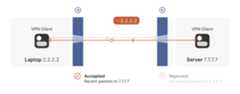
Next, the workstation’s first packet from7.7.7.7:5678 to2.2.2.2:1234 goes through the corporate firewall and across theinternet. When it arrives at the laptop, Windows Defender thinks “ah,a response to that outbound request I saw”, and lets the packetthrough! Additionally, the corporate firewall now remembers that itshould expect responses from2.2.2.2:1234 to7.7.7.7:5678, andthat those packets are also okay.
Encouraged by the receipt of a packet from the workstation, the laptopsends another packet back. It goes through the Windows Defenderfirewall, through the corporate firewall (because it’s a “response” toa previously sent packet), and arrives at the workstation.

Success! We’ve established two-way communication through a pair offirewalls that, at first glance, would have prevented it.
Creative connectivity caveats
It’s not always so easy. We’re relying on some indirect influence overthird-party systems, which requires careful handling. What do we needto keep in mind when managing firewall-traversing connections?
Both endpoints must attempt communication at roughly the same time, sothat all the intermediate firewalls open up while both peers are stillaround. One approach is to have the peers retry continuously, but thisis wasteful. Wouldn’t it be better if both peers knew to startestablishing a connection at the same time?
This may sound a little recursive: to communicate, first you need tobe able to communicate. However, this preexisting “side channel”doesn’t need to be very fancy: it can have a few seconds of latency,and only needs to deliver a few thousand bytes in total, so a tiny VMcan easily be a matchmaker for thousands of machines.
In the distant past, I used XMPP chat messages as the side channel,with great results. As another example, WebRTC requires you to come upwith your own “signalling channel” (a name that reveals WebRTC’s IPtelephony ancestry), and plug it into the WebRTC APIs. In Tailscale,our coordination server and fleet of DERP (Detour Encrypted RoutingProtocol) servers act as our side channel.
Stateful firewalls have limited memory, meaning that we need periodiccommunication to keep connections alive. If no packets are seen for awhile (a common value for UDP is 30 seconds), the firewall forgetsabout the session, and we have to start over. To avoid this, we use atimer and must either send packets regularly to reset the timers, orhave some out-of-band way of restarting the connection on demand.
On the plus side, one thing wedon’t need to worry about is exactlyhow many firewalls exist between our two peers. As long as they arestateful and allow outbound connections, the simultaneous transmissiontechnique will get through any number of layers. That’s really nice,because it means we get to implement the logic once, and it’ll workeverywhere.
…Right?
Well, not quite. For this to work, our peers need to know in advancewhatip:port to use for their counterparts. This is where NATs comeinto play, and ruin our fun.
The nature of NATs
We can think of NAT (Network Address Translator) devices as statefulfirewalls with one more really annoying feature: in addition to allthe stateful firewalling stuff, they also alter packets as they gothrough.
A NAT device is anything that does any kind ofNetwork Address Translation, i.e. altering the source or destinationIP address or port. However, when talking about connectivity problemsand NAT traversal, all the problems come from Source NAT, or SNAT forshort. As you might expect, there is also DNAT (Destination NAT), andit’s very useful but not relevant to NAT traversal.
The most common use of SNAT is to connect many devices to theinternet, using fewer IP addresses than the number of devices. In thecase of consumer-grade routers, we map all devices onto a singlepublic-facing IP address. This is desirable because it turns out thatthere are way more devices in the world that want internet access,than IP addresses to give them (at least in IPv4 — we’ll come to IPv6in a little bit). NATs let us have many devices sharing a single IPaddress, so despite the global shortage of IPv4 addresses, we canscale the internet further with the addresses at hand.
Navigating a NATty network
Let’s look at what happens when your laptop is connected to your homeWi-Fi and talks to a server on the internet.
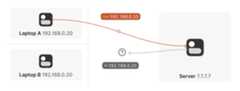
Your laptop sends UDP packets from192.168.0.20:1234 to7.7.7.7:5678. This is exactly the same as if the laptop had a publicIP. But that won’t work on the internet:192.168.0.20 is a privateIP address, which appears on many different peoples’ privatenetworks. The internet won’t know how to get responses back to us.
Enter the home router. The laptop’s packets flow through the homerouter on their way to the internet, and the router sees that this isa new session that it’s never seen before.
It knows that192.168.0.20 won’t fly on the internet, but it canwork around that: it picks some unused UDP port on its own public IPaddress — we’ll use2.2.2.2:4242 — and creates aNAT mapping thatestablishes an equivalence:192.168.0.20:1234 on the LAN side is thesame as2.2.2.2:4242 on the internet side.
From now on, whenever it sees packets that match that mapping, it will rewritethe IPs and ports in the packet appropriately.

Resuming our packet’s journey: the home router applies the NAT mappingit just created, and sends the packet onwards to the internet. Onlynow, the packet is from2.2.2.2:4242, not192.168.0.20:1234. Itgoes on to the server, which is none the wiser. It’s communicatingwith2.2.2.2:4242, like in our previous examples sans NAT.
Responses from the server flow back the other way as you’d expect,with the home router rewriting2.2.2.2:4242 back to192.168.0.20:1234. The laptop isalso none the wiser, from itsperspective the internet magically figured out what to do with itsprivate IP address.
Our example here was with a home router, but the same principleapplies on corporate networks. The usual difference there is that theNAT layer consists of multiple machines (for high availability orcapacity reasons), and they can have more than one public IP address,so that they have more publicip:port combinations to choose fromand can sustain more active clients at once.

Multiple NATs on a single layer allow for higher availability or capacity, but function the same as a single NAT.
A study in STUN
We now have a problem that looks like our earlier scenario with thestateful firewalls, but with NAT devices:

Our problem is that our two peers don’t know what theip:port oftheir peer is. Worse, strictly speaking there isnoip:port untilthe other peer sends packets, since NAT mappings only get created whenoutbound traffic towards the internet requires it. We’re back to ourstateful firewall problem, only worse: both sides have to speak first,but neither side knows to whom to speak, and can’t know until theother side speaks first.
How do we break the deadlock? That’s where STUN comes in. STUN is botha set of studies of the detailed behavior of NAT devices, and aprotocol that aids in NAT traversal. The main thing we care about fornow is the network protocol.
STUN relies on a simple observation: when you talk to a server on theinternet from a NATed client, the server sees the publicip:portthat your NAT device created for you, not your LANip:port. So, theserver cantell you whatip:port it saw. That way, you know whattraffic from your LANip:port looks like on the internet, you cantell your peers about that mapping, and now they know where to sendpackets! We’re back to our “simple” case of firewall traversal.
That’s fundamentally all that the STUN protocol is: your machine sendsa “what’s my endpoint from your point of view?” request to a STUNserver, and the server replies with “here’s theip:port that I sawyour UDP packet coming from.”

(The STUN protocol has a bunch more stuff in it — there’s a way ofobfuscating theip:port in the response to stop really broken NATsfrom mangling the packet’s payload, and a whole authenticationmechanism that only really gets used by TURN and ICE, siblingprotocols to STUN that we’ll talk about in a bit. We can ignore all ofthat stuff for address discovery.)
Incidentally, this is why we said in the introduction that, if youwant to implement this yourself, the NAT traversal logic and your mainprotocol have to share a network socket. Each socket gets a differentmapping on the NAT device, so in order to discover your publicip:port, you have to send and receive STUN packets from the socketthat you intend to use for communication, otherwise you’ll get auseless answer.
How this helps
Given STUN as a tool, it seems like we’re close to done. Each machinecan do STUN to discover the public-facingip:port for its localsocket, tell its peers what that is, everyone does the firewalltraversal stuff, and we’re all set… Right?
Well, it’s a mixed bag. This’ll work in some cases, but notothers. Generally speaking, this’ll work with most home routers, andwill fail with some corporate NAT gateways. The probability of failureincreases the more the NAT device’s brochure mentions that it’s asecurity device. (NATs do not enhance security in any meaningful way,but that’s a rant for another time.)
The problem is an assumption we made earlier: when the STUN servertold us that we’re2.2.2.2:4242 from its perspective, we assumedthat meant that we’re2.2.2.2:4242 from the entire internet’sperspective, and that therefore anyone can reach us by talking to2.2.2.2:4242.
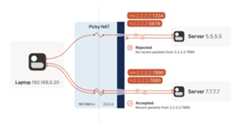
As it turns out, that’s not always true. Some NAT devices behaveexactly in line with our assumptions. Their stateful firewallcomponent still wants to see packets flowing in the right order, butwe can reliably figure out the correctip:port to give to our peerand do our simultaneous transmission trick to get through. Those NATsare great, and our combination of STUN and the simultaneous packetsending will work fine with those.
(in theory, there are also NAT devices that are super relaxed, anddon’t ship with stateful firewall stuff at all. In those, you don’teven need simultaneous transmission, the STUN request gives you aninternetip:port that anyone can connect to with no furtherceremony. If such devices do still exist, they’re increasingly rare.)
Other NAT devices are more difficult, and create a completelydifferent NAT mapping for every different destination that you talkto. On such a device, if we use the same socket to send to5.5.5.5:1234 and7.7.7.7:2345, we’ll end up with two differentports on 2.2.2.2, one for each destination. If you use the wrong portto talk back, you don’t get through.
Naming our NATs
Now that we’ve discovered that not all NAT devices behave in the sameway, we should talk terminology. If you’ve done anything related toNAT traversal before, you might have heard of “Full Cone”, “RestrictedCone”, “Port-Restricted Cone” and “Symmetric” NATs. These are termsthat come from early research into NAT traversal.
That terminology is honestly quite confusing. I always look up what aRestricted Cone NAT is supposed to be. Empirically, I’m not alone inthis, because most of the internet calls “easy” NATs Full Cone, whenthese days they’re much more likely to be Port-Restricted Cone.
More recent research and RFCs have come up with a much bettertaxonomy. First of all, they recognize that there are many morevarying dimensions of behavior than the single “cone” dimension ofearlier research, so focusing on the cone-ness of your NAT isn’tnecessarily helpful. Second, they came up with words that more plainlyconvey what the NAT is doing.
The “easy” and “hard” NATs above differ in a single dimension: whetheror not their NAT mappings depend on what the destination is.RFC4787 calls the easy variant “Endpoint-Independent Mapping”(EIM for short), and the hard variant “Endpoint-Dependent Mapping”(EDM for short). There’s a subcategory of EDM that specifies whetherthe mapping varies only on the destination IP, or on both thedestination IP and port. For NAT traversal, the distinction doesn’tmatter. Both kinds of EDM NATs are equally bad news for us.
In the grand tradition of naming things being hard,endpoint-independent NATs still depend on an endpoint: eachsourceip:port gets a different mapping, because otherwise your packetswould get mixed up with someone else’s packets, and that would bechaos. Strictly speaking, we should say “Destination EndpointIndependent Mapping” (DEIM?), but that’s a mouthful, and since “SourceEndpoint Independent Mapping” would be another way to say “broken”, wedon’t specify. Endpoint always means “Destination Endpoint.”
You might be wondering how 2 kinds of endpoint dependence maps into 4kinds of cone-ness. The answer is that cone-ness encompasses twoorthogonal dimensions of NAT behavior. One is NAT mapping behavior,which we looked at above, and the other is stateful firewallbehavior. Like NAT mapping behavior, the firewalls can beEndpoint-Independent or a couple of variants of Endpoint-Dependent. Ifyou throw all of these into a matrix, you can reconstruct thecone-ness of a NAT from its more fundamental properties:
NAT Cone Types
| Endpoint-Independent NAT mapping | Endpoint-Dependent NAT mapping (all types) | |
|---|---|---|
| Endpoint-Independent firewall | Full Cone NAT | N/A* |
| Endpoint-Dependent firewall (dest. IP only) | Restricted Cone NAT | N/A* |
| Endpoint-Dependent firewall (dest. IP+port) | Port-Restricted Cone NAT | Symmetric NAT |
* can theoretically exist, but don't show up in the wild
Once broken down like this, we can see that cone-ness isn’t terriblyuseful to us. The major distinction we care about is Symmetric versusanything else — in other words, we care about whether a NAT device isEIM or EDM.
While it’s neat to know exactly how your firewall behaves, we don’tcare from the point of view of writing NAT traversal code. Oursimultaneous transmission trick will get through all three variants offirewalls. In the wild we’re overwhelmingly dealing only withIP-and-port endpoint-dependent firewalls. So, for practical code, wecan simplify the table down to:
| Endpoint-Independent NAT mapping | Endpoint-Dependent NAT mapping (dest. IP only) | |
|---|---|---|
| Firewall is yes | Easy NAT | Hard NAT |
If you’d like to read more about the newer taxonomies of NATs, you canget the full details in RFCs4787 (NAT BehavioralRequirements for UDP),5382 (for TCP) and5508(for ICMP). And if you’re implementing a NAT device, these RFCs arealso your guide to what behaviors youshould implement, to make themwell-behaved devices that play well with others and don’t generatecomplaints about Halo multiplayer not working.
Back to our NAT traversal. We were doing well with STUN and firewalltraversal, but these hard NATs are a big problem. It only takes one ofthem in the whole path to break our current traversal plans.
But wait, this post is titled “how NAT traversal works”, not “how NATtraversal doesn’t work.” So presumably, I have a trick up my sleeve toget out of this, right?
Have you considered giving up?
This is a good time to have the awkward part of our chat: what happenswhen we empty our entire bag of tricks, and westill can’t getthrough? A lot of NAT traversal code out there gives up and declaresconnectivity impossible. That’s obviously not acceptable for us;Tailscale is nothing without the connectivity.
We could use a relay that both sides can talk to unimpeded, and haveit shuffle packets back and forth. But wait, isn’t that terrible?
Sort of. It’s certainly not as good as a direct connection, but if therelay is “near enough” to the network path your direct connectionwould have taken, and has enough bandwidth, the impact on yourconnection quality isn’t huge. There will be a bit more latency, maybeless bandwidth. That’s still much better than no connection at all,which is where we were heading.
And keep in mind that we only resort to this in cases where directconnections fail. We can still establish direct connections through alot of different networks. Having relays to handle the long tailisn’t that bad.
Additionally, some networks can break our connectivity much moredirectly than by having a difficult NAT. For example, we’ve observedthat the UC Berkeley guest Wi-Fi blocks all outbound UDP except for DNStraffic. No amount of clever NAT tricks is going to get around thefirewall eating your packets. So, we need some kind of reliablefallback no matter what.
You could implement relays in a variety of ways. The classic way is aprotocol called TURN (Traversal Using Relays around NAT). We’ll skipthe protocol details, but the idea is that you authenticate yourselfto a TURN server on the internet, and it tells you “okay, I’veallocatedip:port, and will relay packets for you.” You tell yourpeer the TURNip:port, and we’re back to a completely trivialclient/server communication scenario.
For Tailscale, we didn’t use TURN for our relays. It’s not aparticularly pleasant protocol to work with, and unlike STUN there’sno real interoperability benefit since there are no open TURN serverson the internet.
Instead, we createdDERP (Detoured Encrypted RoutingProtocol), which is a general purpose packet relayingprotocol. It runs over HTTP, which is handy on networks with strictoutbound rules, and relays encrypted payloads based on thedestination’s public key.
As we briefly touched on earlier, we use this communication path bothas a data relay when NAT traversal fails (in the same role as TURN inother systems) and as the side channel to help with NATtraversal. DERP is both our fallback of last resort to getconnectivity, and our helper to upgrade to a peer-to-peer connection,when that’s possible.
Now that we have a relay, in addition to the traversal tricks we’vediscussed so far, we’re in pretty good shape. We can’t get througheverything but we can get through quite a lot, and we have a backupfor when we fail. If you stopped reading now and implemented just theabove, I’d estimate you could get a direct connection over 90% of thetime, and your relays guaranteesome connectivity all the time.
NAT notes for nerds
But… If you’re not satisfied with “good enough”, there’s still a lotmore we can do! What follows is a somewhat miscellaneous set oftricks, which can help us out in specific situations. None of themwill solve NAT traversal by itself, but by combining them judiciously,we can get incrementally closer to a 100% success rate.
The benefits of birthdays
Let’s revisit our problem with hard NATs. The key issue is that theside with the easy NAT doesn’t know whatip:port to send to on thehard side. Butmust send to the rightip:port in order to open upits firewall to return traffic. What can we do about that?

Well, we knowsomeip:port for the hard side, because we ranSTUN. Let’s assume that the IP address we got is correct. That’s notnecessarily true, but let’s run with the assumption for now. As itturns out, it’s mostly safe to assume this. (If you’re curious why,see REQ-2 inRFC 4787.)
If the IP address is correct, our only unknown is the port. There’s65,535 possibilities… Could we try all of them? At 100 packets/sec,that’s a worst case of 10 minutes to find the right one. It’s betterthan nothing, but not great. And itreally looks like a port scan(because in fairness, it is), which may anger network intrusiondetection software.
We can do much better than that, with the help of thebirthdayparadox. Rather than open 1 port on the hard side and have theeasy side try 65,535 possibilities, let’s open, say, 256 ports on thehard side (by having 256 sockets sending to the easy side’sip:port), and have the easy side probe target ports at random.
I’ll spare you the detailed math, but you can check out the dinkypython calculator I made while working it out. Thecalculation is a very slight variant on the “classic” birthdayparadox, because it’s looking at collisions between two setscontaining distinct elements, rather than collisions within a singleset. Fortunately, the difference works out slightly in our favor!Here’s the chances of a collision of open ports (i.e. successfulcommunication), as the number of random probes from the easy sideincreases, and assuming 256 ports on the hard side:
| Number of random probes | Chance of success |
|---|---|
| 174 | 50% |
| 256 | 64% |
| 1024 | 98% |
| 2048 | 99.9% |
If we stick with a fairly modest probing rate of 100 ports/sec, halfthe time we’ll get through in under 2 seconds. And even if we getunlucky, 20 seconds in we’re virtually guaranteed to have found a wayin, after probing less than 4% of the total search space.
That’s great! With this additional trick, one hard NAT in the path isan annoying speedbump, but we can manage. What about two?

We can try to apply the same trick, but now the search is much harder:each random destination port we probe through a hard NAT also resultsin a randomsource port. That means we’re now looking for acollision on a{source port, destination port} pair, rather thanjust the destination port.
Again I’ll spare you the calculations, but after 20 seconds in thesame regime as the previous setup (256 probes from one side, 2048 fromthe other), our chance of success is… 0.01%.
This shouldn’t be surprising if you’ve studied the birthday paradoxbefore. The birthday paradox lets us convertN “effort” intosomething on the order ofsqrt(N). But we squared the size of thesearch space, so even the reduced amount of effort is still a lot moreeffort. To hit a 99.9% chance of success, we need each side to send170,000 probes. At 100 packets/sec, that’s 28 minutes of trying beforewe can communicate. 50% of the time we’ll succeed after “only” 54,000packets, but that’s still 9 minutes of waiting around with noconnection. Still, that’s better than the 1.2years it would takewithout the birthday paradox.
In some applications, 28 minutes might still be worth it. Spend halfan hour brute-forcing your way through, then you can keep pinging tokeep the open path alive indefinitely — or at least until one of theNATs reboots and dumps all its state, then you’re back to bruteforcing. But it’s not looking good for any kind of interactiveconnectivity.
Worse, if you look at common office routers, you’ll find that theyhave a surprisingly low limit on active sessions. For example, aJuniper SRX 300 maxes out at 64,000 active sessions. We’d consume itsentire session table with our one attempt to get through! And that’sassuming the router behaves gracefully when overloaded.And this isall to get a single connection! What if we have 20 machines doing thisbehind the same router? Disaster.
Still, with this trick we can make it through a slightly hardernetwork topology than before. That’s a big deal, because home routerstend to be easy NATs, and hard NATs tend to be office routers or cloudNAT gateways. That means this trick buys us improved connectivity forthe home-to-office and home-to-cloud scenarios, as well as a fewoffice-to-cloud and cloud-to-cloud scenarios.
Partially manipulating port maps
Our hard NATs would be so much easier if we could ask the NATs to stopbeing such jerks, and let more stuff through. Turns out, there’s aprotocol for that! Three of them, to be precise. Let’s talk aboutport mapping protocols.
The oldest is theUPnP IGD (Universal Plug’n’Play InternetGateway Device) protocol. It was born in the late 1990’s, and as suchuses a lot of very 90’s technology (XML, SOAP, multicast HTTP over UDP— yes, really) and is quite hard to implement correctly and securely —but a lot of routers shipped with UPnP, and a lot still do. If westrip away all the fluff, we find a very simple request-response thatall three of our port mapping protocols implement: “Hi, please forwarda WAN port tolan-ip:port,” and “okay, I’ve allocatedwan-ip:portfor you.”
Speaking of stripping away the fluff: some years after UPnP IGD cameout, Apple launched a competing protocol calledNAT-PMP(NAT Port Mapping Protocol). Unlike UPnP, itonly does portforwarding, and is extremely simple to implement, both on clients andon NAT devices. A little bit after that, NAT-PMP v2 was reborn asPCP (Port Control Protocol).
So, to help our connectivity further, we can look for UPnP IGD,NAT-PMP and PCP on our local default gateway. If one of the protocolselicits a response, we request a public port mapping. You can think ofthis as a sort of supercharged STUN: in addition to discovering ourpublicip:port, we can instruct the NAT to be friendlier to ourpeers, by not enforcing firewall rules for that port. Any packet fromanywhere that lands on our mapped port will make it back to us.
You can’t rely on these protocols being present. They might not beimplemented on your devices. They might be disabled by default andnobody knew to turn them on. They might have been disabled by policy.
Disabling by policy is fairly common because UPnP suffered from anumber of high-profile vulnerabilities (since fixed, so newer devicescan safely offer UPnP, if implemented properly). Unfortunately, manydevices come with a single “UPnP” checkbox that actually toggles UPnP,NAT-PMP and PCP all at once, so folks concerned about UPnP’s securityend up disabling the perfectly safe alternatives as well.
Still, when it’s available, it effectively makes one NAT vanish fromthe data path, which usually makes connectivity trivial… But let’slook at the unusual cases.
Negotiating numerous NATs
So far, the topologies we’ve looked at have each client behind one NATdevice, with the two NATs facing each other. What happens if we builda “double NAT”, by chaining two NATs in front of one of our machines?
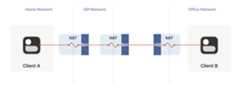
What happens if we build a “double NAT”, by chaining two NATs in front of one of our machines?
In this example, not much of interest happens. Packets from client Ago through two different layers of NAT on their way to theinternet. But the outcome is the same as it was with multiple layersof stateful firewalls: the extra layer is invisible to everyone, andour other techniques will work fine regardless of how many layersthere are. All that matters is the behavior of the “last” layer beforethe internet, because that’s the one that our peer has to find a waythrough.
The big thing that breaks is our port mapping protocols. They act uponthe layer of NAT closest to the client, whereas the one we need toinfluence is the one furthest away. You can still use the port mappingprotocols, but you’ll get anip:port in the “middle” network, whichyour remote peer cannot reach. Unfortunately, none of the protocolsgive you enough information to find the “next NAT up” to repeat theprocess there, although you could try your luck with a traceroute andsome blind requests to the next few hops.
Breaking port mapping protocols is the reason why the internet is sofull of warnings about the evils of double-NAT, and how you shouldbend over backwards to avoid them. But in fact, double-NAT is entirelyinvisible to most internet-using applications, because mostapplications don’t try to do this kind of explicit NAT traversal.
I’m definitely not saying that youshould set up a double-NAT inyour network. Breaking the port mapping protocols will degrademultiplayer on many video games, and will likely strip IPv6 from yournetwork, which robs you of some very good options for NAT-freeconnectivity. But, if circumstances beyond your control force you intoa double-NAT, and you can live with the downsides, most things willstill work fine.
Which is a good thing, because you know what circumstances beyond yourcontrol force you to double-NAT? Let’s talk carrier-grade NAT.
Concerning CGNATs
Even with NATs to stretch the supply of IPv4 addresses, we’restillrunning out, and ISPs can no longer afford to give one entire publicIP address to every home on their network. To work around this, ISPsapply SNAT recursively: your home router SNATs your devices to an“intermediate” IP address, and further out in the ISP’s network asecond layer of NAT devices map those intermediate IPs onto a smallernumber of public IPs. This is “carrier-grade NAT”, or CGNAT for short.
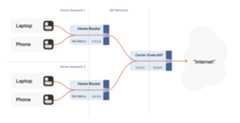

How do we connect two peers who are behind the same CGNAT, but different home NATs within?
Carrier-grade NAT is an important development for NAT traversal. Priorto CGNAT, enterprising users could work around NAT traversaldifficulties by manually configuring port forwarding on their homerouters. But you can’t reconfigure the ISP’s CGNAT! Now even powerusers have to wrestle with the problems NATs pose.
The good news: this is a run of the mill double-NAT, and so as wecovered above it’s mostly okay. Some stuff won’t work as well as itcould, but things work well enough that ISPs can charge money forit. Aside from the port mapping protocols, everything from our currentbag of tricks works fine in a CGNAT world.
We do have to overcome a new challenge, however: how do we connect twopeers who are behind the same CGNAT, but different home NATs within?That’s how we set up peers A and B in the diagram above.
The problem here is that STUN doesn’t work the way we’d like. We’dlike to find out ourip:port on the “middle network”, because it’seffectively playing the role of a miniature internet to our twopeers. But STUN tells us what ourip:port is from the STUN server’spoint of view, and the STUN server is out on the internet, beyond theCGNAT.
If you’re thinking that port mapping protocols can help us here,you’re right! If either peer’s home NAT supports one of the portmapping protocols, we’re happy, because we have anip:port thatbehaves like an un-NATed server, and connecting istrivial. Ironically, the fact that double NAT “breaks” the portmapping protocols helps us! Of course, we still can’t count on theseprotocols helping us out, doubly so because CGNAT ISPs tend to turnthem off in the equipment they put in homes in order to avoid softwaregetting confused by the “wrong” results they would get.
But what if we don’t get lucky, and can’t map ports on our NATs? Let’sgo back to our STUN-based technique and see what happens. Both peersare behind the same CGNAT, so let’s say that STUN tells us that peer Ais2.2.2.2:1234, and peer B is2.2.2.2:5678.
The question is: what happens when peer A sends a packet to2.2.2.2:5678? We might hope that the following takes place in theCGNAT box:
Apply peer A’s NAT mapping, rewrite the packet to be from
2.2.2.2:1234andto2.2.2.2:5678.Notice that
2.2.2.2:5678matches peer B’sincoming NAT mapping, rewritethe packet to be from2.2.2.2:1234and to peer B’s private IP.Send the packet on to peer B, on the “internal” interface rather than offtowards the internet.
This behavior of NATs is called hairpinning, and with all thisdramatic buildup you won’t be surprised to learn that hairpinningworks on some NATs and not others.
In fact, a great many otherwise well-behaved NAT devices don’t supporthairpinning, because they make assumptions like “a packet from myinternal network to a non-internal IP address will always flowoutwards to the internet”, and so end up dropping packets as they tryto turn around within the router. These assumptions might even bebaked into routing silicon, where it’s impossible to fix without newhardware.
Hairpinning, or lack thereof, is a trait of all NATs, not justCGNATs. In most cases, it doesn’t matter, because you’d expect two LANdevices to talk directly to each other rather than hairpin throughtheir default gateway. And it’s a pity that it usually doesn’t matter,because that’s probably why hairpinning is commonly broken.
But once CGNAT is involved, hairpinning becomes vital toconnectivity. Hairpinning lets you apply the same tricks that you usefor internet connectivity, without worrying about whether you’rebehind a CGNAT. If both hairpinning and port mapping protocols fail,you’re stuck with relaying.
Ideally IPv6, NAT64 notwithstanding
By this point I expect some of you are shouting at your screens thatthe solution to all this nonsense is IPv6. All this is happeningbecause we’re running out of IPv4 addresses, and we keep piling onNATs to work around that. A much simpler fix would be to not have an IPaddress shortage, and make every device in the world reachable withoutNATs. Which is exactly what IPv6 gets us.
And you’re right! Sort of. It’s true that in an IPv6-only world, allof this becomes much simpler. Not trivial, mind you, because we’restill stuck with stateful firewalls. Your office workstation may havea globally reachable IPv6 address, but I’ll bet there’s still acorporate firewall enforcing “outbound connections only” between youand the greater internet. And on-device firewalls are still there,enforcing the same thing.
So, we still need the firewall traversal stuff from the start of thearticle, and a side channel so that peers can know whatip:port totalk to. We’ll probably also still want fallback relays that use awell-like protocol like HTTP, to get out of networks that blockoutbound UDP. But we can get rid of STUN, the birthday paradox trick,port mapping protocols, and all the hairpinning bumf. That’s muchnicer!
The big catch is that we currently don’t have an all-IPv6 world. Wehave a world that’s mostly IPv4, andabout 33% IPv6. Those34% are very unevenly distributed, so a particular set of peers couldbe 100% IPv6, 0% IPv6, or anywhere in between.
What this means, unfortunately, is that IPv6 isn’tyet the solutionto our problems. For now, it’s just an extra tool in our connectivitytoolbox. It’ll work fantastically well with some pairs of peers, andnot at all for others. If we’re aiming for “connectivity no matterwhat”, we have to also do IPv4+NAT stuff.
Meanwhile, the coexistence of IPv6 and IPv4 introduces yet another newscenario we have to account for: NAT64 devices.

So far, the NATs we’ve looked at have been NAT44: they translate IPv4addresses on one side to different IPv4 addresses on the otherside. NAT64, as you might guess, translates between protocols. IPv6 onthe internal side of the NAT becomes IPv4 on the externalside. Combined with DNS64 to translate IPv4 DNS answers into IPv6, youcan present an IPv6-only network to the end device, while still givingaccess to the IPv4 internet.
(Incidentally, you can extend this naming scheme indefinitely. Therehave been some experiments with NAT46; you could deploy NAT66 if youenjoy chaos; and some RFCs use NAT444 for carrier-grade NAT.)
This works fine if you only deal in DNS names. If you connect togoogle.com, turning that into an IP address involves the DNS64apparatus, which lets the NAT64 get involved without you being any thewiser.
But we care deeply about specific IPs and ports for our NAT andfirewall traversal. What about us? If we’re lucky, our device supportsCLAT (Customer-side translator — from Customer XLAT). CLAT makes theOS pretend that it has direct IPv4 connectivity, using NAT64 behindthe scenes to make it work out. On CLAT devices, we don’t need to doanything special.
CLAT is very common on mobile devices, but very uncommon on desktops,laptops and servers. On those, we have to explicitly do the work CLATwould have done: detect the existence of a NAT64+DNS64 setup, and useit appropriately.
Detecting NAT64+DNS64 is easy: send a DNS request toipv4only.arpa.That name resolves to known, constant IPv4 addresses, and only IPv4addresses. If you get IPv6 addresses back, you know that a DNS64 didsome translation to steer you to a NAT64. That lets you figure outwhat the NAT64 prefix is.
From there, to talk to IPv4 addresses, send IPv6 packets to{NAT64 prefix + IPv4 address}. Similarly, if you receive traffic from{NAT64 prefix + IPv4 address}, that’s IPv4 traffic. Now speak STUNthrough the NAT64 to discover your publicip:port on the NAT64, andyou’re back to the classic NAT traversal problem — albeit with a bitmore work.
Fortunately for us, this is a fairly esoteric corner case. Mostv6-only networks today are mobile operators, and almost all phonessupport CLAT. ISPs running v6-only networks deploy CLAT on the routerthey give you, and again you end up none the wiser. But if you want toget those last few opportunities for connectivity, you’ll have toexplicitly support talking to v4-only peers from a v6-only network aswell.
Integrating it all with ICE
We’re in the home stretch. We’ve covered stateful firewalls, simpleand advanced NAT tricks, IPv4 and IPv6. So, implement all the above,and we’re done!
Except, how do you figure out which tricks to use for a particularpeer? How do you figure out if this is a simple stateful firewallproblem, or if it’s time to bust out the birthday paradox, or if youneed to fiddle with NAT64 by hand? Or maybe the two of you are on thesame Wi-Fi network, with no firewalls and no effort required.
Early research into NAT traversal had you precisely characterize thepath between you and your peer, and deploy a specific set ofworkarounds to defeat that exact path. But as it turned out, networkengineers and NAT box programmers have many inventive ideas, and thatstops scaling very quickly. We need something that involves a bit lessthinking on our part.
Enter the Interactive Connectivity Establishment (ICE) protocol. LikeSTUN and TURN, ICE has its roots in the telephony world, and so theRFC is full of SIP and SDP and signalling sessions and dialing and soforth. However, if you push past that, it also specifies a stunninglyelegant algorithm for figuring out the best way to get a connection.
Ready? The algorithm is: try everything at once, and pick the bestthing that works. That’s it. Isn’t that amazing?
Let’s look at this algorithm in a bit more detail. We’re going todeviate from the ICE spec here and there, so if you’re trying toimplement an interoperable ICE client, you should go readRFC8445 and implement that. We’ll skip all thetelephony-oriented stuff to focus on the core logic, and suggest a fewplaces where you have more degrees of freedom than the ICE specsuggests.
To communicate with a peer, we start by gathering a list of candidateendpoints for our local socket. A candidate is anyip:port thatour peer might, perhaps, be able to use in order to speak to us. Wedon’t need to be picky at this stage, the list should include atleast:
IPv6
ip:portsIPv4 LAN
ip:portsIPv4 WAN
ip:portsdiscovered by STUN (possibly via a NAT64 translator)IPv4 WAN
ip:portallocated by a port mapping protocolOperator-provided endpoints (e.g. for statically configured port forwards)
Then, we swap candidate lists with our peer through the side channel,and start sending probe packets at each others’ endpoints. Again, atthis point you don’t discriminate: if the peer provided you with 15endpoints, you send “are you there?” probes to all 15 of them.
These packets are pulling double duty. Their first function is to actas the packets that open up the firewalls and pierce the NATs, likewe’ve been doing for this entire article. But the other is to act as ahealth check. We’re exchanging (hopefully authenticated) “ping” and“pong” packets, to check if a particular path works end to end.
Finally, after some time has passed, we pick the “best” (according tosome heuristic) candidate path that was observed to work, and we’redone.
The beauty of this algorithm is that if your heuristic is right,you’ll always get an optimal answer. ICE has you score your candidatesahead of time (usually: LAN > WAN > WAN+NAT), but it doesn’t have tobe that way. Starting with v0.100.0, Tailscale switched from ahardcoded preference order to round-trip latency, which tends toresult in the same LAN > WAN > WAN+NAT ordering. But unlike staticordering, we discover which “category” a path falls into organically,rather than having to guess ahead of time.
The ICE spec structures the protocol as a “probe phase” followed by an“okay let’s communicate” phase, but there’s no reason youneed tostrictly order them. In Tailscale, we upgrade connections on the flyas we discover better paths, and all connections start out with DERPpreselected. That means you can use the connection immediately throughthe fallback path, while path discovery runs in parallel. Usually,after a few seconds, we’ll have found a better path, and yourconnection transparently upgrades to it.
One thing to be wary of is asymmetric paths. ICE goes to some effortto ensure that both peers have picked the same network path, so thatthere’s definite bidirectional packet flow to keep all the NATs andfirewalls open. You don’t have to go to the same effort, but youdohave to ensure that there’s bidirectional traffic along all pathsyou’re using. That can be as simple as continuing to send ping/pongprobes periodically.
To be really robust, you also need to detect that your currentlyselected path has failed (say, because maintenance caused your NAT’sstate to get dumped on the floor), and downgrade to another path. Youcan do this by continuing to probe all possible paths and keep a setof “warm” fallbacks ready to go, but downgrades are rare enough thatit’s probably more efficient to fall all the way back to your relay oflast resort, then restart path discovery.
Finally, we should mention security. Throughout this article, I’veassumed that the “upper layer” protocol you’ll be running over thisconnection brings its own security (QUIC has TLS certs, WireGuard hasits own public keys…). If that’s not the case, you absolutely needto bring your own. Once you’re dynamically switching paths at runtime,IP-based security becomes meaningless (not that it was worth much inthe first place), and youmust have at least end-to-endauthentication.
If you have security for your upper layer, strictly speaking it’s okayif your ping/pong probes are spoofable. The worst that can happen isthat an attacker can persuade you to relay your traffic throughthem. In the presence of e2e security, that’s not ahuge deal(although obviously it depends on your threat model). But for goodmeasure, you might as well authenticate and encrypt the path discoverypackets as well. Consult your local application security engineer forhow to do that safely.
Concluding our connectivity chat
At last, we’re done. If you implement all of the above, you’ll havestate of the art NAT traversal software that can get directconnections established in the widest possible array ofsituations. And you’ll have your relay network to pick up the slackwhen traversal fails, as it likely will for a long tail of cases.
This is all quite complicated! It’s one of those problems that’s funto explore, but quite fiddly to get right, especially if you startchasing the long tail of opportunities for just that little bit moreconnectivity.
The good news is that, once you’ve done it, you have something of asuperpower: you get to explore the exciting and relativelyunder-explored world of peer-to-peer applications. So many interestingideas for decentralized software fall at the first hurdle, when itturns out that talking to each other on the internet is harder thanexpected. But now you know how to get past that, so go build coolstuff!
Here’s a parting “TL;DR” recap: For robust NAT traversal, you needthe following ingredients:
A UDP-based protocol to augment
Direct access to a socket in your program
A communication side channel with your peers
A couple of STUN servers
A network of fallback relays (optional, but highly recommended)
Then, you need to:
Enumerate all the
ip:portsfor your socket on your directlyconnected interfacesQuery STUN servers to discover WAN
ip:portsand the “difficulty”of your NAT, if anyTry using the port mapping protocols to find more WAN
ip:portsCheck for NAT64 and discover a WAN
ip:portthrough that as well,if applicableExchange all those
ip:portswith your peer through your sidechannel, along with some cryptographic keys to secure everything.Begin communicating with your peer through fallback relays(optional, for quick connection establishment)
Probe all of your peer’s
ip:portsfor connectivity and ifnecessary/desired, also execute birthday attacks to get throughharder NATsAs you discover connectivity paths that are better than the oneyou’re currently using, transparently upgrade away from the previouspaths.
If the active path stops working, downgrade as needed to maintainconnectivity.
Make sure everything is encrypted and authenticated end-to-end.
Author
 David Anderson
Author
David Anderson


