Configuring Neovim for Swift Development
Neovim is a modern reimplementation ofVim, a popular terminal-based texteditor.Neovim adds new features like asynchronous operations and powerful Lua bindingsfor a snappy editing experience, in addition to the improvementsVim brings tothe originalVi editor.
This article walks you through configuring Neovim for Swift development,providing configurations for various plugins to build a working Swift editingexperience.The configuration files are built up step by step and the end of the article contains thefully assembled versions of those files.It is not a tutorial on how to use Neovim and assumes some familiaritywith modal text editors likeNeovim,Vim, orVi.We are also assuming that you have already installed a Swift toolchain on yourcomputer. If not, please see theSwift installation instructions.
Although the article references Ubuntu 22.04, the configuration itself works onany operating system where a recent version of Neovim and a Swift toolchain isavailable.
Basic setup and configuration includes:
- Installing Neovim.
- Installing
lazy.nvimto manage our plugins. - Configuring the SourceKit-LSP server.
- Setting up Language-Server-driven code completion withnvim-cmp.
- Setting up snippets withLuaSnip.
The following sections are provided to help guide you through the setup:
- Prerequisites
- Package Management
- Language Server Support
- Code Completion
- Snippets
- Fully Assembled Configuration Files
Tip: If you already have Neovim, Swift, and a package manager installed, you can skip to setting upLanguage Server support.
Note: If you are bypassing thePrerequisites section, make sure yourcopy of Neovim is version v0.9.4 or higher, or you may experience issues with someof the Language Server Protocol (LSP) Lua APIs.
Prerequisites
To get started, you’ll need to install Neovim. The LuaAPIs exposed by Neovim are under rapid development. We will want to takeadvantage of the recent improvements in the integrated support for LanguageServer Protocol (LSP), so we will need a fairly recent versionof Neovim.
I’m running Ubuntu 22.04 on anx86_64 machine. Unfortunately, theversion of Neovim shipped in the Ubuntu 22.04apt repository is too old tosupport many of the APIs that we will be using.
For this install, I usedsnap to install Neovim v0.9.4.Ubuntu 24.04 has a new enough version of Neovim, so a normalapt install neovim invocation will work.For installing Neovim on other operating systems and Linux distributions,please see theNeovim install page.
$sudosnapinstallnvim--classic $nvim--versionNVIM v0.9.4Build type: RelWithDebInfoLuaJIT 2.1.1692716794Compilation: /usr/bin/cc -O2 -g -Og -g -Wall -Wextra -pedantic -Wno-unused-pa... system vimrc file: "$VIM/sysinit.vim" fall-back for $VIM: "/usr/share/nvim"Run :checkhealth for more infoGetting Started
We have working copies of Neovim and Swift on our path. While we can start withavimrc file, Neovim is transitioning from using vimscript to Lua. Luais easier to find documentation for since it’s an actual programming language,tends to run faster, and pulls your configuration out of the main runloop soyour editor stays nice and snappy.You can still use avimrc with vimscript, but we’ll use Lua.
The main Neovim configuration file goes in~/.config/nvim. The other Lua filesgo in~/.config/nvim/lua. Go ahead and create aninit.lua now;
$mkdir-p ~/.config/nvim/lua&&cd ~/.config/nvim $nvim init.luaNote: The examples below contain a GitHub link to the plugin to help you readily access the documentation. You can also explore the plugin itself.
Packaging withlazy.nvim
While it’s possible to set everything up manually, using a package manager helpskeep your packages up-to-date, and ensures that everything is installedcorrectly when copy your configuration to a new computer. Neovim also has abuilt-in plugin manager, but I have foundlazy.nvim to work well.
We will start with a little bootstrapping script to installlazy.nvim if itisn’t installed already, add it to our runtime path, and finally configure ourpackages.
At the top of yourinit.lua write:
locallazypath=vim.fn.stdpath("data").."/lazy/lazy.nvim"ifnotvim.loop.fs_stat(lazypath)thenvim.fn.system({"git","clone","--filter=blob:none","https://github.com/folke/lazy.nvim.git","--branch=stable",lazypath})endvim.opt.rtp:prepend(lazypath)This snippet cloneslazy.nvim if it doesn’t already exist, and then adds it to theruntime path. Now we initializelazy.nvim and tell it where to look for the pluginspecs.
require("lazy").setup("plugins")This configureslazy.nvim to look in aplugins/ directory under ourlua/directory for each plugin. We’ll also want a place to put our own non-pluginrelated configurations, so we’ll stick it inconfig/. Go ahead and createthose directories now.
$mkdirlua/plugins lua/configSeelazy.nvim Configuration for details on configuringlazy.nvim.

Note that your configuration won’t look exactly like this.We have only installedlazy.nvim, so that is the only plugin that is listed onyour configuration at the moment.That’s not very exciting to look at, so I’ve added a few additional plugins tomake it look more appealing.
To check that it’s working:
Launch Neovim.
You should first see an error saying that there were no specs found formodule plugins. This just means that there aren’t any plugins.
Press Enter and type,
:Lazy.lazy.nvim lists the plugins installed. There should only be one right now:“lazy.nvim”. This islazy.nvim tracking and updating itself.
We can manage our plugins through thelazy.nvim menu.
- Pressing
Iwill install new plugins. - Pressing
Uwill update installed plugins. - Pressing
Xwill delete any plugins thatlazy.nvim installed, but areno longer tracked in your configuration.
- Pressing
Language Server Support
Language servers respond to editor requests providing language-specific support.Neovim has support for Language Server Protocol (LSP) built-in, so you don’tneed an external package for LSP, but adding a configuration for each LSP servermanually is a lot of work. Neovim has a package for configuring LSP servers,nvim-lspconfig.
Go ahead and create a new file underlua/plugins/lsp.lua. In it, we’ll startby adding the following snippet.
return{{"neovim/nvim-lspconfig",config=function()locallspconfig=require('lspconfig')lspconfig.sourcekit.setup{}end,}}While this gives us LSP support through SourceKit-LSP, there are no keybindings,so it’s not very practical. Let’s hook those up now.
We’ll set up an auto command that fires when an LSP server attaches in theconfigfunction under where we set up thesourcekit server. The keybindings areapplied to all LSP servers so you end up with a consistent experience acrosslanguages.
config=function()locallspconfig=require('lspconfig')lspconfig.sourcekit.setup{}vim.api.nvim_create_autocmd('LspAttach',{desc='LSP Actions',callback=function(args)vim.keymap.set('n','K',vim.lsp.buf.hover,{noremap=true,silent=true})vim.keymap.set('n','gd',vim.lsp.buf.definition,{noremap=true,silent=true})end,})end,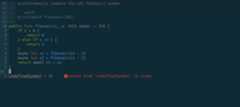
I’ve created a little example Swift package that computesFibonaccinumbers asynchronously.Pressingshift +k on one of the references to thefibonacci functionshows the documentation for that function, along with the function signature.The LSP integration is also showing that we have an error in the code.
File Updating
SourceKit-LSP increasingly relies on the editor informing the server whencertain files change. This need is communicated throughdynamic registration.You don’t have to understand what that means, but Neovim doesn’t implementdynamic registration. You’ll notice this when you update your package manifest,or add new files to yourcompile_commands.json file and LSP doesn’t work withoutrestarting Neovim.
Instead, we know that SourceKit-LSP needs this functionality, so we’ll enable itstatically. We’ll update oursourcekit setup configuration to manually set thedidChangeWatchedFiles capability.
lspconfig.sourcekit.setup{capabilities={workspace={didChangeWatchedFiles={dynamicRegistration=true,},},},}If you’re interested in reading more about this issue, the conversations in thefollowing issues describe the issue in more detail:
Code Completion
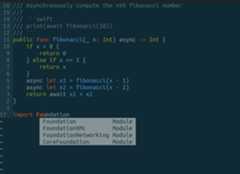
We will usenvim-cmp to act as the code completion mechanism.We’ll start by tellinglazy.nvim to download the package and to load it lazily when we enter insertmode since you don’t need code completion if you’re not editing the file.
-- lua/plugins/codecompletion.luareturn{{"hrsh7th/nvim-cmp",version=false,event="InsertEnter",},}Next, we’ll configure some completion sources to provide code completion results.nvim-cmp doesn’t come with completion sources, those are additional plugins.For this configuration, I want results based on LSP, filepath completion, andthe text in my current buffer. For more, thenvim-cmp Wiki has alist ofsources.
To start, we will telllazy.nvim about the new plugins and thatnvim-cmp dependson them.This ensures thatlazy.nvim will initialize each of them whennvim-cmp is loaded.
-- lua/plugins/codecompletion.luareturn{{"hrsh7th/nvim-cmp",version=false,event="InsertEnter",dependencies={"hrsh7th/cmp-nvim-lsp","hrsh7th/cmp-path","hrsh7th/cmp-buffer",},},{"hrsh7th/cmp-nvim-lsp",lazy=true},{"hrsh7th/cmp-path",lazy=true},{"hrsh7th/cmp-buffer",lazy=true},}Now we need to configurenvim-cmp to take advantage of the code completionsources.Unlike many other plugins,nvim-cmp hides many of its inner-workings, soconfiguring it is a little different from other plugins. Specifically, you’llnotice the differences around setting key-bindings. We start out by requiringthe module from within its own configuration function and will call the setupfunction explicitly.
{"hrsh7th/nvim-cmp",version=false,event="InsertEnter",dependencies={"hrsh7th/cmp-nvim-lsp","hrsh7th/cmp-path","hrsh7th/cmp-buffer",},config=function()localcmp=require('cmp')localopts={-- Where to get completion results fromsources=cmp.config.sources{{name="nvim_lsp"},{name="buffer"},{name="path"},},-- Make 'enter' key select the completionmapping=cmp.mapping.preset.insert({["<CR>"]=cmp.mapping.confirm({select=true})}),}cmp.setup(opts)end,},Using thetab key to select completions is a fairly popular option, so we’llgo ahead and set that up now.
mapping=cmp.mapping.preset.insert({["<CR>"]=cmp.mapping.confirm({select=true}),["<tab>"]=cmp.mapping(function(original)ifcmp.visible()thencmp.select_next_item()-- run completion selection if completingelseoriginal()-- run the original behavior if not completingendend,{"i","s"}),["<S-tab>"]=cmp.mapping(function(original)ifcmp.visible()thencmp.select_prev_item()elseoriginal()endend,{"i","s"}),}),Pressingtab while the completion menu is visible will select the nextcompletion andshift +tab will select the previous item. The tab behaviorfalls back on whatever pre-defined behavior was there originally if the menuisn’t visible.
Snippets
Snippets are a great way to improve your workflow by expanding short pieces oftext into anything you like. Lets hook those up now. We’ll useLuaSnip as oursnippet plugin.
Create a new file in your plugins directory for configuring the snippet plugin.
-- lua/plugins/snippets.luareturn{{'L3MON4D3/LuaSnip',conifg=function(opts)require('luasnip').setup(opts)require('luasnip.loaders.from_snipmate').load({paths="./snippets"})end,},}Now we’ll wire the snippet expansions intonvim-cmp. First, we’ll addLuaSnip as a dependency ofnvim-cmp to ensure that it gets loaded beforenvim-cmp. Then we’ll wire it into the tab key expansion behavior.
{"hrsh7th/nvim-cmp",version=false,event="InsertEnter",dependencies={"hrsh7th/cmp-nvim-lsp","hrsh7th/cmp-path","hrsh7th/cmp-buffer","L3MON4D3/LuaSnip",},config=function()localcmp=require('cmp')localluasnip=require('cmp')localopts={-- Where to get completion results fromsources=cmp.config.sources{{name="nvim_lsp"},{name="buffer"},{name="path"},},mapping=cmp.mapping.preset.insert({-- Make 'enter' key select the completion["<CR>"]=cmp.mapping.confirm({select=true}),-- Super-tab behavior["<tab>"]=cmp.mapping(function(original)ifcmp.visible()thencmp.select_next_item()-- run completion selection if completingelseifluasnip.expand_or_jumpable()thenluasnip.expand_or_jump()-- expand snippetselseoriginal()-- run the original behavior if not completingendend,{"i","s"}),["<S-tab>"]=cmp.mapping(function(original)ifcmp.visible()thencmp.select_prev_item()elseifluasnip.expand_or_jumpable()thenluasnip.jump(-1)elseoriginal()endend,{"i","s"}),}),snippets={expand=function(args)luasnip.lsp_expand(args)end,},}cmp.setup(opts)end,},Now our tab-key is thoroughly overloaded in super-tab fashion.
- If the completion window is open, pressing tab selects the next item in thelist.
- If you press tab over a snippet, the snippet will expand, and continuing topress tab moves the cursor to the next selection point.
- If you’re neither code completing nor expanding a snippet, it will behavelike a normal
tabkey.
Now we need to write up some snippets.LuaSnip supports several snippet formats,including a subset of the popularTextMate,Visual Studio Code snippet format,and its ownLua-based API.
Here are some snippets that I’ve found to be useful:
snippet pub "public access control" public $0snippet priv "private access control" private $0snippet if "if statement" if $1 { $2 }$0snippet ifl "if let" if let $1 = ${2:$1} { $3 }$0snippet ifcl "if case let" if case let $1 = ${2:$1} { $3 }$0snippet func "function declaration" func $1($2) $3{ $0 }snippet funca "async function declaration" func $1($2) async $3{ $0 }snippet guard guard $1 else { $2 }$0snippet guardl guard let $1 else { $2 }$0snippet main @main public struct ${1:App} { public static func main() { $2 } }$0Another popular snippet plugin worth mentioning isUltiSnips which allows you to use inlinePython while defining the snippet, allowing you to write some very powerfulsnippets.
Conclusion
Swift development with Neovim is a solid experience once everything isconfigured correctly. There are thousands of plugins for you to explore, thisarticle gives you a solid foundation for building up your Swift developmentexperience in Neovim.
Files
Here are the files for this configuration in their final form.
-- init.lualocallazypath=vim.fn.stdpath("data").."/lazy/lazy.nvim"ifnotvim.loop.fs_stat(lazypath)thenvim.fn.system({"git","clone","--filter=blob:none","https://github.com/folke/lazy.nvim.git","--branch=stable",lazypath})endvim.opt.rtp:prepend(lazypath)require("lazy").setup("plugins",{ui={icons={cmd="",config="",event="",ft="",init="",keys="",plugin="",runtime="",require="",source="",start="",task="",lazy="",},},})vim.opt.wildmenu=truevim.opt.wildmode="list:longest,list:full"-- don't insert, show options-- line numbersvim.opt.nu=truevim.opt.rnu=true-- textwrap at 80 colsvim.opt.tw=80-- set solarized colorscheme.-- NOTE: Uncomment this if you have installed solarized, otherwise you'll see-- errors.-- vim.cmd.background = "dark"-- vim.cmd.colorscheme("solarized")-- vim.api.nvim_set_hl(0, "NormalFloat", { bg = "none" })-- lua/plugins/codecompletion.luareturn{{"hrsh7th/nvim-cmp",version=false,event="InsertEnter",dependencies={"hrsh7th/cmp-nvim-lsp","hrsh7th/cmp-path","hrsh7th/cmp-buffer",},config=function()localcmp=require('cmp')localluasnip=require('luasnip')localopts={sources=cmp.config.sources{{name="nvim_lsp",},{name="path",},{name="buffer",},},mapping=cmp.mapping.preset.insert({["<CR>"]=cmp.mapping.confirm({select=true}),["<tab>"]=cmp.mapping(function(original)print("tab pressed")ifcmp.visible()thenprint("cmp expand")cmp.select_next_item()elseifluasnip.expand_or_jumpable()thenprint("snippet expand")luasnip.expand_or_jump()elseprint("fallback")original()endend,{"i","s"}),["<S-tab>"]=cmp.mapping(function(original)ifcmp.visible()thencmp.select_prev_item()elseifluasnip.expand_or_jumpable()thenluasnip.jump(-1)elseoriginal()endend,{"i","s"}),})}cmp.setup(opts)end,},{"hrsh7th/cmp-nvim-lsp",lazy=true},{"hrsh7th/cmp-path",lazy=true},{"hrsh7th/cmp-buffer",lazy=true},}-- lua/plugins/lsp.luareturn{{"neovim/nvim-lspconfig",config=function()locallspconfig=require('lspconfig')lspconfig.sourcekit.setup{capabilities={workspace={didChangeWatchedFiles={dynamicRegistration=true,},},},}vim.api.nvim_create_autocmd('LspAttach',{desc="LSP Actions",callback=function(args)vim.keymap.set("n","K",vim.lsp.buf.hover,{noremap=true,silent=true})vim.keymap.set("n","gd",vim.lsp.buf.definition,{noremap=true,silent=true})end,})end,},}-- lua/plugins/snippets.luareturn{{'L3MON4D3/LuaSnip',lazy=false,config=function(opts)localluasnip=require('luasnip')luasnip.setup(opts)require('luasnip.loaders.from_snipmate').load({paths="./snippets"})end,}}# snippets/swift.snippetssnippet pub "public access control" public $0snippet priv "private access control" private $0snippet if "if statement" if $1 { $2 }$0snippet ifl "if let" if let $1 = ${2:$1} { $3 }$0snippet ifcl "if case let" if case let $1 = ${2:$1} { $3 }$0snippet func "function declaration" func $1($2) $3{ $0 }snippet funca "async function declaration" func $1($2) async $3{ $0 }snippet guard guard $1 else { $2 }$0snippet guardl guard let $1 else { $2 }$0snippet main @main public struct ${1:App} { public static func main() { $2 } }$0