
![[Experimental]](/image.pl?url=https%3a%2f%2fstrohne.github.io%2fvolker%2freference%2ffigures%2flifecycle-experimental.svg&f=jpg&w=240)
Arguments
- data
A tibble containing the dataset.
- codes
A tibble incodebook format.
- cols
A tidy column selection. Set to NULL (default) to apply to all columnsfound in the codebook.Restricting the columns is helpful when you want to set value labels.In this case, provide a tibble with value_name and value_label columnsand specify the columns that should be modified.
- items
If TRUE, column labels will be retrieved from the codes (the default).If FALSE, no column labels will be changed.Alternatively, a named list of column names with their labels.
- values
If TRUE, value labels will be retrieved from the codes (default).If FALSE, no value labels will be changed.Alternatively, a named list of value names with their labels.In this case, use the cols-Parameter to define which columns should be changed.
Details
You can either provide a data frame incodebook format to the codes-parameteror provide named lists to the items- or values-parameter.
When working with a codebook in the codes-parameter:
Change column labels by providing the columns item_name and item_label in the codebook.Set the items-parameter to TRUE (the default setting).
Change value labels by providing the columns value_name and value_label in the codebook.To tell which columns should be changed, you can either use the item_name column in the codebookor use the cols-parameter.For factor values, the levels and their order are retrieved from the value_label column.For coded values, labels are retrieved from both the columns value_name and value_label.
When working with lists in the items- or values-parameter:
Change column labels by providing a named list to the items-parameter. The list contains labels named by the columns.Set the parameters codes and cols to NULL (their default value).
Change value labels by providing a named list to the values-parameter. The list contains labels named by the values.Provide the column selection in the cols-parameter.Set the codes-parameter to NULL (its default value).
Examples
library(volker)# Set column labels using the items-parametervolker::chatgpt%>%labs_apply( items=list("cg_adoption_advantage_01"="Allgemeine Vorteile","cg_adoption_advantage_02"="Finanzielle Vorteile","cg_adoption_advantage_03"="Vorteile bei der Arbeit","cg_adoption_advantage_04"="Macht mehr Spaß"))%>%tab_metrics(starts_with("cg_adoption_advantage_"))#>#>#> |Item | min| q1| median| q3| max| mean| sd| n|#> |:-----------------------|---:|--:|------:|--:|---:|----:|---:|--:|#> |Allgemeine Vorteile | 1| 3| 4| 4| 5| 3.5| 1.0| 99|#> |Finanzielle Vorteile | 1| 2| 3| 4| 5| 2.7| 1.2| 99|#> |Vorteile bei der Arbeit | 1| 3| 4| 4| 5| 3.6| 1.1| 99|#> |Macht mehr Spaß | 1| 3| 4| 4| 5| 3.5| 1.0| 99|#>#> n=99. 2 missing case(s) omitted.#># Set value labels using the values-parametervolker::chatgpt%>%labs_apply( cols=starts_with("cg_adoption"), values=list("1"="Stimme überhaupt nicht zu","2"="Stimme nicht zu","3"="Unentschieden","4"="Stimme zu","5"="Stimme voll und ganz zu"))%>%plot_metrics(starts_with("cg_adoption"))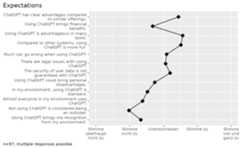 #> In the plot, 4 missing case(s) omitted.