I have using Eclipse Luna win32.x86_64 runing with Java 8.
Here from theHelp Menu > About > Installation Detail > Configuration Tab:
java.runtime.version=1.8.0_05-b13java.version=1.8.0_05I have created new plug-in project, requestingJavaSE-1.8 as Execution Environment:
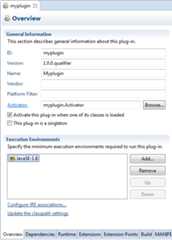
In themyplugin/META-INF/MANIFEST.MF file I have of course:
Bundle-RequiredExecutionEnvironment: JavaSE-1.8I use this plugin in a product file. When I try to validate it, I get following error:
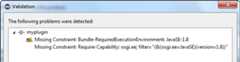
Of course if I start the product, I get:
!ENTRY org.eclipse.osgi 2 0 2014-07-10 08:14:22.042!MESSAGE One or more bundles are not resolved because the following root constraints are not resolved:!SUBENTRY 1 org.eclipse.osgi 2 0 2014-07-10 08:14:22.043!MESSAGE Bundle update@********/myplugin/ was not resolved.!SUBENTRY 2 myplugin 2 0 2014-07-10 08:14:22.044!MESSAGE Missing required capability Require-Capability: osgi.ee; filter="(&(osgi.ee=JavaSE)(version=1.8))".I have tried to verify a lot:
Preferences > Java > Installed JREs
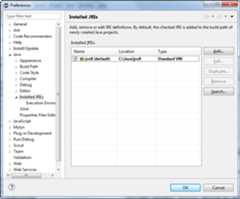
Preferences > Java > Installed JREs > Excution Environments
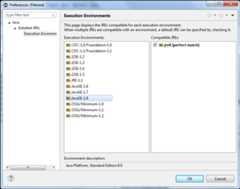
Preferences > Java > Compiler: JDK Compliance Compiler compliance level
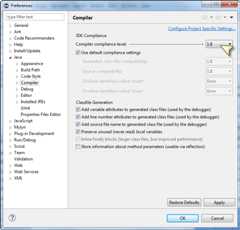
When I start the product, I checked in theLaunching tab that I use the jre8 as execution environment.
I have even tried to change theJava Runtime Environment in theRun Configurations Dialog:

I have tried different settings. None of them works.
What is wrong?
Is it a known issue?

8 Answers8
The error means that your bundle has aRequire-Capability: osgi.ee; filter="(&(osgi.ee=JavaSE)(version=1.8))" entry in its manifest. So this means the bundle will only start when there is a bundle that provides this capability.
In case of the osgi.ee capability it is the OSGi framework (equinox) that should provide this capability. Apparently it does not do this.
So one approach would be to remove the header from you bundle Manifest.The other would be to make equinox export the capability. Perhaps you could simply try with the newest equinox version. Not sure if this helps though.You could also try to set the framework property (using -D):org.osgi.framework.system.capabilities=osgi.ee; osgi.ee="JavaSE";version:List="1.0,1.1,1.2,1.3,1.4,1.5,1.6,1.7,1.8"
See


3 Comments


Sharing my experience on retrofitting a target platform based on Juno 3.8.2 to run JUnit plugin tests withBundle-RequiredExecutionEnvironment ("BREE")JavaSE-1.8:
Failed approach 1: Fragment
Creating a fragment toorg.eclipse.osgi with aProvide-Capability header in the manifest:
Manifest-Version: 1.0Bundle-ManifestVersion: 2Bundle-Name: FrwJava8SupportBundle-SymbolicName: frwJava8SupportBundle-Version: 1.0.0.qualifierFragment-Host: org.eclipse.osgi;bundle-version="3.8.2"Bundle-RequiredExecutionEnvironment: JavaSE-1.7Provide-Capability: osgi.ee;osgi.ee="JavaSE";version:List="1.0,1.1,1.2,1.3,1.4,1.5,1.6,1.7,1.8"This capability was never picked up.
Failed approach 2: Startup parameter
Using-Dorg.osgi.framework.system.capabilities as outlined in Christian's answer.
First of all, the argument must be quoted correctly:
-Dorg.osgi.framework.system.capabilities="osgi.ee; osgi.ee=\"JavaSE\";version:List=\"1.0,1.1,1.2,1.3,1.4,1.5,1.6,1.7,1.8\""This approach might have worked for any other use case other thanpde.junit. I still got this (slightly different) exception:
!MESSAGE Bundle com.XXX.tst.frw.common_1.0.0.qualifier [92] was not resolved.!SUBENTRY 2 com.XXX.tst.frw.common 2 0 2015-04-18 13:43:55.336!MESSAGE Missing Constraint: Bundle-RequiredExecutionEnvironment: JavaSE-1.8!SUBENTRY 1 org.eclipse.osgi 2 0 2015-04-18 13:43:55.336!MESSAGE Bundle com.XXX.tst.frw.common.test_1.0.0.qualifier [101] was not resolved.!SUBENTRY 2 com.XXX.tst.frw.common.test 2 0 2015-04-18 13:43:55.336!MESSAGE Missing host com.XXX.tst.frw.common_1.0.0.!ENTRY org.eclipse.osgi 4 0 2015-04-18 13:43:55.336!MESSAGE Application error!STACK 1java.lang.IllegalArgumentException: Bundle "com.XXX.tst.frw.common" not found. Possible causes include missing dependencies, too restrictive version ranges, or a non-matching required execution environment. at org.eclipse.pde.internal.junit.runtime.RemotePluginTestRunner.getClassLoader(RemotePluginTestRunner.java:77)Working approach 3: Patch Equinox
Patch theorg.eclipse.osgi bundle to include Luna'sJavaSE-1.8.profile.
Copy file
<LUNA>\plugins\org.eclipse.osgi_3.10.1.v20140909-1633.jar\JavaSE-1.8.profileto your target platform bundle pool'sorg.eclipse.osgibundle.
(e.g.<myworkspace>\.metadata\.plugins\org.eclipse.pde.core\.bundle_pool\plugins\org.eclipse.osgi_3.8.2.v20130124-134944.jar\JavaSE-1.8.profile)Reference profile in
profile.list(actually, this seems to be optional):
addJavaSE-1.8.profile,\to.metadata\.plugins\org.eclipse.pde.core\.bundle_pool\plugins\org.eclipse.osgi_3.8.2.v20130124-134944.jar\profile.list
However, this solution requires hosting your own P2 repository containing theorg.eclipse.osgi bundle or applying a patch to every workspace's bundle pool.
Discussion
Still, there exists the possibility to keep BREE at "JavaSE-1.7" that is compatible with the existingorg.eclipse.osgi 3.8.2 version.
I am currently aware of two drawbacks:
- Exporting plugins directly from Eclipse via PDE fails if Java 8 syntax is used in the code (e.g. lambda expressions).
- Log contains compiler errors and compiled result is actually of different size compared to a bundle compiled with JavaSE-1.8 BREE.
Presumably, PDE evaluates BREE and sets compiler source level accordingly which then results in "1.7" for Java 8 sources. It is possible that other PDE features (feature export, product export) might exhibit same problem.
UsingEclipse Tycho, it is possible to manually override the javac source level instead of evaluating a bundle's BREE (to select a JDK to compile with). However, also Tycho still matches the given source level vs. BREE and refuses to compile Java 8 code (tested with Tycho 0.22).
Also, approach 2 will most likely not work with PDE's bundle export, at least I am not aware of any possibility to pass VM arguments.
Update 29.05.2015
We went with approach 3 and successfully patched our target platform to use Java 8 together with Eclipse 3.8.
As we already maintain our own P2 repository with all 3.8-based Eclipse plugins, we needed to:
- create an updated copy of
org.eclipse.osgi(needed to strip signing information from bundle as well) - create a feature patch that patches
org.eclipse.rcpfeature with updatedorg.eclipse.osgibundle - publish new 3.8-based P2 repository to be consumed by our workstations and build server.
Summary
If you maintain your own P2 repository to serve a custom target platform instead of using any Eclipse.org-based update site, it is possible to make Eclipse 3.8 work with Java 8.
References:Eclipse Bug to support osgi.ee

6 Comments


profile.list file was mandatory.

An easy fix is to include org.eclipse.equinox.ds (equinox declarative services). That runtime bundle exports the required osgi.extender and appears to trigger no additional dependencies.

3 Comments


org.eclipse.equinox.event besidesorg.eclipse.equinox.dsAdd Required Plug-ins seems to be broken:bugs.eclipse.org/bugs/show_bug.cgi?id=494913I found a configuration that just works, without much work. You select Java 8 in product file, project settings and build path. The important thing is the manifest file. Here you have to select both Java 8 and Java 7. Here also the order is important. Java 8 has to be on top.
I think the reason why this configuration is working is that the compiler selects the first JRE and so can handle the new syntax of Java 8. The eclipse bundles check if one of the entries is the needed Java 7 and are also satisfied.

1 Comment

I found the problem in the Felix 5.6.10 version that was causing my issue:
"Missing required capability Require-Capability: osgi.ee; filter="(&(osgi.ee=JavaSE)(version=1.8))"
This is the code that creates the problem.It is in the constructor of the ExtensionManager
String pkgextra = "true".equalsIgnoreCase(configProps.getProperty(FelixConstants.USE_PROPERTY_SUBSTITUTION_IN_SYSTEMPACKAGES)) ? Util.getPropertyWithSubs(configProps, FelixConstants.FRAMEWORK_SYSTEMPACKAGES_EXTRA) : configProps.getProperty(FelixConstants.FRAMEWORK_SYSTEMPACKAGES_EXTRA); syspkgs = ((pkgextra == null) || (pkgextra.trim().length() == 0)) ? syspkgs : syspkgs + (pkgextra.trim().startsWith(",") ? pkgextra : "," + pkgextra);changed the last line to:
syspkgs = ((pkgextra == null) || (pkgextra.trim().length() == 0)) ? syspkgs : syspkgs + (pkgextra.trim().startsWith(",") ? pkgextra.substring(1) : pkgextra);the reason it causes a problem is that a little further on in the constructor we find this code:
try{ ManifestParser mp = new ManifestParser( m_logger, m_configMap, m_systemBundleRevision, m_headerMap); List<BundleCapability> caps = aliasSymbolicName(mp.getCapabilities()); caps.add(buildNativeCapabilites()); appendCapabilities(caps);}catch (Exception ex){Without the correction the ManifestParser contructor call throws an exception complaining that an exported capability cannot be blank. That extra comma in the syspkgs made the parser think that some capability was missing.
And once you fail in that try block you don't get your host osgi.ee capabilities added to your framework which means you can'tresolve requests like (&(osgi.ee=JavaSE)(version=1.8))
Just to be clear, this is the specific version I am referring to:
org.apache.felix:org.apache.felix.framework:5.6.10This issue only occurs if you add some extra system capabilities to your configuration like I did. So that might explain why some people see this problem and others don't.
I've applied the patch and the filers are once again working.


Comments
Real and Quick Solution:
"I edited the Plug-ins tab on the Run Configuration and checkedorg.eclipse.equinox.ds and clicked 'Add Required Plug-ins'.THAT FIXED IT."

1 Comment

I got this error in liferay dxp. I had changed liferay workspace and it is working fine.

Comments
I have the same issue: Missing required capability Require-Capability: osgi.ee; filter="(&(osgi.ee=JavaSE)(version=1.8))
I am using Felix 5.6.10
Here's an interesting thing I discovered:I created two test.jar bundles that contain the following MANIFEST.MF
test1.jarManifest-Version: 1.0Bundle-Description: bundle used for testingBundle-SymbolicName: com.phinneyridge.testbundleBundle-Version: 0.0.1Bundle-Name: testbundleBundle-ManifestVersion: 2Require-Capability: osgi.ee=JavaSE; version="1.8"Created-By: 1.8.0_131 (Oracle Corporation)
test2.jar:Manifest-Version: 1.0Bundle-Description: bundle used for testingBundle-SymbolicName: com.phinneyridge.testbundleBundle-Version: 0.0.2Bundle-Name: testbundleBundle-ManifestVersion: 2Require-Capability: osgi.ee;filter:="(&(osgi.ee=JavaSE)(version 1.8))"Created-By: 1.8.0_131 (Oracle Corporation)
As you can see the two bundles only differ in the Bundle-Version and how the required capability is specified.
The result is:test1.jar installs just finetest2.jar produces the missing requirement message when you try to install it.
So there's something about using a filter in the Require-Capability header that doesn't work in my felix osgi framework. Is it not supported, is there something I need to configure to enable filters? It's clearly not because my framework isn't configured for having the required osgi.ee capability (test1.jar works).
Obviously, that means if I correct the Require-Capability header in the faulting bundles, I got a workaround. (Not a good solution if you're installing your bundles from an open repository.)
Comments
Explore related questions
See similar questions with these tags.