Inspired by the question series 'Hidden features of ...', I am curious to hear about your favorite Django tips or lesser known but useful features you know of.
- Please, include only one tip per answer.
- Add Django version requirements if there are any.
55 Answers55
I'm just going to start with a tip from myself :)
Use os.path.dirname() in settings.py to avoid hardcoded dirnames.
Don't hardcode path's in your settings.py if you want to run your project in different locations. Use the following code in settings.py if your templates and static files are located within the Django project directory:
# settings.pyimport osPROJECT_DIR = os.path.dirname(__file__)...STATIC_DOC_ROOT = os.path.join(PROJECT_DIR, "static")...TEMPLATE_DIRS = ( os.path.join(PROJECT_DIR, "templates"),)Credits: I got this tip from the screencast 'Django From the Ground Up'.

14 Comments


j = lambda filename: os.path.join(PROJECT_DIR, filename). Then you just need to typej("static").

wontfix decision.InstallDjango Command Extensions andpygraphviz and then issue the following command to get a really nice looking Django model visualization:
./manage.py graph_models -a -g -o my_project.png4 Comments


Usedjango-annoying'srender_to decorator instead ofrender_to_response.
@render_to('template.html')def foo(request): bars = Bar.objects.all() if request.user.is_authenticated(): return HttpResponseRedirect("/some/url/") else: return {'bars': bars}# equals todef foo(request): bars = Bar.objects.all() if request.user.is_authenticated(): return HttpResponseRedirect("/some/url/") else: return render_to_response('template.html', {'bars': bars}, context_instance=RequestContext(request))Edited to point out that returning an HttpResponse (such as a redirect) will short circuit the decorator and work just as you expect.


10 Comments


There's a set of custom tags I use all over my site's templates. Looking for a way to autoload it (DRY, remember?), I found the following:
from django import templatetemplate.add_to_builtins('project.app.templatetags.custom_tag_module')If you put this in a module that's loaded by default (your main urlconf for instance), you'll have the tags and filters from your custom tag module available in any template, without using{% load custom_tag_module %}.
The argument passed totemplate.add_to_builtins() can be any module path; your custom tag module doesn't have to live in a specific application. For example, it can also be a module in your project's root directory (eg.'project.custom_tag_module').

3 Comments


Virtualenv + Python = life saver if you are working on multiple Django projects and there is a possibility that they all don't depend on the same version of Django/an application.

2 Comments
virtualenv myNewEnv --no-site-packages;. myNewEnv/bin/activate;pip install django; And it just works!Don't hard-code your URLs!
Useurl names instead, and thereverse function to get the URL itself.
When you define your URL mappings, give names to your URLs.
urlpatterns += ('project.application.views' url( r'^something/$', 'view_function', name="url-name" ), ....)Make sure the name is unique per URL.
I usually have a consistent format "project-appplication-view", e.g. "cbx-forum-thread" for a thread view.
UPDATE (shamelessly stealingayaz's addition):
This name can be used in templates with theurl tag.


5 Comments


url tag... His stance is that urls shouldn't be changing anyway (if you want to be friendly to your users).{% url path.to.view.name arg1 arg2 %}docs.djangoproject.com/en/dev/ref/templates/builtins/…reverse like thisenvironment.filters['url'] = django.core.urlresolvers.reverse and you can use it in your templates like so:{{ 'view-name'|url(arg1, arg2)|e }} (the "e" is needed to escape some characters for inclusion in HTML)Usedjango debug toolbar. For example, it allows to view all SQL queries performed while rendering view and you can also view stacktrace for any of them.


Comments
Don't write your own login pages. If you're using django.contrib.auth.
The real, dirty secret is that if you're also using django.contrib.admin, and django.template.loaders.app_directories.load_template_source is in your template loaders,you can get your templates free too!
# somewhere in urls.pyurlpatterns += patterns('django.contrib.auth', (r'^accounts/login/$','views.login', {'template_name': 'admin/login.html'}), (r'^accounts/logout/$','views.logout'),)
1 Comment

Context processors are awesome.
Say you have a different user model and you want to includethat in every response. Instead of doing this:
def myview(request, arg, arg2=None, template='my/template.html'): ''' My view... ''' response = dict() myuser = MyUser.objects.get(user=request.user) response['my_user'] = myuser ... return render_to_response(template, response, context_instance=RequestContext(request))Context processes give you the ability to pass any variable to yourtemplates. I typically put mine in'my_project/apps/core/context.py:
def my_context(request): try: return dict(my_user=MyUser.objects.get(user=request.user)) except ObjectNotFound: return dict(my_user='')In yoursettings.py add the following line to yourTEMPLATE_CONTEXT_PROCESSORS
TEMPLATE_CONTEXT_PROCESSORS = ( 'my_project.apps.core.context.my_context', ...)Now every time a request is made it includes themy_user key automatically.
Alsosignals win.
I wrote a blog post about this a few months ago so I'm just going to cut and paste:
Out of the box Django gives you several signals that areincredibly useful. You have the ability to do things pre andpost save, init, delete, or even when a request is beingprocessed. So lets get away from the concepts anddemonstrate how these are used. Say we’ve got a blog
from django.utils.translation import ugettext_lazy as _class Post(models.Model): title = models.CharField(_('title'), max_length=255) body = models.TextField(_('body')) created = models.DateTimeField(auto_now_add=True)So somehow you want to notify one of the many blog-pingingservices we’ve made a new post, rebuild the most recentposts cache, and tweet about it. Well with signals you havethe ability to do all of this without having to add anymethods to the Post class.
import twitterfrom django.core.cache import cachefrom django.db.models.signals import post_savefrom django.conf import settingsdef posted_blog(sender, created=None, instance=None, **kwargs): ''' Listens for a blog post to save and alerts some services. ''' if (created and instance is not None): tweet = 'New blog post! %s' instance.title t = twitter.PostUpdate(settings.TWITTER_USER, settings.TWITTER_PASSWD, tweet) cache.set(instance.cache_key, instance, 60*5) # send pingbacks # ... # whatever else else: cache.delete(instance.cache_key)post_save.connect(posted_blog, sender=Post)There we go, by defining that function and using thepost_init signal to connect the function to the Post modeland execute it after it has been saved.


5 Comments


UseIPython to jump into your code at any level and debug using the power of IPython. Once you have installed IPython just put this code in wherever you want to debug:
from IPython.Shell import IPShellEmbed; IPShellEmbed()()Then, refresh the page, go to your runserver window and you will be in an interactive IPython window.
I have a snippet set up in TextMate so I just type ipshell and hit tab. I couldn't live without it.
3 Comments

ipdb and then just typeipdb.set_trace()

Run a development SMTP server that will just output whatever is sent to it (if you don't want to actually install SMTP on your dev server.)
command line:
python -m smtpd -n -c DebuggingServer localhost:10253 Comments


EMAIL_BACKEND = 'django.core.mail.backends.console.EmailBackend' ..that will print the email to themanage.py output.From thedjango-admin documentation:
If you use the Bash shell, consider installing the Django bash completion script, which lives inextras/django_bash_completion in the Django distribution. It enables tab-completion ofdjango-admin.py andmanage.py commands, so you can, for instance...
- Type
django-admin.py. - Press [TAB] to see all available options.
- Type
sql, then [TAB], to see all available options whose names start withsql.

1 Comment

The./manage.py runserver_plus facilty which comes withdjango_extensions is truly awesome.
It creates an enhanced debug page that, amongst other things, uses the Werkzeug debugger to create interactive debugging consoles for each point in the stack (see screenshot). It also provides a very useful convenience debugging methoddump() for displaying information about an object/frame.
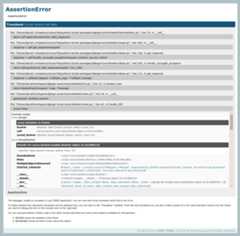
To install, you can use pip:
pip install django_extensionspip install WerkzeugThen add'django_extensions' to yourINSTALLED_APPS tuple insettings.py and start the development server with the new extension:
./manage.py runserver_plusThis will change the way you debug.
Comments
I like to use the Python debugger pdb to debug Django projects.
This is a helpful link for learning how to use it:http://www.ferg.org/papers/debugging_in_python.html

1 Comment

When trying to exchange data between Django and another application,request.raw_post_data is a good friend. Use it to receive and custom-process, say, XML data.
Documentation:http://docs.djangoproject.com/en/dev/ref/request-response/

Comments
UseJinja2 alongside Django.
If you find the Django template language extremely restricting (like me!) then you don't have to be stuck with it. Django is flexible, and the template language is loosely coupled to the rest of the system, so just plug-in another template language and use it to render your http responses!
I useJinja2, it's almost like a powered-up version of the django template language, it uses the same syntax, and allows you to use expressions in if statements! no more making a custom if-tags such asif_item_in_list! you can simply say%{ if item in list %}, or{% if object.field < 10 %}.
But that's not all; it has many more features to ease template creation, that I can't go though all of them in here.
6 Comments


Addassert False in your view code to dump debug information.

7 Comments


5 / 0 myself. Why five? No idea.This adds to the reply above aboutDjango URL names and reverse URL dispatching.
The URL names can also be effectively used within templates. For example, for a given URL pattern:
url(r'(?P<project_id>\d+)/team/$', 'project_team', name='project_team')you can have the following in templates:
<a href="{% url project_team project.id %}">Team</a>
Comments
Since Django "views" only need to be callables that return an HttpResponse, you can easily create class-based views like those in Ruby on Rails and other frameworks.
There are several ways to create class-based views, here's my favorite:
from django import httpclass RestView(object): methods = ('GET', 'HEAD') @classmethod def dispatch(cls, request, *args, **kwargs): resource = cls() if request.method.lower() not in (method.lower() for method in resource.methods): return http.HttpResponseNotAllowed(resource.methods) try: method = getattr(resource, request.method.lower()) except AttributeError: raise Exception("View method `%s` does not exist." % request.method.lower()) if not callable(method): raise Exception("View method `%s` is not callable." % request.method.lower()) return method(request, *args, **kwargs) def get(self, request, *args, **kwargs): return http.HttpResponse() def head(self, request, *args, **kwargs): response = self.get(request, *args, **kwargs) response.content = '' return responseYou can add all sorts of other stuff like conditional request handling and authorization in your base view.
Once you've got your views setup your urls.py will look something like this:
from django.conf.urls.defaults import *from views import MyRestViewurlpatterns = patterns('', (r'^restview/', MyRestView.dispatch),)3 Comments
Instead of usingrender_to_response to bind your context to a template and render it (which is what the Django docs usually show) use the generic viewdirect_to_template. It does the same thing thatrender_to_response does but it also automatically adds RequestContext to the template context, implicitly allowing context processors to be used. You can do this manually usingrender_to_response, but why bother? It's just another step to remember and another LOC. Besides making use of context processors, having RequestContext in your template allows you to do things like:
<a href="{{MEDIA_URL}}images/frog.jpg">A frog</a>which is very useful. In fact, +1 on generic views in general. The Django docs mostly show them as shortcuts for not even having a views.py file for simple apps, but you can also use them inside your own view functions:
from django.views.generic import simpledef article_detail(request, slug=None): article = get_object_or_404(Article, slug=slug) return simple.direct_to_template(request, template="articles/article_detail.html", extra_context={'article': article} )2 Comments

render shortcut method from Django 1.3 (docs.djangoproject.com/en/dev/topics/http/shortcuts/#render)I don't have enough reputation to reply to the comment in question, but it's important to note that if you're going to useJinja, it does NOT support the '-' character in template block names, while Django does. This caused me a lot of problems and wasted time trying to track down the very obscure error message it generated.

1 Comment

Thewebdesign app is very useful when starting to design your website. Once imported, you can add this to generate sample text:
{% load webdesign %}{% lorem 5 p %}
1 Comment
django.db.models.get_model does allow you to retrieve a model without importing it.
James shows how handy it can be:"Django tips: Write better template tags — Iteration 4 ".

1 Comment

Everybody knows there is a development server you can run with "manage.py runserver", but did you know that there is a development view for serving static files (CSS / JS / IMG) as well ?
Newcomers are always puzzled because Django doesn't come with any way to serve static files. This is because the dev team think it is the job for a real life Web server.
But when developing, you may not want to set up Apache + mod_wisgi, it's heavy. Then you can just add the following to urls.py:
(r'^site_media/(?P<path>.*)$', 'django.views.static.serve', {'document_root': '/path/to/media'}),Your CSS / JS / IMG will be available at www.yoursite.com/site_media/.
Of course, don't use it in a production environment.
1 Comment

I learned this one from the documentation for thesorl-thumbnails app. You can use the "as" keyword in template tags to use the results of the call elsewhere in your template.
For example:
{% url image-processor uid as img_src %}<img src="{% thumbnail img_src 100x100 %}"/>This is mentioned in passing in the Django templatetag documentation, but in reference to loops only. They don't call out that you can use this elsewhere (anywhere?) as well.
1 Comment

django.views.generic.list_detail.object_list -- It provides all the logic & template variables for pagination (one of those I've-written-that-a-thousand-times-now drudgeries).Wrapping it allows for any logic you need. This gem has saved me many hours of debugging off-by-one errors in my "Search Results" pages and makes the view code cleaner in the process.

1 Comment

PyCharm IDE is a nice environment to code and especially debug, with built-in support for Django.
Comments
Usexml_models to create Django models that use an XML REST API backend (instead of a SQL one). This is very useful especially when modelling third party APIs - you get all the same QuerySet syntax that you're used to. You can install it from PyPI.
XML from an API:
<profile id=4> <email>[email protected]</email> <first_name>Joe</first_name> <last_name>Example</last_name> <date_of_birth>1975-05-15</date_of_birth></profile>And now in python:
class Profile(xml_models.Model): user_id = xml_models.IntField(xpath='/profile/@id') email = xml_models.CharField(xpath='/profile/email') first = xml_models.CharField(xpath='/profile/first_name') last = xml_models.CharField(xpath='/profile/last_name') birthday = xml_models.DateField(xpath='/profile/date_of_birth') finders = { (user_id,): settings.API_URL +'/api/v1/profile/userid/%s', (email,): settings.API_URL +'/api/v1/profile/email/%s', }profile = Profile.objects.get(user_id=4)print profile.email# would print '[email protected]'It can also handle relationships and collections. We use it every day in heavily used production code, so even though it's beta it's very usable. It also has a good set of stubs that you can use in your tests.
(Disclaimer: while I'm not the author of this library, I am now a committer, having made a few minor commits)
1 Comment

Use database migrations. UseSouth.
Comments
Explore related questions
See similar questions with these tags.