
A long time ago, in a job far, far away, I was tasked with switching our old-school LAMP stacks over to Kubernetes. My boss at the time, always starry-eyed for new technologies, announced the change should only take a few days—a bold statement considering we didn’t even have a grasp on how containers worked yet.
After reading the official docs and Googling around, I began to feel overwhelmed. There were too many new concepts to learn: there were the pods, the containers, and the replicas. To me, it seemed Kubernetes was reserved for a clique of sophisticated developers.
I then did what I always do in these cases: I learned by doing. Going through a simple example goes a long way in understanding intricate subjects. So, I walked through the deployment process on my own.
In the end, we did it, albeit nowhere near the prescribed week—it took us almost a month to create three clusters, including their development, testing and production). This is not that bad when you consider the upgrade team I was part of consisted of three complete neophytes in Kubernetes. It was hard but well worth the effort.
This post is what I would have liked to read at that time: a detailed, step-by-step account of how to deploy an app to Kubernetes. By the end of this article, you’ll have a working Kubernetes deployment and continuous delivery workflow.
Continuous Integration and Delivery
Continuous Integration (CI) is the practice of building and testing the application on each update. By working in small increments, errors are detected earlier and promptly resolved.
Once integration is complete and all tests have passed, we can addContinuous Delivery (CD) to automate the release and deployment process. A project that uses CI/CD can make more frequent and reliable releases.
We’ll useSemaphore, a fast, powerful and easy-to-useContinuous Integration and Delivery (CI/CD) platform to automate the whole process:
- Install project dependencies.
- Run unit tests.
- Build a Docker image.
- Push the image to Docker Hub.
- Provide a one-click Kubernetes deployment.
For the application, we have a Ruby Sinatra microservice that exposes a few HTTP endpoints. The project already includes everything needed for the deployment, but some assembly is required.
Getting Ready
Before doing anything, you’ll need to sign up for aGitHub and a Semaphore account. Additionally, create aDocker Hub login for your Docker images.
Next, you should install some tools on your machine as well:
- Git: to handle the code.
- curl: the Swiss Army knife of networking.
- kubectl: to control your cluster remotely.
Of course, let’s not forget Kubernetes. Most cloud providers offer this service in one form or another, so shop around and see what fits your needs. The lowest-end machine and cluster size is enough to run our example app. I like starting from a three-node cluster, but you can get away with just one node.
After the cluster ready, download thekubeconfig file from your provider. Some let you download it directly from their web console, while others require a helper program. We’ll need this file to connect to the cluster.
With that out of the way, we’re ready to get started. The first thing to do is to fork the repository.
Fork the Repository
Fork the demo app we’ll be using throughout this post.
- Go thesemaphore-demo-ruby-kubernetes repository and click theFork button on the top right side.
- Click theClone or download button and copy the address.
- Clone the repository:
$ git clone https://github.com/...your-repository-url...To connect your new repository with Semaphore:
- Log in to yourSemaphore using your GitHub account.
- Follow the link in the sidebar to create a new project:

- Click on theChoose button next to your repository:

- Choose the option:I will use the existing configuration to keep the supplied CI/CD pipelines.
Semaphore will detect the existing configuration once you make an initial push to the repository. A single empty file is enough to trigger the process:
- Go back to the repository on GitHub.
- Use theCreate new file button:

- Create a file with any name andcommit the change.
- Semaphore will start running immediately:

Testing With Semaphore
Continuous Integration turns testing fun and effective again. A well-thought-outCI pipeline creates a short feedback loop to catch errors early before they can do any harm. Our project comes with some ready-made tests:
- Click onEdit Workflow. This will open theWorkflow Builder:
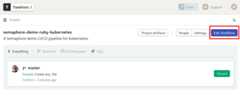
- This pipeline describes all the steps that Semaphore must follow to build and test the application:
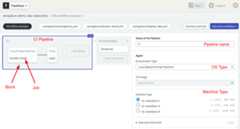
Theagent is the virtual machine that powers the jobs. We have threemachine types to choose from. The machine runs an optimizedUbuntu 18.04 image with build tools for many languages.
Blocks andjobs define what to do at each step of the pipeline. On Semaphore, blocks run sequentially, while jobs within a blockrun in parallel. The pipeline contains two blocks—one for the libraries installation and the other for running tests.
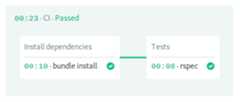
Thefirst block downloads and installs theRuby gems:
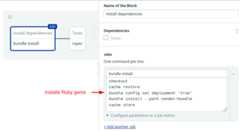
We’re using some Semaphore built-in commands:
- Checkout clones the code from GitHub.
- Since each job runs in a fully isolated machine, we must rely on thecache to store and retrieve files between job runs.
Thesecond block is for testing. Notice that we repeatcheckout andcache to get the initial files into the job. The final command starts the RSpec test suite:

The last part declares a promotion.Promotions can conditionally connect pipelines to create complex workflows.
- Click on theDockerize button in thePromotions box.
- Check theEnable automatic promotion option. This will cause the next pipeline to automatically start when all tests pass:

The workflow continues with the next pipeline.
Building Docker Images
We can run anything in Kubernetes—as long as it has been packaged in a Docker image. In this section, we’ll learn how to build it.
Our Docker image will include Ruby, the app code, and all its libraries. Take a look a the Dockerfile:
FROM ruby:2.5 RUN apt-get update -qq && apt-get install -y build-essential ENV APP_HOME /appRUN mkdir $APP_HOMEWORKDIR $APP_HOME ADD Gemfile* $APP_HOME/RUN bundle install --without development test ADD . $APP_HOME EXPOSE 4567 CMD ["bundle", "exec", "rackup", "--host", "0.0.0.0", "-p", "4567"]The Dockerfile, like a recipe, has all the steps and commands needed to build the container image:
- Start from a pre-built ruby image.
- Install the build tools with
apt-get. - Copy Gemfile since it has all the dependencies.
- Install them with
bundle. - Copy the app source code.
- Define the listening port and the start command.
We’ll bake our production image in the Semaphore environment. However, if you wish to do a quick test on your machine, type:
$ docker build . -t test-imageTo start the server locally, use docker run and expose the internal port 4567:
$ docker run -p 4567:4567 test-imageYou can now test one of the available HTTP endpoints:
$ curl -w "\n" localhost:4567hello world :)Add Docker Hub Account to Semaphore
Semaphore provides a secure mechanism to store sensitive information such as passwords, tokens, or keys.
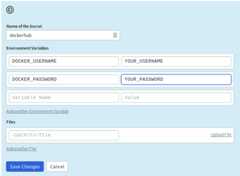
In order to push the image to your Docker Hub registry, create aSecret with your username and password:
- Open your Semaphore.
- On the left navigation bar, underConfiguration, click onSecrets.
- Click on theCreate New Secret.
- The name of the secret should be
dockerhub. Type in your login details as shown andSave:
The Docker Pipeline Build
This pipeline builds and pushed the image to Docker Hub. It only has one block and one job:
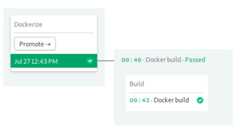
Let’s use theWorkflow Builder again to examine theDocker Build Continuous Delivery Pipeline:
- Click onEdit Workflow
- Scroll right and click on theDockerize promotion. This will open the pipeline:
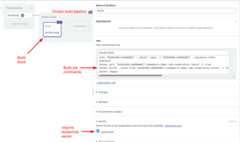
Thebuild block starts by signing in to Docker Hub. The username and password are imported from the secret you just created.
Once logged in, Docker can directly access the registry:
echo "${DOCKER_PASSWORD}" | docker login -u "${DOCKER_USERNAME}" --password-stdincheckoutdocker pull "${DOCKER_USERNAME}"/semaphore-demo-ruby-kubernetes:latest || truedocker build --cache-from "${DOCKER_USERNAME}"/semaphore-demo-ruby-kubernetes:latest -t "${DOCKER_USERNAME}"/semaphore-demo-ruby-kubernetes:$SEMAPHORE_WORKFLOW_ID -t Dockerfile.ci .docker imagesdocker push "${DOCKER_USERNAME}"/semaphore-demo-ruby-kubernetes:$SEMAPHORE_WORKFLOW_IDThe next command isdocker pull which attempts to pull the image latest image. If the image is found, Docker may be able to reuse some of its layers and speed up the build. If there isn’t any latest image, that’s fine. It just takes a little bit longer to build.
Thedocker build command builds the image. You may have noticed that we use a different Dockerfile here:-f Dockerfile.ci. This version of the Dockerfile pulls the Ruby base image fromSemaphore Container Registry, which is faster than Docker Hub and isn’t subjected to any kind of rate limits.
Finally, we push the new image. Notice here we’re using theSEMAPHORE_WORKFLOW_ID variable to uniquely tag the image.
To make your first automated build, run the pipeline:
- Click onRun the Workflow on the top-right corner.
- ClickStart:
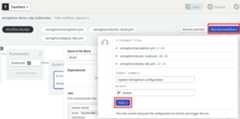
With the image ready, we can jump to the deployment phase:

Deploying to Kubernetes
Automatic deployment is Kubernetes’ strong suit. All we need is to tell the cluster our final desired state and it will take care of the rest.
Before doing the deployment, however, you have to upload the kubeconfig file to Semaphore.
Add Kubeconfig to Semaphore
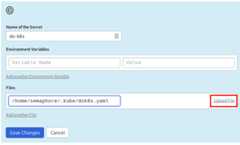
We’ll need a second secret: the kubeconfig for the cluster. The file grants administrative access to it. As such, we don’t want it checked into the repository.
Create a secret calleddo-k8s and upload the kubeconfig file to/home/semaphore/.kube/dok8s.yaml:
Next, we’ll have to tell the Kubernetes cluster how to authenticate with the docker registry. Run the following command to store your Docker Hub username and password.
$ kubectl create secret docker-registry dockerhub \--docker-server=docker.io \--docker-username=YOUR_DOCKER_HUB_USERNAME \--docker-password=YOUR_DOCKER_HUB_PASSWORDsecret/dockerhub createdDeployment Manifest
In spite of Kubernetes being a container orchestration platform, we don’t manage containers directly. In truth, the deployment unit is thepod. A pod is like a group of merry friends that always go together to the same places. Containers in a pod are guaranteed to run on the same node and have the same IP. They always start and stop in unison and, since they run on the same machine, they can share its resources.
The problem with pods is that they can start and stop at any time, and we can’t know for sure what IPs they’ll get assigned. To route HTTP traffic from our users we’ll also need a load-balancing service; it will be responsible for keeping track of the pods and forwarding incoming connections so, from the client’s point of view, there is always a single public IP.
Open the file located atdeployment.yml. This is the manifest for deploying our app. It has two resources separated by three dashes.
First, the deployment:
apiVersion: apps/v1kind: Deploymentmetadata: name: semaphore-demo-ruby-kubernetesspec: replicas: 1 selector: matchLabels: app: semaphore-demo-ruby-kubernetes template: metadata: labels: app: semaphore-demo-ruby-kubernetes spec: imagePullSecrets: - name: dockerhub containers: - name: semaphore-demo-ruby-kubernetes image: $DOCKER_USERNAME/semaphore-demo-ruby-kubernetes:$SEMAPHORE_WORKFLOW_IDThere are several concepts to unpack here:
- Labels: resources can have a name and several labels, which are convenient to organize things.
- Spec: defines the desired final state and the template used to create the pods.
- Replicas: defines how many copies of the pod to create. We usually set this to the number of nodes in the cluster. Since I’m using three nodes, I’ll change this line to
replicas: 3.
The second resource is the service. It binds to port 80 and forwards the HTTP traffic to the pods in the deployment:
---apiVersion: v1kind: Servicemetadata: name: semaphore-demo-ruby-kubernetes-lbspec: selector: app: semaphore-demo-ruby-kubernetes type: LoadBalancer ports: - port: 80 targetPort: 4567Kubernetes matches up the selector with the labels to connect services with pods. Thus, we can have many services and deployments in the same cluster and wire them as required.
Deployment Pipeline
We’re entering the last stage of CI/CD configuration. At this point, we have a CI pipeline and the Docker pipeline.
In this one, we deploy to Kubernetes.
Two jobs make up the last pipeline:
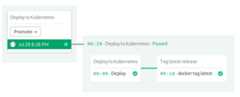
Use theWorkflow Builder to examine how it works:
- Open theDockerize promotion.
- Scroll to the far right and open theDeploy to Kubernetes promotion:

Thefirst block starts the deployment. After importing the kubeconfig file,envsubst replaces the placeholder variables in deployment.yml with their actual values. Then, kubectl apply sends the manifest to the cluster:
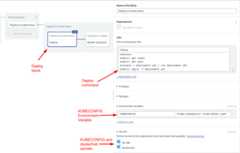
Thesecond block pushes the image aslatest so we can use it as a cache on the next run:

We usedocker pull,tag andpush to update the tags on DockerHub:
echo "${DOCKER_PASSWORD}" | docker login -u "${DOCKER_USERNAME}" --password-stdindocker pull "${DOCKER_USERNAME}"/semaphore-demo-ruby-kubernetes:$SEMAPHORE_WORKFLOW_IDdocker tag "${DOCKER_USERNAME}"/semaphore-demo-ruby-kubernetes:$SEMAPHORE_WORKFLOW_ID "${DOCKER_USERNAME}"/semaphore-demo-ruby-kubernetes:latestdocker push "${DOCKER_USERNAME}"/semaphore-demo-ruby-kubernetes:latestThis is the end of the workflow. We’re ready to try it out. Save the changes:
- Click onRun the Workflow.
- Click onStart.
Deploy the App
Let’s teach our Sinatra app to sing. Add the following code inside the App class in app.rb:
get "/sing" do "And now, the end is near And so I face the final curtain..."endPush the modified files to GitHub:
$ git add deployment.yml$ git add app.rb$ git commit -m "test deployment”$ git push origin masterWait until the docker build pipeline completes; you can check the progress on Semaphore. Once ready, hit thePromote button:

Did it work?

We’re off to a good start. Now it’s up to Kubernetes. We can check the deployment status using kubectl. The initial status is three pods desired and zero available:
$ kubectl get deploymentsNAME DESIRED CURRENT UP-TO-DATE AVAILABLE AGEsemaphore-demo-ruby-kubernetes 3 0 0 0 15mA few seconds after, the pods have started and reconciliation is complete:
$ kubectl get deploymentsNAME DESIRED CURRENT UP-TO-DATE AVAILABLE AGEsemaphore-demo-ruby-kubernetes 3 3 3 3 15mTo get a general status of the cluster use get all. It shows pods, services, deployments and replicas:
$ kubectl get allNAME READY STATUS RESTARTS AGEpod/semaphore-demo-ruby-kubernetes-7d985f8b7c-454dh 1/1 Running 0 2mpod/semaphore-demo-ruby-kubernetes-7d985f8b7c-4pdqp 1/1 Running 0 119spod/semaphore-demo-ruby-kubernetes-7d985f8b7c-9wsgk 1/1 Running 0 2m34s NAME TYPE CLUSTER-IP EXTERNAL-IP PORT(S) AGEservice/kubernetes ClusterIP 10.12.0.1 443/TCP 24mservice/semaphore-demo-ruby-kubernetes-lb LoadBalancer 10.12.15.50 35.232.70.45 80:31354/TCP 17m NAME DESIRED CURRENT UP-TO-DATE AVAILABLE AGEdeployment.apps/semaphore-demo-ruby-kubernetes 3 3 3 3 17m NAME DESIRED CURRENT READY AGEreplicaset.apps/semaphore-demo-ruby-kubernetes-7d985f8b7c 3 3 3 2m36sThe service IP is shown after the pods. For me, the load-balancer was assigned the external IP 35.232.70.45. Replace it with the one your provider has assigned to you. Let’s try the new server.
Would you sing for us?
$ curl -w "\n" http://YOUR_EXTERNAL_IP/singAnd now, the end is near And so I face the final curtain...The End Is Near
Deploying to Kubernetes doesn’t have to be hard or painful, less so when backed with the right CI/CD solution. You now have a fully automated continuous delivery pipeline to Kubernetes.
Feel free to fork and play withsemaphore-demo-ruby-kubernetes on your Kubernetes instance. Here are some ideas:
- Create a staging cluster.
- Build a development container and run tests inside it.
- Extend the project with more microservices.
Interested in Kubernetes? Don’t miss the rest of our tutorials:
- CI/CD for Microservices on DigitalOcean Kubernetes
- Continuous Integration and Delivery to AWS Kubernetes
- How to Release Faster with Continuous Delivery for Google Kubernetes
- CI/CD for Microservices on DigitalOcean Kubernetes
Want to discuss this article?Join our Discord.