13 Arranging views
One technique essential to high-dimensional data visualization is the ability to arrange multiple views. By arranging multiple low-dimensional graphics of the same (or similar) high-dimensional data, one can putlocal summaries and patterns into a global context. When arranging multipleplotly objects, you have some flexibility in terms of how you arrange them: you could usesubplot() to merge multipleplotly object into a single object (useful for synchronizing zoom&pan events across multiple axes), place them in separate HTML tags (Section13.2), or embedded in a larger system for intelligently managing many views (Section13.3).
Ideally, when displaying multiple related data views, they are linked through an underlying data source to foster comparisons and enable posing of data queries(D. Cook, Buja, and Swayne2007). Chapter16.1 shows how to build upon these methods for arranging views to link them (client-side) as well.
13.1 Arranging plotly objects
Thesubplot() function provides a flexible interface for merging multipleplotly objects into a single object. It is more flexible than most trellis display frameworks (e.g.,ggplot2’sfacet_wrap()) as you don’t have to condition on a value of common variable in each display(Richard A. Becker1996). Its capabilities and interface are similar to thegrid.arrange() function from thegridExtra package, which allows you to arrange multiplegrid grobs in a single view, effectively providing a way to arrange (possibly unrelated)ggplot2 and/orlattice plots in a single view(R Core Team2016; Auguie2016; Sarkar2008). Figure13.1 shows the most simple way to usesubplot() which is to directly supply plotly objects.
library(plotly)p1 <-plot_ly(economics,x =~date,y =~unemploy)%>%add_lines(name ="unemploy")p2 <-plot_ly(economics,x =~date,y =~uempmed)%>%add_lines(name ="uempmed")subplot(p1, p2)
FIGURE 13.1: The most basic use ofsubplot() to merge multiple plotly objects into a single plotly object.
Althoughsubplot() accepts an arbitrary number of plot objects, passing alist of plots can save typing and redundant code when dealing with a large number of plots. Figure13.2 shows one time series for each variable in theeconomics dataset and share the x-axis so that zoom/pan events are synchronized across each series:
vars <-setdiff(names(economics),"date")plots <-lapply(vars,function(var) {plot_ly(economics,x =~date,y =as.formula(paste0("~", var)))%>%add_lines(name = var)})subplot(plots,nrows =length(plots),shareX =TRUE,titleX =FALSE)
FIGURE 13.2: Five different economic variables on different y scales and a common x scale. Zoom and pan events in the x-direction are synchronized across plots.
Conceptually,subplot() provides a way to place a collection of plots into a table with a given number of rows and columns. The number of rows (and, by consequence, the number of columns) is specified via thenrows argument. By default each row/column shares an equal proportion of the overall height/width, but as shown in Figure13.3 the default can be changed via theheights andwidths arguments.

FIGURE 13.3: A visual diagram of controlling theheights of rows andwidths of columns. In this particular example, there are 5 plots being placed in 2 rows and three columns.
This flexibility is quite useful for a number of visualizations, for example, as shown in Figure13.4, a joint density plot is really of subplot of joint and marginal densities. Theheatmaply package is great example of leveragingsubplot() in a similar way to create interactive dendrograms(Galili2016).
Click to show code
# draw random values from correlated bi-variate normal distributions <-matrix(c(1,0.3,0.3,1),nrow =2)m <-mvtnorm::rmvnorm(1e5,sigma = s)x <-m[,1]y <-m[,2]s <-subplot(plot_ly(x = x,color =I("black")),plotly_empty(),plot_ly(x = x,y = y,color =I("black"))%>%add_histogram2dcontour(colorscale ="Viridis"),plot_ly(y = y,color =I("black")),nrows =2,heights =c(0.2,0.8),widths =c(0.8,0.2),margin =0,shareX =TRUE,shareY =TRUE,titleX =FALSE,titleY =FALSE)layout(s,showlegend =FALSE)
FIGURE 13.4: A joint density plot with synchronized axes.
13.1.1 Recursive subplots
Thesubplot() function returns a plotly object so it can be modified like any other plotly object. This effectively means that subplots work recursively (i.e., you can have subplots within subplots). This idea is useful when your desired layout doesn’t conform to the table structure described in the previous section. In fact, you can think of a subplot of subplots like a spreadsheet with merged cells. Figure13.5 gives a basic example where each row of the outer-most subplot contains a different number of columns.
Click to show code

FIGURE 13.5: Recursive subplots.
The concept is particularly useful when you want plot(s) in a given row to have different widths from plot(s) in another row. Figure13.6 uses this recursive behavior to place many bar charts in the first row, and a single choropleth in the second row.
Click to show code
# specify some map projection/optionsg <-list(scope ='usa',projection =list(type ='albers usa'),lakecolor =toRGB('white'))# create a map of population densitydensity <-state.x77[,"Population"]/state.x77[,"Area"]map <-plot_geo(z =~density,text = state.name,locations = state.abb,locationmode ='USA-states')%>%layout(geo = g)# create a bunch of horizontal bar chartsvars <-colnames(state.x77)barcharts <-lapply(vars,function(var) {plot_ly(x = state.x77[, var],y = state.name)%>%add_bars(orientation ="h",name = var)%>%layout(showlegend =FALSE,hovermode ="y",yaxis =list(showticklabels =FALSE))})subplot(barcharts,margin =0.01)%>%subplot(map,nrows =2,heights =c(0.3,0.7),margin =0.1)%>%layout(legend =list(y =1))%>%colorbar(y =0.5)
FIGURE 13.6: Multiple bar charts of US statistics by state in a subplot with a choropleth of population density.
13.1.2 Other approaches & applications
Usingsubplot() directly is not theonly way to create multiple views of a dataset withplotly. In some special cases, like scatterplot matrices and generalized pair plots, we can take advantage of some special methods designed specifically for these use cases.
13.1.2.1 Scatterplot matrices
The plotly.js library provides a trace specifically designed and optimized for scatterplot matrices (splom). To use it, provide numeric variables to thedimensions attribute of thesplom trace type.
dims <-dplyr::select_if(iris, is.numeric)dims <-purrr::map2(dims,names(dims),~list(values=.x,label=.y))plot_ly(type ="splom",dimensions =setNames(dims,NULL),showupperhalf =FALSE,diagonal =list(visible =FALSE))FIGURE 13.7: Linked brushing in a scatterplot matrix of the iris dataset. For the interactive, seehttps://plotly-r.com/interactives/splom.html
Seehttps://plot.ly/r/splom/ for more options related to the splom trace type.
13.1.2.2 Generalized pairs plot
The generalized pairs plot is an extension of the scatterplot matrix to support both discrete and numeric variables(Emerson et al.2013). Theggpairs() function from theGGally package provides an interface for creating these plots viaggplot2(Schloerke et al.2016). To implementggpairs(),GGally introduces the notion of a matrix ofggplot2 plot objects that it callsggmatrix(). As Figure13.8 shows, theggplotly() function has a method for converting ggmatrix objects directly:

FIGURE 13.8: A generalized pairs plot made via theggpairs() function from theGGally package.
As it turns out,GGally useggmatrix() as a building block for other visualizations, like model diagnostic plots (ggnostic()). Sections16.4.6 and16.4.7 demonstrates how to leverage linked brushing in theggplotly() versions of these plots.
13.1.2.3 Trellis displays withsubplot()
It’s true thatggplot2’sfacet_wrap()/facet_grid() provides a simple way to create trellis displays, but for learning purposes, it can be helpful to learn how to implement a similar trellis display withplot_ly() andsubplot(). Figure13.9 demonstrates one approach, which leveragessubplot()’s ability to reposition annotations and shapes. Specifically, thepanel() function below, which defines the visualization method to be applied to eachvariable in theeconomics_long dataset, uses paper coordinates (i.e., graph coordinates on a normalized 0-1 scale) to place an annotation at the top-center of each panel as well as a rectangle shape behind the annotation. Note also the use ofysizemode = 'pixel' which gives the rectangle shape a fixed height (i.e., the rectangle height is always 16 pixels, regardless of the height of the trellis display).
Click to show code
library(dplyr)panel <-.%>%plot_ly(x =~date,y =~value)%>%add_lines()%>%add_annotations(text =~unique(variable),x =0.5,y =1,yref ="paper",xref ="paper",yanchor ="bottom",showarrow =FALSE,font =list(size =15) )%>%layout(showlegend =FALSE,shapes =list(type ="rect",x0 =0,x1 =1,xref ="paper",y0 =0,y1 =16,yanchor =1,yref ="paper",ysizemode ="pixel",fillcolor =toRGB("gray80"),line =list(color ="transparent") ) )economics_long%>%group_by(variable)%>%do(p =panel(.))%>%subplot(nrows =NROW(.),shareX =TRUE)
FIGURE 13.9: Creating a trellis display withsubplot().
13.1.2.4 ggplot2 subplots
It’s possible to combine the convenience ofggplot2’sfacet_wrap()/facet_grid() with the more flexible arrangement capabilities ofsubplot(). Figure13.10 does this to show two different views of theeconomics_long data: the left-hand column displays each variable along time while the right-hand column shows violin plots of each variable. For the implementation, each column is created throughggplot2::facet_wrap(), but then the trellis displays are combined withsubplot(). In this case,ggplot2 objects are passed directly tosubplot(), but you can also useggplotly() for finer control over the conversion ofggplot2 toplotly (see also Chapter33) before supplying that result tosubplot().
gg1 <-ggplot(economics_long,aes(date, value))+geom_line()+facet_wrap(~variable,scales ="free_y",ncol =1)gg2 <-ggplot(economics_long,aes(factor(1), value))+geom_violin()+facet_wrap(~variable,scales ="free_y",ncol =1)+theme(axis.text =element_blank(),axis.ticks =element_blank())subplot(gg1, gg2)
FIGURE 13.10: Arranging multiple faceted ggplot2 plots into a plotly subplot.
13.2 Arranging htmlwidgets
Sinceplotly objects are alsohtmlwidgets, any method that works for arranginghtmlwidgets also works forplotly objects. Moreover, sincehtmlwidgets are alsohtmltools tags, any method that works for arranginghtmltools tags also works forhtmlwidgets. Here are three common ways to arrange components (e.g.,htmlwidgets,htmltools tags, etc) in a single web-page:
- flexdashboard: An R package for arranging components into an opinionated dashboard layout. This package is essentially a specialrmarkdown template that uses a simple markup syntax to define the layout.
- Bootstrap’s grid layout: Both thecrosstalk andshiny packages provide ways to arrange numerous components via Bootstrap’s (a popular HTML/CSS framework)grid layout system.
- CSS flexbox: If you know some HTML and CSS, you can leverageCSS flexbox to arrange components via thehtmltools package.
Althoughflexdashboard is a really excellent way to arrange web-based content generated from R, it can pay-off to know the other two approaches as their arrangement techniques are agnostic to anrmarkdown output format. In other words, approaches 2-3 can be used with anyrmarkdown template21 or reallyany framework for website generation. Although Bootstrap grid layout system (2) is expressive and intuitive, using it in a larger website that also uses a different HTML/CSS framework (e.g. Bulma, Skeleton, etc) can cause issues. In that case, CSS flexbox (3) is a light-weight (i.e., no external CSS/JS dependencies) alternative that is less likely to introduce undesirable side-effects.
13.2.1 Flexdashboard
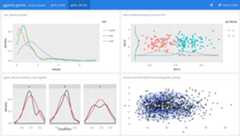
Figure13.11 provides an example of embeddingggplotly() insideflexdashboard(Allaire2016). Sinceflexdashboard is anrmarkdown template, it automatically comes with many of things that makermarkdown great: ability to produce standalone HTML, integration with other languages, and thoughtful integration with RStudio products like Connect. There are many other things to like aboutflexdashboard, including lots of easy-to-use theming options, multiple pages, storyboards, and evenshiny integration. Explaining how theflexdashboard package actually works is beyond the scope of this book, but you can visit the website for documentation and more exampleshttps://rmarkdown.rstudio.com/flexdashboard/.
 https://plotly-r.com/flexdashboard.html" width="100%" />
FIGURE 13.11: An example of embeddingggplotly() graphs insideflexdashboard. See here for the interactive dashboardhttps://plotly-r.com/flexdashboard.html
13.2.2 Bootstrap grid layout
If you’re already familiar withshiny, you may already be familiar with functions likefluidPage(),fluidRow(), andcolumn(). These R functions provide an interface from R to bootstrap’s grid layout system. That layout system is based on the notion of rows and columns where each row spans a width of 12 columns. Figure13.12 demonstrates how one can use these functions to produce a standalone HTML page with threeplotly graphs – with the first plot in the first row spanning the full width and the other 2 plots in the second row of equal width. To learn more about thisfluidPage() approach to layouts, seehttps://shiny.rstudio.com/articles/layout-guide.html.
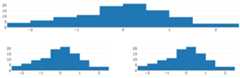
FIGURE 13.12: Arranging multiple htmlwidgets withfluidPage() from theshiny package.
It’s also worth noting another, somewhat similar, yet more succinct, interface to grid’s layout system provided by thebscols() function from thecrosstalk package. You can think of it in a similar way tofluidRow(), but instead of definingcolumn() width for each component individually, you can specify the width of several components at once through thewidths argument. Also, importantly, this functions works recursively – it returns a collection ofhtmltools tags and accepts them as input as well. The code below produces the same result as above, but is a much more succinct way of doing so.
Bootstrap is much more than just its grid layout system, so beware – using either of these approaches will impose Bootstrap’s styling rules on other content in your webpage. If you are using another CSS framework for styling or just want to reduce the size of dependencies in your webpage, consider working with CSS flexbox instead of Bootstrap.
13.2.3 CSS flexbox
Cascading Style Sheet (CSS) flexbox is a relatively new CSS feature that most modern web browsers natively support.22 It aims to provide a general system for distributing space among multiple components in a container. Instead of covering this entire system, we’ll cover it’s basic functionality, which is fairly similar to Bootstrap’s grid layout system.
Creating a flexbox requires a flexbox container – in HTML speak, that means a<div> tag with a CSS style property ofdisplay: flex. By default, in this display setting, all the components inside that container will try fit in a single row. To allow ‘overflowing’ components the freedom to ‘wrap’ into new row(s), set the CSS property offlex-wrap: wrap in the parent container. Another useful CSS property to know about for the ‘parent’ container isjustify-content: in the case of Figure13.13, I’m using it to horizontallycenter the components. Moreover, since I’ve imposed a width of 40% for the first two plots, the net effect is that we have 2 plots in the first two (spanning 80% of the page width), then the third plot wraps onto a new line.
library(htmltools)p <-plot_ly(x =rnorm(100))#NOTE: you don't need browsable() in rmarkdown,# but you do at the R promptbrowsable(div(style ="display: flex; flex-wrap: wrap; justify-content: center",div(p,style ="width: 40%; border: solid;"),div(p,style ="width: 40%; border: solid;"),div(p,style ="width: 100%; border: solid;")))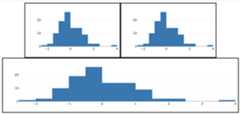
FIGURE 13.13: Arranging multiple htmlwidgets with CSS flexbox.
From the code example in Figure13.13, you might notice thatdisplay: flex; flex-wrap: wrap is quite similar to Bootstrap grid layout system. The main difference is that, instead of specifying widths in terms of 12 columns, you have more flexibility with how to size things, as well as how you handle extra space. Here, in Figure13.13 I’ve used widths that are relative to the page width, but you could also use fixed widths (using fixed widths, however, is generally frowned upon). For those that would like to learn about more details about CSS flexbox, seehttps://css-tricks.com/snippets/css/a-guide-to-flexbox/.
13.3 Arranging many views
As we’ve already seen in Figures2.10,16.14, &13.9, the trellis (aka small multiple) display is an effective way to see how a conditional distribution behaves under different conditions. In other words, the trellis display helps us understand how patterns or structure in the data changes across groups. However, trellis displays do have a limitation: they don’t scale very well to a large number of groups.
Before trellis displays were formally introduced,Tukey and Tukey (1985) proposed a solution to the problem of scatterplots not being able to scale to a large number of variables (i.e., it’s time consuming to visualize 1000 scatterplots!). The proposed solution involved using quantitative measurements of various scatterplot characteristics (e.g. correlation, clumpiness, etc) to help summarise and guide attention towards ‘interesting’ scatterplots. This idea, coined scagnostics (short for scatterplot diagnostics), has since been made explicit, and many other similar applications have been explored, even techniques for time-series(Wilkinson, Anand, and Grossman2005; Wilkinson and Wills2008; Dang and Wilkinson2012). The idea of associating quantitative measures with a graphical display of data can be generalized to include more that just scatterplots, and in this more general case, these measures are sometimes referred to as cognostics.
In addition to being useful for navigating exploration of many variables, cognostics can also be useful for exploring many subsets of data. This idea has inspired work on more general divide & recombine technique(s) for working with navigating through many statistical artifacts(Cleveland and Hafen2014; Guha et al.2012), including visualizations(Hafen et al.2013). Thetrelliscope package provides a system for computing arbitrary cognostics on each panel of a trellis display as well as an interactive graphical user interface for defining (and navigating through) interesting panels based on those cognostics(Hafen2016). This system also allows users to define the graphical method for displaying each panel, soplotly graphs can easily be embedded. Thetrelliscope package is currently built uponshiny, but as Figure13.14 demonstrates, thetrelliscopejs package provides lower-level tools that allow one to create trelliscope displays withoutshiny(Hafen and Schloerke2018).
As the video behind Figure13.14 demonstrates,trelliscopejs provides two very powerful interactive techniques for surfacing ‘interesting’ panels: sorting and filtering. In this toy example, each panel represents a different country, and the life expectancy is plotted as a function of time. By default,trelliscopejs sorts panels by group alphabetically, which is why, on page load we see the first 12 countries (Afghanistan, Albania, Algeria, etc). By opening the sort menu, we can pick and sort by any cognostic for any variable in the dataset. If no cognostics are supplied (as it the case here), some sensible ones are computed and supplied for us (e.g., mean, median, var, max, min). In this case, since we are primarily interested in life expectancy, we sort by life expectancy. This simple task allows us to quickly see the countries with the best and worst average life expectancy, as well as how it has evolved over time. By combining sort with filter, we can surface countries that perform well/poorly under certain conditions. For example, Cuba, Uruguay, Taiwan have great life expectancy considering their GDP per capita. Also, within the Americas, Haiti, Bolivia, and Guatemala have the poorest life expectancy.
library(trelliscopejs)data(gapminder,package ="gapminder")qplot(year, lifeExp,data = gapminder)+xlim(1948,2011)+ylim(10,95)+theme_bw()+facet_trelliscope(~country+continent,nrow =2,ncol =6,width =300,as_plotly =TRUE,plotly_args =list(dynamicTicks = T),plotly_cfg =list(displayModeBar = F) )FIGURE 13.14: Usingtrelliscopejs to surface high-dimensional insights related to life expectancy and GDP per capita in various countries. For the interactive, seehttps://plotly-r.com/interactives/trelliscope
References
Allaire, JJ. 2016.Flexdashboard: R Markdown Format for Flexible Dashboards.https://CRAN.R-project.org/package=flexdashboard.
Auguie, Baptiste. 2016.GridExtra: Miscellaneous Functions for "Grid" Graphics.https://CRAN.R-project.org/package=gridExtra.
Cleveland, William S., and Ryan Hafen. 2014. “Divide and Recombine: Data Science for Large Complex Data.”Statistical Analysis and Data Mining: The ASA Data Science Journal 7 (6): 425–33.
Cook, Dianne, Andreas Buja, and Deborah F Swayne. 2007. “Interactive High-Dimensional Data Visualization.”Journal of Computational and Graphical Statistics, December, 1–23.
Dang, Tuan Nhon, and Leland Wilkinson. 2012. “Timeseer: Detecting interesting distributions in multiple time series data.”VINCI, October, 1–9.
Emerson, John W., Walton A. Green, Barret Schloerke, Jason Crowley, Dianne Cook, Heike Hofmann, and Hadley Wickham. 2013. “The Generalized Pairs Plot.”Journal of Computational and Graphical Statistics 22 (1): 79–91.https://doi.org/10.1080/10618600.2012.694762.
Galili, Tal. 2016.Heatmaply: Interactive Heat Maps Using ’Plotly’.https://CRAN.R-project.org/package=heatmaply.
Guha, Saptarshi, Ryan Hafen, Jeremiah Rounds, Jin Xia, Jianfu Li, Bowei Xi, and William S. Cleveland. 2012. “Large Complex Data: Divide and Recombine with Rhipe.”The ISI’s Journal for the Rapid Dissemination of Statistics Research, August, 53–67.
Hafen, R., L. Gosink, J. McDermott, K. Rodland, K. K. V. Dam, and W. S. Cleveland. 2013. “Trelliscope: A System for Detailed Visualization in the Deep Analysis of Large Complex Data.” InLarge-Scale Data Analysis and Visualization (Ldav), 2013 Ieee Symposium on, 105–12.https://doi.org/10.1109/LDAV.2013.6675164.
Hafen, Ryan. 2016.Trelliscope: Create and Navigate Large Multi-Panel Visual Displays.https://CRAN.R-project.org/package=trelliscope.
Hafen, Ryan, and Barret Schloerke. 2018.Trelliscopejs: Create Interactive Trelliscope Displays.https://github.com/hafen/trelliscopejs.
R Core Team. 2016.R: A Language and Environment for Statistical Computing. Vienna, Austria: R Foundation for Statistical Computing.https://www.R-project.org/.
Richard A. Becker, Ming-Jen Shyu, William S. Cleveland. 1996. “The Visual Design and Control of Trellis Display.”Journal of Computational and Graphical Statistics 5 (2): 123–55.http://www.jstor.org/stable/1390777.
Sarkar, Deepayan. 2008.Lattice: Multivariate Data Visualization with R. New York: Springer.http://lmdvr.r-forge.r-project.org.
Schloerke, Barret, Jason Crowley, Di Cook, Francois Briatte, Moritz Marbach, Edwin Thoen, Amos Elberg, and Joseph Larmarange. 2016.GGally: Extension to ’Ggplot2’.
Tukey, J. W., and P. A. Tukey. 1985. “Computer Graphics and Exploratory Data Analysis: An Introduction.” InIn Proceedings of the Sixth Annual Conference and Exposition: Computer Graphics85.
Wilkinson, Leland, Anushka Anand, and Robert Grossman. 2005. “Graph-Theoretic Scagnostics.” InProceedings of the Proceedings of the 2005 Ieee Symposium on Information Visualization, 21. INFOVIS ’05. Washington, DC, USA: IEEE Computer Society.https://doi.org/10.1109/INFOVIS.2005.14.
Wilkinson, Leland, and Graham Wills. 2008. “Scagnostics Distributions.”Journal of Computational and Graphical Statistics 17 (2): 473–91.
Although HTML can not possibly render in a pdf or word document,knitr can automatically detect a non-HTML output format and embed a static image of the htmlwidget via thewebshot package(Chang2016).↩︎
For a full reference of which browsers/versions support flexbox, seehttps://caniuse.com/#feat=flexbox.↩︎