US8990702B2 - System and method for controlling a networked display - Google Patents
System and method for controlling a networked displayDownload PDFInfo
- Publication number
- US8990702B2 US8990702B2US12/894,569US89456910AUS8990702B2US 8990702 B2US8990702 B2US 8990702B2US 89456910 AUS89456910 AUS 89456910AUS 8990702 B2US8990702 B2US 8990702B2
- Authority
- US
- United States
- Prior art keywords
- client device
- networked display
- application
- display
- networked
- Prior art date
- Legal status (The legal status is an assumption and is not a legal conclusion. Google has not performed a legal analysis and makes no representation as to the accuracy of the status listed.)
- Expired - Fee Related, expires
Links
Images



Classifications
- H—ELECTRICITY
- H04—ELECTRIC COMMUNICATION TECHNIQUE
- H04N—PICTORIAL COMMUNICATION, e.g. TELEVISION
- H04N21/00—Selective content distribution, e.g. interactive television or video on demand [VOD]
- H04N21/40—Client devices specifically adapted for the reception of or interaction with content, e.g. set-top-box [STB]; Operations thereof
- H04N21/41—Structure of client; Structure of client peripherals
- H04N21/4104—Peripherals receiving signals from specially adapted client devices
- H04N21/4126—The peripheral being portable, e.g. PDAs or mobile phones
- H04N21/41265—The peripheral being portable, e.g. PDAs or mobile phones having a remote control device for bidirectional communication between the remote control device and client device
- H—ELECTRICITY
- H04—ELECTRIC COMMUNICATION TECHNIQUE
- H04N—PICTORIAL COMMUNICATION, e.g. TELEVISION
- H04N21/00—Selective content distribution, e.g. interactive television or video on demand [VOD]
- H04N21/40—Client devices specifically adapted for the reception of or interaction with content, e.g. set-top-box [STB]; Operations thereof
- H04N21/41—Structure of client; Structure of client peripherals
- H04N21/422—Input-only peripherals, i.e. input devices connected to specially adapted client devices, e.g. global positioning system [GPS]
- H04N21/4227—Providing Remote input by a user located remotely from the client device, e.g. at work
- G—PHYSICS
- G06—COMPUTING OR CALCULATING; COUNTING
- G06F—ELECTRIC DIGITAL DATA PROCESSING
- G06F3/00—Input arrangements for transferring data to be processed into a form capable of being handled by the computer; Output arrangements for transferring data from processing unit to output unit, e.g. interface arrangements
- G06F3/01—Input arrangements or combined input and output arrangements for interaction between user and computer
- G06F3/048—Interaction techniques based on graphical user interfaces [GUI]
- G06F3/0481—Interaction techniques based on graphical user interfaces [GUI] based on specific properties of the displayed interaction object or a metaphor-based environment, e.g. interaction with desktop elements like windows or icons, or assisted by a cursor's changing behaviour or appearance
- G06F3/0482—Interaction with lists of selectable items, e.g. menus
- G—PHYSICS
- G06—COMPUTING OR CALCULATING; COUNTING
- G06F—ELECTRIC DIGITAL DATA PROCESSING
- G06F3/00—Input arrangements for transferring data to be processed into a form capable of being handled by the computer; Output arrangements for transferring data from processing unit to output unit, e.g. interface arrangements
- G06F3/01—Input arrangements or combined input and output arrangements for interaction between user and computer
- G06F3/048—Interaction techniques based on graphical user interfaces [GUI]
- G06F3/0487—Interaction techniques based on graphical user interfaces [GUI] using specific features provided by the input device, e.g. functions controlled by the rotation of a mouse with dual sensing arrangements, or of the nature of the input device, e.g. tap gestures based on pressure sensed by a digitiser
- G06F3/0488—Interaction techniques based on graphical user interfaces [GUI] using specific features provided by the input device, e.g. functions controlled by the rotation of a mouse with dual sensing arrangements, or of the nature of the input device, e.g. tap gestures based on pressure sensed by a digitiser using a touch-screen or digitiser, e.g. input of commands through traced gestures
- H—ELECTRICITY
- H04—ELECTRIC COMMUNICATION TECHNIQUE
- H04M—TELEPHONIC COMMUNICATION
- H04M1/00—Substation equipment, e.g. for use by subscribers
- H04M1/72—Mobile telephones; Cordless telephones, i.e. devices for establishing wireless links to base stations without route selection
- H04M1/724—User interfaces specially adapted for cordless or mobile telephones
- H04M1/72403—User interfaces specially adapted for cordless or mobile telephones with means for local support of applications that increase the functionality
- H04M1/72409—User interfaces specially adapted for cordless or mobile telephones with means for local support of applications that increase the functionality by interfacing with external accessories
- H04M1/72415—User interfaces specially adapted for cordless or mobile telephones with means for local support of applications that increase the functionality by interfacing with external accessories for remote control of appliances
- H04M1/72533—
- H—ELECTRICITY
- H04—ELECTRIC COMMUNICATION TECHNIQUE
- H04N—PICTORIAL COMMUNICATION, e.g. TELEVISION
- H04N21/00—Selective content distribution, e.g. interactive television or video on demand [VOD]
- H04N21/40—Client devices specifically adapted for the reception of or interaction with content, e.g. set-top-box [STB]; Operations thereof
- H04N21/41—Structure of client; Structure of client peripherals
- H04N21/4104—Peripherals receiving signals from specially adapted client devices
- H04N21/4126—The peripheral being portable, e.g. PDAs or mobile phones
- H—ELECTRICITY
- H04—ELECTRIC COMMUNICATION TECHNIQUE
- H04N—PICTORIAL COMMUNICATION, e.g. TELEVISION
- H04N21/00—Selective content distribution, e.g. interactive television or video on demand [VOD]
- H04N21/40—Client devices specifically adapted for the reception of or interaction with content, e.g. set-top-box [STB]; Operations thereof
- H04N21/47—End-user applications
- H—ELECTRICITY
- H04—ELECTRIC COMMUNICATION TECHNIQUE
- H04N—PICTORIAL COMMUNICATION, e.g. TELEVISION
- H04N21/00—Selective content distribution, e.g. interactive television or video on demand [VOD]
- H04N21/40—Client devices specifically adapted for the reception of or interaction with content, e.g. set-top-box [STB]; Operations thereof
- H04N21/47—End-user applications
- H04N21/485—End-user interface for client configuration
- H—ELECTRICITY
- H04—ELECTRIC COMMUNICATION TECHNIQUE
- H04N—PICTORIAL COMMUNICATION, e.g. TELEVISION
- H04N21/00—Selective content distribution, e.g. interactive television or video on demand [VOD]
- H04N21/80—Generation or processing of content or additional data by content creator independently of the distribution process; Content per se
- H04N21/81—Monomedia components thereof
- H04N21/812—Monomedia components thereof involving advertisement data
- H04N5/44543—
- G—PHYSICS
- G08—SIGNALLING
- G08C—TRANSMISSION SYSTEMS FOR MEASURED VALUES, CONTROL OR SIMILAR SIGNALS
- G08C2201/00—Transmission systems of control signals via wireless link
- G08C2201/90—Additional features
- G08C2201/92—Universal remote control
- G—PHYSICS
- G08—SIGNALLING
- G08C—TRANSMISSION SYSTEMS FOR MEASURED VALUES, CONTROL OR SIMILAR SIGNALS
- G08C2201/00—Transmission systems of control signals via wireless link
- G08C2201/90—Additional features
- G08C2201/93—Remote control using other portable devices, e.g. mobile phone, PDA, laptop
- H04N2005/4425—
- H04N2005/44565—
- H—ELECTRICITY
- H04—ELECTRIC COMMUNICATION TECHNIQUE
- H04N—PICTORIAL COMMUNICATION, e.g. TELEVISION
- H04N21/00—Selective content distribution, e.g. interactive television or video on demand [VOD]
- H04N21/40—Client devices specifically adapted for the reception of or interaction with content, e.g. set-top-box [STB]; Operations thereof
- H04N21/41—Structure of client; Structure of client peripherals
- H04N21/422—Input-only peripherals, i.e. input devices connected to specially adapted client devices, e.g. global positioning system [GPS]
- H04N21/42204—User interfaces specially adapted for controlling a client device through a remote control device; Remote control devices therefor
- H04N21/42206—User interfaces specially adapted for controlling a client device through a remote control device; Remote control devices therefor characterized by hardware details
- H04N21/4222—Remote control device emulator integrated into a non-television apparatus, e.g. a PDA, media center or smart toy
- H—ELECTRICITY
- H04—ELECTRIC COMMUNICATION TECHNIQUE
- H04N—PICTORIAL COMMUNICATION, e.g. TELEVISION
- H04N21/00—Selective content distribution, e.g. interactive television or video on demand [VOD]
- H04N21/60—Network structure or processes for video distribution between server and client or between remote clients; Control signalling between clients, server and network components; Transmission of management data between server and client, e.g. sending from server to client commands for recording incoming content stream; Communication details between server and client
- H04N21/65—Transmission of management data between client and server
- H04N21/654—Transmission by server directed to the client
- H04N21/6547—Transmission by server directed to the client comprising parameters, e.g. for client setup
Definitions
- the present inventionrelates to methods and systems for providing remote control commands via HTTP requests.
- Televisions and displaysare today utilized to render and enable users to interface with a variety of content. Televisions are often connected to various devices such as media players, set-top boxes, console systems, and the like, in order to enable rendering of various types of content.
- the types of content which may be rendered on a television or displaymay include broadcast video and audio, prerecorded video and audio, games, internet content, and various other types of content.
- Embodiments of the present inventionprovide methods and systems for presenting advertisements based on user interactivity with a web page. Several inventive embodiments of the present invention are described below.
- a methodfor controlling a networked display via a client device, the client device and the networked display being connected by a network.
- a sessionis initiated between the client device and the networked display, the session being defined by two-way communication between the client device and the networked display.
- a remote user interfaceis transmitted from the networked display to the client device. Interactivity with the remote user interface is detected at the client device.
- input datais transmitted from the client device to the networked display based on the interactivity with the remote user interface.
- the input datais interpreted at the networked display so as to cause a change in a state of an application being executed by the networked display.
- the remote user interfaceis updated based on the changed state of the application executed by the networked display.
- a method for controlling a networked display via a client deviceis provided, the client device and the networked display being connected by a network.
- an applicationis executed on the networked display, the application having an associated remote control page.
- a two-way communication linkis established between the networked display and the client device.
- the remote control pageis transmitted from the networked display to the client device, and the remote control page is rendered on the client device.
- Interactivity with the rendered remote control pageis detected at the client device, and input data is transmitted to the networked display based on the detected interactivity, so as to effect a change in a state of the executing application on the networked display.
- a system for enabling remote control of a networked display via a client deviceincludes a networked display, the networked display configured to execute an application, the application having an associated remote control page.
- the systemfurther includes a client device, the client device being connected to the networked display via a two-way communication link.
- the client devicereceives and renders the remote control page from the networked display, and the client device is further configured to detect interactivity with the rendered remote control page and transmit input data to the networked display based on the detected interactivity, so as to effect a change in a state of the executing application on the networked display.
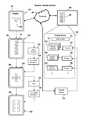
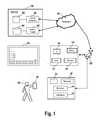
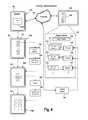
- FIG. 1a system for enabling a user to provide input to a networked display via a client device, in accordance with an embodiment of the invention.
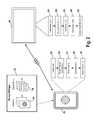
- FIG. 2illustrates various operations performed by a networked display and a client device, in accordance with an embodiment of the invention.
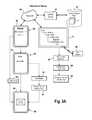
- FIG. 3Aillustrates a diagram showing a procedure for pairing a client device with a networked display, in accordance with an embodiment of the invention.
- FIG. 3Billustrates an exemplary pairing input page, in accordance with an embodiment of the invention.
- FIG. 4illustrates a diagram showing an example of a dynamic remote user interface as applied to an application running on a networked display, in accordance with an embodiment of the invention.
- FIG. 5illustrates an exemplary remote user interface, in accordance with an embodiment of the invention.
- FIG. 6illustrates a remote user interface page, in accordance with an embodiment of the invention.
- a modern connected television (TV) or displayis capable of connecting to a network such as the Internet to send and receive data.
- a networksuch as the Internet to send and receive data.
- Connected TVsmay include various applications which are configured to execute on the television and make content available to a viewer using the television as an interface device. Examples of applications which may be executed on a connected television are described in U.S. provisional patent application No. 61/320,685, filed Apr. 2, 2010, entitled “METHODS AND SYSTEMS FOR DISPLAY DEVICE WIDGET ACCESS AND DEVICE MANAGEMENT,” the disclosure of which is herein incorporated by reference in its entirety for all purposes.
- One solution to the above-described deficiencies of conventional remote control devicesis to configure a portable device, such as a smartphone, personal digital assistant (PDA), tablet computer, or other type of handheld device, to be used as a remote control for the connected TV.
- a portable devicesuch as a smartphone, personal digital assistant (PDA), tablet computer, or other type of handheld device
- PDApersonal digital assistant
- Many such devicesprovide rich environments for development of applications to provide input data to a television.
- developing a native application for a specific portable devicehas several shortcomings.
- the applicationmust be written specifically for each device, which can be difficult and time-consuming. With limited resources it may only be possible to target some of the multitude of available devices. Additionally, native applications must also typically go through an approval process before they are allowed to be installed on the device. This introduces delays in the process of bringing an application to market, and also means that applications cannot be quickly and easily updated, as such updates must again go through the approval process. Furthermore, once approved, an application may be difficult to find amongst a plethora of other applications which are all featured in the same application repository (e.g. in an application store or other type of repository which makes the applications available for installation on the device).
- a small web serveris implemented by the networked display that redirects to device-specific HTML pages based on the type of client device. If no device-specific page is available, then a generic one is provided.
- immediate supportis provided for all smartphones that have a built in browser.
- device-optimized HTMLthat targets a specific device, as requests are redirected in real-time based on the device's ID.
- a networked display 10may be any of various kinds of displays, such as a television, LCD, monitor, projector, or other kind of display which is capable of receiving and sending data over a network such as the Internet.
- the networked display 10includes various components and functionality, including a processor 12 and memory 14 for executing applications, performing operations, storing data, etc.
- the networked display 10includes a graphical user interface (GUI) 16 according to which a user may access various functions and settings of the display 10 .
- GUIgraphical user interface
- the networked display 10operates a server 18 , so as to enable a client device to be utilized to provide remote input, as is described in further detail below.
- a client device 20is operated by a user 30 .
- the client device 20may be any of various kinds of portable handheld devices, including a smartphone, personal digital assistant (pda), tablet computer, or any other type of portable handheld device which may be configured to provide remote control functionality in accordance with embodiments described herein.
- the client device 20includes a processor 22 and memory 24 for executing program instructions, performing various operations, storing data, etc.
- the client device 20also includes a browser 26 for accessing content via a network, such as an in-home local area network (LAN) or the Internet.
- the client device 20also includes an interface 28 , which is utilized by the user 30 to provide input to the client device 20 .
- the interface 28may include any of various kinds of interface technologies, such as a touchscreen, joystick, trackpad, trackball, buttons, directional pad, keys, motion detection devices, etc.
- the client device 20 and the networked display 10are connected to a router 32 , which in turn is connected to the Internet 34 .
- thisis merely one possible network configuration which enables network connectivity between the networked display 10 and the client device 20 and resources accessible via the Internet. It is contemplated that in other embodiments, any of various other types of network configurations and devices may be employed to enable communication between the networked display 10 and the client device 20 and Internet resources.
- the browser 26is activated on the client device 20 .
- the browser 26may be an Internet browser application, or any other type of browser application which enables access to networked resources.
- the user 30enters or otherwise navigates to a URL of the server 18 of the networked display 10 (such as a hostname or IP address assigned to the server 18 ).
- the URL or IP addressmay be stored as a bookmark so that the user 30 may easily navigate to it.
- the browser 26may access the server 18 by executing HTTP requests utilizing the server's assigned URL.
- the server 18sends or redirects to a device-specific HTML page, which is received by the client device 20 and rendered by the browser 26 .
- This device-specific HTML pageprovides a remote user interface for providing input to the networked display 10 .
- the remote user interfacemay include various features such as selectable regions or buttons, which when selected, cause the client device 20 to send input data to the networked display 10 .
- the input datamay be utilized for various purposes related to the networked display 10 , such as navigating within or indicating selection of items in menus displayed on the networked display 10 , providing text input, maneuvering an object such as a pointer, navigating within an application, etc.
- the sending of input datamay occur via HTTP protocol transmissions, such as HTTP GET requests, wherein information is passed in the headers.
- HTTP protocol transmissionssuch as HTTP GET requests
- informationis passed in the headers.
- various eventssuch as keydown, keyup, or other keypress events can be communicated to the networked display 10 .
- Information passed in the headersmay include various kinds of information such as repeat intervals, counts, and parameters like acceleration and/or direction (with respect to detected gestures, as explained below).
- a server 36is shown, the server 36 communicating with the networked display 10 via the network 34 .
- the aforementioned device-specific HTML page which provides the remote user interfaceis provided by a remote UI module 38 of the server 36 to the networked display 10 .
- the remote UI module 38retrieves various device-specific HTML pages from a remote UI storage 40 .
- the device-specific HTML pagemay be downloaded from the server 36 to the networked display 10 in advance and stored on the networked display 10 , so as to be easily locally retrieved by the server 18 of the networked display 10 when necessary.
- the device-specific HTML pagemay also be retrieved from the server 36 at the time the client device 20 initiates communications with the server 18 of the networked display 20 via the URL of the server 18 . If no device-specific HTML page is available, then a generic HTML page may be provided.
- the appropriate device-specific HTML page or group of pagesis retrieved from the remote UI module 38 . These pages are then stored on the networked display 10 for future reference, so that when the same device type is encountered again, the appropriate device-specific HTML page may be retrieved locally at the networked display 10 and served more quickly to the client device 20 . When another new device is detected, then appropriate device-specific HTML pages for that new device are retrieved from the remote UI module 38 at that time. Additionally, the server 18 may be configured to periodically check for updates to its stored device-specific HTML pages.
- the networked display 10is configured to retrieve content from a content module 42 of the server 36 .
- the content module 42is in turn linked to a content storage 44 , which stores content that may be served to the networked display 10 .
- the networked displaymay be configured to execute one or more applications which are configured to retrieve content from the content module 42 . It will be understood by those skilled in the art that the networked display 10 may be configured to execute any kind of application that may be rendered and interfaced with via the networked display 10 . Further examples of applications executed by the networked display 10 and methods for providing the same are disclosed in U.S. provisional patent application No. 61/320,685, filed Apr. 2, 2010, entitled “METHODS AND SYSTEMS FOR DISPLAY DEVICE WIDGET ACCESS AND DEVICE MANAGEMENT,” the disclosure of which is incorporated herein by reference.
- FIG. 2illustrates various operations performed by a networked display 10 and a client device 20 , in accordance with an embodiment of the invention.
- the client device 20initiates an authentication procedure with the networked display 10 .
- the authenticationmay be initiated by, for example, navigating to a URL of the networked display 10 .
- the networked display 10authenticates the client device 20 for use as a remote device for providing input data to the networked display 10 .
- the authentication proceduremay involve the submission and verification of identification data such as a predetermined password, hardware identification data, or other types of identification data which are useful for verifying the identification of the client device 20 .
- the authentication proceduremay also establish secure communication between the client device 20 and the networked display 10 according to any of various secure protocols.
- the authentication proceduredefines the initiation of a session between the client device 20 and the networked display 10 .
- the sessionmay be defined by two-way communication between the client device 20 and the networked display 10 .
- a timermay be executed at the networked display 10 , the timer being configured to trigger termination of the session when a predetermined amount of time has elapsed without any activity.
- the networked display 10 and client device 20may be configured to automatically establish a connection when the client device 20 is detected in the vicinity of the networked display 10 .
- the proximity of the client device 20might be detected based on connection of the client device 20 the same local network as the networked display 10 .
- other methods for establishing proximity of the client device 20 to the networked display 10may be utilized.
- the networked display 10determines the device type of the client device 20 , and determines an appropriate remote user interface for that device type.
- the remote user interfaces for different types of devicesmay vary based on factors such as screen size and resolution, available interface technologies (such as touchscreen, buttons, trackball, touchpad, joystick, etc.), and other variances in features and properties of different types of devices.
- a remote user interfacemay include any of various features which are useful for enabling the user to provide commands and input to the networked display 10 .
- the remote user interfacemay include a number of buttons or other features for navigation, selection, or other specialized functions which are useful for interfacing with content displayed on the networked display 10 .
- content displayed on the networked display 10shall be broadly construed to include any of various items which may be rendered on the networked display 10 , including, but not limited to, video, images, menus, adjustment parameters, settings, applications, or any other kind of content which may be displayed on the networked display 10 .
- Various exemplary remote user interfacesare described further below.
- the networked display 10sends the appropriate remote user interface to the client device 20 , which receives and renders the remote user interface at operation 52 by displaying it on the client device 20 .
- the client device 20detects gesture input or other types of input which indicate the user's interaction with the remote user interface displayed on the client device 20 .
- Gesture inputwill be understood by those skilled in the art to include any of various kinds of detected actions on a touch-sensitive device (such as a touchscreen), including, but not limited to, the following actions: tapping or touching the touch-sensitive device with one or more fingers, touching and moving (or swiping) one or more fingers across the touch-sensitive device, tracing a path on the touch-sensitive device such as that of a shape, symbol, letter, number, or other element which may or may not be displayed as part of the remote user interface, etc.
- a touch-sensitive devicesuch as a touchscreen
- the following actionstapping or touching the touch-sensitive device with one or more fingers, touching and moving (or swiping) one or more fingers across the touch-sensitive device, tracing a path on the touch-sensitive device such as that of a shape, symbol, letter, number, or other element which may or may not be displayed as part of the remote user interface, etc.
- detection of gesturesmay include detection of the user touching or tapping buttons of the displayed remote user interface.
- the remote user interfaceis configured to send input data (operation 56 ) from the client device 20 to the networked display 10 , the input data being indicative of the selected button of the remote user interface.
- Selection of a button of the remote user interfaceis merely one example of an event according to which input data is sent to the networked display 10 . It will be apparent to those skilled in the art that in various embodiments, any type of interactive event with the remote user interface which may be detected on the client device 20 may be configured to trigger sending of input data (operation 56 ) to the networked display 10 .
- the networked display 10receives the input data from the client device 20 .
- the input datais then processed to effect the performance of a function on the networked display 10 .
- the input datamay indicate commands for navigation or selection within a menu or application rendered on the networked display 10 .
- the input datamay indicate other types of input relevant to content rendered on the networked display, such as text or numerical input, directional input, symbolic input, etc.
- the received inputmay be processed so as to cause a change in the state of the application (operation 68 ).
- the changed state of the applicationmay be reflected in the rendering of the application on the networked display 10 .
- the remote user interfacemay be updated (operation 58 ).
- the updating of the interfaceis configured to provide an appropriate user interface to the user for the content which is displayed on the networked display 10 .
- a usermay be presented with an interface which enables directional navigation and selection. A user might use such an interface to navigate to a certain item and select the item. However, following selection of the item, the user may be required to enter text input.
- the remote user interfacemay thus be updated so as to provide the user with an interface which enables text input, such as, for example, a keyboard and/or number pad layout on the touchscreen display of the client device 20 .
- a text entry boxmight also be provided as part of the remote user interface so that the user may see text on the client device 20 as it is being entered without having to look at the display in order to verify that text is being entered correctly.
- the remote user interfacemay be updated such that a region is provided on the client device for the user may draw letters, numbers, symbols, or other gestures which are detected via the touchscreen of the client device 20 .
- embodiments of the inventionprovide for a dynamic interface which may be changed and adapted so as to provide appropriate interface mechanisms which facilitate ease of operation with regard to the current status of content displayed on the networked display.
- These interface mechanismsmay vary extensively depending upon the nature of the content or application shown on the networked display 10 for which the interface is intended to be utilized.
- Embodiments of the inventioncontemplate that any of various types of interfaces may be provided sequentially via updates of the remote user interface.
- the particular interface which is provided to the client device 20 at any given timeis determined based on the current status of the content or application which is displayed on the networked display 10 . Accordingly, it is possible to have any of various sequences of interfaces provided to the client device 20 depending upon the state of the content or application displayed on the networked display 10 , which may be affected by the user's input (provided by way of one of the interfaces).
- the updates provided to the remote user interfacemay be in total, such that an update presents an entirely new interface to the user. Examples include switching between various types of interfaces, such as a navigational interface, a text entry interface, a trackpad-type interface, etc.
- the updates provided to the remote user interfacemay be partial, wherein one or more portions of the remote user interface are updated.
- a region of an interfacemight be designated to display certain information which can be updated.
- a button or other selectable iconmight be updated to indicate a change in status (e.g. on or off status).
- the button or iconcould be changed in appearance, such as by changing colors, highlighting, or replacement with a different icon.
- Selected buttons or iconsmight be called to the attention of the user by highlighting them in some fashion, such as by causing them to flash or be displayed more prominently than others based on color, shading, relative brightness, font size/type, etc. This could aid the user in determining which buttons of an interface are especially appropriate for providing input or otherwise interacting with content or an application shown on the networked display 10 .
- partial updating of the remote user interfaceas described herein are provided by way of example only and not by way of limitation. It will be appreciated by those skilled in the art that in other embodiments of the invention, any of various types of partial updates to the remote user interface may be provided so as to provide the user with an interface which is relevant to content or an application displayed on the networked display 10 .
- remote user interface pages 72are supplied to the client device as needed.
- the remote user interface pages 72may be stored locally at the networked display 10 or on a locally attached storage device, or they may be stored remotely and made accessible via network.
- the remote user interface pages 72include specific pages which are tailored to suit particular client device types. As shown, certain user interface pages 74 are suitable for a device type A, whereas certain user interface pages 76 are suitable for a device type B.
- the client device 20is of device type A, and therefore remote user interface pages are supplied from the corresponding user interface pages 74 which are appropriate for device type A
- FIG. 3Aa diagram illustrating a procedure for pairing a client device 20 with a networked display 10 is shown, in accordance with an embodiment of the invention.
- the client device 20 and networked display 10are connected via a network 80 .
- a content server 82is also accessible via the network 80 .
- the content serveris in turn linked to remote interface pages 84 .
- the client device 20In order to use the client device 20 for providing remote user interfaces for interfacing with the networked display 10 , the client device 20 is first paired with the networked display 10 . As the client device 20 cannot yet be used as a functional remote interface prior to pairing, the user may utilize a standard remote control 86 for providing input to the networked display 10 . As shown, the user navigates to a settings menu so as to enable pairing of a client device. A particular authentication code is provided to the user.
- the userutilizes a browser application on the client device 20 to navigate to a URL or IP address of the networked display 10 .
- the networked displayserves a pairing input page at operation 98 .
- the pairing input pageis displayed on the client device 20 (reference numeral 90 ) for the user to provide the proper authentication code.
- the client device 20is authenticated (operation 92 ) and a remote interface page is received from the networked display 10 (operation 94 ).
- the remote interface pageis displayed on the client device 20 (reference numeral 96 ).
- the entered authentication codeis confirmed, and at operation 102 a device-specific remote interface page which is appropriate for the device type of the client device 20 is retrieved and sent to the client device 20 .
- the device-specific remote interface pagemay be retrieved from the remote interface pages 84 if it is not already locally stored at the networked display 10 .
- the networked display 10After the client device 20 has been paired with the networked display 10 , the next time the user utilizes the browser on the client device 20 to navigate to the URL or IP address of the networked display 10 , the networked display 10 authenticates the client device (operation 104 ) and serves a remote interface page to the client device 20 .
- an exemplary pairing input pageis shown, as described with reference to operation 98 of FIG. 3A , in accordance with an embodiment of the invention.
- a pairing input pagesuch as that shown at FIG. 3B is sent to the client device and rendered to the user.
- the useris requested to enter a name for the client device, as well as an authentication code.
- the authentication codeis provided when the user operates the networked display (e.g.
- FIG. 4a diagram illustrating an example of a dynamic remote user interface as applied to an application running on a networked display is shown, in accordance with an embodiment of the invention.
- a client device 20connects to the networked display 10 via a network 80 .
- a content server 126is accessible via the network 80 .
- the networked display 110includes a display server 110 , which executes a number of modules and/or applications. It will be understood that the display server 110 is embodied on system resources included in the networked display 10 , such as one or more processors and one or more types of memory (not shown).
- a usermay utilize a browser or other application of the client device 20 to navigate to a URL or IP address of the display server 110 of the networked display 10 .
- the navigation to the display server's URL or IP addressmay be accomplished by utilizing a shortcut or bookmark or other simplified interface, such as button 129 as shown on the client device 20 .
- the display server 110Upon receiving a request from the client device 20 , the display server 110 operates an authentication module 112 which performs an authentication procedure to verify that the client device 20 has been approved for use with the display server 110 .
- the authentication module 112may utilize any of various kinds of authentication technologies in order to determine if the client device 20 has been approved for use with the display server 110 . These may involve the use of various kinds of information, such as addresses or codes associated with specific hardware of the client device 20 , such as a MAC address, predetermined authorization codes, user ID, etc.
- the authentication module 112may also establish secure communication between the client device 20 and the display server 110 via any of various secure communication protocols, such as, for example, those utilizing public/private key encryption.
- the display server 110includes a number of widgets, which are applications executed by the networked display 10 .
- the display server 110includes a widget A 114 , a widget B 118 , and a widget C 122 .
- Each of the widgetsmay have one or more remote interface pages associated with it. These associated remote interface pages provide a remote user interface to the user when rendered on the client device 20 which is specifically tailored to the widget for which they are associated. Thus, they enable the user to interface with and provide input to the widgets via an interface which is better adapted for the specific widget which is being executed and rendered on the networked display 10 at that given time.
- the widget A 114has an associated remote interface A 1 116
- widget B 118has an associated remote interface B 1 120
- widget C 122has an associated remote interface C 1 124 .
- the display server 110provides a remote interface page to the client device 20 , as shown at reference 130 .
- the networked display 10is shown displaying a menu of widgets 109 , including corresponding icons for the aforementioned widget A 114 , widget B 118 , and widget C 122 .
- the client device 20is provided with a remote interface page which includes corresponding selectable icons for the widgets, as shown at reference 130 .
- a userselects the selectable icon 131 which corresponds to widget A 114 .
- Thiscauses input data indicating selection of widget A 114 to be sent from the client device 20 to the display server 110 .
- the display server 110therefore activates widget A 114 , rendering it on the networked display 10 .
- the remote interface A 1 116is sent from the display server 110 to the client device 130 .
- the remote interface A 1 116is thus rendered on the client device 20 , as shown at reference 136 , thereby providing the user with an interface which is specifically tailored for operation with widget A 114 .
- the usermay indicate selection of an item or some other action while operating widget A.
- Thiscauses operation 140 , wherein remote interface A 2 117 is sent from the display server 110 to the client device 20 .
- the client device 20renders the remote interface A 2 , as shown at reference 142 .
- an interface provided to the userchanges dynamically depending upon the widget being operated and the user's input and interaction with the widget.
- the useris not required to utilize the same interface for each widget, as would be the case with a conventional remote control device, but can experience a different interface customized for each of the widgets, and even different interfaces while interacting with one particular widget.
- any particular sequence of operations related to the initiation and operation of widgets or other applications, or any other type of content which may be displayed on the networked display 10may be configured so as to provide a dynamically changing remote user interface utilizing the principles described herein.
- a dedicated property button 150provides easy access to a particular property or content destination, such as a particular webpage or a particular widget or application.
- the dedicated property button 150is configured so that pressing it causes the networked display to launch a web browser and navigate to a predetermined web page, such as the Yahoo! home page.
- pressing the dedicated property button 150may cause an specific application or widget to launch on the networked display, such as a Yahoo! application which provides access to Yahoo! content.
- a keyboard button 152provides access to a keyboard interface so as to enable the user to enter text input.
- An information button 154provides access to help information or other information which may be related to particular content displayed on the networked display.
- a back button 158returns a user to a previous destination, such as a previous web page to one currently being viewed, or a previous point within a menu tree, or some other previous navigational destination within an application, a menu, or some other content shown on the networked display.
- a home button 156provides instant access to a home menu or home destination from which the user may access various options available on the networked display.
- Navigational buttons 160 , 162 , 164 , and 166enable the user to navigate within menus or other types of content.
- the navigational buttonsmay also be configured to perform specific functions in particular contexts, such as controlling a level of an adjustable attribute such as volume or various audio or video display properties, changing channels, adjusting playback within video content such as fast-forwarding or rewinding, etc.
- a selection button 176enables a user to indicate selection of an item such as a menu item or some other selectable item shown on the networked display.
- the selection button 176could also be configured to perform other functions depending upon the context, such as initiating playback or pausing of video content.
- buttons 168 , 170 , 172 , and 174may be configured to provide additional functionality.
- the auxiliary buttons 168 , 170 , 172 , and 174may be user-assignable, so as to enable the user to configure them as shortcuts to favorite applications or other types of content accessible via the networked display.
- the auxiliary buttons 168 , 170 , 172 , and 174may have different functions based on the context of content displayed on the networked display. For example, an application or other content may be configured to display selection choices which correspond to the auxiliary buttons 168 , 170 , 172 , and 174 .
- the auxiliary buttons 168 , 170 , 172 , and 174may have different colors, shadings, shapes or other unique identifying characteristics.
- An application or other content configured to display selection choices corresponding to the auxiliary buttons 168 , 170 , 172 , and 174may be configured to display the same colors, shadings, shapes or other unique identifying characteristics on the networked display so as to communicate to the user that pressing the auxiliary buttons 168 , 170 , 172 , or 174 will perform a particular function.
- a remote user interface pageis shown, in accordance with an embodiment of the invention.
- a dedicated property button 180provides easy access to a particular property or content destination, such as a particular webpage or a particular widget or application.
- a home button 182provides instant access to a home menu or home destination from which the user may access various options available on the networked display.
- a back button 184returns a user to a previous destination, such as a previous web page to one currently being viewed, or a previous point within a menu tree, or some other previous navigational destination within an application, a menu, or some other content shown on the networked display.
- Navigational buttons 188 , 190 , 192 , and 194enable the user to navigate within menus or other types of content.
- the navigational buttonsmay also be configured to perform specific functions in particular contexts, as discussed above.
- a selection button 196enables a user to indicate selection of an item such as a menu item or some other selectable item shown on the networked display.
- the selection button 176could also be configured to perform other functions depending upon the context.
- buttons 198 , 200 , 202 , and 204may be configured to provide additional functionality.
- the auxiliary buttons 198 , 200 , 202 , and 204may be user-assignable, or they may have different functions based on the context of content displayed on the networked display.
- an application or other contentmay be configured to display selection choices which correspond to the auxiliary buttons 198 , 200 , 202 , and 204 .
- the auxiliary buttons 198 , 200 , 202 , and 204may have different colors, shadings, shapes or other unique identifying characteristics.
- FIG. 6differs from that of FIG. 5 in terms of design and layout, and may be designed to suit the touchscreen display of a different client device than that of FIG. 5 .
- the foregoing examples of remote interface pageshave been provided by way of example only, and not by way of limitation.
- device-specific remote user interface pagesmay have any design suitable for any client device which may be utilized to render and enable use of remote interface pages in accordance with embodiments of the invention described herein.
- the determination of the appropriate remote user interface for the client devicemay be based on the device type of the client device as well as other factors.
- Various possible remote user interfaces applicable to certain exemplary contextshave been discussed herein. However, it will be understood by those skilled in the art that in other embodiments of the invention, other remote user interfaces may be provided for similar or other types of contexts.
- the appropriate remote user interface for the specific device typemay be based on not only the specific device, but also the type of content being actively rendered on the networked display.
- the contentmay be a menu, application, video content, photo content, internet content, text, graphics, audio content, etc.
- the remote user interfaceincludes various buttons applicable to television viewing, such as channel up/down buttons, numerical keys, display settings, volume controls, or any other types of buttons which may be applicable to television viewing.
- the user interfaceis adapted for use with one or more applications which are executed by or otherwise rendered by the networked display.
- the remote user interfacemay include a home button for navigating to a home interface, which may, for example, include a menu of available applications on the networked display.
- the remote user interfacemay also include various other types of navigational and other input features for enabling interaction and submission of input for applications on the networked display.
- the remote user interfacemay include a movable slider, a rotatable feature, or otherwise apparently movable feature for enabling adjustment of a parameter in an intuitive manner.
- movement of a featureoccurs via animation of the feature so as to convey a sense of movement to the user, as the remote user interface is rendered on a display of the client device, in response to the user's interaction with the feature, such as via gestures detected on a touchscreen display of the client device.
- movement of the feature by the useralso causes input data to be communicated from the client device to the networked display indicative of the movement of the feature by the user.
- the remote user interfacemay be configured to detect and respond to certain types of gestures on the touchscreen display. For example, the user might trace a symbol or letter indicative of a particular desired action. For example, tracing the letter “P” could indicate play, tracing the letter “S” could indicate stop, etc. with respect to playback of content on the networked display. Tracing particular letters or symbols in other contexts could provide other types of functionality, such as with particular applications or widgets rendered on the networked display.
- swiping in a particular directioncould affect playback, such as swiping to the right causing fast-forward of content playback, whereas swiping to the left may cause rewind of content playback.
- Multiple sequential swipes in a particular directionmay indicate increasing speed of fast-forward or rewind.
- swiping in particular directionssuch as up or down, and left or right, could be utilized for changing channels, affecting volume, or adjusting some other parameter related to the rendering of content on the networked display.
- detection of gesturesmay be related to particular features rendered on the touchscreen display of the client device.
- the usermay be required to execute gestures over a particular feature or region of the remote user interface so as to cause an action associated with the gesture.
- gestures and their interpretation and utilizationare provided by way of example only, and not by way of limitation. In various other embodiments of the invention, it will be appreciated that any of various other kinds of gestures may be detected and interpreted for use with a remote user interface as defined herein.
- embodiments of the inventionprovide for methods and systems to enable use of a remote interface page which has been transmitted from a networked display to a client device.
- a remote interface pageBy enabling a remote interface page to be rendered on the client device via a browser on the client device, no separate application is required to be installed on the client device. This means that costly application approval procedures are avoided, and that updates to the remote interface page may be provided in a timely fashion without going through such application approval processes.
- Embodiments of the invention as herein describedmay utilize relational database systems as are known in the art. Examples of such database systems include MySQL, Oracle, and Access. Various operations as described above may be effected by performance of an operation via a relational database management system. Such database systems may be embodied in one or more server computers, which may be configured as part of a network of computers.
- Embodiments of the present inventionmay be practiced with various computer system configurations including hand-held devices, microprocessor systems, microprocessor-based or programmable consumer electronics, minicomputers, mainframe computers and the like.
- the inventioncan also be practiced in distributed computing environments where tasks are performed by remote processing devices that are linked through a wire-based or wireless network.
- the inventioncan employ various computer-implemented operations involving data stored in computer systems. These operations are those requiring physical manipulation of physical quantities. Usually, though not necessarily, these quantities take the form of electrical or magnetic signals capable of being stored, transferred, combined, compared and otherwise manipulated.
- the inventionalso relates to a device or an apparatus for performing these operations.
- the apparatusmay be specially constructed for the required purpose, such as a special purpose computer.
- the computercan also perform other processing, program execution or routines that are not part of the special purpose, while still being capable of operating for the special purpose.
- the operationsmay be processed by a general purpose computer selectively activated or configured by one or more computer programs stored in the computer memory, cache, or obtained over a network. When data is obtained over a network the data may be processed by other computers on the network, e.g. a cloud of computing resources.
- the embodiments of the present inventioncan also be defined as a machine that transforms data from one state to another state.
- the datamay represent an article, that can be represented as an electronic signal and electronically manipulate data.
- the transformed datacan, in some cases, be visually depicted on a display, representing the physical object that results from the transformation of data.
- the transformed datacan be saved to storage generally, or in particular formats that enable the construction or depiction of a physical and tangible object.
- the manipulationcan be performed by a processor.
- the processorthus transforms the data from one thing to another.
- the methodscan be processed by one or more machines or processors that can be connected over a network. Each machine can transform data from one state or thing to another, and can also process data, save data to storage, transmit data over a network, display the result, or communicate the result to another machine.
- the inventioncan also be embodied as computer readable code on a computer readable medium.
- the computer readable mediummay be any data storage device that can store data, which can thereafter be read by a computer system. Examples of the computer readable medium include hard drives, network attached storage (NAS), read-only memory, random-access memory, FLASH based memory, CD-ROMs, CD-Rs, CD-RWs, DVDs, magnetic tapes, and other optical and non-optical data storage devices.
- the computer readable mediumcan also be distributed over a network coupled computer systems so that the computer readable code may be stored and executed in a distributed fashion.
Landscapes
- Engineering & Computer Science (AREA)
- Signal Processing (AREA)
- Multimedia (AREA)
- Human Computer Interaction (AREA)
- General Engineering & Computer Science (AREA)
- Theoretical Computer Science (AREA)
- Physics & Mathematics (AREA)
- General Physics & Mathematics (AREA)
- Business, Economics & Management (AREA)
- Marketing (AREA)
- Computer Networks & Wireless Communication (AREA)
- User Interface Of Digital Computer (AREA)
Abstract
Description
Claims (19)
Priority Applications (4)
| Application Number | Priority Date | Filing Date | Title |
|---|---|---|---|
| US12/894,569US8990702B2 (en) | 2010-09-30 | 2010-09-30 | System and method for controlling a networked display |
| US14/226,744US9491502B2 (en) | 2010-04-02 | 2014-03-26 | Methods and systems for application rendering and management on internet television enabled displays |
| US14/619,608US9160819B2 (en) | 2010-09-30 | 2015-02-11 | System and method for controlling a networked display |
| US15/295,857US9843833B2 (en) | 2010-04-02 | 2016-10-17 | Methods and systems for application rendering and management on internet television enabled displays |
Applications Claiming Priority (1)
| Application Number | Priority Date | Filing Date | Title |
|---|---|---|---|
| US12/894,569US8990702B2 (en) | 2010-09-30 | 2010-09-30 | System and method for controlling a networked display |
Related Child Applications (1)
| Application Number | Title | Priority Date | Filing Date |
|---|---|---|---|
| US14/619,608ContinuationUS9160819B2 (en) | 2010-09-30 | 2015-02-11 | System and method for controlling a networked display |
Publications (2)
| Publication Number | Publication Date |
|---|---|
| US20120084662A1 US20120084662A1 (en) | 2012-04-05 |
| US8990702B2true US8990702B2 (en) | 2015-03-24 |
Family
ID=45890897
Family Applications (2)
| Application Number | Title | Priority Date | Filing Date |
|---|---|---|---|
| US12/894,569Expired - Fee RelatedUS8990702B2 (en) | 2010-04-02 | 2010-09-30 | System and method for controlling a networked display |
| US14/619,608Expired - Fee RelatedUS9160819B2 (en) | 2010-09-30 | 2015-02-11 | System and method for controlling a networked display |
Family Applications After (1)
| Application Number | Title | Priority Date | Filing Date |
|---|---|---|---|
| US14/619,608Expired - Fee RelatedUS9160819B2 (en) | 2010-09-30 | 2015-02-11 | System and method for controlling a networked display |
Country Status (1)
| Country | Link |
|---|---|
| US (2) | US8990702B2 (en) |
Cited By (2)
| Publication number | Priority date | Publication date | Assignee | Title |
|---|---|---|---|---|
| US20140062676A1 (en)* | 2012-08-30 | 2014-03-06 | Sony Corporation | Remote controller, remote device, multimedia system and the controlling method thereof |
| US20150156283A1 (en)* | 2010-09-30 | 2015-06-04 | Yahoo! Inc. | System and method for controlling a networked display |
Families Citing this family (39)
| Publication number | Priority date | Publication date | Assignee | Title |
|---|---|---|---|---|
| US11769398B2 (en) | 2005-09-08 | 2023-09-26 | Universal Electronics Inc. | System and method for widget-assisted setup of a universal remote control |
| US9088663B2 (en)* | 2008-04-18 | 2015-07-21 | Universal Electronics Inc. | System for appliance control via a network |
| US9852615B2 (en) | 2011-03-25 | 2017-12-26 | Universal Electronics Inc. | System and method for facilitating appliance control via a smart device |
| US11606615B2 (en) | 2010-04-27 | 2023-03-14 | Comcast Cable Communications, Llc | Remote user interface |
| US8769444B2 (en)* | 2010-11-05 | 2014-07-01 | Sap Ag | Multi-input gesture control for a display screen |
| US8918719B2 (en)* | 2011-02-14 | 2014-12-23 | Universal Electronics Inc. | Graphical user interface and data transfer methods in a controlling device |
| KR20120100045A (en)* | 2011-03-02 | 2012-09-12 | 삼성전자주식회사 | User terminal apparatus, display apparatus, ui providing method and control method thereof |
| US10564791B2 (en)* | 2011-07-21 | 2020-02-18 | Nokia Technologies Oy | Method and apparatus for triggering a remote data entry interface |
| US9952755B2 (en)* | 2011-09-13 | 2018-04-24 | Sony Interactive Entertainment Inc. | Information processing device, information processing method, data structure of content file, GUI placement simulator, and GUI placement setting assisting method |
| US9019435B2 (en) | 2011-09-22 | 2015-04-28 | Universal Electronics Inc. | System and method for configuring controlling device functionality |
| US11295603B2 (en) | 2011-10-28 | 2022-04-05 | Universal Electronics Inc. | System and method for optimized appliance control |
| US11756412B2 (en) | 2011-10-28 | 2023-09-12 | Universal Electronics Inc. | Systems and methods for associating services and/or devices with a voice assistant |
| US20140145834A1 (en)* | 2012-11-29 | 2014-05-29 | Alexandros Cavgalar | Gateway device, system and method |
| US20130155171A1 (en)* | 2011-12-16 | 2013-06-20 | Wayne E. Mock | Providing User Input Having a Plurality of Data Types Using a Remote Control Device |
| US9645724B2 (en) | 2012-02-01 | 2017-05-09 | Facebook, Inc. | Timeline based content organization |
| US9557876B2 (en) | 2012-02-01 | 2017-01-31 | Facebook, Inc. | Hierarchical user interface |
| US9552147B2 (en) | 2012-02-01 | 2017-01-24 | Facebook, Inc. | Hierarchical user interface |
| KR101844395B1 (en)* | 2012-08-24 | 2018-04-02 | 엠파이어 테크놀로지 디벨롭먼트 엘엘씨 | Virtual reality applications |
| JP5980432B2 (en) | 2012-08-27 | 2016-08-31 | エンパイア テクノロジー ディベロップメント エルエルシー | Augmented reality sample generation |
| US20140320391A1 (en)* | 2012-12-28 | 2014-10-30 | Gaurav BAZAZ | Methods for improvements in mobile electronic devices |
| US9911136B2 (en) | 2013-06-03 | 2018-03-06 | Google Llc | Method and system for providing sign data and sign history |
| US11075996B2 (en)* | 2013-10-15 | 2021-07-27 | Red Hat Israel, Ltd. | Remote dashboard console |
| US20150186921A1 (en)* | 2013-12-31 | 2015-07-02 | Google Inc. | Wifi Landing Page for Remote Control of Digital Signs |
| CN103826156B (en)* | 2014-03-17 | 2017-09-19 | 华为技术有限公司 | Terminal remote control method, set-top box, mobile terminal and web server |
| US9886169B2 (en)* | 2014-04-29 | 2018-02-06 | Verizon Patent And Licensing Inc. | Media service user interface systems and methods |
| JP6277075B2 (en)* | 2014-07-16 | 2018-02-07 | 株式会社ミツトヨ | Hardness testing machine |
| GB201421603D0 (en)* | 2014-12-04 | 2015-01-21 | Paywizard Group Plc | Interactive television data entry |
| US10334303B1 (en)* | 2014-12-31 | 2019-06-25 | The Directv Group, Inc. | Systems and methods for personalized feature setup and parental guidance sensing |
| JP6488762B2 (en)* | 2015-02-26 | 2019-03-27 | ヤマハ株式会社 | System, terminal, and program |
| KR102434103B1 (en) | 2015-09-18 | 2022-08-19 | 엘지전자 주식회사 | Digital device and method of processing data the same |
| DK201670583A1 (en)* | 2016-03-28 | 2017-10-16 | Apple Inc | Keyboard input to an electronic device |
| US12093524B2 (en) | 2016-03-28 | 2024-09-17 | Apple Inc. | Multifunction device control of another electronic device |
| US11150798B2 (en) | 2016-03-28 | 2021-10-19 | Apple Inc. | Multifunction device control of another electronic device |
| US10284897B1 (en) | 2018-03-28 | 2019-05-07 | Rovi Guides, Inc. | Systems and methods for modifying the display of inputs on a user input device |
| KR102620073B1 (en)* | 2019-01-04 | 2024-01-03 | 삼성전자주식회사 | Home appliance and control method thereof |
| EP4058862A4 (en)* | 2019-11-12 | 2023-12-13 | AVEVA Software, LLC | COMPUTERIZED SYSTEM AND METHOD FOR AUTOMATICALLY DETECTING ANOMALIES IN DISTRIBUTED SCADA SYSTEMS AND DYNAMIC DISPLAY OF A UNIFORM INTERFACE THEREOF |
| WO2023024628A1 (en)* | 2021-08-26 | 2023-03-02 | 海信视像科技股份有限公司 | Display device and startup navigation configuration method |
| US11837067B2 (en)* | 2022-04-25 | 2023-12-05 | Apple Inc. | User interfaces for facilitating operations |
| US12131616B2 (en) | 2022-04-25 | 2024-10-29 | Apple Inc. | User interfaces for facilitating operations |
Citations (36)
| Publication number | Priority date | Publication date | Assignee | Title |
|---|---|---|---|---|
| US6263505B1 (en) | 1997-03-21 | 2001-07-17 | United States Of America | System and method for supplying supplemental information for video programs |
| US20020002707A1 (en)* | 2000-06-29 | 2002-01-03 | Ekel Sylvain G. | System and method to display remote content |
| US6401059B1 (en)* | 1999-05-25 | 2002-06-04 | International Business Machines Corporation | Method and system for using a personal digital assistant as a remote control |
| US20020095687A1 (en)* | 2001-01-16 | 2002-07-18 | Shintani Peter Rae | Embedded content caching for interactive television |
| US20030141987A1 (en)* | 1999-06-16 | 2003-07-31 | Hayes Patrick H. | System and method for automatically setting up a universal remote control |
| US20030208554A1 (en)* | 2002-05-03 | 2003-11-06 | Holder Helen A. | Wireless network access point with computing capability and method of operation thereof |
| US20040010327A1 (en)* | 2002-06-12 | 2004-01-15 | Kabushiki Kaisha Toshiba | Home gateway for automatically acquiring and updating modules for controlling home electronics devices |
| US20040031058A1 (en)* | 2002-05-10 | 2004-02-12 | Richard Reisman | Method and apparatus for browsing using alternative linkbases |
| US6772214B1 (en)* | 2000-04-27 | 2004-08-03 | Novell, Inc. | System and method for filtering of web-based content stored on a proxy cache server |
| US20040268413A1 (en) | 2003-05-29 | 2004-12-30 | Reid Duane M. | System for presentation of multimedia content |
| US20050028222A1 (en)* | 2001-08-08 | 2005-02-03 | Magdy Megeid | Mpeg-4 remote communication device |
| US20050039133A1 (en)* | 2003-08-11 | 2005-02-17 | Trevor Wells | Controlling a presentation of digital content |
| US20060004834A1 (en)* | 2004-06-30 | 2006-01-05 | Nokia Corporation | Dynamic shortcuts |
| US7009528B2 (en)* | 2001-10-26 | 2006-03-07 | Koninklijke Philips Electronics N.V. | Two-way remote control system |
| US20060112181A1 (en)* | 2004-11-23 | 2006-05-25 | Microsoft Corporation | Method and apparatus for controlling execution of an application |
| US20060288300A1 (en)* | 2004-09-08 | 2006-12-21 | Universal Electronics Inc. | Configurable controlling device and associated configuration upload and download system and method |
| US20070105591A1 (en)* | 2005-11-09 | 2007-05-10 | Lifemost Technology Co., Ltd. | Wireless handheld input device |
| US20070233957A1 (en)* | 2006-03-28 | 2007-10-04 | Etai Lev-Ran | Method and apparatus for local access authorization of cached resources |
| US20080228817A1 (en)* | 2007-03-16 | 2008-09-18 | Samsung Electronics Co., Ltd. | Content hook-up apparatus and method |
| US20090037393A1 (en)* | 2004-06-30 | 2009-02-05 | Eric Russell Fredricksen | System and Method of Accessing a Document Efficiently Through Multi-Tier Web Caching |
| US7511632B2 (en)* | 2003-07-24 | 2009-03-31 | Samsung Electronics Co., Ltd. | Remote control device and method using structured data format |
| US20090156251A1 (en)* | 2007-12-12 | 2009-06-18 | Alan Cannistraro | Remote control protocol for media systems controlled by portable devices |
| US20090174653A1 (en)* | 2008-01-07 | 2009-07-09 | Samsung Electronics Co., Ltd. | Method for providing area of image displayed on display apparatus in gui form using electronic apparatus, and electronic apparatus applying the same |
| US20090239587A1 (en)* | 2008-03-19 | 2009-09-24 | Universal Electronics Inc. | System and method for appliance control via a personal communication or entertainment device |
| US20090254839A1 (en)* | 2008-04-04 | 2009-10-08 | Microsoft Corporation | Techniques to remotely manage a multimedia conference event |
| US20090262084A1 (en)* | 2008-04-18 | 2009-10-22 | Shuttle Inc. | Display control system providing synchronous video information |
| US20090327910A1 (en)* | 2008-06-27 | 2009-12-31 | Universal Electronics Inc. | System and method for ubiquitous appliance control |
| US20100107128A1 (en)* | 2008-10-27 | 2010-04-29 | Microsoft Corporation | Displaying available content via a screen saver |
| US20100107018A1 (en)* | 2008-10-24 | 2010-04-29 | Infocus Corporation | User interface for projection device remote control |
| US20100169790A1 (en)* | 2008-12-29 | 2010-07-01 | Apple Inc. | Remote control of a presentation |
| US7774499B1 (en)* | 2003-10-30 | 2010-08-10 | United Online, Inc. | Accelerating network communications |
| US20100241966A1 (en)* | 2009-03-18 | 2010-09-23 | Samsung Electronics Co., Ltd. | Method and apparatus for controlling controlled device included in network |
| US20100313169A1 (en)* | 2001-11-20 | 2010-12-09 | Universal Electronics Inc. | User interface for a remote control application |
| US7870496B1 (en)* | 2009-01-29 | 2011-01-11 | Jahanzeb Ahmed Sherwani | System using touchscreen user interface of a mobile device to remotely control a host computer |
| US20110252318A1 (en)* | 2010-04-09 | 2011-10-13 | Apple Inc. | Context sensitive remote device |
| US8479101B2 (en)* | 2003-11-13 | 2013-07-02 | Koninklijke Philips Electronics N.V. | Consistent user interface front end for remote user interfaces |
Family Cites Families (8)
| Publication number | Priority date | Publication date | Assignee | Title |
|---|---|---|---|---|
| US8176432B2 (en)* | 2001-11-20 | 2012-05-08 | UEI Electronics Inc. | Hand held remote control device having an improved user interface |
| US9870130B2 (en)* | 2008-05-13 | 2018-01-16 | Apple Inc. | Pushing a user interface to a remote device |
| US9311115B2 (en)* | 2008-05-13 | 2016-04-12 | Apple Inc. | Pushing a graphical user interface to a remote device with display rules provided by the remote device |
| US20100157168A1 (en)* | 2008-12-23 | 2010-06-24 | Dunton Randy R | Multiple, Independent User Interfaces for an Audio/Video Device |
| KR101595762B1 (en)* | 2009-11-10 | 2016-02-22 | 삼성전자주식회사 | A remote control method of a mobile terminal and a system therefor |
| US9185458B2 (en)* | 2010-04-02 | 2015-11-10 | Yahoo! Inc. | Signal-driven interactive television |
| US8990702B2 (en)* | 2010-09-30 | 2015-03-24 | Yahoo! Inc. | System and method for controlling a networked display |
| US20120173979A1 (en)* | 2010-12-31 | 2012-07-05 | Openpeak Inc. | Remote control system and method with enhanced user interface |
- 2010
- 2010-09-30USUS12/894,569patent/US8990702B2/ennot_activeExpired - Fee Related
- 2015
- 2015-02-11USUS14/619,608patent/US9160819B2/ennot_activeExpired - Fee Related
Patent Citations (36)
| Publication number | Priority date | Publication date | Assignee | Title |
|---|---|---|---|---|
| US6263505B1 (en) | 1997-03-21 | 2001-07-17 | United States Of America | System and method for supplying supplemental information for video programs |
| US6401059B1 (en)* | 1999-05-25 | 2002-06-04 | International Business Machines Corporation | Method and system for using a personal digital assistant as a remote control |
| US20030141987A1 (en)* | 1999-06-16 | 2003-07-31 | Hayes Patrick H. | System and method for automatically setting up a universal remote control |
| US6772214B1 (en)* | 2000-04-27 | 2004-08-03 | Novell, Inc. | System and method for filtering of web-based content stored on a proxy cache server |
| US20020002707A1 (en)* | 2000-06-29 | 2002-01-03 | Ekel Sylvain G. | System and method to display remote content |
| US20020095687A1 (en)* | 2001-01-16 | 2002-07-18 | Shintani Peter Rae | Embedded content caching for interactive television |
| US20050028222A1 (en)* | 2001-08-08 | 2005-02-03 | Magdy Megeid | Mpeg-4 remote communication device |
| US7009528B2 (en)* | 2001-10-26 | 2006-03-07 | Koninklijke Philips Electronics N.V. | Two-way remote control system |
| US20100313169A1 (en)* | 2001-11-20 | 2010-12-09 | Universal Electronics Inc. | User interface for a remote control application |
| US20030208554A1 (en)* | 2002-05-03 | 2003-11-06 | Holder Helen A. | Wireless network access point with computing capability and method of operation thereof |
| US20040031058A1 (en)* | 2002-05-10 | 2004-02-12 | Richard Reisman | Method and apparatus for browsing using alternative linkbases |
| US20040010327A1 (en)* | 2002-06-12 | 2004-01-15 | Kabushiki Kaisha Toshiba | Home gateway for automatically acquiring and updating modules for controlling home electronics devices |
| US20040268413A1 (en) | 2003-05-29 | 2004-12-30 | Reid Duane M. | System for presentation of multimedia content |
| US7511632B2 (en)* | 2003-07-24 | 2009-03-31 | Samsung Electronics Co., Ltd. | Remote control device and method using structured data format |
| US20050039133A1 (en)* | 2003-08-11 | 2005-02-17 | Trevor Wells | Controlling a presentation of digital content |
| US7774499B1 (en)* | 2003-10-30 | 2010-08-10 | United Online, Inc. | Accelerating network communications |
| US8479101B2 (en)* | 2003-11-13 | 2013-07-02 | Koninklijke Philips Electronics N.V. | Consistent user interface front end for remote user interfaces |
| US20090037393A1 (en)* | 2004-06-30 | 2009-02-05 | Eric Russell Fredricksen | System and Method of Accessing a Document Efficiently Through Multi-Tier Web Caching |
| US20060004834A1 (en)* | 2004-06-30 | 2006-01-05 | Nokia Corporation | Dynamic shortcuts |
| US20060288300A1 (en)* | 2004-09-08 | 2006-12-21 | Universal Electronics Inc. | Configurable controlling device and associated configuration upload and download system and method |
| US20060112181A1 (en)* | 2004-11-23 | 2006-05-25 | Microsoft Corporation | Method and apparatus for controlling execution of an application |
| US20070105591A1 (en)* | 2005-11-09 | 2007-05-10 | Lifemost Technology Co., Ltd. | Wireless handheld input device |
| US20070233957A1 (en)* | 2006-03-28 | 2007-10-04 | Etai Lev-Ran | Method and apparatus for local access authorization of cached resources |
| US20080228817A1 (en)* | 2007-03-16 | 2008-09-18 | Samsung Electronics Co., Ltd. | Content hook-up apparatus and method |
| US20090156251A1 (en)* | 2007-12-12 | 2009-06-18 | Alan Cannistraro | Remote control protocol for media systems controlled by portable devices |
| US20090174653A1 (en)* | 2008-01-07 | 2009-07-09 | Samsung Electronics Co., Ltd. | Method for providing area of image displayed on display apparatus in gui form using electronic apparatus, and electronic apparatus applying the same |
| US20090239587A1 (en)* | 2008-03-19 | 2009-09-24 | Universal Electronics Inc. | System and method for appliance control via a personal communication or entertainment device |
| US20090254839A1 (en)* | 2008-04-04 | 2009-10-08 | Microsoft Corporation | Techniques to remotely manage a multimedia conference event |
| US20090262084A1 (en)* | 2008-04-18 | 2009-10-22 | Shuttle Inc. | Display control system providing synchronous video information |
| US20090327910A1 (en)* | 2008-06-27 | 2009-12-31 | Universal Electronics Inc. | System and method for ubiquitous appliance control |
| US20100107018A1 (en)* | 2008-10-24 | 2010-04-29 | Infocus Corporation | User interface for projection device remote control |
| US20100107128A1 (en)* | 2008-10-27 | 2010-04-29 | Microsoft Corporation | Displaying available content via a screen saver |
| US20100169790A1 (en)* | 2008-12-29 | 2010-07-01 | Apple Inc. | Remote control of a presentation |
| US7870496B1 (en)* | 2009-01-29 | 2011-01-11 | Jahanzeb Ahmed Sherwani | System using touchscreen user interface of a mobile device to remotely control a host computer |
| US20100241966A1 (en)* | 2009-03-18 | 2010-09-23 | Samsung Electronics Co., Ltd. | Method and apparatus for controlling controlled device included in network |
| US20110252318A1 (en)* | 2010-04-09 | 2011-10-13 | Apple Inc. | Context sensitive remote device |
Cited By (4)
| Publication number | Priority date | Publication date | Assignee | Title |
|---|---|---|---|---|
| US20150156283A1 (en)* | 2010-09-30 | 2015-06-04 | Yahoo! Inc. | System and method for controlling a networked display |
| US9160819B2 (en)* | 2010-09-30 | 2015-10-13 | Yahoo! Inc. | System and method for controlling a networked display |
| US20140062676A1 (en)* | 2012-08-30 | 2014-03-06 | Sony Corporation | Remote controller, remote device, multimedia system and the controlling method thereof |
| US9858804B2 (en)* | 2012-08-30 | 2018-01-02 | Sony Corporation | Remote controller, remote device, multimedia system and the controlling method thereof |
Also Published As
| Publication number | Publication date |
|---|---|
| US9160819B2 (en) | 2015-10-13 |
| US20150156283A1 (en) | 2015-06-04 |
| US20120084662A1 (en) | 2012-04-05 |
Similar Documents
| Publication | Publication Date | Title |
|---|---|---|
| US9160819B2 (en) | System and method for controlling a networked display | |
| EP2499577B1 (en) | Implementing customized control interfaces | |
| US8869239B2 (en) | Method and system for rendering composite view of an application | |
| EP2419810B1 (en) | System and method for scrolling a remote application | |
| US9729811B2 (en) | Smart TV system and input operation method | |
| US9189124B2 (en) | Custom pointer features for touch-screen on remote client devices | |
| US9384526B2 (en) | System and method for handling remote drawing commands | |
| EP2874401A1 (en) | Apparatus, method, and system for controlling device based on user interface that reflects user's intention | |
| US9400850B2 (en) | Systems and methods for providing a tailored user interface associated with a web page | |
| EP2963935A1 (en) | Multi screen display controlled by a plurality of remote controls | |
| US11099731B1 (en) | Techniques for content management using a gesture sensitive element | |
| KR20130054579A (en) | Display apparatus and control method thereof | |
| US9807444B2 (en) | Running touch screen applications on display device not having touch capability using a remote controller not having any touch sensitive surface | |
| CN113490060B (en) | Display equipment and method for determining common contact person | |
| KR100639972B1 (en) | Menu display / execution device of DVTV application and its method | |
| US20130290881A1 (en) | Method for displaying a plurality of electronic contents on a display of an electronic device controlled by a user interface | |
| KR20210026099A (en) | Image display apparatus | |
| HK1167196B (en) | System and method for scrolling a remote application | |
| HK1167196A (en) | System and method for scrolling a remote application |
Legal Events
| Date | Code | Title | Description |
|---|---|---|---|
| AS | Assignment | Owner name:YAHOO! INC., CALIFORNIA Free format text:ASSIGNMENT OF ASSIGNORS INTEREST;ASSIGNORS:NAVARRO, PEDRO;JACOBY, RONALD;REEL/FRAME:025070/0615 Effective date:20100929 | |
| STCF | Information on status: patent grant | Free format text:PATENTED CASE | |
| AS | Assignment | Owner name:EXCALIBUR IP, LLC, CALIFORNIA Free format text:ASSIGNMENT OF ASSIGNORS INTEREST;ASSIGNOR:YAHOO! INC.;REEL/FRAME:038383/0466 Effective date:20160418 | |
| AS | Assignment | Owner name:YAHOO! INC., CALIFORNIA Free format text:ASSIGNMENT OF ASSIGNORS INTEREST;ASSIGNOR:EXCALIBUR IP, LLC;REEL/FRAME:038951/0295 Effective date:20160531 | |
| AS | Assignment | Owner name:EXCALIBUR IP, LLC, CALIFORNIA Free format text:ASSIGNMENT OF ASSIGNORS INTEREST;ASSIGNOR:YAHOO! INC.;REEL/FRAME:038950/0592 Effective date:20160531 | |
| MAFP | Maintenance fee payment | Free format text:PAYMENT OF MAINTENANCE FEE, 4TH YEAR, LARGE ENTITY (ORIGINAL EVENT CODE: M1551); ENTITY STATUS OF PATENT OWNER: LARGE ENTITY Year of fee payment:4 | |
| AS | Assignment | Owner name:STARBOARD VALUE INTERMEDIATE FUND LP, AS COLLATERAL AGENT, NEW YORK Free format text:PATENT SECURITY AGREEMENT;ASSIGNORS:ACACIA RESEARCH GROUP LLC;AMERICAN VEHICULAR SCIENCES LLC;BONUTTI SKELETAL INNOVATIONS LLC;AND OTHERS;REEL/FRAME:052853/0153 Effective date:20200604 | |
| AS | Assignment | Owner name:R2 SOLUTIONS LLC, TEXAS Free format text:ASSIGNMENT OF ASSIGNORS INTEREST;ASSIGNOR:EXCALIBUR IP, LLC;REEL/FRAME:053459/0059 Effective date:20200428 | |
| AS | Assignment | Owner name:UNIFICATION TECHNOLOGIES LLC, TEXAS Free format text:RELEASE OF SECURITY INTEREST IN PATENTS;ASSIGNOR:STARBOARD VALUE INTERMEDIATE FUND LP;REEL/FRAME:053654/0254 Effective date:20200630 Owner name:NEXUS DISPLAY TECHNOLOGIES LLC, TEXAS Free format text:RELEASE OF SECURITY INTEREST IN PATENTS;ASSIGNOR:STARBOARD VALUE INTERMEDIATE FUND LP;REEL/FRAME:053654/0254 Effective date:20200630 Owner name:SAINT LAWRENCE COMMUNICATIONS LLC, TEXAS Free format text:RELEASE OF SECURITY INTEREST IN PATENTS;ASSIGNOR:STARBOARD VALUE INTERMEDIATE FUND LP;REEL/FRAME:053654/0254 Effective date:20200630 Owner name:ACACIA RESEARCH GROUP LLC, NEW YORK Free format text:RELEASE OF SECURITY INTEREST IN PATENTS;ASSIGNOR:STARBOARD VALUE INTERMEDIATE FUND LP;REEL/FRAME:053654/0254 Effective date:20200630 Owner name:TELECONFERENCE SYSTEMS LLC, TEXAS Free format text:RELEASE OF SECURITY INTEREST IN PATENTS;ASSIGNOR:STARBOARD VALUE INTERMEDIATE FUND LP;REEL/FRAME:053654/0254 Effective date:20200630 Owner name:LIMESTONE MEMORY SYSTEMS LLC, CALIFORNIA Free format text:RELEASE OF SECURITY INTEREST IN PATENTS;ASSIGNOR:STARBOARD VALUE INTERMEDIATE FUND LP;REEL/FRAME:053654/0254 Effective date:20200630 Owner name:INNOVATIVE DISPLAY TECHNOLOGIES LLC, TEXAS Free format text:RELEASE OF SECURITY INTEREST IN PATENTS;ASSIGNOR:STARBOARD VALUE INTERMEDIATE FUND LP;REEL/FRAME:053654/0254 Effective date:20200630 Owner name:LIFEPORT SCIENCES LLC, TEXAS Free format text:RELEASE OF SECURITY INTEREST IN PATENTS;ASSIGNOR:STARBOARD VALUE INTERMEDIATE FUND LP;REEL/FRAME:053654/0254 Effective date:20200630 Owner name:MONARCH NETWORKING SOLUTIONS LLC, CALIFORNIA Free format text:RELEASE OF SECURITY INTEREST IN PATENTS;ASSIGNOR:STARBOARD VALUE INTERMEDIATE FUND LP;REEL/FRAME:053654/0254 Effective date:20200630 Owner name:SUPER INTERCONNECT TECHNOLOGIES LLC, TEXAS Free format text:RELEASE OF SECURITY INTEREST IN PATENTS;ASSIGNOR:STARBOARD VALUE INTERMEDIATE FUND LP;REEL/FRAME:053654/0254 Effective date:20200630 Owner name:R2 SOLUTIONS LLC, TEXAS Free format text:RELEASE OF SECURITY INTEREST IN PATENTS;ASSIGNOR:STARBOARD VALUE INTERMEDIATE FUND LP;REEL/FRAME:053654/0254 Effective date:20200630 Owner name:BONUTTI SKELETAL INNOVATIONS LLC, TEXAS Free format text:RELEASE OF SECURITY INTEREST IN PATENTS;ASSIGNOR:STARBOARD VALUE INTERMEDIATE FUND LP;REEL/FRAME:053654/0254 Effective date:20200630 Owner name:CELLULAR COMMUNICATIONS EQUIPMENT LLC, TEXAS Free format text:RELEASE OF SECURITY INTEREST IN PATENTS;ASSIGNOR:STARBOARD VALUE INTERMEDIATE FUND LP;REEL/FRAME:053654/0254 Effective date:20200630 Owner name:PARTHENON UNIFIED MEMORY ARCHITECTURE LLC, TEXAS Free format text:RELEASE OF SECURITY INTEREST IN PATENTS;ASSIGNOR:STARBOARD VALUE INTERMEDIATE FUND LP;REEL/FRAME:053654/0254 Effective date:20200630 Owner name:AMERICAN VEHICULAR SCIENCES LLC, TEXAS Free format text:RELEASE OF SECURITY INTEREST IN PATENTS;ASSIGNOR:STARBOARD VALUE INTERMEDIATE FUND LP;REEL/FRAME:053654/0254 Effective date:20200630 Owner name:STINGRAY IP SOLUTIONS LLC, TEXAS Free format text:RELEASE OF SECURITY INTEREST IN PATENTS;ASSIGNOR:STARBOARD VALUE INTERMEDIATE FUND LP;REEL/FRAME:053654/0254 Effective date:20200630 Owner name:MOBILE ENHANCEMENT SOLUTIONS LLC, TEXAS Free format text:RELEASE OF SECURITY INTEREST IN PATENTS;ASSIGNOR:STARBOARD VALUE INTERMEDIATE FUND LP;REEL/FRAME:053654/0254 Effective date:20200630 | |
| AS | Assignment | Owner name:R2 SOLUTIONS LLC, TEXAS Free format text:CORRECTIVE ASSIGNMENT TO CORRECT THE ASSIGNEE NAME PREVIOUSLY RECORDED ON REEL 053654 FRAME 0254. ASSIGNOR(S) HEREBY CONFIRMS THE RELEASE OF SECURITY INTEREST GRANTED PURSUANT TO THE PATENT SECURITY AGREEMENT PREVIOUSLY RECORDED;ASSIGNOR:STARBOARD VALUE INTERMEDIATE FUND LP;REEL/FRAME:054981/0377 Effective date:20200630 | |
| AS | Assignment | Owner name:STARBOARD VALUE INTERMEDIATE FUND LP, AS COLLATERAL AGENT, NEW YORK Free format text:CORRECTIVE ASSIGNMENT TO CORRECT THE THE ASSIGNOR NAME PREVIOUSLY RECORDED AT REEL: 052853 FRAME: 0153. ASSIGNOR(S) HEREBY CONFIRMS THE ASSIGNMENT;ASSIGNOR:R2 SOLUTIONS LLC;REEL/FRAME:056832/0001 Effective date:20200604 | |
| FEPP | Fee payment procedure | Free format text:MAINTENANCE FEE REMINDER MAILED (ORIGINAL EVENT CODE: REM.); ENTITY STATUS OF PATENT OWNER: LARGE ENTITY | |
| LAPS | Lapse for failure to pay maintenance fees | Free format text:PATENT EXPIRED FOR FAILURE TO PAY MAINTENANCE FEES (ORIGINAL EVENT CODE: EXP.); ENTITY STATUS OF PATENT OWNER: LARGE ENTITY | |
| STCH | Information on status: patent discontinuation | Free format text:PATENT EXPIRED DUE TO NONPAYMENT OF MAINTENANCE FEES UNDER 37 CFR 1.362 | |
| FP | Lapsed due to failure to pay maintenance fee | Effective date:20230324 |