US8640052B2 - User interface enhancements for media content access systems and methods - Google Patents
User interface enhancements for media content access systems and methodsDownload PDFInfo
- Publication number
- US8640052B2 US8640052B2US12/651,182US65118209AUS8640052B2US 8640052 B2US8640052 B2US 8640052B2US 65118209 AUS65118209 AUS 65118209AUS 8640052 B2US8640052 B2US 8640052B2
- Authority
- US
- United States
- Prior art keywords
- channel
- media content
- user interface
- icons
- dimensional grid
- Prior art date
- Legal status (The legal status is an assumption and is not a legal conclusion. Google has not performed a legal analysis and makes no representation as to the accuracy of the status listed.)
- Expired - Fee Related, expires
Links
- 238000000034methodMethods0.000titleclaimsabstractdescription37
- 239000011159matrix materialSubstances0.000claimsabstractdescription43
- 230000004044responseEffects0.000claimsabstractdescription24
- 230000002452interceptive effectEffects0.000claimsdescription40
- 230000007704transitionEffects0.000claimsdescription8
- 230000001965increasing effectEffects0.000claimsdescription7
- QQWUGDVOUVUTOY-UHFFFAOYSA-N5-chloro-N2-[2-methoxy-4-[4-(4-methyl-1-piperazinyl)-1-piperidinyl]phenyl]-N4-(2-propan-2-ylsulfonylphenyl)pyrimidine-2,4-diamineChemical compoundCOC1=CC(N2CCC(CC2)N2CCN(C)CC2)=CC=C1NC(N=1)=NC=C(Cl)C=1NC1=CC=CC=C1S(=O)(=O)C(C)CQQWUGDVOUVUTOY-UHFFFAOYSA-N0.000description59
- 238000004891communicationMethods0.000description50
- 230000000007visual effectEffects0.000description19
- 230000008569processEffects0.000description18
- 238000005516engineering processMethods0.000description12
- 230000005540biological transmissionEffects0.000description11
- 238000012545processingMethods0.000description11
- 230000006870functionEffects0.000description9
- 238000013500data storageMethods0.000description8
- 239000000872bufferSubstances0.000description5
- 230000003287optical effectEffects0.000description5
- 230000003319supportive effectEffects0.000description4
- 230000004913activationEffects0.000description3
- 230000000694effectsEffects0.000description3
- 230000003213activating effectEffects0.000description2
- 238000001514detection methodMethods0.000description2
- 239000000463materialSubstances0.000description2
- 230000001737promoting effectEffects0.000description2
- 238000012546transferMethods0.000description2
- 238000004458analytical methodMethods0.000description1
- 239000000969carrierSubstances0.000description1
- 238000013461designMethods0.000description1
- 230000000763evoking effectEffects0.000description1
- 239000000835fiberSubstances0.000description1
- 238000007726management methodMethods0.000description1
- 238000013507mappingMethods0.000description1
- 238000012986modificationMethods0.000description1
- 230000004048modificationEffects0.000description1
- 239000013307optical fiberSubstances0.000description1
- 230000008520organizationEffects0.000description1
- 230000002085persistent effectEffects0.000description1
- 238000009877renderingMethods0.000description1
- 230000011664signalingEffects0.000description1
- 230000001131transforming effectEffects0.000description1
Images
Classifications
- H—ELECTRICITY
- H04—ELECTRIC COMMUNICATION TECHNIQUE
- H04N—PICTORIAL COMMUNICATION, e.g. TELEVISION
- H04N21/00—Selective content distribution, e.g. interactive television or video on demand [VOD]
- H04N21/40—Client devices specifically adapted for the reception of or interaction with content, e.g. set-top-box [STB]; Operations thereof
- H04N21/47—End-user applications
- H04N21/482—End-user interface for program selection
- H04N21/4821—End-user interface for program selection using a grid, e.g. sorted out by channel and broadcast time
- H—ELECTRICITY
- H04—ELECTRIC COMMUNICATION TECHNIQUE
- H04N—PICTORIAL COMMUNICATION, e.g. TELEVISION
- H04N21/00—Selective content distribution, e.g. interactive television or video on demand [VOD]
- H04N21/80—Generation or processing of content or additional data by content creator independently of the distribution process; Content per se
- H04N21/81—Monomedia components thereof
- H04N21/812—Monomedia components thereof involving advertisement data
Definitions
- set-top boxes and other media content access deviceshave provided users of such devices with access to a large number and variety of media content programs, services, and choices. For example, a user may choose to experience a variety of distributed media content, including broadcast or multicast television programs, pay-per-view programming, video-on-demand programming, and audio programming via a set-top box.
- a set-top boxtypically generates and provides data representative of graphical user interfaces (“GUIs”) that may be displayed to a user, who may utilize the GUIs to control operations and access functionality of the set-top box.
- GUIsgraphical user interfaces
- a set-top boxtypically provides menu GUIs through which a user may access various functions of the set-top box.
- a set-top boxtypically provides media program guide GUIs through which a user may identify and access media content.
- GUIsgraphical user interfaces
- FIG. 1illustrates an exemplary media content access system according to principles described herein.
- FIG. 2illustrates an exemplary implementation of the system of FIG. 1 according to principles described herein.
- FIG. 3illustrates exemplary components of a media content delivery subsystem according to principles described herein.
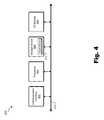
- FIG. 4illustrates exemplary components of a media content access subsystem according to principles described herein.
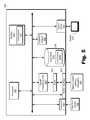
- FIG. 5illustrates an exemplary media content access device having the media content access subsystem of FIG. 4 implemented thereon according to principles described herein.
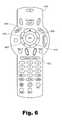
- FIG. 6illustrates an exemplary remote control user input device according to principles described herein.
- FIGS. 7-18illustrate exemplary views of graphical user interfaces that may be displayed on a display screen according to principles described herein.
- FIG. 19illustrates an exemplary channel guide user interface advertising method according to principles described herein.
- advertisement contentmay be integrated within exemplary graphical user interfaces (“GUIs”), such as GUIs displaying media channel and/or program guides, in a way that may provide an appropriate balance of information, advertisements, usability, aesthetics, and/or functionality to a user who views and/or interacts with the GUIs.
- GUIsgraphical user interfaces
- one or more graphical representations of one or more advertisements promoting products and/or servicesmay be displayed together with a graphical representation of a channel guide that includes a plurality of channel icons representing a plurality of media content channels through which media content may be accessed.
- advertisement contentmay be selected for display together with the channel guide in the GUI in response to a launch of the GUI and/or a user navigation event within the channel guide.
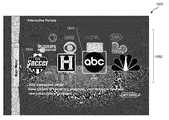
- the channel iconsmay provide launching points through which interactive portals associated with media content providers distributing media content via the media content channels may be accessed.
- the channel guidemay include channel icons arranged to form a three-dimensional grid matrix view of channel icons, and the channel icons may be positioned relative to a graphical representation of a three-dimensional stage in GUI.
- the term “media content”may refer generally to any content that may be accessed and/or presented by a media content access system for experiencing by a user of the media content access system.
- the term “media content program” as used hereinmay refer generally to any instance of media content, including any television program, on-demand media program, pay-per-view media program, broadcast media program (e.g., broadcast television program), multicast media program, narrowcast media program, IPTV program, video program, streamed media program, recorded live transmission of a media program, and any other form of media content that may be accessed and presented by the media content access system.
- media content channelmay refer generally to any carrier of media content, including, but not limited to, media (e.g., television) channels, streams, addresses, frequencies or other carriers of media content.
- the media content channelsmay include frequency bands to which media content access facility may tune to access media content carried over the frequency bands. Additionally or alternatively, the media content channels may include virtual channels that are mapped to frequency bands to which media content access facility may tune to access media content carried over the frequency bands.
- an advertisementmay refer to any advertisement promoting a product and/or service and that is configured to be displayed for viewing by a user.
- An advertisementmay be in the form of one or more graphical representations (e.g., visual images) of advertisement content that may be displayed for viewing by a user.
- an advertisementmay be designed to attract the attention of a user when the advertisement is displayed in a GUI and/or to prompt the user to take steps toward acquiring an advertised product and/or service.
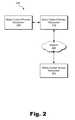
- FIG. 1illustrates an exemplary media content access system 100 (or simply “system 100 ”).
- system 100may be configured to access and present media content, as well as to generate and provide one or more GUIs for viewing and utilization by a user (e.g., an end user such as a subscriber to one or more services accessible by system 100 ).
- System 100may include, without limitation, a media content access facility 102 , a channel guide facility 104 , an advertisement facility 106 , a user interface facility 108 , an interactive portal access facility 110 , and a storage facility 112 selectively and communicatively coupled to one another. Any suitable communication technologies, including any of the communication technologies mentioned herein, may be employed to facilitate communications between facilities 102 - 112 . Each of these facilities will now be described in more detail.
- Media content access facility 102may be configured to access, process, and present media content for experiencing by a user.
- Media content access facility 102may employ any technologies suitable for accessing media content, including accessing media content distributed by a remote source.
- media content access facility 102may be configured to access media content that is distributed over one or more media content channels.
- each media content channelmay be associated with and carry media content provided by a certain media content provider, such as American Broadcasting Company (“ABC”), for example. Accordingly, media content access facility 102 may select (e.g., tune to) a particular media content channel to access media content provided by a particular media content provider associated with the media content channel.
- ABSAmerican Broadcasting Company
- Media content access facility 102may be configured to process and present media content for experiencing by a user.
- a presentation of media contentmay be performed in any suitable way such as by generating and/or providing output signals representative of media content to a display device (e.g., a television) and/or an audio output device.
- media content access facility 102may display, play back, or otherwise present a media content program for experiencing by a user.
- Channel guide facility 104may be configured to maintain channel data representative of one or more media content channels through which media content access facility 102 may access media content.
- the channel datamay be stored as channel data 114 in storage facility 112 .
- Channel data 114may include any information descriptive of or otherwise related to the media content channels.
- channel data 114may include, without limitation, data representative of channel identifiers (e.g., virtual channel numbers), channel frequency ranges, mappings of virtual channels to frequency ranges, information about media content providers associated with media channels, and graphical images associated media content channels (e.g., channel logos and/or media content provider logos).
- Channel data 114may be utilized by channel guide facility 104 to generate a channel guide for presentation to a user.
- a channel guidemay include any compilation of channel data 114 that may be presented to a user. The user may utilize the channel guide to identify and/or access media content associated with a media channel.
- a channel guidemay be integrated within an interactive media program guide in some embodiments or presented independently of an interactive media program guide in other embodiments. Exemplary graphical representations of channel guides are described in more detail further below.
- Advertisement facility 106may be configured to maintain advertisement data representative of one or more advertisements that may be presented to a user.
- the advertisement datamay be stored as advertisement data 116 in storage facility 112 .
- Advertisement data 116may include any data representative of, descriptive of, or otherwise related to advertisements.
- advertisement data 116may include, without limitation, data representative of advertisement content (e.g., advertisements images, artwork, and text) as well as advertisement metadata, which may be descriptive of one or more attributes of advertisement content. Exemplary graphical representations of advertisements are described in more detail further below.
- advertisement facility 106may be configured to select personalized advertisements for presentation to a user. For example, advertisement facility 106 may analyze advertisement metadata and information about the user and select an advertisement that is likely of interest to the user based on the analysis. To this end, advertisement facility 106 may access user profile data 118 stored in storage facility 112 and which may include a user profile containing information about a user. A user's profile may specify one or more preferences of a user, historical media content access data associated with the user (e.g., data indicating one or more media channels and/or media content programs accessed by the user), and any other information about the user that may be helpful for selecting a personalized advertisement for presentation to the user.
- user profile data 118stored in storage facility 112 and which may include a user profile containing information about a user.
- a user's profilemay specify one or more preferences of a user, historical media content access data associated with the user (e.g., data indicating one or more media channels and/or media content programs accessed by the user), and any other information about the user that may
- advertisement data 116may be managed by an entity (e.g., a person or organization) controlling delivery of media content to media content access facility 102 .
- an entitye.g., a person or organization
- an entity that delivers media content from media content providers to end usersmay manage advertisement data 116 .
- the management of advertisement data 116may include, but is not limited to, creating, compiling, and providing graphical advertisement content to be displayed in one or more GUIs.
- User interface facility 108may be configured to generate and launch one or more GUIs for display to a user.
- a launch of a GUImay include any process for facilitating a display of a GUI that was not displayed immediately prior to the launch.
- a launch of a GUImay include an initial instantiation of a GUI in response to user input requesting that the GUI be displayed.
- a launch of a GUImay include an activation and/or selection of an already-instantiated GUI in response to user input requesting that the GUI be displayed.
- a launchmay include transforming a GUI from a non-displayed state to a displayed state on a display screen.
- User interface facility 108may be configured to access and utilize channel data 114 maintained by channel guide facility 104 and/or advertisement data 116 maintained by advertisement facility 106 to generate and launch a GUI for display.
- user interface facility 108may be configured to request a channel guide from channel guide facility 104 and one or more advertisements from advertisement facility 106 for inclusion in the GUI.
- Channel guide facility 104may respond by providing data representative of a channel guide
- advertisement facility 106may respond by providing data representative of one or more advertisements for inclusion in the GUI.
- the GUImay include a graphical representation of a channel guide representing media content channels through which media content may be accessed by media content access facility 102 , and a graphical representation of at least one advertisement displayed together with the channel guide in the GUI.
- the channel guide and the advertisementmay be displayed together in the GUI in a manner that is designed to provide an intuitive and appropriate balance of information, advertisements, usability, aesthetics, and functionality.
- the advertisementmay be integrally displayed together with the channel guide in the GUI on a temporary basis until an occurrence of a predetermined event is detected. In response to the detected event, the advertisement may be replaced in the GUI, for example. Examples of GUI views including channel guides and/or advertisements are described in more detail further below in reference to the drawings.
- User interface facility 108may be further configured to control the contents of a GUI. For example, user interface facility 108 may initially populate a GUI with content such as a graphical representation of a channel guide and a graphical representation of an advertisement. Subsequently, user interface facility 108 may modify the contents of the GUI such as by adding new content to the GUI, removing content from the GUI, modifying content in the GUI, and replacing content in the GUI with new content. As described in more detail further below, for example, user interface facility 108 may replace a graphical representation of an advertisement with a graphical representation of other content, such as content specific to a media content channel in the channel guide of the GUI.
- User interface facility 108may be configured to receive user input and provide user output and may include any hardware, firmware, software, or combination thereof supportive of user interface input and output capabilities. Accordingly, user interface facility 108 may receive input from and provide output to a user. In certain embodiments, user interface facility 108 may be configured to detect user input indicating an occurrence of a predetermined event in a GUI. For example, user interface facility 108 may detect user input indicating an event such as a user navigation event or a user selection event. A user navigation event may include any user-initiated navigation within a channel guide and/or GUI.
- a user navigation eventmay include a browsing event that moves a selector within a channel guide displayed in a GUI (e.g., from one channel icon to another channel icon).
- a user selection eventmay include any user-initiated selection of an object included in a channel guide and/or GUI, such as a selection of a channel icon in a channel guide displayed in a GUI. Examples of a user navigation event and a user selection event are described in more detail further below.
- Interactive portal access facility 110may be configured to access one or more interactive portals.
- an interactive portalmay include any platform through which content associated with a media content channel may be accessed.
- the contentmay include information, media content, advertisements, other content, services, service offers, and/or any other material specific to the media content channel and/or a media content provider associated with the media content channel.
- an interactive portalmay be operated by a media content provider associated with a media content channel such that content accessible through the interactive portal is provided by the media content provider.
- an interactive portalmay be operated at least in part by an entity that facilitates delivery of media content to media content access facility 102 via a media content channel.
- a media content channelmay be associated with a media content provider such as Home Box Office (“HBO”).
- HBOmay maintain an interactive portal through which interactive portal access facility 110 may access information, media content, advertisements, other content, services, service offers, and/or any other material provided by HBO.
- Such an interactive portalmay be used by HBO to promote HBO's brand, disseminate information, promote media content, and/or promote a service (e.g., an HBO subscription package) on a platform that is conveniently accessible by interactive portal access facility 110 .
- a channel icon in a channel guidemay be configured to function as a launching point to an interactive portal such that when a user selects the channel icon in a GUI, interactive portal access facility 110 respond by accessing the interactive portal for the media content channel associated with the channel icon.
- Storage facility 112may be configured to store data, including channel data 114 , advertisement data 116 , user profile data 118 , and any other electronic data as may suit a particular implementation. Storage facility 112 may include and/or employ any suitable data storage technologies.
- System 100may include any computer hardware and/or computer-implemented instructions (e.g., software), or combinations of computer-implemented instructions and hardware, configured to perform one or more of the processes described herein.
- system 100may be implemented on one physical computing device or may be implemented on more than one physical computing device.
- system 100may include any number of computing devices, and may employ any of a number of computer operating systems.
- facilities 102 - 112are shown to be separate facilities in FIG. 1 , any of those facilities may be combined into a single facility as may serve a particular application.
- one or more of the processes described hereinmay be implemented at least in part as instructions executable by one or more computing devices.
- a processore.g., a microprocessor
- receives instructionsfrom a computer-readable medium, (e.g., a memory, etc.), and executes those instructions, thereby performing one or more processes, including one or more of the processes described herein.
- Such instructionsmay be stored and/or transmitted using any of a variety of known computer-readable media.
- a computer-readable mediumincludes any medium that participates in providing data (e.g., instructions) that may be read by a computer (e.g., by a processor of a computer). Such a medium may take many forms, including, but not limited to, non-volatile media and/or volatile media.
- Non-volatile mediamay include, for example, optical or magnetic disks and other persistent memory.
- Volatile mediamay include, for example, dynamic random access memory (“DRAM”), which typically constitutes a main memory.
- DRAMdynamic random access memory
- Computer-readable mediainclude, for example, a floppy disk, flexible disk, hard disk, magnetic tape, any other magnetic medium, a CD-ROM, a DVD, any other optical medium, a RAM, a PROM, an EPROM, a FLASH-EEPROM, any other memory chip or cartridge, or any other medium from which a computer can read.
- FIG. 2illustrates an exemplary implementation 200 of system 100 wherein a media content delivery subsystem 202 (or simply “delivery subsystem 202 ”) is communicatively coupled to a media content access subsystem 204 (or simply “access subsystem 204 ”).
- media content access facility 102 , channel guide facility 104 , advertisement facility 106 , user interface facility 108 , interactive portal access facility 110 , and storage facility 112may each be implemented on one or both of delivery subsystem 202 and access subsystem 204 .
- Access subsystem 204may be configured to communicate with and receive a signal and/or data stream containing data representative of media content and/or data associated with media content (e.g., metadata, program guide data, etc.) from delivery subsystem 202 .
- Access subsystem 204 and delivery subsystem 202may communicate using any suitable communication technologies, devices, networks, media, and protocols supportive of remote data communications.
- delivery subsystem 202may be configured to communicate with access subsystem 204 over a network 206 (and communications links thereto).
- Network 206may include one or more networks or types of networks capable of carrying communications and/or data signals between delivery subsystem 202 and access subsystem 204 .
- network 206may include, but is not limited to, a cable network, optical fiber network, hybrid fiber coax network, wireless network (e.g., a Wi-Fi and/or mobile telephone network), satellite network, wireless broadcast network (e.g., a satellite media broadcasting network or terrestrial broadcasting network), subscriber television network, a provider-specific network (e.g., a Verizon® FIOS® network), the Internet, an intranet, local area network, any other suitable network, and any combination or sub-combination of these networks.
- wireless networke.g., a Wi-Fi and/or mobile telephone network
- satellite networke.g., a satellite media broadcasting network or terrestrial broadcasting network
- wireless broadcast networke.g., a satellite media broadcasting network or terrestrial broadcasting network
- subscriber television networke.g., a provider-specific network (e.g., a Verizon® FIOS® network)
- the Internete.g., an intranet, local area network, any other suitable network, and any
- Delivery subsystem 202 and access subsystem 204may communicate over network 206 using any suitable communication technologies, devices, media, and protocols supportive of remote data communications, including, but not limited to, data transmission media, communications devices, Transmission Control Protocol (“TCP”), Internet Protocol (“IP”), File Transfer Protocol (“FTP”), Telnet, Hypertext Transfer Protocol (“HTTP”), Real Time Protocol (“RTP”), User Datagram Protocol (“UDP”), Ethernet, and any other suitable communications technologies, devices, media, and protocols.
- TCPTransmission Control Protocol
- IPInternet Protocol
- FTPFile Transfer Protocol
- TelnetTelnet
- HTTPHypertext Transfer Protocol
- HTTPReal Time Protocol
- RTPReal Time Protocol
- UDPUser Datagram Protocol
- Ethernetany other suitable communications technologies, devices, media, and protocols.
- FIG. 2shows delivery subsystem 202 and access subsystem 204 communicatively coupled via network 206 , it will be recognized that delivery subsystem 202 and access subsystem 204 may be configured to communicate one with another in any other suitable manner (e.g., via a direct connection).
- delivery subsystem 202may be configured to deliver media content to access subsystem 204 .
- Access subsystem 204may be configured to facilitate access by a user to media content received from delivery subsystem 202 . To this end, access subsystem 204 may present the media content for experiencing (e.g., viewing) by a user, record the media content, parse metadata and/or other data associated with the media content, etc.
- delivery subsystem 202may be communicatively coupled to a media content provider subsystem 208 (or simply “provider subsystem 208 ), which may provide media content to delivery subsystem 202 for distribution over network 206 .
- provider subsystem 208may include or be implemented by one or computing devices operated by a media content provider (e.g., HBO) and that are configured to provide data representative of media content to delivery subsystem 202 .
- Delivery subsystem 202may distribute the media content associated with the media content provider over network 206 via a media content channel.
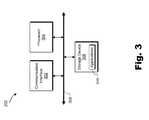
- FIG. 3illustrates exemplary components of delivery subsystem 202 .
- delivery subsystem 202may include a communication interface 302 , a processor 304 , and a storage device 306 communicatively coupled one to another via a communication infrastructure 308 .
- the components of delivery subsystem 202may communicate with one another, including sending data to and receiving data from one another, using any suitable communication technologies.
- the components of delivery subsystem 202may be implemented on any computing device or combination of computing devices, such as one or more servers, personal computers, or the like.
- FIG. 3While an exemplary delivery subsystem 202 is shown in FIG. 3 , the components illustrated in FIG. 3 are not intended to be limiting. Additional or alternative components may be used in other embodiments. Components of the delivery subsystem 202 shown in FIG. 3 will now be described in additional detail.
- Communication interface 302may be configured to communicate with one or more computing devices, including access subsystem 204 .
- communication interface 302may be configured to transmit and/or receive communication signals, media content, and/or data to/from access subsystem 204 .
- Examples of communication interface 302include, without limitation, a wired network interface (such as a network interface card), a wireless network interface (such as a wireless network interface card), a modem, and any other suitable interface.
- communication interface 302may be configured to transmit (e.g., broadcast, multicast, and/or narrowcast) data representative of one or more media content programs to access subsystem 204 . Such data may be transmitted in one or more media content streams, as one or more data files, via one or more media content channels, or in any other suitable manner as may serve a particular application. Communication interface 302 may be configured to interface with any suitable communication media, protocols, and formats, including any of those mentioned above.
- Processor 304generally represents any type or form of processing unit capable of processing data or interpreting, executing, and/or directing execution of one or more of the instructions, processes, and/or operations described herein. Processor 304 may direct execution of operations in accordance with one or more applications 310 or other computer-executable instructions such as may be stored in storage device 306 or another computer-readable medium. As an example, processor 304 may be configured to process data, including modulating, encoding, and/or otherwise preparing data (e.g., media content data) for transmission by communication interface 302 .
- datae.g., media content data
- Storage device 306may include one or more data storage media, devices, or configurations and may employ any type, form, and combination of data storage media and/or device.
- storage device 306may include, but is not limited to, a hard drive, network drive, flash drive, magnetic disc, optical disc, random access memory (“RAM”), dynamic RAM (“DRAM”), other non-volatile and/or volatile data storage units, or a combination or sub-combination thereof.
- Electronic data, including data described herein,may be temporarily and/or permanently stored in storage device 306 .
- data representative of one or more executable applications 310 configured to direct processor 304 to perform any of the operations described hereinmay be stored within storage device 306 .
- datamay be arranged in one or more databases residing within storage device 306 .
- media content access facility 102 , channel guide facility 104 , advertisement facility 106 , user interface facility 108 , interactive portal access facility 110 , and/or storage facility 112may be implemented by or within one or more components of delivery subsystem 202 .
- one or more applications 310 residing within storage device 306may be configured to direct processor 304 to perform one or more processes or functions associated with media content access facility 102 , channel guide facility 104 , advertisement facility 106 , user interface facility 108 , and/or interactive portal access facility 110 .
- storage facility 112may be implemented by or within storage device 306 .
- channel data 114 , advertisement data 116 , and/or user profile data 118may be stored within storage device 306 .
- FIG. 4illustrates exemplary components of access subsystem 204 .
- access subsystem 204may include a communication interface 402 , a processor 404 , a storage device 406 , and an input/output (“I/O”) module 408 communicatively coupled one to another via a communication infrastructure 410 .
- the components of access subsystem 204may communicate with one another, including sending data to and receiving data from one another, using any suitable communication technologies.
- access subsystem 204may be implemented on any computing device or combination of computing devices, such as a set-top box, a communications device, a mobile device (e.g., a mobile phone device), a handheld device, a personal computer, a phone device (e.g., Verizon Hub device), a personal-digital assistant device, gaming device, a DVR device, a television device, a media player device, and/or any media content access device configured to perform one or more of the processes and/or operations described herein.
- a set-top boxsuch as a set-top box, a communications device, a mobile device (e.g., a mobile phone device), a handheld device, a personal computer, a phone device (e.g., Verizon Hub device), a personal-digital assistant device, gaming device, a DVR device, a television device, a media player device, and/or any media content access device configured to perform one or more of the processes and/or operations described herein.
- a mobile devicee.g.,
- FIG. 4While an exemplary access subsystem 204 is shown in FIG. 4 , the components illustrated in FIG. 4 are not intended to be limiting. Additional or alternative components may be used in other embodiments. Components of the access subsystem 204 shown in FIG. 4 will now be described in additional detail.
- Communication interface 402may be configured to communicate with one or more computing devices, including delivery subsystem 202 .
- communication interface 402may be configured to transmit and/or receive communication signals, media content, and/or data to/from delivery subsystem 202 .
- Examples of communication interface 402include, without limitation, a wired network interface (such as a network interface card), a wireless network interface (such as a wireless network interface card), a modem, and any other suitable interface.
- delivery subsystem 202may transmit (e.g., broadcast, multicast, and/or narrowcast) data representative of one or more media content programs.
- Communication interface 402may be configured to receive such data such that the data may be processed by access subsystem 204 .
- communication interface 402may include any device, logic, and/or other technologies suitable for receiving signals, data streams, and/or data representative of media content.
- Communication interface 402may be configured to interface with any suitable communication media, protocols, and formats, including any of those mentioned above.
- delivery subsystem 202may be configured to transmit and access subsystem 204 may be configured to receive data streams or signals including data representative of various media content programs in accordance with a transmission schedule.
- the transmission schedulemay specify that particular media content programs are to be transmitted at scheduled transmission times and on certain media content channels.
- scheduled transmission timeor “scheduled transmission” may refer generally to any period of time during which a media content program is to be transmitted to access subsystem 204 .
- Communication interface 402may be configured to selectively identify, receive, and/or process appropriate data streams and/or media content programs at the scheduled transmission times and on the appropriate media content channels.
- communication interface 402may include a tuner configured to selectively receive media content carried on a particular media content channel. The tuner may be tuned to a particular media content channel such that the media content carried on the media content channel is received and may be processed by access subsystem 204 .
- communication interface 402may include multiple tuners such that media content carried on different media content channels may be concurrently received for processing by the access subsystem 204 .
- communication interface 402may include a first tuner configured to receive media content carried on an analog video signal and a second tuner configured to concurrently receive media content carried on a digital compressed signal.
- communication interface 402may be configured to receive other types of signals (e.g., other types of media content carrying signals) from delivery subsystem 202 and/or one or more other sources without using a tuner.
- delivery subsystem 202may transmit digital streams of data packets (e.g., Internet Protocol (“IP”) based data packets) that can be received without using a tuner.
- IPInternet Protocol
- communication interface 402may receive and forward the signals directly to other components of access subsystem 204 without the signals going through a tuner.
- IP-based signalfor example, communication interface 402 may function as an IP receiver.
- Processor 404generally represents any type or form of processing unit capable of processing data or interpreting, executing, and/or directing execution of one or more of the instructions, processes, and/or operations described herein. Processor 404 may direct execution of operations in accordance with one or more applications 412 or other computer-executable instructions such as may be stored in storage device 406 or another computer-readable medium. As an example, processor 404 may be configured to process data, including demodulating, decoding, and/or parsing data (e.g., data representative of media content received from delivery subsystem 202 by communication interface 402 ), and encoding and modulating data for transmission by communication interface 402 .
- demodulating, decoding, and/or parsing datae.g., data representative of media content received from delivery subsystem 202 by communication interface 402
- encoding and modulating datafor transmission by communication interface 402 .
- Storage device 406may include one or more data storage media, devices, or configurations and may employ any type, form, and combination of data storage media and/or device.
- storage device 406may include, but is not limited to, a hard drive, network drive, flash drive, magnetic disc, optical disc, RAM, DRAM, other non-volatile and/or volatile data storage units, or a combination or sub-combination thereof.
- Electronic data, including data described herein,may be temporarily and/or permanently stored in storage device 406 .
- data representative of one or more executable applications 412 configured to direct processor 404 to perform any of the operations described hereinmay be stored within storage device 406 .
- datamay be arranged in one or more databases residing within storage device 406 .
- I/O module 408may be configured to receive user input and provide user output and may include any hardware, firmware, software, or combination thereof supportive of input and output capabilities.
- I/O module 408may include one or more devices for capturing user input, including, but not limited to, a microphone, speech recognition technologies, keyboard or keypad, touch screen component (e.g., touch screen display), receiver (e.g., an RF or infrared receiver), and one or more input buttons.
- I/O module 408may include one or more devices for presenting output to a user, including, but not limited to, a graphics engine, a display (e.g., a display screen, one or more output drivers (e.g., display drivers), one or more audio speakers, and one or more audio drivers.
- I/O module 408is configured to provide graphical data to a display for presentation to a user.
- the graphical datamay be representative of one or more GUIs, GUI views, media content views, channel guide views, and/or any other view as may serve a particular application.
- media content access facility 102 , channel guide facility 104 , advertisement facility 106 , user interface facility 108 , interactive portal access facility 110 , and/or storage facility 112may be implemented by or within one or more components of access subsystem 204 .
- one or more applications 412 residing within storage device 406may be configured to direct processor 404 to perform one or more processes or functions associated with media content access facility 102 , channel guide facility 104 , advertisement facility 106 , user interface facility 108 , and/or interactive portal access facility 110 .
- storage facility 112may be implemented by or within storage device 406 .
- channel data 114 , advertisement data 116 and/or user profile data 118may be stored within storage device 406 .
- Access subsystem 204 and/or components of access subsystem 204may be implemented as may suit a particular application.
- FIG. 5illustrates an exemplary media content access device 500 (or simply “device 500 ”) having access subsystem 204 implemented thereon.
- Device 500may include one or more of the components of access subsystem 204 shown in FIG. 4 and may be configured to perform one or more of the processes and/or operations described herein.
- Device 500may include, but is not limited to, a set-top box, a media content processing device, a communications device, a mobile device (e.g., a mobile phone device), a handheld device, a personal computer, a phone device (e.g., Verizon Hub device), a personal-digital assistant device, a gaming device, a DVR device, a television device, a media player device, and/or any device configured to perform one or more of the processes and/or operations described herein.
- a mobile devicee.g., a mobile phone device
- handheld devicee.g., a personal computer
- a phone devicee.g., Verizon Hub device
- a personal-digital assistant devicee.g., a gaming device, a DVR device, a television device, a media player device, and/or any device configured to perform one or more of the processes and/or operations described herein.
- device 500may include a communication interface 502 configured to receive media content (e.g., media content) and/or data (e.g., metadata, program guide data, and/or any other data associated with media content) in any acceptable format from delivery subsystem 202 or from any other suitable external source.
- Communication interface 502may include any device, logic, and/or other technologies suitable for receiving signals and/or data representative of media content and/or other types of media content or data.
- Communication interface 502may be configured to interface with any suitable communication media, protocols, and formats, including any of those mentioned above.
- Device 500may also include a receiver 504 configured to receive user input signals from a user input device 506 .
- User input device 506may include, for example, a remote control device or any other suitable input device and may be configured to communicate with receiver 504 via a wireless link (e.g., by infrared signaling), electrical connection, or any other suitable communication link.
- FIG. 6illustrates an exemplary remote control device 600 that may implement user input device 506 .
- remote control device 600may be configured to facilitate a user controlling operations of access subsystem 204 .
- a program guide button 602may be configured to evoke a presentation of a program guide GUI on a display.
- a left button 604 , a right button 606 , an up button 608 , a down button 610 , and a select button 612 (“OK” button 612 )may be included and configured to facilitate a user evoking and/or navigating through various views, options, and GUIs displayed by a display.
- Remote control device 600is merely illustrative of one of the many different types of user input devices that may be used to provide input commands (e.g., channel guide browsing commands) to access subsystem 204 .
- device 500may include a graphics engine 508 and an output driver 510 .
- Graphics engine 508may be configured to generate graphics to be provided to output driver 510 , which may be configured to interface with or drive a display 512 .
- Output driver 510may provide output signals to display 512 , the output signals including graphical content (e.g., media content, program guide media content, user interfaces, and/or advertisement views) generated by graphics engine 508 and to be presented by display 512 for experiencing by a user.
- Graphics engine 508 and output driver 510may include any combination of hardware, software, and/or firmware as may serve a particular application.
- Data store 514may include one or more data storage media, devices, or configurations and may employ any type, form, and combination of storage media.
- data store 514may include, but is not limited to, a hard drive, network drive, flash drive, magnetic disc, optical disc, or other non-volatile storage unit.
- Media content and/or data associated with media contentmay be temporarily and/or permanently stored in data store 514 .
- Data store 514is shown to be included within device 500 in FIG. 5 for illustrative purposes only. It will be understood that data store 514 may additionally or alternatively be located external to device 500 .
- Data store 514may include one or more live cache buffers 516 .
- Live cache buffer 516may additionally or alternatively reside in memory 518 or in a storage device external to device 500 .
- media content datamay be temporarily stored in live cache buffer 516 to facilitate recording of media content and/or presentation of media content in one or more trick play modes.
- Device 500may include memory 518 .
- Memory 518may include, but is not limited to, FLASH memory, RAM, DRAM, other suitable computer-readable media, or any combination or sub-combination thereof.
- one or more applications 520 configured to run on or otherwise be executed by device 500may reside in memory 518 .
- Device 500may include one or more tuners 522 .
- Tuner 522may be configured to selectively receive media content carried on a particular media content channel such that the media content may be processed by device 500 .
- media content received by tuner 522may be temporarily buffered, or stored, in the live cache buffer 516 . If there are multiple tuners 522 , there may be a live cache buffer 516 corresponding to each of the tuners 522 .
- tuner 522may be used to receive certain media content-carrying signals transmitted by delivery subsystem 202
- device 500may be configured to receive other types of content signals (including media content signals and/or program guide data signals) from delivery subsystem 202 and/or one or more other sources without using a tuner.
- delivery subsystem 202may transmit digital streams of data packets (e.g., Internet Protocol (“IP”) based data packets) that can be received without using a tuner.
- IPInternet Protocol
- communication interface 502may receive and forward the signals directly to other components of device 500 (e.g., processor 524 or signal processing unit 526 , described in more detail below) without the signals going through tuner 522 .
- signal processing unit 526may function as an IP receiver.
- Device 500may include at least one processor, such as processor 524 , configured to control and/or perform one or more operations of device 500 .
- Device 500may also include a signal processing unit 526 configured to process incoming media content.
- Signal processing unit 526may be configured, for example, to demodulate and parse encoded digital media content.
- device 500may include one or more signal processing units 526 corresponding to each of the tuners 522 .
- system 100may generate and launch a GUI for display to a user.
- GUIsExemplary views of GUIs that may be provided by system 100 for display will now be described in more detail in reference to FIGS. 7-18 .
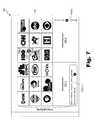
- FIG. 7illustrates an exemplary view of a channel guide GUI 700 (or simply “GUI 700 ”).
- GUI 700may include a graphical representation of a channel guide 702 and one or more graphical representations of one or more advertisements 704 (e.g., advertisements 704 - 1 and 704 - 2 ) displayed together with channel guide 702 in GUI 700 .
- channel guide 702may include a two-dimensional grid matrix view of a plurality of channel icons, which are associated with a plurality of media content channels.
- channel icon 706 - 1is associated with a media content channel known as “CNN”
- channel icon 706 - 2is associated with a media content channel known as “Cartoon Network.”
- channel iconsare arranged by rows and columns to form the two-dimensional grid matrix view.
- each channel icon in channel guide 702may be associated with and configured to function as a launching point for an interactive portal associated with the corresponding media content channel. Accordingly, a user selection of a channel icon in channel guide 702 may cause system 100 to access an interactive portal associated with the selected channel icon.
- system 100may detect the selection and access an interactive portal associated with the “HBO” media content channel.
- One or more GUIs associated with the interactive portalmay be displayed to the user.
- the interactive portal and/or GUIs associated with the interactive portalmay include any of the content disclosed above, including content that is controlled by the media content provider providing content for distribution via the HBO media content channel.
- Advertisements 704 displayed together with channel guide 702 in GUI 700may include any of the advertisement content described above.
- advertisements 704may be personalized to a user as described above.
- system 100may be configured to automatically select and insert one or more advertisements 704 in GUI 700 when the GUI 700 is launched. Accordingly, when a user provides user input configured to trigger a launch of GUI 700 , upon launch of GUI 700 the user may be provided with and able to view advertisements 704 displayed together with channel guide 702 in GUI 700 .
- GUI 700may include one or more visual prompts 708 (e.g., visual prompts 708 - 1 and 708 - 2 ), which may be associated with advertisements 704 and/or with a virtual store through which products and/or services may be acquired by a user.
- visual prompt 708 - 1may be configured to inform a user of a specific input that may be provided by the user to access a virtual store through which products and/or services may be acquired by a user.
- the specific input configured to initiate access to the virtual storecomprises a specific button on a user input device such as remote control device 600 (e.g., a button labeled “1” on remote control device 600 ).
- the virtual storemay include one or more tools that may be utilized by the user to acquire (e.g., purchase, rent, subscribe to) media content such as videos, music, and games, or to acquire any other product or service offered in the virtual store.
- media contentsuch as videos, music, and games
- Exemplary GUI views that are related to a purchase of a media content program in a virtual storeare described further below.
- visual prompt 708 - 2may be configured to inform a user of a specific input that may be provided by the user to access more advertisements 704 .
- the specific input configured to initiate access to additional advertisements 704comprises a specific button on a user input device such as remote control device 600 (e.g., a button labeled “2” on remote control device 600 ).
- system 100may display additional advertisements 704 in GUI 700 . This may include scrolling a strip of advertisements 704 such that one or more of the currently displayed advertisements 704 is moved off-screen out of the display view and one or more other advertisements 704 is moved on-screen within the display view.
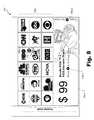
- GUI 700illustrates GUI 700 with a different advertisement 704 - 3 displayed together with channel guide 702 in GUI 700 .
- advertisement 704 - 3is configured to promote a bundled service subscription offering (e.g., a bundled subscription package including television, internet access, and telephone subscriber services).
- a visual prompt 708 - 3is also displayed in conjunction with advertisement 704 - 3 .
- visual prompt 708 - 3may be configured to inform a user of a specific input that may be provided by the user to access more information about the offer specified by advertisement 704 - 3 .
- the specific input configured to initiate access to more information related to advertisement 704 - 3comprises a specific button on a user input device such as remote control device 600 (e.g., a button labeled “1” on remote control device 600 ).
- the advertisement content shown in FIGS. 8 and 9may represent advertisement content that may be displayed in GUI 700 during operation in a “launch mode,” which may be the mode of operation associated with GUI 700 immediately following a launch of GUI 700 for display.
- “launch mode”a first category of advertisement content may be displayed together with channel guide 702 in GUI 700 .
- the first category of contentmay include advertisements that are selected from a general pool of advertisements without restriction to advertisements that are specific to a particular media content channel.
- the first category of advertisement contentmay be provided by an entity operating delivery subsystem 202 (e.g., a service carrier).
- System 100may be configure to transition from “launch mode” to another mode of operation in response to an occurrence of a predefined event. For example, system 100 may transition from “launch mode” to a “navigation mode” in response to a user navigation event within channel guide 702 .
- “launch mode”user navigation input may be received indicating a desire of a user to navigate within channel guide 702 .
- the navigationmay include activating a selector within channel guide 702 and/or moving a graphical representation of the selector within channel guide 702 . As shown in FIGS. 7 and 8 , for example, a graphical representation of a selector 710 may be positioned at channel icon 706 - 1 .
- Selector 710may indicate one or more navigational commands that may be input by a user to navigate selector 710 within channel guide 710 .
- selector 710includes directional arrows indicating directions in which selector 710 may be moved in channel guide 702 in response to user input associated with the directional arrows.
- selector 701may be moved left when left arrow button 604 of remote control device 600 is selected, right when right arrow button 606 of remote control device 600 is selected, and down when down arrow button 610 of remote control device 600 is selected.
- selector 710may be in an inactive state when GUI 700 is operating in “launch mode.”
- selector 710is inactive and includes a visual indicator indicating a specific input that may be input by a user to activate selector 710 for navigation within channel guide 702 .
- the specific inputcomprises a specific button on a user input device such as remote control device 600 (e.g., the “OK” button 612 on remote control device 600 ).
- system 100may activate selector 710 such that it becomes navigable within channel guide 702 .
- system 100may detect the activation of selector 710 as an occurrence of a user navigation event within channel guide 702 in GUI 700 and respond by transitioning GUI 700 from operation in “launch mode” to operation in “navigation mode.”
- a second category of contentmay be displayed together with channel guide 702 in GUI 700 .
- the second category of contentmay include content that is selected from a pool of content that is specific to a particular media content channel, such as information, advertisements, and/or other content specific to the media content channel and/or the media content provider associated with the media content channel.
- the second category of contentmay be provided by the media content provider providing media content for distribution via the media content channel represented by a channel icon that is selected by selector 710 in channel guide 702 .
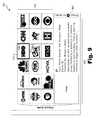
- FIG. 9illustrates a view of GUI 900 after selector 710 has been activated and operation has been transitioned from “launch mode” to “navigation mode.” Selector 710 is now navigable and positioned at channel icon 706 - 1 . Accordingly, content specific to the HBO media content channel associated with channel icon 706 - 1 has been selected and displayed together with channel guide 702 in GUI 700 .
- the contentis labeled as channel content 902 and includes information (e.g., an image, cast information, director information, and a description) about a media content program that is or will be accessible via the HBO media content channel.
- Channel content 902may include other information and/or content specific to the media content channel associated with the selected channel icon in other embodiments.
- advertisements 704 displayed together with channel guide 702 during “launch mode”may be replaced with channel content 902 displayed together with channel guide 702 during “navigation mode.”
- the replacementmay be accomplished in any suitable way, including actual replacement of visual content data in rendering GUI 700 , overlaying or adjusting layers of visual content in GUI 700 , resizing of visual content in GUI 700 , and/or any other operations that may effectuate a full or partial and visually discernible replacement of visual content in a display of GUI 700 .
- GUI 700may include a visual prompt 904 displayed in association with channel content 902 .
- Visual prompt 904may be configured to inform a user of a specific input that may be provided to initiate access to information about one or more deals associated with the channel content 902 , the media content channel corresponding to the selected channel icon 706 - 1 , and/or the media content provider providing content for distribution via the media content channel.
- the dealsmay include, without limitation, deals for purchasing media content and/or service packages from the media content provider.
- the specific input configured to initiate access to information about the dealscomprises a specific button on a user input device such as remote control device 600 (e.g., a button labeled “2” on remote control device 600 ).
- channel content 902may be updated to include content that is specific to the media content channel associated with the newly selected channel icon. For example, when a user navigation event causes selector 710 to be moved from channel icon 706 - 1 to channel icon 706 - 2 , channel content 902 specific to the HBO media content channel associated with channel icon 706 - 1 may be replaced with channel content 902 specific to the Cartoon Network media content channel associated with channel icon 706 - 2 .
- a usermay select the “OK” button 612 of remote control device 600 , or provide another specified input in other embodiments, to direct system 100 to access an interactive portal associated with the media content channel corresponding to the channel icon selected by selector 710 .
- selector 710is at channel icon 706 - 1 as shown in FIG. 9
- system 100may respond by accessing the interactive portal for the HBO media content channel associated with channel icon 706 - 1 .
- system 100may detect the user input and access a virtual store, which may include generating and providing one or more virtual store GUIs for display to the user.
- FIGS. 10-15illustrate exemplary views of virtual store GUIs that may be displayed.
- FIG. 10illustrates an exemplary virtual store GUI 1000 in which a plurality of selectable options are presented to a user.
- the optionsmay be associated with categories of products and/or services that are available for acquisition by the user in the virtual store.
- GUI 1000may include a set of options 1002 that includes a “games” option, a “music” option, a “video” option, a “channels” option, and a “hardware & accessories” option from which the user may select.
- a selector 1004may be positioned at the “video” option.
- a set of sub-options 1006 to the “video” optionmay be displayed in GUI 1000 .
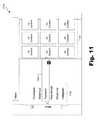
- GUI 1100may include a plurality of selectable options 1102 , which may include a “purchased” option for accessing videos that have been purchased by the user, a “watch list” option for accessing videos that are included in a user's media content watch list, a “featured” option for accessing “featured” videos, a “new arrivals” option for accessing “new arrival” videos, a “what's hot” option for accessing popular videos, and any “categories” option for accessing videos by category.
- selector 1004may be positioned at the “featured” option.
- a set of graphical representations 1104 of featured media content programssuch as videos may be displayed in GUI 1100 .
- the graphical representationsmay include images representative of the videos (e.g., movies).
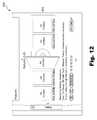
- GUI 1200may be displayed.
- GUI 1200may include graphical representations 1202 of “featured” media content from which a user may select one or more media content programs.
- the graphical representations 1202 of media contentdepict physical objects associated with videos such as movies.
- the graphical representationsmay depict a video disc (e.g., a DVD or Blu-Ray disc), a video disc case (e.g., a DVD or Blu-Ray disc case), and/or any other tangible media on which video content is stored.
- GUI 1200may also include graphical representations of information about the featured media content.
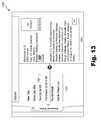
- GUI 1300 shown in FIG. 13may be displayed. As shown in FIG. 13 , GUI may include additional information 1302 about the selected media content program. In addition, GUI 1300 may include a set of selectable options 1304 associated with the selected media content program.
- the set of options 1304includes a “rate this” option for providing a rating of the selected media content program, a “more like this” option for accessing information about media content that is similar to the selected media content program, a rental option for renting the media content program, a purchase option for purchasing the media content program, a “bundle deals” option for accessing information about bundle deals that include the media content program and one or more other media content programs, and an “add to watch list” option for adding and selected media content program to a media content watch list.
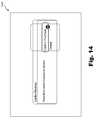
- GUI 1400 shown in FIG. 14may be displayed. As shown in FIG. 14 , GUI 1400 may be configured to provide the user with an opportunity to confirm a purchase of the selected media content program or to cancel a purchase of the selected media content program.
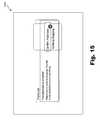
- GUI 1500 shown in FIG. 15may be displayed. As shown in FIG. 15 , GUI 1500 may provide the user with an opportunity to confirm the purchase of the selected media content program and/or to continue shopping in the virtual store.
- GUIs associated with a virtual store described aboveare illustrative only.
- Other virtual store GUIsmay be displayed to facilitate user acquisition of one or more products and/or services via the virtual store.
- the virtual storemay be conveniently accessed by the user from a launching point within channel guide GUI 700 as described above or from a launching point within another channel guide GUI.
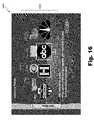
- FIG. 16illustrates another exemplary channel guide GUI 1600 (or simply “GUI 1600 ”) that may be provided for display to a user.
- GUI 1600may include an exemplary graphical representation of a channel guide 1602 that includes a three-dimensional grid matrix view of a plurality of channel icons associated with a plurality of media content channels.
- the channel iconsmay be arranged in the three-dimensional gird matrix in a manner that depicts channel icons at various depths away from a display screen surface.
- channel iconsmay be arranged by rows and columns to form the three-dimensional grid matrix view in which the rows are depicted at different depths from the display screen surface.
- the rowsmay include generally horizontal rows of channel icons with a foremost horizontal row positioned at a forefront of the three-dimensional grid matrix and one or more other horizontal rows positioned at progressively increasing depths from the forefront of the three-dimensional grid matrix.
- the horizontal rows of channel icons arranged in the three-dimensional grid matrixmay visually taper in width with increased depth from the forefront of the three-dimensional grid matrix.
- GUI 1600may further include a graphical representation of a stage 1604 positioned at the forefront of the three-dimensional grid matrix.
- the graphical representation of stage 1604comprises a graphical representation of a three-dimensional stage or stage surface positioned at the forefront of the three-dimensional grid matrix of channel icons.
- the first horizontal row of channel icons that is positioned foremost in the three-dimensional grid matrix of channel iconsmay be positioned and depicted as being “on-stage” (i.e., positioned on stage 1604 ).
- the one or more other horizontal rows of channel iconsmay be positioned and depicted as being “off-stage” (i.e., positioned off of stage 1604 ).
- GUI 1600may further include a visual depiction of a spotlight effect on stage 1604 .
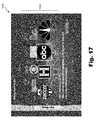
- FIG. 17shows an exemplary view of GUI 1600 with a stage spotlight effect depicted therein.
- the spotlight effectmay be configured to visually accentuate the channel icons positioned on stage 1604 as compared to the channel icons positioned off of stage 1604 .
- the on-stage channel iconsmay be “spotlighted” by increasing the brightness and/or other visual attribute(s) of the on-stage attributes as compared to the visual attributes of other channel icons positioned off-stage.
- GUI 1600may include one or more graphical representations of one or more reflections of one or more channel icons positioned on-stage.
- FIG. 17illustrates exemplary graphical representations of reflections 1702 of the on-stage channel icons. The reflections may help to further accentuate the on-stage channel icons.
- each channel icon in channel guide 1602may be associated with and configured to function as a launching point for an interactive portal associated with the corresponding media content channel, as described above. Accordingly, a user selection of a channel icon in channel guide 1602 may cause system 100 to access an interactive portal associated with the selected channel icon. System 100 may detect the user selection of the channel icon and respond by accessing the interactive portal.
- GUI 1600may provide one or more navigation tools that may be utilized by a user to navigation within channel guide 1602 .
- a usermay utilize directional arrow buttons of remote control device 600 or other input device to browse from channel icon to channel icon in channel guide 1602 .
- the usermay utilize a selection button of remote control device 600 or other input device to select a channel icon and thereby access an interactive portal associated with the media content channel corresponding to the selected channel icon.
- Channel iconsmay be visually moved within channel guide 1602 in response to a user navigation event in channel guide 1602 .
- FIG. 16shows a selector 1610 positioned at a channel icon associated with a media content channel known as “ABC.”
- a usermay select down arrow button 610 of remote control device 600 to navigate away from the channel icon associated with the “ABC” media content channel.
- System 100may detect the user navigation event and respond by directionally scrolling the three-dimensional grid matrix of channel icons relative to stage 1604 . For example, each horizontal row of channel icons may be moved away from the display screen in depth-wise direction, the backmost horizontal row of channel icons may be moved out of the display, the second backmost horizontal row of channel icons may replace the backmost horizontal row of channel icons, and so on.
- the first horizontal row of channel icons positioned at the forefront of the three-dimensional grid matrixmay be moved off of state 1604 .
- a new horizontal row of channel iconsmay be introduced into the display as the foremost horizontal row of channel icons at the forefront of the three-dimensional grid matrix and moved onto stage 1604 .
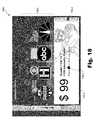
- FIG. 18shows an exemplary channel guide GUI 1800 (or simply “GUI 1800 ”) that includes a graphical representation of channel guide 1602 and a graphical representation of advertisement 704 - 3 displayed together with channel guide 1604 in GUI 1800 .
- GUI 1800may include visual prompts 708 - 2 and 708 - 3 , which may be configured to function as described above in reference to GUI 700 .
- system 100may be configured to automatically select and insert one or more advertisements 704 in GUI 1800 when GUI 1800 is launched. Accordingly, upon launch of GUI 1800 after a user provides user input configured to trigger the launch of GUI 1800 , the user may be able to view advertisements 704 , such as advertisement 704 - 3 , displayed together with channel guide 1602 in GUI 1800 .
- the advertisement content shown in FIG. 18may represent advertisement content that may be displayed in GUI 1800 during operation in a “launch mode,” which may be the mode of operation associated with GUI 1800 immediately following a launch of GUI 1800 for display.
- “launch mode”a first category of advertisement content may be displayed together with channel guide 1602 in GUI 1800 .
- the first category of contentmay include advertisements that are selected from a general pool of advertisements without restriction to advertisements that are specific to a particular media content channel.
- System 100may be configure to transition from “launch mode” to another mode of operation in response to an occurrence of a predefined event. For example, system 100 may transition from “launch mode” to a “navigation mode” in response to a user navigation event within channel guide 1602 .
- “launch mode”user navigation input may be received indicating a desire of a user to navigate within channel guide 1602 .
- the navigationmay include activating a selector within channel guide 1602 , moving channel icons within channel guide 1602 , and/or moving a graphical representation of the selector within channel guide 1602 .
- System 100may detect an occurrence of a user navigation event within channel guide 1602 in GUI 1800 and respond by transitioning GUI 1800 from operation in “launch mode” to operation in “navigation mode.”
- a second category of contentmay be displayed together with channel guide 1602 in GUI 1800 .
- the second category of contentmay include content that is selected from a pool of content that is specific to a particular media content channel, such as information, advertisements, and/or other content specific to the media content channel and/or the media content provider associated with the media content channel.
- advertisements 704 displayed together with channel guide 1602 during “launch mode”may be replaced with channel-specific content displayed together with channel guide 1602 during “navigation mode.”
- the replacementmay be accomplished in any suitable way, including in any of the ways described herein.
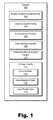
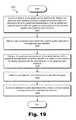
- FIG. 19illustrates an exemplary channel guide user interface advertising method 1900 according to principles described herein. While FIG. 19 illustrates exemplary steps according to one embodiment, other embodiments may omit, add to, reorder, and/or modify any of the steps shown in FIG. 19 . In certain embodiments, one or more of the steps shown in FIG. 19 may be performed by system 100 , delivery subsystem 202 , access subsystem 204 , and/or device 500 .
- a channel guide GUIis launched for display.
- Step 1902may be performed in any of the ways described herein.
- the GUImay include a graphical representation of a channel guide and a graphical representation of an advertisement displayed together with the graphical representation of the channel guide in the GUI. Exemplary views of such a GUI are illustrated in FIGS. 7 , 8 , and 18 .
- a user navigation eventis detected within the channel guide displayed in the GUI.
- Step 1904may be performed in any of the ways described herein, and the user navigation event may include any of the exemplary user navigation events described herein.
- step 1906the graphical representation of the advertisement is replaced with a graphical representation of content specific to a media content channel for display together with the channel guide in the GUI.
- Step 1906may be performed in any of the ways described herein, and the content specific to the media content channel may include any of the channel-specific content described herein.
- An exemplary view of such a GUIis illustrated in FIG. 9 .
- the replacement of the advertisementmay be associated with a transition from a “launch mode” of the GUI to a “navigation mode” of the GUI as described above.
- Step 1908a user selection of a channel icon in the channel guide is detected. Step 1908 may be performed in any of the ways described herein.
- step 1910an interactive portal associated with a media content channel corresponding to the selected channel icon is accessed in response to the detected user selection.
- Step 1910may be performed in any of the ways described herein.
Landscapes
- Engineering & Computer Science (AREA)
- Multimedia (AREA)
- Signal Processing (AREA)
- Business, Economics & Management (AREA)
- Marketing (AREA)
- Human Computer Interaction (AREA)
- Information Transfer Between Computers (AREA)
- Two-Way Televisions, Distribution Of Moving Picture Or The Like (AREA)
Abstract
Description
The advent of set-top boxes and other media content access devices has provided users of such devices with access to a large number and variety of media content programs, services, and choices. For example, a user may choose to experience a variety of distributed media content, including broadcast or multicast television programs, pay-per-view programming, video-on-demand programming, and audio programming via a set-top box.
A set-top box typically generates and provides data representative of graphical user interfaces (“GUIs”) that may be displayed to a user, who may utilize the GUIs to control operations and access functionality of the set-top box. For example, a set-top box typically provides menu GUIs through which a user may access various functions of the set-top box. As another example, a set-top box typically provides media program guide GUIs through which a user may identify and access media content. While conventional set-top box GUIs provide a user with tools to interact with a set-top box, there remains room to improve set-top box GUIs and related functionality. Thus, designers of GUIs for set-top boxes seek to design improved GUIs that provide an intuitive and appropriate balance of information, advertisements, usability, aesthetics, and functionality.
The accompanying drawings illustrate various embodiments and are a part of the specification. The illustrated embodiments are merely examples and do not limit the scope of the disclosure. Throughout the drawings, identical or similar reference numbers designate identical or similar elements.
Exemplary user interfaces and user interface enhancements for media content access systems and methods are described herein. As described in more detail below, in certain embodiments, advertisement content may be integrated within exemplary graphical user interfaces (“GUIs”), such as GUIs displaying media channel and/or program guides, in a way that may provide an appropriate balance of information, advertisements, usability, aesthetics, and/or functionality to a user who views and/or interacts with the GUIs. As an example, one or more graphical representations of one or more advertisements promoting products and/or services may be displayed together with a graphical representation of a channel guide that includes a plurality of channel icons representing a plurality of media content channels through which media content may be accessed. As described in more detail further below, advertisement content may be selected for display together with the channel guide in the GUI in response to a launch of the GUI and/or a user navigation event within the channel guide.
In some examples, the channel icons may provide launching points through which interactive portals associated with media content providers distributing media content via the media content channels may be accessed. In some examples, the channel guide may include channel icons arranged to form a three-dimensional grid matrix view of channel icons, and the channel icons may be positioned relative to a graphical representation of a three-dimensional stage in GUI.
As used herein, the term “media content” may refer generally to any content that may be accessed and/or presented by a media content access system for experiencing by a user of the media content access system. The term “media content program” as used herein may refer generally to any instance of media content, including any television program, on-demand media program, pay-per-view media program, broadcast media program (e.g., broadcast television program), multicast media program, narrowcast media program, IPTV program, video program, streamed media program, recorded live transmission of a media program, and any other form of media content that may be accessed and presented by the media content access system.
The term “media content channel,” “media channel,” or “channel” as used herein may refer generally to any carrier of media content, including, but not limited to, media (e.g., television) channels, streams, addresses, frequencies or other carriers of media content. In some examples, the media content channels may include frequency bands to which media content access facility may tune to access media content carried over the frequency bands. Additionally or alternatively, the media content channels may include virtual channels that are mapped to frequency bands to which media content access facility may tune to access media content carried over the frequency bands.
As used herein, the term “advertisement” or “advertisement content” may refer to any advertisement promoting a product and/or service and that is configured to be displayed for viewing by a user. An advertisement may be in the form of one or more graphical representations (e.g., visual images) of advertisement content that may be displayed for viewing by a user. Typically, an advertisement may be designed to attract the attention of a user when the advertisement is displayed in a GUI and/or to prompt the user to take steps toward acquiring an advertised product and/or service.
Exemplary user interface enhancements for media content access systems and methods will now be described with reference to the accompanying drawings.
Mediacontent access facility 102 may be configured to access, process, and present media content for experiencing by a user. Mediacontent access facility 102 may employ any technologies suitable for accessing media content, including accessing media content distributed by a remote source. In certain embodiments, mediacontent access facility 102 may be configured to access media content that is distributed over one or more media content channels. In certain examples, each media content channel may be associated with and carry media content provided by a certain media content provider, such as American Broadcasting Company (“ABC”), for example. Accordingly, mediacontent access facility 102 may select (e.g., tune to) a particular media content channel to access media content provided by a particular media content provider associated with the media content channel.
Mediacontent access facility 102 may be configured to process and present media content for experiencing by a user. A presentation of media content may be performed in any suitable way such as by generating and/or providing output signals representative of media content to a display device (e.g., a television) and/or an audio output device. For example, mediacontent access facility 102 may display, play back, or otherwise present a media content program for experiencing by a user.
In certain embodiments,advertisement facility 106 may be configured to select personalized advertisements for presentation to a user. For example,advertisement facility 106 may analyze advertisement metadata and information about the user and select an advertisement that is likely of interest to the user based on the analysis. To this end,advertisement facility 106 may access user profile data118 stored instorage facility 112 and which may include a user profile containing information about a user. A user's profile may specify one or more preferences of a user, historical media content access data associated with the user (e.g., data indicating one or more media channels and/or media content programs accessed by the user), and any other information about the user that may be helpful for selecting a personalized advertisement for presentation to the user.
In certain embodiments,advertisement data 116 may be managed by an entity (e.g., a person or organization) controlling delivery of media content to mediacontent access facility 102. For example, an entity that delivers media content from media content providers to end users may manageadvertisement data 116. The management ofadvertisement data 116 may include, but is not limited to, creating, compiling, and providing graphical advertisement content to be displayed in one or more GUIs.
User interface facility108 may be configured to generate and launch one or more GUIs for display to a user. A launch of a GUI may include any process for facilitating a display of a GUI that was not displayed immediately prior to the launch. In certain examples, a launch of a GUI may include an initial instantiation of a GUI in response to user input requesting that the GUI be displayed. In other examples, a launch of a GUI may include an activation and/or selection of an already-instantiated GUI in response to user input requesting that the GUI be displayed. In other examples, a launch may include transforming a GUI from a non-displayed state to a displayed state on a display screen.
User interface facility108 may be configured to access and utilizechannel data 114 maintained bychannel guide facility 104 and/oradvertisement data 116 maintained byadvertisement facility 106 to generate and launch a GUI for display. For example, user interface facility108 may be configured to request a channel guide fromchannel guide facility 104 and one or more advertisements fromadvertisement facility 106 for inclusion in the GUI.Channel guide facility 104 may respond by providing data representative of a channel guide, andadvertisement facility 106 may respond by providing data representative of one or more advertisements for inclusion in the GUI. Hence, in certain embodiments, the GUI may include a graphical representation of a channel guide representing media content channels through which media content may be accessed by mediacontent access facility 102, and a graphical representation of at least one advertisement displayed together with the channel guide in the GUI. The channel guide and the advertisement may be displayed together in the GUI in a manner that is designed to provide an intuitive and appropriate balance of information, advertisements, usability, aesthetics, and functionality. For example, the advertisement may be integrally displayed together with the channel guide in the GUI on a temporary basis until an occurrence of a predetermined event is detected. In response to the detected event, the advertisement may be replaced in the GUI, for example. Examples of GUI views including channel guides and/or advertisements are described in more detail further below in reference to the drawings.
User interface facility108 may be further configured to control the contents of a GUI. For example, user interface facility108 may initially populate a GUI with content such as a graphical representation of a channel guide and a graphical representation of an advertisement. Subsequently, user interface facility108 may modify the contents of the GUI such as by adding new content to the GUI, removing content from the GUI, modifying content in the GUI, and replacing content in the GUI with new content. As described in more detail further below, for example, user interface facility108 may replace a graphical representation of an advertisement with a graphical representation of other content, such as content specific to a media content channel in the channel guide of the GUI.
User interface facility108 may be configured to receive user input and provide user output and may include any hardware, firmware, software, or combination thereof supportive of user interface input and output capabilities. Accordingly, user interface facility108 may receive input from and provide output to a user. In certain embodiments, user interface facility108 may be configured to detect user input indicating an occurrence of a predetermined event in a GUI. For example, user interface facility108 may detect user input indicating an event such as a user navigation event or a user selection event. A user navigation event may include any user-initiated navigation within a channel guide and/or GUI. In certain embodiments, for example, a user navigation event may include a browsing event that moves a selector within a channel guide displayed in a GUI (e.g., from one channel icon to another channel icon). A user selection event may include any user-initiated selection of an object included in a channel guide and/or GUI, such as a selection of a channel icon in a channel guide displayed in a GUI. Examples of a user navigation event and a user selection event are described in more detail further below.
Interactiveportal access facility 110 may be configured to access one or more interactive portals. As used herein, an interactive portal may include any platform through which content associated with a media content channel may be accessed. The content may include information, media content, advertisements, other content, services, service offers, and/or any other material specific to the media content channel and/or a media content provider associated with the media content channel. In certain embodiments, an interactive portal may be operated by a media content provider associated with a media content channel such that content accessible through the interactive portal is provided by the media content provider. In alternative embodiments, an interactive portal may be operated at least in part by an entity that facilitates delivery of media content to mediacontent access facility 102 via a media content channel.
To illustrate, a media content channel may be associated with a media content provider such as Home Box Office (“HBO”). HBO may maintain an interactive portal through which interactiveportal access facility 110 may access information, media content, advertisements, other content, services, service offers, and/or any other material provided by HBO. Such an interactive portal may be used by HBO to promote HBO's brand, disseminate information, promote media content, and/or promote a service (e.g., an HBO subscription package) on a platform that is conveniently accessible by interactiveportal access facility 110.
In certain embodiments, a channel icon in a channel guide may be configured to function as a launching point to an interactive portal such that when a user selects the channel icon in a GUI, interactiveportal access facility 110 respond by accessing the interactive portal for the media content channel associated with the channel icon.
Accordingly, one or more of the processes described herein may be implemented at least in part as instructions executable by one or more computing devices. In general, a processor (e.g., a microprocessor) receives instructions, from a computer-readable medium, (e.g., a memory, etc.), and executes those instructions, thereby performing one or more processes, including one or more of the processes described herein. Such instructions may be stored and/or transmitted using any of a variety of known computer-readable media.
A computer-readable medium (also referred to as a processor-readable medium) includes any medium that participates in providing data (e.g., instructions) that may be read by a computer (e.g., by a processor of a computer). Such a medium may take many forms, including, but not limited to, non-volatile media and/or volatile media. Non-volatile media may include, for example, optical or magnetic disks and other persistent memory. Volatile media may include, for example, dynamic random access memory (“DRAM”), which typically constitutes a main memory. Common forms of computer-readable media include, for example, a floppy disk, flexible disk, hard disk, magnetic tape, any other magnetic medium, a CD-ROM, a DVD, any other optical medium, a RAM, a PROM, an EPROM, a FLASH-EEPROM, any other memory chip or cartridge, or any other medium from which a computer can read.
For example, as shown inFIG. 2 ,delivery subsystem 202 may be configured to communicate withaccess subsystem 204 over a network206 (and communications links thereto).Network 206 may include one or more networks or types of networks capable of carrying communications and/or data signals betweendelivery subsystem 202 andaccess subsystem 204. For example,network 206 may include, but is not limited to, a cable network, optical fiber network, hybrid fiber coax network, wireless network (e.g., a Wi-Fi and/or mobile telephone network), satellite network, wireless broadcast network (e.g., a satellite media broadcasting network or terrestrial broadcasting network), subscriber television network, a provider-specific network (e.g., a Verizon® FIOS® network), the Internet, an intranet, local area network, any other suitable network, and any combination or sub-combination of these networks.
WhileFIG. 2 showsdelivery subsystem 202 andaccess subsystem 204 communicatively coupled vianetwork 206, it will be recognized thatdelivery subsystem 202 andaccess subsystem 204 may be configured to communicate one with another in any other suitable manner (e.g., via a direct connection).
In some examples,delivery subsystem 202 may be configured to deliver media content to accesssubsystem 204.Access subsystem 204 may be configured to facilitate access by a user to media content received fromdelivery subsystem 202. To this end,access subsystem 204 may present the media content for experiencing (e.g., viewing) by a user, record the media content, parse metadata and/or other data associated with the media content, etc.
As shown inFIG. 2 ,delivery subsystem 202 may be communicatively coupled to a media content provider subsystem208 (or simply “provider subsystem208), which may provide media content todelivery subsystem 202 for distribution overnetwork 206. In certain embodiments,provider subsystem 208 may include or be implemented by one or computing devices operated by a media content provider (e.g., HBO) and that are configured to provide data representative of media content todelivery subsystem 202.Delivery subsystem 202 may distribute the media content associated with the media content provider overnetwork 206 via a media content channel.
While anexemplary delivery subsystem 202 is shown inFIG. 3 , the components illustrated inFIG. 3 are not intended to be limiting. Additional or alternative components may be used in other embodiments. Components of thedelivery subsystem 202 shown inFIG. 3 will now be described in additional detail.
In some examples,communication interface 302 may be configured to transmit (e.g., broadcast, multicast, and/or narrowcast) data representative of one or more media content programs to accesssubsystem 204. Such data may be transmitted in one or more media content streams, as one or more data files, via one or more media content channels, or in any other suitable manner as may serve a particular application.Communication interface 302 may be configured to interface with any suitable communication media, protocols, and formats, including any of those mentioned above.
In some examples, mediacontent access facility 102,channel guide facility 104,advertisement facility 106, user interface facility108, interactiveportal access facility 110, and/orstorage facility 112 may be implemented by or within one or more components ofdelivery subsystem 202. For example, one ormore applications 310 residing withinstorage device 306 may be configured todirect processor 304 to perform one or more processes or functions associated with mediacontent access facility 102,channel guide facility 104,advertisement facility 106, user interface facility108, and/or interactiveportal access facility 110. Likewise,storage facility 112 may be implemented by or withinstorage device 306. For example,channel data 114,advertisement data 116, and/or user profile data118 may be stored withinstorage device 306.
While anexemplary access subsystem 204 is shown inFIG. 4 , the components illustrated inFIG. 4 are not intended to be limiting. Additional or alternative components may be used in other embodiments. Components of theaccess subsystem 204 shown inFIG. 4 will now be described in additional detail.
As mentioned,delivery subsystem 202 may transmit (e.g., broadcast, multicast, and/or narrowcast) data representative of one or more media content programs.Communication interface 402 may be configured to receive such data such that the data may be processed byaccess subsystem 204. To this end,communication interface 402 may include any device, logic, and/or other technologies suitable for receiving signals, data streams, and/or data representative of media content.Communication interface 402 may be configured to interface with any suitable communication media, protocols, and formats, including any of those mentioned above.
In certain embodiments,delivery subsystem 202 may be configured to transmit andaccess subsystem 204 may be configured to receive data streams or signals including data representative of various media content programs in accordance with a transmission schedule. The transmission schedule may specify that particular media content programs are to be transmitted at scheduled transmission times and on certain media content channels. As used herein, the term “scheduled transmission time” or “scheduled transmission” may refer generally to any period of time during which a media content program is to be transmitted to accesssubsystem 204.
In some examples,communication interface 402 may include multiple tuners such that media content carried on different media content channels may be concurrently received for processing by theaccess subsystem 204. For example,communication interface 402 may include a first tuner configured to receive media content carried on an analog video signal and a second tuner configured to concurrently receive media content carried on a digital compressed signal.
While one or more tuners may be used to receive various types of media content-carrying signals transmitted bydelivery subsystem 202, additionally or alternatively,communication interface 402 may be configured to receive other types of signals (e.g., other types of media content carrying signals) fromdelivery subsystem 202 and/or one or more other sources without using a tuner. For example,delivery subsystem 202 may transmit digital streams of data packets (e.g., Internet Protocol (“IP”) based data packets) that can be received without using a tuner. For such types of signals,communication interface 402 may receive and forward the signals directly to other components ofaccess subsystem 204 without the signals going through a tuner. For an IP-based signal, for example,communication interface 402 may function as an IP receiver.
I/O module 408 may be configured to receive user input and provide user output and may include any hardware, firmware, software, or combination thereof supportive of input and output capabilities. For example, I/O module 408 may include one or more devices for capturing user input, including, but not limited to, a microphone, speech recognition technologies, keyboard or keypad, touch screen component (e.g., touch screen display), receiver (e.g., an RF or infrared receiver), and one or more input buttons.
I/O module 408 may include one or more devices for presenting output to a user, including, but not limited to, a graphics engine, a display (e.g., a display screen, one or more output drivers (e.g., display drivers), one or more audio speakers, and one or more audio drivers. In certain embodiments, I/O module 408 is configured to provide graphical data to a display for presentation to a user. The graphical data may be representative of one or more GUIs, GUI views, media content views, channel guide views, and/or any other view as may serve a particular application.
In some examples, mediacontent access facility 102,channel guide facility 104,advertisement facility 106, user interface facility108, interactiveportal access facility 110, and/orstorage facility 112 may be implemented by or within one or more components ofaccess subsystem 204. For example, one ormore applications 412 residing withinstorage device 406 may be configured todirect processor 404 to perform one or more processes or functions associated with mediacontent access facility 102,channel guide facility 104,advertisement facility 106, user interface facility108, and/or interactiveportal access facility 110. Likewise,storage facility 112 may be implemented by or withinstorage device 406. For example,channel data 114,advertisement data 116 and/or user profile data118 may be stored withinstorage device 406.
As shown inFIG. 5 ,device 500 may include acommunication interface 502 configured to receive media content (e.g., media content) and/or data (e.g., metadata, program guide data, and/or any other data associated with media content) in any acceptable format fromdelivery subsystem 202 or from any other suitable external source.Communication interface 502 may include any device, logic, and/or other technologies suitable for receiving signals and/or data representative of media content and/or other types of media content or data.Communication interface 502 may be configured to interface with any suitable communication media, protocols, and formats, including any of those mentioned above.
Returning toFIG. 5 ,device 500 may include agraphics engine 508 and anoutput driver 510.Graphics engine 508 may be configured to generate graphics to be provided tooutput driver 510, which may be configured to interface with or drive adisplay 512.Output driver 510 may provide output signals to display512, the output signals including graphical content (e.g., media content, program guide media content, user interfaces, and/or advertisement views) generated bygraphics engine 508 and to be presented bydisplay 512 for experiencing by a user.Graphics engine 508 andoutput driver 510 may include any combination of hardware, software, and/or firmware as may serve a particular application.
Whiletuner 522 may be used to receive certain media content-carrying signals transmitted bydelivery subsystem 202,device 500 may be configured to receive other types of content signals (including media content signals and/or program guide data signals) fromdelivery subsystem 202 and/or one or more other sources without using a tuner. For example,delivery subsystem 202 may transmit digital streams of data packets (e.g., Internet Protocol (“IP”) based data packets) that can be received without using a tuner. For such types of content signals,communication interface 502 may receive and forward the signals directly to other components of device500 (e.g.,processor 524 orsignal processing unit 526, described in more detail below) without the signals going throughtuner 522. For an IP-based signal, for example,signal processing unit 526 may function as an IP receiver.
As mentioned,system 100 may generate and launch a GUI for display to a user. Exemplary views of GUIs that may be provided bysystem 100 for display will now be described in more detail in reference toFIGS. 7-18 .
In addition to being associated with a media content channel, each channel icon inchannel guide 702 may be associated with and configured to function as a launching point for an interactive portal associated with the corresponding media content channel. Accordingly, a user selection of a channel icon inchannel guide 702 may causesystem 100 to access an interactive portal associated with the selected channel icon.
As an example, when a user provides input indicating a selection of channel icon706-1 associated with the HBO media content channel,system 100 may detect the selection and access an interactive portal associated with the “HBO” media content channel. One or more GUIs associated with the interactive portal may be displayed to the user. The interactive portal and/or GUIs associated with the interactive portal may include any of the content disclosed above, including content that is controlled by the media content provider providing content for distribution via the HBO media content channel.
Advertisements704 displayed together withchannel guide 702 inGUI 700 may include any of the advertisement content described above. In certain examples, advertisements704 may be personalized to a user as described above. In certain embodiments,system 100 may be configured to automatically select and insert one or more advertisements704 inGUI 700 when theGUI 700 is launched. Accordingly, when a user provides user input configured to trigger a launch ofGUI 700, upon launch ofGUI 700 the user may be provided with and able to view advertisements704 displayed together withchannel guide 702 inGUI 700.
As shown inFIG. 7 ,GUI 700 may include one or more visual prompts708 (e.g., visual prompts708-1 and708-2), which may be associated with advertisements704 and/or with a virtual store through which products and/or services may be acquired by a user. As an example, visual prompt708-1 may be configured to inform a user of a specific input that may be provided by the user to access a virtual store through which products and/or services may be acquired by a user. InFIG. 7 , the specific input configured to initiate access to the virtual store comprises a specific button on a user input device such as remote control device600 (e.g., a button labeled “1” on remote control device600). The virtual store may include one or more tools that may be utilized by the user to acquire (e.g., purchase, rent, subscribe to) media content such as videos, music, and games, or to acquire any other product or service offered in the virtual store. Exemplary GUI views that are related to a purchase of a media content program in a virtual store are described further below.
As another example, visual prompt708-2 may be configured to inform a user of a specific input that may be provided by the user to access more advertisements704. InFIG. 7 , the specific input configured to initiate access to additional advertisements704 comprises a specific button on a user input device such as remote control device600 (e.g., a button labeled “2” on remote control device600). In response to a user selection of the specific button,system 100 may display additional advertisements704 inGUI 700. This may include scrolling a strip of advertisements704 such that one or more of the currently displayed advertisements704 is moved off-screen out of the display view and one or more other advertisements704 is moved on-screen within the display view.FIG. 8 illustratesGUI 700 with a different advertisement704-3 displayed together withchannel guide 702 inGUI 700. As shown, advertisement704-3 is configured to promote a bundled service subscription offering (e.g., a bundled subscription package including television, internet access, and telephone subscriber services). A visual prompt708-3 is also displayed in conjunction with advertisement704-3. As shown, visual prompt708-3 may be configured to inform a user of a specific input that may be provided by the user to access more information about the offer specified by advertisement704-3. InFIG. 8 , the specific input configured to initiate access to more information related to advertisement704-3 comprises a specific button on a user input device such as remote control device600 (e.g., a button labeled “1” on remote control device600).
In certain embodiments, the advertisement content shown inFIGS. 8 and 9 may represent advertisement content that may be displayed inGUI 700 during operation in a “launch mode,” which may be the mode of operation associated withGUI 700 immediately following a launch ofGUI 700 for display. In “launch mode,” a first category of advertisement content may be displayed together withchannel guide 702 inGUI 700. In certain examples, the first category of content may include advertisements that are selected from a general pool of advertisements without restriction to advertisements that are specific to a particular media content channel. In some examples, the first category of advertisement content may be provided by an entity operating delivery subsystem202 (e.g., a service carrier).
In certain embodiments,selector 710 may be in an inactive state whenGUI 700 is operating in “launch mode.” InFIGS. 7 and 8 , for example,selector 710 is inactive and includes a visual indicator indicating a specific input that may be input by a user to activateselector 710 for navigation withinchannel guide 702. In the illustrated example, the specific input comprises a specific button on a user input device such as remote control device600 (e.g., the “OK”button 612 on remote control device600).
When a user inputs the specific input to activateselector 710,system 100 may activateselector 710 such that it becomes navigable withinchannel guide 702. In addition,system 100 may detect the activation ofselector 710 as an occurrence of a user navigation event withinchannel guide 702 inGUI 700 and respond by transitioningGUI 700 from operation in “launch mode” to operation in “navigation mode.” In “navigation mode,” a second category of content may be displayed together withchannel guide 702 inGUI 700. In certain examples, the second category of content may include content that is selected from a pool of content that is specific to a particular media content channel, such as information, advertisements, and/or other content specific to the media content channel and/or the media content provider associated with the media content channel. In some examples, the second category of content may be provided by the media content provider providing media content for distribution via the media content channel represented by a channel icon that is selected byselector 710 inchannel guide 702.
To illustrate,FIG. 9 illustrates a view of GUI900 afterselector 710 has been activated and operation has been transitioned from “launch mode” to “navigation mode.”Selector 710 is now navigable and positioned at channel icon706-1. Accordingly, content specific to the HBO media content channel associated with channel icon706-1 has been selected and displayed together withchannel guide 702 inGUI 700. InFIG. 9 , the content is labeled aschannel content 902 and includes information (e.g., an image, cast information, director information, and a description) about a media content program that is or will be accessible via the HBO media content channel.Channel content 902 may include other information and/or content specific to the media content channel associated with the selected channel icon in other embodiments.
In the above-described transition from “launch mode” to “navigation mode” in response to a detection of a user navigation event such as an activation ofselector 710 inchannel guide 702, advertisements704 displayed together withchannel guide 702 during “launch mode” may be replaced withchannel content 902 displayed together withchannel guide 702 during “navigation mode.” The replacement may be accomplished in any suitable way, including actual replacement of visual content data inrendering GUI 700, overlaying or adjusting layers of visual content inGUI 700, resizing of visual content inGUI 700, and/or any other operations that may effectuate a full or partial and visually discernible replacement of visual content in a display ofGUI 700.
As shown inFIG. 9 ,GUI 700 may include avisual prompt 904 displayed in association withchannel content 902.Visual prompt 904 may be configured to inform a user of a specific input that may be provided to initiate access to information about one or more deals associated with thechannel content 902, the media content channel corresponding to the selected channel icon706-1, and/or the media content provider providing content for distribution via the media content channel. For example, the deals may include, without limitation, deals for purchasing media content and/or service packages from the media content provider. InFIG. 9 , the specific input configured to initiate access to information about the deals comprises a specific button on a user input device such as remote control device600 (e.g., a button labeled “2” on remote control device600).
In “navigation mode,” when a user navigatesselector 710 to another channel icon inchannel guide 702,channel content 902 may be updated to include content that is specific to the media content channel associated with the newly selected channel icon. For example, when a user navigation event causesselector 710 to be moved from channel icon706-1 to channel icon706-2,channel content 902 specific to the HBO media content channel associated with channel icon706-1 may be replaced withchannel content 902 specific to the Cartoon Network media content channel associated with channel icon706-2.
In “navigation mode,” a user may select the “OK”button 612 ofremote control device 600, or provide another specified input in other embodiments, todirect system 100 to access an interactive portal associated with the media content channel corresponding to the channel icon selected byselector 710. For example, whileselector 710 is at channel icon706-1 as shown inFIG. 9 , the user may select the “OK”button 612 ofremote control device 600, andsystem 100 may respond by accessing the interactive portal for the HBO media content channel associated with channel icon706-1.
Returning now toFIG. 7 , when a user inputs the user input specified by visual prompt708-1,system 100 may detect the user input and access a virtual store, which may include generating and providing one or more virtual store GUIs for display to the user.FIGS. 10-15 illustrate exemplary views of virtual store GUIs that may be displayed.
In response to a user selection of the “video” option inFIG. 10 , aGUI 1100 shown inFIG. 11 may be displayed. As shown inFIG. 11 ,GUI 1100 may include a plurality ofselectable options 1102, which may include a “purchased” option for accessing videos that have been purchased by the user, a “watch list” option for accessing videos that are included in a user's media content watch list, a “featured” option for accessing “featured” videos, a “new arrivals” option for accessing “new arrival” videos, a “what's hot” option for accessing popular videos, and any “categories” option for accessing videos by category. As shown inFIG. 11 ,selector 1004 may be positioned at the “featured” option. Accordingly, a set ofgraphical representations 1104 of featured media content programs such as videos may be displayed inGUI 1100. The graphical representations may include images representative of the videos (e.g., movies).
When the “featured” option is selected inFIG. 11 , aGUI 1200 shown inFIG. 12 may be displayed. As shown inFIG. 12 ,GUI 1200 may includegraphical representations 1202 of “featured” media content from which a user may select one or more media content programs. In the illustrated example, thegraphical representations 1202 of media content depict physical objects associated with videos such as movies. For example, the graphical representations may depict a video disc (e.g., a DVD or Blu-Ray disc), a video disc case (e.g., a DVD or Blu-Ray disc case), and/or any other tangible media on which video content is stored.GUI 1200 may also include graphical representations of information about the featured media content.
When a media content program represented inFIG. 1200 is selected,GUI 1300 shown inFIG. 13 may be displayed. As shown inFIG. 13 , GUI may includeadditional information 1302 about the selected media content program. In addition,GUI 1300 may include a set ofselectable options 1304 associated with the selected media content program. In the illustrated example, the set ofoptions 1304 includes a “rate this” option for providing a rating of the selected media content program, a “more like this” option for accessing information about media content that is similar to the selected media content program, a rental option for renting the media content program, a purchase option for purchasing the media content program, a “bundle deals” option for accessing information about bundle deals that include the media content program and one or more other media content programs, and an “add to watch list” option for adding and selected media content program to a media content watch list.
In response to a user selection of the “purchase” option shown inFIG. 13 , aGUI 1400 shown inFIG. 14 may be displayed. As shown inFIG. 14 ,GUI 1400 may be configured to provide the user with an opportunity to confirm a purchase of the selected media content program or to cancel a purchase of the selected media content program.
If the user confirms the purchase of the selected media content program inFIG. 14 , aGUI 1500 shown inFIG. 15 may be displayed. As shown inFIG. 15 ,GUI 1500 may provide the user with an opportunity to confirm the purchase of the selected media content program and/or to continue shopping in the virtual store.
The examples of GUIs associated with a virtual store described above are illustrative only. Other virtual store GUIs may be displayed to facilitate user acquisition of one or more products and/or services via the virtual store. The virtual store may be conveniently accessed by the user from a launching point withinchannel guide GUI 700 as described above or from a launching point within another channel guide GUI.
In certain embodiments,GUI 1600 may further include a graphical representation of astage 1604 positioned at the forefront of the three-dimensional grid matrix. InFIG. 16 , the graphical representation ofstage 1604 comprises a graphical representation of a three-dimensional stage or stage surface positioned at the forefront of the three-dimensional grid matrix of channel icons.
As shown inFIG. 16 , in certain examples, the first horizontal row of channel icons that is positioned foremost in the three-dimensional grid matrix of channel icons may be positioned and depicted as being “on-stage” (i.e., positioned on stage1604). The one or more other horizontal rows of channel icons may be positioned and depicted as being “off-stage” (i.e., positioned off of stage1604).
In certain embodiments,GUI 1600 may further include a visual depiction of a spotlight effect onstage 1604. To illustrate,FIG. 17 shows an exemplary view ofGUI 1600 with a stage spotlight effect depicted therein. The spotlight effect may be configured to visually accentuate the channel icons positioned onstage 1604 as compared to the channel icons positioned off ofstage 1604. For example, the on-stage channel icons may be “spotlighted” by increasing the brightness and/or other visual attribute(s) of the on-stage attributes as compared to the visual attributes of other channel icons positioned off-stage.
In certain examples,GUI 1600 may include one or more graphical representations of one or more reflections of one or more channel icons positioned on-stage.FIG. 17 illustrates exemplary graphical representations ofreflections 1702 of the on-stage channel icons. The reflections may help to further accentuate the on-stage channel icons.
In addition to being associated with a media content channel, each channel icon inchannel guide 1602 may be associated with and configured to function as a launching point for an interactive portal associated with the corresponding media content channel, as described above. Accordingly, a user selection of a channel icon inchannel guide 1602 may causesystem 100 to access an interactive portal associated with the selected channel icon.System 100 may detect the user selection of the channel icon and respond by accessing the interactive portal.
Channel icons may be visually moved withinchannel guide 1602 in response to a user navigation event inchannel guide 1602. To illustrate,FIG. 16 shows aselector 1610 positioned at a channel icon associated with a media content channel known as “ABC.” A user may select downarrow button 610 ofremote control device 600 to navigate away from the channel icon associated with the “ABC” media content channel.System 100 may detect the user navigation event and respond by directionally scrolling the three-dimensional grid matrix of channel icons relative tostage 1604. For example, each horizontal row of channel icons may be moved away from the display screen in depth-wise direction, the backmost horizontal row of channel icons may be moved out of the display, the second backmost horizontal row of channel icons may replace the backmost horizontal row of channel icons, and so on. The first horizontal row of channel icons positioned at the forefront of the three-dimensional grid matrix may be moved off ofstate 1604. A new horizontal row of channel icons may be introduced into the display as the foremost horizontal row of channel icons at the forefront of the three-dimensional grid matrix and moved ontostage 1604.
In any of the ways described above in reference toGUI 700, content may be displayed together withchannel guide 1602 in a GUI. To illustrate,FIG. 18 shows an exemplary channel guide GUI1800 (or simply “GUI 1800”) that includes a graphical representation ofchannel guide 1602 and a graphical representation of advertisement704-3 displayed together withchannel guide 1604 inGUI 1800. This is illustrative only. Any advertisement content described herein may be displayed together withchannel guide 1602 inGUI 1800. As shown inFIG. 18 ,GUI 1800 may include visual prompts708-2 and708-3, which may be configured to function as described above in reference toGUI 700.
In any of the ways described above, in certain embodiments,system 100 may be configured to automatically select and insert one or more advertisements704 inGUI 1800 whenGUI 1800 is launched. Accordingly, upon launch ofGUI 1800 after a user provides user input configured to trigger the launch ofGUI 1800, the user may be able to view advertisements704, such as advertisement704-3, displayed together withchannel guide 1602 inGUI 1800.
In certain embodiments, the advertisement content shown inFIG. 18 (e.g., advertisement704-3) may represent advertisement content that may be displayed inGUI 1800 during operation in a “launch mode,” which may be the mode of operation associated withGUI 1800 immediately following a launch ofGUI 1800 for display. In “launch mode,” a first category of advertisement content may be displayed together withchannel guide 1602 inGUI 1800. As described above, the first category of content may include advertisements that are selected from a general pool of advertisements without restriction to advertisements that are specific to a particular media content channel.
In the above-described transition from “launch mode” to “navigation mode” in response to a detection of a user navigation event inchannel guide 1602, advertisements704 displayed together withchannel guide 1602 during “launch mode” may be replaced with channel-specific content displayed together withchannel guide 1602 during “navigation mode.” The replacement may be accomplished in any suitable way, including in any of the ways described herein.
Instep 1902, a channel guide GUI is launched for display.Step 1902 may be performed in any of the ways described herein. The GUI may include a graphical representation of a channel guide and a graphical representation of an advertisement displayed together with the graphical representation of the channel guide in the GUI. Exemplary views of such a GUI are illustrated inFIGS. 7 ,8, and18.
Instep 1904, a user navigation event is detected within the channel guide displayed in the GUI.Step 1904 may be performed in any of the ways described herein, and the user navigation event may include any of the exemplary user navigation events described herein.
Instep 1906, the graphical representation of the advertisement is replaced with a graphical representation of content specific to a media content channel for display together with the channel guide in the GUI.Step 1906 may be performed in any of the ways described herein, and the content specific to the media content channel may include any of the channel-specific content described herein. An exemplary view of such a GUI is illustrated inFIG. 9 . In certain examples, the replacement of the advertisement may be associated with a transition from a “launch mode” of the GUI to a “navigation mode” of the GUI as described above.
Instep 1908, a user selection of a channel icon in the channel guide is detected.Step 1908 may be performed in any of the ways described herein.
Instep 1910, an interactive portal associated with a media content channel corresponding to the selected channel icon is accessed in response to the detected user selection.Step 1910 may be performed in any of the ways described herein.
In the preceding description, various exemplary embodiments have been described with reference to the accompanying drawings. It will, however, be evident that various modifications and changes may be made thereto, and additional embodiments may be implemented, without departing from the scope of the invention as set forth in the claims that follow. For example, certain features of one embodiment described herein may be combined with or substituted for features of another embodiment described herein. The description and drawings are accordingly to be regarded in an illustrative rather than a restrictive sense.
Claims (19)
1. A method comprising:
launching, by a media content access system, a graphical user interface for display, the graphical user interface initially including
a graphical representation of a channel guide presented relative to a graphical representation of a stage, the graphical representation of the channel guide comprising a three-dimensional grid matrix of a plurality of channel icons, the plurality of channel icons arranged in both a plurality of horizontal rows and a plurality of columns perpendicular to the horizontal rows, the plurality of channel icons representing a plurality of media content channels through which media content is accessible by the media content access system and arranged in the plurality of horizontal rows in the three-dimensional grid matrix with a first horizontal row of channel icons positioned at a forefront of the three-dimensional grid matrix and a plurality of other horizontal rows of channel icons positioned at progressively increasing depths from the forefront of the three-dimensional grid matrix, and
detecting, by the media content access system, a user navigation event within the channel guide displayed in the graphical user interface, the user navigation event comprising a command to scroll the three-dimensional grid matrix of channel icons relative to the stage; and
replacing, by the media content access system in response to the user navigation event, the first horizontal row of channel icons positioned at the forefront of the three-dimensional grid matrix by directionally scrolling the three-dimensional grid matrix of channel icons relative to the stage.
2. The method ofclaim 1 , further comprising:
transitioning, by the media content access system in response to another user navigation event, from a launch mode of operation to a navigation mode of operation for the graphical user interface.
3. The method ofclaim 1 , wherein the plurality of horizontal rows of channel icons visually tapers with increased depth in the three-dimensional grid matrix.
4. The method ofclaim 1 , wherein:
the stage is positioned at the forefront of the three-dimensional grid matrix;
the first horizontal row of channel icons is initially positioned on the stage; and
the plurality of other horizontal rows of channel icons are initially positioned off of the stage.
5. The method ofclaim 4 , wherein the graphical representation of the stage includes a reflection of at least one of the channel icons positioned on the stage.
6. The method ofclaim 1 , wherein the directionally scrolling comprises:
moving the first horizontal row of channel icons off of the stage; and
moving a new horizontal row of channel icons onto the stage.
7. The method ofclaim 1 , further comprising:
detecting, by the media content access system, a user selection of a channel icon within the three-dimensional grid matrix of channel icons displayed in the graphical user interface; and
accessing, by the media content access system, an interactive portal associated with a media content channel within the plurality of content channels and corresponding to the selected channel icon.
8. The method ofclaim 1 , wherein:
the graphical user interface further includes a graphical representation of an advertisement displayed together with the channel guide in the graphical user interface;
the advertisement is selected for display from a pool of advertisements without restriction to a media content channel within the plurality of media content channels; and
content specific to the media content channel within the plurality of media content channels is selected from a pool of content with restriction to content that is specific to the media content channel within the plurality of media content channels.
9. The method ofclaim 1 , embodied as computer-executable instructions on at least one tangible computer-readable medium.
10. The method ofclaim 1 , wherein the plurality of channel icons are arranged in the plurality of horizontal rows in the three-dimensional grid matrix such that each horizontal row in the plurality of horizontal rows contains multiple channel icons.
11. The method ofclaim 1 , wherein a channel icon included in the plurality of channel icons comprises at least one of a media content provider logo and a media content channel logo.
12. A system comprising:
a media content access facility configured to access media content distributed over one or more of a plurality of media content channels;
a channel guide facility configured to maintain channel data representing the plurality of media content channels;
and
a user interface facility communicatively coupled to the media content access facility and the channel guide facility, the user interface facility configured to
access and utilize the channel data to generate and launch a graphical user interface for display, the graphical user interface including
a graphical representation of a channel guide presented relative to a graphical representation of a stage, the graphical representation of the channel guide comprising a three-dimensional grid matrix of a plurality of channel icons arranged in both a plurality of horizontal rows and a plurality of columns perpendicular to the horizontal rows, the plurality of channel icons representing the plurality of media content channels and arranged in the plurality of horizontal rows in the three-dimensional grid matrix with a first horizontal row of channel icons positioned at a forefront of the three-dimensional grid matrix and a plurality of other horizontal rows of channel icons positioned at progressively increasing depths from the forefront of the three-dimensional grid matrix, and
detect a user navigation event within the channel guide displayed in the graphical user interface, the user navigation event comprising a command to scroll the three-dimensional grid matrix of channel icons relative to the stage, and
replace, in response to the user navigation event, the first horizontal row of channel icons positioned at the forefront of the three-dimensional grid matrix by directionally scrolling the three-dimensional grid matrix of channel icons relative to the stage.
13. The system ofclaim 12 , further comprising an interactive portal access facility communicatively coupled to the user interface facility and configured to access an interactive portal associated with a media content channel within the plurality of media content channels.
14. The system ofclaim 13 , wherein:
the user interface facility detects a user selection of a channel icon within the three-dimensional grid matrix of channel icons displayed in the graphical user interface; and
the interactive portal facility accesses the interactive portal associated with the media content channel within the plurality of media content channels, the media content channel corresponding to the selected channel icon.
15. The system ofclaim 12 , wherein the user interface facility is further configured to transition from a launch mode of operation to a navigation mode of operation for the graphical user interface in response to another user navigation event.
16. The system ofclaim 12 , wherein:
the stage is positioned at the forefront of the three-dimensional grid matrix;
the first horizontal row of channel icons is initially positioned on the stage; and
the plurality of other horizontal rows of channel icons is initially positioned off of the stage.
17. The system ofclaim 12 , implemented on a set-top box device configured to access a subscriber television service.
18. A system comprising:
a media content access facility configured to access media content distributed over one or more of a plurality of media content channels;
a channel guide facility configured to maintain channel data representing the plurality of media content channels;
a user interface facility communicatively coupled to the media content access facility and the channel guide facility, the user interface facility configured to access and utilize the channel data to generate and launch a graphical user interface for display, the graphical user interface including
a graphical representation of a channel guide presented relative to a graphical representation of a stage, the graphical representation of the channel guide comprising channel icons representing the plurality of media content channels, the channel icons arranged to form a three-dimensional grid matrix view of the channel icons in both a plurality of horizontal rows and a plurality of columns perpendicular to the horizontal rows, the plurality of horizontal rows of channel icons comprising a first horizontal row of channel icons positioned at a forefront of the three-dimensional grid matrix view and a plurality of other horizontal rows of channel icons positioned at progressively increasing depths from the forefront of the three-dimensional grid matrix view;
wherein the user interface facility is further configured to:
detect a user navigation event within the channel guide displayed in the graphical user interface, the user navigation event comprising a command to scroll the three-dimensional grid matrix of channel icons relative to the stage, and
replace, in response to the user navigation event, the first horizontal row of channel icons positioned at the forefront of the three-dimensional grid matrix by directionally scrolling the three-dimensional grid matrix of channel icons relative to the stage.
19. The system ofclaim 18 , wherein:
the graphical user interface further includes a graphical representation of an advertisement displayed together with the channel guide in the graphical user interface; and
the user interface facility
detects another user navigation event within the channel guide displayed in the graphical user interface, and
replaces, in response to the another user navigation event, the graphical representation of the advertisement with a graphical representation of content specific to a media content channel within the plurality of media content channels.
Priority Applications (1)
| Application Number | Priority Date | Filing Date | Title |
|---|---|---|---|
| US12/651,182US8640052B2 (en) | 2009-12-31 | 2009-12-31 | User interface enhancements for media content access systems and methods |
Applications Claiming Priority (1)
| Application Number | Priority Date | Filing Date | Title |
|---|---|---|---|
| US12/651,182US8640052B2 (en) | 2009-12-31 | 2009-12-31 | User interface enhancements for media content access systems and methods |
Publications (2)
| Publication Number | Publication Date |
|---|---|
| US20110161882A1 US20110161882A1 (en) | 2011-06-30 |
| US8640052B2true US8640052B2 (en) | 2014-01-28 |
Family
ID=44189040
Family Applications (1)
| Application Number | Title | Priority Date | Filing Date |
|---|---|---|---|
| US12/651,182Expired - Fee RelatedUS8640052B2 (en) | 2009-12-31 | 2009-12-31 | User interface enhancements for media content access systems and methods |
Country Status (1)
| Country | Link |
|---|---|
| US (1) | US8640052B2 (en) |
Cited By (2)
| Publication number | Priority date | Publication date | Assignee | Title |
|---|---|---|---|---|
| US20130166590A1 (en)* | 2011-12-27 | 2013-06-27 | Electronics And Telecommunications Research Institute | Content search recommendation apparatus and method based on semantic network |
| USD714813S1 (en)* | 2007-03-22 | 2014-10-07 | Fujifilm Corporation | Electronic camera |
Families Citing this family (23)
| Publication number | Priority date | Publication date | Assignee | Title |
|---|---|---|---|---|
| US8875172B1 (en) | 2010-06-07 | 2014-10-28 | Purplecomm Inc. | Content sorting and channel definition technology |
| EP2609734A4 (en)* | 2010-08-27 | 2015-02-25 | Intel Corp | Capture and recall of home entertainment system session |
| US20120215701A1 (en) | 2010-10-20 | 2012-08-23 | Mehta Kaushal N | Flexible monetization service apparatuses, methods and systems |
| JP5166611B2 (en)* | 2011-01-18 | 2013-03-21 | シャープ株式会社 | Program information display device, television receiver, program information display method, program information display program, storage medium |
| US10438176B2 (en) | 2011-07-17 | 2019-10-08 | Visa International Service Association | Multiple merchant payment processor platform apparatuses, methods and systems |
| US10318941B2 (en) | 2011-12-13 | 2019-06-11 | Visa International Service Association | Payment platform interface widget generation apparatuses, methods and systems |
| JP5748279B2 (en)* | 2011-09-08 | 2015-07-15 | 株式会社ドワンゴ | Viewing target output device and operation method of viewing target output device |
| US10096022B2 (en)* | 2011-12-13 | 2018-10-09 | Visa International Service Association | Dynamic widget generator apparatuses, methods and systems |
| US20130167091A1 (en)* | 2011-12-21 | 2013-06-27 | United Video Properties, Inc. | Systems and methods for navigating in a hyper-dimensional media guidance application |
| USD722612S1 (en)* | 2012-01-17 | 2015-02-17 | Lg Electronics Inc. | Television with graphical user interface |
| US10142383B2 (en)* | 2012-02-16 | 2018-11-27 | 1974 Productions, Inc. | Method for delivering music content to a smart phone |
| US8971791B2 (en)* | 2012-02-16 | 2015-03-03 | 1974 Productions Inc. | Method for delivering music content to a smart phone |
| US8862764B1 (en)* | 2012-03-16 | 2014-10-14 | Google Inc. | Method and Apparatus for providing Media Information to Mobile Devices |
| USD760767S1 (en)* | 2012-10-12 | 2016-07-05 | Samsung Electronics Co., Ltd. | Display screen or portion thereof with graphical user interface |
| US8990734B2 (en) | 2012-10-15 | 2015-03-24 | Nextep Systems, Inc. | Method and assembly for displaying menu options |
| WO2014068941A1 (en) | 2012-11-02 | 2014-05-08 | 株式会社ソニー・コンピュータエンタテインメント | Information processing device and information processing method |
| US9374610B1 (en) | 2013-08-02 | 2016-06-21 | Purplecomm Inc. | Index channel technology |
| US9288249B1 (en) | 2013-08-02 | 2016-03-15 | Purplecomm Inc. | Content interaction technology |
| US11216468B2 (en) | 2015-02-08 | 2022-01-04 | Visa International Service Association | Converged merchant processing apparatuses, methods and systems |
| USD812090S1 (en)* | 2015-06-17 | 2018-03-06 | Netflix, Inc. | Display screen or portion thereof with a graphical user interface |
| USD809555S1 (en)* | 2015-06-17 | 2018-02-06 | Netflix, Inc. | Display screen or portion thereof with a graphical user interface |
| US9702582B2 (en)* | 2015-10-12 | 2017-07-11 | Ikorongo Technology, LLC | Connected thermostat for controlling a climate system based on a desired usage profile in comparison to other connected thermostats controlling other climate systems |
| CN109388446B (en)* | 2017-08-07 | 2021-07-09 | 腾讯科技(北京)有限公司 | Information processing method, device and storage medium |
Citations (188)
| Publication number | Priority date | Publication date | Assignee | Title |
|---|---|---|---|---|
| US4977455A (en) | 1988-07-15 | 1990-12-11 | Insight Telecast, Inc. | System and process for VCR scheduling |
| US5151789A (en) | 1989-10-30 | 1992-09-29 | Insight Telecast, Inc. | System and method for automatic, unattended recording of cable television programs |
| US5253066A (en) | 1989-06-01 | 1993-10-12 | Vogel Peter S | TV recording and viewing control system |
| US5307173A (en) | 1988-12-23 | 1994-04-26 | Gemstar Development Corporation | Apparatus and method using compressed codes for television program record scheduling |
| US5335079A (en) | 1988-12-23 | 1994-08-02 | Gemstar Development Corporation | Apparatus and method using compressed codes for recorder preprogramming |
| US5353121A (en) | 1989-10-30 | 1994-10-04 | Starsight Telecast, Inc. | Television schedule system |
| US5382983A (en) | 1993-07-29 | 1995-01-17 | Kwoh; Daniel S. | Apparatus and method for total parental control of television use |
| US5479268A (en) | 1990-09-10 | 1995-12-26 | Starsight Telecast Inc. | User interface for television schedule system |
| US5485197A (en)* | 1990-09-28 | 1996-01-16 | Ictv, Inc. | Carousel display |
| US5499103A (en) | 1993-10-20 | 1996-03-12 | E Guide, Inc. | Apparatus for an electronic guide with video clips |
| US5512963A (en) | 1995-01-05 | 1996-04-30 | Mankovitz; Roy J. | Apparatus and methods for providing combining multiple video sources |
| US5515173A (en) | 1993-03-05 | 1996-05-07 | Gemstar Developement Corporation | System and method for automatically recording television programs in television systems with tuners external to video recorders |
| US5532732A (en) | 1988-12-23 | 1996-07-02 | Gemstar Development Corporation | Apparatus and methods for using compressed codes for monitoring television program viewing |
| US5541738A (en) | 1994-04-12 | 1996-07-30 | E. Guide, Inc. | Electronic program guide |
| US5550576A (en) | 1995-04-17 | 1996-08-27 | Starsight Telecast Incorporated | Method and apparatus for merging television program schedule information received from multiple television schedule information sources |
| US5553123A (en) | 1994-06-09 | 1996-09-03 | Gemstar Development Corporation | Method for downloading setup data via telephone to an appliance controller |
| US5559550A (en) | 1995-03-01 | 1996-09-24 | Gemstar Development Corporation | Apparatus and methods for synchronizing a clock to a network clock |
| US5600711A (en) | 1994-05-03 | 1997-02-04 | Yuen; Henry C. | Apparatus and methods for providing initializing settings to an appliance |
| US5619274A (en) | 1990-09-10 | 1997-04-08 | Starsight Telecast, Inc. | Television schedule information transmission and utilization system and process |
| US5623613A (en)* | 1994-11-29 | 1997-04-22 | Microsoft Corporation | System for displaying programming information |
| US5640484A (en) | 1993-10-20 | 1997-06-17 | E. Guide, Inc. | Switch for automatic selection of television signal sources for delivery of television guide data |
| US5701383A (en) | 1994-05-20 | 1997-12-23 | Gemstar Development Corporation | Video time-shifting apparatus |
| US5706145A (en) | 1994-08-25 | 1998-01-06 | Hindman; Carl L. | Apparatus and methods for audio tape indexing with data signals recorded in the guard band |
| US5727060A (en) | 1989-10-30 | 1998-03-10 | Starsight Telecast, Inc. | Television schedule system |
| US5790198A (en) | 1990-09-10 | 1998-08-04 | Starsight Telecast, Inc. | Television schedule information transmission and utilization system and process |
| US5801787A (en) | 1996-06-14 | 1998-09-01 | Starsight Telecast, Inc. | Television schedule system and method of operation for multiple program occurrences |
| US5808608A (en) | 1990-09-10 | 1998-09-15 | Starsight Telecast, Inc. | Background television schedule system |
| US5812205A (en) | 1994-05-04 | 1998-09-22 | Starsight Telecast Incorporated | Automatic time set in a television system |
| US5822123A (en)* | 1993-09-09 | 1998-10-13 | Davis; Bruce | Electronic television program guide schedule system and method with pop-up hints |
| US5828945A (en) | 1995-04-17 | 1998-10-27 | Starsight Telecast, Inc. | Merging multi-source information in a television system |
| US5850218A (en)* | 1997-02-19 | 1998-12-15 | Time Warner Entertainment Company L.P. | Inter-active program guide with default selection control |
| US5870150A (en) | 1995-08-30 | 1999-02-09 | Gemstar Development Corporation | Television guide reader and programmer |
| US5886690A (en)* | 1996-10-31 | 1999-03-23 | Uniden America Corporation | Program schedule user interface |
| US5886746A (en) | 1994-12-13 | 1999-03-23 | Gemstar Development Corporation | Method for channel scanning |
| US5915026A (en) | 1994-12-23 | 1999-06-22 | Gemstar Development Corporation | System and method for programming electronic devices from a remote site |
| US5940073A (en) | 1996-05-03 | 1999-08-17 | Starsight Telecast Inc. | Method and system for displaying other information in a TV program guide |
| US5956025A (en)* | 1997-06-09 | 1999-09-21 | Philips Electronics North America Corporation | Remote with 3D organized GUI for a home entertainment system |
| US5969748A (en) | 1996-05-29 | 1999-10-19 | Starsight Telecast, Inc. | Television schedule system with access control |
| US5974222A (en) | 1988-12-23 | 1999-10-26 | Gemstar Development Corporation | Apparatus and method using compressed codes for scheduling broadcast information recording |
| US5988078A (en) | 1991-12-04 | 1999-11-23 | Gemstar Development Corp. | Method and apparatus for receiving customized television programming information by transmitting geographic location to a service provider through a wide-area network |
| US5991498A (en) | 1991-05-24 | 1999-11-23 | Starsight Telecast, Inc. | VCR programming system |
| US6002394A (en) | 1995-10-02 | 1999-12-14 | Starsight Telecast, Inc. | Systems and methods for linking television viewers with advertisers and broadcasters |
| US6005565A (en)* | 1997-03-25 | 1999-12-21 | Sony Corporation | Integrated search of electronic program guide, internet and other information resources |
| US6016141A (en) | 1997-10-06 | 2000-01-18 | United Video Properties, Inc. | Interactive television program guide system with pay program package promotion |
| US6025837A (en)* | 1996-03-29 | 2000-02-15 | Micrsoft Corporation | Electronic program guide with hyperlinks to target resources |
| US6028599A (en) | 1994-08-31 | 2000-02-22 | Yuen; Henry C. | Database for use in method and apparatus for displaying television programs and related text |
| US6037933A (en)* | 1996-11-13 | 2000-03-14 | Samsung Electronics Co., Ltd. | TV graphical user interface for providing user access to preset time periods of TV program information |
| US6049652A (en) | 1988-12-23 | 2000-04-11 | Gemstar Development Corporation | Apparatus and method using compressed codes for recorder preprogramming |
| US6052145A (en) | 1995-01-05 | 2000-04-18 | Gemstar Development Corporation | System and method for controlling the broadcast and recording of television programs and for distributing information to be displayed on a television screen |
| US6075575A (en) | 1995-10-02 | 2000-06-13 | Starsight Telecast, Inc. | Remote control device and method for using television schedule information |
| US6075551A (en) | 1997-07-08 | 2000-06-13 | United Video Properties, Inc. | Video promotion system with flexible local insertion capabilities |
| US6078348A (en) | 1996-06-17 | 2000-06-20 | Starsight Telecast Inc. | Television schedule system with enhanced features |
| US6118492A (en) | 1996-08-14 | 2000-09-12 | Starsight Telecast, Inc. | Guide system and method of operation |
| US6128009A (en)* | 1996-05-29 | 2000-10-03 | Sony Corporation | Program guide controller |
| US6133909A (en) | 1996-06-13 | 2000-10-17 | Starsight Telecast, Inc. | Method and apparatus for searching a guide using program characteristics |
| US6137950A (en) | 1991-10-23 | 2000-10-24 | Gemstar Development Corporation | Bar code matrix television calendar |
| US6141003A (en)* | 1997-03-18 | 2000-10-31 | Microsoft Corporation | Channel bar user interface for an entertainment system |
| US6151059A (en)* | 1996-08-06 | 2000-11-21 | Starsight Telecast, Inc. | Electronic program guide with interactive areas |
| US6177931B1 (en)* | 1996-12-19 | 2001-01-23 | Index Systems, Inc. | Systems and methods for displaying and recording control interface with television programs, video, advertising information and program scheduling information |
| US6182098B1 (en)* | 1998-07-22 | 2001-01-30 | International Business Machines Corporation | Next/current/last ticker graphical presentation method |
| US6208335B1 (en)* | 1997-01-13 | 2001-03-27 | Diva Systems Corporation | Method and apparatus for providing a menu structure for an interactive information distribution system |
| US6211921B1 (en)* | 1996-12-20 | 2001-04-03 | Philips Electronics North America Corporation | User interface for television |
| US6262722B1 (en)* | 1997-07-08 | 2001-07-17 | United Video Properties, Inc. | Interactive program guide navigator menu system |
| US20010012020A1 (en)* | 1996-10-07 | 2001-08-09 | Stautner John P. | Integrated content guide for interactive selection of content and services on personal computer systems with multiple sources and multiple media presentation |
| US20010029610A1 (en) | 2000-02-01 | 2001-10-11 | Corvin Johnny B. | Systems and methods for providing promotions with recorded programs |
| US20010030667A1 (en)* | 2000-04-10 | 2001-10-18 | Kelts Brett R. | Interactive display interface for information objects |
| US6323911B1 (en) | 1995-10-02 | 2001-11-27 | Starsight Telecast, Inc. | System and method for using television schedule information |
| US20010047298A1 (en) | 2000-03-31 | 2001-11-29 | United Video Properties,Inc. | System and method for metadata-linked advertisements |
| US20010054181A1 (en) | 2000-02-01 | 2001-12-20 | Corvin Johnny B. | Methods and systems for forced advertisi |
| US6341195B1 (en) | 1994-12-28 | 2002-01-22 | E-Guide, Inc. | Apparatus and methods for a television on-screen guide |
| US6388714B1 (en) | 1995-10-02 | 2002-05-14 | Starsight Telecast Inc | Interactive computer system for providing television schedule information |
| US6396546B1 (en) | 1994-05-20 | 2002-05-28 | United Video Properties, Inc. | Electronic television program guide schedule system and method |
| US6405371B1 (en)* | 1997-06-03 | 2002-06-11 | Konklijke Philips Electronics N.V. | Navigating through television programs |
| US20020073424A1 (en) | 1996-12-19 | 2002-06-13 | Eguide, Inc. | System and method for modifying advertisement responsive to EPG information |
| US6411337B2 (en)* | 1997-10-22 | 2002-06-25 | Matsushita Electric Corporation Of America | Function presentation and selection using a rotatable function menu |
| US6421067B1 (en)* | 2000-01-16 | 2002-07-16 | Isurftv | Electronic programming guide |
| US6430358B1 (en) | 1988-12-23 | 2002-08-06 | Gemstar Development Corporation | Universal remote including apparatus using compressed codes for video recorder control |
| US6430359B1 (en) | 1988-12-23 | 2002-08-06 | Gemstar Development Corporation | Apparatus and method using compressed codes for television program record scheduling |
| US20020124255A1 (en) | 1999-12-10 | 2002-09-05 | United Video Properties, Inc. | Systems and methods for coordinating interactive and passive advertisement and merchandising opportunities |
| US6453471B1 (en) | 1996-12-13 | 2002-09-17 | Starsight Telecast, Inc. | Electronic programming guide with movie preview |
| US20020138834A1 (en)* | 2000-08-14 | 2002-09-26 | George Gerba | System and method for displaying advertising in an interactive program guide |
| US6460181B1 (en) | 1997-12-29 | 2002-10-01 | Starsight Telecast, Inc. | Channels and services display |
| US20020184627A1 (en)* | 1997-02-28 | 2002-12-05 | Alba Theresa A. | Television control interface with electronic guide |
| US20030005445A1 (en) | 1995-10-02 | 2003-01-02 | Schein Steven M. | Systems and methods for linking television viewers with advertisers and broadcasters |
| US20030001907A1 (en)* | 2001-06-28 | 2003-01-02 | Nokia Corporation | Method and apparatus for scrollable cross-point navigation in a user interface |
| US20030001898A1 (en)* | 2001-06-27 | 2003-01-02 | Marcus Bernhardson | Graphical user interface device and method |
| US20030005439A1 (en)* | 2001-06-29 | 2003-01-02 | Rovira Luis A. | Subscriber television system user interface with a virtual reality media space |
| US6505348B1 (en) | 1998-07-29 | 2003-01-07 | Starsight Telecast, Inc. | Multiple interactive electronic program guide system and methods |
| US20030014752A1 (en)* | 2001-06-01 | 2003-01-16 | Eduard Zaslavsky | Method and apparatus for generating a mosaic style electronic program guide |
| US20030018748A1 (en)* | 2001-07-19 | 2003-01-23 | Digeo, Inc. | System and method for providing television program information to an entertainment device |
| US6526577B1 (en)* | 1998-12-01 | 2003-02-25 | United Video Properties, Inc. | Enhanced interactive program guide |
| US6538701B1 (en) | 1998-02-17 | 2003-03-25 | Gemstar Development Corporation | Simulated pip window in EPG |
| US6538672B1 (en)* | 1999-02-08 | 2003-03-25 | Koninklijke Philips Electronics N.V. | Method and apparatus for displaying an electronic program guide |
| US6549719B2 (en) | 1988-12-23 | 2003-04-15 | Gemstar Development Corporation | Television program record scheduling and satellite receiver control using compressed codes |
| US20030084445A1 (en)* | 2001-10-30 | 2003-05-01 | Paul Pilat | Method of enhancing awareness of a data cell in a grid |
| US6564379B1 (en) | 1998-04-30 | 2003-05-13 | United Video Properties, Inc. | Program guide system with flip and browse advertisements |
| US20030090524A1 (en)* | 2001-11-02 | 2003-05-15 | Tomas Segerberg | Program guide data selection device |
| US6567606B2 (en) | 1996-07-05 | 2003-05-20 | Starsight Telecast Incorporation | On screen VCR programming guide |
| US20030110499A1 (en) | 1998-03-04 | 2003-06-12 | United Video Properties, Inc. | Program guide system with targeted advertising |
| US20030110495A1 (en) | 1993-09-09 | 2003-06-12 | United Video Properties, Inc. | Electronic television program guide schedule system and method |
| US20030115602A1 (en) | 1995-06-07 | 2003-06-19 | Knee Robert Alan | Electronic television program guide schedule system and method with data feed access |
| US6588013B1 (en) | 1998-08-18 | 2003-07-01 | United Video Properties, Inc. | Promotional material distribution system with automatic updating of promotional material selection algorithms |
| US6600501B1 (en)* | 2000-05-18 | 2003-07-29 | Microsoft Corporation | Method and system for generating a dynamic timeline |
| US20030169302A1 (en)* | 2000-06-30 | 2003-09-11 | Marcus Davidsson | Method and apparatus for selection control |
| US20030188311A1 (en) | 1996-12-19 | 2003-10-02 | Starsight Telecast, Inc. | Method and system for displaying advertisements between schedule listings |
| US20030204847A1 (en) | 1995-04-24 | 2003-10-30 | Ellis Michael Dean | Electronic television program guide schedule system and method with remote product ordering |
| US6664984B2 (en)* | 1999-06-11 | 2003-12-16 | Scientific-Atlantic, Inc. | Method and system for identification of pay-per-view programming |
| US20040002987A1 (en)* | 2002-06-27 | 2004-01-01 | David Clancy | Dynamic electronic program guide |
| US6678891B1 (en)* | 1998-11-19 | 2004-01-13 | Prasara Technologies, Inc. | Navigational user interface for interactive television |
| US20040008229A1 (en)* | 2002-07-01 | 2004-01-15 | Nokia Corporation | Reconfigurable user interface |
| US20040010806A1 (en) | 2002-05-01 | 2004-01-15 | Yuen Henry C. | Method and system for facilitating advertising and T-commerce transactions in connection with content stored on a storage medium |
| US6690391B1 (en)* | 2000-07-13 | 2004-02-10 | Sony Corporation | Modal display, smooth scroll graphic user interface and remote command device suitable for efficient navigation and selection of dynamic data/options presented within an audio/visual system |
| US20040045025A1 (en) | 1999-06-28 | 2004-03-04 | Index Systems, Inc. | System and method for utilizing EPG database for modifying advertisements |
| US6704028B2 (en)* | 1998-01-05 | 2004-03-09 | Gateway, Inc. | System for using a channel and event overlay for invoking channel and event related functions |
| US6742183B1 (en) | 1998-05-15 | 2004-05-25 | United Video Properties, Inc. | Systems and methods for advertising television networks, channels, and programs |
| US20040103432A1 (en)* | 2002-11-25 | 2004-05-27 | Barrett Peter T. | Three-dimensional program guide |
| US20040100484A1 (en)* | 2002-11-25 | 2004-05-27 | Barrett Peter T. | Three-dimensional television viewing environment |
| US6745391B1 (en) | 1997-12-10 | 2004-06-01 | E Guide, Inc. | Premium channel promotion system and method |
| US20040107439A1 (en)* | 1999-02-08 | 2004-06-03 | United Video Properties, Inc. | Electronic program guide with support for rich program content |
| US20040128683A1 (en)* | 2002-12-31 | 2004-07-01 | Samaung Electronics Co., Ltd. | Apparatus and method for displaying electronic program guide |
| US6760537B2 (en) | 1993-03-05 | 2004-07-06 | Gemstar Development Corporation | Apparatus and method for television program scheduling |
| US20040140995A1 (en)* | 2003-01-21 | 2004-07-22 | Flora Goldthwaite | Electronic programming guide system and method |
| US20040154040A1 (en)* | 2003-01-30 | 2004-08-05 | Ellis Michael D. | Interactive television systems with digital video recording and adjustable reminders |
| US6799327B1 (en)* | 1998-07-14 | 2004-09-28 | United Video Properties, Inc. | Program guide with selectable advertisements and pseudo-ads |
| US6799326B2 (en) | 1998-07-07 | 2004-09-28 | United Video Properties, Inc. | Interactive television program guide system with local advertisements |
| US20040194138A1 (en) | 1998-04-30 | 2004-09-30 | Prevue Networks, Inc. | Program guide system with targeted advertisements based on function buttons and non-programming options |
| US20040221307A1 (en)* | 1997-12-05 | 2004-11-04 | Matsushita Electric Industrial Co. Ltd. | Method and apparatus for preparing and transmitting electronic program information and apparatus for producing electronic program guide from the electronic program information |
| US20040243942A1 (en)* | 2000-12-29 | 2004-12-02 | Microsoft Corporation | Graphically represented dynamic time strip for displaying user-accessible time-dependant data objects |
| US6839705B1 (en)* | 1998-02-10 | 2005-01-04 | Gateway, Inc. | Method for delivering and caching preprocessed search results to improve performance of background information searches on a convergence device |
| US6859799B1 (en) | 1998-11-30 | 2005-02-22 | Gemstar Development Corporation | Search engine for video and graphics |
| US20050076361A1 (en)* | 2003-09-02 | 2005-04-07 | Samsung Electronics Co., Ltd. | Method of displaying EPG information using mini-map |
| US20050097603A1 (en)* | 2000-05-08 | 2005-05-05 | Eagle New Media Investments Llc | Three dimensional light electronic programming guide |
| US20050102634A1 (en)* | 2003-11-10 | 2005-05-12 | Sloo David H. | Understandable navigation of an information array |
| US20050108752A1 (en)* | 2003-11-17 | 2005-05-19 | Sony Corporation, A Japanese Corporation | 3-Dimensional browsing and selection apparatus and method |
| US20050125823A1 (en) | 1999-06-29 | 2005-06-09 | United Video Properties, Inc. | Promotional philosophy for a video-on-demand-related interactive display within an interactive television application |
| US20050149964A1 (en) | 1998-03-04 | 2005-07-07 | United Video Properties, Inc. | Program guide system with monitoring of advertisement usage and user activities |
| US20050155056A1 (en) | 1998-05-15 | 2005-07-14 | United Video Properties, Inc. | Interactive television program guide system for determining user values for demographic categories |
| US6938208B2 (en)* | 2000-01-04 | 2005-08-30 | United Video Properties, Inc. | Electronic program guide with graphic program listings |
| US20050193408A1 (en)* | 2000-07-24 | 2005-09-01 | Vivcom, Inc. | Generating, transporting, processing, storing and presenting segmentation information for audio-visual programs |
| US20050216936A1 (en) | 1998-04-30 | 2005-09-29 | Knudson Edward B | Program guide system with advertisements |
| US20050235321A1 (en)* | 2004-04-15 | 2005-10-20 | Comcast Cable Holdings, Llc | Method and system for providing an electronic programming guide |
| US20050257166A1 (en)* | 2004-05-11 | 2005-11-17 | Tu Edgar A | Fast scrolling in a graphical user interface |
| US20050278737A1 (en)* | 2002-04-05 | 2005-12-15 | Matsushita Electric Industrial Co., Ltd | User configurable electronic program guide drawing upon disparate content sources |
| US6978473B1 (en)* | 2000-10-27 | 2005-12-20 | Sony Corporation | Pop-up option palette |
| US20060026647A1 (en)* | 2004-07-30 | 2006-02-02 | Microsoft Corporation | Methods and systems for recording programs |
| US7036091B1 (en)* | 2001-09-24 | 2006-04-25 | Digeo, Inc. | Concentric curvilinear menus for a graphical user interface |
| US7036092B2 (en)* | 2002-05-23 | 2006-04-25 | Microsoft Corporation | Categorical user interface for navigation within a grid |
| US7065709B2 (en)* | 1998-08-21 | 2006-06-20 | United Video Properties, Inc. | Client-server electronic program guide |
| US20060146436A1 (en)* | 2005-01-05 | 2006-07-06 | Digital Networks North America, Inc. | Method and system for displaying a series of recordable events |
| US7076734B2 (en)* | 2001-06-22 | 2006-07-11 | Microsoft Corporation | Systems and methods for providing a dynamically controllable user interface that embraces a variety of media |
| US7096431B2 (en)* | 2001-08-31 | 2006-08-22 | Sony Corporation | Menu display apparatus and menu display method |
| US7103905B2 (en)* | 2000-08-28 | 2006-09-05 | Digeo, Inc. | System and method to provide media programs for synthetic channels |
| US7117440B2 (en)* | 1997-12-03 | 2006-10-03 | Sedna Patent Services, Llc | Method and apparatus for providing a menu structure for an interactive information distribution system |
| US20060224987A1 (en)* | 2005-03-31 | 2006-10-05 | Tvblob S.R.L. | Graphical user interface for accessing data |
| US20060253874A1 (en)* | 2005-04-01 | 2006-11-09 | Vulcan Inc. | Mobile interface for manipulating multimedia content |
| US7155675B2 (en)* | 2001-08-29 | 2006-12-26 | Digeo, Inc. | System and method for focused navigation within a user interface |
| US7159177B2 (en)* | 2001-08-29 | 2007-01-02 | Digeo, Inc. | System and method for focused navigation within a user interface |
| US7174126B2 (en)* | 2002-05-03 | 2007-02-06 | Time Warner Interactive Video Group Inc. | Technique for effectively accessing programming listing information in an entertainment delivery system |
| US7178111B2 (en)* | 2004-08-03 | 2007-02-13 | Microsoft Corporation | Multi-planar three-dimensional user interface |
| US20070061724A1 (en)* | 2005-09-15 | 2007-03-15 | Slothouber Louis P | Self-contained mini-applications system and method for digital television |
| US7203952B2 (en)* | 2001-03-27 | 2007-04-10 | Digeo, Inc. | Passive program completion status indicator for an electronic program guide |
| US20070107010A1 (en) | 2005-11-08 | 2007-05-10 | United Video Properties, Inc. | Interactive advertising and program promotion in an interactive television system |
| US20080104058A1 (en)* | 2006-11-01 | 2008-05-01 | United Video Properties, Inc. | Presenting media guidance search results based on relevancy |
| US7373652B1 (en)* | 1999-07-22 | 2008-05-13 | Sedna Patent Services, Llc | Server-centric search function in an interactive program guide |
| US20080126989A1 (en)* | 2006-11-29 | 2008-05-29 | Philip Flores | Method and user interface tool for navigation through grid of scheduled items |
| US20080122870A1 (en)* | 2006-09-11 | 2008-05-29 | Rainer Brodersen | Content Abstraction Presentation Along A Multidimensional Path |
| US7444665B2 (en)* | 2001-01-03 | 2008-10-28 | Thomas Edward Cezeaux | Interactive television system |
| US20080270449A1 (en)* | 2007-04-30 | 2008-10-30 | Google Inc. | Program Guide User Interface |
| US20090031338A1 (en)* | 2007-07-26 | 2009-01-29 | The Directv Group, Inc. | Method and system for positioning row advertising in a program guide |
| US7487529B1 (en) | 1997-12-01 | 2009-02-03 | Starsight Telecast, Inc. | Electronic program guide system with advertising messages in pop-ups |
| US20090064222A1 (en)* | 2007-09-05 | 2009-03-05 | Sony Corporation | Gui with dynamic thumbnail grid navigation for internet tv |
| US20090063552A1 (en)* | 2003-12-15 | 2009-03-05 | Quantum Matrix Holdings, Llc | System and Method for Multi-Dimensional Organization, Management, and Manipulation of Data |
| US20090089834A1 (en)* | 2007-09-28 | 2009-04-02 | Alcatel Lucent | 3D electronic program guide |
| US20090165048A1 (en)* | 2007-12-19 | 2009-06-25 | United Video Properties, Inc. | Methods and devices for presenting guide listings and guidance data in three dimensions in an interactive media guidance application |
| US7577973B1 (en)* | 2001-05-31 | 2009-08-18 | Keen Personal Media, Inc. | Client terminal for displaying program guide information associated with different programs within a pop-up |
| US20090210910A1 (en)* | 2005-04-18 | 2009-08-20 | Gregory Clark Smith | High Densitiy Interactive Media Guide |
| US20090249393A1 (en)* | 2005-08-04 | 2009-10-01 | Nds Limited | Advanced Digital TV System |
| US20100031193A1 (en)* | 2004-04-30 | 2010-02-04 | Vulcan Inc. | Time-based graphical user interface for multimedia content |
| US7685619B1 (en)* | 2003-06-27 | 2010-03-23 | Nvidia Corporation | Apparatus and method for 3D electronic program guide navigation |
| US7761812B2 (en)* | 2005-07-27 | 2010-07-20 | Microsoft Corporation | Media user interface gallery control |
| US20100262938A1 (en)* | 2009-04-10 | 2010-10-14 | Rovi Technologies Corporation | Systems and methods for generating a media guidance application with multiple perspective views |
| US7834883B2 (en)* | 2004-06-08 | 2010-11-16 | Total Intellectual Property Protection Services, LLC | Virtual digital imaging and method of using the same in real estate |
| US20100306801A1 (en)* | 2008-08-22 | 2010-12-02 | Filippov Vasily B | Methods and apparatus for delivering content from a television channel |
| US20110074918A1 (en)* | 2009-09-30 | 2011-03-31 | Rovi Technologies Corporation | Systems and methods for generating a three-dimensional media guidance application |
| US20110137727A1 (en)* | 2009-12-07 | 2011-06-09 | Rovi Technologies Corporation | Systems and methods for determining proximity of media objects in a 3d media environment |
| US20110167385A1 (en)* | 2010-01-06 | 2011-07-07 | France Telecom | Processing of data for improved display |
| US8006264B2 (en)* | 1998-09-22 | 2011-08-23 | United Video Properties, Inc. | Interactive television program guide with passive content |
| US8065603B2 (en)* | 2007-04-30 | 2011-11-22 | Google Inc. | Hiding portions of display content |
- 2009
- 2009-12-31USUS12/651,182patent/US8640052B2/ennot_activeExpired - Fee Related
Patent Citations (247)
| Publication number | Priority date | Publication date | Assignee | Title |
|---|---|---|---|---|
| US4977455A (en) | 1988-07-15 | 1990-12-11 | Insight Telecast, Inc. | System and process for VCR scheduling |
| US5809204A (en) | 1988-07-15 | 1998-09-15 | Starsight Telecast, Inc. | User interface for television schedule system |
| US4977455B1 (en) | 1988-07-15 | 1993-04-13 | System and process for vcr scheduling | |
| US5970206A (en) | 1988-12-23 | 1999-10-19 | Gemstar Development Corporation | Television calendar and method for creating same |
| US6430359B1 (en) | 1988-12-23 | 2002-08-06 | Gemstar Development Corporation | Apparatus and method using compressed codes for television program record scheduling |
| US5335079A (en) | 1988-12-23 | 1994-08-02 | Gemstar Development Corporation | Apparatus and method using compressed codes for recorder preprogramming |
| US6049652A (en) | 1988-12-23 | 2000-04-11 | Gemstar Development Corporation | Apparatus and method using compressed codes for recorder preprogramming |
| US5974222A (en) | 1988-12-23 | 1999-10-26 | Gemstar Development Corporation | Apparatus and method using compressed codes for scheduling broadcast information recording |
| US5532732A (en) | 1988-12-23 | 1996-07-02 | Gemstar Development Corporation | Apparatus and methods for using compressed codes for monitoring television program viewing |
| US6430358B1 (en) | 1988-12-23 | 2002-08-06 | Gemstar Development Corporation | Universal remote including apparatus using compressed codes for video recorder control |
| US5307173A (en) | 1988-12-23 | 1994-04-26 | Gemstar Development Corporation | Apparatus and method using compressed codes for television program record scheduling |
| US6466734B2 (en) | 1988-12-23 | 2002-10-15 | Gemstar Development Corporation | Apparatus and method using compressed codes for scheduling broadcast information recording |
| US6549719B2 (en) | 1988-12-23 | 2003-04-15 | Gemstar Development Corporation | Television program record scheduling and satellite receiver control using compressed codes |
| US6668133B2 (en) | 1988-12-23 | 2003-12-23 | Gemstar Development Corporation | Apparatus and method using compressed codes for scheduling broadcast information recording |
| US6091882A (en) | 1988-12-23 | 2000-07-18 | Gemstar Development Corporation | Apparatus and method using compressed codes for recorder preprogramming |
| US5253066A (en) | 1989-06-01 | 1993-10-12 | Vogel Peter S | TV recording and viewing control system |
| US5253066C1 (en) | 1989-06-01 | 2001-05-22 | United Video Properties Inc | Tv recording and viewing control system |
| US5532754A (en) | 1989-10-30 | 1996-07-02 | Starsight Telecast Inc. | Background television schedule system |
| US5353121A (en) | 1989-10-30 | 1994-10-04 | Starsight Telecast, Inc. | Television schedule system |
| US5727060A (en) | 1989-10-30 | 1998-03-10 | Starsight Telecast, Inc. | Television schedule system |
| US5151789A (en) | 1989-10-30 | 1992-09-29 | Insight Telecast, Inc. | System and method for automatic, unattended recording of cable television programs |
| US5619274A (en) | 1990-09-10 | 1997-04-08 | Starsight Telecast, Inc. | Television schedule information transmission and utilization system and process |
| US6216265B1 (en) | 1990-09-10 | 2001-04-10 | Starsight Telecast, Inc. | System and method for transmitting and utilizing electronic program guide information |
| US6498895B2 (en) | 1990-09-10 | 2002-12-24 | Starsight Telecast, Inc. | User interface for television schedule system |
| US5479268A (en) | 1990-09-10 | 1995-12-26 | Starsight Telecast Inc. | User interface for television schedule system |
| US5479266A (en) | 1990-09-10 | 1995-12-26 | Starsight Telecast Inc. | User interface for television schedule system |
| US6167188A (en) | 1990-09-10 | 2000-12-26 | Starsight Telecast, Inc. | User interface for television schedule system |
| US5949954A (en) | 1990-09-10 | 1999-09-07 | Starsight Telecast, Inc. | System and process for control of recording and reproducing apparatus |
| US5790198A (en) | 1990-09-10 | 1998-08-04 | Starsight Telecast, Inc. | Television schedule information transmission and utilization system and process |
| US6850693B2 (en) | 1990-09-10 | 2005-02-01 | Starsight Telecast, Inc. | User interface for television schedule system |
| US5808608A (en) | 1990-09-10 | 1998-09-15 | Starsight Telecast, Inc. | Background television schedule system |
| US5485197A (en)* | 1990-09-28 | 1996-01-16 | Ictv, Inc. | Carousel display |
| US5991498A (en) | 1991-05-24 | 1999-11-23 | Starsight Telecast, Inc. | VCR programming system |
| US6137950A (en) | 1991-10-23 | 2000-10-24 | Gemstar Development Corporation | Bar code matrix television calendar |
| US5988078A (en) | 1991-12-04 | 1999-11-23 | Gemstar Development Corp. | Method and apparatus for receiving customized television programming information by transmitting geographic location to a service provider through a wide-area network |
| US6760537B2 (en) | 1993-03-05 | 2004-07-06 | Gemstar Development Corporation | Apparatus and method for television program scheduling |
| US5515173A (en) | 1993-03-05 | 1996-05-07 | Gemstar Developement Corporation | System and method for automatically recording television programs in television systems with tuners external to video recorders |
| US5987213A (en) | 1993-03-05 | 1999-11-16 | Gemstar Development Corporation | System and method for automatically recording television programs in television systems with tuners external to video recorders |
| US5382983A (en) | 1993-07-29 | 1995-01-17 | Kwoh; Daniel S. | Apparatus and method for total parental control of television use |
| US5822123A (en)* | 1993-09-09 | 1998-10-13 | Davis; Bruce | Electronic television program guide schedule system and method with pop-up hints |
| US20030115599A1 (en) | 1993-09-09 | 2003-06-19 | United Video Properties, Inc. | Electronic television program guide schedule system and method |
| US20030110495A1 (en) | 1993-09-09 | 2003-06-12 | United Video Properties, Inc. | Electronic television program guide schedule system and method |
| US5640484A (en) | 1993-10-20 | 1997-06-17 | E. Guide, Inc. | Switch for automatic selection of television signal sources for delivery of television guide data |
| US5734786A (en) | 1993-10-20 | 1998-03-31 | E Guide, Inc. | Apparatus and methods for deriving a television guide from audio signals |
| US5499103A (en) | 1993-10-20 | 1996-03-12 | E Guide, Inc. | Apparatus for an electronic guide with video clips |
| US5541738A (en) | 1994-04-12 | 1996-07-30 | E. Guide, Inc. | Electronic program guide |
| US5600711A (en) | 1994-05-03 | 1997-02-04 | Yuen; Henry C. | Apparatus and methods for providing initializing settings to an appliance |
| US5812205A (en) | 1994-05-04 | 1998-09-22 | Starsight Telecast Incorporated | Automatic time set in a television system |
| US5701383A (en) | 1994-05-20 | 1997-12-23 | Gemstar Development Corporation | Video time-shifting apparatus |
| US6396546B1 (en) | 1994-05-20 | 2002-05-28 | United Video Properties, Inc. | Electronic television program guide schedule system and method |
| US5553123A (en) | 1994-06-09 | 1996-09-03 | Gemstar Development Corporation | Method for downloading setup data via telephone to an appliance controller |
| US5706145A (en) | 1994-08-25 | 1998-01-06 | Hindman; Carl L. | Apparatus and methods for audio tape indexing with data signals recorded in the guard band |
| US6239794B1 (en) | 1994-08-31 | 2001-05-29 | E Guide, Inc. | Method and system for simultaneously displaying a television program and information about the program |
| US6477705B1 (en) | 1994-08-31 | 2002-11-05 | Gemstar Development Corporation | Method and apparatus for transmitting, storing, and processing electronic program guide data for on-screen display |
| US6028599A (en) | 1994-08-31 | 2000-02-22 | Yuen; Henry C. | Database for use in method and apparatus for displaying television programs and related text |
| US5623613A (en)* | 1994-11-29 | 1997-04-22 | Microsoft Corporation | System for displaying programming information |
| US5886746A (en) | 1994-12-13 | 1999-03-23 | Gemstar Development Corporation | Method for channel scanning |
| US5915026A (en) | 1994-12-23 | 1999-06-22 | Gemstar Development Corporation | System and method for programming electronic devices from a remote site |
| US6341195B1 (en) | 1994-12-28 | 2002-01-22 | E-Guide, Inc. | Apparatus and methods for a television on-screen guide |
| US6052145A (en) | 1995-01-05 | 2000-04-18 | Gemstar Development Corporation | System and method for controlling the broadcast and recording of television programs and for distributing information to be displayed on a television screen |
| US5512963A (en) | 1995-01-05 | 1996-04-30 | Mankovitz; Roy J. | Apparatus and methods for providing combining multiple video sources |
| US5559550A (en) | 1995-03-01 | 1996-09-24 | Gemstar Development Corporation | Apparatus and methods for synchronizing a clock to a network clock |
| US5923362A (en) | 1995-04-17 | 1999-07-13 | Starsight Telecast, Inc. | Merging multi-source information in a television system |
| US6072983A (en) | 1995-04-17 | 2000-06-06 | Starsight Telecast, Inc. | Merging multi-source information in a television system |
| US5828945A (en) | 1995-04-17 | 1998-10-27 | Starsight Telecast, Inc. | Merging multi-source information in a television system |
| US5550576A (en) | 1995-04-17 | 1996-08-27 | Starsight Telecast Incorporated | Method and apparatus for merging television program schedule information received from multiple television schedule information sources |
| US5684525A (en) | 1995-04-17 | 1997-11-04 | Starsight Telecast Incorporated | Merging multi-source information in a television system |
| US20030204847A1 (en) | 1995-04-24 | 2003-10-30 | Ellis Michael Dean | Electronic television program guide schedule system and method with remote product ordering |
| US20030115602A1 (en) | 1995-06-07 | 2003-06-19 | Knee Robert Alan | Electronic television program guide schedule system and method with data feed access |
| US5870150A (en) | 1995-08-30 | 1999-02-09 | Gemstar Development Corporation | Television guide reader and programmer |
| US20030196201A1 (en) | 1995-10-02 | 2003-10-16 | Starsight Telecast, Inc. | Method and system for displaying advertising, video, and program schedule listing |
| US6732369B1 (en) | 1995-10-02 | 2004-05-04 | Starsight Telecast, Inc. | Systems and methods for contextually linking television program information |
| US20030005445A1 (en) | 1995-10-02 | 2003-01-02 | Schein Steven M. | Systems and methods for linking television viewers with advertisers and broadcasters |
| US20060277574A1 (en) | 1995-10-02 | 2006-12-07 | Schein Steven M | System and method for displaying advertising, video, and program schedule listing |
| US6002394A (en) | 1995-10-02 | 1999-12-14 | Starsight Telecast, Inc. | Systems and methods for linking television viewers with advertisers and broadcasters |
| US6388714B1 (en) | 1995-10-02 | 2002-05-14 | Starsight Telecast Inc | Interactive computer system for providing television schedule information |
| US6323911B1 (en) | 1995-10-02 | 2001-11-27 | Starsight Telecast, Inc. | System and method for using television schedule information |
| US6263501B1 (en) | 1995-10-02 | 2001-07-17 | Star Sight | Systems and methods for linking television viewers with advertisers and broadcasters |
| US6075575A (en) | 1995-10-02 | 2000-06-13 | Starsight Telecast, Inc. | Remote control device and method for using television schedule information |
| US6025837A (en)* | 1996-03-29 | 2000-02-15 | Micrsoft Corporation | Electronic program guide with hyperlinks to target resources |
| US20030164858A1 (en) | 1996-05-03 | 2003-09-04 | Starsight Telecast, Inc. | Method and system for displaying banner advertisements in an electronic program guide |
| US20030188310A1 (en) | 1996-05-03 | 2003-10-02 | Starsight Telecast, Inc. | Method and system for displaying advertisements in an electronic program guide |
| US5940073A (en) | 1996-05-03 | 1999-08-17 | Starsight Telecast Inc. | Method and system for displaying other information in a TV program guide |
| US6469753B1 (en) | 1996-05-03 | 2002-10-22 | Starsight Telecast, Inc. | Information system |
| US20050028201A1 (en) | 1996-05-03 | 2005-02-03 | Starsight Telecast, Inc. | Information system |
| US7552459B2 (en)* | 1996-05-03 | 2009-06-23 | Starsight Telecast, Inc. | Information system |
| US20030163813A1 (en) | 1996-05-03 | 2003-08-28 | Starsight Telecast, Inc. | Method and system for displaying advertisements in an electronic program guide |
| US6128009A (en)* | 1996-05-29 | 2000-10-03 | Sony Corporation | Program guide controller |
| US6144401A (en) | 1996-05-29 | 2000-11-07 | Starsight Telecast, Inc. | Television schedule system with access control |
| US5969748A (en) | 1996-05-29 | 1999-10-19 | Starsight Telecast, Inc. | Television schedule system with access control |
| US6133909A (en) | 1996-06-13 | 2000-10-17 | Starsight Telecast, Inc. | Method and apparatus for searching a guide using program characteristics |
| US5959688A (en) | 1996-06-14 | 1999-09-28 | Starsight Telecast, Inc. | Television schedule system and method of operation for multiple program occurences |
| US6247176B1 (en) | 1996-06-14 | 2001-06-12 | Starsight Telecast, Inc. | Television schedule system and method of operation for multiple program occurrences |
| US6341374B2 (en) | 1996-06-14 | 2002-01-22 | Starsight Telecast. Inc. | Television schedule system and method of operation for multiple program occurrences |
| US5801787A (en) | 1996-06-14 | 1998-09-01 | Starsight Telecast, Inc. | Television schedule system and method of operation for multiple program occurrences |
| US6078348A (en) | 1996-06-17 | 2000-06-20 | Starsight Telecast Inc. | Television schedule system with enhanced features |
| US6567606B2 (en) | 1996-07-05 | 2003-05-20 | Starsight Telecast Incorporation | On screen VCR programming guide |
| US6412110B1 (en) | 1996-08-06 | 2002-06-25 | Starsight Telecast, Inc. | Electronic program guide with interactive areas |
| US6151059A (en)* | 1996-08-06 | 2000-11-21 | Starsight Telecast, Inc. | Electronic program guide with interactive areas |
| US6118492A (en) | 1996-08-14 | 2000-09-12 | Starsight Telecast, Inc. | Guide system and method of operation |
| US20010012020A1 (en)* | 1996-10-07 | 2001-08-09 | Stautner John P. | Integrated content guide for interactive selection of content and services on personal computer systems with multiple sources and multiple media presentation |
| US5886690A (en)* | 1996-10-31 | 1999-03-23 | Uniden America Corporation | Program schedule user interface |
| US6037933A (en)* | 1996-11-13 | 2000-03-14 | Samsung Electronics Co., Ltd. | TV graphical user interface for providing user access to preset time periods of TV program information |
| US6453471B1 (en) | 1996-12-13 | 2002-09-17 | Starsight Telecast, Inc. | Electronic programming guide with movie preview |
| US20070016926A1 (en) | 1996-12-19 | 2007-01-18 | Index Systems, Inc. | System and method for modifying advertisement responsive to EPG information |
| US20030188311A1 (en) | 1996-12-19 | 2003-10-02 | Starsight Telecast, Inc. | Method and system for displaying advertisements between schedule listings |
| US20050010949A1 (en) | 1996-12-19 | 2005-01-13 | Ward Thomas E. | System and method for modifying advertisement responsive to EPG information |
| US6756997B1 (en)* | 1996-12-19 | 2004-06-29 | Gemstar Development Corporation | Systems and methods for displaying and recording control interface with television programs, video, advertising information and program scheduling information |
| US6687906B1 (en) | 1996-12-19 | 2004-02-03 | Index Systems, Inc. | EPG with advertising inserts |
| US6177931B1 (en)* | 1996-12-19 | 2001-01-23 | Index Systems, Inc. | Systems and methods for displaying and recording control interface with television programs, video, advertising information and program scheduling information |
| US20020073424A1 (en) | 1996-12-19 | 2002-06-13 | Eguide, Inc. | System and method for modifying advertisement responsive to EPG information |
| US20070033613A1 (en) | 1996-12-19 | 2007-02-08 | Index Systems, Inc. | System and method for targeted advertisement display responsive to user characteristics |
| US20030208756A1 (en) | 1996-12-19 | 2003-11-06 | Index Systems, Inc. | Method and system for displaying targeted advertisements in an electronic program guide |
| US6211921B1 (en)* | 1996-12-20 | 2001-04-03 | Philips Electronics North America Corporation | User interface for television |
| US6208335B1 (en)* | 1997-01-13 | 2001-03-27 | Diva Systems Corporation | Method and apparatus for providing a menu structure for an interactive information distribution system |
| US6772433B1 (en)* | 1997-02-19 | 2004-08-03 | Time Warner Entertainment Company, L.P. | Interactive program guide for designating information on an interactive program guide display |
| US20050015804A1 (en)* | 1997-02-19 | 2005-01-20 | Time Warner Entertainment Company, L.P. | Interactive television program guide display |
| US5850218A (en)* | 1997-02-19 | 1998-12-15 | Time Warner Entertainment Company L.P. | Inter-active program guide with default selection control |
| US20020184627A1 (en)* | 1997-02-28 | 2002-12-05 | Alba Theresa A. | Television control interface with electronic guide |
| US6141003A (en)* | 1997-03-18 | 2000-10-31 | Microsoft Corporation | Channel bar user interface for an entertainment system |
| US6005565A (en)* | 1997-03-25 | 1999-12-21 | Sony Corporation | Integrated search of electronic program guide, internet and other information resources |
| US6405371B1 (en)* | 1997-06-03 | 2002-06-11 | Konklijke Philips Electronics N.V. | Navigating through television programs |
| US5956025A (en)* | 1997-06-09 | 1999-09-21 | Philips Electronics North America Corporation | Remote with 3D organized GUI for a home entertainment system |
| US6262722B1 (en)* | 1997-07-08 | 2001-07-17 | United Video Properties, Inc. | Interactive program guide navigator menu system |
| US6075551A (en) | 1997-07-08 | 2000-06-13 | United Video Properties, Inc. | Video promotion system with flexible local insertion capabilities |
| US20060212894A1 (en) | 1997-10-06 | 2006-09-21 | Knudson Edward B | Interactive television program guide system with pay program package promotion |
| US7069576B1 (en) | 1997-10-06 | 2006-06-27 | United Video Properties, Inc. | Interactive television program guide system with pay program package promotion |
| US6016141A (en) | 1997-10-06 | 2000-01-18 | United Video Properties, Inc. | Interactive television program guide system with pay program package promotion |
| US6411337B2 (en)* | 1997-10-22 | 2002-06-25 | Matsushita Electric Corporation Of America | Function presentation and selection using a rotatable function menu |
| US7487529B1 (en) | 1997-12-01 | 2009-02-03 | Starsight Telecast, Inc. | Electronic program guide system with advertising messages in pop-ups |
| US7117440B2 (en)* | 1997-12-03 | 2006-10-03 | Sedna Patent Services, Llc | Method and apparatus for providing a menu structure for an interactive information distribution system |
| US20040221307A1 (en)* | 1997-12-05 | 2004-11-04 | Matsushita Electric Industrial Co. Ltd. | Method and apparatus for preparing and transmitting electronic program information and apparatus for producing electronic program guide from the electronic program information |
| US6745391B1 (en) | 1997-12-10 | 2004-06-01 | E Guide, Inc. | Premium channel promotion system and method |
| US20040261098A1 (en) | 1997-12-10 | 2004-12-23 | Macrae Douglas B. | Premium channel promotion system and method |
| US6460181B1 (en) | 1997-12-29 | 2002-10-01 | Starsight Telecast, Inc. | Channels and services display |
| US6704028B2 (en)* | 1998-01-05 | 2004-03-09 | Gateway, Inc. | System for using a channel and event overlay for invoking channel and event related functions |
| US6839705B1 (en)* | 1998-02-10 | 2005-01-04 | Gateway, Inc. | Method for delivering and caching preprocessed search results to improve performance of background information searches on a convergence device |
| US6538701B1 (en) | 1998-02-17 | 2003-03-25 | Gemstar Development Corporation | Simulated pip window in EPG |
| US20050251824A1 (en) | 1998-03-04 | 2005-11-10 | United Viedeo Properties, Inc. | Program guide system with monitoring of advertisement usage and user activities |
| US20030110499A1 (en) | 1998-03-04 | 2003-06-12 | United Video Properties, Inc. | Program guide system with targeted advertising |
| US20050149964A1 (en) | 1998-03-04 | 2005-07-07 | United Video Properties, Inc. | Program guide system with monitoring of advertisement usage and user activities |
| US20060156336A1 (en) | 1998-04-30 | 2006-07-13 | United Video Properties, Inc. | Program guide system with flip and browse advertisements |
| US20050216936A1 (en) | 1998-04-30 | 2005-09-29 | Knudson Edward B | Program guide system with advertisements |
| US7039935B2 (en) | 1998-04-30 | 2006-05-02 | United Video Properties, Inc. | Program guide system with flip and browse advertisements |
| US20040194138A1 (en) | 1998-04-30 | 2004-09-30 | Prevue Networks, Inc. | Program guide system with targeted advertisements based on function buttons and non-programming options |
| US6564379B1 (en) | 1998-04-30 | 2003-05-13 | United Video Properties, Inc. | Program guide system with flip and browse advertisements |
| US20050155056A1 (en) | 1998-05-15 | 2005-07-14 | United Video Properties, Inc. | Interactive television program guide system for determining user values for demographic categories |
| US6742183B1 (en) | 1998-05-15 | 2004-05-25 | United Video Properties, Inc. | Systems and methods for advertising television networks, channels, and programs |
| US20040168189A1 (en) | 1998-05-15 | 2004-08-26 | United Video Properties, Inc. | Systems and methods for advertising television networks, channels, and programs |
| US6799326B2 (en) | 1998-07-07 | 2004-09-28 | United Video Properties, Inc. | Interactive television program guide system with local advertisements |
| US20060288366A1 (en) | 1998-07-07 | 2006-12-21 | Boylan Peter C Iii | Interactive television program guide system with local advertisements |
| US6799327B1 (en)* | 1998-07-14 | 2004-09-28 | United Video Properties, Inc. | Program guide with selectable advertisements and pseudo-ads |
| US6182098B1 (en)* | 1998-07-22 | 2001-01-30 | International Business Machines Corporation | Next/current/last ticker graphical presentation method |
| US6505348B1 (en) | 1998-07-29 | 2003-01-07 | Starsight Telecast, Inc. | Multiple interactive electronic program guide system and methods |
| US6588013B1 (en) | 1998-08-18 | 2003-07-01 | United Video Properties, Inc. | Promotional material distribution system with automatic updating of promotional material selection algorithms |
| US7065709B2 (en)* | 1998-08-21 | 2006-06-20 | United Video Properties, Inc. | Client-server electronic program guide |
| US8006264B2 (en)* | 1998-09-22 | 2011-08-23 | United Video Properties, Inc. | Interactive television program guide with passive content |
| US6678891B1 (en)* | 1998-11-19 | 2004-01-13 | Prasara Technologies, Inc. | Navigational user interface for interactive television |
| US6859799B1 (en) | 1998-11-30 | 2005-02-22 | Gemstar Development Corporation | Search engine for video and graphics |
| US6526577B1 (en)* | 1998-12-01 | 2003-02-25 | United Video Properties, Inc. | Enhanced interactive program guide |
| US20040107439A1 (en)* | 1999-02-08 | 2004-06-03 | United Video Properties, Inc. | Electronic program guide with support for rich program content |
| US6538672B1 (en)* | 1999-02-08 | 2003-03-25 | Koninklijke Philips Electronics N.V. | Method and apparatus for displaying an electronic program guide |
| US6664984B2 (en)* | 1999-06-11 | 2003-12-16 | Scientific-Atlantic, Inc. | Method and system for identification of pay-per-view programming |
| US20040045025A1 (en) | 1999-06-28 | 2004-03-04 | Index Systems, Inc. | System and method for utilizing EPG database for modifying advertisements |
| US20050125823A1 (en) | 1999-06-29 | 2005-06-09 | United Video Properties, Inc. | Promotional philosophy for a video-on-demand-related interactive display within an interactive television application |
| US7373652B1 (en)* | 1999-07-22 | 2008-05-13 | Sedna Patent Services, Llc | Server-centric search function in an interactive program guide |
| US20020124255A1 (en) | 1999-12-10 | 2002-09-05 | United Video Properties, Inc. | Systems and methods for coordinating interactive and passive advertisement and merchandising opportunities |
| US20040107437A1 (en) | 1999-12-10 | 2004-06-03 | United Video Properties, Inc. | Systems and methods for coordinating interactive and passive advertisement and merchandising opportunities |
| US20030056219A1 (en) | 1999-12-10 | 2003-03-20 | United Video Properties, Inc. | Systems and methods for coordinating interactive and passive advertisement and merchandising opportunities |
| US6938208B2 (en)* | 2000-01-04 | 2005-08-30 | United Video Properties, Inc. | Electronic program guide with graphic program listings |
| US6421067B1 (en)* | 2000-01-16 | 2002-07-16 | Isurftv | Electronic programming guide |
| US20010029610A1 (en) | 2000-02-01 | 2001-10-11 | Corvin Johnny B. | Systems and methods for providing promotions with recorded programs |
| US20010054181A1 (en) | 2000-02-01 | 2001-12-20 | Corvin Johnny B. | Methods and systems for forced advertisi |
| US20010047298A1 (en) | 2000-03-31 | 2001-11-29 | United Video Properties,Inc. | System and method for metadata-linked advertisements |
| US20010030667A1 (en)* | 2000-04-10 | 2001-10-18 | Kelts Brett R. | Interactive display interface for information objects |
| US20060218588A1 (en)* | 2000-04-10 | 2006-09-28 | Hillcrest Laboratories, Inc. | Interactive content guide for television programming |
| US20050097603A1 (en)* | 2000-05-08 | 2005-05-05 | Eagle New Media Investments Llc | Three dimensional light electronic programming guide |
| US6600501B1 (en)* | 2000-05-18 | 2003-07-29 | Microsoft Corporation | Method and system for generating a dynamic timeline |
| US20030169302A1 (en)* | 2000-06-30 | 2003-09-11 | Marcus Davidsson | Method and apparatus for selection control |
| US6690391B1 (en)* | 2000-07-13 | 2004-02-10 | Sony Corporation | Modal display, smooth scroll graphic user interface and remote command device suitable for efficient navigation and selection of dynamic data/options presented within an audio/visual system |
| US20050193408A1 (en)* | 2000-07-24 | 2005-09-01 | Vivcom, Inc. | Generating, transporting, processing, storing and presenting segmentation information for audio-visual programs |
| US20020138834A1 (en)* | 2000-08-14 | 2002-09-26 | George Gerba | System and method for displaying advertising in an interactive program guide |
| US7634789B2 (en)* | 2000-08-14 | 2009-12-15 | Corporate Media Partners | System and method for displaying advertising in an interactive program guide |
| US7103905B2 (en)* | 2000-08-28 | 2006-09-05 | Digeo, Inc. | System and method to provide media programs for synthetic channels |
| US6978473B1 (en)* | 2000-10-27 | 2005-12-20 | Sony Corporation | Pop-up option palette |
| US20040243942A1 (en)* | 2000-12-29 | 2004-12-02 | Microsoft Corporation | Graphically represented dynamic time strip for displaying user-accessible time-dependant data objects |
| US7444665B2 (en)* | 2001-01-03 | 2008-10-28 | Thomas Edward Cezeaux | Interactive television system |
| US7203952B2 (en)* | 2001-03-27 | 2007-04-10 | Digeo, Inc. | Passive program completion status indicator for an electronic program guide |
| US7577973B1 (en)* | 2001-05-31 | 2009-08-18 | Keen Personal Media, Inc. | Client terminal for displaying program guide information associated with different programs within a pop-up |
| US20030014752A1 (en)* | 2001-06-01 | 2003-01-16 | Eduard Zaslavsky | Method and apparatus for generating a mosaic style electronic program guide |
| US7076734B2 (en)* | 2001-06-22 | 2006-07-11 | Microsoft Corporation | Systems and methods for providing a dynamically controllable user interface that embraces a variety of media |
| US20030001898A1 (en)* | 2001-06-27 | 2003-01-02 | Marcus Bernhardson | Graphical user interface device and method |
| US20030001907A1 (en)* | 2001-06-28 | 2003-01-02 | Nokia Corporation | Method and apparatus for scrollable cross-point navigation in a user interface |
| US20030005439A1 (en)* | 2001-06-29 | 2003-01-02 | Rovira Luis A. | Subscriber television system user interface with a virtual reality media space |
| US20030018748A1 (en)* | 2001-07-19 | 2003-01-23 | Digeo, Inc. | System and method for providing television program information to an entertainment device |
| US7159177B2 (en)* | 2001-08-29 | 2007-01-02 | Digeo, Inc. | System and method for focused navigation within a user interface |
| US7155675B2 (en)* | 2001-08-29 | 2006-12-26 | Digeo, Inc. | System and method for focused navigation within a user interface |
| US7096431B2 (en)* | 2001-08-31 | 2006-08-22 | Sony Corporation | Menu display apparatus and menu display method |
| US7036091B1 (en)* | 2001-09-24 | 2006-04-25 | Digeo, Inc. | Concentric curvilinear menus for a graphical user interface |
| US20030084445A1 (en)* | 2001-10-30 | 2003-05-01 | Paul Pilat | Method of enhancing awareness of a data cell in a grid |
| US20030090524A1 (en)* | 2001-11-02 | 2003-05-15 | Tomas Segerberg | Program guide data selection device |
| US20050278737A1 (en)* | 2002-04-05 | 2005-12-15 | Matsushita Electric Industrial Co., Ltd | User configurable electronic program guide drawing upon disparate content sources |
| US20040010806A1 (en) | 2002-05-01 | 2004-01-15 | Yuen Henry C. | Method and system for facilitating advertising and T-commerce transactions in connection with content stored on a storage medium |
| US7174126B2 (en)* | 2002-05-03 | 2007-02-06 | Time Warner Interactive Video Group Inc. | Technique for effectively accessing programming listing information in an entertainment delivery system |
| US7036092B2 (en)* | 2002-05-23 | 2006-04-25 | Microsoft Corporation | Categorical user interface for navigation within a grid |
| US20040002987A1 (en)* | 2002-06-27 | 2004-01-01 | David Clancy | Dynamic electronic program guide |
| US20040008229A1 (en)* | 2002-07-01 | 2004-01-15 | Nokia Corporation | Reconfigurable user interface |
| US20040103432A1 (en)* | 2002-11-25 | 2004-05-27 | Barrett Peter T. | Three-dimensional program guide |
| US20040100484A1 (en)* | 2002-11-25 | 2004-05-27 | Barrett Peter T. | Three-dimensional television viewing environment |
| US20040128683A1 (en)* | 2002-12-31 | 2004-07-01 | Samaung Electronics Co., Ltd. | Apparatus and method for displaying electronic program guide |
| US20040140995A1 (en)* | 2003-01-21 | 2004-07-22 | Flora Goldthwaite | Electronic programming guide system and method |
| US20040154040A1 (en)* | 2003-01-30 | 2004-08-05 | Ellis Michael D. | Interactive television systems with digital video recording and adjustable reminders |
| US7685619B1 (en)* | 2003-06-27 | 2010-03-23 | Nvidia Corporation | Apparatus and method for 3D electronic program guide navigation |
| US20050076361A1 (en)* | 2003-09-02 | 2005-04-07 | Samsung Electronics Co., Ltd. | Method of displaying EPG information using mini-map |
| US20050102634A1 (en)* | 2003-11-10 | 2005-05-12 | Sloo David H. | Understandable navigation of an information array |
| US20050108752A1 (en)* | 2003-11-17 | 2005-05-19 | Sony Corporation, A Japanese Corporation | 3-Dimensional browsing and selection apparatus and method |
| US20090063552A1 (en)* | 2003-12-15 | 2009-03-05 | Quantum Matrix Holdings, Llc | System and Method for Multi-Dimensional Organization, Management, and Manipulation of Data |
| US20050235321A1 (en)* | 2004-04-15 | 2005-10-20 | Comcast Cable Holdings, Llc | Method and system for providing an electronic programming guide |
| US20100031193A1 (en)* | 2004-04-30 | 2010-02-04 | Vulcan Inc. | Time-based graphical user interface for multimedia content |
| US20050257166A1 (en)* | 2004-05-11 | 2005-11-17 | Tu Edgar A | Fast scrolling in a graphical user interface |
| US7834883B2 (en)* | 2004-06-08 | 2010-11-16 | Total Intellectual Property Protection Services, LLC | Virtual digital imaging and method of using the same in real estate |
| US20060026647A1 (en)* | 2004-07-30 | 2006-02-02 | Microsoft Corporation | Methods and systems for recording programs |
| US7178111B2 (en)* | 2004-08-03 | 2007-02-13 | Microsoft Corporation | Multi-planar three-dimensional user interface |
| US20060146436A1 (en)* | 2005-01-05 | 2006-07-06 | Digital Networks North America, Inc. | Method and system for displaying a series of recordable events |
| US20060224987A1 (en)* | 2005-03-31 | 2006-10-05 | Tvblob S.R.L. | Graphical user interface for accessing data |
| US20060253874A1 (en)* | 2005-04-01 | 2006-11-09 | Vulcan Inc. | Mobile interface for manipulating multimedia content |
| US20090210910A1 (en)* | 2005-04-18 | 2009-08-20 | Gregory Clark Smith | High Densitiy Interactive Media Guide |
| US7761812B2 (en)* | 2005-07-27 | 2010-07-20 | Microsoft Corporation | Media user interface gallery control |
| US20090249393A1 (en)* | 2005-08-04 | 2009-10-01 | Nds Limited | Advanced Digital TV System |
| US20070061724A1 (en)* | 2005-09-15 | 2007-03-15 | Slothouber Louis P | Self-contained mini-applications system and method for digital television |
| US20070107010A1 (en) | 2005-11-08 | 2007-05-10 | United Video Properties, Inc. | Interactive advertising and program promotion in an interactive television system |
| US20080122870A1 (en)* | 2006-09-11 | 2008-05-29 | Rainer Brodersen | Content Abstraction Presentation Along A Multidimensional Path |
| US20080104058A1 (en)* | 2006-11-01 | 2008-05-01 | United Video Properties, Inc. | Presenting media guidance search results based on relevancy |
| US20080126989A1 (en)* | 2006-11-29 | 2008-05-29 | Philip Flores | Method and user interface tool for navigation through grid of scheduled items |
| US8065603B2 (en)* | 2007-04-30 | 2011-11-22 | Google Inc. | Hiding portions of display content |
| US20080270449A1 (en)* | 2007-04-30 | 2008-10-30 | Google Inc. | Program Guide User Interface |
| US20090031338A1 (en)* | 2007-07-26 | 2009-01-29 | The Directv Group, Inc. | Method and system for positioning row advertising in a program guide |
| US20090064222A1 (en)* | 2007-09-05 | 2009-03-05 | Sony Corporation | Gui with dynamic thumbnail grid navigation for internet tv |
| US20090089834A1 (en)* | 2007-09-28 | 2009-04-02 | Alcatel Lucent | 3D electronic program guide |
| US20090165048A1 (en)* | 2007-12-19 | 2009-06-25 | United Video Properties, Inc. | Methods and devices for presenting guide listings and guidance data in three dimensions in an interactive media guidance application |
| US20100306801A1 (en)* | 2008-08-22 | 2010-12-02 | Filippov Vasily B | Methods and apparatus for delivering content from a television channel |
| US20100262938A1 (en)* | 2009-04-10 | 2010-10-14 | Rovi Technologies Corporation | Systems and methods for generating a media guidance application with multiple perspective views |
| US8117564B2 (en)* | 2009-04-10 | 2012-02-14 | United Video Properties, Inc. | Systems and methods for generating a media guidance application with multiple perspective views |
| US20110074918A1 (en)* | 2009-09-30 | 2011-03-31 | Rovi Technologies Corporation | Systems and methods for generating a three-dimensional media guidance application |
| US20110078634A1 (en)* | 2009-09-30 | 2011-03-31 | Rovi Technologies Corporation | Systems and methods for navigating a three-dimensional media guidance application |
| US20110137727A1 (en)* | 2009-12-07 | 2011-06-09 | Rovi Technologies Corporation | Systems and methods for determining proximity of media objects in a 3d media environment |
| US20110167385A1 (en)* | 2010-01-06 | 2011-07-07 | France Telecom | Processing of data for improved display |
Cited By (3)
| Publication number | Priority date | Publication date | Assignee | Title |
|---|---|---|---|---|
| USD714813S1 (en)* | 2007-03-22 | 2014-10-07 | Fujifilm Corporation | Electronic camera |
| USD737288S1 (en)* | 2007-03-22 | 2015-08-25 | Fujifilm Corporation | Electronic camera |
| US20130166590A1 (en)* | 2011-12-27 | 2013-06-27 | Electronics And Telecommunications Research Institute | Content search recommendation apparatus and method based on semantic network |
Also Published As
| Publication number | Publication date |
|---|---|
| US20110161882A1 (en) | 2011-06-30 |
Similar Documents
| Publication | Publication Date | Title |
|---|---|---|
| US8640052B2 (en) | User interface enhancements for media content access systems and methods | |
| CN103348693B (en) | Systems and methods for navigating content in an interactive media guidance application | |
| EP1894408B1 (en) | Dynamic media guide listings | |
| US20150003798A1 (en) | Alternate view video playback on a second screen | |
| KR20200015582A (en) | Systems and Methods for Generating Volume-Based Response for Multiple Voice-Operating User Devices | |
| US20140139742A1 (en) | Methods and systems for displaying advertisements | |
| US20130268522A1 (en) | System and method for content exclusion from a multi-domain search | |
| EP2659666A1 (en) | Method and system for providing additional content related to a displayed content | |
| US20130054319A1 (en) | Methods and systems for presenting a three-dimensional media guidance application | |
| CN102792679A (en) | Systems and methods for providing media guidance application functionality using a wireless communications device | |
| US9363568B2 (en) | Systems and methods for receiving product data | |
| US10104439B2 (en) | Systems and methods for navigation of groups of media assets | |
| WO2013151901A1 (en) | System and method for navigating content on a user equipment having multi- region touch sensitive display | |
| US11915257B2 (en) | Systems and methods for receiving coupon and vendor data | |
| US11863826B2 (en) | Systems and methods for providing a storyline selection interface | |
| US9532100B2 (en) | Systems and methods for selecting sound logos for media content | |
| US12200316B2 (en) | Systems and methods for presenting closed caption and subtitle data during fast-access playback operations | |
| JP6704357B2 (en) | System and method for automatically modifying actuator functionality for selected media assets | |
| US10382812B1 (en) | Methods and systems for selecting a destination for storage of a media asset based on trick-play likelihood | |
| US10382821B1 (en) | Methods and systems for selecting a destination for storage of a media asset based on wireless access likelihood | |
| WO2019178555A1 (en) | Methods and systems for selecting a destination for storage of a media asset based on trick-play likelihood |
Legal Events
| Date | Code | Title | Description |
|---|---|---|---|
| AS | Assignment | Owner name:VERIZON PATENT AND LICENSING, INC., NEW JERSEY Free format text:ASSIGNMENT OF ASSIGNORS INTEREST;ASSIGNORS:DASGUPTA, MOUSUMI;RUIZ-VELASCO, ENRIQUE;REEL/FRAME:023724/0547 Effective date:20091231 | |
| STCF | Information on status: patent grant | Free format text:PATENTED CASE | |
| FPAY | Fee payment | Year of fee payment:4 | |
| FEPP | Fee payment procedure | Free format text:MAINTENANCE FEE REMINDER MAILED (ORIGINAL EVENT CODE: REM.); ENTITY STATUS OF PATENT OWNER: LARGE ENTITY | |
| LAPS | Lapse for failure to pay maintenance fees | Free format text:PATENT EXPIRED FOR FAILURE TO PAY MAINTENANCE FEES (ORIGINAL EVENT CODE: EXP.); ENTITY STATUS OF PATENT OWNER: LARGE ENTITY | |
| STCH | Information on status: patent discontinuation | Free format text:PATENT EXPIRED DUE TO NONPAYMENT OF MAINTENANCE FEES UNDER 37 CFR 1.362 | |
| FP | Lapsed due to failure to pay maintenance fee | Effective date:20220128 |