US8633911B2 - Force sensing input device and method for determining force information - Google Patents
Force sensing input device and method for determining force informationDownload PDFInfo
- Publication number
- US8633911B2 US8633911B2US13/325,705US201113325705AUS8633911B2US 8633911 B2US8633911 B2US 8633911B2US 201113325705 AUS201113325705 AUS 201113325705AUS 8633911 B2US8633911 B2US 8633911B2
- Authority
- US
- United States
- Prior art keywords
- input
- force
- processing system
- axis
- information
- Prior art date
- Legal status (The legal status is an assumption and is not a legal conclusion. Google has not performed a legal analysis and makes no representation as to the accuracy of the status listed.)
- Active, expires
Links
Images
Classifications
- G—PHYSICS
- G06—COMPUTING OR CALCULATING; COUNTING
- G06F—ELECTRIC DIGITAL DATA PROCESSING
- G06F3/00—Input arrangements for transferring data to be processed into a form capable of being handled by the computer; Output arrangements for transferring data from processing unit to output unit, e.g. interface arrangements
- G06F3/01—Input arrangements or combined input and output arrangements for interaction between user and computer
- G06F3/03—Arrangements for converting the position or the displacement of a member into a coded form
- G06F3/041—Digitisers, e.g. for touch screens or touch pads, characterised by the transducing means
- G06F3/044—Digitisers, e.g. for touch screens or touch pads, characterised by the transducing means by capacitive means
- G—PHYSICS
- G06—COMPUTING OR CALCULATING; COUNTING
- G06F—ELECTRIC DIGITAL DATA PROCESSING
- G06F3/00—Input arrangements for transferring data to be processed into a form capable of being handled by the computer; Output arrangements for transferring data from processing unit to output unit, e.g. interface arrangements
- G06F3/01—Input arrangements or combined input and output arrangements for interaction between user and computer
- G06F3/016—Input arrangements with force or tactile feedback as computer generated output to the user
- G—PHYSICS
- G06—COMPUTING OR CALCULATING; COUNTING
- G06F—ELECTRIC DIGITAL DATA PROCESSING
- G06F3/00—Input arrangements for transferring data to be processed into a form capable of being handled by the computer; Output arrangements for transferring data from processing unit to output unit, e.g. interface arrangements
- G06F3/01—Input arrangements or combined input and output arrangements for interaction between user and computer
- G06F3/03—Arrangements for converting the position or the displacement of a member into a coded form
- G06F3/033—Pointing devices displaced or positioned by the user, e.g. mice, trackballs, pens or joysticks; Accessories therefor
- G06F3/0354—Pointing devices displaced or positioned by the user, e.g. mice, trackballs, pens or joysticks; Accessories therefor with detection of 2D relative movements between the device, or an operating part thereof, and a plane or surface, e.g. 2D mice, trackballs, pens or pucks
- G06F3/03547—Touch pads, in which fingers can move on a surface
Definitions
- This inventiongenerally relates to electronic devices.
- proximity sensor devicesalso commonly called touchpads or touch sensor devices
- a proximity sensor devicetypically includes a sensing region, often demarked by a surface, in which the proximity sensor device determines the presence, location and/or motion of one or more input objects.
- Proximity sensor devicesmay be used to provide interfaces for the electronic system.
- proximity sensor devicesare often used as input devices for larger computing systems (such as opaque touchpads integrated in, or peripheral to, notebook or desktop computers).
- proximity sensor devicesare also often used in smaller computing systems (such as touch screens integrated in cellular phones).
- Some input devicesinclude force sensors for sensing a force applied to the input device.
- the mechanical system for mounting the input devicecan be complicated and expensive.
- current input devices with force sensorsmay be affected by chassis twist and by a user's palm resting on the input device.
- an input devicemay include, but is not limited to, an input surface configured to rotate about a first axis, a proximity sensor configured to sense an input object in a sensing region proximate to the input surface of the input device, a force sensor configured to sense a force applied to the input surface of the input device, and a processing system communicatively coupled to the proximity sensor and the force sensor.
- the processing systemmay be configured to determine a position of the input object in the sensing region, and determine force information for the input object based upon the position of the input object, the force applied to the input surface, and a location of the force sensor relative to the first axis.
- a processing system for an input devicemay include an input surface configured to rotate about a first axis and further configured to be touched by input objects and a force sensor configured to determine a force applied to the input surface.
- the processing systemmay include, but is not limited to sensing circuitry configured to sense input in a sensing region of the input device and the force applied to the input surface, and a determination module configured to determine force information for the input object based upon a position of the input object on the input surface, the force applied to the input surface, and a location of the force sensor relative to the first axis.
- a method for determining force information for an input object interacting with an input device having an input surface configured to rotate about an axis and configured to be touched by input objects and a force sensor coupled to the input surface and configured to determine a representation of force applied to the input surfaceis provided.
- the methodmay include, but is not limited to, determining a position of an input object, and determining force information for the input object based upon the position of the input object on the input surface, the representation of force applied to the input surface, and a location of the force sensor relative to the axis.
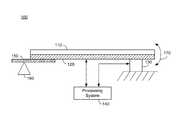
- FIG. 1illustrates an exemplary input device 100 in accordance with an embodiment
- FIG. 2illustrates a top view of the input device illustrated in FIG. 1 in accordance with an embodiment
- FIG. 3illustrates a top view of another exemplary input device in accordance with an embodiment
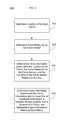
- FIG. 4is a flow diagram illustrating a method for determining force information for an input device, in accordance with an embodiment
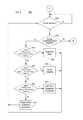
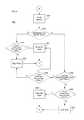
- FIGS. 5 & 6are flow charts illustrating an exemplary method for controlling the input device in accordance with an embodiment
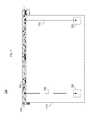
- FIG. 7illustrates a top view of another exemplary input device in accordance with an embodiment
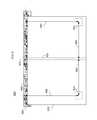
- FIG. 8illustrates a top view of yet another exemplary input device in accordance with an embodiment
- FIG. 9illustrates a method for determining force information for the input device illustrated in FIG. 9 ;
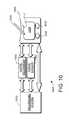
- FIG. 10is a block diagram of another exemplary input device, in accordance with an embodiment.
- the input deviceincludes a rotatable input surface and a force sensor.
- the input surfacemay be mounted to a chassis or casing of the input device using a rotating mounting structure.
- This mounting structureprovides a simple and low cost method for mounting and allowing rotation of the input surface to the input device. Further, the mounting structure may be less affected by chassis twist and chassis deformation caused by a user's palm resting on the chassis.
- the input surfaceis rotatable, the position of the touch relative to an axis of rotation and the force sensor affects the amount of force the force sensor detects. Accordingly, the output of the force sensor is scaled to account for the rotation of the input surface, as discussed in further detail below.
- FIG. 1illustrates an exemplary input device 100 .
- the input device 100includes an input surface 110 , at least one sensing electrode 120 , a force sensor 130 for sensing a force applied to the input surface 110 and a processing system 140 .
- the input surface 110 and at least one sensing electrode 120are configured to rotate about a an axis 160 via mounting structure 150 .
- the mounting structure 150 and force sensor 130are preferably mounted on opposite ends of the input surface 110 and at least one sensing electrode 120 , as illustrated in FIG. 1 .
- the mounting structure 150allows the input surface 110 and the at least one sensing electrode 120 to rotate about the axis 160 , represented as a fulcrum in FIG. 1 , as illustrated by arrow 170 .
- the edge of the input surface 110 and at least one sensing electrode 120 furthest from the axis 160may only rotate approximately one to two tenths of a millimeter.
- the amount of rotationcan vary depending upon the needs of the input device 100 and the sensitivity of the force sensor 130 .
- the amount of force detected by the force sensor 130 from an input objectwill vary depending upon the location of the input object on the input surface 110 .
- an input object applying identical amounts of force on the input surface 110 at the edge of the input surface furthest from the force sensor 130 and at a location directly above the force sensor 130would result in different outputs from the force sensor 130 .
- the output from the force sensor 130would be larger for the second touch, even though identical force was applied in both touches.
- the processing system 140determines force information for an input object based upon the amount of force detected by the force sensor, the location of the input object, and the location of the force sensor, as discussed in further detail below.
- the processing system 140can emulate various types of user input based upon the force information. Furthermore, the processing system 140 can emulate various types of user input based upon a combination the force information and at least one of a number of input objects, the position of the one or more input object and a duration the one or more input objects were touching the input surface 110 , herein after referred to as “input information”.
- the types of user inputmay include, but are not limited to, pointing, tapping, selecting, clicking, double clicking, panning, zooming, and scrolling. For example, the processing system may emulate a left-click if the input information meets a predetermined input metric.
- the input metricmay be, for example, a predetermined force range, a combination of a force range and a length of time the input object is in contact with the input surface 110 , a combination of a force range and a position of the input objects in contact with the input surface 110 , or a combination of a force range, a length of time, and a position of the input objects in contact with the input surface 110 .
- the input metricmay also depend upon the number of input objects contacting the input surface 110 .
- the processing systemmay also determine an initiation and/or rate or speed of a user interface action, such as a scroll, zoom, or pan, for example, based upon at least one of the force information and the positional information.
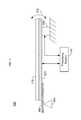
- FIG. 2illustrates a top view of an exemplary input device 100 in accordance with an embodiment.
- the mounting structure 150 illustrated in FIG. 2is a thin piece of metal.
- the mounting structure 150may be a thin piece of plastic or any other semi-flexible material.
- the mounting structure 150may be a piano hinge, bearing(s), a gimbal joint or any other type of hinge or mechanism configured to rotate and/or deflect the input surface 110 in response to a force from an input object.
- the axis 160is located above the top edge of the input surface 110 . In one embodiment, the axis 160 is located outside of the input surface area.
- FIG. 3illustrates a top view of another exemplary input device 100 in accordance with an embodiment.
- the input deviceincludes two mounting structures 150 , located at the corners of the input surface 110 near the axis 160 .
- the mounting structures 150may be any material or mechanism configured to rotate and/or deflect the input surface 110 in response to a force from an input object.
- FIG. 4is a flow diagram illustrating a method 400 for determining force information for the input device 100 .
- the methodbegins by determining a location of an input object in contact with the input surface. (Step 410 ). In one embodiment, if multiple input objects are in contact with the input surface, the location of the touch may be based upon the first or subsequent input object to touch the input surface 110 or a consolidated location. For example, a location in the middle of the multiple input objects may be used as the consolidated location of the input objects.
- a force measured by the force sensor 130is then determined (Step 420 ). As discussed above, the amount of force measured by the force sensor may not accurately represent the force applied by the input object to the input surface.
- the processing system 140can determine force information for the input object(s) based on a known location of the force sensor (Step 430 ).
- the location of the force sensor 130 relative to the axis 160may be stored, for example, in a memory of the processing system.
- the distance of the force sensor 130 from the axis 160affects the amount of force the force sensor 130 will detect from any given touch. Since the input surface 110 acts like a lever, when the force sensor 130 is further from the axis 160 the force sensor 130 will measure less force than if the force sensor 130 was closer to the axis 160 , given an identical input.
- the processing system 140may scale the force measured by the force sensor based upon the location of the touch and the location of the force sensor relative to the axis. Accordingly, input objects imparting an identical amount of force on the input surface 110 should have approximately the same force information. After the force information is determined, the processing system can determine input information for the input object(s) and determine if the input information meets a input metric (Step 440 ), as discussed in further detail below.
- FIGS. 5 & 6are flow charts illustrating an exemplary method 500 for controlling the input device 100 in accordance with an embodiment.
- the processing system 140monitors the at least one sensing electrode 120 to determine if an input object is touching the input surface 110 . (Step 505 ). The processing system 140 further determines if a single input object or multiple input objects are touching the input surface. (Step 510 ).
- the processing systemdetermines if the input information (determined in part via the method 400 ) meets a first input metric. (Step 515 ).
- the first input metricmay correspond to a first force value range, a combination of a force value range and a length of time the input object was in contact with the input surface 110 , a combination of a force value range and a position of the input object in contact with the input surface 110 , or a combination of a force value range and a length of time and a position of the input object in contact with the input surface 110 .
- the input metrics and/or force valuesmay be scaled based upon the number of input object touching the input surface 110 . If the input information meets a first input metric, the processing system may ignore any input and suppress reporting any location, force or movement of the input object. (Step 520 ). In one embodiment, the processing system uses force information along with a time of contact between the input object and the input surface to determine if to ignore any input on the input surface. For example, an input determined to be in contact with the input surface for a time less than a first time metric, may be determined to be a light tap by the input object.
- An input determined to be in contact with the input surface for a time longer than a first time metricmay be determined to be a resting input object and any input associated with the object is suppressed.
- the processing systemthen returns to Step 505 to continue to monitor for input objects.
- the processing system 140determines if the force information meets a second input metric. (Step 525 ).
- the second input metricmay be a force value range, a combination of a force value range and a length of time the input object was in contact with the input surface 110 , a combination of a force value range, a position of the input object in contact with the input surface 110 , or a combination of a force value range, a length of time and a position of the input object in contact with the input surface 110 . If the input information meets the second force metric, the processing system 140 could allow both pointing and tapping.
- the processing systemmay emulate a first type of user input such as a left click, a right-click, a middle-click, a scroll, zoom, highlight or any other type of user input, as described above.
- the processing systemuses force information along with a time of contact between the input object and the input surface to determine if to ignore/allow any input on the input surface. (Step 530 ). The processing system then returns to Step 505 to continue to monitor for input objects.
- the processing system 140determines if the input information meets a third input metric.
- the third input metricmay be a force value range, a combination of a force value range and a length of time the input object was in contact with the input surface 110 , a combination of a force value range and a position of the input object in contact with the input surface 110 , or a combination of a force value range, a length of time the input object is in contact with the input surface 110 and a position of the input object on the input surface 110 . If the input information meets the third force metric, the processing system 140 could suppress movement and emulates a second type of user input. (Step 540 ).
- the processing systemthen returns to Step 505 to continue to monitor for input objects.
- the second type of user inputmay be a left-click.
- the second type of user inputmay be a right-click, a middle-click, a scroll, zoom, highlight or any other type of user input.
- the processing system 140suppresses movement and emulates a user input. (Step 545 ).
- the user inputmay be a right-click. However, any type of user input may be emulated.
- the processing systemthen returns to Step 505 to continue to monitor for input objects.
- the input metricsmay be a force value range, a combination of a force value range and a length of time the input object was in contact with the input surface 110 , a combination of a force value range and a position of the input object in contact with the input surface 110 , or a combination of a force value range, a length of time the input object was in contact with the input surface 110 and a position of the input object with respect to the input surface 110 . It should be appreciated that some uniquely different force, position and/or time values may meet the same input metric.
- input information for an input objectcomprising, a force value F, a location X, Y and a time of contact T may meet a first input metric.
- input information for an input objectcomprising a force value F′, a location X′, Y′ and a time of contact T′ (where the prime values are uniquely different from the non-prime values) may also meet the first input metric.
- input information for an input objectcomprising a force value F, a location X′, Y and a time of contact T′ may not meet a first input metric. While FIG.
- FIG. 5illustrates one exemplary embodiment of various input metrics which can be met by the input information to perform a type of user input
- different input informationmay meet the same input metric, resulting in the same type of user input.
- different input informationmay meet different input metrics, resulting in the same type of user input.
- the same type of user inputmay provide different functionality based on a component of the input information. For example, different values of F, X/Y and T may result in the same type of user input (e.g. panning, zooming, etc), that type of user input may behave differently based upon said values (e.g. zooming faster, panning slower, etc).
- the processing system 140is determining if the input information meets one of a number of input metrics by comparing the input information to each input metric
- other processing methodscan be used.
- the input metricscan be organized in a tree structure and the processing system 140 can traverse the tree structure to determine which input metric has been met.
- the processing system 140scales the input metrics.
- the processing system 140may scale the input metrics based upon a number of input objects touching the input surface 110 . In other words, the processing system 140 increases the amount of combined force necessary to meet a metric.
- the processing system 140determines if the multiple input objects touched the input surface substantially simultaneously or asynchronously. (Step 610 ). In other words, the processing system 140 determines if the multiple input objects touched the input surface 110 within a predetermined time, or if a second input object began touching the input surface 110 substantially after the first input object began touching the input surface 110 .
- the processing system 140determines if the input information for the multiple input objects generated via the method illustrated in FIG. 4 meets an input metric. (Step 615 ). If the input information does not meet the input metric, the processing system may suppress any input. (Step 620 ). The processing system then returns to Step 505 to continue to monitor for input objects. If the force information does meet the input metric, the processing system may emulate a type of user input. (Step 625 ). In one embodiment, for example, the type of user input may be a right click. However, other user inputs such as a left click, a middle-click, a scroll, zoom, highlight or any other type of user input may be emulated. The processing system then returns to Step 505 to continue to monitor for input objects.
- the processing system 140determines if input information of the second input object comprises a substantially co-linear (i.e., next to) position next first input object. (Step 630 ). If the second input object is substantially co-linear (i.e., next to) the first input object, the processing system 140 determines if the input information for the first and second input objects calculated using at least the method illustrated in FIG. 4 meets an input metric. (Step 635 ). In one embodiment, if the input information does not meet the input metric, the processing system may suppress any input. (Step 620 ). The processing system then returns to Step 505 to continue to monitor for input objects.
- the processing systemmay emulate a type of user input. (Step 625 ).
- the user inputmay be a right-click.
- other user inputsmay be emulated such as, a left-click, middle-click, a scroll, zoom, highlight, panning, tapping, clicking or any other type of user input.
- the processing systemthen returns to Step 505 to continue to monitor for input objects.
- the processing system 140determines if the input information for the first and second input objects calculated using at least the method illustrated in FIG. 4 meets an input metric. (Step 640 ). In one embodiment, for example, the processing system 140 determines a differential force imparted by the arrival of the second input object. If the input information or the differential force does not meet the force metric, the processing system may suppress any input. (Step 650 ). In another embodiment, if the input information or the differential force does not meet the input metric, the processing system may suppress any input from the second input object. The processing system then returns to Step 505 to continue to monitor for input objects.
- the processing systemmay emulate a type user input. (Step 645 ).
- the user inputmay be a left-click.
- other user inputsmay be emulated such as, a left-click, middle-click, a scroll, zoom, highlight, panning, tapping, clicking or any other type of user input.
- the processing systemthen returns to Step 505 to continue to monitor for input objects.
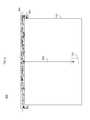
- FIG. 7illustrates a top view of another exemplary input device 700 in accordance with an embodiment.
- the input device 700includes an input surface 710 and force sensors 720 and 730 .
- the input surface 710is connected to a first mounting structure 740 which allows the input surface 710 to rotate about a first axis 750 .
- the force sensors 720 and 730are positioned in the lower left and lower right corner of the input surface 710 , respectively.
- the input device 700operates similar to the input devices illustrated in FIGS. 1-3 .
- force informationis determined for each force sensor 720 and 730 based upon the location of the input object, the force measured by each sensor 720 and 730 and the location of each force sensor relative to the axis 750 , as illustrated by arrows 760 and 770 , respectively.
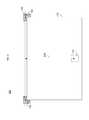
- FIG. 8illustrates a top view of another exemplary input device 800 in accordance with an embodiment.
- the input device 800includes an input surface 810 and force sensors 820 and 830 .
- the input surface 810is connected to a first mounting structure 840 and a second mounting structure 850 .
- the first mounting structure 840allows the input surface 810 to rotate about a first axis 860 .
- the second mounting structure 850allows the input surface 810 to rotate about a second axis 870 .
- the first axis 860 and second axis 870are substantially perpendicular to each other.
- the second mounting structure 850 and second axis 870are positioned in the middle of the input surface 810 .
- the second hinge 850 and second axis 870could be positioned anywhere along the input surface 810 .
- the force sensors 820 and 830are preferably positioned on opposite sides of the axis 870 and are preferable positioned as far from both axis 860 and axis 870 as is possible.
- the first and second mounting structures 840 and 850are shown to extend the full width and length of the input surface 810 .
- the mounting structuresmay comprise a piano hinge, bearing(s), a gimbal joint or any other type of hinge or mechanism configured to rotate and/or deflect the input surface 810 in response to a force from an input object.
- the mounting structuremay only extend partially along the input surface or be near specific regions of the input surface (e.g. corners, etc). It should be appreciated that in a symmetrical layout (i.e.
- force information from force sensors 720 / 820 and 730 / 830should be substantially the same. Yet, because of various factors, such as manufacturing tolerances, device construction and mounting, and calibration, among others; use of multiple force sensors may allow the input device to operate more accurately since the force sensors can be used to calibrate one another and to compensate for manufacturing and assembly variances.
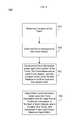
- FIG. 9illustrates a method 900 for determining force information for the input device 800 illustrated in FIG. 8 .
- the methodbegins by determining a location of a touch on the input surface by an input object. (Step 910 ).
- the location of the touchmay be based upon the last object to touch the input surface 110 .
- the force informationmay be a total force of all input objects, or a differential force between the multiple objects.
- a location in the middle of the multiple input objects or an average positioncould be selected as the location.
- the location of the first input objectcould be selected as the location.
- a location of a first input objectmay be used to calculate force information for one of the force sensor 820 and 830 and a location of a second object may be used to calculate the force information for the other of the force sensor 820 and 830 .
- a force measured by each force sensor 820 and 830is then determined (Step 920 ).
- only one of the force sensors 820 and 830may be used to calculate the force information.
- the force sensor closest to the input objectmay be used.
- a force sensor located on the same side of the axis 870 as the input objectmay be used to determine the force information.
- each force sensor 820 and 830can determine force information for the touch using a known location of each force sensor.
- the location of each force sensor 820 and 830 relative to the first axis 860 and second axis 870may be stored, for example, in a memory.
- the distance of each force sensor 820 and 830 from the first axis 860 and second axis 870also affects the amount of force each force sensor 820 and 830 will detect from any given touch.
- the processing systemcan determine input information for the input object(s) and determine if the input information meets an input metric (Step 940 ), as discussed above.
- the processing system 140may scale the force measured by each force sensor based upon the location of the touch and the location of the respective force sensor. Accordingly, input objects imparting an identical amount of force on the input surface 810 should have approximately the same force information.
- FIG. 10is a block diagram of another exemplary input device 1000 , in accordance with an embodiment.
- the input device 900may be configured to provide input to an electronic system (not shown).
- the term “electronic system”broadly refers to any system capable of electronically processing information.
- Some non-limiting examples of electronic systemsinclude personal computers of all sizes and shapes, such as desktop computers, laptop computers, netbook computers, tablets, web browsers, e-book readers, and personal digital assistants (PDAs).
- Additional example electronic systemsinclude composite input devices, such as physical keyboards that include input device 900 and separate joysticks or key switches.
- Further example electronic systemsinclude peripherals such as data input devices (including remote controls and mice), and data output devices (including display screens and printers).
- remote terminalse.g., video game consoles, portable gaming devices, and the like.
- video game machinese.g., video game consoles, portable gaming devices, and the like.
- communication devicesincluding cellular phones, such as smart phones
- media devicesincluding recorders, editors, and players such as televisions, set-top boxes, music players, digital photo frames, and digital cameras.
- the electronic systemcould be a host or a slave to the input device.
- the input device 1000can be implemented as a physical part of the electronic system, or can be physically separate from the electronic system. As appropriate, the input device 1000 may communicate with parts of the electronic system using any one or more of the following: buses, networks, and other wired or wireless interconnections. Examples include I 2 C, SPI, PS/2, Universal Serial Bus (USB), Bluetooth, RF, and IRDA.
- buses, networks, and other wired or wireless interconnectionsexamples include I 2 C, SPI, PS/2, Universal Serial Bus (USB), Bluetooth, RF, and IRDA.
- the input device 1000is shown as a proximity sensor device (also often referred to as a “touchpad” or a “touch sensor device”) configured to sense input provided by one or more input objects 1040 in a sensing region 1020 .
- Example input objectsinclude fingers and styli, as shown in FIG. 10 .
- Sensing region 1020encompasses any space above, around, in and/or near the input device 1000 in which the input device 1000 is able to detect user input (e.g., user input provided by one or more input objects 1040 ).
- the sizes, shapes, and locations of particular sensing regionsmay vary widely from embodiment to embodiment.
- the sensing region 1020extends from a surface of the input device 1000 in one or more directions into space until signal-to-noise ratios prevent sufficiently accurate object detection.
- the distance to which this sensing region 1020 extends in a particular directionin various embodiments, may be on the order of less than a millimeter, millimeters, centimeters, or more, and may vary significantly with the type of sensing technology used and the accuracy desired.
- some embodimentssense input that comprises no contact with any surfaces of the input device 1000 , contact with an input surface (e.g. a touch surface) of the input device 1000 , contact with an input surface of the input device 1000 coupled with some amount of applied force, and/or a combination thereof.
- input surfacesmay be provided by surfaces of casings within which the sensing electrodes reside, by face sheets applied over the sensing electrodes or any casings, etc.
- the sensing region 1020has a rectangular shape when projected onto an input surface of the input device 1000 .
- the input device 1000may utilize any combination of sensor components and capacitive sensing technologies to detect user input in the sensing region 1020 .
- the input device 1000comprises one or more sensing elements for capacitively detecting user input.
- Some implementationsare configured to provide images that span one, two, or three dimensions in space. Some implementations are configured to provide projections of input along particular axes or planes.
- voltage or currentis applied to create an electric field. Nearby input objects cause changes in the electric field, and produce detectable changes in capacitive coupling that may be detected as changes in voltage, current, or the like.
- Some capacitive implementationsutilize arrays or other regular or irregular patterns of capacitive sensing elements to create electric fields.
- separate sensing elementsmay be ohmically shorted together to form larger sensing electrodes.
- Some capacitive implementationsutilize resistive sheets, which may be uniformly resistive.
- Some capacitive implementationsutilize “self capacitance” (or “absolute capacitance”) sensing methods based on changes in the capacitive coupling between sensing electrodes and an input object.
- an input object near the sensing electrodesalters the electric field near the sensing electrodes, thus changing the measured capacitive coupling.
- an absolute capacitance sensing methodoperates by modulating sensing electrodes with respect to a reference voltage (e.g. system ground), and by detecting the capacitive coupling between the sensing electrodes and input objects.
- Some capacitive implementationsutilize “mutual capacitance” (or “transcapacitance”) sensing methods based on changes in the capacitive coupling between sensing electrodes.
- an input object near the sensing electrodesalters the electric field between the sensing electrodes, thus changing the measured capacitive coupling.
- a transcapacitive sensing methodoperates by detecting the capacitive coupling between one or more transmitting electrodes and one or more receiving electrodes. Transmitting sensing electrodes may be modulated relative to a reference voltage (e.g., system ground) to facilitate transmission, and receiving sensing electrodes may be held substantially constant relative to the reference voltage to facilitate receipt.
- Sensing electrodesmay be dedicated transmitters or receivers, or may be configured to both transmit and receive.
- a processing system (or “processor”) 1010is shown as part of the input device 1000 .
- the processing system 1010is configured to operate the hardware of the input device 1000 to detect input in the sensing region 1020 .
- the processing system 1010comprises parts of or all of one or more integrated circuits (ICs) and/or other circuitry components; in some embodiments, the processing system 1010 also comprises electronically-readable instructions, such as firmware code, software code, and/or the like.
- components composing the processing system 1010are located together, such as near sensing element(s) of the input device 1000 . In other embodiments, components of processing system 1010 are physically separate with one or more components close to sensing element(s) of input device 1000 , and one or more components elsewhere.
- the input device 1000may be a peripheral coupled to a desktop computer, and the processing system 1010 may comprise software configured to run on a central processing unit of the desktop computer and one or more ICs (perhaps with associated firmware) separate from the central processing unit.
- the input device 1000may be physically integrated in a phone, and the processing system 1010 may comprise circuits and firmware that are part of a main processor of the phone.
- the processing system 1010is dedicated to implementing the input device 1000 .
- the processing system 1010also performs other functions, such as operating display screens, driving haptic actuators, etc.
- the processing system 1010may be implemented as a set of modules that handle different functions of the processing system 1010 .
- Each modulemay comprise circuitry that is a part of the processing system 1010 , firmware, software, or a combination thereof.
- Example modulesinclude hardware operation modules for operating hardware such as sensing electrodes and display screens, data processing modules for processing data such as sensor signals and positional information, and reporting modules for reporting information.
- Further example modulesinclude sensor operation modules configured to operate sensing element(s) to detect input, identification modules configured to identify gestures such as mode changing gestures, mode changing modules for changing operation modes, and determination modules to determine force information for input objects touching the sensing region, as discussed above.
- a haptic moduleis configured to control an actuation of a haptic mechanism 1050 configured to haptically affect an input surface of the input device 1000 or otherwise provide haptic feedback to a user.
- a force sensing moduleis configured to control a force sensor 1060 configured to determine a force applied to an input surface of the input device 1000 .
- the force sensor 1060 and force sensing modulemay be configured to provide haptic feedback to the sensing region 1020 .
- the processing system 1010may also include sensing circuitry configured to sense input near or on the input surface using sensing electrodes in the sensing region 1020 .
- the processing system 1010responds to user input (or lack of user input) in the sensing region 1020 directly by causing one or more actions.
- Example actionsinclude changing operation modes, as well as GUI actions such as cursor movement, selection, menu navigation, and other functions.
- the processing system 1010provides information about the input (or lack of input) to some part of the electronic system (e.g. to a central processing system of the electronic system that is separate from the processing system 1010 , if such a separate central processing system exists).
- some part of the electronic systemprocesses information received from the processing system 1010 to act on user input, such as to facilitate a full range of actions, including mode changing actions and GUI actions.
- the processing system 1010operates the sensing element(s) of the input device 1000 to produce electrical signals indicative of input (or lack of input) in the sensing region 1020 .
- the processing system 1010may perform any appropriate amount of processing on the electrical signals in producing the information provided to the electronic system.
- the processing system 1010may digitize analog electrical signals obtained from the sensing electrodes.
- the processing system 1010may perform filtering or other signal conditioning.
- the processing system 1010may subtract or otherwise account for a baseline, such that the information reflects a difference between the electrical signals and the baseline.
- the processing system 1010may determine positional information, recognize inputs as commands, recognize handwriting, and the like.
- Positional informationas used herein broadly encompasses absolute position, relative position, velocity, acceleration, and other types of spatial information.
- Exemplary “zero-dimensional” positional informationincludes near/far or contact/no contact information.
- Exemplary “one-dimensional” positional informationincludes positions along an axis.
- Exemplary “two-dimensional” positional informationincludes position in a plane.
- Exemplary “three-dimensional” positional informationincludes position in space and position and magnitude of a velocity in a plane. Further examples include other representations of spatial information.
- Historical data regarding one or more types of positional informationmay also be determined and/or stored, including, for example, historical data that tracks position, motion, or instantaneous velocity over time.
- a “position estimate” as used hereinis intended to broadly encompass any estimate of object location regardless of format. For example, some embodiments may represent a position estimates as two dimensional “images” of object location. Other embodiments may use centroids of object location.
- Force informationis intended to broadly encompass information about force(s) regardless of format.
- Force informationmay be in any appropriate form and of any appropriate level of complexity. For example, some embodiments determine an estimate of a single resulting force regardless of the number of forces that combine to produce the resultant force (e.g. forces applied by one or more objects apply forces to an input surface). Some embodiments determine an estimate for the force applied by each object, when multiple objects simultaneously apply forces to the surface.
- force informationmay be of any number of bits of resolution. That is, the force information may be a single bit, indicating whether or not an applied force (or resultant force) is beyond a force threshold; or, the force information may be of multiple bits, and represent force to a finer resolution.
- force informationmay indicate relative or absolute force measurements.
- some embodimentscombine force information to provide a map or an “image” of the force applied by the object(s) to the input surface.
- Historical data of force informationmay also be determined and/or stored.
- the force informationcan be provided for each object as a vector or scalar quantity.
- the force informationcan be provided as an indication that determined force has or has not crossed a threshold amount.
- the force informationcan also include time history components used for gesture recognition. As has been described, positional information and force information from the processing systems may be used to facilitate a full range of interface inputs, including use of the proximity sensor device as a pointing device for selection, cursor control, scrolling, and other functions.
- the input device 1000is implemented with additional input components that are operated by the processing system 1010 or by some other processing system. These additional input components may provide redundant functionality for input in the sensing region 1020 , or some other functionality.
- FIG. 10shows buttons 1030 near the sensing region 1020 that can be used to facilitate selection of items using the input device 300 .
- Other types of additional input componentsinclude sliders, balls, wheels, switches, and the like.
- the input device 1000may be implemented with no other input components.
- the input device 1000comprises a touch screen interface, and the sensing region 1020 overlaps at least part of an active area of a display screen.
- the input device 1000may comprise substantially transparent sensing electrodes overlaying the display screen and provide a touch screen interface for the associated electronic system.
- the display screenmay be any type of dynamic display capable of displaying a visual interface to a user, and may include any type of light emitting diode (LED), organic LED (OLED), cathode ray tube (CRT), liquid crystal display (LCD), plasma, electroluminescence (EL), or other display technology.
- the input device 1000 and the display screenmay share physical elements. For example, some embodiments may utilize some of the same electrical components for displaying and sensing. As another example, the display screen may be operated in part or in total by the processing system 1010 .
- the mechanisms of the present inventionare capable of being distributed as a program product (e.g., software) in a variety of forms.
- the mechanisms of the present inventionmay be implemented and distributed as a software program on information bearing media that are readable by electronic processors (e.g., non-transitory computer-readable and/or recordable/writable information bearing media readable by the processing system 1010 ).
- the embodiments of the present inventionapply equally regardless of the particular type of medium used to carry out the distribution. Examples of non-transitory, electronically readable media include various discs, memory sticks, memory cards, memory modules, and the like. Electronically readable media may be based on flash, optical, magnetic, holographic, or any other storage technology.
Landscapes
- Engineering & Computer Science (AREA)
- General Engineering & Computer Science (AREA)
- Theoretical Computer Science (AREA)
- Human Computer Interaction (AREA)
- Physics & Mathematics (AREA)
- General Physics & Mathematics (AREA)
- Position Input By Displaying (AREA)
Abstract
Description
Claims (20)
Priority Applications (3)
| Application Number | Priority Date | Filing Date | Title |
|---|---|---|---|
| US13/325,705US8633911B2 (en) | 2011-12-14 | 2011-12-14 | Force sensing input device and method for determining force information |
| PCT/US2012/067893WO2013090086A1 (en) | 2011-12-14 | 2012-12-05 | Force sensing input device and method for determining force information |
| US14/157,293US9207801B2 (en) | 2011-12-14 | 2014-01-16 | Force sensing input device and method for determining force information |
Applications Claiming Priority (1)
| Application Number | Priority Date | Filing Date | Title |
|---|---|---|---|
| US13/325,705US8633911B2 (en) | 2011-12-14 | 2011-12-14 | Force sensing input device and method for determining force information |
Related Child Applications (1)
| Application Number | Title | Priority Date | Filing Date |
|---|---|---|---|
| US14/157,293ContinuationUS9207801B2 (en) | 2011-12-14 | 2014-01-16 | Force sensing input device and method for determining force information |
Publications (2)
| Publication Number | Publication Date |
|---|---|
| US20130154948A1 US20130154948A1 (en) | 2013-06-20 |
| US8633911B2true US8633911B2 (en) | 2014-01-21 |
Family
ID=48609625
Family Applications (2)
| Application Number | Title | Priority Date | Filing Date |
|---|---|---|---|
| US13/325,705Active2032-02-21US8633911B2 (en) | 2011-12-14 | 2011-12-14 | Force sensing input device and method for determining force information |
| US14/157,293Active2032-05-27US9207801B2 (en) | 2011-12-14 | 2014-01-16 | Force sensing input device and method for determining force information |
Family Applications After (1)
| Application Number | Title | Priority Date | Filing Date |
|---|---|---|---|
| US14/157,293Active2032-05-27US9207801B2 (en) | 2011-12-14 | 2014-01-16 | Force sensing input device and method for determining force information |
Country Status (2)
| Country | Link |
|---|---|
| US (2) | US8633911B2 (en) |
| WO (1) | WO2013090086A1 (en) |
Cited By (11)
| Publication number | Priority date | Publication date | Assignee | Title |
|---|---|---|---|---|
| US20150116205A1 (en)* | 2012-05-09 | 2015-04-30 | Apple Inc. | Thresholds for determining feedback in computing devices |
| US9652069B1 (en) | 2015-10-22 | 2017-05-16 | Synaptics Incorporated | Press hard and move gesture |
| US9772688B2 (en) | 2014-09-30 | 2017-09-26 | Apple Inc. | Haptic feedback assembly |
| US9798409B1 (en) | 2015-03-04 | 2017-10-24 | Apple Inc. | Multi-force input device |
| US9870080B2 (en) | 2015-09-18 | 2018-01-16 | Synaptics Incorporated | Method, system, and device for controlling a cursor or user interface action as a function of touch and force input |
| US9886116B2 (en) | 2012-07-26 | 2018-02-06 | Apple Inc. | Gesture and touch input detection through force sensing |
| US10108265B2 (en) | 2012-05-09 | 2018-10-23 | Apple Inc. | Calibration of haptic feedback systems for input devices |
| US10297119B1 (en) | 2014-09-02 | 2019-05-21 | Apple Inc. | Feedback device in an electronic device |
| US10591368B2 (en) | 2014-01-13 | 2020-03-17 | Apple Inc. | Force sensor with strain relief |
| US10642361B2 (en) | 2012-06-12 | 2020-05-05 | Apple Inc. | Haptic electromagnetic actuator |
| US20220147147A1 (en)* | 2020-11-06 | 2022-05-12 | Synaptics Incorporated | Single-bracket support structure for force sensing and haptic feedback |
Families Citing this family (56)
| Publication number | Priority date | Publication date | Assignee | Title |
|---|---|---|---|---|
| US9417754B2 (en) | 2011-08-05 | 2016-08-16 | P4tents1, LLC | User interface system, method, and computer program product |
| CN104487928B (en) | 2012-05-09 | 2018-07-06 | 苹果公司 | Apparatus, method and graphical user interface for transitioning between display states in response to gestures |
| HK1208275A1 (en) | 2012-05-09 | 2016-02-26 | 苹果公司 | Device, method, and graphical user interface for moving and dropping a user interface object |
| WO2013169849A2 (en) | 2012-05-09 | 2013-11-14 | Industries Llc Yknots | Device, method, and graphical user interface for displaying user interface objects corresponding to an application |
| EP2847662B1 (en) | 2012-05-09 | 2020-02-19 | Apple Inc. | Device, method, and graphical user interface for providing feedback for changing activation states of a user interface object |
| WO2013169851A2 (en) | 2012-05-09 | 2013-11-14 | Yknots Industries Llc | Device, method, and graphical user interface for facilitating user interaction with controls in a user interface |
| EP2847660B1 (en) | 2012-05-09 | 2018-11-14 | Apple Inc. | Device, method, and graphical user interface for selecting user interface objects |
| CN104508618B (en) | 2012-05-09 | 2018-01-05 | 苹果公司 | Apparatus, method and graphical user interface for providing tactile feedback for operations performed in the user interface |
| WO2013169875A2 (en) | 2012-05-09 | 2013-11-14 | Yknots Industries Llc | Device, method, and graphical user interface for displaying content associated with a corresponding affordance |
| AU2013259606B2 (en) | 2012-05-09 | 2016-06-02 | Apple Inc. | Device, method, and graphical user interface for displaying additional information in response to a user contact |
| WO2013169845A1 (en) | 2012-05-09 | 2013-11-14 | Yknots Industries Llc | Device, method, and graphical user interface for scrolling nested regions |
| WO2013169843A1 (en) | 2012-05-09 | 2013-11-14 | Yknots Industries Llc | Device, method, and graphical user interface for manipulating framed graphical objects |
| WO2013169842A2 (en) | 2012-05-09 | 2013-11-14 | Yknots Industries Llc | Device, method, and graphical user interface for selecting object within a group of objects |
| WO2013169865A2 (en) | 2012-05-09 | 2013-11-14 | Yknots Industries Llc | Device, method, and graphical user interface for moving a user interface object based on an intensity of a press input |
| EP2939095B1 (en) | 2012-12-29 | 2018-10-03 | Apple Inc. | Device, method, and graphical user interface for moving a cursor according to a change in an appearance of a control icon with simulated three-dimensional characteristics |
| AU2013368445B8 (en) | 2012-12-29 | 2017-02-09 | Apple Inc. | Device, method, and graphical user interface for determining whether to scroll or select contents |
| HK1215091A1 (en) | 2012-12-29 | 2016-08-12 | Apple Inc. | Device, method, and graphical user interface for navigating user interface hierarchies |
| JP6093877B2 (en) | 2012-12-29 | 2017-03-08 | アップル インコーポレイテッド | Device, method, and graphical user interface for foregoing generation of tactile output for multi-touch gestures |
| WO2014105276A1 (en) | 2012-12-29 | 2014-07-03 | Yknots Industries Llc | Device, method, and graphical user interface for transitioning between touch input to display output relationships |
| WO2014105279A1 (en) | 2012-12-29 | 2014-07-03 | Yknots Industries Llc | Device, method, and graphical user interface for switching between user interfaces |
| US9304587B2 (en)* | 2013-02-13 | 2016-04-05 | Apple Inc. | Force sensing mouse |
| US20170131840A1 (en)* | 2014-06-17 | 2017-05-11 | Corning Incorporated | Algorithms and implementation of touch pressure sensors |
| US9645732B2 (en) | 2015-03-08 | 2017-05-09 | Apple Inc. | Devices, methods, and graphical user interfaces for displaying and using menus |
| US10095396B2 (en) | 2015-03-08 | 2018-10-09 | Apple Inc. | Devices, methods, and graphical user interfaces for interacting with a control object while dragging another object |
| US10048757B2 (en) | 2015-03-08 | 2018-08-14 | Apple Inc. | Devices and methods for controlling media presentation |
| US9632664B2 (en) | 2015-03-08 | 2017-04-25 | Apple Inc. | Devices, methods, and graphical user interfaces for manipulating user interface objects with visual and/or haptic feedback |
| US9990107B2 (en) | 2015-03-08 | 2018-06-05 | Apple Inc. | Devices, methods, and graphical user interfaces for displaying and using menus |
| US9785305B2 (en) | 2015-03-19 | 2017-10-10 | Apple Inc. | Touch input cursor manipulation |
| US9639184B2 (en) | 2015-03-19 | 2017-05-02 | Apple Inc. | Touch input cursor manipulation |
| US20170045981A1 (en) | 2015-08-10 | 2017-02-16 | Apple Inc. | Devices and Methods for Processing Touch Inputs Based on Their Intensities |
| US10152208B2 (en) | 2015-04-01 | 2018-12-11 | Apple Inc. | Devices and methods for processing touch inputs based on their intensities |
| US9891811B2 (en) | 2015-06-07 | 2018-02-13 | Apple Inc. | Devices and methods for navigating between user interfaces |
| US10200598B2 (en) | 2015-06-07 | 2019-02-05 | Apple Inc. | Devices and methods for capturing and interacting with enhanced digital images |
| US10346030B2 (en) | 2015-06-07 | 2019-07-09 | Apple Inc. | Devices and methods for navigating between user interfaces |
| US9674426B2 (en) | 2015-06-07 | 2017-06-06 | Apple Inc. | Devices and methods for capturing and interacting with enhanced digital images |
| US9830048B2 (en) | 2015-06-07 | 2017-11-28 | Apple Inc. | Devices and methods for processing touch inputs with instructions in a web page |
| US9860451B2 (en) | 2015-06-07 | 2018-01-02 | Apple Inc. | Devices and methods for capturing and interacting with enhanced digital images |
| US9753582B2 (en)* | 2015-06-30 | 2017-09-05 | Synaptics Incorporated | Position-filtering for land-lift events |
| US10248308B2 (en) | 2015-08-10 | 2019-04-02 | Apple Inc. | Devices, methods, and graphical user interfaces for manipulating user interfaces with physical gestures |
| US10416800B2 (en) | 2015-08-10 | 2019-09-17 | Apple Inc. | Devices, methods, and graphical user interfaces for adjusting user interface objects |
| US10235035B2 (en) | 2015-08-10 | 2019-03-19 | Apple Inc. | Devices, methods, and graphical user interfaces for content navigation and manipulation |
| US9880735B2 (en) | 2015-08-10 | 2018-01-30 | Apple Inc. | Devices, methods, and graphical user interfaces for manipulating user interface objects with visual and/or haptic feedback |
| US20170192576A1 (en)* | 2015-12-31 | 2017-07-06 | Synaptics Incorporated | Flexible grommet |
| US10372259B2 (en) | 2016-02-19 | 2019-08-06 | Synaptics Incorporated | Transcapacitive touch and force sensing in an input device |
| CN107305467A (en)* | 2016-04-20 | 2017-10-31 | 富泰华工业(深圳)有限公司 | Haptic interaction system, method and electronic installation |
| US10095341B2 (en) | 2016-06-30 | 2018-10-09 | Synaptics Incorporated | Hybrid force measurement |
| US10049589B1 (en)* | 2016-09-08 | 2018-08-14 | Amazon Technologies, Inc. | Obstacle awareness based guidance to clear landing space |
| US10198955B1 (en) | 2016-09-08 | 2019-02-05 | Amazon Technologies, Inc. | Drone marker and landing zone verification |
| US10121117B1 (en) | 2016-09-08 | 2018-11-06 | Amazon Technologies, Inc. | Drone location signature filters |
| US11232178B2 (en)* | 2017-12-22 | 2022-01-25 | Synaptics Incorporated | Systems and methods for behavioral authentication using a touch sensor device |
| US11400220B2 (en) | 2018-05-01 | 2022-08-02 | Portal Instruments, Inc. | Active injection guide |
| DE202018006400U1 (en) | 2018-12-18 | 2020-07-27 | Volkswagen Aktiengesellschaft | Control device for a motor vehicle |
| WO2020183626A1 (en) | 2019-03-12 | 2020-09-17 | 株式会社ワコム | Touch pad and computer |
| WO2020217336A1 (en) | 2019-04-24 | 2020-10-29 | 株式会社ワコム | Touch pad system |
| US10812639B1 (en) | 2019-12-17 | 2020-10-20 | Robert Bosch Gmbh | Pressure chamber and associated pressure sensors for a mobile communication device |
| US10999421B1 (en) | 2019-12-17 | 2021-05-04 | Robert Bosch Gmbh | System and method for utilizing pressure sensors in an electric device |
Citations (16)
| Publication number | Priority date | Publication date | Assignee | Title |
|---|---|---|---|---|
| US4558757A (en) | 1983-06-06 | 1985-12-17 | Matsushita Electric Industrial Co., Ltd. | Position coordinate input device |
| US20020163509A1 (en) | 2001-04-13 | 2002-11-07 | Roberts Jerry B. | Touch screen with rotationally isolated force sensor |
| US20060244733A1 (en)* | 2005-04-28 | 2006-11-02 | Geaghan Bernard O | Touch sensitive device and method using pre-touch information |
| US20080144267A1 (en)* | 2006-12-15 | 2008-06-19 | Fujitsu Limited | Electronic apparatus |
| US7499040B2 (en) | 2003-08-18 | 2009-03-03 | Apple Inc. | Movable touch pad with added functionality |
| US20090309616A1 (en)* | 2008-06-13 | 2009-12-17 | Sony Ericsson Mobile Communications Ab | Touch and force sensing for input devices |
| US20100053116A1 (en) | 2008-08-26 | 2010-03-04 | Dodge Daverman | Multi-touch force sensing touch-screen devices and methods |
| US20100079404A1 (en)* | 2008-09-30 | 2010-04-01 | Apple Inc. | Movable Track Pad with Added Functionality |
| US20110141052A1 (en)* | 2009-12-10 | 2011-06-16 | Jeffrey Traer Bernstein | Touch pad with force sensors and actuator feedback |
| US20110141053A1 (en)* | 2009-12-14 | 2011-06-16 | Synaptics Incorporated | System and method for measuring individual force in multi-object sensing |
| US20110278078A1 (en) | 2010-05-11 | 2011-11-17 | Synaptics Incorporated | Input device with force sensing |
| US20110291950A1 (en) | 2010-05-28 | 2011-12-01 | Research In Motion Limited | Electronic device including touch-sensitive display and method of controlling same |
| US20120038583A1 (en)* | 2010-08-16 | 2012-02-16 | Perceptive Pixel Inc. | Force and true capacitive touch measurement techniques for capacitive touch sensors |
| US20120086666A1 (en)* | 2010-10-12 | 2012-04-12 | Cypress Semiconductor Corporation | Force Sensing Capacitive Hybrid Touch Sensor |
| US20120249474A1 (en)* | 2011-04-01 | 2012-10-04 | Analog Devices, Inc. | Proximity and force detection for haptic effect generation |
| US8294047B2 (en)* | 2008-12-08 | 2012-10-23 | Apple Inc. | Selective input signal rejection and modification |
Family Cites Families (4)
| Publication number | Priority date | Publication date | Assignee | Title |
|---|---|---|---|---|
| DE102007052008A1 (en)* | 2007-10-26 | 2009-04-30 | Andreas Steinhauser | Single- or multitouch-capable touchscreen or touchpad consisting of an array of pressure sensors and production of such sensors |
| KR20110028834A (en)* | 2009-09-14 | 2011-03-22 | 삼성전자주식회사 | Method and device for providing user interface using touch pressure of mobile terminal with touch screen |
| US8669946B2 (en)* | 2010-05-28 | 2014-03-11 | Blackberry Limited | Electronic device including touch-sensitive display and method of controlling same |
| US8982062B2 (en)* | 2011-05-09 | 2015-03-17 | Blackberry Limited | Multi-modal user input device |
- 2011
- 2011-12-14USUS13/325,705patent/US8633911B2/enactiveActive
- 2012
- 2012-12-05WOPCT/US2012/067893patent/WO2013090086A1/enactiveApplication Filing
- 2014
- 2014-01-16USUS14/157,293patent/US9207801B2/enactiveActive
Patent Citations (16)
| Publication number | Priority date | Publication date | Assignee | Title |
|---|---|---|---|---|
| US4558757A (en) | 1983-06-06 | 1985-12-17 | Matsushita Electric Industrial Co., Ltd. | Position coordinate input device |
| US20020163509A1 (en) | 2001-04-13 | 2002-11-07 | Roberts Jerry B. | Touch screen with rotationally isolated force sensor |
| US7499040B2 (en) | 2003-08-18 | 2009-03-03 | Apple Inc. | Movable touch pad with added functionality |
| US20060244733A1 (en)* | 2005-04-28 | 2006-11-02 | Geaghan Bernard O | Touch sensitive device and method using pre-touch information |
| US20080144267A1 (en)* | 2006-12-15 | 2008-06-19 | Fujitsu Limited | Electronic apparatus |
| US20090309616A1 (en)* | 2008-06-13 | 2009-12-17 | Sony Ericsson Mobile Communications Ab | Touch and force sensing for input devices |
| US20100053116A1 (en) | 2008-08-26 | 2010-03-04 | Dodge Daverman | Multi-touch force sensing touch-screen devices and methods |
| US20100079404A1 (en)* | 2008-09-30 | 2010-04-01 | Apple Inc. | Movable Track Pad with Added Functionality |
| US8294047B2 (en)* | 2008-12-08 | 2012-10-23 | Apple Inc. | Selective input signal rejection and modification |
| US20110141052A1 (en)* | 2009-12-10 | 2011-06-16 | Jeffrey Traer Bernstein | Touch pad with force sensors and actuator feedback |
| US20110141053A1 (en)* | 2009-12-14 | 2011-06-16 | Synaptics Incorporated | System and method for measuring individual force in multi-object sensing |
| US20110278078A1 (en) | 2010-05-11 | 2011-11-17 | Synaptics Incorporated | Input device with force sensing |
| US20110291950A1 (en) | 2010-05-28 | 2011-12-01 | Research In Motion Limited | Electronic device including touch-sensitive display and method of controlling same |
| US20120038583A1 (en)* | 2010-08-16 | 2012-02-16 | Perceptive Pixel Inc. | Force and true capacitive touch measurement techniques for capacitive touch sensors |
| US20120086666A1 (en)* | 2010-10-12 | 2012-04-12 | Cypress Semiconductor Corporation | Force Sensing Capacitive Hybrid Touch Sensor |
| US20120249474A1 (en)* | 2011-04-01 | 2012-10-04 | Analog Devices, Inc. | Proximity and force detection for haptic effect generation |
Non-Patent Citations (1)
| Title |
|---|
| International Searching Authority, International Search Report and Written Opinion in PCT International Application No. PCT/US2012/067893, mailed Mar. 8, 2013. |
Cited By (18)
| Publication number | Priority date | Publication date | Assignee | Title |
|---|---|---|---|---|
| US10108265B2 (en) | 2012-05-09 | 2018-10-23 | Apple Inc. | Calibration of haptic feedback systems for input devices |
| US20150116205A1 (en)* | 2012-05-09 | 2015-04-30 | Apple Inc. | Thresholds for determining feedback in computing devices |
| US9910494B2 (en) | 2012-05-09 | 2018-03-06 | Apple Inc. | Thresholds for determining feedback in computing devices |
| US9977499B2 (en)* | 2012-05-09 | 2018-05-22 | Apple Inc. | Thresholds for determining feedback in computing devices |
| US9977500B2 (en) | 2012-05-09 | 2018-05-22 | Apple Inc. | Thresholds for determining feedback in computing devices |
| US10642361B2 (en) | 2012-06-12 | 2020-05-05 | Apple Inc. | Haptic electromagnetic actuator |
| US9886116B2 (en) | 2012-07-26 | 2018-02-06 | Apple Inc. | Gesture and touch input detection through force sensing |
| US10591368B2 (en) | 2014-01-13 | 2020-03-17 | Apple Inc. | Force sensor with strain relief |
| US10297119B1 (en) | 2014-09-02 | 2019-05-21 | Apple Inc. | Feedback device in an electronic device |
| US9772688B2 (en) | 2014-09-30 | 2017-09-26 | Apple Inc. | Haptic feedback assembly |
| US9939901B2 (en) | 2014-09-30 | 2018-04-10 | Apple Inc. | Haptic feedback assembly |
| US10162447B2 (en) | 2015-03-04 | 2018-12-25 | Apple Inc. | Detecting multiple simultaneous force inputs to an input device |
| US9798409B1 (en) | 2015-03-04 | 2017-10-24 | Apple Inc. | Multi-force input device |
| US9870080B2 (en) | 2015-09-18 | 2018-01-16 | Synaptics Incorporated | Method, system, and device for controlling a cursor or user interface action as a function of touch and force input |
| US9823767B2 (en) | 2015-10-22 | 2017-11-21 | Synaptics Incorporated | Press and move gesture |
| US9652069B1 (en) | 2015-10-22 | 2017-05-16 | Synaptics Incorporated | Press hard and move gesture |
| US20220147147A1 (en)* | 2020-11-06 | 2022-05-12 | Synaptics Incorporated | Single-bracket support structure for force sensing and haptic feedback |
| US11669167B2 (en)* | 2020-11-06 | 2023-06-06 | Synaptics Incorporated | Single-bracket support structure for force sensing and haptic feedback |
Also Published As
| Publication number | Publication date |
|---|---|
| US9207801B2 (en) | 2015-12-08 |
| US20130154948A1 (en) | 2013-06-20 |
| WO2013090086A1 (en) | 2013-06-20 |
| US20140132563A1 (en) | 2014-05-15 |
Similar Documents
| Publication | Publication Date | Title |
|---|---|---|
| US8633911B2 (en) | Force sensing input device and method for determining force information | |
| US9864507B2 (en) | Methods and apparatus for click detection on a force pad using dynamic thresholds | |
| US9442650B2 (en) | Systems and methods for dynamically modulating a user interface parameter using an input device | |
| KR102172819B1 (en) | Device and method for localized force and proximity sensing | |
| US9958994B2 (en) | Shear force detection using capacitive sensors | |
| US20120319987A1 (en) | System and method for calibrating an input device | |
| US20150084909A1 (en) | Device and method for resistive force sensing and proximity sensing | |
| US20120161791A1 (en) | Methods and apparatus for determining input objects associated with proximity events | |
| US20170242539A1 (en) | Use based force auto-calibration | |
| US9746952B2 (en) | Force enhanced input device vibration compensation | |
| US9405383B2 (en) | Device and method for disambiguating region presses on a capacitive sensing device | |
| WO2014042808A1 (en) | Routing trace compensation | |
| US9870080B2 (en) | Method, system, and device for controlling a cursor or user interface action as a function of touch and force input | |
| US9753587B2 (en) | Driving sensor electrodes for absolute capacitive sensing | |
| US9811213B2 (en) | Systems and methods for input device noise mitigation via a touch buffer | |
| US10254873B2 (en) | System and method for determining user input using dual baseline modes | |
| US20160034092A1 (en) | Stackup for touch and force sensing | |
| US9823767B2 (en) | Press and move gesture | |
| US9244608B2 (en) | Method and system for gesture identification | |
| US20140267061A1 (en) | System and method for pre-touch gestures in sensor devices | |
| US9612703B2 (en) | Top mount clickpad module | |
| KR102502789B1 (en) | Position-filtering for land-lift events |
Legal Events
| Date | Code | Title | Description |
|---|---|---|---|
| AS | Assignment | Owner name:SYNAPTICS INCORPORATED, CALIFORNIA Free format text:ASSIGNMENT OF ASSIGNORS INTEREST;ASSIGNORS:SCHEDIWY, RICHARD;INSCORE, KIPLING;REEL/FRAME:027386/0300 Effective date:20111213 | |
| STCF | Information on status: patent grant | Free format text:PATENTED CASE | |
| AS | Assignment | Owner name:WELLS FARGO BANK, NATIONAL ASSOCIATION, NORTH CARO Free format text:SECURITY INTEREST;ASSIGNOR:SYNAPTICS INCORPORATED;REEL/FRAME:033888/0851 Effective date:20140930 | |
| FPAY | Fee payment | Year of fee payment:4 | |
| AS | Assignment | Owner name:WELLS FARGO BANK, NATIONAL ASSOCIATION, NORTH CAROLINA Free format text:SECURITY INTEREST;ASSIGNOR:SYNAPTICS INCORPORATED;REEL/FRAME:044037/0896 Effective date:20170927 Owner name:WELLS FARGO BANK, NATIONAL ASSOCIATION, NORTH CARO Free format text:SECURITY INTEREST;ASSIGNOR:SYNAPTICS INCORPORATED;REEL/FRAME:044037/0896 Effective date:20170927 | |
| MAFP | Maintenance fee payment | Free format text:PAYMENT OF MAINTENANCE FEE, 8TH YEAR, LARGE ENTITY (ORIGINAL EVENT CODE: M1552); ENTITY STATUS OF PATENT OWNER: LARGE ENTITY Year of fee payment:8 | |
| MAFP | Maintenance fee payment | Free format text:PAYMENT OF MAINTENANCE FEE, 12TH YEAR, LARGE ENTITY (ORIGINAL EVENT CODE: M1553); ENTITY STATUS OF PATENT OWNER: LARGE ENTITY Year of fee payment:12 |