US7143362B2 - System and method for visualizing and navigating content in a graphical user interface - Google Patents
System and method for visualizing and navigating content in a graphical user interfaceDownload PDFInfo
- Publication number
- US7143362B2 US7143362B2US10/034,300US3430001AUS7143362B2US 7143362 B2US7143362 B2US 7143362B2US 3430001 AUS3430001 AUS 3430001AUS 7143362 B2US7143362 B2US 7143362B2
- Authority
- US
- United States
- Prior art keywords
- document
- search
- summary view
- documents
- user
- Prior art date
- Legal status (The legal status is an assumption and is not a legal conclusion. Google has not performed a legal analysis and makes no representation as to the accuracy of the status listed.)
- Expired - Fee Related, expires
Links
Images



Classifications
- G—PHYSICS
- G06—COMPUTING OR CALCULATING; COUNTING
- G06F—ELECTRIC DIGITAL DATA PROCESSING
- G06F3/00—Input arrangements for transferring data to be processed into a form capable of being handled by the computer; Output arrangements for transferring data from processing unit to output unit, e.g. interface arrangements
- G06F3/01—Input arrangements or combined input and output arrangements for interaction between user and computer
- G06F3/048—Interaction techniques based on graphical user interfaces [GUI]
- G06F3/0484—Interaction techniques based on graphical user interfaces [GUI] for the control of specific functions or operations, e.g. selecting or manipulating an object, an image or a displayed text element, setting a parameter value or selecting a range
- G06F3/0485—Scrolling or panning
- G—PHYSICS
- G06—COMPUTING OR CALCULATING; COUNTING
- G06F—ELECTRIC DIGITAL DATA PROCESSING
- G06F16/00—Information retrieval; Database structures therefor; File system structures therefor
- G06F16/30—Information retrieval; Database structures therefor; File system structures therefor of unstructured textual data
- G06F16/33—Querying
- G06F16/338—Presentation of query results
Definitions
- This inventionrelates to graphical user interfaces and more specifically to a system and method for visualizing and navigating content in a graphical user interface without requiring the use of conventional scrolling techniques in a web browser.
- Search enginestypically return dozens or hundreds of URLs (universal resource locators, which are essentially web site addresses) that the search engines have determined are related to user-specified keywords or search phrases. Many search engines return the first sentence or the first n characters found at a given URL, or a snippet of text around the location of the found keyword, to help the user determine whether that URL is actually of interest. Some search engines also provide a relevance ranking, which is a relative numerical estimate of the statistical likelihood that the material at a given URL will be of interest in comparison to other documents. Relevance rankings are generally based on the number of times a keyword or search phrase appears in a document, its placement in the document (for example, a keyword in the title is often deemed more relevant than one at the end of the page), and the size of the document.
- a usergenerally needs a web browser to explore a URL suggested by a search engine to determine whether the URL's content is actually interesting.
- a web browseris a software application used to locate and display web pages. Conventional web browsers include Netscape Navigator® by Netscape Communications Corporation of Mountain View, Calif., and Internet Explorer® by Microsoft Corporation of Redmond, Wash., among others. The user often selects a given URL either by clicking on a hyperlink or by directly specifying a URL (e.g. http://www.ibm.com). The user then typically navigates around a given web site by scrolling inside web pages and activating links between pages with a mouse until interesting content is discovered.
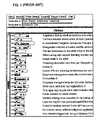
- Hearstdescribes a rectangular array of square tiles depicted in a graphical user interface along with the typical output of a search engine, as shown in FIG. 1 .
- Each arraycorresponds to a document found by the search engine.
- Each row of tiles in the arraycorresponds to a specified search term of interest (e.g. “law legal attorney lawsuit” and “network lan”).
- Each column in the arraycorresponds to a segment (e.g. different paragraphs) of the document, with the overall width of the array indicating the relative length of documents found by a search engine. The darkness of each tile indicates the relative number of occurrences of the search term in the corresponding document segment represented by the tile.
- the Seesoft systemalso describes the use of mouse “brushing”, wherein the mouse-controlled placement of a screen cursor near or over an entity within the graphical user interface triggers a display of additional information.
- a summary of the TileBars and Seesoft interfacesis given in Modem Information Retrieval by Ricardo Baeza-Yates and Berthier Ribeiro-Neto, ACM Press, p. 291–293, which is hereby incorporated by reference.
- CueVideois a research project of the IBM Corporation intended to address challenges arising in the automatic indexing, segmentation, and use of multimedia documents and collections.
- the CueVideo toolkitperforms multimedia analysis and includes an indexing engine that computes (and saves on a server) indices, hyperlinks, and data for browsing documents. It also includes an interactive user interface for searching and browsing video files with conventional web browser applications and standard media plug-ins.
- CueVideois well-described at www.almaden.ibm.com/cs/cuevideo/index.html and in “‘What is in that video anyway’:in search of better browsing”, by S. Srinivasan, D. Ponceleon, A. Amir and D. Petkovic, IEEE International Conference on Multimedia Computing and Systems, volume 1, 1999, p. 388–393, which are hereby incorporated by reference.
- GUI toolsthat provide further ease of use could be developed. Such tools would be of interest to Internet users who must currently sift and scroll through large collections of potentially immense documents, sometimes with hardware of limited display, storage, and communication capability. A system for providing concise document visualization and easy navigation while keeping the user within context is therefore needed.
- the userspecifies keywords or search terms of interest, and a search engine provides links to a number of documents that it deems relevant.
- a document analysis and indexing toolmay generate related document metadata.
- the inventionthen provides an abstract representation or summary view of at least one of the documents.
- the summary viewmay be generated from the document itself or from the document metadata or both.
- the summary viewdepicts the structure of the documents as well as the distribution and frequency of interesting features including search terms within the documents' various segments as an exemplary indication of document relevance.
- the summary viewmay be generated by a Java applet.
- the summary viewcomprises a rectangular array of cells in which the rows of the array correspond to the interesting features such as user-specified search terms, and the columns correspond to segments of the document.
- the content of each cellrepresents the presence or absence of features, or the frequency with which features occur in the portion of the document represented by that particular cell.
- the summary viewcomprises a rectangular array of cells in which columns of the array correspond to the features and the rows correspond to segments of the document, i.e. the summary view is substantially vertically oriented to more intuitively correspond with the top and bottom of a document.
- the summary viewthus provides an immediate overview of the document as well as the distribution of interesting features throughout the document as an exemplary indication of document relevance.
- the inventionprovide such concise visualization and easy navigation means within a modified version of a document.
- the meansmay be embodied as a fold-out window that appears to float above a displayed document.
- the summary viewutilizes cursor “brushing”, the juxtaposition of a cursor near or over a cell, to trigger an enhancement of the summary view providing more detailed information.
- a contextual snippet of informationincluding a particular search term and several surrounding words from the particular portion of a document represented by a cell can be displayed when a user moves the cursor over that cell.
- the inventionserves as an intermediary that enables intuitive visualization and navigation capabilities without causing distraction or confusion to users who are accustomed to conventional web browser use.
- the improved visualization and navigation meansmay be of particular utility to users of computer systems having limited storage, display, and communication capability. This is often the case with PDAs, personal information managers (PIMs) and cellular phones or other platforms incorporating microbrowsers.
- PDAspersonal information managers
- PIMspersonal information managers
- cellular phonesor other platforms incorporating microbrowsers.
- Each summary view in the hierarchydepicts increasingly detailed summary information about portions of the document until finally a particular portion of the document is directly displayed.
- the visualization and navigation systemprovide summary information about various features of documents that are linked to a document currently being displayed, without requiring that linked documents be pre-fetched in their entirety.
- This summary informationmay include thumbnails (low resolution versions) of other documents linked to the document currently being displayed, or indications of the presence and distribution of features in linked documents. The user may therefore choose whether to click on (and thus navigate to) a linked document based on the summary information.
- the summary informationmay also include a description of the number of accesses that have been made to the linked documents or portions thereof For example, the darkness of depicted cells may correspond to the popularity of a document portion.
- each row in a summary viewcorresponds to a section of the video data selected by a segmentation tool. For example, when a user brushes a cursor over a cell, the invention displays a video frame corresponding to the segment of video data represented by the cell and indicia of the correspondence. When the user clicks on a cell or video frame, the invention navigates to the corresponding segment in the video data and begins playing the video in the display at the beginning of the selected segment.
- the first hierarchical fold-out windowmay represent a plurality of videos, with subsequent fold-out windows in the hierarchy representing individual videos, and then segments of individual videos and so forth to a point where the video itself begins playing in the display.
- the inventionmay display a storyboard comprising a plurality of video frames, with navigation enabled as described above.
- FIG. 1is a display of the TileBars interface (prior art).
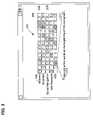
- FIG. 2is a diagram of the summary view of the first embodiment of the present invention.
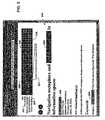
- FIG. 3is a display of the summary view of the first embodiment of the present invention within a modified version of a document.
- FIG. 4is a diagram of the summary view of the preferred embodiment of the present invention as a fold-out window.
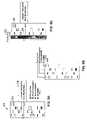
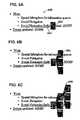
- FIGS. 5A , 5 B, and 5 Care diagrams of the summary view of the preferred embodiment of the present invention including a listing of search terms and a contextual snippet.
- FIGS. 6A , 6 B, and 6 Care displays of the summary view of the preferred embodiment of the present invention depicting a hierarchy of fold-out windows including previews or indications of the distribution of search terms in linked documents.
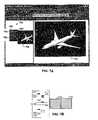
- FIGS. 7A and 7Bare displays of the summary view of the third embodiment of the present invention with a video document.
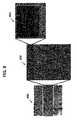
- FIG. 8is a diagram of the summary view of the third embodiment of the present invention depicting a hierarchy of fold-out windows.
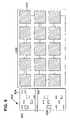
- FIG. 9is a diagram of the summary view of the fourth embodiment of the present invention including a storyboard depiction of the video document.
- FIG. 10is a display of the summary view of the fourth embodiment of the present invention including a storyboard depiction of the video document.
- the typical invention use scenariobegins with the user starting a web browser providing a graphical user interface, and then specifying features such as keywords or search terms that are of interest.
- the graphical user interfacemay for example be generated by a digital computer, a personal digital assistant, a personal information manager, or a microbrowser application running on a cellular telephone.
- a search engineprovides links to documents that it discovers and deems relevant based on an analysis of the instances of search terms found in such documents. Search engines are generally known in the art and are readily familiar to persons looking for information in digital data stored in networks like the Internet.
- Search enginesoften provide metadata describing the discovered relevant documents; this metadata routinely includes the documents' URLs, overall size, date, the first sentence from the document (or its header if not a text document), and a relevance ranking.
- Documentsmay include text files, image files, audio files, and video files for example, as well as collections.
- a multimedia analysis and indexing toolsuch as IBM's CueVideo toolkit, may also generate document metadata beyond that provided by the search engine, particularly for multimedia documents.
- document metadatamay include search terms, a textual transcript, the results of a textual transcript search, the results of a speaker change search, the results of a stress analysis, topic headings, the results of a topic change search, the results of a speech transcript search, audio features, the audio amplitude data, and the number of accesses to a particular document segment.
- Summary view 200is a condensed abstract representation of at least one of the documents a user wishes to visualize and navigate.
- a Java appletcan generate summary view 200 from the document itself, or from the document metadata, or both.
- Summary view 200depicts the structure of the document, as well as the distribution and frequency of search terms within the document's various segments (which may be defined by an indexing tool or merely represent a straightforward segmentation of the document).
- the segments shownall have the same size, but this depiction is not limiting; the visualization could show the segment size by varying the cell size.
- summary view 200comprises rows 202 , columns 204 , and cells 206 in a rectangular array.
- rows 202correspond to the user-specified search terms
- columns 204correspond to segments of the document.
- Search terms 208are displayed to help remind the user of row 202 meanings, helping to keep the user oriented and within the context of the information retrieval effort.
- the content of each cell 206represents for example the frequency with which a particular search term 208 occurs in the portion of the document represented by that particular cell 206 .
- each cell 206depicts the density of each search term 208 .
- different colorsmay be assigned to represent different densities according to a color legend.
- the physical dimensions of summary view 200 and its separate componentsmay also encode metadata; for example, search terms 208 not occurring frequently anywhere in the document may be represented by thin corresponding rows 202 .
- an enhancement 210is responsively displayed.
- the juxtaposition of a cursor near or on a graphical user interface targetis termed “brushing” and is distinct from selection of that target by clicking a mouse button.
- Enhancement 210is an addition to summary view 200 providing more detailed information.
- enhancement 210includes a few words at the beginning of the paragraph (e.g. a text document segment).
- Guide lines 212help the user stay in context by unobtrusively identifying the particular cell 206 to which enhancement 210 corresponds. Highlighting of a cell 206 boundary in response to cursor proximity accomplishes a similar effect.
- document 300is a web page that has been modified, for example, to include a Java applet to generate summary view 200 therein.
- Search terms 208are highlighted throughout the document to help reinforce the intuitive relationship between document 300 content and summary view 200 .
- Enhancement 304includes not only a few words at the beginning of the paragraph represented by a particular cell 306 , but also includes a contextual snippet 308 .
- Contextual snippet 308includes a particular search term 302 and several surrounding words from the particular portion of document 300 represented by cell 306 , to help the user determine how search term 302 relates to nearby document 300 content.
- Contextual snippet 308is displayed in response to cursor brushing that triggers enhancement 304 .
- a usermay therefore determine the context in which search terms 302 occur in a document via summary view 200 . If the user then decides that the instance of search term 302 is likely to be of interest, then the user can navigate directly to that instance in the document by selecting the corresponding particular cell 306 . For example, when the user clicks a mouse button to select a particular cell 306 , the invention scrolls the document so that the portion of the document corresponding to that particular cell 306 is directly displayed.
- the present inventiontherefore does not rely on the use of conventional scrolling techniques as practiced with conventional web browsing programs for document navigation, although the invention is likely be used with web browsers.
- FIG. 4a diagram of summary view 400 of the preferred embodiment of the present invention as a fold-out window is shown.
- the document(not shown) is not modified to include a summary view 400 within the document itself as in the first embodiment. Instead, the visualization and navigation tool of the present invention generates the fold-out window that floats over the document in the graphical user interface. Rows 402 correspond to segments of the document, and columns 404 correspond to search terms 208 .
- summary view 400is substantially vertically oriented to more intuitively correspond to a top-down document depiction and navigation scheme.
- cells 406correspond to particular search terms 208 occurring in particular portions of the document; however, in the preferred embodiment, cells 406 appear ONLY where search terms 208 occur, i.e. cell 406 boundaries are removed to prevent user confusion.
- Cells 406resemble the bands that appear in electrophoretic autoradiographs used for genetic analyses, so summary views 400 are intuitively very familiar to those who have seen such depictions of DNA.
- Summary view 400provides an immediate overview of the document as well as the distribution of interesting expressions throughout the document as an exemplary indication of document relevance.
- a slider 408helps the user identify particular document segments, and appears in response to cursor brushing of a particular row 402 .
- Enhancement 410appears in response to at least one cell 406 , and in this Figure comprises a topic heading and the first sentence of text under that heading.
- FIG. 5Aa diagram of summary view 500 of the preferred embodiment of the present invention including a listing of search terms 502 and a contextual snippet 504 is shown.
- Search terms 502are displayed in colors or near colored bars corresponding to cell 506 color to help the user maintain context. For hardware platforms that are not capable of displaying a color graphical user interface, sets of bars and cells 506 sharing common individual texture patterns can still help the user relate cells 506 to their corresponding search terms 502 .
- Instances of search terms 508can be highlighted (e.g. “forty-two”) for example when an adjustable relevance threshold is exceeded.
- search terms 502may be staggered and visually linked to corresponding columns with leading lines.
- the inventionthus operates to avoid distraction and confusion for users who are accustomed to conventional web browser use, and may be of particular utility with computer systems that have limited display capabilities.
- a usermay select a particular cell 506 and navigate to its corresponding document portion directly, without relying on scrolling.
- FIG. 5CYet another way of identifying search terms 502 corresponding to particular cells 506 being brushed is depicted in FIG. 5C .
- Search terms 502are shown only when a corresponding cell 506 is brushed, and a highlighter 510 denotes the column containing such a cell 506 .
- Highlighter 510may comprise a differently colored or shaded region, or the outline of a column.
- search terms 502may be shown in small fonts except for the particular search term 502 corresponding to highlighter 510 , which is shown in a larger font so that as different cells 506 are brushed the corresponding search terms 502 are temporarily enlarged in a magnifying-glass effect.
- Search terms 502 and highlighter 510may be depicted in any of the manners described above as the user traverses through a hierarchy of summary views.
- FIGS. 6A , 6 B, and 6 Cdisplays of the summary view of the preferred embodiment of the present invention depicting a hierarchy of fold-out windows is shown.
- Each fold-out window in the hierarchycan depict increasingly detailed information about portions of a document, until finally a particular portion of the document is directly displayed.
- document 600comprises five lines from a web page.
- the link “Social Navigation Swiki” 602is in document 600 being displayed, but link 602 points to another document.
- an enhancemente.g. in FIG. 6A this enhancement is a first fold-out window 604 .
- Fold-out window 604depicts summary information about the linked-to document without requiring that the linked-to document be pre-fetched in its entirety, because only the metadata of the linked-to document is required. In other words, only the linked-to document's summary view is needed.
- the present inventionis therefore of particular utility with computer systems having limited storage and communication capability.
- the summary informationmay include for example a thumbnail or contextual snippet of the linked-to document, or a depiction of the linked-to document's search term density distribution.
- the summary informationmay also include a description of the number of accesses that have been made to the linked-to document or portions thereof. For example, the darkness of cells in first fold-out window 604 can correspond to the popularity of a document portion. The user can therefore choose whether to select and navigate to a linked-to document based solely on the summary information.
- FIG. 6Bdepicts a further enhancement via a second fold-out window 606
- FIG. 6Cdepicts an even further enhancement via a third fold-out window 608 .
- These further enhancementsmay comprise depictions of different types of summary information about the same linked-to document, or may comprise summary views of a hierarchy of linked-to documents.
- Summary view 700includes rows 702 , columns 704 , cells 706 , and a slider 708 as with the preferred embodiment. Rows 702 correspond to segments of the video document as may be selected by a segmentation tool. However, the enhancement triggered by brushing a particular row 702 in this embodiment is a video frame 710 from the video document corresponding to the segment of video data represented by cell 706 .
- the inventionnavigates to the corresponding segment in the video data and begins playing the video in a document display 712 at the beginning of the selected segment.
- a document display 712at the beginning of the selected segment.
- more than one type of enhancementcan be triggered.
- a slide 714can be shown.
- the video frame 710could depict a speaker giving a slide presentation.
- First hierarchical window 800is the now-familiar summary view of a video file or a collection of video files.
- Second hierarchical window 802triggered by brushing a row in first hierarchical window 800 , is the summary view of a number of rows of first hierarchical window 800 .
- first hierarchical window 800depicts a summary view of a video collection
- second hierarchical window 802may depict a summary view of a single video in the collection.
- a third hierarchical window 804triggered by brushing a row in second hierarchical window 802 , is the summary view of the brushed row.
- third hierarchical window 804depicts a video frame and the first sentence from an audio transcript corresponding to the beginning of the document segment represented by the brushed row. The user can begin playing the video at this point by selecting third hierarchical window 804 .
- FIG. 9a diagram of the summary view of the fourth embodiment of the present invention including a storyboard depiction of the video document is shown.
- This embodimentis similar to the third embodiment, but the enhancement to summary view 900 with its rows 902 , columns 904 , and cells 906 comprises a storyboard 908 comprising a number of video frames 910 in a hierarchy of summary views having at least one level.
- video frames 910are interconnected in a serpentine fashion, to help the user maintain context more effectively as different rows 902 are brushed and, in response, visualized. The user can navigate even a very long video by brushing rows 902 and video frames 910 to reach a particular video frame 910 to be selected and played.
- FIG. 10a display of the summary view of the fourth embodiment of the present invention including a storyboard depiction of the video document is shown. As described above with respect to FIG. 9 , a particular video frame 910 is selected and play begins at a corresponding point in the video document in document display 1000 .
- a general purpose computeris programmed according to the inventive steps herein.
- the inventioncan also be embodied as an article of manufacture—a machine component—that is used by a digital processing apparatus to execute the present logic.
- This inventionis realized in a critical machine component that causes a digital processing apparatus to perform the inventive method steps herein.
- the inventionmay be embodied by a computer program that is executed by a processor within a computer as a series of computer-executable instructions. These instructions may reside, for example, in RAM of a computer or on a hard drive or optical drive of the computer, or the instructions may be stored on a DASD array, magnetic tape, electronic read-only memory, or other appropriate data storage device.
Landscapes
- Engineering & Computer Science (AREA)
- Theoretical Computer Science (AREA)
- General Engineering & Computer Science (AREA)
- Physics & Mathematics (AREA)
- General Physics & Mathematics (AREA)
- Human Computer Interaction (AREA)
- Computational Linguistics (AREA)
- Data Mining & Analysis (AREA)
- Databases & Information Systems (AREA)
- User Interface Of Digital Computer (AREA)
Abstract
Description
Claims (2)
Priority Applications (1)
| Application Number | Priority Date | Filing Date | Title |
|---|---|---|---|
| US10/034,300US7143362B2 (en) | 2001-12-28 | 2001-12-28 | System and method for visualizing and navigating content in a graphical user interface |
Applications Claiming Priority (1)
| Application Number | Priority Date | Filing Date | Title |
|---|---|---|---|
| US10/034,300US7143362B2 (en) | 2001-12-28 | 2001-12-28 | System and method for visualizing and navigating content in a graphical user interface |
Publications (2)
| Publication Number | Publication Date |
|---|---|
| US20030122873A1 US20030122873A1 (en) | 2003-07-03 |
| US7143362B2true US7143362B2 (en) | 2006-11-28 |
Family
ID=21875539
Family Applications (1)
| Application Number | Title | Priority Date | Filing Date |
|---|---|---|---|
| US10/034,300Expired - Fee RelatedUS7143362B2 (en) | 2001-12-28 | 2001-12-28 | System and method for visualizing and navigating content in a graphical user interface |
Country Status (1)
| Country | Link |
|---|---|
| US (1) | US7143362B2 (en) |
Cited By (44)
| Publication number | Priority date | Publication date | Assignee | Title |
|---|---|---|---|---|
| US20030212585A1 (en)* | 2002-05-09 | 2003-11-13 | Kabushiki Kaisha Toshiba | Idea drawing support method and program product therefor |
| US20040103372A1 (en)* | 1997-12-22 | 2004-05-27 | Ricoh Company, Ltd. | Multimedia visualization and integration environment |
| US20040155898A1 (en)* | 2002-09-19 | 2004-08-12 | Fuji Xerox Co., Ltd. | Image processing system |
| US20040255337A1 (en)* | 2003-02-19 | 2004-12-16 | Impatica Inc. | Method of synchronization |
| US20060117067A1 (en)* | 2004-11-30 | 2006-06-01 | Oculus Info Inc. | System and method for interactive visual representation of information content and relationships using layout and gestures |
| US20060156257A1 (en)* | 2005-01-13 | 2006-07-13 | Yen-Fu Chen | Method and system for rapid memorization and learning |
| US20060236238A1 (en)* | 2005-03-30 | 2006-10-19 | Kyocera Corporation | Portable terminal and document display control method thereof |
| US20060271887A1 (en)* | 2005-05-24 | 2006-11-30 | Palo Alto Research Center Inc. | Systems and methods for semantically zooming information |
| US20060271883A1 (en)* | 2005-05-24 | 2006-11-30 | Palo Alto Research Center Inc. | Systems and methods for displaying linked information in a sorted context |
| US20070185893A1 (en)* | 2005-11-25 | 2007-08-09 | Steven Rosenbaum | Method of and a system for logging on a project which contains a footage |
| US20070204239A1 (en)* | 2006-02-28 | 2007-08-30 | Microsoft Corporation | Indication of Delayed Content Output in a User Interface |
| US20070219945A1 (en)* | 2006-03-09 | 2007-09-20 | Microsoft Corporation | Key phrase navigation map for document navigation |
| US20070250789A1 (en)* | 2006-04-20 | 2007-10-25 | Bell Denise A | Method for Displaying Graphical Data |
| US20080141180A1 (en)* | 2005-04-07 | 2008-06-12 | Iofy Corporation | Apparatus and Method for Utilizing an Information Unit to Provide Navigation Features on a Device |
| US20080222527A1 (en)* | 2004-01-15 | 2008-09-11 | Myung-Won Kang | Apparatus and Method for Searching for a Video Clip |
| US20080295039A1 (en)* | 2007-05-21 | 2008-11-27 | Laurent An Minh Nguyen | Animations |
| US20080309614A1 (en)* | 2007-06-12 | 2008-12-18 | Dunton Randy R | User interface with software lensing for very long lists of content |
| US20090031224A1 (en)* | 2007-07-25 | 2009-01-29 | International Business Machines Corporation | Method, system, and computer program product for visually associating a static graphic image and html text on a web page |
| US20090327896A1 (en)* | 2008-06-27 | 2009-12-31 | Microsoft Corporation | Dynamic media augmentation for presentations |
| US20100168881A1 (en)* | 2008-12-30 | 2010-07-01 | Apple Inc. | Multimedia Display Based on Audio and Visual Complexity |
| US20100169777A1 (en)* | 2008-12-30 | 2010-07-01 | Apple Inc. | Light Table for Editing Digital Media |
| US20100169783A1 (en)* | 2008-12-30 | 2010-07-01 | Apple, Inc. | Framework for Slideshow Object |
| US7848598B2 (en) | 2002-09-19 | 2010-12-07 | Fuji Xerox Co., Ltd. | Image retrieval processing to obtain static image data from video data |
| US20110022966A1 (en)* | 2006-06-22 | 2011-01-27 | Digg, Inc. | Content visualization |
| US20110173188A1 (en)* | 2010-01-13 | 2011-07-14 | Oto Technologies, Llc | System and method for mobile document preview |
| WO2011071990A3 (en)* | 2009-12-08 | 2011-08-04 | Google Inc. | Resource search operations |
| US20110209037A1 (en)* | 2010-02-19 | 2011-08-25 | Samsung Electronics Co., Ltd. | Method for providing link and electronic apparatus thereof |
| WO2011144531A1 (en) | 2010-05-16 | 2011-11-24 | International Business Machines Corporation | Visual enhancement of a data record |
| US8078740B2 (en) | 2005-06-03 | 2011-12-13 | Microsoft Corporation | Running internet applications with low rights |
| US8185737B2 (en) | 2006-06-23 | 2012-05-22 | Microsoft Corporation | Communication across domains |
| US8326835B1 (en) | 2008-12-02 | 2012-12-04 | Adobe Systems Incorporated | Context-sensitive pagination as a function of table sort order |
| US20130066852A1 (en)* | 2006-06-22 | 2013-03-14 | Digg, Inc. | Event visualization |
| US20130167034A1 (en)* | 2009-07-22 | 2013-06-27 | Microsoft Corporation | Aggregated, interactive communication timeline |
| US8549441B2 (en) | 2007-06-15 | 2013-10-01 | Microsoft Corporation | Presenting and navigating content having varying properties |
| US20140059477A1 (en)* | 2007-11-16 | 2014-02-27 | Microsoft Corporation | Localized thumbnail preview of related content during spatial browsing |
| US9032300B2 (en) | 2010-08-24 | 2015-05-12 | Apple Inc. | Visual presentation composition |
| US20150205882A1 (en)* | 2007-03-19 | 2015-07-23 | Dean Vukas | Testing accessibility and compatibility of websites and web-based software |
| US20160291802A1 (en)* | 2015-04-01 | 2016-10-06 | Microsoft Technology Licensing, Llc | Contextual help |
| US20210397331A1 (en)* | 2013-03-08 | 2021-12-23 | Thomas Creative Group Productions, Llc | Interactive presentation system |
| US20220309938A1 (en)* | 2021-03-29 | 2022-09-29 | Panasonic Intellectual Property Management Co., Ltd. | Online video distribution support method and online video distribution support apparatus |
| US20230333704A1 (en)* | 2020-12-21 | 2023-10-19 | Vivo Mobile Communication Co., Ltd. | Image display method and apparatus, and electronic device |
| US11860931B1 (en)* | 2022-07-11 | 2024-01-02 | Truist Bank | Graphical user interface with insight hub and insight carousel |
| US20240380945A1 (en)* | 2023-05-08 | 2024-11-14 | Apple Inc. | Video editing and key-framing animations using accessory on a touch device |
| US12321579B2 (en) | 2023-02-08 | 2025-06-03 | Motorola Mobility Llc | Guidance image generation for a mobile device |
Families Citing this family (72)
| Publication number | Priority date | Publication date | Assignee | Title |
|---|---|---|---|---|
| US7627552B2 (en) | 2003-03-27 | 2009-12-01 | Microsoft Corporation | System and method for filtering and organizing items based on common elements |
| US7240292B2 (en) | 2003-04-17 | 2007-07-03 | Microsoft Corporation | Virtual address bar user interface control |
| US7409644B2 (en) | 2003-05-16 | 2008-08-05 | Microsoft Corporation | File system shell |
| US7769794B2 (en)* | 2003-03-24 | 2010-08-03 | Microsoft Corporation | User interface for a file system shell |
| US7234114B2 (en) | 2003-03-24 | 2007-06-19 | Microsoft Corporation | Extensible object previewer in a shell browser |
| US7823077B2 (en)* | 2003-03-24 | 2010-10-26 | Microsoft Corporation | System and method for user modification of metadata in a shell browser |
| US7712034B2 (en) | 2003-03-24 | 2010-05-04 | Microsoft Corporation | System and method for shell browser |
| US7421438B2 (en) | 2004-04-29 | 2008-09-02 | Microsoft Corporation | Metadata editing control |
| US7827561B2 (en) | 2003-03-26 | 2010-11-02 | Microsoft Corporation | System and method for public consumption of communication events between arbitrary processes |
| US7890960B2 (en)* | 2003-03-26 | 2011-02-15 | Microsoft Corporation | Extensible user context system for delivery of notifications |
| US7536386B2 (en) | 2003-03-27 | 2009-05-19 | Microsoft Corporation | System and method for sharing items in a computer system |
| US7650575B2 (en) | 2003-03-27 | 2010-01-19 | Microsoft Corporation | Rich drag drop user interface |
| US7587411B2 (en)* | 2003-03-27 | 2009-09-08 | Microsoft Corporation | System and method for filtering and organizing items based on common elements |
| US7925682B2 (en) | 2003-03-27 | 2011-04-12 | Microsoft Corporation | System and method utilizing virtual folders |
| US7499925B2 (en)* | 2003-03-27 | 2009-03-03 | Microsoft Corporation | File system for displaying items of different types and from different physical locations |
| US7526483B2 (en)* | 2003-03-27 | 2009-04-28 | Microsoft Corporation | System and method for virtual folder sharing including utilization of static and dynamic lists |
| US8024335B2 (en) | 2004-05-03 | 2011-09-20 | Microsoft Corporation | System and method for dynamically generating a selectable search extension |
| US7181463B2 (en) | 2003-10-24 | 2007-02-20 | Microsoft Corporation | System and method for managing data using static lists |
| US8150824B2 (en)* | 2003-12-31 | 2012-04-03 | Google Inc. | Systems and methods for direct navigation to specific portion of target document |
| US7493555B2 (en)* | 2004-02-24 | 2009-02-17 | Idx Investment Corporation | Document conversion and integration system |
| US7694236B2 (en) | 2004-04-23 | 2010-04-06 | Microsoft Corporation | Stack icons representing multiple objects |
| US7657846B2 (en) | 2004-04-23 | 2010-02-02 | Microsoft Corporation | System and method for displaying stack icons |
| US7992103B2 (en) | 2004-04-26 | 2011-08-02 | Microsoft Corporation | Scaling icons for representing files |
| US8707209B2 (en) | 2004-04-29 | 2014-04-22 | Microsoft Corporation | Save preview representation of files being created |
| US7496583B2 (en) | 2004-04-30 | 2009-02-24 | Microsoft Corporation | Property tree for metadata navigation and assignment |
| US8108430B2 (en) | 2004-04-30 | 2012-01-31 | Microsoft Corporation | Carousel control for metadata navigation and assignment |
| US7437358B2 (en) | 2004-06-25 | 2008-10-14 | Apple Inc. | Methods and systems for managing data |
| US8521720B2 (en)* | 2004-06-25 | 2013-08-27 | Apple Inc. | Methods and systems for managing data |
| US7774326B2 (en) | 2004-06-25 | 2010-08-10 | Apple Inc. | Methods and systems for managing data |
| US7693856B2 (en)* | 2004-06-25 | 2010-04-06 | Apple Inc. | Methods and systems for managing data |
| US9081872B2 (en) | 2004-06-25 | 2015-07-14 | Apple Inc. | Methods and systems for managing permissions data and/or indexes |
| US8538997B2 (en) | 2004-06-25 | 2013-09-17 | Apple Inc. | Methods and systems for managing data |
| US8156123B2 (en)* | 2004-06-25 | 2012-04-10 | Apple Inc. | Method and apparatus for processing metadata |
| US8131674B2 (en) | 2004-06-25 | 2012-03-06 | Apple Inc. | Methods and systems for managing data |
| US8150837B2 (en)* | 2004-06-25 | 2012-04-03 | Apple Inc. | Methods and systems for managing data |
| US7730012B2 (en) | 2004-06-25 | 2010-06-01 | Apple Inc. | Methods and systems for managing data |
| US7962449B2 (en)* | 2004-06-25 | 2011-06-14 | Apple Inc. | Trusted index structure in a network environment |
| US20050289127A1 (en)* | 2004-06-25 | 2005-12-29 | Dominic Giampaolo | Methods and systems for managing data |
| US20050289107A1 (en)* | 2004-06-25 | 2005-12-29 | Yan Arrouye | Methods and systems for managing data |
| US7539943B2 (en)* | 2004-07-14 | 2009-05-26 | Microsoft Corporation | Systems and methods for tracking file modifications in software development |
| US9071870B2 (en)* | 2004-12-08 | 2015-06-30 | Nokia Technologies Oy | System and method for viewing digital visual content on a device |
| US7383503B2 (en)* | 2005-02-23 | 2008-06-03 | Microsoft Corporation | Filtering a collection of items |
| US8490015B2 (en)* | 2005-04-15 | 2013-07-16 | Microsoft Corporation | Task dialog and programming interface for same |
| US20060236253A1 (en)* | 2005-04-15 | 2006-10-19 | Microsoft Corporation | Dialog user interfaces for related tasks and programming interface for same |
| US7614016B2 (en)* | 2005-04-21 | 2009-11-03 | Microsoft Corporation | Multiple roots in navigation pane |
| US20060242122A1 (en)* | 2005-04-22 | 2006-10-26 | Microsoft Corporation | Systems, methods, and user interfaces for storing, searching, navigating, and retrieving electronic information |
| US8522154B2 (en) | 2005-04-22 | 2013-08-27 | Microsoft Corporation | Scenario specialization of file browser |
| US8195646B2 (en)* | 2005-04-22 | 2012-06-05 | Microsoft Corporation | Systems, methods, and user interfaces for storing, searching, navigating, and retrieving electronic information |
| US7536410B2 (en)* | 2005-04-22 | 2009-05-19 | Microsoft Corporation | Dynamic multi-dimensional scrolling |
| US20060271855A1 (en)* | 2005-05-27 | 2006-11-30 | Microsoft Corporation | Operating system shell management of video files |
| US7665028B2 (en)* | 2005-07-13 | 2010-02-16 | Microsoft Corporation | Rich drag drop user interface |
| US9026990B2 (en)* | 2005-08-16 | 2015-05-05 | International Business Machines Corporation | Dynamic filtering of a navigation path to a set of minimums |
| NO20054720L (en)* | 2005-10-13 | 2007-04-16 | Fast Search & Transfer Asa | Information access with user-driven metadata feedback |
| US7664739B2 (en)* | 2006-02-14 | 2010-02-16 | Microsoft Corporation | Object search ui and dragging object results |
| US8375302B2 (en)* | 2006-11-17 | 2013-02-12 | Microsoft Corporation | Example based video editing |
| US8108371B2 (en)* | 2006-11-30 | 2012-01-31 | Microsoft Corporation | Web engine search preview |
| US7793230B2 (en)* | 2006-11-30 | 2010-09-07 | Microsoft Corporation | Search term location graph |
| US8100541B2 (en) | 2007-03-01 | 2012-01-24 | Taylor Alexander S | Displaying and navigating digital media |
| US20110099495A1 (en)* | 2009-10-22 | 2011-04-28 | Xerox Corporation | Method for enabling internet access on a multifunction reprographic machine |
| US10402419B1 (en)* | 2010-04-19 | 2019-09-03 | Facebook, Inc. | Search queries with previews of search results on online social networks |
| US9275101B2 (en)* | 2010-04-19 | 2016-03-01 | Facebook, Inc. | Search queries with previews of search results on online social networks |
| US8640055B1 (en)* | 2010-10-19 | 2014-01-28 | Pixar | Condensing hierarchies in user interfaces |
| US9449526B1 (en) | 2011-09-23 | 2016-09-20 | Amazon Technologies, Inc. | Generating a game related to a digital work |
| US9639518B1 (en) | 2011-09-23 | 2017-05-02 | Amazon Technologies, Inc. | Identifying entities in a digital work |
| US9613003B1 (en) | 2011-09-23 | 2017-04-04 | Amazon Technologies, Inc. | Identifying topics in a digital work |
| US8842085B1 (en) | 2011-09-23 | 2014-09-23 | Amazon Technologies, Inc. | Providing supplemental information for a digital work |
| US8874569B2 (en)* | 2012-11-29 | 2014-10-28 | Lexisnexis, A Division Of Reed Elsevier Inc. | Systems and methods for identifying and visualizing elements of query results |
| US9613161B2 (en) | 2013-09-05 | 2017-04-04 | Paypal, Inc. | Seamless pagination |
| CN103559246B (en)* | 2013-10-29 | 2018-01-05 | 优视科技有限公司 | Identify the method and device of hyperlinked title |
| US20160203178A1 (en)* | 2015-01-12 | 2016-07-14 | International Business Machines Corporation | Image search result navigation with ontology tree |
| CN108984685B (en)* | 2018-06-29 | 2020-07-03 | 北京字节跳动网络技术有限公司 | Method and device for automatically displaying document directory |
| WO2024115538A1 (en)* | 2022-11-30 | 2024-06-06 | Koninklijke Philips N.V. | Fingerprinting of unstructured patient data |
Citations (33)
| Publication number | Priority date | Publication date | Assignee | Title |
|---|---|---|---|---|
| US5521841A (en) | 1994-03-31 | 1996-05-28 | Siemens Corporate Research, Inc. | Browsing contents of a given video sequence |
| US5636350A (en)* | 1993-08-24 | 1997-06-03 | Lucent Technologies Inc. | Using symbols whose appearance varies to show characteristics of a result of a query |
| US5708767A (en) | 1995-02-03 | 1998-01-13 | The Trustees Of Princeton University | Method and apparatus for video browsing based on content and structure |
| US5821945A (en) | 1995-02-03 | 1998-10-13 | The Trustees Of Princeton University | Method and apparatus for video browsing based on content and structure |
| US5852435A (en) | 1996-04-12 | 1998-12-22 | Avid Technology, Inc. | Digital multimedia editing and data management system |
| US5862325A (en) | 1996-02-29 | 1999-01-19 | Intermind Corporation | Computer-based communication system and method using metadata defining a control structure |
| US5944783A (en) | 1997-07-29 | 1999-08-31 | Lincom Corporation | Apparatus and method for data transfers through software agents using client-to-server and peer-to-peer transfers |
| US5966139A (en)* | 1995-10-31 | 1999-10-12 | Lucent Technologies Inc. | Scalable data segmentation and visualization system |
| US6061062A (en)* | 1991-12-20 | 2000-05-09 | Apple Computer, Inc. | Zooming controller |
| US6094648A (en)* | 1995-01-11 | 2000-07-25 | Philips Electronics North America Corporation | User interface for document retrieval |
| US6119101A (en) | 1996-01-17 | 2000-09-12 | Personal Agents, Inc. | Intelligent agents for electronic commerce |
| WO2000063837A1 (en) | 1999-04-20 | 2000-10-26 | Textwise, Llc | System for retrieving multimedia information from the internet using multiple evolving intelligent agents |
| US6166735A (en) | 1997-12-03 | 2000-12-26 | International Business Machines Corporation | Video story board user interface for selective downloading and displaying of desired portions of remote-stored video data objects |
| US6181336B1 (en) | 1996-05-31 | 2001-01-30 | Silicon Graphics, Inc. | Database-independent, scalable, object-oriented architecture and API for managing digital multimedia assets |
| US6181342B1 (en) | 1998-07-06 | 2001-01-30 | International Business Machines Corp. | Computer file directory system displaying visual summaries of visual data in desktop computer documents for quickly identifying document content |
| US20010021268A1 (en)* | 2000-03-07 | 2001-09-13 | Lg Electronics Inc. | Hierarchical hybrid shot change detection method for MPEG-compressed video |
| US6353448B1 (en)* | 2000-05-16 | 2002-03-05 | Ez Online Network, Inc. | Graphic user interface display method |
| US6356285B1 (en)* | 1997-12-17 | 2002-03-12 | Lucent Technologies, Inc | System for visually representing modification information about an characteristic-dependent information processing system |
| US20020067380A1 (en)* | 1999-03-23 | 2002-06-06 | Jamey Graham | Method and system for organizing document information |
| US20020129051A1 (en)* | 2001-03-08 | 2002-09-12 | International Business Machines Corporation | Previewing portions of the hypertext World Wide Web documents linked to hyperlinks in received World Wide Web documents |
| US20020163545A1 (en)* | 2001-05-01 | 2002-11-07 | Hii Samuel S. | Method of previewing web page content while interacting with multiple web page controls |
| US6483523B1 (en)* | 1998-05-08 | 2002-11-19 | Institute For Information Industry | Personalized interface browser and its browsing method |
| US6486896B1 (en)* | 1999-04-07 | 2002-11-26 | Apple Computer, Inc. | Scalable scroll controller |
| US20020198875A1 (en)* | 2001-06-20 | 2002-12-26 | Masters Graham S. | System and method for optimizing search results |
| US6580437B1 (en)* | 2000-06-26 | 2003-06-17 | Siemens Corporate Research, Inc. | System for organizing videos based on closed-caption information |
| US20030146939A1 (en)* | 2001-09-24 | 2003-08-07 | John Petropoulos | Methods and apparatus for mouse-over preview of contextually relevant information |
| US6615209B1 (en)* | 2000-02-22 | 2003-09-02 | Google, Inc. | Detecting query-specific duplicate documents |
| US20040205514A1 (en)* | 2002-06-28 | 2004-10-14 | Microsoft Corporation | Hyperlink preview utility and method |
| US6816174B2 (en)* | 2000-12-18 | 2004-11-09 | International Business Machines Corporation | Method and apparatus for variable density scroll area |
| US6883138B2 (en)* | 2001-08-08 | 2005-04-19 | Xerox Corporation | Methods and systems for generating enhanced thumbnails usable for document navigation |
| US6912327B1 (en)* | 1999-01-28 | 2005-06-28 | Kabushiki Kaisha Toshiba | Imagine information describing method, video retrieval method, video reproducing method, and video reproducing apparatus |
| US20050154637A1 (en)* | 2004-01-09 | 2005-07-14 | Rahul Nair | Generating and displaying level-of-interest values |
| US6996782B2 (en)* | 2001-05-23 | 2006-02-07 | Eastman Kodak Company | Using digital objects organized according to a histogram timeline |
- 2001
- 2001-12-28USUS10/034,300patent/US7143362B2/ennot_activeExpired - Fee Related
Patent Citations (33)
| Publication number | Priority date | Publication date | Assignee | Title |
|---|---|---|---|---|
| US6061062A (en)* | 1991-12-20 | 2000-05-09 | Apple Computer, Inc. | Zooming controller |
| US5636350A (en)* | 1993-08-24 | 1997-06-03 | Lucent Technologies Inc. | Using symbols whose appearance varies to show characteristics of a result of a query |
| US5521841A (en) | 1994-03-31 | 1996-05-28 | Siemens Corporate Research, Inc. | Browsing contents of a given video sequence |
| US6094648A (en)* | 1995-01-11 | 2000-07-25 | Philips Electronics North America Corporation | User interface for document retrieval |
| US5708767A (en) | 1995-02-03 | 1998-01-13 | The Trustees Of Princeton University | Method and apparatus for video browsing based on content and structure |
| US5821945A (en) | 1995-02-03 | 1998-10-13 | The Trustees Of Princeton University | Method and apparatus for video browsing based on content and structure |
| US5966139A (en)* | 1995-10-31 | 1999-10-12 | Lucent Technologies Inc. | Scalable data segmentation and visualization system |
| US6119101A (en) | 1996-01-17 | 2000-09-12 | Personal Agents, Inc. | Intelligent agents for electronic commerce |
| US5862325A (en) | 1996-02-29 | 1999-01-19 | Intermind Corporation | Computer-based communication system and method using metadata defining a control structure |
| US5852435A (en) | 1996-04-12 | 1998-12-22 | Avid Technology, Inc. | Digital multimedia editing and data management system |
| US6181336B1 (en) | 1996-05-31 | 2001-01-30 | Silicon Graphics, Inc. | Database-independent, scalable, object-oriented architecture and API for managing digital multimedia assets |
| US5944783A (en) | 1997-07-29 | 1999-08-31 | Lincom Corporation | Apparatus and method for data transfers through software agents using client-to-server and peer-to-peer transfers |
| US6166735A (en) | 1997-12-03 | 2000-12-26 | International Business Machines Corporation | Video story board user interface for selective downloading and displaying of desired portions of remote-stored video data objects |
| US6356285B1 (en)* | 1997-12-17 | 2002-03-12 | Lucent Technologies, Inc | System for visually representing modification information about an characteristic-dependent information processing system |
| US6483523B1 (en)* | 1998-05-08 | 2002-11-19 | Institute For Information Industry | Personalized interface browser and its browsing method |
| US6181342B1 (en) | 1998-07-06 | 2001-01-30 | International Business Machines Corp. | Computer file directory system displaying visual summaries of visual data in desktop computer documents for quickly identifying document content |
| US6912327B1 (en)* | 1999-01-28 | 2005-06-28 | Kabushiki Kaisha Toshiba | Imagine information describing method, video retrieval method, video reproducing method, and video reproducing apparatus |
| US20020067380A1 (en)* | 1999-03-23 | 2002-06-06 | Jamey Graham | Method and system for organizing document information |
| US6486896B1 (en)* | 1999-04-07 | 2002-11-26 | Apple Computer, Inc. | Scalable scroll controller |
| WO2000063837A1 (en) | 1999-04-20 | 2000-10-26 | Textwise, Llc | System for retrieving multimedia information from the internet using multiple evolving intelligent agents |
| US6615209B1 (en)* | 2000-02-22 | 2003-09-02 | Google, Inc. | Detecting query-specific duplicate documents |
| US20010021268A1 (en)* | 2000-03-07 | 2001-09-13 | Lg Electronics Inc. | Hierarchical hybrid shot change detection method for MPEG-compressed video |
| US6353448B1 (en)* | 2000-05-16 | 2002-03-05 | Ez Online Network, Inc. | Graphic user interface display method |
| US6580437B1 (en)* | 2000-06-26 | 2003-06-17 | Siemens Corporate Research, Inc. | System for organizing videos based on closed-caption information |
| US6816174B2 (en)* | 2000-12-18 | 2004-11-09 | International Business Machines Corporation | Method and apparatus for variable density scroll area |
| US20020129051A1 (en)* | 2001-03-08 | 2002-09-12 | International Business Machines Corporation | Previewing portions of the hypertext World Wide Web documents linked to hyperlinks in received World Wide Web documents |
| US20020163545A1 (en)* | 2001-05-01 | 2002-11-07 | Hii Samuel S. | Method of previewing web page content while interacting with multiple web page controls |
| US6996782B2 (en)* | 2001-05-23 | 2006-02-07 | Eastman Kodak Company | Using digital objects organized according to a histogram timeline |
| US20020198875A1 (en)* | 2001-06-20 | 2002-12-26 | Masters Graham S. | System and method for optimizing search results |
| US6883138B2 (en)* | 2001-08-08 | 2005-04-19 | Xerox Corporation | Methods and systems for generating enhanced thumbnails usable for document navigation |
| US20030146939A1 (en)* | 2001-09-24 | 2003-08-07 | John Petropoulos | Methods and apparatus for mouse-over preview of contextually relevant information |
| US20040205514A1 (en)* | 2002-06-28 | 2004-10-14 | Microsoft Corporation | Hyperlink preview utility and method |
| US20050154637A1 (en)* | 2004-01-09 | 2005-07-14 | Rahul Nair | Generating and displaying level-of-interest values |
Non-Patent Citations (14)
| Title |
|---|
| "Cue Video", www.almaden.ibm.com/cs/cuevideo/index.html. |
| Baeza-Yates, R., Ribeiro-Neto, B. Modern Information Retrieval, ACM Press, New York, p. 291-293. |
| Berkley Digital Library Project, TileBars, May 21, 1998, p. 1-5.* |
| Card, S. K., Mackinlay, J.D., et al., Eds. (1999). Readings in Information Visualization-Using Visi n to Think. San Francisco, CA, Morgan Kaufmann, p. 58-59. |
| Eick, S. G., Steffen, J.L., et al. (1999). Seesoft-A Tool For Visualizing Line Oriented Software Statistics. Readings in Information Visualization. San Francisco, CA, Morgan Kauffman, p. 419-430. |
| Fan, Y. and Gauch, S., "Adaptive Agents for Information Gathering from Multiple, Distributed Information Sources", Intelligent Agents in Cyberspace, Papers from the 1999 AAAI Symposium, p. xiii+197, 40-46. |
| Hearst, Marti A., "Tile Bars: Visualization of Term Distribution Information in Full Text Information Access", Proceedings of the ACM SIGCHI Conference on Human Factors in Computing Systems, p. 59-66, Denver, CO, May 1995. Also available at: www.acm.org/pubs/articles/proceedings/chi/223904/p59-hearst.html. |
| McCorman, Jenifer S., Wohlschlaeger, Brian, "Harnessing Agent Technologies for Data Mining and Knowledge Discovery", in Data Mining and Knowledge Discovery: Theory, Tools, and Technology II, Belur V. Dasarathy, Editor, Proceedings of SPIE, v. 4057 (2000), p. 393-400. |
| North, Chris, User Controlled Overviews of an Image Library: A Case Study of the Visible Human, 1996, pp. 1-10.* |
| Pirolli, P. and Card, S., "Informati n foraging in information access environment", Human Factors in C mputing Systems, CHI'95 Conference Proceedings, 1995, p. 51-58. |
| Ponceleon, D. and Dieberger, A. "Hierarchical Brushing In A Collection Of Video Data", Proceedings of the 34<SUP>th </SUP>Annual Hawaii International Conference on System Sciences, HICSS 34, Maui, HI, USA, Jan. 3-6, 2001. |
| Srinivasan, S. et al., "What is in that video anyway?: in search of better browsing", IEEE International Conference on Multimedia and Computing Systems, vol. 1, 1999, p. 388-393. |
| WinNT, Microsoft Windows NT screenshots, 1998, p. 1.* |
| Woodruff, A. et al., "Enhancing a Digital Book with a Reading Recommender", CHI'2000 Letters, vol. 2, issue 1, Apr. 1-6, 2000, p. 153-160 + 580. |
Cited By (85)
| Publication number | Priority date | Publication date | Assignee | Title |
|---|---|---|---|---|
| US8995767B2 (en) | 1997-12-22 | 2015-03-31 | Ricoh Company, Ltd. | Multimedia visualization and integration environment |
| US20040103372A1 (en)* | 1997-12-22 | 2004-05-27 | Ricoh Company, Ltd. | Multimedia visualization and integration environment |
| US8739040B2 (en)* | 1997-12-22 | 2014-05-27 | Ricoh Company, Ltd. | Multimedia visualization and integration environment |
| US20030212585A1 (en)* | 2002-05-09 | 2003-11-13 | Kabushiki Kaisha Toshiba | Idea drawing support method and program product therefor |
| US20040155898A1 (en)* | 2002-09-19 | 2004-08-12 | Fuji Xerox Co., Ltd. | Image processing system |
| US7873905B2 (en)* | 2002-09-19 | 2011-01-18 | Fuji Xerox Co., Ltd. | Image processing system |
| US7848598B2 (en) | 2002-09-19 | 2010-12-07 | Fuji Xerox Co., Ltd. | Image retrieval processing to obtain static image data from video data |
| US20040255337A1 (en)* | 2003-02-19 | 2004-12-16 | Impatica Inc. | Method of synchronization |
| US7647556B2 (en)* | 2004-01-15 | 2010-01-12 | Samsung Electronics Co., Ltd. | Apparatus and method for searching for a video clip |
| US20080222527A1 (en)* | 2004-01-15 | 2008-09-11 | Myung-Won Kang | Apparatus and Method for Searching for a Video Clip |
| US8296666B2 (en)* | 2004-11-30 | 2012-10-23 | Oculus Info. Inc. | System and method for interactive visual representation of information content and relationships using layout and gestures |
| US20060117067A1 (en)* | 2004-11-30 | 2006-06-01 | Oculus Info Inc. | System and method for interactive visual representation of information content and relationships using layout and gestures |
| US20060156257A1 (en)* | 2005-01-13 | 2006-07-13 | Yen-Fu Chen | Method and system for rapid memorization and learning |
| US20060236238A1 (en)* | 2005-03-30 | 2006-10-19 | Kyocera Corporation | Portable terminal and document display control method thereof |
| US20080141180A1 (en)* | 2005-04-07 | 2008-06-12 | Iofy Corporation | Apparatus and Method for Utilizing an Information Unit to Provide Navigation Features on a Device |
| US20110167390A1 (en)* | 2005-04-07 | 2011-07-07 | Ingram Dv Llc | Apparatus and method for utilizing an information unit to provide navigation features on a device |
| US7552398B2 (en)* | 2005-05-24 | 2009-06-23 | Palo Alto Research Center Incorporated | Systems and methods for semantically zooming information |
| US7562085B2 (en) | 2005-05-24 | 2009-07-14 | Palo Alto Research Center Incorporated | Systems and methods for displaying linked information in a sorted context |
| US20060271883A1 (en)* | 2005-05-24 | 2006-11-30 | Palo Alto Research Center Inc. | Systems and methods for displaying linked information in a sorted context |
| US20060271887A1 (en)* | 2005-05-24 | 2006-11-30 | Palo Alto Research Center Inc. | Systems and methods for semantically zooming information |
| US8078740B2 (en) | 2005-06-03 | 2011-12-13 | Microsoft Corporation | Running internet applications with low rights |
| US20070185893A1 (en)* | 2005-11-25 | 2007-08-09 | Steven Rosenbaum | Method of and a system for logging on a project which contains a footage |
| US8341537B2 (en)* | 2006-02-28 | 2012-12-25 | Microsoft Corporation | Indication of delayed content output in a user interface |
| US20070204239A1 (en)* | 2006-02-28 | 2007-08-30 | Microsoft Corporation | Indication of Delayed Content Output in a User Interface |
| US7861149B2 (en) | 2006-03-09 | 2010-12-28 | Microsoft Corporation | Key phrase navigation map for document navigation |
| US20070219945A1 (en)* | 2006-03-09 | 2007-09-20 | Microsoft Corporation | Key phrase navigation map for document navigation |
| US20070250789A1 (en)* | 2006-04-20 | 2007-10-25 | Bell Denise A | Method for Displaying Graphical Data |
| US20130066852A1 (en)* | 2006-06-22 | 2013-03-14 | Digg, Inc. | Event visualization |
| US8869037B2 (en)* | 2006-06-22 | 2014-10-21 | Linkedin Corporation | Event visualization |
| US8751940B2 (en) | 2006-06-22 | 2014-06-10 | Linkedin Corporation | Content visualization |
| US20110022966A1 (en)* | 2006-06-22 | 2011-01-27 | Digg, Inc. | Content visualization |
| US8631332B2 (en)* | 2006-06-22 | 2014-01-14 | Linkedin Corporation | Content visualization |
| US10067662B2 (en) | 2006-06-22 | 2018-09-04 | Microsoft Technology Licensing, Llc | Content visualization |
| US10042540B2 (en) | 2006-06-22 | 2018-08-07 | Microsoft Technology Licensing, Llc | Content visualization |
| US9606979B2 (en) | 2006-06-22 | 2017-03-28 | Linkedin Corporation | Event visualization |
| US9213471B2 (en) | 2006-06-22 | 2015-12-15 | Linkedin Corporation | Content visualization |
| US8335929B2 (en) | 2006-06-23 | 2012-12-18 | Microsoft Corporation | Communication across domains |
| US8185737B2 (en) | 2006-06-23 | 2012-05-22 | Microsoft Corporation | Communication across domains |
| US8489878B2 (en) | 2006-06-23 | 2013-07-16 | Microsoft Corporation | Communication across domains |
| US20150205882A1 (en)* | 2007-03-19 | 2015-07-23 | Dean Vukas | Testing accessibility and compatibility of websites and web-based software |
| US7853900B2 (en)* | 2007-05-21 | 2010-12-14 | Amazon Technologies, Inc. | Animations |
| US20080295039A1 (en)* | 2007-05-21 | 2008-11-27 | Laurent An Minh Nguyen | Animations |
| US9024864B2 (en)* | 2007-06-12 | 2015-05-05 | Intel Corporation | User interface with software lensing for very long lists of content |
| US20080309614A1 (en)* | 2007-06-12 | 2008-12-18 | Dunton Randy R | User interface with software lensing for very long lists of content |
| US8549441B2 (en) | 2007-06-15 | 2013-10-01 | Microsoft Corporation | Presenting and navigating content having varying properties |
| US20090031224A1 (en)* | 2007-07-25 | 2009-01-29 | International Business Machines Corporation | Method, system, and computer program product for visually associating a static graphic image and html text on a web page |
| US20140059477A1 (en)* | 2007-11-16 | 2014-02-27 | Microsoft Corporation | Localized thumbnail preview of related content during spatial browsing |
| US20090327896A1 (en)* | 2008-06-27 | 2009-12-31 | Microsoft Corporation | Dynamic media augmentation for presentations |
| US8326835B1 (en) | 2008-12-02 | 2012-12-04 | Adobe Systems Incorporated | Context-sensitive pagination as a function of table sort order |
| US20100169783A1 (en)* | 2008-12-30 | 2010-07-01 | Apple, Inc. | Framework for Slideshow Object |
| US8621357B2 (en)* | 2008-12-30 | 2013-12-31 | Apple Inc. | Light table for editing digital media |
| US8626322B2 (en) | 2008-12-30 | 2014-01-07 | Apple Inc. | Multimedia display based on audio and visual complexity |
| US20100168881A1 (en)* | 2008-12-30 | 2010-07-01 | Apple Inc. | Multimedia Display Based on Audio and Visual Complexity |
| US20100169777A1 (en)* | 2008-12-30 | 2010-07-01 | Apple Inc. | Light Table for Editing Digital Media |
| US8832555B2 (en)* | 2008-12-30 | 2014-09-09 | Apple Inc. | Framework for slideshow object |
| US20130167034A1 (en)* | 2009-07-22 | 2013-06-27 | Microsoft Corporation | Aggregated, interactive communication timeline |
| US20200064976A1 (en)* | 2009-07-22 | 2020-02-27 | Microsoft Technology Licensing, Llc | Aggregated, interactive communication timeline |
| US20160283060A1 (en)* | 2009-07-22 | 2016-09-29 | Microsoft Technology Licensing, Llc | Aggregated, interactive communication timeline |
| US9515891B2 (en)* | 2009-07-22 | 2016-12-06 | Microsoft Technology Licensing, Llc | Aggregated, interactive communication timeline |
| US10860179B2 (en)* | 2009-07-22 | 2020-12-08 | Microsoft Technology Licensing, Llc | Aggregated, interactive communication timeline |
| US10466864B2 (en)* | 2009-07-22 | 2019-11-05 | Microsoft Technology Licensing, Llc | Aggregated, interactive communication timeline |
| US8392449B2 (en) | 2009-12-08 | 2013-03-05 | Google Inc. | Resource search operations |
| WO2011071990A3 (en)* | 2009-12-08 | 2011-08-04 | Google Inc. | Resource search operations |
| US20110173188A1 (en)* | 2010-01-13 | 2011-07-14 | Oto Technologies, Llc | System and method for mobile document preview |
| US8522141B2 (en)* | 2010-02-19 | 2013-08-27 | Samsung Electronics Co., Ltd. | Method for providing link and electronic apparatus thereof |
| US20110209037A1 (en)* | 2010-02-19 | 2011-08-25 | Samsung Electronics Co., Ltd. | Method for providing link and electronic apparatus thereof |
| WO2011144531A1 (en) | 2010-05-16 | 2011-11-24 | International Business Machines Corporation | Visual enhancement of a data record |
| US9032300B2 (en) | 2010-08-24 | 2015-05-12 | Apple Inc. | Visual presentation composition |
| US20210397331A1 (en)* | 2013-03-08 | 2021-12-23 | Thomas Creative Group Productions, Llc | Interactive presentation system |
| US11550458B2 (en)* | 2013-03-08 | 2023-01-10 | Trustees Of The Thomas Family Trust | Interactive presentation system |
| US20160291802A1 (en)* | 2015-04-01 | 2016-10-06 | Microsoft Technology Licensing, Llc | Contextual help |
| US9727201B2 (en)* | 2015-04-01 | 2017-08-08 | Microsoft Technology Licensing, Llc | Contextual help |
| US20230333704A1 (en)* | 2020-12-21 | 2023-10-19 | Vivo Mobile Communication Co., Ltd. | Image display method and apparatus, and electronic device |
| US12429998B2 (en)* | 2020-12-21 | 2025-09-30 | Vivo Mobile Communication Co., Ltd. | Image display method and apparatus, and electronic device |
| US20220309938A1 (en)* | 2021-03-29 | 2022-09-29 | Panasonic Intellectual Property Management Co., Ltd. | Online video distribution support method and online video distribution support apparatus |
| US12277167B2 (en)* | 2022-07-11 | 2025-04-15 | Truist Bank | Graphical user interface with insight hub and insight carousel |
| US11860931B1 (en)* | 2022-07-11 | 2024-01-02 | Truist Bank | Graphical user interface with insight hub and insight carousel |
| US20240086456A1 (en)* | 2022-07-11 | 2024-03-14 | Truist Bank | Graphical user interface with insight hub and insight carousel |
| US20240176813A1 (en)* | 2022-07-11 | 2024-05-30 | Truist Bank | Graphical user interface with insight hub and insight carousel |
| US12417242B2 (en)* | 2022-07-11 | 2025-09-16 | Truist Bank | Graphical user interface with insight hub and insight carousel |
| US12321579B2 (en) | 2023-02-08 | 2025-06-03 | Motorola Mobility Llc | Guidance image generation for a mobile device |
| US12262077B2 (en) | 2023-05-08 | 2025-03-25 | Apple Inc. | User interfaces for video editing application on touch screen device |
| US12348812B2 (en) | 2023-05-08 | 2025-07-01 | Apple Inc. | Color management technologies in video editing application |
| US12231715B2 (en)* | 2023-05-08 | 2025-02-18 | Apple Inc. | Video editing and key-framing animations using accessory on a touch device |
| US20240380945A1 (en)* | 2023-05-08 | 2024-11-14 | Apple Inc. | Video editing and key-framing animations using accessory on a touch device |
Also Published As
| Publication number | Publication date |
|---|---|
| US20030122873A1 (en) | 2003-07-03 |
Similar Documents
| Publication | Publication Date | Title |
|---|---|---|
| US7143362B2 (en) | System and method for visualizing and navigating content in a graphical user interface | |
| US7721192B2 (en) | User interface for a resource search tool | |
| JP4814575B2 (en) | System and method for displaying content on a small screen computing device | |
| JP4893243B2 (en) | Image summarization method, image display device, k-tree display system, k-tree display program, and k-tree display method | |
| US7007069B2 (en) | Method and apparatus for clustering hierarchically related information | |
| Kärkkäinen et al. | Designing for small display screens | |
| US7861149B2 (en) | Key phrase navigation map for document navigation | |
| US7111253B2 (en) | Method and apparatus for displaying hierarchical information | |
| US7266765B2 (en) | Detection and processing of annotated anchors | |
| Furnas et al. | Considerations for information environments and the NaviQue workspace | |
| US7739622B2 (en) | Dynamic thumbnails for document navigation | |
| US8005857B2 (en) | Object search UI and dragging object results | |
| US7873901B2 (en) | Small form factor web browsing | |
| US6665836B1 (en) | Method for managing information on an information net | |
| US7280957B2 (en) | Method and apparatus for generating overview information for hierarchically related information | |
| US20100146012A1 (en) | Previewing search results for suggested refinement terms and vertical searches | |
| US20040117736A1 (en) | Method and apparatus for normalizing quoting styles in electronic mail messages | |
| KR20090084870A (en) | A system that facilitates delivery of improved query results, a computer implemented method and computer implemented system that facilitates providing contextual query results | |
| US20040117340A1 (en) | Method and apparatus for generating summary information for hierarchically related information | |
| Ahmadi et al. | User-centric adaptation of Web information for small screens | |
| US7725487B2 (en) | Content synchronization system and method of similar web pages | |
| US7107550B2 (en) | Method and apparatus for segmenting hierarchical information for display purposes | |
| Xiao et al. | Browsing on small displays by transforming web pages into hierarchically structured subpages | |
| US20030018667A1 (en) | Website using images as a navigational tool for user-created photopages on the internet | |
| Mukherjea et al. | Automatically determining semantics for world wide web multimedia information retrieval |
Legal Events
| Date | Code | Title | Description |
|---|---|---|---|
| AS | Assignment | Owner name:INTERNATIONAL BUSINESS MACHINES CORPORATION, NEW Y Free format text:ASSIGNMENT OF ASSIGNORS INTEREST;ASSIGNORS:DIEBERGER, ANDREAS;PONCELEON, DULCE BEATRIZ;RUSSELL, DANIEL MARTIN;REEL/FRAME:012429/0907;SIGNING DATES FROM 20011217 TO 20011218 | |
| FEPP | Fee payment procedure | Free format text:PAYOR NUMBER ASSIGNED (ORIGINAL EVENT CODE: ASPN); ENTITY STATUS OF PATENT OWNER: LARGE ENTITY | |
| FPAY | Fee payment | Year of fee payment:4 | |
| REMI | Maintenance fee reminder mailed | ||
| FPAY | Fee payment | Year of fee payment:8 | |
| SULP | Surcharge for late payment | Year of fee payment:7 | |
| AS | Assignment | Owner name:LINKEDIN CORPORATION, CALIFORNIA Free format text:ASSIGNMENT OF ASSIGNORS INTEREST;ASSIGNOR:INTERNATIONAL BUSINESS MACHINES CORPORATION;REEL/FRAME:035201/0479 Effective date:20140331 | |
| FEPP | Fee payment procedure | Free format text:MAINTENANCE FEE REMINDER MAILED (ORIGINAL EVENT CODE: REM.) | |
| LAPS | Lapse for failure to pay maintenance fees | Free format text:PATENT EXPIRED FOR FAILURE TO PAY MAINTENANCE FEES (ORIGINAL EVENT CODE: EXP.); ENTITY STATUS OF PATENT OWNER: LARGE ENTITY | |
| STCH | Information on status: patent discontinuation | Free format text:PATENT EXPIRED DUE TO NONPAYMENT OF MAINTENANCE FEES UNDER 37 CFR 1.362 | |
| FP | Lapsed due to failure to pay maintenance fee | Effective date:20181128 |