US7079111B2 - Computer based browsing computer program product, system and method - Google Patents
Computer based browsing computer program product, system and methodDownload PDFInfo
- Publication number
- US7079111B2 US7079111B2US10/262,960US26296002AUS7079111B2US 7079111 B2US7079111 B2US 7079111B2US 26296002 AUS26296002 AUS 26296002AUS 7079111 B2US7079111 B2US 7079111B2
- Authority
- US
- United States
- Prior art keywords
- book
- pages
- computer
- page
- document
- Prior art date
- Legal status (The legal status is an assumption and is not a legal conclusion. Google has not performed a legal analysis and makes no representation as to the accuracy of the status listed.)
- Expired - Fee Related, expires
Links
Images


















Classifications
- G—PHYSICS
- G06—COMPUTING OR CALCULATING; COUNTING
- G06F—ELECTRIC DIGITAL DATA PROCESSING
- G06F3/00—Input arrangements for transferring data to be processed into a form capable of being handled by the computer; Output arrangements for transferring data from processing unit to output unit, e.g. interface arrangements
- G06F3/01—Input arrangements or combined input and output arrangements for interaction between user and computer
- G06F3/048—Interaction techniques based on graphical user interfaces [GUI]
- G06F3/0481—Interaction techniques based on graphical user interfaces [GUI] based on specific properties of the displayed interaction object or a metaphor-based environment, e.g. interaction with desktop elements like windows or icons, or assisted by a cursor's changing behaviour or appearance
- G06F3/0483—Interaction with page-structured environments, e.g. book metaphor
- G—PHYSICS
- G06—COMPUTING OR CALCULATING; COUNTING
- G06F—ELECTRIC DIGITAL DATA PROCESSING
- G06F3/00—Input arrangements for transferring data to be processed into a form capable of being handled by the computer; Output arrangements for transferring data from processing unit to output unit, e.g. interface arrangements
- G06F3/01—Input arrangements or combined input and output arrangements for interaction between user and computer
- G06F3/03—Arrangements for converting the position or the displacement of a member into a coded form
- G06F3/033—Pointing devices displaced or positioned by the user, e.g. mice, trackballs, pens or joysticks; Accessories therefor
- G06F3/0354—Pointing devices displaced or positioned by the user, e.g. mice, trackballs, pens or joysticks; Accessories therefor with detection of 2D relative movements between the device, or an operating part thereof, and a plane or surface, e.g. 2D mice, trackballs, pens or pucks
- G06F3/03547—Touch pads, in which fingers can move on a surface
- G—PHYSICS
- G06—COMPUTING OR CALCULATING; COUNTING
- G06F—ELECTRIC DIGITAL DATA PROCESSING
- G06F3/00—Input arrangements for transferring data to be processed into a form capable of being handled by the computer; Output arrangements for transferring data from processing unit to output unit, e.g. interface arrangements
- G06F3/01—Input arrangements or combined input and output arrangements for interaction between user and computer
- G06F3/048—Interaction techniques based on graphical user interfaces [GUI]
- G06F3/0484—Interaction techniques based on graphical user interfaces [GUI] for the control of specific functions or operations, e.g. selecting or manipulating an object, an image or a displayed text element, setting a parameter value or selecting a range
- G06F3/0485—Scrolling or panning
- G—PHYSICS
- G06—COMPUTING OR CALCULATING; COUNTING
- G06F—ELECTRIC DIGITAL DATA PROCESSING
- G06F3/00—Input arrangements for transferring data to be processed into a form capable of being handled by the computer; Output arrangements for transferring data from processing unit to output unit, e.g. interface arrangements
- G06F3/01—Input arrangements or combined input and output arrangements for interaction between user and computer
- G06F3/048—Interaction techniques based on graphical user interfaces [GUI]
- G06F3/0487—Interaction techniques based on graphical user interfaces [GUI] using specific features provided by the input device, e.g. functions controlled by the rotation of a mouse with dual sensing arrangements, or of the nature of the input device, e.g. tap gestures based on pressure sensed by a digitiser
- G06F3/0488—Interaction techniques based on graphical user interfaces [GUI] using specific features provided by the input device, e.g. functions controlled by the rotation of a mouse with dual sensing arrangements, or of the nature of the input device, e.g. tap gestures based on pressure sensed by a digitiser using a touch-screen or digitiser, e.g. input of commands through traced gestures
- G06F3/04883—Interaction techniques based on graphical user interfaces [GUI] using specific features provided by the input device, e.g. functions controlled by the rotation of a mouse with dual sensing arrangements, or of the nature of the input device, e.g. tap gestures based on pressure sensed by a digitiser using a touch-screen or digitiser, e.g. input of commands through traced gestures for inputting data by handwriting, e.g. gesture or text
- G—PHYSICS
- G06—COMPUTING OR CALCULATING; COUNTING
- G06F—ELECTRIC DIGITAL DATA PROCESSING
- G06F2203/00—Indexing scheme relating to G06F3/00 - G06F3/048
- G06F2203/033—Indexing scheme relating to G06F3/033
- G06F2203/0339—Touch strips, e.g. orthogonal touch strips to control cursor movement or scrolling; single touch strip to adjust parameter or to implement a row of soft keys
Definitions
- the present inventionrelates to a computer based browsing computer program product, system and method for browsing through documents stored in a computer.
- the present inventionfacilitates the browsing of a document stored in a computer in such a way that it allows a rapid and holistic view of what contents are present and the organization of the material in the document, as well as rapid access to the items in the document involved.
- the document-browsing system in the present inventionis also generalized to provide a novel human-computer interface, not just for browsing documents but also for interacting with and operating a computer to achieve the various functionalities normally carried out on the computer.
- the ironyis that computer software packages (included in computer readable media, such as optical disks, magnetic disks, semiconductor memory, etc.) usually come with thick and heavy manuals containing information which can easily be stored on a light-weight CD-ROM, and even if the manuals are sometimes dispensed in the form of a CD-ROM, more often than not people would print them out into a hard-copy format in order to facilitate reading.
- computer software packagesincluded in computer readable media, such as optical disks, magnetic disks, semiconductor memory, etc.
- the browserhas a glimpse of what are the contents of the book document.
- the browserhas an idea of approximately where the items of interest are so that the browser can (a) return to look for them later when needed, and (b) have an understanding of the relationships between the material currently being viewed and other material (i.e., an understanding of the hierarchical structure involved).
- many finger-operationsare required of the browser in order to flip through the pages and, together with the inherent sequential order imposed by the pages, very quickly allow the browser to have an understanding of the nature, location and organization of the material involved.
- Another method used for presenting information on the computer screenis flashing one page of information after another.
- This methodeliminates the problem of blurred images but it also eliminates the continuity between different portions of the document.
- the lack of continuityeliminates the reader's ability to form impressions of the approximate absolute locations of these portions of the material involved and hence the impressions of the relationships between these portions of the material.
- only the flipping method normally present in a booke.g., a hardcover book
- a booke.g., a hardcover book
- U.S. Pat. No. 5,467,102discloses a device for document viewing that consists of two display screens.
- One of the purposes of using two display screensis to allow the user to display two different pages from the document so that they can be read side-by-side (e.g., a diagram and its textual explanation).
- Another purposeis to allow a large picture to be displayed simultaneously on both pages.
- the Kuno et al. deviceallows users to change the speed of movement through the document through a pressure sensor—the more pressure applied, the faster the pages in the document are moved through.
- the Kuno et al. devicealso allows the document to be viewed in the forward or backward direction by pressing on a forward sensor area or a reverse sensor area respectively.
- the Kuno et al. devicestill does not provide the same convenience as browsing through a book, primarily because when switching between the operations for different controls—the speed of movement through the document, the change of direction of viewing, and the jumping to different parts of the document—there are a lot more hand and finger movements than is the case in manipulating a physical book.
- the Kuno et al. deviceis a specialized, relatively costly device with sensors and hardware built onto two display screens, whereas the present inventor recognizes that a lower cost and more practical device would be one that adds modularly to the existing computer system.
- micethat can eliminate the above-mentioned problem of positioning cursor on the computer screen with a conventional mouse (i.e., fine control of the hand or fingers is needed). These mice allow the user to specify “hot locations” on the screen on which the cursor “homes onto” with less fine control than conventional mice. Furthermore, a subset of these mice can generate “vertical only” or “horizontal only” movement of the cursor so that the scrolling process requires less fine control of the muscle than is required with a conventional mouse. These mice eliminate some, but not all, of the problems associated with the conventional methods of computer input as far as computer-based document browsing is concerned.
- McTaggartdiscloses an electronic book that comprises laminated sheets bound together in the form of a book. On each of these sheets, printed material is arranged on the top layer and below that layer is an electronic backdrop containing thin light-emitting diodes (LED's) and pressure sensitive switches affixed onto a backing sheet.
- LED'sthin light-emitting diodes
- the pressure switchespositioned under certain items in the printed material, are for the purpose of sensing the user's selection of those items.
- a speakeris also provided on the book to generate audio signals for explaining the text or giving the user audio feedback.
- Contact or photo-sensitive switchesare also embedded in the pages to allow the electronic circuits to know which pages are currently being viewed, so that the appropriate audio and visual signals can be generated.
- this apparatusis in a form that allows a person to handle it like handling a typical book, with visual and audio enhancements of the printed material as well as facilities that accept the user's feedback, it is basically a hard-wired device that is not reprogrammable and different hardware has to be configured for books with different contents. No provision is available for downloading document files from a computer for display on the electronic book nor is the electronic book able to display any arbitrary document file. This device is hence not suitable for browsing through documents stored in a computer.
- the present inventorhas identified there exists a need for a low-cost, modular device that can be connected to existing computer systems and that, through the computer executing a set of operations stored on a computer-readable medium, can effect rapidly the necessary browsing operations and together with a preferred mode of moving through a document—e.g., the flipping mode—that permits easy, effective computer-based document browsing that approaches that of browsing through a book.
- a preferred mode of moving through a documente.g., the flipping mode
- a feature of such a systemis that it would exhibit functional attributes like those of a paper-book (i.e., a physical book such as a paper-back book).
- the method of browsing a physical bookcan also benefit another aspect of human-computer interaction.
- the WINDOWS interfacee.g., MICROSOFT Corporation's WINDOWS 95® or APPLE Computer's MAC operating system, OS
- the WINDOWS interfacealso suffers from many of the problems associated with reading documents on a computer.
- the firstis when the user needs to look into the contents of “directories” containing either other directories or computer programs and data files. In this situation, what are displayed in a window when it is opened are the contents of a directory.
- a usercan navigate among the directories organized in a tree structure and resident on the computer hard-disks to locate programs (often called “applications”) and data.
- applicationsprograms
- the otheris when a user activates a program, and the program either generates some output to be displayed on the computer screen or is waiting to accept some user input (usually either a command to the program or data to be fed into the program).
- these output and inputare presented and accepted through a “window”, referred to as the working window of a program.
- each opened windowtends to occlude other windows already present, it is often the case that in the process of accomplishing a certain task (e.g., creating a multimedia document), a large and often confusing sequence of windows has to be opened, closed or moved aside, each window representing an activation of a program to accomplish some subtasks (e.g., extracting some text from a text file, extracting a sub-part of an image from an image file, carrying out some processing on the images thus obtained, “pasting” all these items together in yet another program, etc.) Again a large number of finger and hand operations and movement is required to carry out these operations through the use of a mouse. Furthermore, because the various windows thus opened in this process do not have any fixed locations, and their relative locations keep changing, an excessive amount of mouse operations is often needed just to locate these opened windows or put them away for later use.
- the WINDOWS interfacederives from the desktop metaphor, in which the computer screen is likened to the desktop, and the windows are thus analogous to items that one normally handles on a desktop. While the desktop interface is a large improvement over the previous kind of command line interface (e.g., MICROSOFT's DOS®), primarily because of its user-friendly graphical interface and menu driven input, it suffers from the same problem of the desktop: when the items to be handled are many, the desktop tends to become very messy, and one often has to keep pushing aside many items to look for other items.
- command line interfacee.g., MICROSOFT's DOS®
- the present inventorhas identified that there is a need for a higher level of organization built onto the currently available WINDOWS interface—a “Books” interface—that can be used in conjunction with the above-mentioned low-cost, modular device that can alleviate many of the problems associated with the WINDOWS interface in order to facilitate human-computer interaction.
- one objective of the present inventionis to overcome these short-comings of conventional systems, computer-readable media, and methods.
- Another objectis to provide a browsing device that exploits the use of finger operations normally involved in browsing through a book, namely, the change of speed of movement through the document involved, the change of direction of movement through the document, the jumping to other portions of the document and the bookmarking of pages (e.g., when a page is bookmarked, it can be returned/jumped to later very quickly by using the controls operated by the fingers).
- Another object of the inventionis that the positioning, arrangement, and operability of the controls for the above-mentioned operations performed by the fingers are such that they allow almost no movement of the hand and minimal movements of the fingers, thus maximizing the ease of browsing through the stored document by capitalizing on the dexterity of the human fingers to operate these controls.
- a further object of the inventionis to provide a low cost, modular browsing device that can be easily attached to existing computer systems much like how a mouse attaches to a computer system.
- Still a further objectiveis to provide a reconfigurable construct for the browsing device so that it can be (a) configured into a hand-held controller; (b) attached to the sides of existing computer screens; (c) configured to cooperate with a mouse so that there is no need to move the user's hand(s) when switching between browser-related operations and mouse-related operations; and (d) configured to cooperate with a gyro-mouse so that the entire assembly can be used in the absence of a table top, where the particular construct is selected by the user depending on the user's preference.
- Another object of the inventionis to provide a computer-readable medium that holds software that when executed by a computer displays, on the computer screen, the document to be browsed by way of browsing commands generated by the user actuating the browsing device.
- the displayis in the form of a book format image that shows the thicknesses of material in the document before and after the currently viewed material, showing of the bookmarks, and showing, on the thicknesses, of the location of the pages that would be jumped to at any given time if jumping were to be effected.
- Another object of the inventionis to provide a system, computer-based process, and method that permit different organizations of material in the document and corresponding display formats, including: (a) organized into pages that can be flipped through page by page from right to left or vice versa, much like what happens when one flips through a book; (b) organized into pages that can be flipped through page by page from bottom to top or vice versa, much like what happens when one flips through a notepad; (c) organized into pages that can be slid through page by page from right to left or vice versa, much like what happens when one views a microfilm; (d) organized into pages that can be flashed one after another; and (e) organized into pages that can be scrolled through, with no distinct page boundaries, much like what is normally done in a computer implemented word-processor application stored on a computer-readable medium.
- the first three methods when used together with the aforementioned browsing deviceresult in a browsing process that most resembles that of browsing through a book, a notepad, or a micro-film.
- the last two methodsdo not precisely emulate the book-browsing process but can still benefit from the rapidity of finger control effected on the browsing device.
- Another object of the inventionis to provide a computer based mechanism that implements simultaneous multiple indexing in conjunction with the inventive browsing system.
- a keyword of interestWhen a keyword of interest is encountered during the reading of the document, the user selects the keyword using a cursor on the screen in conjunction with a pointing device such as a mouse, like what is normally done in current computer systems, or using his/her finger in conjunction with a touch or pressure sensing screen, or other methods.
- the pages on which explanations or other issues related to this keyword resideare bookmarked by the inventive system, after which the user can quickly flip to one of these pages using the mechanisms provided in the browsing system.
- Another object of the inventionis to use the above-described browsing facility in conjunction with other software, storable on computer readable media, that is configured to reorganize the material in the document involved to facilitate browsing/viewing—for example, the positioning of material for comparison side by side on the pages currently being viewed.
- Another object of the inventionis to use the above-mentioned browsing facility in conjunction with software, storable on computer readable media, that can highlight selected portions of the material or annotate on the pages in the document involved to facilitate browsing/viewing/reading.
- Yet another object of the inventionis to provide the above-mentioned browsing facility to a computer configured to execute word processing software so as to facilitate the entering, processing, and viewing/browsing of material in conjunction with the word processing software.
- Another object of the inventionis to provide the above-mentioned browsing facility to any software, storable in a computer-readable medium, in which information cannot be fitted within one computer screen for viewing or manipulating.
- Yet another object of the inventionis to add a new metaphor mechanism—the “library metaphor”—to the computer operating system's human interface in which information on the computer screen which is traditionally presented in the form of windows is now be presented in the form of “books”.
- a processor-based browsing devicefor browsing through a document that includes, a top surface, a sensor surface and a bottom surface.
- a sensor area on the sensor surfacedetects the position of a finger along one direction and the force of the finger on the sensor area.
- the browsing devicealso includes four buttons/on-off switches on the bottom surface, and four additional buttons/on-off switches on the said top surface, each of which is operated by the fingers.
- An electrical circuitconverts the force and position of the finger on the sensor area as detected by the force and position sensors on that area into electrical forms and outputs them.
- the electrical circuitalso outputs the on/off states of the four buttons/on-off switches on the bottom surface, and four additional buttons/on-off switches on the said top surface.
- the deviceconnects to a computer configured to implement in software the control, sense, and display mechanisms consistent with the users activity with the browsing device.
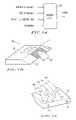
- FIG. 1Ais the block diagram of the browsing device according to the present invention, detailing input commands and output signals;
- FIGS. 1B and 1Care a schematic perspective upper and lower views of a first embodiment of the browsing device
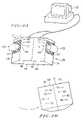
- FIGS. 2A and 2Bare top/bottom perspective views of the browsing device configured into a mini-book configuration used in conjunction with a computer;
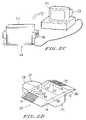
- FIG. 2Cis front perspective view of the browsing device configured into a screen configuration used in conjunction with a computer;
- FIG. 2Dis a front perspective view of the browsing device configured into a mouse configuration used in conjunction with a computer;
- FIG. 2Eis a front perspective view of the browsing device configured into a gyro-mouse configuration used in conjunction with a computer;
- FIG. 2Fis a front perspective view of the browsing device configured into a one-hand configuration used in conjunction with a computer;
- FIG. 2Gis a front perspective view of the browsing device configured into a one-hand-gyro-mouse configuration used in conjunction with a computer;
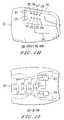
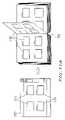
- FIGS. 2H and 2Iare side perspective and bottom views respectively of another embodiment of the mini-book configuration of FIG. 2A ;
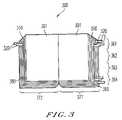
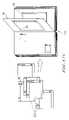
- FIG. 3is a top perspective view of a computer book displayed on a screen that is to be browsed through using browsing device of the present invention
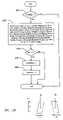
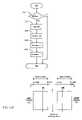
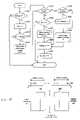
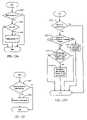
- FIGS. 4A and 4Bare a flowchart that details the mechanisms for jumping to other parts of the document being viewed/browsed through and movement through a document under the control of the thumb on the browsing device of present invention
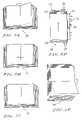
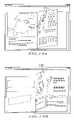
- FIG. 5Ais a top view of the computer book of the present invention that uses a flipping method of moving through a document;
- FIG. 5Bis a top view of the computer book of the present invention that uses a sliding method of moving through a document
- FIG. 5Cis a top view of the computer book of the present invention that uses a flashing method of moving through a document;
- FIG. 5Dis a top view of the computer book of the present invention that uses a scrolling method of moving through a document;
- FIG. 5Eis a top perspective view of the computer book of the present invention that uses a vertical flipping method of moving through a document;
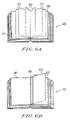
- FIG. 6Ais a top perspective view of an open fan display for displaying pages and that is used in conjunction with the flipping method of moving through the document illustrated in FIG. 5A ;
- FIG. 6Bis a top perspective view of a collapsed fan display for displaying pages and that is used in conjunction with the flipping method of moving through the document illustrated in FIG. 5A ;
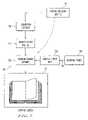
- FIG. 7is a schematic block diagram of the browsing system that incorporates the inventive browsing device of FIG. 1B ;
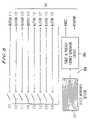
- FIG. 8is a schematic electrical block diagram of the buttons and sensor portions of the browsing device of FIGS. 1B and 1C ;
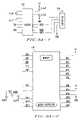
- FIG. 9Ais a schematic diagram of the signal-generating circuit used with any of the devices depicted in FIGS. 2A–2I to generate the necessary output signals to the computer's RS232 port based on the various input commands as depicted in the block diagram in FIG. 1A ;
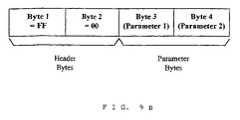
- FIG. 9Bis a data structure of a communication signal format stored in memory and generated by the circuit of FIG. 9A to communicate with the computer through the RS232 port;
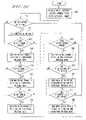
- FIG. 9Cis a flowchart of a control program retrievable by the micro-controller chip 900 in the circuit of FIG. 9A so as to generate signals in the format of FIG. 9B for the RS232 port of the computer;
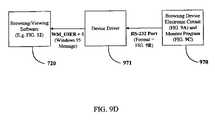
- FIG. 9Dis a signal flow diagram of signals from the browsing device to the browsing/viewing software
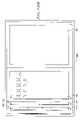
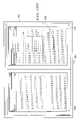
- FIG. 10Aillustrates a computer book displayed on a screen that is to be browsed by using the flipping method and the browsing device of the present invention
- FIG. 10Bis a sequence of images showing how one page of the computer book in FIG. 10A flips across;
- FIG. 10Cillustrates the simultaneous flipping of more than one page of the computer book of FIG. 10A when the flipping speed is fast;
- FIG. 10Dillustrates the activation of a jump cursor operation on the thickness of the book in FIG. 10A ;
- FIG. 10Eillustrates a jump operation to a different portion of the book
- FIG. 10Fillustrates the creation of a finger-bookmark
- FIG. 10Gillustrates the retention of the finger-bookmark created in FIG. 10F ;
- FIG. 10Hillustrates a jump operation made to a finger-bookmarked page
- FIG. 10Iillustrates all the created finger-bookmarks
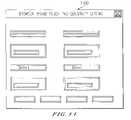
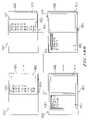
- FIG. 11shows a WINDOWS interface that allows the user to adjust the sensitivities of the force and position sensor on the browsing device
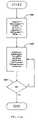
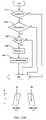
- FIGS. 12A–12Ishow the flowchart of one embodiment of a computer-based process that generates the necessary operations for the purpose of browsing through a document as controlled from a browsing device;
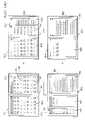
- FIGS. 13A–13Bshow a flipping display embodiment of the present invention
- FIGS. 14A–14Cillustrate the process by which the flipping display of FIGS. 13A and 13B is generated
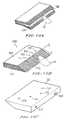
- FIGS. 15A–Care schematic perspective views of another embodiment of the browsing device that uses many thin, hard, and flexible pieces of material bound together in the manner of the binding of the pages of a book;
- FIGS. 16A–16Bare top/bottom schematic perspective views of another embodiment of the browsing device that uses a display screen fitted to a slanted surface to display a material thicknesses before or after currently viewed material;
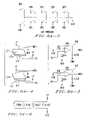
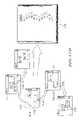
- FIG. 17Ais a comparative schematic diagram of directories/sub-directories in a “window” compared with pages of a computer book that uses the flipping method of FIG. 5A in order to move through the book;
- FIG. 17Bis a comparative schematic diagram of directories/sub-directories and the files in a WINDOWS system compared with chapters and sections in a computer book that uses the flipping method of FIG. 5A to move through the book;
- FIG. 17Cis a comparative schematic diagram of working windows in a WINDOWS system compared with pages of a computer book that uses the flipping method of FIG. 5A to move through the book;
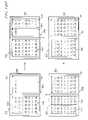
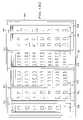
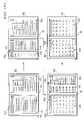
- FIGS. 18A–18Millustrate the various implementation processes of a “Books” interface according to the present invention
- FIGS. 19A–19Cillustrate the one-sided flipping display for the Books interface
- FIG. 20illustrates a sequence of display screens representing a tear-off operation for window-pages of the Books interface
- FIG. 21illustrates the combined use of the Books and WINDOWS interface
- FIG. 22is a flowchart of a method for implementing the processes of the Books interface
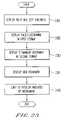
- FIG. 23is a flowchart of a method for displaying a set of information on a display screen as controlled by a browsing device
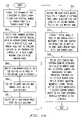
- FIG. 24is a flowchart of a method for browsing a set of information on a display screen
- FIG. 25is a flowchart of a user-interface method according to the library metaphor aspect of the present invention.
- FIG. 26is a flowchart of a Books interface method according to the library metaphor aspect of the present invention.
- FIG. 1Adepicts the browsing device 100 according to the present invention that can be used in conjunction with existing computer systems for the purpose of browsing through documents or any information stored in the computer. While certain embodiments of the browsing device (e.g., device 100 ) are shown herein, other data input devices, such as keyboards, keypads, a computer mouse used with pull-down menus, etc., may be used as well to accomplish the browsing functions, albeit in a less convenient format. Nevertheless, in reference to the browsing device 100 , four commands are input and detected by the browsing device 100 .
- commandsinclude the following: (a) specifying whether a movement in a forward direction or in a backward direction through the document is to be performed; (b) specifying a speed of the movement described in (a); (c) jumping to a specified location in the document or information involved; and (d) specifying that certain portions of the document or the information involved is to be bookmarked.
- signalsare generated and output to effect the necessary operations in a computer system (e.g., computer 205 in FIG. 2A ) attached to the browsing device 100 .
- FIGS. 1B and 1Cdepict a top and bottom view of one embodiment of the primary browsing device 100 according to the present invention.
- the browsing device 100includes a slanted surface 120 , extending from a top surface 110 of the browsing device 100 .
- the slanted surface 120supports a user's thumb 122 on which to rest, although the user may use another instrument or finger as well.
- four other fingers 141 – 144are placed on a bottom surface 130 of the device (as shown in FIG. 1C ), opposed to the thumb 122 .
- a set of force and position sensors disposed in a sensor area 121detect (a) a force of the thumb 122 on the slanted surface 120 within the sensor area 121 and (b) the position of the thumb 122 (or one of the other fingers) in the sensor area 121 in the direction of the slant.
- the direction of the slantis referred to as an x-direction, as shown in FIG. 1B , where the positive x-direction points away from the edge that adjoins the top surface 110 and the slanted surface 120 .
- the position of the thumb 122 (or one of the other fingers) in the y-directiongauges whether the thumb 122 remains on the sensor area 121 .
- buttons/switches 131 – 134are placed on the bottom surface 130 , within easy reach of the four fingers ( 141 – 144 ) during those operations when these fingers ( 141 – 144 ) are placed on the bottom surface 130 .
- another four buttons/switchesare placed, preferably parallel to the edge adjoining the top surface 110 and the slanted surface 120 , as shown in FIG. 1B .
- buttons ( 131 – 134 , and 111 – 114 ) on the bottom and top surfaces ( 130 and 110 respectively)are for the purposes of bookmarking. The use of these buttons ( 131 – 134 , 111 – 114 ) depends on the particular configuration in which the browsing device 100 is used and will be described below.
- FIGS. 2A–2Fdepict alternative configurations to employ the browsing device 100 for producing the browsing input.
- the browsing device 100 depicted in FIGS. 1B and 1Cis preferably used with an operator's right hand.
- a left-hand version of the browsing device 101 as depicted in FIGS. 2A and 2Bis employed in some of the alternative embodiments depicted in FIGS. 2A–2F .
- FIGS. 2A and 2Bdepict top and bottom views of one embodiment of the mini-book configuration 200 in which a left-hand version 101 and a right-hand version 100 of the browsing device 100 are joined back-to-back through latching mechanisms 151 and 152 as shown in FIG. 1C and the resulting assembly 200 is electrically operatively connected to the computer 205 (such as an IBM Aptiva A92, Part Number 42H0333).
- the left and the right handsoperate the devices on the left and right respectively, hence the left thumb 172 and right thumb 122 rest on the left and right sensor areas ( 171 and 121 ) respectively.
- buttons ( 131 – 134 , 181 – 184 ) on the bottom surfaces 130 and 180 of both the left and right devicesare placed near the buttons ( 111 – 114 , 161 – 164 ) on top surfaces 110 , 160 are available for auxiliary functions.
- the direction of movementi.e., forward or backward
- the direction of movementis effected through the force applied by the right and left thumbs ( 122 and 172 ) on the sensor areas 121 and 171 respectively.
- the right thumb 122 forceactivates a forward movement through the document and the left thumb 172 force activates a backward movement.
- the speed of movementis preferably proportional to the force applied, although other force/speed relationships may be employed successfully.
- the right thumb 122 operating the right sensor area 121activates jumping to points in the document involved that lie between the currently viewed material in the document and the end of the document and the left thumb 171 operating the left sensor area 172 activates jumping to points in the document involved that lie between the currently viewed material in the document and the beginning of the document.
- the right fingers other than the thumb 122 operating the buttons 131 – 134 on the bottom surface 130create bookmarks for points in the document involved that lie between the currently viewed material in the document and the end of the document and the left fingers other than the thumb 172 operating the corresponding buttons 181 – 184 on the corresponding bottom surface 180 create bookmarks for points in the document involved that lie between the currently viewed material in the document and the beginning of the document.
- An x-directionis defined along the slanted surface for the left-hand device 101 that is perpendicular to the edge adjoining the top surface 160 and the slanted surface 170 of the left-hand device 101 and the positive x-direction is taken to be the direction away from that edge as illustrated in FIG. 2A .
- the operations to be described below for the sensor areas 121 or 171 and for the buttons on the bottom surfaces 131 – 134 or 181 – 184are similar for both the right-hand device 100 and the left-hand device 101 and unless necessary, only the operations for the right-hand device 100 will be described.
- the position of the thumb 122 in the x-direction on the sensor area 121determines the page in the document to jump to (for the cases in which the material in the document is organized into pages to be flipped, slid or flashed on the computer screen, the details of which will be described later) or the point in the document to jump to (for the case in which material in the document is not organized into pages like in the case of the use of scrolling to move through the document).
- x0 (the origin) be the point at which the slanted surface 120 meets the top surface 110 .
- the thumb 122will be referred to as being “at” position x1 when it covers the point x1 and some contiguous points to the “right” of x1, i.e., some of the contiguous points x such that x>x1, and “right” refers to the conventional positive axial direction. This is because the intersection of the thumb 122 and the slanted surface 120 (in the sensor area 121 ) on the browsing device 100 has a small spatial extent and hence it will have some dimension in the x-direction.
- FIG. 3shows the “book” 300 displayed on the computer screen, henceforth referred to as the computer book.
- the thickness 310 of the computer book 300 on both sidesis shown on the computer screen next to the displayed pages 301 as shown in FIG. 3 .
- the thumbselects the page to jump to by sliding along the side until it reaches that page.
- the thumbslides along the side of the book in a(direction perpendicular to the edge of the book the thumb is touching (similar to the x-direction in FIG. 1B ) by an amount proportional to how far along in the document the page to be jump to is from the current page.
- the width of the slanted surface felt by the thumbdoes not change, even as the amount of material/number of pages present on that “side” of the “book” changes, the translation of the x-position of the thumb to a page in the document to jump to is slightly more complicated.
- the distance along the slanted surface from the current thumb position XT1 to the edge, XSis treated as being proportional to the number of pages remaining from that point to the end or beginning of the document.
- PRbecomes the amount of material, say the number of lines of material, remaining and PJ becomes the amount of material to be skipped over.
- the thumb 122moves from the starting position XT1 in the positive x-direction, before it applies any force to effect a jump, it is at liberty to move between XT1 and XS in the positive or negative x-directions to search for a page it wishes to jump to. If in this process the thumb 122 moves in the negative x-direction beyond the starting position XT1, whatever new position the thumb 122 finds itself in and after having applied a momentary force in that position, that position will become a new starting position XT1 for the computation of any subsequent jump. If the thumb 122 did not apply any momentary force after having moved in the negative x-direction beyond the starting position XT1, and then it moves back past XT1 in the positive x-direction, the starting position for any subsequent jump will be XT1.
- step 401the thumb 122 is placed at position XT on the sensor area 121 .
- step 402a check is made to determine if a force has been applied momentarily or longer (than a predefined, short time). If not, nothing happens; the thumb 122 may move to a new position XT (step 403 ) or stay in the same position XT. If an affirmative response is received in step 402 , a check is made to see if the thumb has applied the force longer than momentarily.
- step 405movement through the document is initiated (with a speed proportional to the force applied and a direction depending on whether the left-hand device 101 or the right-hand device 100 in the mini-book configuration 200 is activated). If a negative response is received in step 404 , the process flows to step 406 . Similarly, after initiation of movement through the document in step 405 , the process also flows to step 406 . In step 406 , the starting position XT1 is assigned the value of the current thumb 122 position XT. The process then flows to step 407 where the thumb 122 either stays in the current position or moves to a new position XT ( ⁇ >XT1).
- PRis the number of pages or amount of material remaining from the current page to the end of the document if the right-hand device 100 in the mini-book configuration 200 is now being activated or from the current page to the beginning of the document if the left-hand device 110 in the mini-book configuration 200 is being activated.
- XSis the width of the sensor area 121 .
- step 408If in step 408 , XT is found to be smaller than XT1, then the process flows to step 412 which checks if a force has been applied at XT momentarily or longer. If not, nothing happens, the process flows to step 407 where the thumb can move to a new position XT. If so, step 413 checks to see if the force applied is longer than a pre-defined, short period. If the force applied is longer than a pre-defined, short period, the process flows to step 414 where movement through the document is initiated (with a speed proportional to the force applied and a direction depending on whether the left-hand device 101 or the right-hand device 100 in the mini-book configuration 200 is activated). If a negative response is received in step 413 , the process flows to step 406 where the starting position XT1 is assigned the current value of XT. After the initiation of movement through the document in step 414 , the process also flows to step 406 .
- the above described method of jumping/skipping through the pages through the use of the sliding of the thumb 122 over a certain distance (in the x-direction)is referred to as the relative distance method whereas the jumping/skipping in the process of browsing through a physical book uses absolute distance (in the direction perpendicular to the edge of the book).
- Another embodiment of the browsing device 1600 that uses absolute distancewill be described later in reference to FIG. 16 .
- an indication 380 of the position of the thumb 122is provided on the thickness 310 area of the book 300 displayed on the screen next to the pages 301 currently being viewed ( FIG. 3 ).
- This indication 380is referred to as the jump cursor.
- the thumb 122starts from one point on the sensor area 121 and slides on the sensor area 121 in the x-direction before a force is applied to effect the jump. In this process, the thumb 122 slides over many points on the x-position sensor 121 on the slanted surface 120 .
- the other partcorresponds to the pages that remain from the page jumped to if a force were applied to the end of the document (if one is moving forward through the document and the right hand device 100 in the mini-book configuration 200 is being activated) or to the beginning of the document (if one is moving backward through the document and the left-hand device 101 in the mini-book configuration 200 is being activated).
- a thin linePreferably within the thickness area 310 on the computer screen is shown by the boundary, a thin line, as being different in darkness, texture, or color (preferably darkness) from the rest of the thickness 310 —hence one would see a line oriented perpendicular to the x-direction (parallel to the y-direction, FIG. 1B ) and whose length is confined to the thickness 310 region moving in the positive or negative x-direction depending on the direction of movement of the thumb 122 on the sensor area 121 .
- one partsay the left part, is shown as being different in darkness, texture or color (preferably darkness) from the other part, say the right part—hence one would see one part expanding and the other contracting, or vice versa, depending on the direction of movement of the thumb 122 on the sensor area 121 .
- buttons 131 to 134 on the bottom surface 130 of the browsing device 100will be described for bookmarking.
- each of the other four fingers 141 to 144 except the thumb 122is placed near each of the four buttons 131 to 134 and each of these buttons is meant to be operated by the finger nearest to it.
- the pagewill then be bookmarked and a bookmark 320 is displayed on the screen as shown in FIG.
- buttons 131 to 134are used to bookmark more than one point/page. All the bookmarks 320 that are created by the same button (i.e., one of buttons 131 to 134 ) are clustered together (e.g., one of clusters 361 to 364 ) and displayed as such as shown in FIG. 3 .
- the bookmarkAfter one has bookmarked a certain page/point on a certain side (right, 371 , or left, 372 , FIG. 3 ) of the book, if one moves through the document past that page/point (forward or backward respectively), the bookmark will either disappear or be transferred to the other side, depending on whether the bookmark is a finger-bookmark or a permanent-bookmark respectively.
- the finger-bookmarksare more like the bookmarks created by the use of the fingers when browsing through a physical book—they are more temporary and they “disappear” after the bookmarked page/point has been passed.
- the permanent bookmarksare more like the bookmarks created by inserting, say, a slip of paper when one is browsing through a physical book.
- the finger-bookmarks and the permanent-bookmarksare displayed differently on the computer screen. (They are differentiated either by shape, size, color, marking, or lettering.)
- the finger-bookmarkFor the finger-bookmark, if one wishes that the bookmark not be removed after one has moved through the document past the corresponding page/point, one can transfer it to the other side by creating another bookmark using the fingers on the other hand, much like what one does when browsing through a physical book.
- the permanent-bookmarking processtends to create many bookmarks and they should be used only if necessary.
- this pagewas a finger-bookmarked page and one wishes to bookmark this page again, one has to press the button (one of 131 – 134 or one of 181 – 184 ) again (once or twice depending on whether now one wishes to finger-bookmark or permanent-bookmark it respectively).
- buttons ( 131 – 134 and 181 – 184 )provided as possible. That is, if there are four pages to be bookmarked on one side, one should use all four buttons ( 131 – 134 or 181 – 184 , depending on whether it is the right side 371 or left side 372 respectively that is involved), creating only one bookmark in each cluster. This way, a speedier jump to a desired bookmarked page is possible because one does not have to jump through those unwanted pages bookmarked in the same cluster before one arrives at the intended page.
- only one of the handsis supposed to perform operations (i.e., only one of the two browsing devices 100 and 101 is supposed to be activated). If both hands try to perform operations at exactly the same time, there will be no operation performed. If one hand performs an operation before the other hand, then that hand takes priority.
- One exception to thisis when the device is used in conjunction with a flipping method 500 or 540 of moving through the document involved to be described in detail later (with reference to FIG. 5A and FIG. 5E ), whereby the operation of both hands is used to create a “fan display” 600 or 610 (with reference to FIG. 6A and FIG. 6B ).
- FIG. 2Cdepicts one embodiment of the screen configuration 210 .
- the operationsare identical to that described above for the mini-book configuration 200 depicted in FIG. 2A , except now, in this configuration 210 , the two browsing devices 100 and 101 are separated and attached to the sides of a screen 216 (such as an IBM Color Monitor G50, Part Number 96G1593). This is achieved by first attaching these devices to a frame 215 , and then attaching the frame 215 to the screen 216 . This is done because the browsing devices 100 and 101 need to be firmly attached and we would like to use existing computer screens 216 and hardware with no necessity of any physical modifications to them.
- a screen 216such as an IBM Color Monitor G50, Part Number 96G1593
- FIG. 2Ddepicts one embodiment of the mouse configuration 220 .
- two browsing devices 100 and 101are joined together in the same manner as in FIG. 2A and also mounted onto a mouse 225 (e.g., a mouse adapted from the IBM Enhanced Mouse II, Part Number 13H6714).
- a mouse 225e.g., a mouse adapted from the IBM Enhanced Mouse II, Part Number 13H6714.
- the mouse-browser configuration 220is preferably placed on a flat surface like the top of a table, but not typically held in the hands.
- the four buttons 131 – 134 on the bottom surface 130FIG.
- buttons 111 – 114 on the top surface 110replace the functions of the four bottom buttons 131 – 134 .
- the four buttons 161 – 164 on the top surface 160replace the functions of the four buttons 181 – 184 on the bottom surface 180 ( FIG. 2A ).
- the eight top buttons 111 – 114 and 161 – 164are now operated only by the index finger which also operates the mouse buttons 226 and 227 .
- the thumb of the same handis preferably used.
- one of the other three fingersnormally the middle finger, is used. (For a left-handed, “southpaw”, this is reversed).
- FIG. 2Edepicts one embodiment of the gyro-mouse configuration 230 (which includes an adapted gyro-mouse such as a GyroPoint® Desk from Gyration, Inc. of Saratoga, Calif., Part Number PA00038-001).
- a Gyro-mousesuch as a GyroPoint® Desk from Gyration, Inc. of Saratoga, Calif., Part Number PA00038-001.
- This gyro-mouse 235can be attached to the mini-book configuration 200 of FIG. 2A which consists of a right-hand browsing device 100 and a left-hand browsing device 101 , and the whole assembly—the gyro-mouse configuration 230 —can be used in the hand away from the table top.
- the gyro-mouse 230must be attached to the mini-book configuration 200 in such a way that the index fingers can also be used to operate the gyro-mouse buttons 236 and 237 , as shown in FIG. 2E .
- the gyro-mouse buttons 236 and 237must be near enough to the buttons 131 and 181 operated by the index fingers so that the index fingers can reach them (buttons 236 and 237 ) easily.
- the mini-book 200 , screen 210 , and mouse 220 configurations of the browsing devices 100 and 101preferably add modularly to existing computer hardware.
- FIG. 2Fdepicts the one-hand configuration 240 of the browsing device.
- the device 100is held in one hand in much the same way as that in the mini-book configuration 200 —the thumb is placed on the sensor area 121 while the other fingers operate the buttons 131 – 134 on the bottom surface 130 .
- the operationis largely the same as that for the mini-book configuration 200 except now the browsing device 100 functions as the left device 101 as well as the right device 100 in the mini-book configuration 200 .
- a triple click of the button 131(refer to FIG. 1 B—the button nearest the index finger) toggles between these two states.
- This configuration 240may not handle as well as the mini-book configuration 200 but it frees one hand for other operations. (Instead of triple-clicking an existing button such as button 131 , an alternative is to add another button to the existing buttons and allow a single click of that button to effect the same operation.)
- FIG. 2Gdepicts the one-hand-gyro-mouse configuration 250 of the browsing device.
- a gyro-mouse 255is attached to one browsing device 100 .
- the operationis largely the same as in the one-hand configuration 240 in FIG. 2F except now the one index finger also operates the mouse buttons 256 and 257 .
- buttons 256 and 257 of the gyro-mouse 255must be positioned near the button 131 on the bottom surface 130 of the browsing device 100 that is nearest the index finger during normal operations of the device 100 so that the index finger can operate all three buttons 256 , 257 and 131 easily. If no such gyro-mouse 255 exists, then a specially made one has to be used.
- FIGS. 2H and 2Idepict side and bottom views of a browsing device 260 that is another embodiment of the mini-book configuration 200 that provides good ergonomy for the human hands and fingers and that also incorporates mouse buttons 263 , 264 , 265 , and 266 so that the device 260 can also function as a usual computer mouse.
- the sensor areas 261 and 262incorporates X-Y position sensors so that in the mouse mode they can accept X-Y coordinates input through a finger to control the usual mouse cursor on the computer screen.
- the operations of sensor areas 261 and 262are similar to the operations of sensor areas 121 and 171 respectively on the browsing device 200 and the buttons 271 – 278 function like the buttons 131 – 134 , 181 – 184 respectively.
- the buttons 281 – 288function like the buttons 161 – 164 , 111 – 114 respectively.
- One mode of operation of the browsing device 260is that it is held by both hands, with the left thumb placed on the sensor area 262 and the right thumb on the sensor area 261 .
- buttons 271 – 278 for browsing-related operationssuch as bookmarking and the buttons 263 and 264 for the usual two-button mouse operations in, say, MICROSOFT's WINDOWS operating system.
- the browsing device 260is placed on a flat surface such as the table-top with the sensor areas 261 and 262 facing up, and only one hand is used to operate the device.
- the thumb and the middle fingerwould operate the sensor areas 261 and 262 respectively while the index fingers would operate the buttons 281 – 288 for browsing-related operations such as bookmarking and operate the buttons 265 and 266 for the usual two-button mouse operations.
- the browsing device 100 employed in the configurations 200 , 210 , 220 , 230 , 240 , and 250 , among others, and the browsing device 260can be used in conjunction with a number of different methods for displaying the movement through the document involved on the computer screen in a computer book. Among others, there are five methods which will be described here.
- FIG. 5Adepicts one preferred embodiment of the flipping method 500 .
- the material in the documentis organized into pages and as one moves through the document, the pages are shown to flip across from right to left or vice versa, depending on the direction of movement, much like what happens when one flips through a physical book.
- a permanent-bookmarkwhen a permanent-bookmark is being transferred from one side to the other, it will be shown to be attached to the page, sticking out from the page, and flipped together with the page.
- the pages skippedare shown to flip across together as a thick page (the thickness being proportional to the number of pages involved) like in the case of a physical book.
- One method of generating flipping pages from a document stored in semiconductor, magnetic, optical, or other media on a personal (e.g. laptop) computer in the form of a text file, such as a text file in the WINDOWS 95 operating systeminvolves several steps, as discussed below.
- First, the contents of the text fileis displayed on the computer screen (such as an IBM Color Monitor G50, part Number 96G1593) using, say a word processing software such as MICROSOFT WORD Version 7.0 from MICROSOFT Corporation, running on the computer.
- the image on the computer screen which is stored in the screen dumpcan then be put into the clipboard using the “Print Screen” key on the keyboard (such as an IBM Keyboard, Part Number 06H9742).
- the clipboardcan be imported as an image file into a graphics software such as VISONEER PAPERPORT from Visioneer Communications, Inc. of Palo Alto, Calif., Part Number C1132-90000 running on the computer using the “Paste” command provided by the software, and then exported and stored as an image file in, say, the TIFF format. Each page in the document can be captured in this way in one TIFF file.
- a graphics softwaresuch as VISONEER PAPERPORT from Visioneer Communications, Inc. of Palo Alto, Calif., Part Number C1132-90000 running on the computer using the “Paste” command provided by the software
- the TIFF fileseach containing one page of the document, can be imported into the software and using the “Motion” command and superimposition facilities provided by the software a “movie” of flipping pages can be generated and if necessary, exported and stored in a motion picture format such as a .AVI file.
- a video editing/movie making softwaresuch as Adobe PREMIER 4.0 from Adobe Systems Incorporated of Mountain View, Calif., part Number 02970103 running on the computer
- the TIFF fileseach containing one page of the document, can be imported into the software and using the “Motion” command and superimposition facilities provided by the software a “movie” of flipping pages can be generated and if necessary, exported and stored in a motion picture format such as a .AVI file.
- the various components/operations described above for generating flipping pages from an existing document fileare preferably integrated into a single software process that may be conveniently ported from one computer to the next in a computer readable medium, such as an optical disc (e.g., CD ROM, or digital versatile disc, DVD), magnetic media (e.g., floppy diskette), or semiconductor memory (ROM, PROM, application specific integrated circuit, ASIC, or Field Programmable Gate Array, FPGA).
- An alternative methodreads from the existing document file directly, generates the necessary images for all the pages, and then creates a “motion picture” of flipping pages from these images.
- FIG. 6Adepicts one embodiment of a open fan display 600 and FIG. 6B depicts one embodiment of a collapsed fan display 610 that can be created in conjunction with the flipping method 500 .
- one thumbsay, the right thumb 122 , which operates the sensor area 121 in the configuration 200
- This forcewill be referred to as the opposing force.
- the force applied by the other thumbin this case, the right thumb 122
- the flipping forcewill be referred to as the flipping force.
- the open fan display 600There are two kinds of fan display that can be created—the open fan display 600 or the collapsed fan display 610 —depending on the magnitude of the opposing force. If the opposing force is of a magnitude roughly the same as or smaller than the flipping force, the pages 603 that have been flipped since the beginning of the process (i.e., since the opposing force has been applied) form equal angles between themselves as well as the two “flat” pages 601 and 602 on the left and right sides of the book as depicted in FIG. 6A . This creates the open fan display 600 . If the opposing force is greater than the other force, a collapsed fan display 610 is created as shown in FIG. 6B .
- the open fan display 600 or the collapsed fan display 610can also be created in conjunction with the process of jumping to another page.
- the pages skippedare shown to flip across together as a thick page (the thickness being proportional to the number of pages involved) like in the case of a physical book.
- This thick, flipping pagewill be treated like any of those flipping pages 603 in the process of creating the open fan display 600 or the flipping pages 605 in the process of creating the collapsed fan display 610 .
- the pageswill freeze in the open fan display 600 or the collapsed fan display 610 , depending on which type of display is being created.
- the collapsed fan display 610at the moment when the flipping force stops, there could be one page 605 that is still in the process of being flipped as depicted in FIG. 6B . This page will immediately collapse onto the center, thick page 604 that has collected in it all those pages flipped earlier.
- the open fan display 600facilitates the viewing of many pages simultaneously, even though only the rough contents of each page can be properly viewed.
- the collapsed fan display 610facilitates the viewing and comparison of the two flat pages 606 and 607 that are currently in view since all the flipped pages 605 have been collected in the center, thick page 604 that does not block the view of the two flat pages 606 and 607 .
- the thumb that applied the opposing forcethe thumb that prevented the complete flipping of the pages—removes its force, and then that is followed by the normal initiation of the flipping action by either thumb, the fanned out pages 603 (in the case of the open fan display 600 ) or the center thick page 604 (in the case of the collapsed fan display 610 ) will collapse and flip over to the appropriate side and normal flipping begins.
- FIG. 5Bdepicts one embodiment of the sliding method 510 .
- this method 510the material in the document is organized into pages and the pages are shown to slide across the screen, much like what happens when one views a microfilm.
- more than one pagecan be displayed here, depending on the choice of the user.
- this method 510when moving through the document, the pages are seen to move horizontally within a fixed frame—as a page slides leftward, as it appears on the right side of the frame, its left side appears first and as it reaches the left side of the frame, the left side of the page would disappear first and vice versa for rightward movement.
- FIG. 5Bshows two pages being displayed at the same time but in this method 510 any number of pages can be displayed at the same time, depending on the user's preference and the selection made.
- FIG. 5Cdepicts the flashing method 520 , where the material in the document is organized into pages and one or more than one page at a time (as specified by the user) is flashed onto the screen as one moves through the document—that is, the current page(s) disappears and the next page(s) before or after the current page(s) appears.
- FIG. 5Cdepicts, in particular, the case in which two pages are displayed at a time. When more than one page is displayed on the screen and flashing is effected, it can be effected in two modes—the exclusive mode or the overlapping mode. Consider the case of displaying two pages at one time on the screen as shown in FIG. 5C .
- the next two pages that appearare the two pages that follow the righthand page of the previously displayed pages.
- the next two pages that appearare the righthand page from the previously displayed pages and the page that follows that page.
- the exclusive modedictates that the next pages displayed will not be the same as the currently displayed pages and the overlapping mode dictates that the next pages displayed can have some but not all of the pages that are the same as the currently displayed pages.
- the overlaprefers to the same pages that are displayed in the current display as well as the very next display of the pages.
- the usercan specify the amount of overlap for the overlapping mode.
- a permanent bookmarkwhen a permanent bookmark is being transferred from one side to the other, it will be shown to disappear from the side from which it originates and appear on the other side when the page involved reaches the other side.
- the display of the thicknesses of the material in the document on both sides of the displayed pages, the use and display of bookmarks (finger bookmarks or permanent bookmarks), the operations of bookmarking, and the display of the location, on the thicknesses, of the page/point in the document that would be jumped towere jumping to be effected at any given moment based on, say, the thumb's x-position on the sensor area 121 at that moment are like what is described above for the computer book 300 in FIG. 3 .
- FIG. 5Ddepicts the scrolling method 530 .
- this methodcan still benefit from the ease of control using the browsing device 100 .
- the material in the documentis not organized into distinct pages. Instead, lines of text or portions of graphics disappear from the top of the display and appear at the bottom of the display or vice versa as the document is moved through forward or backward respectively.
- the thicknesses 531 of material present before or after the currently viewed materialare shown on the top and bottom of the display as shown in FIG. 5D .
- the bookmarks 532finger-bookmarks or permanent bookmarks
- the usercan rotate the mini-book configuration 200 held in his/her hand which is normally used “horizontally”—with the left-hand device 101 held to the left and the right-hand device 100 held to the right (FIG. 2 A)—by, say, 90 degrees clockwise, so that the left-handed device 101 is now on the top and the right-handed device 100 is now on the bottom (to achieve this, the left and right wrists will have to bend a fair bit).
- the controlswill now be more natural because they correspond better to what is seen on the screen i.e., the left-hand/top device 101 and the right-hand/bottom device 100 will now operate the bookmarks on the top and bottom respectively of the material shown on the screen in the scrolling method 530 .
- a scroll bar 533 and a marker 534 on itcan be added to one side, say the right side, of the displayed material, as shown in FIG. 5D , to indicate the position of the currently viewed material in the document involved, but the marker 534 here is not used in conjunction with the browsing device 100 for effecting the scrolling of the document. (In current word processors, normally the marker 534 is used in conjunction with the mouse for effecting the scrolling of the document.)
- bookmarks 535are added to the scroll bar 533 to indicate the pages bookmarked.
- the display of the bookmarks 532 on the top and bottom of the currently viewed materialis still necessary because their positions along the top and bottom edges give an indication of the fingers and buttons on the browsing devices 100 and/or 101 (depending on whether one or two devices are being used) that are to be used to jump to the pages that they mark.
- this method 530when a bookmark is inserted, it is associated with the material that is currently in view. For permanent-bookmarks, they disappear from one side (top or bottom) of the display and appear on the other side (bottom or top respectively) when the associated material has gone completely out of view.
- the page(s) or parts of the document jumped toare flashed onto the screen, much like what happens when one uses the scroll bar in conjunction with the mouse to jump to some other parts of the document in a typical word processor.
- FIG. 5Edepicts the vertical flipping method 540 of the browsing device. This method is similar to the flipping method 500 depicted in FIG. 5A , and except for the flipping action that is effected vertically instead of horizontally, all other operations are the same as that described for the flipping method 500 , including the vertical equivalents of the open and collapsed fan displays depicted in FIGS. 6A and 6B .
- the usercan rotate the mini-book configuration 200 held in his/her hand which is normally used “horizontally”—with the left-hand device 101 held to the left and the right-hand device 100 held to the right (FIG. 2 A)—by, say, 90 degrees clockwise, so that the left-handed device 101 is now on the top and the right-handed device 100 is now on the bottom (to achieve this, the left and right wrists will have to bend a fair bit).
- the controlswill now be more natural because they correspond better to what is seen on the screen—i.e., the left-hand/top device 101 and the right-hand/bottom device 100 will now operate the bookmarks on the top and bottom respectively of the material shown on the screen in the vertical flipping method 540 .
- the name of the selected itemwill also appear on the corresponding bookmark 320 (in case more than one item has been selected).
- the usercan then quickly jump to these pages.
- This facilityallows the user to bypass the need of having to move through the document first to an index (usually at the end of the document) to locate the various references to the item of interest and then jump to those corresponding pages. Many returns to the index would also have to be carried out if there is more than one reference to the item involved.
- FIG. 7depicts an embodiment of a complete browsing system 700 .
- a conversion software 710(a computer program coded in a “C++ programming language”) is provided to pre-convert the document 701 to be viewed that is stored in the computer in whatever existing form (e.g., such as in the form of a text file, stored on the hard disk in the WINDOWS 95 operating environment) to a form 711 that allows one of the five methods ( 500 , 510 , 520 , 530 and 540 ) of moving through the document as described above or other methods to be implemented and to be used in conjunction with the browsing device 740 (in one of the configurations 200 , 210 , 220 , 230 , 240 , and 250 described above or other configurations).
- the browsing device 740in one of the configurations 200 , 210 , 220 , 230 , 240 , and 250 described above or other configurations.
- the document 701 in its existing form on the computercan also be converted on the fly during the browsing process.
- a browsing/viewing software 720is also needed to convert the signals from the browsing device to effect all the operations on the document as described above.
- the browsing/viewing software 720(a computer program preferably coded in a “C++ programming language”) takes as its data input either the pre-converted data file 711 or the document in its existing form 701 (to be converted on the fly during the browsing process)
- the browsing device 740sends the necessary signals through a bus 741 (such as a 25 pin parallel port ribbon cable, although a serial bus, mouse line, Universal Serial Bus, USB, and IEEE 1394 FireWire, are example alternatives) and to a computer input port 730 (preferably a 25 pin parallel port, or alternatively a mouse port, a RS-232 port, USB port, or FireWire port) to the browsing/viewing software 720 to effect the necessary operations on the screen 721 of the computer.
- a bus 741such as a
- FIG. 8depicts one embodiment of the browsing device's 100 electrical block diagram 800 .
- the sensor area 121 on the browsing device 100(e.g., FIG. 1B ) is made up of a force and position sensor that is used to sense the force and position of the thumb 122 (or one of the other fingers) on that area, and signals representing these two parameters are made available through a Force and Position Signals Generator Circuit 801 (preferably the separated Force and Position Analog LP Interface circuit described in the Interlink Electronics, Inc. document “FSR® Integration Guide and Evaluation Part Catalog with Suggested Electrical Interfaces”).
- Respective Force and Position signalsare presented to the computer through one of the input ports 730 ( FIG. 7 ), to the software 720 responsible to effect the necessary operations on the screen of the computer.
- buttons 111 – 114 , 131 – 134(of which are preferably on/off push-button toggle switches) on the top surface 110 and bottom surface 130 respectively of the browsing device 100 ( FIG. 1B ) are also transmitted to the computer via the bus 741 .
- a common voltage lineis available to send a corresponding common voltage through individual ones of the buttons 111 – 114 and 131 – 134 when the respective buttons are closed.
- FIG. 9Adepicts one embodiment of the browsing device's 200 or browsing device's 260 electrical schematic.
- a 87C752 micro-controller 900having memory contained therein, although accessible external memory is an alternative, incorporated with a 5 channel analog-to-digital converter (ADC), accepts various inputs, e.g. from the sensors, and produces output signals to be sent to the computer.
- the force and position sensor area 121 or 171 on the browsing device 200 or area 261 or 262 on the browsing device 260is made up of a position sensor (available from Kanto Bussan Co. Ltd of Japan part designation KBH) stacked on top of a force sensor (available from Interlink Electronics of U.S.A. force sensor part number 406 ).
- the force signals FL and FR from the force sensorsare amplified and buffered by the LM324 operational amplifiers 910 and 920 respectively, appropriately biased with resistors 560 and 470 , for the purpose of isolation and voltage level adjustment, to pins ADC 0 and ADC 2 respectively on the micro-controller 900 .
- the position signals ADC 1 and ADC 3 from the position sensorsare sent directly to pins ADC 1 and ADC 3 respectively on the micro-controller 900 .
- ADC 0 – 3are the input of analog-to-digital converters which convert the analog signals into digital signals for further processing by the micro-controller 900 .
- the signals from the 10 buttons, BT 0 –BT 9are sent to the data input pins BT 0 –BT 9 on the micro-controller 900 .
- the signals on pins RXD and TXD on the micro-controller 900receive and transmit signals respectively through the MAX202 RS232 Interface chip 930 , which in turn interfaces with the computer through an RS232 connector 940 .
- the microcontroller 900receives a clock input from a crystal oscillator XT1, as shown.
- FIG. 9Billustrates a communication format between the browsing device 200 or 260 and the computer sent through the RS232 interface, where each message packet, having 4 bytes, is formed in the micro-controller 900 , later saved in a memory register in the interface chip 930 , and eventually saved in RAM in the computer to which the browsing device communicates.
- the first two bytesare the Header Bytes, holding a hexadecimal value FF00 in hexadecimal number, specifying to the computer that it is a message from the browsing device 200 or 260 .
- the last two bytes, the Parameter Bytescontain the body of the message.
- Byte 3holds a Parameter 1 , specifying the type of information contained in Byte 4 .
- Byte 4holds a Parameter 2 that specifies a particular user-actuated browsing device setting.
- RS-232 (or EIA-232) specific informationis found in Stallings, W., Data and Computer Communications, Fifth Edition, Prentice Hall, Chapter 5, pages, 140–156, the contents of which is incorporated herein by reference.
- Parameter 1specifies whether any one of the first set of buttons (BT 0 –BT 7 in FIG. 9A ) or second set of buttons (BT 8 and BT 9 in FIG. 9A ) is pressed, or whether there is a change in the position of a finger or force on the left and right sensors.
- the first set of buttonsare the 8 buttons on the left and right of the browsing device 200 or 260 and the second set of buttons are the buttons that can function as mouse buttons on browsing device 260 .
- Parameter 2specifies which particular button is pressed or the position of a finger on a particular sensor or the magnitude of the force on a particular sensor.
- buttons BT7-BT0are respectively represented by value of Byte 4 If Byte 3 is 02, then closed/open 0x, 1x, 2x or 3x.
- buttons BT9 and BT8are respectively represented by third and fourth most significant bits of value of Byte 4 If Byte 3 is 82, then change in 00-FF position is represented by value of Byte 4 If Byte 3 is 84, then change in 00-FF position is represented by value of Byte 4 If Byte 3 is 81, then force is 00-FF represented by value of Byte 4 If Byte 3 is 82, then force is 00-FF represented by value of Byte 4
- FIG. 9Cis the flowchart of the assembly language program—the Browsing Device Monitor Program—resident in the micro-controller 900 memory (or resident in memory accessible by the microcontroller 900 ) for the purpose of processing the input signals from the various sensors and buttons of the browsing device 200 or 260 and sending them to the computer through the RS232 interface using the format described in FIG. 9B .
- step 950initialization of interrupt vectors, variables, ports and counter/channel timings are carried out.
- the processthen flows to step 951 , where-a check is made to see if any data is sent from the computer to the RXD line (through the RS232 connector, as shown in FIG. 9A ). If not, the process flows to step 953 .
- step 952the same data is echoed through the TXD line in step 952 .
- the processthen flows to step 953 , where a check is made to see if the data on the ADC channel 0 has been changed. If not, the process flows to step 955 . If so, the process flows to step 954 where the data on ADC channel 0 is sent to the TXD line (with the appropriate preceding bytes as described in FIG. 9B ), after which the process flows to step 955 .
- the operations that take place in steps 955 and 956are similar to the operations in steps 953 and 954 except that the data on ADC channel 1 is checked and sent to the TXD line if necessary, after which the process flows to step 957 .
- the steps from 957 to 960are for checking and sending data on ADC channels 2 and 3 , after which the process flows to step 961 .
- step 961a check is made to see if one of the buttons BT 0 –BT 7 has been pressed. If not, the process flows to step 963 . If so, the byte pattern (Parameter 2 as discussed above) indicating which button has been pressed is sent, together with the appropriate bytes 1 – 3 , to the TXD line, after which the process flows to step 963 . In step 963 a check is made to see if one of buttons BT 8 and BT 9 has been pressed. If not the process flows to step 951 . If so, the byte pattern indicating which button has been pressed is sent, after which the process returns to step 951 .
- the byte pattern(Parameter 2 as discussed above) indicating which button has been pressed is sent, together with the appropriate bytes 1 – 3 , to the TXD line, after which the process flows to step 963 .
- FIG. 9Dis a block diagram of an information flow from the browsing device electronic circuit of FIG. 9A , by way of the monitor program 970 (shown in FIG. 9C ) and device driver 971 to the browsing/viewing software 720 (as will be discussed with respect to FIG. 12 ).
- the signal from the browsing device 970is sent through the RS232 port and is received by the device driver software 971 resident on the personal computer, such as IBM Aptiva 2176X71 running the MICROSOFT WINDOWS 95® operating system.
- the signals through the RS232 portare encoded preferably using the format shown in FIG. 9B .
- the device driver softwarewritten in the C++ programming language, sends the signals it receives from the RS232 port to the browsing/viewing software 720 using the message mechanisms available under MICROSOFT WINDOWS 95.
- the MICROSOFT WINDOWS 95 message WM_USER+5is preferably used to achieve this purpose.
- FIG. 10Aillustrates a flippable book 1000 embodiment that is displayed on the computer screen 1001 .
- the pages in this bookare displayed much like the pages in a physical, paper book. Note that on the left and right sides of the book are displayed the thicknesses 310 , thus indicating a relative position of the opened pages of the book with respect to the preceding pages and following pages.
- FIG. 10Billustrates an exemplary series of display screens of the flipping page display. More particularly, FIG. 10B shows four of the intervening positions of a page 1005 , 1006 , 1007 and 1008 as it flips from the right side of the book to the left side (in the sequence 1005 ⁇ 1006 ⁇ 1007 ⁇ 1008 ).
- the arrow 1009indicates the direction of movement of the edge of the said page.
- the contents of the documentare read from the hard disk and displayed in a flipping fashion within a short time, say, less than 0.5 second, of the computer receiving a command from the browsing device 200 or 260 or other input device such as the keyboard.
- the flipping mechanismsare implemented using the Direct X API (Application Programming Interface) from MICROSOFT that allows very low level functions on the computer to be accessed so as to achieve the speed required.
- a Direct X function BLTblock transfer
- the 3D effect of the flipping actionis achieved through changing the width of the page involved in the direction of flipping.
- the speed of movement through the documentcan be changed on a command from the browsing device 200 or 260 —namely the force applied on one of the force sensors.
- the speed of movement through the documentcan be changed on a command from the browsing device 200 or 260 —namely the force applied on one of the force sensors.
- the speed of movement through the documentcan be changed on a command from the browsing device 200 or 260 —namely the force applied on one of the force sensors.
- the speed of movement through the documentcan be changed on a command from the browsing device 200 or 260 —namely the force applied on one of the force sensors.
- the speed of movement through the documentcan be changed on a command from the browsing device 200 or 260 —namely the force applied on one of the force sensors.
- FIG. 10Cshows two pages 1010 and 1011 being flipped across at the same time. As the speed increases, more and more pages would be flipped across at the same time. This feature of multi-page flipping provides consistency for the flipping paradigm. If only one page is allowed to flip across at any given time, then at a very high speed of flipping, the movement through the document would degenerate into the flashing mode with all its attendant deficiencies.
- FIG. 10Dillustrates the operations of the jump cursor 380 .
- a highlighted line parallel to the length of the thicknessthat indicates the current position of the jump cursor. The user can move this cursor across the thickness by moving his finger on the position sensor 121 or 171 on the browsing device 200 (or 261 or 262 on the browsing device 260 ) to select the position in the document to jump to before effecting the jump.
- FIG. 10Eshows a jump being effected to a different portion of the document—a thickened page 1015 with a thickness proportional to the amount of material skipped over is shown to flip across the book.
- FIG. 10Fillustrates the creation of a finger-bookmark 320 .
- one of the finger-bookmarking buttons 131 – 134 and 181 – 184 on the browsing device 200is pressed, one of the currently viewed pages would be bookmarked and a finger-bookmark is displayed sticking out from the edge of the page involved as shown in FIG. 10F .
- up to four finger-bookmarkscan be created on each side of the book and they are displayed at locations in the thicknesses 310 that correspond to the locations of the bookmarking buttons on the browsing device 200 or 260 .
- a property of a finger-bookmarkis that if the page that it bookmarks flips, it would be removed, freeing the corresponding finger-bookmarking button for future finger-bookmarking.
- FIG. 10Gshows the retention of the finger-bookmark 320 created in FIG. 10F after the user has flipped to other pages.
- FIG. 10Hshows a jump being effected to the page bookmarked in FIG. 10F through the use of the finger-bookmarking button (that is, one of 131 – 134 and 181 – 184 ) on the browsing device 200 that was earlier used to bookmark that page.
- the display of the jumping actionis similar to that effected through the use of the position sensor and jump cursor as described above and illustrated in FIG. 10 E—a thickened page 1020 proportional to the amount of material skipped over is shown to flip across the book.
- FIG. 10Ishows an example in which the maximum number (in the present embodiment, although a greater number of bookmarks is possible in a less restrictive embodiment) of eight finger-bookmarks 320 is created.
- FIG. 11illustrates an embodiment of a window-oriented interface 1100 displayed on the computer screen that allows the user to set the sensitivities of the force and position sensors 121 and 171 on the browsing device 200 .
- One embodiment of the above browsing operations illustrated in FIG. 10 A– FIG. 10H controlled from a browsing device 200is as follows. There are two force thresholds, F 1 (typically about 50% of the maximum force signal generated by the sensor 121 or 171 ) and F 2 (typically about 80% of the maximum force signal generated by the sensor 121 or 171 ), defined for the force sensing aspect of the sensors 121 and 171 on the browsing device 200 .
- F 1typically about 50% of the maximum force signal generated by the sensor 121 or 171
- F 2typically about 80% of the maximum force signal generated by the sensor 121 or 171
- the browsing processenters a continuous flipping mode. Pages continue to flip for as long as the force is greater than F 1 , and the speed of movement through the document (as reflected in the speed of flipping of one page or the number of pages flipped across at any given time) increases as the force on the sensor 121 or 171 of the browsing device 200 increases.
- the flipping actionsstop.
- the browsing processenters the jump exploration mode.
- the usercan move the jump cursor using the position sensing capabilities of the sensor 121 or 171 on the browsing device 200 to select the page to which to jump.
- the user's finger movement in the x-direction (as defined in FIG. 2A ) on the force and position sensor 121 or 171is translated into the movement of the jump cursor in the direction of the thickness of the book.
- the userlets the force fall below F 1 , and the jump to the selected location is effected.
- the userdecides to terminate the mode and not execute any jump, he can press one of the unused finger-bookmarking buttons 131 – 134 and 181 – 184 (i.e., the button has not been used to bookmark any of the pages in the document) on the browsing device 200 to cancel the mode.
- buttons 131 – 134 and 181 – 184 on the browsing device 200are for bookmarking the right-hand page and vice versa for the left side.
- One click of the button involvedcreates a finger-bookmark 320 .
- the buttonis now associated with the bookmark 320 thus created.
- the bookmarkis removed—i.e., the bookmark disappears and the button becomes unused—as soon as the bookmarked page is flipped.
- Another way a finger-bookmark can be removedis when the button associated with it is clicked one time.
- the userhas to first enter the jump exploration mode using the method described above and then press the button associated with the finger-bookmarked page.
- the present embodiment of the browsing operations, as controlled from the browsing device 200are preferably implemented in software, say, the C++ computer language, held in a computer readable medium and executable on a personal computer such as an IBM Aptiva 2176X71.
- FIGS. 12A–12Ishow the respective flowcharts of this software. Because the flipping processes for forward flipping and backward flipping to move through the document in both directions are symmetrical, only the mechanism for one of the directions—the forward direction—is described.
- FIG. 12Ais the Main software loop that begins in step 1201 , where various flags are initialized. The process then flows to step 1202 , where 8 sub-routines that will be separately described are executed. The process then flows to step 1203 where a check is made to see if the user desires to terminate the entire program. If so, the program terminates. If not, the process flows back to step 1202 where all the 8 sub-routines are executed again.
- FIG. 12Bis the flowchart for the DoRActivate (activation of right-side processes) sub-routine, which is a first of the eight subroutines discussed above.
- the RActivate flagis checked to see if it is 0. If not, the process ends; if so, the process flows to step 1206 where the RJECancelled flag is checked to see if it is 0. If not, the process ends; if so, the process flows to step 1207 where a check is made to see if FR (the force on the right sensor on the browsing device 200 ) is greater than a preset threshold F 1 (typically about 50% of the maximum force signal generated by the sensor 121 or 171 ). If not, the process ends; if so, the process flows to step 1208 where RActivate is set to 1. The process then flows to step 1209 where RModeCounter, a counter for deciding which mode of the browsing process the user intends to enter, is started.
- RModeCountera counter for deciding which mode of the browsing process the
- FIG. 12Cis the flowchart for the DoRModeEnter (decide which mode to enter based on signals from the right sensor) sub-routine.
- step 1211a check is made to see if RActivate is equal to 1. If not the process ends; if so the process flows to step 1212 where a check is made to see if RModeCounter is greater than a preset, short, time T 1 . If not the process flows to step 1218 . If so, the process flows to step 1213 where RmodeCounter is set to 0. After that the process flows to step 1214 where a check is made to see if FR is greater than a preset threshold F 2 (F 2 >F 1 ).
- step 1217(F 2 is typically about 80% of the maximum force signal generated by the sensor 121 or 171 .) If so, the flag RJEStart is set to 1 in step 1217 and after that the process ends. If not, the process flows to step 1215 where a check is made to see if FR is greater than F 1 . If so the process flows to step 1216 where the flag ContFFlip is set to 1, after which the process ends. If not, the process flows to step 1219 where if one or more than one page is in the process of flipping from the left side to the right side of the book, the direction of flipping of the left-most page moving in that direction is reversed, or else a page is launched from the right side to the left side of the book.
- step 1220RActivate is set to 0, after which the process ends.
- step 1218a check is made to see if FR is less than F 1 . If not the process ends; if so the process flows to step 1219 .
- FIG. 12Dis a flowchart for the subroutine DoContFFlip (continuous forward flipping mode).
- step 1221a check is made to see if the flag ContFFlip is equal to 1. If not the process ends. If so, the process flows to step 1222 where, based on the current speed setting determined by the force signals from the sensor 121 or 171 , if one or more than one page is in the process of flipping from the left side to the right side of the book, the direction of flipping of the left-most page moving in that direction is reversed if it is time to do so, or else a new page is launched if it is time to launch the new page.
- step 1222the process flows to step 1223 where a check is made to see if FR is less than F 1 . If not, the process ends; if so, the process flows to step 1224 where ContFFlip is set to 0. Subsequently, the process flows to step 1225 where RActivate is set to 0, and then, the process ends.
- FIG. 12Eshows the flowchart of the subroutine DoRJEStart.
- step 1231a check is made to see if RJEStart is equal to 1. If not, the process ends. If so, the process flows to step 1232 where XR, the finger's position on the right sensor, is read. The process then flows to step 1233 where a variable XRStart is given the value of XR. The process then flows to step 1234 where RJEStart is set to 0. Subsequently, the process flows to step 1235 where RJExplore is set to 1, and then the process ends.
- FIG. 12Fillustrates the flowchart of the subroutine DoRJExplore.
- step 1241a check is made to see if the flag RJExplore is equal to 1. If not, the process ends. If so, the process flows to step 1242 where XR is set to be the current position value of the finger on the right sensor. The process then flows to step 1243 where a check is made to see if XR is not the same as XRStart. If that condition is not met, the process flows to step 1245 . If that is true, the process flows to step 1244 where the jump cursor's position on the thickness on the right side of the book displayed on the computer screen is updated. The process then flows to step 1245 .
- step 1245a check is made to see if any finger-bookmarking button has been pressed. If so, the process flows to step 1250 . If not the process flows to step 1246 where a check is made to see if FR is less than F 1 . If not the process ends. If so the process flows to step 1247 where a jump is made to the page indicated by the jump cursor. After that, the process flows to step 1248 where the flag RJExplore is set to 0. Subsequently, the process flows to step 1249 where the value of RActivate is set to 0, and then the process ends.
- step 1250a check is made to see if the button just pressed has been assigned to bookmark a page. If so, the process flows to step 1252 where a jump is effected to the page bookmarked by Button X and after that, the process flows to step 1248 . If not, the process flows to step 1251 where the value of RJECancelled is set to 1, and then to steps 1248 and 1249 before ending.
- FIG. 12Gshows the flowchart of the subroutine DoRJECancelled.
- step 1261a check is made to see if the value of RJECancelled is equal to 1. If not, the process ends; but, if so, the process flows to step 1262 where a check is made to see if FR is less than F 1 . If not, the process ends; but, if so, the process flows to step 1263 where the value of RJECancelled is set to 0, and then the process ends.
- FIG. 12Hillustrates the flowchart of the subroutine DoFingerBookmark.
- step 1271a check is made to see if any finger-bookmarking button has been pressed once. If not, the process ends; but, if so, the process flows to step 1272 where a check is made to see if the button pressed has already been assigned to bookmark a page. If so, the process flows to step 1275 where the associated bookmark is removed and then the process ends. If not, the process flows to step 1273 where a check is made to see if the page on the same side as the pressed button has been bookmarked. If so, the process ends; but, if not, the process flows to step 1274 where the page is finger-bookmarked and the just pressed button is associated with this bookmark, and then the process ends.
- FIG. 12Ishows the flowchart of the subroutine DoFBRemove.
- step 1281a check is made to see if any finger-bookmarked page is being flipped. If not, the process ends; if so, the process flows to step 1282 where the bookmark is removed. After that, the process ends.
- FIGS. 13A and 13Billustrate a different, alternative method of displaying flipping pages on a computer screen.
- the pagesare shown to bend as they flip, enhancing the 3D effect and ease of use for a reader.
- FIG. 13Ashows a page 1301 bending as it is being flipped from right to left.
- FIG. 13Bshows the bending of a group of pages 1302 that are skipped over when a jump is made to a different portion of the book.
- this methodcan provide real-time flipping—i.e., the generation of the flipping pages and browsing operations in a short time in response to commands from, say, the browsing device 200 —the method places a greater processing load on a processor than the other methods. For example, in 1997 a higher speed computer such as the Silicon Graphics O2 workstation would be better suited than a typical personal computer to perform the requisite video processing.
- FIGS. 14A–14Cdescribe the video processing performed to display the bending pages.
- the points on its moving edge opposite its stationary edgei.e., the edge that is joined to the edges of the other pages
- the points on its moving edge opposite its stationary edgei.e., the edge that is joined to the edges of the other pages
- the arc over which the moving points of a flipping page sweepis obtained from an arc on an ellipse 1401 as shown in FIG. 14A .
- the arclies in quadrants I and II and between two end points 1402 and 1403 , one of which has a gradient of ⁇ 1 and the other 1.
- the thickness of the bookdetermines how much of this arc is used when the book is opened right in the middle as shown in FIG. 14B .
- the moving points 1404lie along a short segment of the arc 1404 obtained from FIG. 14A .
- the stationary points 1405lie along an appropriately translated version of the short arc.
- Its moving pointssweep across the arc as their X-axis values change, say, linearly.
- arcshave to be generated to join the moving points to their corresponding stationary points so that the page would bend as it flips.
- FIGS. 15A , 15 B and 15 Cdepict another embodiment 1500 of the browsing device 100 of FIGS. 1B and 1C .
- This device 1500includes many thin, hard and flexible pieces of material 1501 bound together in the manner of the binding of the pages in a book, except that the “flipping” side is made into a slanted surface 1520 in much the same way as in the device 100 depicted in FIG. 1B .
- the thumb 122applies a force onto the slanted surface 1520
- the “pages” 1501will bend like the pages in a normal book and the bending force is sensed to effect the same operations as those performed by the thumb's force on the slanted surface 121 of the browsing device 100 .
- the thumb 122slides along the slanted surface 1520 in the x-direction (similar to that defined for the browsing device 100 ) until it reaches the desired position, say XT, and then it bends the remaining pages 1501 , much like one would bend the pages of a book in the process of holding onto the left and right edges of the book to browse through the pages, which results in a slight separation 1560 of the pages 1501 for which x>XT from those pages for which x ⁇ XT and a gap 1560 in the pages 1501 is created where the thumb 122 is placed.
- Thin film sensors 1570are placed on the surfaces of these mini-pages 1501 to sense the separation 1560 and hence the location to jump to in the document involved.
- buttons 1511 – 1514are provided on the top surface 1510 and four buttons 1531 – 1534 are provided on the bottom surface 1530 of the device 1500 that function like the four buttons 111 – 114 on the top surface 110 and the four buttons 131 – 134 on the bottom surface 130 respectively of the browsing device 100 .
- Mechanisms 1551 and 1552are also provided to join two devices 1500 (a left-hand and a right-hand version) together. All other operations are identical to those described for the device 100 depicted in FIGS. 1B and 1C .
- FIGS. 16A and 16Bdepict yet another embodiment 1600 of the browsing device 100 of FIG. 1B .
- a liquid crystal display (LCD), plasma or other type of display screen 1605is fitted onto the slanted surface 1602 of the browsing device 1600 as shown in the FIG. 16 . It is used to display the amount of material present before and after the currently viewed material. To do this, a thickness 1607 is displayed on the screen 1605 that is proportional to the amount involved, that changes with the changes of the amount involved. On this thickness 1607 , bookmarks 1620 can be displayed that indicate the locations of the pages/parts of the document involved. The same methods as described before for the computer book 300 depicted in FIG.
- Transparent force and position sensors 1606overlay the screen 1605 and function much like what has been described before for the sensor area 121 in the browsing device 100 except that now the thumb 122 can move to the “absolute” location of the page to be jumped to effect the jumping.
- the thickness 1607 of material as well as the bookmarks 1620are displayed on the screen 1605 of the browsing device 1600 , they can also be displayed on the computer monitor screen like in the case described for the computer book 300 in FIG. 3 at the same time.
- buttons 1611 – 1614are provided on the top surface 1610 and four buttons 1631 – 1634 are provided on the bottom surface 1630 of the device 1600 that function like the fours buttons 111 – 114 on the top surface 110 and the four buttons 131 – 134 on the bottom surface 130 respectively of the browsing device 100 .
- Mechanisms 1651 and 1652are also provided to join two devices 1600 (a left-hand and a right-hand version) together. All other operations are identical to those described for the device 100 depicted in FIG. 1B .
- the above browsing system 700( FIG. 7 ) is adapted to be used in conjunction with any software method that allows the reorganization of the material in the document involved to facilitate browsing/viewing.
- a mouse cum cursor methodsay, two or more pages in the document to be compared or parts of the document to be compared can all be brought together and displayed in the currently viewed page(s). This may be achieved by, say, using the mouse cum cursor to first select parts of the current viewed pages by clicking the mouse button and dragging the mouse like what is normally done or to select one of the currently viewed pages by double clicking on that page where the cursor is now positioned.
- the cursorcan now be positioned over a point on one of the currently viewed pages and the selected material can be brought into view by one click of the mouse button.
- the selected materialif it is one page full, will simply cover the page on which the cursor was placed before the one click of the mouse button to bring it into view. If the selected material is not one page full, it will be positioned, say, to the right and bottom of the cursor, and cover part of the page on which the cursor was placed before the one click of the mouse button to bring it into view.
- Another click of the mouse buttonwill remove this temporarily placed material to allow one to see what was on the page originally. This temporarily placed material will also automatically disappear from the page on which it was placed after that page disappears from view after the user activates movement to other parts of the document.
- the above browsing system 700can also be used in conjunction with any software method that allows the highlighting of selected portions of the material or annotations of the pages in the document involved to facilitate browsing/viewing/reading.
- the above browsing system 700is suitable for use not just for browsing through or viewing documents that do not require any processing of their contents while they are being viewed, but also in conjunction with a word-processing system. Instead of creating a document and processing it on a computer screen like what is normally done, and then scroll up and down to view and browse through it using the usual mouse cum scroll bar method, the method of viewing and browsing through the document as described in the above browsing system 700 can be used.
- the process of entering/deleting material in the documentcan also be made to be consonant with the method of movement through the document (i.e., one of the methods 500 , 510 , 520 , 530 and 540 described in FIGS. 5A–5E ).
- the pagewill flip over to reveal a new, empty page for the entering of material. As one deletes material until nothing is left on the currently viewed pages, continued deletion will effect a flipping back to the previous page.
- Similar mechanismscan be used in conjunction with the other three non-scrolling methods of moving through the document—namely the sliding method 510 , the flashing method 520 , and the vertical flipping method 540 .
- the above browsing system 700is adapted for use in conjunction with any software in which there is information/icons of control “buttons” to be displayed, either for viewing or manipulating, that cannot be fitted within one computer screen.
- scrolling in conjunction with the use of a mouseis often done, or sub-menus and sub-operations can be selected by pressing icons of “buttons” on the screen.
- the sub-menus or displays containing buttons for sub-operationsare flashed on the screen once they are selected.
- the systemcan provide a good idea of what kinds of information/operations are available, where they can be found and how they are related to each other, as well as fast access to them.
- these menus/sub-menus and buttons for operations/sub-operationscan all be organized into a “book” and access to them can be effected by the browsing system 700 described above.
- the present inventionimproves the human-computer interface by organizing these directories/sub-directories or temporary working windows into “books” to be manipulated by the browsing system 700 described above. All information contained in memory on the computer can be organized into one big book or more than one book at any given moment, hence the descriptive phrase “library metaphor”. There are at least three possible improvements over the conventional “windows” interface. First, sub-directory and file icons that cannot be fitted onto one window/screen can be browsed through and better accessed if they are organized/implemented in a form to be used in conjunction with the browsing device/system 700 described above. FIG.
- FIG. 17Adepicts one embodiment of this in conjunction with the flipping method 500 of moving through the document: items 1701 —directories/sub-directories or files—in a window 1705 are placed in the pages of the book 1700 which is an instance of the computer book 500 depicted in FIG. 5A .
- items 1701directory/sub-directories or files—in a window 1705 are placed in the pages of the book 1700 which is an instance of the computer book 500 depicted in FIG. 5A .
- sub-directories 1715FIG. 17B
- files 1716that are normally found in windows 1714 in the current window-based systems can be organized into chapters, sections, etc. in a computer book 1720 (an instance of the computer book 500 depicted in FIG. 5A ) instead and used in conjunction with the browsing system 700 , an embodiment of which is depicted in FIG. 17B .
- FIG. 17Cdepicts one embodiment of this in conjunction with the flipping method 500 of moving through the document.
- each window 1725maps onto one page or many windows 1725 can map onto one page in a computer book 1730 (an instance of the computer book 500 depicted in FIG. 5A ).
- all opened windowscan be joined together into a book as shown in FIGS. 18A–18M .
- theseautomatically become pages in a book, or more than one book, where the pages are “window-pages” and the books are “working books”.
- the preferred flipping methodis used to organize the pages in this book, it further enhances the ability to search for items (whether it be a file in a directory or a certain item in a program's working window)—unlike the case of the current WINDOWS system, because each page now acquires an absolute location, they are easy to locate.
- the browsing deviceis used in conjunction with this kind of computer interface, it confers two major advantages.
- the mouseis reserved for the higher precision, analytic kind of operations such as the positioning of the cursor over a small item on the computer screen while the browsing device is used for a lower precision, holistic kind of operation such as the flipping of the window-pages to access different windows. Together, these increase the bandwidth of the user's interaction with the computer and can also spread the load of hand/finger operations onto both hands, thus lowering the possibility of repetitive strain injury.
- FIGS. 18A–18Mshow an example of the sequence of operations as one opens windows on the computer.
- the useris at the usual WINDOWS 95® desktop as shown in FIG. 18A , which is now shown on the computer screen 1800 as the first page 1802 of a working book 1801 yet to be made from subsequent window-pages.
- This first page 1802could be thought of as residing on a sheet of “paper” that has two sides and currently the other side of this first page 1802 is empty.
- a blank page 1810is also created on the right side of the working book 1801 .
- the contents of “System C” 1815would fill a number of pages, starting from the initially empty right page 1810 currently on the display as shown in FIG. 18C .
- two more pages, now manifested as a thickness 1817 on the right side of the working book 1801are created to contain the entire contents of System C and they are all “joined” to the back of the page currently on the right 1810 .
- the usercan reveal the contents of “System C” by activating a flipping process as shown in FIG. 18D .
- the sequence of images 1821 , 1822 , 1823 , 1824shows the flipping process.
- the arrow 1820indicates the direction of movement of the flipping page 1816 .
- Two more pages of contents 1818 and 1819 of the directory “System C” 1815are revealed.
- the last page 1819 of the directory “System C” 1815is currently the last page of the working book 1801 .
- the current right page 1819begins to flip to the left to reveal the first page 1840 and the second page 1841 of the directory “Windows” 1830 as shown in the sequence of images 1835 , 1836 , 1837 , 1838 in FIG. 18F .
- “Windows” 1830is a larger directory than “System C” 1815 and its contents are contained in 13 pages of the current working book 1801 .
- FIG. 18Gillustrates the effect of browsing about the pages 1840 , 1842 , 1844 , 1845 , 1847 , and 1849 containing the contents of the directory “Windows” 1830 by flipping through them with, say, the aid of the browsing device 200 .
- These pagescan be flipped forward or backward individually or together or in various forward and backward flipping combinations according to the user's wish using the system with mechanisms described in FIGS. 9A–9D , 10 A– 10 I, and 12 A– 12 H.
- FIG. 9A–9D10 A– 10 I, and 12 A– 12 H.
- FIG. 18Gshows the last few pages 1848 , 1850 and 1852 of the directory “Windows” 1830 .
- the page 1853 after the last page 1852 of the directory “Windows” 1830is currently empty.
- the usercan now flip to the other pages of the document “fcc962088G” 1865 to read or carry out other operations as shown in the sequence of images 1877 , 1878 , and 1879 in FIG. 18J .
- the forward flipping (from right to left, as indicated by the arrow 1876 ) of the page 1853reveals two other pages 1854 and 1855 of the document “fcc962088G” 1865 .
- FIG. 18Kthe user carries out a typical operation performed on an electronic document—the change of the font of some of the words 1880 on one of the pages 1855 of the document “fcc962088G” 1865 .
- a typical pulled down menu 1881is used to carry out this operation.
- FIG. 18Lshows that the activates the jump cursor 1882 (in the top left picture 1884 ) and activates a backward (from left to right) jumping process to return to one of the pages 1842 of the directory “Windows” 1830 to locate the icon of a program “Calc.exe” 1888 .
- the sequence of images 1884 , 1885 , 1886 and 1887shows the jumping process.
- the arrow 1883indicates the direction of movement of the skipped over pages 1844 – 1853 (hidden). (If the desired icon cannot be located at the end of this jumping process, the user might then flip the pages back and forth to locate it.)
- FIG. 18Lshows that the activates the jump cursor 1882 (in the top left picture 1884 ) and activates a backward (from left to right) jumping process to return to one of the pages 1842 of the directory “Windows” 1830 to locate the icon of a program “Calc.exe” 1888 .
- the sequence of images 1884 , 1885 , 1886 and 1887
- 18Mshows the actions that result when the user activates the program “Calc.exe” 1888 .
- the window-page for this program 1888is added after the current last page 1856 of the working book and a jump is automatically made to reveal the window-page 1857 , as shown in the sequence of images 1891 , 1892 , 1893 and 1894 .
- the arrow 1890indicates the direction of movement of the skipped over pages 1844 – 1855 (hidden).
- a sizeable working book 1801( FIG. 18M ) has been created.
- the usercan benefit from the organization of these items in the working book thus created and the method of locating them through flipping and the use of the browsing device 200 .
- What is effectively createdis a kind of “simultaneous multiple-screen” display: because of the book-like organization including the flipping method of moving through the book, the user knows roughly where these “screens” of information are located and, in conjunction with the browsing device, has rapid access to them. It is like having a much larger computer display screen to display various information simultaneously because these “screens” are accessible almost simultaneously.
- FIG. 18The method described using the example of FIG. 18 is only one mode of operation of the Books interface.
- another modeinstead of displaying two pages side-by-side on the screen and using both sides of each “sheet of paper” to display information like in the case of a typical book, an alternative is to display information on only one side of each “sheet of paper” and have the entire flippable page occupy the computer screen, as shown in FIGS. 19A–C .
- FIGS. 19A–Ca page 1901 is shown to flip to the left (direction of movement indicated by the arrow 1905 ) to reveal another page 1902 . All the flipped pages collect in a thickness 1903 on the left side. We term this a one-sided book. This is a useful method especially for the working window-pages of a program since it would be advantageous to make full use of the screen for the purpose of interfacing with a program.
- the userwhen the user is not interested in having the contents of a directory, say, spread over many pages, perhaps because the user wants to have quick access to the pages that come after the directory, the user can choose to activate a “single-page” mode which will only generate one page to display the contents of the directory involved. Then, the traditional scrolling mechanism is used to access the parts of the contents not visible initially on that page.
- the usermay also choose the dimensions—the height and width—of the newly opened pages.
- These pagescan be set to automatically have the dimensions of the current working book, or they can appear in the dimensions in which they most recently appeared.
- the dimensions of each pageare also changeable.
- the resulting working bookwould resemble more a clipped-together collection of arbitrarily sized paper than a typical book in which the dimensions of all its pages are the same. This is to facilitate especially the operations of working window-pages of programs which normally require a wide range of window-page sizes to contain the information required for the programs to interact with the user.
- each window-pagecan be resized, maximized, minimized or closed.
- a “tear-off” operationis available for the user to, say, tear off a selected page and place it in a selected location in another working book that is also on display at the same time, as shown in FIG. 20 .
- a page 1853 of a working book 1801is shown being torn off to be added between the two opened pages 2002 and 2003 of another working book 2001 .
- the typical computer mousecan be used to carry out this operation—that is, to “drag” the torn-off page 1853 from the source working book 1801 to the destination working book 2001 .
- the usercan also choose to tear off a selected number of contiguous or non-contiguous pages from the working book, or all the associated pages, say, from the same directory.
- a “join” operationis available to join selected “torn-off” pages at any selected location in any selected existing working book or these selected torn-off pages can be used to form the first pages of a new working book.
- the Books interfacecan be used in conjunction with the WINDOWS interface to take advantage of both the library and desktop metaphor as depicted in FIG. 21 .
- a usual Windows-oriented operating systemsuch as MICROSOFT WINDOWS 95®
- MICROSOFT WINDOWS 95®is shown displayed in the background on the computer screen 2100 with the usual desktop icons 2101 .
- One directory window 2102 and two application windows 2103 and 2104are opened.
- a working book 2105Hence only when the user so desires, the opened windows would become the window-pages of a working book, or else they would behave like the windows in a typical Windows system such as MICROSOFT WINDOWS 95®.
- the directory structure of the typical Windows systemremains on the system to allow fast search when items' locations in the directory tree structure are known, thus complementing the browsing method.
- the Books interface described above in FIGS. 18A–18M , 19 , 20 , and 21can be implemented on a personal computer system using the C++ programming language (or other programming language) to implement various browsing and other necessary operations.
- C++ programming languageor other programming language
- similar mechanisms used in the implementation of a flipping display as described in FIGS. 10A–10Isuch as the use of the Direct X API (Application Programming Interface) and in particular the BLT (Block Transfer) function are used to generate flipping window-pages capable of responding in real-time to various browsing commands.
- BLTBlock Transfer
- FIG. 22shows the flowchart of one embodiment of the Books interface mechanisms.
- the processbegins when the user elects to generate a working book and then in step 2201 , the first pages of the working book are generated. These pages are organized into a plurality of flippable window-pages joined along one edge. One, or alternatively two, of these pages is displayed on the computer screen.
- the processthen flows to step 2202 where a check is made to see whether the user has selected any operations. If not, the process returns to step 2202 and checks again. If so, the process flows to step 2203 where a check is made to see if the operation the user selected was the opening of a directory or the creation of a new program-user interface “window”. If not, the process flows to step 2204 .
- step 2205the new window-pages of the directory opened or the program-user interface are added to the current working book or another existing working book or are used to form a new working book depending on the user's specification as to where the new pages are to be added. If it is necessary, images of flipping intervening window-pages are generated to get to the location at which the new window-pages are to be added. These window-pages are added as a plurality of flippable pages joined along one edge and joined to any existing window-pages. The process then flows to step 2206 where one page or multiple pages are added depending on whether the user has selected the single-page or multi-page mode.
- step 2207the dimensions of the page to be added are generated according to user's selection of whether they be the same as the current working book or the most recently used dimensions for those pages.
- step 2208one or two of the newly added window-pages are displayed on the computer screen in the working book to which they are added.
- step 2204operations other than those related to the addition of window-pages to a working book are performed according to the operations selected by the user.
- FIG. 23describes a method for displaying a computer-based set of information on a display screen controlled by the inventive browsing device.
- Step 2301displays a thickness image of a set of information corresponding to the size of a data file which holds the set of information.
- the thickness imageincludes a left side portion and a right side portion which are displayed on the display screen.
- the left side portion of the thickness imageis displayed on the left side of the screen and is proportional to an amount of the information that precedes a given point in the set of information that is currently being displayed on the display screen.
- the right-hand portion of the thickness imageis displayed on the right-hand side of the display and is proportional to an amount of the information that comes after the point as currently displayed on the display screen. For example, if the currently displayed point is near the end of the document, the left-hand side of the display will have a thickness image that appears thicker than that on the right-hand side.
- step 2301the process flows to step 2302 where all existing finger-bookmarks are displayed in a first image format. Then, in step 2303 , all existing permanent-bookmarks, are displayed in a second format. Both the finger-bookmarks and the permanent-bookmarks are displayed in the location in the thickness display corresponding to the locations of the material they bookmark. Then the process flows to step 2304 where the user elects to bookmark the currently viewed material and a new bookmark (finger-bookmark or permanent bookmark) is added to the display. After 2304 , the process flows to step 2305 where a position within the set of information is jumped to in response to a jump position indicated by the instrument (e.g., the user's finger). Once the position is jumped to, the process ends.
- the instrumente.g., the user's finger
- FIG. 24describes a method for browsing a computer-based set of information.
- the processstarts in step 2401 where a move command is generated to move a pointer through a set of information hosted on the computer either in a forward direction or a backward direction.
- the processthen flows to step 2402 where the pointer is moved in response to the command that was generated in step 2401 .
- the processthen flows to step 2403 where the speed of movement of the pointer through the information is adjusted.
- the processthen flows to step 2404 where a jump command is received.
- the processthen flows to step 2405 where a pointer is moved to a jump position in response to the received jump command.
- the processthen moves to step 2406 where a bookmark command is received to mark a desired portion of text or graphics information from the set of information.
- a userenters the bookmark command based on the desired portion of textual graphics.
- the processthen moves to step 2407 where the desired portion is marked in the set of information corresponding to the received bookmark command, after which the process ends
- FIG. 25is flowchart for a computer-interface process.
- the processstarts in step 2501 where a set of information hosted on the computer is arranged in a set of books. Each of the books includes a subset of the information from the set of information hosted on the computer. Once arranged, the process flows to step 2502 where each of the books is labeled with a respective portion of the subset of information corresponding with each book. The process then flows to step 2503 where, based on user input, a user can select a selected book by first viewing books which are displayed as a single book document image. The book document image is made up of individual pages that correspond to the respective portions of the books.
- step 2504a command is generated, as actuated by the user, to move through the pages so that a user can view the individual pages and select a desired book.
- step 2505the pages of the book are displayed in an animated image where the pages of the book document are either flipped (preferable), scrolled, slid or flashed on the screen.
- step 2506the process then flows to step 2506 where, while viewing the animated image, the user via user input can select one of the pages. By selecting one of the pages, the user has selected the desired book.
- step 2507the selected book is displayed as the image of a book document. However, pages of the selected book document include respective portions of the subset of information corresponding to the selected book.
- step 2508a move command is generated for moving a pointer through a subset of the pages of the selected book.
- the processthen flows to step 2509 where an animated image is displayed of the pages in the selected book being shown as either flipped (preferable), scrolled, slid or flashed on the screen.
- step 2510a selected book page of the selected book is selected by the user via a user input indication. Once the user has selected the desired book page, the process ends.
- FIG. 26is the flowchart for a book-oriented computer interface process.
- the processstarts in step 2601 where a command is received from the user to create window-pages to contain the contents of a directory or a program-user interface.
- the processthen flows to step 2602 where a command is received from the user to indicate whether these new window-pages are to form the first pages of a new working book or to become pages at a selected location within the current working book or another existing working book.
- the processthen flows to step 2603 where the new window-pages are added to the said location or as pages in a new working book.
- the processthen flows to step 2604 where a command is received from the user whether to add one or more window pages.
- step 2605the size of the new window-pages to be added is determined based on user selection.
- step 2606the newly added pages are organized into a plurality of flippable pages joined along one edge and joined to any existing pages in the said working book.
- step 2607the flipping of some of the pages of the said working book are generated and displayed on the computer screen to get to the said location for the adding of the newly added working pages and one or more of the newly added working-pages are then displayed on the computer screen in the said working book.
- step 2608user commands are received to perform various operations such as browsing operations on a selected working book such as flipping, jumping and bookmarking or other operations involving a selected working book such as resizing, minimizing, maximizing, closing, or “tearing-off” of selected window-pages or joining of selected “torn-off” window-pages to selected existing working books or any operations normally performed on a computer.
- various operationssuch as browsing operations on a selected working book such as flipping, jumping and bookmarking or other operations involving a selected working book such as resizing, minimizing, maximizing, closing, or “tearing-off” of selected window-pages or joining of selected “torn-off” window-pages to selected existing working books or any operations normally performed on a computer.
- the present inventionthus also includes a computer-based product which may be hosted on a storage medium and include instructions which can be used to program a computer to perform a process in accordance with the present invention.
- This storage mediumcan include, but is not limited to, any type of disk including floppy disks, optical disks, CD-ROMs, magneto-optical disks, ROMs, RAMs, EPROMs, EEPROMs, flash memory, magnetic or optical cards, or any type of media suitable for storing electronic instructions.
Landscapes
- Engineering & Computer Science (AREA)
- General Engineering & Computer Science (AREA)
- Theoretical Computer Science (AREA)
- Human Computer Interaction (AREA)
- Physics & Mathematics (AREA)
- General Physics & Mathematics (AREA)
- User Interface Of Digital Computer (AREA)
Abstract
Description
This application is a continuation of and claims the benefit of the earlier filing date of U.S. patent application Ser. No. 10/052,387, filed on Jan. 23, 2002 now U.S. Pat No. 6,762,775; and U.S. patent application Ser. No. 08/992,793, filed on Dec. 18, 1997 now U.S. Pat. No. 6,407,757.
1. Field of the Invention
The present invention relates to a computer based browsing computer program product, system and method for browsing through documents stored in a computer. Specifically, the present invention facilitates the browsing of a document stored in a computer in such a way that it allows a rapid and holistic view of what contents are present and the organization of the material in the document, as well as rapid access to the items in the document involved. The document-browsing system in the present invention is also generalized to provide a novel human-computer interface, not just for browsing documents but also for interacting with and operating a computer to achieve the various functionalities normally carried out on the computer.
2. Description of the Related Art
Currently, the method for viewing documents stored in a computer is through a computer monitor screen. For documents that are longer/larger than can be contained within one screen, a way is provided to scroll the document up and down or to jump to a particular point in the document (through the use of, for example, a “mouse” coupled with scroll bars at the edges of the document displayed on the screen or through the use of hypertext links).
However, most people do not find this a particularly convenient way to view a document, as compared with a book. That this is true is evidenced in the fact that despite the trend of increased computer usage, there is not only no corresponding reduction in paper use, but an increase in paper quantity is required to print what is conveniently stored in a computer that can be seemingly easily and flexibly manipulated for viewing. Sometimes the printed version of the information involved is necessary, like in the case of printing a picture on a sheet of paper to be pasted on some surface (e.g., a wall), or in the case of the convenience of having a relatively light, hardy paperback book for reading in almost any possible situation and location. Reading textual material on the computer screen for a prolonged period of time also leads to visual fatigue. But there are times when a reader does not need to read for a prolonged period of time and is quite happy to sit at a desk in front of a desktop computer or handle a notebook computer away from the desk, and yet the reader would still prefer a printed version of the document in a hand-held format. This is especially true in the case of looking through manuals, including software manuals, to understand how to operate a device or software application. The irony is that computer software packages (included in computer readable media, such as optical disks, magnetic disks, semiconductor memory, etc.) usually come with thick and heavy manuals containing information which can easily be stored on a light-weight CD-ROM, and even if the manuals are sometimes dispensed in the form of a CD-ROM, more often than not people would print them out into a hard-copy format in order to facilitate reading.
What is involved when one interacts with the printed material in a book is a subtle and complicated process. To start with, material in a book is presented in a sequential order, with a continuity of material from page to page, and there is also a hierarchical structure in the material presented (as the material is organized into chapters, sections, subsections, etc.) because ideas in the material are related to each other in some kind of conceptual hierarchy. The human perceptual system inputs data in a sequential manner, and after a book is read from the beginning to the end in a sequential fashion, the brain then recreates the conceptual hierarchy after viewing the material involved. However, very often one does not read a book (or input the material involved) from the beginning to the end because (a) one wants to have an overview of the material present; (b) one is searching for something of interest to him/her; or (c) one is interested in reading only portions of the book (in the case of, say, reading the manual to understand how to operate something). In these cases, one browses through the subject book to find the material of unique interest to that reader.
Two basic things are achieved in the browsing process. First, the browser has a glimpse of what are the contents of the book document. Second, the browser has an idea of approximately where the items of interest are so that the browser can (a) return to look for them later when needed, and (b) have an understanding of the relationships between the material currently being viewed and other material (i.e., an understanding of the hierarchical structure involved). When browsing a book document, many finger-operations are required of the browser in order to flip through the pages and, together with the inherent sequential order imposed by the pages, very quickly allow the browser to have an understanding of the nature, location and organization of the material involved.
In the process of browsing through a book, one can perform the following operations:
(a) flip through the pages at varying speeds depending on the level of detail at which one wishes to view the material in the book;
(b) jump to the approximate location of the item of interest;
(c) change the direction of flipping (forward or backward) very rapidly because
- (i) one would like to compare and contrast material on different pages,
- (ii) after jumping to an approximate location of some items of interest one would like to find their exact locations, or
- (iii) one is unsure of where the item of interest is and is in the process of searching for it; and
(d) mark the locations of some pages of interest that one may want to later return.
All these operations are performed very rapidly with the fingers interacting with the flipping pages and with minimal unnecessary movements of the fingers and hands. Interestingly, a book/magazine with soft and flexible pages is harder to handle because more finger and hand movements are needed to browse through it, while books with stiff pages can be browsed with almost no movement of the hand.
In currently available methods of browsing through documents stored in a computer, e.g., the use of a mouse combined with scroll bars and buttons on the computer screen, more movements of the hands are necessary to effect the various operations described above. Also, fine control of the hand or fingers (depending on whether the mouse uses hand movement to move the cursor on the screen or finger movement like in the case of a track ball) is necessary to position the cursor on the screen at the required places. The process is both lengthy and clumsy. The lengthiness of the process taxes the human short term memory's ability to remember items encountered in the recent past for the purpose of establishing the relationships between items and the clumsiness of the process creates distraction and interferes with the short term memory process, a well known effect in perceptual psychology. These destroy the ability of the reader to form an idea of the contents and structure—i.e., a holistic view—of the document involved.
Because material in a book is organized into pages, it allows the reader to quantify approximately the amount of coverage given to each topic—e.g., three-quarters of a page, three-and-a-half pages, etc. In addition, page-oriented organization together with the fact that the pages are joined together in a sequential order with a continuity of material from page to page enhance the ability of the reader to better remember the location of various portions of the material involved (e.g., roughly how many pages from the pages currently in view). Also, unlike the process of scrolling through a document on a screen like what is normally done in a word-processor, wherein the contents become a blur and reading is impossible, when one moves through the material in a book through flipping, one is still able to read at least the approximate contents, if not the details. This, together with the page-oriented organization that enhances the user's impression of the location of material viewed, allow the user to form an impression of the organization of the material in the document.
Another method used for presenting information on the computer screen is flashing one page of information after another. This method eliminates the problem of blurred images but it also eliminates the continuity between different portions of the document. In turn, the lack of continuity eliminates the reader's ability to form impressions of the approximate absolute locations of these portions of the material involved and hence the impressions of the relationships between these portions of the material. As recognized by the present inventor, only the flipping method normally present in a book (e.g., a hardcover book) is able to provide both continuity and readable pages in view. It is due to these features that a person browsing through a book can acquire a good understanding of its contents, the location of specific items and organization of the material, and hence a holistic view of the book involved.
As recognized by the present inventor, it is because of the reasons set forth above that people still prefer to read a book in their hands rather than a document image displayed on a computer screen using currently available methods.
U.S. Pat. No. 5,467,102 (Kuno et al.) discloses a device for document viewing that consists of two display screens. One of the purposes of using two display screens is to allow the user to display two different pages from the document so that they can be read side-by-side (e.g., a diagram and its textual explanation). Another purpose is to allow a large picture to be displayed simultaneously on both pages. The Kuno et al. device allows users to change the speed of movement through the document through a pressure sensor—the more pressure applied, the faster the pages in the document are moved through. The Kuno et al. device also allows the document to be viewed in the forward or backward direction by pressing on a forward sensor area or a reverse sensor area respectively. One can also select a page to jump to by pressing on an icon displayed on the screen. However the Kuno et al. device still does not provide the same convenience as browsing through a book, primarily because when switching between the operations for different controls—the speed of movement through the document, the change of direction of viewing, and the jumping to different parts of the document—there are a lot more hand and finger movements than is the case in manipulating a physical book. Moreover, the Kuno et al. device is a specialized, relatively costly device with sensors and hardware built onto two display screens, whereas the present inventor recognizes that a lower cost and more practical device would be one that adds modularly to the existing computer system.
Currently, there are also computer mice that can eliminate the above-mentioned problem of positioning cursor on the computer screen with a conventional mouse (i.e., fine control of the hand or fingers is needed). These mice allow the user to specify “hot locations” on the screen on which the cursor “homes onto” with less fine control than conventional mice. Furthermore, a subset of these mice can generate “vertical only” or “horizontal only” movement of the cursor so that the scrolling process requires less fine control of the muscle than is required with a conventional mouse. These mice eliminate some, but not all, of the problems associated with the conventional methods of computer input as far as computer-based document browsing is concerned.
In U.S. Pat. No. 5,417,575 (1995) McTaggart discloses an electronic book that comprises laminated sheets bound together in the form of a book. On each of these sheets, printed material is arranged on the top layer and below that layer is an electronic backdrop containing thin light-emitting diodes (LED's) and pressure sensitive switches affixed onto a backing sheet. The LED's generate visual signals that can be seen through the top layer for the purpose of highlighting parts of the printed material. The pressure switches, positioned under certain items in the printed material, are for the purpose of sensing the user's selection of those items. A speaker is also provided on the book to generate audio signals for explaining the text or giving the user audio feedback. Contact or photo-sensitive switches are also embedded in the pages to allow the electronic circuits to know which pages are currently being viewed, so that the appropriate audio and visual signals can be generated. Even though this apparatus is in a form that allows a person to handle it like handling a typical book, with visual and audio enhancements of the printed material as well as facilities that accept the user's feedback, it is basically a hard-wired device that is not reprogrammable and different hardware has to be configured for books with different contents. No provision is available for downloading document files from a computer for display on the electronic book nor is the electronic book able to display any arbitrary document file. This device is hence not suitable for browsing through documents stored in a computer.
Therefore, the present inventor has identified there exists a need for a low-cost, modular device that can be connected to existing computer systems and that, through the computer executing a set of operations stored on a computer-readable medium, can effect rapidly the necessary browsing operations and together with a preferred mode of moving through a document—e.g., the flipping mode—that permits easy, effective computer-based document browsing that approaches that of browsing through a book. A feature of such a system is that it would exhibit functional attributes like those of a paper-book (i.e., a physical book such as a paper-back book).
The method of browsing a physical book can also benefit another aspect of human-computer interaction. In 1997, the most popular type of human-computer interface—the WINDOWS interface (e.g., MICROSOFT Corporation's WINDOWS 95® or APPLE Computer's MAC operating system, OS)—also suffers from many of the problems associated with reading documents on a computer. Basically, there are two situations when “windows” are created on the computer screen. The first is when the user needs to look into the contents of “directories” containing either other directories or computer programs and data files. In this situation, what are displayed in a window when it is opened are the contents of a directory. This way, a user can navigate among the directories organized in a tree structure and resident on the computer hard-disks to locate programs (often called “applications”) and data. The other is when a user activates a program, and the program either generates some output to be displayed on the computer screen or is waiting to accept some user input (usually either a command to the program or data to be fed into the program). In the WINDOWS interface, these output and input are presented and accepted through a “window”, referred to as the working window of a program.
In the case of the use of multiple windows to display the contents of directories in the process of searching for a certain item (either a directory, a program or a data file), if one knows exactly under which directory an item of interest is placed, the tree-oriented structure present in this kind of system can greatly facilitate the search for the item. However, if one does not know where the item is placed, one would need to carry out a large number of operations opening/entering and closing/exiting directories, often across and up and down many levels of the directory structure, and this is carried out with a large number of, and often tiring, operations involving clicking and dragging the mouse (or other pointing device).
The situation is compounded by the fact that often the contents of a directory cannot fit entirely within a window. When that happens, a mouse-cum-scroll-bar method, much like that used for browsing through documents on a computer, is available for use to reveal the hidden parts of the directory involved. The situation is similar to viewing documents on computers, where the process of entering, exiting and scrolling up and down directory windows to search for items of interest demands a large number of finger and hand operations and movement. Also, the flashing in and out of view of these directory windows results in a discrete, non-continuous, and random sequence of images. This results in a poor idea of items' location in the entire directory structure as well as the inability to form a holistic view of the entire collection of program and data files resident on the computer's hard-disk.
In the case of computer programs using multiple windows to interact with a user, because each opened window tends to occlude other windows already present, it is often the case that in the process of accomplishing a certain task (e.g., creating a multimedia document), a large and often confusing sequence of windows has to be opened, closed or moved aside, each window representing an activation of a program to accomplish some subtasks (e.g., extracting some text from a text file, extracting a sub-part of an image from an image file, carrying out some processing on the images thus obtained, “pasting” all these items together in yet another program, etc.) Again a large number of finger and hand operations and movement is required to carry out these operations through the use of a mouse. Furthermore, because the various windows thus opened in this process do not have any fixed locations, and their relative locations keep changing, an excessive amount of mouse operations is often needed just to locate these opened windows or put them away for later use.
The WINDOWS interface derives from the desktop metaphor, in which the computer screen is likened to the desktop, and the windows are thus analogous to items that one normally handles on a desktop. While the desktop interface is a large improvement over the previous kind of command line interface (e.g., MICROSOFT's DOS®), primarily because of its user-friendly graphical interface and menu driven input, it suffers from the same problem of the desktop: when the items to be handled are many, the desktop tends to become very messy, and one often has to keep pushing aside many items to look for other items.
As a practical matter, when a large number of sheets of papers are handled by a person, either to collect information on various things or to scribble down ideas, one often joins (perhaps by a staple or binder clip) these sheets of paper into a temporary “book”, or one uses a scrap book with blank pages on which the user may scribble-down ideas. However, the working items, once bound together, are not necessarily related to one another, and thus, are different than a paper book in which the various portions of material are often related to one another. This organization of these sheets of paper allows one to obtain the usual advantages associated with a book, namely, the items of interest acquire absolute locations, and together with the finger/hand operations one can normally apply to a book to search for information, the items of interest can easily be located. Because the pages thus organized in a book can be quickly and easily located and viewed, the effect is tantamount to having multiple pages in view almost simultaneously, and hence it will alleviate the problems associated with the occlusion of pages by other pages or windows by other windows.
Thus, the present inventor has identified that there is a need for a higher level of organization built onto the currently available WINDOWS interface—a “Books” interface—that can be used in conjunction with the above-mentioned low-cost, modular device that can alleviate many of the problems associated with the WINDOWS interface in order to facilitate human-computer interaction.
In view of the aforementioned short-comings of presently available schemes for browsing through documents stored in a computer, one objective of the present invention is to overcome these short-comings of conventional systems, computer-readable media, and methods.
Another object is to provide a browsing device that exploits the use of finger operations normally involved in browsing through a book, namely, the change of speed of movement through the document involved, the change of direction of movement through the document, the jumping to other portions of the document and the bookmarking of pages (e.g., when a page is bookmarked, it can be returned/jumped to later very quickly by using the controls operated by the fingers).
Another object of the invention is that the positioning, arrangement, and operability of the controls for the above-mentioned operations performed by the fingers are such that they allow almost no movement of the hand and minimal movements of the fingers, thus maximizing the ease of browsing through the stored document by capitalizing on the dexterity of the human fingers to operate these controls.
A further object of the invention is to provide a low cost, modular browsing device that can be easily attached to existing computer systems much like how a mouse attaches to a computer system.
Still a further objective is to provide a reconfigurable construct for the browsing device so that it can be (a) configured into a hand-held controller; (b) attached to the sides of existing computer screens; (c) configured to cooperate with a mouse so that there is no need to move the user's hand(s) when switching between browser-related operations and mouse-related operations; and (d) configured to cooperate with a gyro-mouse so that the entire assembly can be used in the absence of a table top, where the particular construct is selected by the user depending on the user's preference.
Another object of the invention is to provide a computer-readable medium that holds software that when executed by a computer displays, on the computer screen, the document to be browsed by way of browsing commands generated by the user actuating the browsing device. The display is in the form of a book format image that shows the thicknesses of material in the document before and after the currently viewed material, showing of the bookmarks, and showing, on the thicknesses, of the location of the pages that would be jumped to at any given time if jumping were to be effected.
Another object of the invention is to provide a system, computer-based process, and method that permit different organizations of material in the document and corresponding display formats, including: (a) organized into pages that can be flipped through page by page from right to left or vice versa, much like what happens when one flips through a book; (b) organized into pages that can be flipped through page by page from bottom to top or vice versa, much like what happens when one flips through a notepad; (c) organized into pages that can be slid through page by page from right to left or vice versa, much like what happens when one views a microfilm; (d) organized into pages that can be flashed one after another; and (e) organized into pages that can be scrolled through, with no distinct page boundaries, much like what is normally done in a computer implemented word-processor application stored on a computer-readable medium. The first three methods when used together with the aforementioned browsing device result in a browsing process that most resembles that of browsing through a book, a notepad, or a micro-film. The last two methods do not precisely emulate the book-browsing process but can still benefit from the rapidity of finger control effected on the browsing device.
Another object of the invention is to provide a computer based mechanism that implements simultaneous multiple indexing in conjunction with the inventive browsing system. When a keyword of interest is encountered during the reading of the document, the user selects the keyword using a cursor on the screen in conjunction with a pointing device such as a mouse, like what is normally done in current computer systems, or using his/her finger in conjunction with a touch or pressure sensing screen, or other methods. In response, the pages on which explanations or other issues related to this keyword reside are bookmarked by the inventive system, after which the user can quickly flip to one of these pages using the mechanisms provided in the browsing system.
Another object of the invention is to use the above-described browsing facility in conjunction with other software, storable on computer readable media, that is configured to reorganize the material in the document involved to facilitate browsing/viewing—for example, the positioning of material for comparison side by side on the pages currently being viewed.
Another object of the invention is to use the above-mentioned browsing facility in conjunction with software, storable on computer readable media, that can highlight selected portions of the material or annotate on the pages in the document involved to facilitate browsing/viewing/reading.
Yet another object of the invention is to provide the above-mentioned browsing facility to a computer configured to execute word processing software so as to facilitate the entering, processing, and viewing/browsing of material in conjunction with the word processing software.
Another object of the invention is to provide the above-mentioned browsing facility to any software, storable in a computer-readable medium, in which information cannot be fitted within one computer screen for viewing or manipulating.
Yet another object of the invention is to add a new metaphor mechanism—the “library metaphor”—to the computer operating system's human interface in which information on the computer screen which is traditionally presented in the form of windows is now be presented in the form of “books”.
These and other objects are achieved by providing a processor-based browsing device, system, computer-readable media, and method for browsing through a document that includes, a top surface, a sensor surface and a bottom surface. A sensor area on the sensor surface detects the position of a finger along one direction and the force of the finger on the sensor area. The browsing device also includes four buttons/on-off switches on the bottom surface, and four additional buttons/on-off switches on the said top surface, each of which is operated by the fingers. An electrical circuit converts the force and position of the finger on the sensor area as detected by the force and position sensors on that area into electrical forms and outputs them. The electrical circuit also outputs the on/off states of the four buttons/on-off switches on the bottom surface, and four additional buttons/on-off switches on the said top surface. The device connects to a computer configured to implement in software the control, sense, and display mechanisms consistent with the users activity with the browsing device.
A more complete appreciation of the invention and many of the attendant advantages thereof will be readily obtained as the same becomes better understood by reference to the following detailed description when considered in connection with the accompanying drawings, wherein:
Referring now to the drawings, wherein like reference numerals designate identical or corresponding parts throughout the several views, and more particularly toFIG. 1A thereof which depicts thebrowsing device 100 according to the present invention that can be used in conjunction with existing computer systems for the purpose of browsing through documents or any information stored in the computer. While certain embodiments of the browsing device (e.g., device100) are shown herein, other data input devices, such as keyboards, keypads, a computer mouse used with pull-down menus, etc., may be used as well to accomplish the browsing functions, albeit in a less convenient format. Nevertheless, in reference to thebrowsing device 100, four commands are input and detected by thebrowsing device 100. These commands include the following: (a) specifying whether a movement in a forward direction or in a backward direction through the document is to be performed; (b) specifying a speed of the movement described in (a); (c) jumping to a specified location in the document or information involved; and (d) specifying that certain portions of the document or the information involved is to be bookmarked. Based on these commands, signals are generated and output to effect the necessary operations in a computer system (e.g.,computer 205 inFIG. 2A ) attached to thebrowsing device 100.
As shown inFIG. 1C , four buttons/switches 131–134 are placed on thebottom surface 130, within easy reach of the four fingers (141–144) during those operations when these fingers (141–144) are placed on thebottom surface 130. On thetop surface 110 of thedevice 100, another four buttons/switches (111–114) are placed, preferably parallel to the edge adjoining thetop surface 110 and theslanted surface 120, as shown inFIG. 1B .
The force of the thumb122 (or one of the other fingers) on thesensor area 121 dictates how fast to move through the document, and the position of the thumb122 (or one of the other fingers) along the x-direction dictates the point to which the document is jumped. More particularly, the buttons (131–134, and111–114) on the bottom and top surfaces (130 and110 respectively) are for the purposes of bookmarking. The use of these buttons (131–134,111–114) depends on the particular configuration in which thebrowsing device 100 is used and will be described below.
In this configuration, the direction of movement (i.e., forward or backward) through the document (using flipping or other methods, all to be described in detail later) is effected through the force applied by the right and left thumbs (122 and172) on thesensor areas right thumb 122 force activates a forward movement through the document and theleft thumb 172 force activates a backward movement. The speed of movement is preferably proportional to the force applied, although other force/speed relationships may be employed successfully. Theright thumb 122 operating theright sensor area 121 activates jumping to points in the document involved that lie between the currently viewed material in the document and the end of the document and theleft thumb 171 operating theleft sensor area 172 activates jumping to points in the document involved that lie between the currently viewed material in the document and the beginning of the document. As shown inFIG. 2B , the right fingers other than thethumb 122 operating thebuttons 131–134 on thebottom surface 130 create bookmarks for points in the document involved that lie between the currently viewed material in the document and the end of the document and the left fingers other than thethumb 172 operating the correspondingbuttons 181–184 on the correspondingbottom surface 180 create bookmarks for points in the document involved that lie between the currently viewed material in the document and the beginning of the document.
An x-direction is defined along the slanted surface for the left-hand device 101 that is perpendicular to the edge adjoining thetop surface 160 and theslanted surface 170 of the left-hand device 101 and the positive x-direction is taken to be the direction away from that edge as illustrated inFIG. 2A . The operations to be described below for thesensor areas hand device 100 and the left-hand device 101 and unless necessary, only the operations for the right-hand device 100 will be described.
The position of thethumb 122 in the x-direction on the sensor area121 (refer toFIG. 1B ) as detected by the position sensors on theslanted surface 120 determines the page in the document to jump to (for the cases in which the material in the document is organized into pages to be flipped, slid or flashed on the computer screen, the details of which will be described later) or the point in the document to jump to (for the case in which material in the document is not organized into pages like in the case of the use of scrolling to move through the document). Let x=0 (the origin) be the point at which the slantedsurface 120 meets thetop surface 110. Thethumb 122 will be referred to as being “at” position x1 when it covers the point x1 and some contiguous points to the “right” of x1, i.e., some of the contiguous points x such that x>x1, and “right” refers to the conventional positive axial direction. This is because the intersection of thethumb 122 and the slanted surface120 (in the sensor area121) on thebrowsing device 100 has a small spatial extent and hence it will have some dimension in the x-direction.
In the browsing of a real book, the thumb selects the page to jump to by sliding along the side until it reaches that page. In the process of accomplishing this, the thumb slides along the side of the book in a(direction perpendicular to the edge of the book the thumb is touching (similar to the x-direction inFIG. 1B ) by an amount proportional to how far along in the document the page to be jump to is from the current page. Because in thebrowsing device 100 depicted inFIG. 1B , the width of the slanted surface felt by the thumb does not change, even as the amount of material/number of pages present on that “side” of the “book” changes, the translation of the x-position of the thumb to a page in the document to jump to is slightly more complicated.
Consider initially no force is applied onto thesensor area 121 by thethumb 122 and a certain page of the document involved is being displayed. When thethumb 122 is placed at any position x=XT1 on thesensor area 121 and when a force is applied for a time longer than a user-specified pre-defined, short period, preferably, but not limited to, a range of 100 milliseconds to 1 second, the document is moved through forward (or backward if theleft sensor area 171 is activated by the thumb172). The speed of movement is proportional to the force applied. If the force is applied only momentarily, (e.g., less than preferred 100 millisecond) no movement through the document takes place, but a starting position for any subsequent jumping process is taken to be XT1. When thethumb 122 is moved from x=XT1 to a position XT2 (XT2>XT1) and thethumb 122 is pressed momentarily, a jump is made to a page in the document that is further along. Let XS be the width of thesensor area 121 and let PR be the number of pages remaining from the current page to the end of the document (or to the beginning of the document, if theleft device 101 is activated). PJ, the number of pages to skip over is equal to PR*(XT2−XT1)/(XS−XT1). That is, at any given time, the distance along the slanted surface from the current thumb position XT1 to the edge, XS, is treated as being proportional to the number of pages remaining from that point to the end or beginning of the document. In the case of using the method of scrolling to display the document in which the material is not organized into pages, then PR becomes the amount of material, say the number of lines of material, remaining and PJ becomes the amount of material to be skipped over.
After thethumb 122 moves from the starting position XT1 in the positive x-direction, before it applies any force to effect a jump, it is at liberty to move between XT1 and XS in the positive or negative x-directions to search for a page it wishes to jump to. If in this process thethumb 122 moves in the negative x-direction beyond the starting position XT1, whatever new position thethumb 122 finds itself in and after having applied a momentary force in that position, that position will become a new starting position XT1 for the computation of any subsequent jump. If thethumb 122 did not apply any momentary force after having moved in the negative x-direction beyond the starting position XT1, and then it moves back past XT1 in the positive x-direction, the starting position for any subsequent jump will be XT1.
When one continues to apply force for longer than the user-defined pre-defined, short time period on thesensor area 121 using thethumb 122 after a jump is made while holding thethumb 122 at the same position, the movement through the document begins from that page/point onwards, and the speed of movement is proportional to the force applied as before.
The starting position of thethumb 122 for the jumping process can be at x=0 or any position XT1 in the x-direction. But starting at x=0 allows the use of a larger width (from x=0 to XS) to correspond to the remaining material and thus a better resolution of control in terms of jumping/skipping. At any given time, no matter how much remaining material there is, while one is moving through the document by having thethumb 122 at a given position, one can always move thethumb 122 back to a position of smaller x (that does NOT trigger a movement through the document in the opposite direction—one has to use the other device operated by the other hand to change direction) or x=0, and apply some force momentarily to signify that the user has now repositioned thethumb 122. The user may then continue the process of moving through the document by applying the force longer than a pre-defined, short moment, or use this current position as a new reference/starting point (XT1) and slide thethumb 122 to a new position (XT2) to skip through some material. The movement of thethumb 122 back to a smaller x or x=0 to define a starting position XT1 before the jumping process gives the user a better resolution for the jumping/skipping control.
The mechanisms for jumping to some other parts of the document and movement through the document under the control of thethumb 122 as described above are described in the flowchart inFIG. 4 .
Consider initially a certain page of the document is being displayed. Instep 401, thethumb 122 is placed at position XT on thesensor area 121. The process flows to step402, where a check is made to determine if a force has been applied momentarily or longer (than a predefined, short time). If not, nothing happens; thethumb 122 may move to a new position XT (step403) or stay in the same position XT. If an affirmative response is received instep 402, a check is made to see if the thumb has applied the force longer than momentarily. If so, the process flows to step405 where movement through the document is initiated (with a speed proportional to the force applied and a direction depending on whether the left-hand device 101 or the right-hand device 100 in themini-book configuration 200 is activated). If a negative response is received instep 404, the process flows to step406. Similarly, after initiation of movement through the document instep 405, the process also flows to step406. Instep 406, the starting position XT1 is assigned the value of thecurrent thumb 122 position XT. The process then flows to step407 where thethumb 122 either stays in the current position or moves to a new position XT (< >XT1). The process then flows to step408, where a check is made to find out whether XT is greater than XT1. If so, a check is made instep 409 to find out whether a force is applied at XT; if not, nothing happens and the thumb may move to a new position XT (< >XT1) instep 407. If the response to step409 is affirmative, the process flows to step410, where XT2 is assigned the value of the current XT. The process then flows to step411 where a value PJ=PR*(XT2−XT1)/(XS−XT1) is computed. (PR is the number of pages or amount of material remaining from the current page to the end of the document if the right-hand device 100 in themini-book configuration 200 is now being activated or from the current page to the beginning of the document if the left-hand device 110 in themini-book configuration 200 is being activated. XS is the width of thesensor area 121.) A jump is effected that skips over PJ pages or PJ amount of material in the document. The process then flows back to step401 where the process repeats.
If instep 408, XT is found to be smaller than XT1, then the process flows to step412 which checks if a force has been applied at XT momentarily or longer. If not, nothing happens, the process flows to step407 where the thumb can move to a new position XT. If so, step413 checks to see if the force applied is longer than a pre-defined, short period. If the force applied is longer than a pre-defined, short period, the process flows to step414 where movement through the document is initiated (with a speed proportional to the force applied and a direction depending on whether the left-hand device 101 or the right-hand device 100 in themini-book configuration 200 is activated). If a negative response is received instep 413, the process flows to step406 where the starting position XT1 is assigned the current value of XT. After the initiation of movement through the document instep 414, the process also flows to step406.
The above described method of jumping/skipping through the pages through the use of the sliding of thethumb 122 over a certain distance (in the x-direction) is referred to as the relative distance method whereas the jumping/skipping in the process of browsing through a physical book uses absolute distance (in the direction perpendicular to the edge of the book). Another embodiment of thebrowsing device 1600 that uses absolute distance will be described later in reference toFIG. 16 .
To provide the user with feedback of his/her thumb movement on thesensor area 121 along the x-direction (FIG. 1B ) before he/she effects the jump to a different part of the document involved, anindication 380 of the position of thethumb 122 is provided on thethickness 310 area of thebook 300 displayed on the screen next to thepages 301 currently being viewed (FIG. 3 ). Thisindication 380 is referred to as the jump cursor. Recall that thethumb 122 starts from one point on thesensor area 121 and slides on thesensor area 121 in the x-direction before a force is applied to effect the jump. In this process, thethumb 122 slides over many points on thex-position sensor 121 on theslanted surface 120. An indication is made on the computer screen of the location of the page that would be jumped to had thethumb 122 applied a force at any given point along the x-direction. As thethumb 122 slides on thesensor area 121 before the application of the force, the whole width of thethickness 310 displayed on the screen next to the currently viewedpages 301 is preferably divided into two parts. One part corresponds to all the pages that will be skipped if a force were applied at that point in the x-direction on thesensor area 121. The other part corresponds to the pages that remain from the page jumped to if a force were applied to the end of the document (if one is moving forward through the document and theright hand device 100 in themini-book configuration 200 is being activated) or to the beginning of the document (if one is moving backward through the document and the left-hand device 101 in themini-book configuration 200 is being activated). There are two ways to display the boundary380 (a thin line) between these two parts that corresponds to the point or page in the document jumped to if a jump were to take place. Preferably within thethickness area 310 on the computer screen is shown by the boundary, a thin line, as being different in darkness, texture, or color (preferably darkness) from the rest of thethickness 310—hence one would see a line oriented perpendicular to the x-direction (parallel to the y-direction,FIG. 1B ) and whose length is confined to thethickness 310 region moving in the positive or negative x-direction depending on the direction of movement of thethumb 122 on thesensor area 121. Alternatively, one part, say the left part, is shown as being different in darkness, texture or color (preferably darkness) from the other part, say the right part—hence one would see one part expanding and the other contracting, or vice versa, depending on the direction of movement of thethumb 122 on thesensor area 121.
The use of the fourbuttons 131 to134 on thebottom surface 130 of thebrowsing device 100 will be described for bookmarking. During operation, each of the other fourfingers 141 to144 except thethumb 122 is placed near each of the fourbuttons 131 to134 and each of these buttons is meant to be operated by the finger nearest to it. At any moment when one is viewing a page of the document and decides that it might be of interest to return to later, one presses one of thebuttons 131 to134 momentarily and then lets go, either once or twice, depending on whether one wishes to create a finger-bookmark or a permanent-bookmark respectively as will be described below. The page will then be bookmarked and abookmark 320 is displayed on the screen as shown in FIG.3—sticking out from the position of the page/point that it marks on the side of thebook 300. One can use the same button (one of thebuttons 131 to134) to bookmark more than one point/page. All thebookmarks 320 that are created by the same button (i.e., one ofbuttons 131 to134) are clustered together (e.g., one ofclusters 361 to364) and displayed as such as shown inFIG. 3 .
After one has bookmarked a certain page/point on a certain side (right,371, or left,372,FIG. 3 ) of the book, if one moves through the document past that page/point (forward or backward respectively), the bookmark will either disappear or be transferred to the other side, depending on whether the bookmark is a finger-bookmark or a permanent-bookmark respectively. The finger-bookmarks are more like the bookmarks created by the use of the fingers when browsing through a physical book—they are more temporary and they “disappear” after the bookmarked page/point has been passed. In the case of a page/point marked by a permanent-bookmark, when the page/point is passed the bookmark will be transferred to the other side and be grouped in the cluster that corresponds to the same cluster in the other side from which it originates. (The preferred method by which this transfer is to be effected and shown on the computer screen depends on the method of movement through the document which will be described later together with the description of those methods). To remove a permanent-bookmark, one presses the corresponding button twice in quick succession (e.g., “double click”) when the bookmarked page/point is currently in view. (The permanent bookmarks are more like the bookmarks created by inserting, say, a slip of paper when one is browsing through a physical book.) The finger-bookmarks and the permanent-bookmarks are displayed differently on the computer screen. (They are differentiated either by shape, size, color, marking, or lettering.)
For the finger-bookmark, if one wishes that the bookmark not be removed after one has moved through the document past the corresponding page/point, one can transfer it to the other side by creating another bookmark using the fingers on the other hand, much like what one does when browsing through a physical book. The permanent-bookmarking process tends to create many bookmarks and they should be used only if necessary.
To return to a bookmarked page/point (whether it be finger-bookmarked or permanent-bookmarked), one presses the button (one of131–134 or one of181–184) that corresponds to the cluster to which the page/point belongs and uses thecorresponding thumb sensor area thumb sensor area
To avoid confusion and speed up the browsing process, even though the facility of using one button to bookmark more than one page is provided, hence creating the cluster of bookmarks associated with that button, it is to be avoided if possible. Hence, one should try to use as many of the buttons (131–134 and181–184) provided as possible. That is, if there are four pages to be bookmarked on one side, one should use all four buttons (131–134 or181–184, depending on whether it is theright side 371 orleft side 372 respectively that is involved), creating only one bookmark in each cluster. This way, a speedier jump to a desired bookmarked page is possible because one does not have to jump through those unwanted pages bookmarked in the same cluster before one arrives at the intended page.
At any given time, only one of the hands is supposed to perform operations (i.e., only one of the twobrowsing devices method FIG. 5A andFIG. 5E ), whereby the operation of both hands is used to create a “fan display”600 or610 (with reference toFIG. 6A andFIG. 6B ).
Thebrowsing device 100 employed in theconfigurations browsing device 260 can be used in conjunction with a number of different methods for displaying the movement through the document involved on the computer screen in a computer book. Among others, there are five methods which will be described here.
One method of generating flipping pages from a document stored in semiconductor, magnetic, optical, or other media on a personal (e.g. laptop) computer in the form of a text file, such as a text file in the WINDOWS 95 operating system involves several steps, as discussed below. First, the contents of the text file is displayed on the computer screen (such as an IBM Color Monitor G50, part Number 96G1593) using, say a word processing software such as MICROSOFT WORD Version 7.0 from MICROSOFT Corporation, running on the computer. The image on the computer screen which is stored in the screen dump can then be put into the clipboard using the “Print Screen” key on the keyboard (such as an IBM Keyboard, Part Number 06H9742). The clipboard can be imported as an image file into a graphics software such as VISONEER PAPERPORT from Visioneer Communications, Inc. of Palo Alto, Calif., Part Number C1132-90000 running on the computer using the “Paste” command provided by the software, and then exported and stored as an image file in, say, the TIFF format. Each page in the document can be captured in this way in one TIFF file. Then, using a video editing/movie making software such as Adobe PREMIER 4.0 from Adobe Systems Incorporated of Mountain View, Calif., part Number 02970103 running on the computer, the TIFF files, each containing one page of the document, can be imported into the software and using the “Motion” command and superimposition facilities provided by the software a “movie” of flipping pages can be generated and if necessary, exported and stored in a motion picture format such as a .AVI file.
For the purpose of the present invention, the various components/operations described above for generating flipping pages from an existing document file are preferably integrated into a single software process that may be conveniently ported from one computer to the next in a computer readable medium, such as an optical disc (e.g., CD ROM, or digital versatile disc, DVD), magnetic media (e.g., floppy diskette), or semiconductor memory (ROM, PROM, application specific integrated circuit, ASIC, or Field Programmable Gate Array, FPGA). An alternative method reads from the existing document file directly, generates the necessary images for all the pages, and then creates a “motion picture” of flipping pages from these images. To move through the document forward or backward at any selected speed, mechanisms similar to forwarding or reversing at any selected speed when viewing a motion picture file (such as one in the .AVI format) using a software video player (such as Video for WINDOWS from MICROSOFT Corporation) are used. The other features such as the thicknesses310 (FIG. 3 ), the bookmarks320 (FIG. 3 ) and the operations of bookmarking etc. are also incorporated.
There are two kinds of fan display that can be created—theopen fan display 600 or thecollapsed fan display 610—depending on the magnitude of the opposing force. If the opposing force is of a magnitude roughly the same as or smaller than the flipping force, thepages 603 that have been flipped since the beginning of the process (i.e., since the opposing force has been applied) form equal angles between themselves as well as the two “flat”pages FIG. 6A . This creates theopen fan display 600. If the opposing force is greater than the other force, acollapsed fan display 610 is created as shown inFIG. 6B . In thisdisplay 610, all thepages 605 that have been flipped since the beginning of the process (i.e., since the opposing force has been applied) are collected in athick page 604 that forms an equal angle with the two “flat”pages FIG. 6B .
Theopen fan display 600 or thecollapsed fan display 610 can also be created in conjunction with the process of jumping to another page. Earlier it was described that in order to be consonant with the flipping of successive pages, in the process of jumping to a different page in the document, the pages skipped are shown to flip across together as a thick page (the thickness being proportional to the number of pages involved) like in the case of a physical book. This thick, flipping page will be treated like any of those flippingpages 603 in the process of creating theopen fan display 600 or the flippingpages 605 in the process of creating thecollapsed fan display 610. Hence after a jumping process has been initiated and after the skipped pages have begun flipping across together as a thick page, if one were to now apply an opposing force, the process of creating aopen fan display 600 or acollapsed fan display 610 will begin as described above.
If the thumb that initiated the flipping now stops applying force—i.e., the flipping force—to the sensor area (121 or171 in theconfiguration 200, say), the pages will freeze in theopen fan display 600 or thecollapsed fan display 610, depending on which type of display is being created. For thecollapsed fan display 610, at the moment when the flipping force stops, there could be onepage 605 that is still in the process of being flipped as depicted inFIG. 6B . This page will immediately collapse onto the center,thick page 604 that has collected in it all those pages flipped earlier.
Theopen fan display 600 facilitates the viewing of many pages simultaneously, even though only the rough contents of each page can be properly viewed. Thecollapsed fan display 610 facilitates the viewing and comparison of the twoflat pages pages 605 have been collected in the center,thick page 604 that does not block the view of the twoflat pages
If now the thumb that applied the opposing force—the thumb that prevented the complete flipping of the pages—removes its force, and then that is followed by the normal initiation of the flipping action by either thumb, the fanned out pages603 (in the case of the open fan display600) or the center thick page604 (in the case of the collapsed fan display610) will collapse and flip over to the appropriate side and normal flipping begins.
In the slidingmethod 510, when a permanent-bookmark is being transferred from one side to the other, it will be shown to disappear from the side from which it originates and appear on the other side when the page involved reaches the other side. To be consonant with the sliding of successive pages, in the process of jumping to some other parts of the document, the page(s) jumped to is shown to slide into view much like what happens when one operates a physical microfilm. The display of the thicknesses of the material in the document on both sides of the displayed pages, the use and display of bookmarks (finger-bookmarks or permanent-bookmarks), the operations of bookmarking, and the display of the location, on the thicknesses, of the page/point in the document that would be jumped to were jumping to be effected at any given moment based on, say, the thumb's x-position on thesensor area 121 at that moment are like what is described above for thecomputer book 300 inFIG. 3 .
To generate sliding pages, a method similar to that described for the flipping pages forFIG. 5A can be used.
In theflashing method 520, when a permanent bookmark is being transferred from one side to the other, it will be shown to disappear from the side from which it originates and appear on the other side when the page involved reaches the other side. The display of the thicknesses of the material in the document on both sides of the displayed pages, the use and display of bookmarks (finger bookmarks or permanent bookmarks), the operations of bookmarking, and the display of the location, on the thicknesses, of the page/point in the document that would be jumped to were jumping to be effected at any given moment based on, say, the thumb's x-position on thesensor area 121 at that moment are like what is described above for thecomputer book 300 inFIG. 3 .
To generate sliding pages, a method similar to that described for the flipping pages forFIG. 5A can be used.
To generate scrolling pages, a method similar to what is used in MICROSOFT WORD Version 7.0, Part Number 62306 can be used, with appropriate enhancements for the display of the thicknesses310 (FIG. 3 ), the bookmarks320 (FIG. 3 ) and the operations of bookmarking, etc.
If themini-book configuration 200, say, is used in conjunction with thescrolling method 530 of moving through the document, the user can rotate themini-book configuration 200 held in his/her hand which is normally used “horizontally”—with the left-hand device 101 held to the left and the right-hand device 100 held to the right (FIG.2A)—by, say, 90 degrees clockwise, so that the left-handed device 101 is now on the top and the right-handed device 100 is now on the bottom (to achieve this, the left and right wrists will have to bend a fair bit). The controls will now be more natural because they correspond better to what is seen on the screen i.e., the left-hand/top device 101 and the right-hand/bottom device 100 will now operate the bookmarks on the top and bottom respectively of the material shown on the screen in thescrolling method 530.
In thescrolling method 530, depending on the user's preference, ascroll bar 533 and amarker 534 on it, similar to what is normally used in a word processor, can be added to one side, say the right side, of the displayed material, as shown inFIG. 5D , to indicate the position of the currently viewed material in the document involved, but themarker 534 here is not used in conjunction with thebrowsing device 100 for effecting the scrolling of the document. (In current word processors, normally themarker 534 is used in conjunction with the mouse for effecting the scrolling of the document.) Alternatively,bookmarks 535 are added to thescroll bar 533 to indicate the pages bookmarked. However, the display of thebookmarks 532 on the top and bottom of the currently viewed material is still necessary because their positions along the top and bottom edges give an indication of the fingers and buttons on thebrowsing devices 100 and/or101 (depending on whether one or two devices are being used) that are to be used to jump to the pages that they mark. In thismethod 530, when a bookmark is inserted, it is associated with the material that is currently in view. For permanent-bookmarks, they disappear from one side (top or bottom) of the display and appear on the other side (bottom or top respectively) when the associated material has gone completely out of view.
In theflashing method 520 andscrolling method 530, in the process of jumping to some other parts of the document, the page(s) or parts of the document jumped to are flashed onto the screen, much like what happens when one uses the scroll bar in conjunction with the mouse to jump to some other parts of the document in a typical word processor.
The simultaneous multiple indexing facility is now described. In the process of viewing a document, if there is a keyword or phrase that is of interest to the user, one can select it using one of the usual methods—the mouse cum cursor method, the finger cum pressure-sensing computer display screen method, etc.—and then all those pages that contain the explanations or related topics of the selected item will become permanently-bookmarked—i.e., all thecorresponding bookmarks 320 will appear on the displayedcomputer book 300 like that described above (FIG. 3 ). On thebookmarks 320, markings, letters or otherwise, will appear to indicate the kind of information these pages contain about the selected item (e.g., basic definition, detailed elaboration, related concepts, etc.). The name of the selected item will also appear on the corresponding bookmark320 (in case more than one item has been selected). The user can then quickly jump to these pages. This facility allows the user to bypass the need of having to move through the document first to an index (usually at the end of the document) to locate the various references to the item of interest and then jump to those corresponding pages. Many returns to the index would also have to be carried out if there is more than one reference to the item involved.
Particular codes used to represent theParameter 1 settings are shown below:
| Parameter 1 (Byte 3) Setting | Byte Value (hex) | ||
| 01 | |||
| BrowserButtonDownSet2 | 02 | ||
| BrowserFingerPositionChangeLeft | 82 | ||
| BrowserFingerPositionChangeRight | 84 | ||
| BrowserFingerForceChangeLeft | 81 | ||
| BrowserFingerForceChangeRight | 83 | ||
Particular codes used to represent theParameter 2 settings are shown below:
| Information in Parameter 2 (Byte 4) | Byte Value (hex) | ||
| If | 00-FF | ||
| state of buttons BT7-BT0 are | |||
| respectively represented by value of | |||
| 0x, 1x, 2x or 3x. | |||
| state of buttons BT9 and BT8 are | |||
| respectively represented by third | |||
| and fourth most significant bits of | |||
| value of | |||
| 00-FF | |||
| position is represented by value of | |||
| 00-FF | |||
| position is represented by value of | |||
| 00-FF | |||
| represented by value of | |||
| 00-FF | |||
| represented by value of | |||
In step961 a check is made to see if one of the buttons BT0–BT7 has been pressed. If not, the process flows to step963. If so, the byte pattern (Parameter 2 as discussed above) indicating which button has been pressed is sent, together with theappropriate bytes 1–3, to the TXD line, after which the process flows to step963. In step963 a check is made to see if one of buttons BT8 and BT9 has been pressed. If not the process flows to step951. If so, the byte pattern indicating which button has been pressed is sent, after which the process returns to step951.
In the current embodiment, the speed of movement through the document can be changed on a command from thebrowsing device
When one or more pages are in the process of being flipped across the field of view in one direction, say, from right to left, the user can reverse the direction of flipping with immediate effect by activating thebrowsing device 200 accordingly.
One embodiment of the above browsing operations illustrated in FIG.10A–FIG. 10H controlled from abrowsing device 200 is as follows. There are two force thresholds, F1 (typically about 50% of the maximum force signal generated by thesensor 121 or171) and F2 (typically about 80% of the maximum force signal generated by thesensor 121 or171), defined for the force sensing aspect of thesensors browsing device 200. When the user's finger applies a force less than F1, no action is taken. If a force greater than F1 is applied and then removed in a short time, say in less than T1 (typically about 1 second or less), a single page is shown to flip across and then no further change in thebook display 1000 is made until other operations are performed. Starting from a force less than F1, if a force greater than F1 but less then F2 is applied and held for longer than T1, the browsing process enters a continuous flipping mode. Pages continue to flip for as long as the force is greater than F1, and the speed of movement through the document (as reflected in the speed of flipping of one page or the number of pages flipped across at any given time) increases as the force on thesensor browsing device 200 increases. In the continuous flipping mode, as soon as the force falls below F1, the flipping actions stop.
Starting from a force less then F1, if a force greater than F2 is applied and held for longer than T1, the browsing process enters the jump exploration mode. In this mode, the user can move the jump cursor using the position sensing capabilities of thesensor browsing device 200 to select the page to which to jump. The user's finger movement in the x-direction (as defined inFIG. 2A ) on the force andposition sensor bookmarking buttons 131–134 and181–184 (i.e., the button has not been used to bookmark any of the pages in the document) on thebrowsing device 200 to cancel the mode.
For finger-bookmarking, when the user desires to finger-bookmark one of the pages currently in view, he would use one of the finger-bookmarking buttons 131–134 and181–184 on thebrowsing device 200. Thebuttons 131–134 on the right side of thebrowsing device 200 are for bookmarking the right-hand page and vice versa for the left side. One click of the button involved creates a finger-bookmark 320. The button is now associated with thebookmark 320 thus created. The bookmark is removed—i.e., the bookmark disappears and the button becomes unused—as soon as the bookmarked page is flipped. Another way a finger-bookmark can be removed is when the button associated with it is clicked one time. To return to a finger-bookmarked page, the user has to first enter the jump exploration mode using the method described above and then press the button associated with the finger-bookmarked page.
The present embodiment of the browsing operations, as controlled from thebrowsing device 200, are preferably implemented in software, say, the C++ computer language, held in a computer readable medium and executable on a personal computer such as an IBM Aptiva 2176X71.FIGS. 12A–12I show the respective flowcharts of this software. Because the flipping processes for forward flipping and backward flipping to move through the document in both directions are symmetrical, only the mechanism for one of the directions—the forward direction—is described.
Instep 1250, a check is made to see if the button just pressed has been assigned to bookmark a page. If so, the process flows to step1252 where a jump is effected to the page bookmarked by Button X and after that, the process flows to step1248. If not, the process flows to step1251 where the value of RJECancelled is set to 1, and then tosteps
The thickness of the book determines how much of this arc is used when the book is opened right in the middle as shown inFIG. 14B . Before any flipping action begins, the movingpoints 1404 lie along a short segment of thearc 1404 obtained fromFIG. 14A . Thestationary points 1405 lie along an appropriately translated version of the short arc. During the flipping action of a page, its stationary points do not move, as shown inFIG. 14C . Its moving points sweep across the arc as their X-axis values change, say, linearly. As these points move, arcs have to be generated to join the moving points to their corresponding stationary points so that the page would bend as it flips. Thesearcs 1406 are generated based on the equation x=ky**2 as shown inFIG. 14C .
The absolute distance method for computing the point/page in the document to jump to when jumping is activated will be described. Let x=0 be the x-position on thescreen 1605 that is nearest the edge adjoining thetop surface 1610 and the slantedsurface 1602. Recall that the intersection of thethumb 122 with the slantedsurface 1602 has some spatial extent and thethumb 122 is considered to be at position x1 if it covers the point x1 and some contiguous points x such that x>x1. Consider now that the thickness of the book displayed on thescreen 1605 is XS−XH, where XS is the width of thescreen 1605. Let PR be the amount of remaining material in the document as defined before. The process of jumping can only be activated when thethumb 122 is at XT>XH, and when that happens, the amount of material skipped, PJ, is equal to PR*(XT−XH)/XS.
In the embodiment of thebrowsing device 1600, fourbuttons 1611–1614 are provided on thetop surface 1610 and fourbuttons 1631–1634 are provided on thebottom surface 1630 of thedevice 1600 that function like thefours buttons 111–114 on thetop surface 110 and the fourbuttons 131–134 on thebottom surface 130 respectively of thebrowsing device 100.Mechanisms device 100 depicted inFIG. 1B .
The above browsing system700 (FIG. 7 ) is adapted to be used in conjunction with any software method that allows the reorganization of the material in the document involved to facilitate browsing/viewing. For example, under software control, in conjunction with the use of a mouse cum cursor method, say, two or more pages in the document to be compared or parts of the document to be compared can all be brought together and displayed in the currently viewed page(s). This may be achieved by, say, using the mouse cum cursor to first select parts of the current viewed pages by clicking the mouse button and dragging the mouse like what is normally done or to select one of the currently viewed pages by double clicking on that page where the cursor is now positioned. And then, after moving to another part of the document, the cursor can now be positioned over a point on one of the currently viewed pages and the selected material can be brought into view by one click of the mouse button. The selected material, if it is one page full, will simply cover the page on which the cursor was placed before the one click of the mouse button to bring it into view. If the selected material is not one page full, it will be positioned, say, to the right and bottom of the cursor, and cover part of the page on which the cursor was placed before the one click of the mouse button to bring it into view. Another click of the mouse button will remove this temporarily placed material to allow one to see what was on the page originally. This temporarily placed material will also automatically disappear from the page on which it was placed after that page disappears from view after the user activates movement to other parts of the document.
Theabove browsing system 700 can also be used in conjunction with any software method that allows the highlighting of selected portions of the material or annotations of the pages in the document involved to facilitate browsing/viewing/reading.
Theabove browsing system 700 is suitable for use not just for browsing through or viewing documents that do not require any processing of their contents while they are being viewed, but also in conjunction with a word-processing system. Instead of creating a document and processing it on a computer screen like what is normally done, and then scroll up and down to view and browse through it using the usual mouse cum scroll bar method, the method of viewing and browsing through the document as described in theabove browsing system 700 can be used. The process of entering/deleting material in the document can also be made to be consonant with the method of movement through the document (i.e., one of themethods FIGS. 5A–5E ). If the word processing is used in conjunction with, say, the flippingmethod 500 of moving through the document, as one finishes entering material for the right-hand page, the page will flip over to reveal a new, empty page for the entering of material. As one deletes material until nothing is left on the currently viewed pages, continued deletion will effect a flipping back to the previous page. Similar mechanisms can be used in conjunction with the other three non-scrolling methods of moving through the document—namely the slidingmethod 510, theflashing method 520, and thevertical flipping method 540.
Theabove browsing system 700 is adapted for use in conjunction with any software in which there is information/icons of control “buttons” to be displayed, either for viewing or manipulating, that cannot be fitted within one computer screen. In this case, scrolling in conjunction with the use of a mouse is often done, or sub-menus and sub-operations can be selected by pressing icons of “buttons” on the screen. In the case of selection of sub-menus and sub-operations, the sub-menus or displays containing buttons for sub-operations are flashed on the screen once they are selected. When there is a large amount of this kind of information/operations present in the software, it will benefit from the use of the browsing system—the system can provide a good idea of what kinds of information/operations are available, where they can be found and how they are related to each other, as well as fast access to them. To be used in conjunction with thecurrent browsing system 700, these menus/sub-menus and buttons for operations/sub-operations can all be organized into a “book” and access to them can be effected by thebrowsing system 700 described above.
In 1997, the most popular and convenient form of human-computer interface is the “Windows” interface that grew out of the “desktop metaphor” in which manipulating items on a computer screen is likened to manipulating items on a desktop. This kind of interface, though representing a vast improvement over previous kinds of interface and user-friendly, still suffers from one of the problems of manipulating items on a desktop—a person's desktop tends to get very messy and things are hard to find when there are too many of them present. In the Windows interface, when there are a lot of sub-directories/files within a directory that cannot be fitted within one window or one screen, they are to be located by scrolling through the use of a mouse, with all the attendant problems as described above for the browsing of information using this method. Looking for items (say, a program or data file) whose names or associations with particular directories/sub-directories are not known in advance by going up, down, and across many levels of the directory structure is also a tedious and confusing process because it suffers from a lack of a holistic view of the entire directory structure. In the Windows interface, a typical computer program communicates with the user through “working windows”—the computer program accepts input from and directs its output to a prescribed, often rectangular, area on the computer screen. In the process of completing a typical task, often many programs have to be activated which gives rise to many windows being opened on the computer screen. When many windows are opened, they tend to obscure each other and those that are currently not in view are hard to find because their locations (in the “third dimension”—the “direction perpendicular to the screen”) are not fixed, much like a scattered collection of papers on a desktop. Users often have to keep closing and opening the same windows repeatedly or moving them aside by directing the mouse cursor to various locations on the computer screen in the process of completing a particular task on the computer.
The present invention improves the human-computer interface by organizing these directories/sub-directories or temporary working windows into “books” to be manipulated by thebrowsing system 700 described above. All information contained in memory on the computer can be organized into one big book or more than one book at any given moment, hence the descriptive phrase “library metaphor”. There are at least three possible improvements over the conventional “windows” interface. First, sub-directory and file icons that cannot be fitted onto one window/screen can be browsed through and better accessed if they are organized/implemented in a form to be used in conjunction with the browsing device/system 700 described above.FIG. 17A depicts one embodiment of this in conjunction with the flippingmethod 500 of moving through the document:items 1701—directories/sub-directories or files—in awindow 1705 are placed in the pages of thebook 1700 which is an instance of thecomputer book 500 depicted inFIG. 5A . Second, sub-directories1715 (FIG. 17B ) and files1716 that are normally found inwindows 1714 in the current window-based systems can be organized into chapters, sections, etc. in a computer book1720 (an instance of thecomputer book 500 depicted inFIG. 5A ) instead and used in conjunction with thebrowsing system 700, an embodiment of which is depicted inFIG. 17B . Third, items that are being worked on, either collections of files and sub-directories or the current working areas in a software (such as a word-processor) which current systems present in “windows”, can be organized into pages in a “scrap book” to be used in conjunction with thebrowsing system 700 with its attendant advantages.FIG. 17C depicts one embodiment of this in conjunction with the flippingmethod 500 of moving through the document. Either eachwindow 1725 maps onto one page ormany windows 1725 can map onto one page in a computer book1730 (an instance of thecomputer book 500 depicted inFIG. 5A ).
In one embodiment, all opened windows, whether they are for the showing of directory contents or working windows of programs, can be joined together into a book as shown inFIGS. 18A–18M . Generally, as one opens windows in the process of operating the computer, these automatically become pages in a book, or more than one book, where the pages are “window-pages” and the books are “working books”. If the preferred flipping method is used to organize the pages in this book, it further enhances the ability to search for items (whether it be a file in a directory or a certain item in a program's working window)—unlike the case of the current WINDOWS system, because each page now acquires an absolute location, they are easy to locate. In addition, if the browsing device is used in conjunction with this kind of computer interface, it confers two major advantages. First, the search for and access to items can benefit in the same way as in the browsing of a document. Second, one mode of the operation of the flip-browsing controller, in which the controller is placed on the table and operated by one hand as described earlier (for example, in conjunction withFIG. 2H ), can be taken advantage of to lighten the load of the hand that operates the mouse and provide a complementary function to that of the mouse.
Often, one uses the mouse for all the operations including the opening and closing of windows and the search for icons to locate closed or occluded windows, etc. that do not involve the keyboard. Now, one can use one hand to operate the mouse and the other to operate the browsing device. The mouse is reserved for the higher precision, analytic kind of operations such as the positioning of the cursor over a small item on the computer screen while the browsing device is used for a lower precision, holistic kind of operation such as the flipping of the window-pages to access different windows. Together, these increase the bandwidth of the user's interaction with the computer and can also spread the load of hand/finger operations onto both hands, thus lowering the possibility of repetitive strain injury.
We now describe one embodiment of this “books” interface in which the series of windows opened during the process of operating the computer become the “window-pages” in a “working book”.FIGS. 18A–18M show an example of the sequence of operations as one opens windows on the computer. Initially, suppose the user is at the usual WINDOWS 95® desktop as shown inFIG. 18A , which is now shown on thecomputer screen 1800 as thefirst page 1802 of a workingbook 1801 yet to be made from subsequent window-pages. Thisfirst page 1802 could be thought of as residing on a sheet of “paper” that has two sides and currently the other side of thisfirst page 1802 is empty. Now, suppose the user, uses, say, a typical computer mouse and, pointing the mouse cursor at the appropriate position, “double-clicks” on the “My Computer”directory icon 1803 to open it. The contents of “My Computer”1803 are now added to the workingbook 1801 in one or more subsequent pages. Right after that the desktop window-page 1802 will be shown to flip to, say, the left side to reveal the contents of “My Computer”1805 at the back of this window-page 1802, as shown in the sequence ofimages FIG. 18B . The entire contents of the directory “My Computer”1803 can be fitted into onepage 1805. Thearrow 1804 indicates the direction of movement of the flippingpage 1802. During this flipping action, ablank page 1810 is also created on the right side of the workingbook 1801. Next, suppose the user now opens the directory “System C”1815 whose icon resides on the currentleft page 1805 and whose contents cannot be fitted into one page. The contents of “System C”1815 would fill a number of pages, starting from the initially emptyright page 1810 currently on the display as shown inFIG. 18C . In particular, in addition to the first page ofcontents 1816, two more pages, now manifested as athickness 1817 on the right side of the workingbook 1801, are created to contain the entire contents of System C and they are all “joined” to the back of the page currently on the right1810. The user can reveal the contents of “System C” by activating a flipping process as shown inFIG. 18D . The sequence ofimages arrow 1820 indicates the direction of movement of the flippingpage 1816. Two more pages ofcontents last page 1819 of the directory “System C”1815 is currently the last page of the workingbook 1801.
Suppose now the user chooses to open a directory named “Windows”1830 under the directory “System C”1815 whoseicon 1830 resides on thesecond page 1818 of the directory “System C”1815 as shown inFIGS. 18D and 18E . The pages containing the contents of the directory “Windows”1830 are now added to the back of theright page 1819 currently on the display. These pages are manifested as athickness 1831 on the right side of the workingbook 1801. Even though the pages containing the directory just opened—“Windows”1830—have been added to the workingbook 1801, the first page of thisdirectory 1830 is not visible right away because it is “hidden behind” thecurrent page 1819 on the right. Hence, right after the pages of the directory “Windows”1830 are added and thethickness 1831 associated with them is displayed, the currentright page 1819 begins to flip to the left to reveal thefirst page 1840 and thesecond page 1841 of the directory “Windows”1830 as shown in the sequence ofimages FIG. 18F . “Windows”1830 is a larger directory than “System C”1815 and its contents are contained in 13 pages of thecurrent working book 1801.
Suppose now the user chooses to go to one of thepages 1847 of the directory “Windows”1830 that contains a file named “fcc962088G”1865 which is a data file for a document as shown in the topleft picture 1871 ofFIG. 18I . Suppose the user now chooses to open “fcc962088G”1865. On the activation of that operation, the system adds the pages of “fcc962088G”1865 to the end of the workingbook 1801 and jumps to thefirst page 1853 that contains the contents of the file “fcc962088G”1865, as shown in the sequence ofimages thickness 1866 on the right side of the workingbook 1801 as soon as the contents of the file “fcc962088G”1865 are added to the end of the workingbook 1801. Many intervening pages between the page on theright side 1847 just before the jump and thelast page 1852 of the directory “Windows”1830 are skipped over in this jumping process and the display shows a thickenedpage 1847 flipping from right to left of the workingbook 1801. Thearrow 1867 shows the direction of movement of the thickenedpage 1847. Because thelast page 1852 of the directory “Windows”1830 resides on the left side of the workingbook 1801, thefirst page 1853 of the just opened file “fcc962088G”1865 is added to the initiallyempty page 1853 on the right side. This example of the opening of a document file is an example of the activation of a program as opposed to earlier examples that were examples of the opening of directories.
The user can now flip to the other pages of the document “fcc962088G”1865 to read or carry out other operations as shown in the sequence ofimages FIG. 18J . The forward flipping (from right to left, as indicated by the arrow1876) of thepage 1853 reveals twoother pages
InFIG. 18K , the user carries out a typical operation performed on an electronic document—the change of the font of some of thewords 1880 on one of thepages 1855 of the document “fcc962088G”1865. A typical pulled downmenu 1881 is used to carry out this operation.
Suppose now the user decides to return to one of thepages 1842 of the directory “Windows”1830 to activate another program.FIG. 18L shows that the activates the jump cursor1882 (in the top left picture1884) and activates a backward (from left to right) jumping process to return to one of thepages 1842 of the directory “Windows”1830 to locate the icon of a program “Calc.exe”1888. The sequence ofimages arrow 1883 indicates the direction of movement of the skipped overpages 1844–1853 (hidden). (If the desired icon cannot be located at the end of this jumping process, the user might then flip the pages back and forth to locate it.)FIG. 18M shows the actions that result when the user activates the program “Calc.exe”1888. The window-page for thisprogram 1888 is added after the currentlast page 1856 of the working book and a jump is automatically made to reveal the window-page 1857, as shown in the sequence ofimages arrow 1890 indicates the direction of movement of the skipped overpages 1844–1855 (hidden).
At this point, a sizeable working book1801 (FIG. 18M ) has been created. At any moment, when the user needs to search for some items, whether it be a file or a control button on a program's window, the user can benefit from the organization of these items in the working book thus created and the method of locating them through flipping and the use of thebrowsing device 200. What is effectively created is a kind of “simultaneous multiple-screen” display: because of the book-like organization including the flipping method of moving through the book, the user knows roughly where these “screens” of information are located and, in conjunction with the browsing device, has rapid access to them. It is like having a much larger computer display screen to display various information simultaneously because these “screens” are accessible almost simultaneously. This effectively increases by a large amount the size of the computer screen whose limited size is a vexing problem for many computer users. The conventional window-oriented system, despite the fact that it also allows users to create multiple windows of information, does not provide the structure, organization and user-input method required to achieve this “simultaneous multiple-screen effect.”
The method described using the example ofFIG. 18 is only one mode of operation of the Books interface. In another mode, instead of displaying two pages side-by-side on the screen and using both sides of each “sheet of paper” to display information like in the case of a typical book, an alternative is to display information on only one side of each “sheet of paper” and have the entire flippable page occupy the computer screen, as shown inFIGS. 19A–C .
InFIGS. 19A–C , apage 1901 is shown to flip to the left (direction of movement indicated by the arrow1905) to reveal anotherpage 1902. All the flipped pages collect in athickness 1903 on the left side. We term this a one-sided book. This is a useful method especially for the working window-pages of a program since it would be advantageous to make full use of the screen for the purpose of interfacing with a program.
Sometimes, when the user is not interested in having the contents of a directory, say, spread over many pages, perhaps because the user wants to have quick access to the pages that come after the directory, the user can choose to activate a “single-page” mode which will only generate one page to display the contents of the directory involved. Then, the traditional scrolling mechanism is used to access the parts of the contents not visible initially on that page.
There are also other modes available for the addition of pages into the current working book. Instead of adding the pages to the end of the current working book, as shown in the example inFIGS. 18A–18M , the user can choose to have the pages added:
- 1. To the beginning of the entire working book;
- 2. Right after or before the pages currently in view,;
- 3. Right after or before the pages associated with the pages currently in view, such as after the last page or before the first page of the many-page directory to which the pages currently in view belong;
- 4. To an arbitrary location in the current working book or another working book displayed elsewhere on the computer screen indicated by, say, the mouse cursor or the
jump cursor 380 ofFIG. 10 on the thickness of the working book involved; or - 5. As the first page of a new working book (when, say, the mouse cursor is pointing at a blank part of the computer screen just before the generation of the new page(s)).
The user may also choose the dimensions—the height and width—of the newly opened pages. These pages can be set to automatically have the dimensions of the current working book, or they can appear in the dimensions in which they most recently appeared. The dimensions of each page are also changeable. Hence the resulting working book would resemble more a clipped-together collection of arbitrarily sized paper than a typical book in which the dimensions of all its pages are the same. This is to facilitate especially the operations of working window-pages of programs which normally require a wide range of window-page sizes to contain the information required for the programs to interact with the user.
Like in the conventional WINDOWS-based system, each window-page can be resized, maximized, minimized or closed. In addition to these operations, a “tear-off” operation is available for the user to, say, tear off a selected page and place it in a selected location in another working book that is also on display at the same time, as shown inFIG. 20 . InFIG. 20 , apage 1853 of a workingbook 1801 is shown being torn off to be added between the two openedpages book 2001. The typical computer mouse can be used to carry out this operation—that is, to “drag” the torn-off page 1853 from thesource working book 1801 to thedestination working book 2001. Instead of tearing off one page at a time, the user can also choose to tear off a selected number of contiguous or non-contiguous pages from the working book, or all the associated pages, say, from the same directory. A “join” operation is available to join selected “torn-off” pages at any selected location in any selected existing working book or these selected torn-off pages can be used to form the first pages of a new working book.
The Books interface can be used in conjunction with the WINDOWS interface to take advantage of both the library and desktop metaphor as depicted inFIG. 21 . InFIG. 21 , a usual Windows-oriented operating system, such as MICROSOFT WINDOWS 95®, is shown displayed in the background on thecomputer screen 2100 with theusual desktop icons 2101. Onedirectory window 2102 and twoapplication windows book 2105. Hence only when the user so desires, the opened windows would become the window-pages of a working book, or else they would behave like the windows in a typical Windows system such as MICROSOFT WINDOWS 95®.
In addition, one can also create a “directory book”, with flippable pages, that contains the entire directory contents on the computer to facilitate browsing and searching for items whose locations within the directory tree structure are unknown. The directory structure of the typical Windows system remains on the system to allow fast search when items' locations in the directory tree structure are known, thus complementing the browsing method.
The Books interface described above inFIGS. 18A–18M ,19,20, and21 can be implemented on a personal computer system using the C++ programming language (or other programming language) to implement various browsing and other necessary operations. Preferably, similar mechanisms used in the implementation of a flipping display as described inFIGS. 10A–10I , such as the use of the Direct X API (Application Programming Interface) and in particular the BLT (Block Transfer) function are used to generate flipping window-pages capable of responding in real-time to various browsing commands.
Afterstep 2301, the process flows to step2302 where all existing finger-bookmarks are displayed in a first image format. Then, instep 2303, all existing permanent-bookmarks, are displayed in a second format. Both the finger-bookmarks and the permanent-bookmarks are displayed in the location in the thickness display corresponding to the locations of the material they bookmark. Then the process flows to step2304 where the user elects to bookmark the currently viewed material and a new bookmark (finger-bookmark or permanent bookmark) is added to the display. After2304, the process flows to step2305 where a position within the set of information is jumped to in response to a jump position indicated by the instrument (e.g., the user's finger). Once the position is jumped to, the process ends.
The mechanisms, methods and processes set forth in the present description may be implemented using a conventional general purpose microprocessor programmed according to the teachings in the present specification, as will be appreciated to those skilled in the relevant art(s). Appropriate software coding can readily be prepared by skilled programmers based on the teachings of the present disclosure, as will also be apparent to those skilled in the relevant art(s).
The present invention thus also includes a computer-based product which may be hosted on a storage medium and include instructions which can be used to program a computer to perform a process in accordance with the present invention. This storage medium can include, but is not limited to, any type of disk including floppy disks, optical disks, CD-ROMs, magneto-optical disks, ROMs, RAMs, EPROMs, EEPROMs, flash memory, magnetic or optical cards, or any type of media suitable for storing electronic instructions.
While particular embodiments of the present invention have been illustrated and described, it will be appreciated that numerous changes and modifications will occur to those skilled in the art, and it is intended that the appended claims cover all those changes and modifications which fall within the spirit and scope of the present invention.
Obviously numerous modifications and variations of the present invention are possible in light of the above teachings. It is therefore to be understood that within the scope of the appended claims, the invention may be practiced otherwise than specifically described herein.
Claims (3)
1. A computer-readable medium whose contents cause a computer to perform an operation for displaying a portion of a set of information stored in a computer readable memory as a book image format, said portion corresponding to browsing commands output from a user-actuated browsing device, by performing the steps of:
arranging a set of information hosted on a computer into a set of books, each book of said set of books comprising a subset of said set of information;
labeling each book with a respective portion of said subset of said set of information; and
selecting a selected book from the set of books, said selecting step comprising,
displaying said respective portions of said books as book document images comprising pages, said pages corresponding to said respective portions of said books,
generating a command for moving through said pages,
displaying an animated image of said pages of said book document being at least one of flipped, scrolled, slid and flashed, on a display, and
selecting said book when one of said pages containing a predetermined portion of said book is displayed in said displaying step.
2. The computer-readable medium ofclaim 1 whose contents, when executed by the computer, cause the computer to perform additional steps of:
identifying a selected book page of a set of book pages within said selected book, comprising the steps of,
displaying the selected book as the image of the book document,
generating a move command for moving a pointer through a subset of pages of said selected book,
displaying an animated image of said pages in said book document being at least one of flipped, scrolled, slid and flashed in said display, and
selecting said selected book page in said selected book when the selected book page is displayed in said step of displaying an animated image of pages in said book.
3. A computer-readable medium whose contents cause a computer to perform an operation for displaying a portion of a set of information stored in a computer readable memory in a book format image, said portion corresponding to browsing commands output from a user-actuated browsing device, by performing the steps of:
generating a command to move a pointer through said set of information;
moving said pointer in at least one of a forward direction and a backward direction through said computer-based set of information in response to said command generated in said generating step;
adjusting a speed of said movement of said pointer through said computer-based set of information corresponding to said command generated in said generating step;
jumping to a selected location in said computer-based set of information, said jumping step comprising the steps of,
receiving a jump command, and
moving said pointer from a current position in said computer-based set information to a user-defined jump position; and
bookmarking a desired portion of said computer-based set of information, said desired portion comprising a selected subset of a text or a graphics information, said bookmarking step comprising the steps of,
receiving a bookmark command via a user-entry, and
marking said desired portion of said computer-based set of information corresponding to said user entry.
Priority Applications (2)
| Application Number | Priority Date | Filing Date | Title |
|---|---|---|---|
| US10/262,960US7079111B2 (en) | 1997-12-18 | 2002-10-03 | Computer based browsing computer program product, system and method |
| US11/432,401US20060202954A1 (en) | 1997-12-18 | 2006-05-12 | Computer based browsing computer program product, system and method |
Applications Claiming Priority (3)
| Application Number | Priority Date | Filing Date | Title |
|---|---|---|---|
| US08/992,793US6407757B1 (en) | 1997-12-18 | 1997-12-18 | Computer-based browsing method and computer program product for displaying information in an electronic book form |
| US10/052,387US6762775B2 (en) | 1996-08-26 | 2002-01-23 | Computer based browsing computer program product, system and method |
| US10/262,960US7079111B2 (en) | 1997-12-18 | 2002-10-03 | Computer based browsing computer program product, system and method |
Related Parent Applications (1)
| Application Number | Title | Priority Date | Filing Date |
|---|---|---|---|
| US10/052,387ContinuationUS6762775B2 (en) | 1996-08-26 | 2002-01-23 | Computer based browsing computer program product, system and method |
Related Child Applications (1)
| Application Number | Title | Priority Date | Filing Date |
|---|---|---|---|
| US11/432,401ContinuationUS20060202954A1 (en) | 1997-12-18 | 2006-05-12 | Computer based browsing computer program product, system and method |
Publications (2)
| Publication Number | Publication Date |
|---|---|
| US20030030673A1 US20030030673A1 (en) | 2003-02-13 |
| US7079111B2true US7079111B2 (en) | 2006-07-18 |
Family
ID=25538742
Family Applications (5)
| Application Number | Title | Priority Date | Filing Date |
|---|---|---|---|
| US08/992,793Expired - Fee RelatedUS6407757B1 (en) | 1996-08-26 | 1997-12-18 | Computer-based browsing method and computer program product for displaying information in an electronic book form |
| US10/052,387Expired - LifetimeUS6762775B2 (en) | 1996-08-26 | 2002-01-23 | Computer based browsing computer program product, system and method |
| US10/262,960Expired - Fee RelatedUS7079111B2 (en) | 1997-12-18 | 2002-10-03 | Computer based browsing computer program product, system and method |
| US10/765,199Expired - Fee RelatedUS7555724B2 (en) | 1997-12-18 | 2004-01-28 | Computer based browsing computer program product, system and method |
| US11/432,401AbandonedUS20060202954A1 (en) | 1997-12-18 | 2006-05-12 | Computer based browsing computer program product, system and method |
Family Applications Before (2)
| Application Number | Title | Priority Date | Filing Date |
|---|---|---|---|
| US08/992,793Expired - Fee RelatedUS6407757B1 (en) | 1996-08-26 | 1997-12-18 | Computer-based browsing method and computer program product for displaying information in an electronic book form |
| US10/052,387Expired - LifetimeUS6762775B2 (en) | 1996-08-26 | 2002-01-23 | Computer based browsing computer program product, system and method |
Family Applications After (2)
| Application Number | Title | Priority Date | Filing Date |
|---|---|---|---|
| US10/765,199Expired - Fee RelatedUS7555724B2 (en) | 1997-12-18 | 2004-01-28 | Computer based browsing computer program product, system and method |
| US11/432,401AbandonedUS20060202954A1 (en) | 1997-12-18 | 2006-05-12 | Computer based browsing computer program product, system and method |
Country Status (1)
| Country | Link |
|---|---|
| US (5) | US6407757B1 (en) |
Cited By (44)
| Publication number | Priority date | Publication date | Assignee | Title |
|---|---|---|---|---|
| US20080297496A1 (en)* | 2007-02-07 | 2008-12-04 | Ben Watson | Electronic document reading devices |
| US20080297470A1 (en)* | 2007-02-07 | 2008-12-04 | Matthew Marsh | Electronic document readers and reading devices |
| US20080298083A1 (en)* | 2007-02-07 | 2008-12-04 | Ben Watson | Electronic reading devices |
| US20090066701A1 (en)* | 2007-09-06 | 2009-03-12 | Chih-Hung Kao | Image browsing method and image browsing apparatus thereof |
| US20090109185A1 (en)* | 2007-10-24 | 2009-04-30 | Plastic Logic Limited | Electronic Document Reader |
| US20100332962A1 (en)* | 2009-06-30 | 2010-12-30 | International Business Machines Corporation | Determining web analytics information |
| US20120110235A1 (en)* | 2010-10-29 | 2012-05-03 | Hon Hai Precision Industry Co., Ltd. | Wire control device and electronic device using the same |
| US8228323B2 (en) | 2008-03-03 | 2012-07-24 | Plastic Logic Limited | Electronic document reader system |
| US20130088438A1 (en)* | 2011-10-05 | 2013-04-11 | Quanta Computer Inc. | Method and electronic device for haptic/tactile feedback |
| US20140043291A1 (en)* | 2008-01-04 | 2014-02-13 | Tactus Technology., Inc. | Method for adjusting the user interface of a device |
| USD701234S1 (en)* | 2010-01-27 | 2014-03-18 | Apple Inc. | Display screen or portion thereof with graphical user interface |
| USD729818S1 (en)* | 2012-03-14 | 2015-05-19 | Samsung Electronics Co., Ltd. | Display screen or portion thereof with graphical user interface |
| US9052790B2 (en) | 2008-01-04 | 2015-06-09 | Tactus Technology, Inc. | User interface and methods |
| US9063627B2 (en) | 2008-01-04 | 2015-06-23 | Tactus Technology, Inc. | User interface and methods |
| US9075525B2 (en) | 2008-01-04 | 2015-07-07 | Tactus Technology, Inc. | User interface system |
| TWI492145B (en)* | 2014-05-09 | 2015-07-11 | Hyweb Technology Co Ltd | An e-book displaying method |
| US9098141B2 (en) | 2008-01-04 | 2015-08-04 | Tactus Technology, Inc. | User interface system |
| US9128525B2 (en) | 2008-01-04 | 2015-09-08 | Tactus Technology, Inc. | Dynamic tactile interface |
| US9207795B2 (en) | 2008-01-04 | 2015-12-08 | Tactus Technology, Inc. | User interface system |
| USD746336S1 (en)* | 2012-10-17 | 2015-12-29 | Samsung Electronics Co., Ltd. | Portable electronic device with graphical user interface |
| USD747346S1 (en)* | 2012-10-17 | 2016-01-12 | Samsung Electronics Co., Ltd. | Portable electronic device with a graphical user interface |
| US9239623B2 (en) | 2010-01-05 | 2016-01-19 | Tactus Technology, Inc. | Dynamic tactile interface |
| USD748145S1 (en)* | 2012-10-17 | 2016-01-26 | Samsung Electronics Co., Ltd. | Portable electronic device with graphical user interface |
| USD749637S1 (en)* | 2012-10-17 | 2016-02-16 | Samsung Electronics Co., Ltd. | Portable electronic device with a graphical user interface |
| US9274612B2 (en) | 2008-01-04 | 2016-03-01 | Tactus Technology, Inc. | User interface system |
| US9280224B2 (en) | 2012-09-24 | 2016-03-08 | Tactus Technology, Inc. | Dynamic tactile interface and methods |
| US9298261B2 (en) | 2008-01-04 | 2016-03-29 | Tactus Technology, Inc. | Method for actuating a tactile interface layer |
| US9367132B2 (en) | 2008-01-04 | 2016-06-14 | Tactus Technology, Inc. | User interface system |
| US9372539B2 (en) | 2008-01-04 | 2016-06-21 | Tactus Technology, Inc. | Method for actuating a tactile interface layer |
| US9372565B2 (en) | 2008-01-04 | 2016-06-21 | Tactus Technology, Inc. | Dynamic tactile interface |
| USD762208S1 (en)* | 2010-07-08 | 2016-07-26 | Apple Inc. | Portable display device with graphical user interface |
| US9405417B2 (en) | 2012-09-24 | 2016-08-02 | Tactus Technology, Inc. | Dynamic tactile interface and methods |
| US9423875B2 (en) | 2008-01-04 | 2016-08-23 | Tactus Technology, Inc. | Dynamic tactile interface with exhibiting optical dispersion characteristics |
| US9477308B2 (en) | 2008-01-04 | 2016-10-25 | Tactus Technology, Inc. | User interface system |
| US9524025B2 (en) | 2008-01-04 | 2016-12-20 | Tactus Technology, Inc. | User interface system and method |
| US9552065B2 (en) | 2008-01-04 | 2017-01-24 | Tactus Technology, Inc. | Dynamic tactile interface |
| US9557813B2 (en) | 2013-06-28 | 2017-01-31 | Tactus Technology, Inc. | Method for reducing perceived optical distortion |
| US9557915B2 (en) | 2008-01-04 | 2017-01-31 | Tactus Technology, Inc. | Dynamic tactile interface |
| US9588683B2 (en) | 2008-01-04 | 2017-03-07 | Tactus Technology, Inc. | Dynamic tactile interface |
| US9588684B2 (en) | 2009-01-05 | 2017-03-07 | Tactus Technology, Inc. | Tactile interface for a computing device |
| US9612659B2 (en) | 2008-01-04 | 2017-04-04 | Tactus Technology, Inc. | User interface system |
| US9619030B2 (en) | 2008-01-04 | 2017-04-11 | Tactus Technology, Inc. | User interface system and method |
| US9720501B2 (en) | 2008-01-04 | 2017-08-01 | Tactus Technology, Inc. | Dynamic tactile interface |
| US9760172B2 (en) | 2008-01-04 | 2017-09-12 | Tactus Technology, Inc. | Dynamic tactile interface |
Families Citing this family (187)
| Publication number | Priority date | Publication date | Assignee | Title |
|---|---|---|---|---|
| US6407757B1 (en)* | 1997-12-18 | 2002-06-18 | E-Book Systems Pte Ltd. | Computer-based browsing method and computer program product for displaying information in an electronic book form |
| US6157392A (en)* | 1998-07-20 | 2000-12-05 | Micron Technology, Inc. | Animation packager for an on-line book |
| US6611291B1 (en)* | 1998-08-07 | 2003-08-26 | Hewlett-Packard Development Company | Appliance and method for communicating and viewing multiple captured images |
| GB9920327D0 (en)* | 1999-08-28 | 1999-11-03 | Koninkl Philips Electronics Nv | Menu display for a graphical user interface |
| US6857106B1 (en)* | 1999-09-15 | 2005-02-15 | Listen.Com, Inc. | Graphical user interface with moveable, mergeable elements |
| US6970145B1 (en)* | 1999-11-19 | 2005-11-29 | Ricoh Company, Ltd. | Method and apparatus for controlling image-display devices collectively |
| US7337389B1 (en) | 1999-12-07 | 2008-02-26 | Microsoft Corporation | System and method for annotating an electronic document independently of its content |
| US7437683B1 (en)* | 1999-12-16 | 2008-10-14 | Microsoft Corporation | Method and apparatus for fostering immersive reading of electronic documents |
| US8589777B1 (en)* | 2000-01-21 | 2013-11-19 | International Business Machines Corporation | Method and system for calculating cost of a compilation of content |
| JP2001265481A (en)* | 2000-03-21 | 2001-09-28 | Nec Corp | Method and device for displaying page information and storage medium with program for displaying page information stored |
| KR100853349B1 (en)* | 2000-08-17 | 2008-08-21 | 가부시키가이샤 이 미디어 | How to prepare a publication, a digitalized publication by the method, a display method thereof, and a network system |
| TW494323B (en)* | 2000-08-29 | 2002-07-11 | Ibm | System and method for locating on a physical document items referenced in another physical document |
| US7170500B2 (en)* | 2000-08-29 | 2007-01-30 | Palm, Inc. | Flip-style user interface |
| NZ525202A (en)* | 2000-09-07 | 2007-12-21 | Virtual Publishing Company Ltd | An electronic publication and methods and components thereof |
| US20020118231A1 (en)* | 2000-11-14 | 2002-08-29 | Jeff Smith | Method of realistically displaying and interacting with electronic files |
| JP3878408B2 (en)* | 2000-11-16 | 2007-02-07 | 株式会社リコー | Image processing apparatus, image processing method, and computer-readable recording medium storing program for causing computer to execute the method |
| US7069518B2 (en)* | 2000-12-21 | 2006-06-27 | Xerox Corporation | Indexing methods, systems, and computer program products for virtual three-dimensional books |
| US7240291B2 (en)* | 2000-12-21 | 2007-07-03 | Xerox Corporation | Methods, systems, and computer program products for display of information relating to a virtual three-dimensional book |
| US7139982B2 (en)* | 2000-12-21 | 2006-11-21 | Xerox Corporation | Navigation methods, systems, and computer program products for virtual three-dimensional books |
| US6924822B2 (en)* | 2000-12-21 | 2005-08-02 | Xerox Corporation | Magnification methods, systems, and computer program products for virtual three-dimensional books |
| US7015910B2 (en) | 2000-12-21 | 2006-03-21 | Xerox Corporation | Methods, systems, and computer program products for the display and operation of virtual three-dimensional books |
| US7320107B2 (en)* | 2001-02-10 | 2008-01-15 | Samsung Electronics Co., Ltd. | Bookmark frame and method of launching browsers using the bookmark in an internet terminal |
| US20020140735A1 (en)* | 2001-03-30 | 2002-10-03 | Luca Bosurgi | Interactive digital environment structured in the format of a paper publication |
| US6943773B2 (en)* | 2001-05-11 | 2005-09-13 | Palmone, Inc. | Page flicking mechanism for electronic display devices that paginate content |
| GB0117543D0 (en)* | 2001-07-18 | 2001-09-12 | Hewlett Packard Co | Document viewing device |
| US6989815B2 (en)* | 2001-09-13 | 2006-01-24 | E-Book Systems Pte Ltd. | Method for flipping pages via electromechanical information browsing device |
| US20030117378A1 (en) | 2001-12-21 | 2003-06-26 | International Business Machines Corporation | Device and system for retrieving and displaying handwritten annotations |
| DE10205110A1 (en)* | 2002-02-07 | 2003-08-21 | Siemens Ag | Electronically operated two-hand control device |
| AU2003228334A1 (en)* | 2002-03-19 | 2003-10-08 | E-Book Systems Pte Ltd | Tracking electronic book reading pattern |
| US7487444B2 (en) | 2002-03-19 | 2009-02-03 | Aol Llc | Reformatting columns of content for display |
| US20030200281A1 (en)* | 2002-04-23 | 2003-10-23 | Wu Shen Yu | Method for displaying text utilizing an information processing apparatus |
| US7281215B1 (en) | 2002-04-30 | 2007-10-09 | Aol Llc | IM conversation counter and indicator |
| US20080040675A1 (en)* | 2002-04-30 | 2008-02-14 | Aol Llc | Instant messaging interface having a tear-off element |
| US7127685B2 (en) | 2002-04-30 | 2006-10-24 | America Online, Inc. | Instant messaging interface having a tear-off element |
| US7421661B1 (en) | 2002-04-30 | 2008-09-02 | Aol Llc | Instant messaging interface having an informational tool tip |
| US7966569B2 (en)* | 2002-08-16 | 2011-06-21 | Schlumberger Technology Corporation | Method and system and program storage device for storing oilfield related data in a computer database and displaying a field data handbook on a computer display screen |
| JP3809411B2 (en)* | 2002-09-27 | 2006-08-16 | キヤノン株式会社 | Image processing method and apparatus, and printing apparatus |
| US20040145603A1 (en)* | 2002-09-27 | 2004-07-29 | Soares Stephen Michael | Online multimedia presentation builder and presentation player |
| US7574407B2 (en) | 2002-10-10 | 2009-08-11 | International Business Machines Corporation | System and method for selecting, ordering and accessing copyrighted information from physical documents |
| US7310779B2 (en) | 2003-06-26 | 2007-12-18 | International Business Machines Corporation | Method for creating and selecting active regions on physical documents |
| US9489853B2 (en)* | 2004-09-27 | 2016-11-08 | Kenneth Nathaniel Sherman | Reading and information enhancement system and method |
| US20060075345A1 (en)* | 2004-09-27 | 2006-04-06 | Sherman Kenneth N | Progressive reference system, method and apparatus |
| US9547994B2 (en)* | 2003-10-01 | 2017-01-17 | Kenneth Nathaniel Sherman | Progressive reference system, method and apparatus |
| US6990637B2 (en)* | 2003-10-23 | 2006-01-24 | Microsoft Corporation | Graphical user interface for 3-dimensional view of a data collection based on an attribute of the data |
| CA2545940C (en)* | 2003-11-14 | 2016-01-05 | Research In Motion Limited | System and method of retrieving and presenting partial (skipped) document content |
| US7667703B2 (en)* | 2003-12-19 | 2010-02-23 | Palo Alto Research Center Incorporated | Systems and method for turning pages in a three-dimensional electronic document |
| US7911446B2 (en)* | 2004-07-13 | 2011-03-22 | Hewlett-Packard Development Company, L.P. | Networked keyboard and mouse drivers |
| JP4398465B2 (en)* | 2004-07-28 | 2010-01-13 | パナソニック株式会社 | Electronic display device, electronic display method, electronic display program, and recording medium |
| US9924887B2 (en) | 2004-08-30 | 2018-03-27 | Toshiba Medical Systems Corporation | Medical image display apparatus |
| USD570359S1 (en)* | 2004-09-30 | 2008-06-03 | Google Inc. | Graphic user interface of page turning elements for a display screen of a communications terminal |
| US7417622B2 (en)* | 2004-12-15 | 2008-08-26 | Yankee Technology Co., Ltd. | Mouse scroll device |
| USD554139S1 (en)* | 2004-12-16 | 2007-10-30 | Samsung Electronics Co., Ltd. | Time display on electronic device screen |
| US9275052B2 (en) | 2005-01-19 | 2016-03-01 | Amazon Technologies, Inc. | Providing annotations of a digital work |
| JP3865141B2 (en)* | 2005-06-15 | 2007-01-10 | 任天堂株式会社 | Information processing program and information processing apparatus |
| US20070061755A1 (en)* | 2005-09-09 | 2007-03-15 | Microsoft Corporation | Reading mode for electronic documents |
| USD549726S1 (en)* | 2005-11-14 | 2007-08-28 | Microsoft Corporation | Icon for a portion of a display screen |
| US7509588B2 (en) | 2005-12-30 | 2009-03-24 | Apple Inc. | Portable electronic device with interface reconfiguration mode |
| USD553146S1 (en)* | 2006-03-29 | 2007-10-16 | Samsung Electronics Co., Ltd. | Generated image for display on a portable telephone |
| US8296684B2 (en) | 2008-05-23 | 2012-10-23 | Hewlett-Packard Development Company, L.P. | Navigating among activities in a computing device |
| US8683362B2 (en) | 2008-05-23 | 2014-03-25 | Qualcomm Incorporated | Card metaphor for activities in a computing device |
| US9274807B2 (en) | 2006-04-20 | 2016-03-01 | Qualcomm Incorporated | Selective hibernation of activities in an electronic device |
| US10313505B2 (en) | 2006-09-06 | 2019-06-04 | Apple Inc. | Portable multifunction device, method, and graphical user interface for configuring and displaying widgets |
| US8564543B2 (en)* | 2006-09-11 | 2013-10-22 | Apple Inc. | Media player with imaged based browsing |
| US8736557B2 (en)* | 2006-09-11 | 2014-05-27 | Apple Inc. | Electronic device with image based browsers |
| US7689928B1 (en)* | 2006-09-29 | 2010-03-30 | Adobe Systems Inc. | Methods and apparatus for placing and interpreting reference marks on scrollbars |
| US7889399B1 (en)* | 2006-12-22 | 2011-02-15 | Leapfrog Enterprises, Inc. | Dot enabled template |
| US9001047B2 (en) | 2007-01-07 | 2015-04-07 | Apple Inc. | Modal change based on orientation of a portable multifunction device |
| US8519964B2 (en) | 2007-01-07 | 2013-08-27 | Apple Inc. | Portable multifunction device, method, and graphical user interface supporting user navigations of graphical objects on a touch screen display |
| US20080256194A1 (en)* | 2007-04-13 | 2008-10-16 | Girouard Janice M | Email Bookmark with Automatic Archiving |
| US20080282146A1 (en)* | 2007-05-08 | 2008-11-13 | Waleed Nema | Text display device |
| US9772751B2 (en) | 2007-06-29 | 2017-09-26 | Apple Inc. | Using gestures to slide between user interfaces |
| US8619038B2 (en) | 2007-09-04 | 2013-12-31 | Apple Inc. | Editing interface |
| US9619143B2 (en) | 2008-01-06 | 2017-04-11 | Apple Inc. | Device, method, and graphical user interface for viewing application launch icons |
| US11126321B2 (en) | 2007-09-04 | 2021-09-21 | Apple Inc. | Application menu user interface |
| US20090144648A1 (en)* | 2007-12-04 | 2009-06-04 | Google Inc. | Tabbed windows for viewing multimedia programs |
| US8327272B2 (en) | 2008-01-06 | 2012-12-04 | Apple Inc. | Portable multifunction device, method, and graphical user interface for viewing and managing electronic calendars |
| KR101505191B1 (en)* | 2008-01-09 | 2015-03-20 | 엘지전자 주식회사 | A portable terminal and its operation control method |
| CN101256467B (en)* | 2008-02-29 | 2010-06-02 | 鹏智科技(深圳)有限公司 | An electronic device capable of displaying the page-turning effect of an electronic document and its method |
| CN101256466B (en)* | 2008-02-29 | 2012-02-15 | 鹏智科技(深圳)有限公司 | Electronic device and method capable of embodiment of electric document page-turning effect |
| US20090267909A1 (en)* | 2008-04-27 | 2009-10-29 | Htc Corporation | Electronic device and user interface display method thereof |
| US9176943B2 (en)* | 2008-05-12 | 2015-11-03 | Adobe Systems Incorporated | Comment presentation in electronic documents |
| USD604313S1 (en)* | 2008-06-27 | 2009-11-17 | Microsoft Corporation | User interface for a portion of a display screen |
| USD604318S1 (en)* | 2008-06-27 | 2009-11-17 | Microsoft Corporation | Transitional image for a portion of a display screen |
| TWM352310U (en)* | 2008-07-02 | 2009-03-11 | Sonnenschein Industry Co Ltd | Improved structure of electronic photo frame |
| TW201004591A (en)* | 2008-07-24 | 2010-02-01 | Flexmedia Electronics Corp | Digital photo album and display method thereof and controller using the same |
| CN101655766B (en)* | 2008-08-22 | 2012-03-28 | 鸿富锦精密工业(深圳)有限公司 | Electronic device capable of displaying page-turning effect of electronic document and method thereof |
| TWI386840B (en)* | 2008-09-12 | 2013-02-21 | Hon Hai Prec Ind Co Ltd | Electronic device capable of showing page flip effect and method thereof |
| US8291348B2 (en)* | 2008-12-31 | 2012-10-16 | Hewlett-Packard Development Company, L.P. | Computing device and method for selecting display regions responsive to non-discrete directional input actions and intelligent content analysis |
| US8786640B2 (en)* | 2009-02-02 | 2014-07-22 | Nec Corporation | Information display device, moving distance display method and moving distance display program |
| US10705701B2 (en) | 2009-03-16 | 2020-07-07 | Apple Inc. | Device, method, and graphical user interface for moving a current position in content at a variable scrubbing rate |
| USD614666S1 (en)* | 2009-04-21 | 2010-04-27 | Microsoft Corporation | Icon for a display screen |
| USD614665S1 (en)* | 2009-04-21 | 2010-04-27 | Microsoft Corporation | Icon for a display screen |
| US20110039602A1 (en)* | 2009-08-13 | 2011-02-17 | Mcnamara Justin | Methods And Systems For Interacting With Content On A Mobile Device |
| KR101638190B1 (en)* | 2009-08-19 | 2016-07-20 | 삼성전자주식회사 | Apparatus and method of digital media server's contents flip listing caching using user input feedback |
| WO2011054076A1 (en)* | 2009-11-06 | 2011-05-12 | Research In Motion Limited | Device, system and method for selecting, sharing and displaying electronic content |
| US20110111697A1 (en)* | 2009-11-06 | 2011-05-12 | Research In Motion Limited | Device, system and method for selecting, sharing and displaying electronic content |
| US8736561B2 (en) | 2010-01-06 | 2014-05-27 | Apple Inc. | Device, method, and graphical user interface with content display modes and display rotation heuristics |
| USD660862S1 (en)* | 2010-01-27 | 2012-05-29 | Apple Inc. | Display screen or portion thereof with graphical user interface |
| USD707706S1 (en)* | 2010-01-29 | 2014-06-24 | Apple Inc. | Display screen or portion thereof with icon |
| DE102011006448A1 (en) | 2010-03-31 | 2011-10-06 | Tk Holdings, Inc. | steering wheel sensors |
| US8587422B2 (en) | 2010-03-31 | 2013-11-19 | Tk Holdings, Inc. | Occupant sensing system |
| DE102011006649B4 (en) | 2010-04-02 | 2018-05-03 | Tk Holdings Inc. | Steering wheel with hand sensors |
| US8502856B2 (en) | 2010-04-07 | 2013-08-06 | Apple Inc. | In conference display adjustments |
| US9026932B1 (en)* | 2010-04-16 | 2015-05-05 | Amazon Technologies, Inc. | Edge navigation user interface |
| KR101626301B1 (en)* | 2010-05-28 | 2016-06-01 | 엘지전자 주식회사 | Electronic device and operation control method thereof |
| US9223475B1 (en) | 2010-06-30 | 2015-12-29 | Amazon Technologies, Inc. | Bookmark navigation user interface |
| US9367227B1 (en)* | 2010-06-30 | 2016-06-14 | Amazon Technologies, Inc. | Chapter navigation user interface |
| USD682262S1 (en)* | 2010-07-08 | 2013-05-14 | Apple Inc. | Portable display device with animated graphical user interface |
| US20120066591A1 (en)* | 2010-09-10 | 2012-03-15 | Tina Hackwell | Virtual Page Turn and Page Flip via a Touch Sensitive Curved, Stepped, or Angled Surface Side Edge(s) of an Electronic Reading Device |
| USD665396S1 (en)* | 2010-09-14 | 2012-08-14 | Microsoft Corporation | Display screen with graphical user interface |
| KR101743632B1 (en) | 2010-10-01 | 2017-06-07 | 삼성전자주식회사 | Apparatus and method for turning e-book pages in portable terminal |
| EP2437151B1 (en)* | 2010-10-01 | 2020-07-08 | Samsung Electronics Co., Ltd. | Apparatus and method for turning e-book pages in portable terminal |
| US9678572B2 (en) | 2010-10-01 | 2017-06-13 | Samsung Electronics Co., Ltd. | Apparatus and method for turning e-book pages in portable terminal |
| KR101719989B1 (en)* | 2010-10-14 | 2017-03-27 | 엘지전자 주식회사 | An electronic device and a interface method for configurating menu using the same |
| US9013398B2 (en)* | 2010-10-19 | 2015-04-21 | Elan Microelectronics Corporation | Control methods for a multi-function controller |
| KR102006740B1 (en) | 2010-10-20 | 2019-08-02 | 삼성전자 주식회사 | Method and apparatus for displaying screen in mobile terminal |
| KR20120062037A (en)* | 2010-10-25 | 2012-06-14 | 삼성전자주식회사 | Method for changing page in e-book reader |
| US9244606B2 (en) | 2010-12-20 | 2016-01-26 | Apple Inc. | Device, method, and graphical user interface for navigation of concurrently open software applications |
| USD664969S1 (en)* | 2011-01-21 | 2012-08-07 | Microsoft Corporation | Display screen with graphical user interface |
| US9552015B2 (en) | 2011-01-24 | 2017-01-24 | Apple Inc. | Device, method, and graphical user interface for navigating through an electronic document |
| JP5691593B2 (en)* | 2011-02-09 | 2015-04-01 | セイコーエプソン株式会社 | Display control method, display device, and electronic apparatus |
| US8918711B2 (en) | 2011-03-10 | 2014-12-23 | Michael J. Reed | System and method for visually presenting electronic media |
| KR101294306B1 (en)* | 2011-06-09 | 2013-08-08 | 엘지전자 주식회사 | Mobile device and control method for the same |
| CN102306083B (en)* | 2011-09-16 | 2014-07-16 | 鸿富锦精密工业(深圳)有限公司 | Electronic device and method for reflecting tearing effects of electronic documents |
| US20130073277A1 (en)* | 2011-09-21 | 2013-03-21 | Pket Llc | Methods and systems for compiling communication fragments and creating effective communication |
| US20130073279A1 (en)* | 2011-09-21 | 2013-03-21 | Pket Llc | Methods and systems for compiling communication fragments and creating effective communication |
| US20130073278A1 (en)* | 2011-09-21 | 2013-03-21 | Pket Llc | Methods and systems for compiling communication fragments and creating effective communication |
| USD673967S1 (en) | 2011-10-26 | 2013-01-08 | Mcafee, Inc. | Computer having graphical user interface |
| USD674404S1 (en) | 2011-10-26 | 2013-01-15 | Mcafee, Inc. | Computer having graphical user interface |
| USD674403S1 (en) | 2011-10-26 | 2013-01-15 | Mcafee, Inc. | Computer having graphical user interface |
| USD677687S1 (en) | 2011-10-27 | 2013-03-12 | Mcafee, Inc. | Computer display screen with graphical user interface |
| USD710864S1 (en)* | 2011-11-21 | 2014-08-12 | Google Inc. | Portion of a display panel with a user interface component |
| JP5984366B2 (en)* | 2011-12-01 | 2016-09-06 | キヤノン株式会社 | Display device, control method therefor, and program |
| US20130145252A1 (en)* | 2011-12-02 | 2013-06-06 | Opera Software Asa | Page based navigation and presentation of web content |
| CN103197871B (en)* | 2012-01-09 | 2016-03-30 | 联想(北京)有限公司 | Method for page jump and equipment |
| USD688704S1 (en)* | 2012-01-18 | 2013-08-27 | Apple Inc. | Display screen or portion thereof with graphical user interface |
| US8543910B2 (en)* | 2012-01-23 | 2013-09-24 | International Business Machines Corporation | Dog ear-based page turning for electronic documents |
| WO2013154720A1 (en) | 2012-04-13 | 2013-10-17 | Tk Holdings Inc. | Pressure sensor including a pressure sensitive material for use with control systems and methods of using the same |
| USD706810S1 (en)* | 2012-06-21 | 2014-06-10 | Maria Francisca Jones | Display panel with a transitional graphical user interface computer icon |
| WO2014042258A1 (en)* | 2012-09-14 | 2014-03-20 | シャープ株式会社 | Display device, portable terminal, monitor, television, and method for controlling display device |
| WO2014043664A1 (en) | 2012-09-17 | 2014-03-20 | Tk Holdings Inc. | Single layer force sensor |
| JP5983366B2 (en)* | 2012-12-05 | 2016-08-31 | 富士ゼロックス株式会社 | Information processing apparatus and program |
| US9141259B2 (en)* | 2013-01-21 | 2015-09-22 | International Business Machines Corporation | Pressure navigation on a touch sensitive user interface |
| EP2953014B1 (en)* | 2013-01-31 | 2019-02-27 | Nec Corporation | Document browsing device, method for turning over pages of electronic document, and program |
| US20140215341A1 (en)* | 2013-01-31 | 2014-07-31 | Lsi Corporation | Transitioning between pages of content on a display of a user device |
| USD741339S1 (en) | 2013-02-23 | 2015-10-20 | Samsung Electronics Co., Ltd. | Display screen or portion thereof with graphical user interface |
| US20160062485A1 (en)* | 2013-03-14 | 2016-03-03 | Kyocera Corporation | Electronic device |
| USD734774S1 (en) | 2013-06-09 | 2015-07-21 | Apple Inc. | Display screen or portion thereof with graphical user interface |
| USD755843S1 (en) | 2013-06-10 | 2016-05-10 | Apple Inc. | Display screen or portion thereof with graphical user interface |
| US9400601B2 (en)* | 2013-06-21 | 2016-07-26 | Nook Digital, Llc | Techniques for paging through digital content on touch screen devices |
| KR20150002312A (en)* | 2013-06-28 | 2015-01-07 | 삼성전자주식회사 | Page display method and electronic device implementing the same |
| KR20150002358A (en)* | 2013-06-28 | 2015-01-07 | 삼성전자주식회사 | Method and electronic device for displaying e-book |
| JP6018993B2 (en)* | 2013-08-29 | 2016-11-02 | 京セラドキュメントソリューションズ株式会社 | Display device, image forming apparatus, and display control method |
| US10545657B2 (en) | 2013-09-03 | 2020-01-28 | Apple Inc. | User interface for manipulating user interface objects |
| US12287962B2 (en) | 2013-09-03 | 2025-04-29 | Apple Inc. | User interface for manipulating user interface objects |
| US20150277678A1 (en)* | 2014-03-26 | 2015-10-01 | Kobo Incorporated | Information presentation techniques for digital content |
| US20150277677A1 (en)* | 2014-03-26 | 2015-10-01 | Kobo Incorporated | Information presentation techniques for digital content |
| DE102014208502A1 (en)* | 2014-05-07 | 2015-11-12 | Volkswagen Aktiengesellschaft | User interface and method for switching between screen views of a user interface |
| EP3108342B1 (en) | 2014-05-30 | 2019-10-23 | Apple Inc. | Transition from use of one device to another |
| USD813242S1 (en) | 2014-05-30 | 2018-03-20 | Maria Francisca Jones | Display screen with graphical user interface |
| US10156967B2 (en) | 2014-05-31 | 2018-12-18 | Apple Inc. | Device, method, and graphical user interface for tabbed and private browsing |
| US20160062571A1 (en) | 2014-09-02 | 2016-03-03 | Apple Inc. | Reduced size user interface |
| CN106797493A (en) | 2014-09-02 | 2017-05-31 | 苹果公司 | Music user interface |
| CN106662966B (en) | 2014-09-02 | 2020-08-18 | 苹果公司 | Multi-dimensional object rearrangement |
| USD749115S1 (en)* | 2015-02-20 | 2016-02-09 | Translate Abroad, Inc. | Mobile device with graphical user interface |
| US9606633B2 (en)* | 2015-05-08 | 2017-03-28 | John W. Downey | Method and apparatus for input to electronic devices |
| JP2017182167A (en)* | 2016-03-28 | 2017-10-05 | 富士通株式会社 | Electronic book browsing apparatus and display control program |
| USD886116S1 (en) | 2016-04-14 | 2020-06-02 | Markup Llc | Display screen portion with graphical user interface |
| US10637986B2 (en) | 2016-06-10 | 2020-04-28 | Apple Inc. | Displaying and updating a set of application views |
| DK201670595A1 (en) | 2016-06-11 | 2018-01-22 | Apple Inc | Configuring context-specific user interfaces |
| US10992795B2 (en) | 2017-05-16 | 2021-04-27 | Apple Inc. | Methods and interfaces for home media control |
| US11431836B2 (en) | 2017-05-02 | 2022-08-30 | Apple Inc. | Methods and interfaces for initiating media playback |
| US10928980B2 (en) | 2017-05-12 | 2021-02-23 | Apple Inc. | User interfaces for playing and managing audio items |
| US12242707B2 (en) | 2017-05-15 | 2025-03-04 | Apple Inc. | Displaying and moving application views on a display of an electronic device |
| CN111343060B (en) | 2017-05-16 | 2022-02-11 | 苹果公司 | Method and interface for home media control |
| US20220279063A1 (en) | 2017-05-16 | 2022-09-01 | Apple Inc. | Methods and interfaces for home media control |
| US11402988B2 (en)* | 2017-11-08 | 2022-08-02 | Viacom International Inc. | Tiling scroll display |
| JP7172030B2 (en)* | 2017-12-06 | 2022-11-16 | 富士フイルムビジネスイノベーション株式会社 | Display device and program |
| US11016643B2 (en) | 2019-04-15 | 2021-05-25 | Apple Inc. | Movement of user interface object with user-specified content |
| USD928182S1 (en)* | 2019-05-20 | 2021-08-17 | Abb Schweiz Ag | Display screen of an industrial assets condition monitoring system with graphical user interface |
| US10996917B2 (en) | 2019-05-31 | 2021-05-04 | Apple Inc. | User interfaces for audio media control |
| CN115562613A (en) | 2019-05-31 | 2023-01-03 | 苹果公司 | User interface for audio media controls |
| USD974370S1 (en) | 2020-04-03 | 2023-01-03 | Markup Llc | Display screen portion with graphical user interface |
| US11392291B2 (en) | 2020-09-25 | 2022-07-19 | Apple Inc. | Methods and interfaces for media control with dynamic feedback |
| US11449188B1 (en) | 2021-05-15 | 2022-09-20 | Apple Inc. | Shared-content session user interfaces |
| US11907605B2 (en) | 2021-05-15 | 2024-02-20 | Apple Inc. | Shared-content session user interfaces |
| US12405631B2 (en) | 2022-06-05 | 2025-09-02 | Apple Inc. | Displaying application views |
Citations (27)
| Publication number | Priority date | Publication date | Assignee | Title |
|---|---|---|---|---|
| EP0246971A2 (en) | 1986-05-21 | 1987-11-25 | Pierre Edmond Gabriel Bourgain | Data input device for a data-pressing system |
| WO1991011769A1 (en) | 1990-01-23 | 1991-08-08 | Kim Robert Woodill | Portable electronic reading and reference device |
| WO1992008182A1 (en) | 1990-10-30 | 1992-05-14 | Wang Laboratories, Inc. | Computer apparatus and method for graphical flip book |
| US5237651A (en) | 1987-08-21 | 1993-08-17 | Eden Group Limited | Electronic personal organizer |
| US5333255A (en) | 1991-01-03 | 1994-07-26 | Xerox Corporation | Apparatus for displaying a plurality of two dimensional display regions on a display |
| EP0635780A1 (en) | 1993-07-21 | 1995-01-25 | Xerox Corporation | User interface having clicktrough tools that can be composed with other tools |
| US5392387A (en) | 1992-12-17 | 1995-02-21 | International Business Machines Corporation | Method and system for enhanced data access efficiency in an electronic book |
| US5417575A (en) | 1989-08-21 | 1995-05-23 | Mctaggart; Stephen I. | Electronic book |
| US5438662A (en) | 1990-11-12 | 1995-08-01 | Eden Group Limited | Electronic display and data processing apparatus for displaying text and graphics in a ring binder representation |
| US5463725A (en) | 1992-12-31 | 1995-10-31 | International Business Machines Corp. | Data processing system graphical user interface which emulates printed material |
| US5467102A (en) | 1992-08-31 | 1995-11-14 | Kabushiki Kaisha Toshiba | Portable display device with at least two display screens controllable collectively or separately |
| US5592605A (en) | 1993-08-05 | 1997-01-07 | Hitachi, Ltd. | Menu picture display method and apparatus for a data processor |
| US5632022A (en) | 1991-11-13 | 1997-05-20 | The United States Of America As Represented By The Administrator Of The National Aeronautics And Space Administration | Encyclopedia of software components |
| US5668964A (en) | 1995-08-24 | 1997-09-16 | Wall Data Incorporated | Graphical user interface for creating a new notebook with a dragged page |
| US5673406A (en) | 1990-03-30 | 1997-09-30 | Sony Corporation | Portable information processing apparatus having simplified page selection |
| US5696982A (en) | 1993-03-31 | 1997-12-09 | Matsushita Electric Industrial Co., Ltd. | Apparatus and method for page-retrieval using electronic-book display |
| US5801713A (en) | 1995-05-23 | 1998-09-01 | Nec Corporation | Data browsing apparatus and method therefor including automatic page-turning |
| US5870092A (en) | 1994-07-28 | 1999-02-09 | Hewlett-Packard Company | Page turning facility |
| US5900876A (en) | 1995-04-14 | 1999-05-04 | Canon Kabushiki Kaisha | Information processing apparatus and method with display book page turning |
| US5909207A (en) | 1996-08-26 | 1999-06-01 | E-Book Systems Pte Ltd | Browsing system and method for computer information |
| US5937419A (en) | 1995-09-19 | 1999-08-10 | Kabushiki Kaisha Toshiba | Page turning apparatus for use with computer system |
| US6064384A (en) | 1996-08-26 | 2000-05-16 | E-Brook Systems Pte Ltd | Computer user interface system and method having book image features |
| US6229502B1 (en) | 1998-11-03 | 2001-05-08 | Cylark Development Llc | Electronic book |
| US6407757B1 (en) | 1997-12-18 | 2002-06-18 | E-Book Systems Pte Ltd. | Computer-based browsing method and computer program product for displaying information in an electronic book form |
| US6486895B1 (en) | 1995-09-08 | 2002-11-26 | Xerox Corporation | Display system for displaying lists of linked documents |
| US6496803B1 (en)* | 2000-10-12 | 2002-12-17 | E-Book Systems Pte Ltd | Method and system for advertisement using internet browser with book-like interface |
| US6725203B1 (en)* | 2000-10-12 | 2004-04-20 | E-Book Systems Pte Ltd. | Method and system for advertisement using internet browser to insert advertisements |
Family Cites Families (1)
| Publication number | Priority date | Publication date | Assignee | Title |
|---|---|---|---|---|
| US5471575A (en)* | 1992-01-03 | 1995-11-28 | Home Equity Software, Inc. | Interactive parameter driven iterative financial spreadsheet analysis with context and layout sensitive help screen |
- 1997
- 1997-12-18USUS08/992,793patent/US6407757B1/ennot_activeExpired - Fee Related
- 2002
- 2002-01-23USUS10/052,387patent/US6762775B2/ennot_activeExpired - Lifetime
- 2002-10-03USUS10/262,960patent/US7079111B2/ennot_activeExpired - Fee Related
- 2004
- 2004-01-28USUS10/765,199patent/US7555724B2/ennot_activeExpired - Fee Related
- 2006
- 2006-05-12USUS11/432,401patent/US20060202954A1/ennot_activeAbandoned
Patent Citations (32)
| Publication number | Priority date | Publication date | Assignee | Title |
|---|---|---|---|---|
| EP0246971A2 (en) | 1986-05-21 | 1987-11-25 | Pierre Edmond Gabriel Bourgain | Data input device for a data-pressing system |
| US5237651A (en) | 1987-08-21 | 1993-08-17 | Eden Group Limited | Electronic personal organizer |
| US5417575A (en) | 1989-08-21 | 1995-05-23 | Mctaggart; Stephen I. | Electronic book |
| WO1991011769A1 (en) | 1990-01-23 | 1991-08-08 | Kim Robert Woodill | Portable electronic reading and reference device |
| US5673406A (en) | 1990-03-30 | 1997-09-30 | Sony Corporation | Portable information processing apparatus having simplified page selection |
| WO1992008182A1 (en) | 1990-10-30 | 1992-05-14 | Wang Laboratories, Inc. | Computer apparatus and method for graphical flip book |
| US5283864A (en) | 1990-10-30 | 1994-02-01 | Wang Laboratories, Inc. | Computer apparatus and method for graphical flip book |
| US5438662A (en) | 1990-11-12 | 1995-08-01 | Eden Group Limited | Electronic display and data processing apparatus for displaying text and graphics in a ring binder representation |
| US5333255A (en) | 1991-01-03 | 1994-07-26 | Xerox Corporation | Apparatus for displaying a plurality of two dimensional display regions on a display |
| US5632022A (en) | 1991-11-13 | 1997-05-20 | The United States Of America As Represented By The Administrator Of The National Aeronautics And Space Administration | Encyclopedia of software components |
| US5467102A (en) | 1992-08-31 | 1995-11-14 | Kabushiki Kaisha Toshiba | Portable display device with at least two display screens controllable collectively or separately |
| US5392387A (en) | 1992-12-17 | 1995-02-21 | International Business Machines Corporation | Method and system for enhanced data access efficiency in an electronic book |
| US5463725A (en) | 1992-12-31 | 1995-10-31 | International Business Machines Corp. | Data processing system graphical user interface which emulates printed material |
| US5696982A (en) | 1993-03-31 | 1997-12-09 | Matsushita Electric Industrial Co., Ltd. | Apparatus and method for page-retrieval using electronic-book display |
| US5909690A (en) | 1993-03-31 | 1999-06-01 | Matsushita Electric Industrial Co., Ltd. | Apparatus and method for page-retrieval using electronic book display |
| EP0635780A1 (en) | 1993-07-21 | 1995-01-25 | Xerox Corporation | User interface having clicktrough tools that can be composed with other tools |
| US5592605A (en) | 1993-08-05 | 1997-01-07 | Hitachi, Ltd. | Menu picture display method and apparatus for a data processor |
| US5870092A (en) | 1994-07-28 | 1999-02-09 | Hewlett-Packard Company | Page turning facility |
| US5900876A (en) | 1995-04-14 | 1999-05-04 | Canon Kabushiki Kaisha | Information processing apparatus and method with display book page turning |
| US5801713A (en) | 1995-05-23 | 1998-09-01 | Nec Corporation | Data browsing apparatus and method therefor including automatic page-turning |
| US5668964A (en) | 1995-08-24 | 1997-09-16 | Wall Data Incorporated | Graphical user interface for creating a new notebook with a dragged page |
| US6486895B1 (en) | 1995-09-08 | 2002-11-26 | Xerox Corporation | Display system for displaying lists of linked documents |
| US5937419A (en) | 1995-09-19 | 1999-08-10 | Kabushiki Kaisha Toshiba | Page turning apparatus for use with computer system |
| US6064384A (en) | 1996-08-26 | 2000-05-16 | E-Brook Systems Pte Ltd | Computer user interface system and method having book image features |
| US6340980B1 (en) | 1996-08-26 | 2002-01-22 | E-Book Systems Pte Ltd | Computer user interface system and method having book image features |
| US5909207A (en) | 1996-08-26 | 1999-06-01 | E-Book Systems Pte Ltd | Browsing system and method for computer information |
| US6762775B2 (en)* | 1996-08-26 | 2004-07-13 | E-Book Systems Pte Ltd | Computer based browsing computer program product, system and method |
| US6407757B1 (en) | 1997-12-18 | 2002-06-18 | E-Book Systems Pte Ltd. | Computer-based browsing method and computer program product for displaying information in an electronic book form |
| US6229502B1 (en) | 1998-11-03 | 2001-05-08 | Cylark Development Llc | Electronic book |
| US6496803B1 (en)* | 2000-10-12 | 2002-12-17 | E-Book Systems Pte Ltd | Method and system for advertisement using internet browser with book-like interface |
| US6701301B2 (en)* | 2000-10-12 | 2004-03-02 | E-Book Systems Pte Ltd | Advertisement using internet browser with book-like interface |
| US6725203B1 (en)* | 2000-10-12 | 2004-04-20 | E-Book Systems Pte Ltd. | Method and system for advertisement using internet browser to insert advertisements |
Cited By (60)
| Publication number | Priority date | Publication date | Assignee | Title |
|---|---|---|---|---|
| US20080297496A1 (en)* | 2007-02-07 | 2008-12-04 | Ben Watson | Electronic document reading devices |
| US20080297470A1 (en)* | 2007-02-07 | 2008-12-04 | Matthew Marsh | Electronic document readers and reading devices |
| US20080298083A1 (en)* | 2007-02-07 | 2008-12-04 | Ben Watson | Electronic reading devices |
| US8207947B2 (en) | 2007-02-07 | 2012-06-26 | Plastic Logic Limited | Electronic document readers and reading devices |
| US8203546B2 (en) | 2007-02-07 | 2012-06-19 | Plastic Logic Limited | Electronic document reading devices |
| US7920320B2 (en)* | 2007-02-07 | 2011-04-05 | Plastic Logic Limited | Electronic reading devices |
| US20090066701A1 (en)* | 2007-09-06 | 2009-03-12 | Chih-Hung Kao | Image browsing method and image browsing apparatus thereof |
| US20090113291A1 (en)* | 2007-10-24 | 2009-04-30 | Plastic Logic Limited | Electronic Document Reader |
| US8539341B2 (en) | 2007-10-24 | 2013-09-17 | Plastic Logic Limited | Electronic document reader |
| US8836970B2 (en) | 2007-10-24 | 2014-09-16 | Plastic Logic Limited | Document printing techniques |
| US20090109498A1 (en)* | 2007-10-24 | 2009-04-30 | Duncan Barclay | Electronic document reading devices |
| US20090109185A1 (en)* | 2007-10-24 | 2009-04-30 | Plastic Logic Limited | Electronic Document Reader |
| US8711395B2 (en) | 2007-10-24 | 2014-04-29 | Plastic Logic Limited | Electronic document reading devices |
| US9448630B2 (en) | 2008-01-04 | 2016-09-20 | Tactus Technology, Inc. | Method for actuating a tactile interface layer |
| US9298261B2 (en) | 2008-01-04 | 2016-03-29 | Tactus Technology, Inc. | Method for actuating a tactile interface layer |
| US9760172B2 (en) | 2008-01-04 | 2017-09-12 | Tactus Technology, Inc. | Dynamic tactile interface |
| US20140043291A1 (en)* | 2008-01-04 | 2014-02-13 | Tactus Technology., Inc. | Method for adjusting the user interface of a device |
| US9720501B2 (en) | 2008-01-04 | 2017-08-01 | Tactus Technology, Inc. | Dynamic tactile interface |
| US9626059B2 (en) | 2008-01-04 | 2017-04-18 | Tactus Technology, Inc. | User interface system |
| US9619030B2 (en) | 2008-01-04 | 2017-04-11 | Tactus Technology, Inc. | User interface system and method |
| US9612659B2 (en) | 2008-01-04 | 2017-04-04 | Tactus Technology, Inc. | User interface system |
| US9052790B2 (en) | 2008-01-04 | 2015-06-09 | Tactus Technology, Inc. | User interface and methods |
| US9063627B2 (en) | 2008-01-04 | 2015-06-23 | Tactus Technology, Inc. | User interface and methods |
| US9075525B2 (en) | 2008-01-04 | 2015-07-07 | Tactus Technology, Inc. | User interface system |
| US9588683B2 (en) | 2008-01-04 | 2017-03-07 | Tactus Technology, Inc. | Dynamic tactile interface |
| US9098141B2 (en) | 2008-01-04 | 2015-08-04 | Tactus Technology, Inc. | User interface system |
| US9128525B2 (en) | 2008-01-04 | 2015-09-08 | Tactus Technology, Inc. | Dynamic tactile interface |
| US9207795B2 (en) | 2008-01-04 | 2015-12-08 | Tactus Technology, Inc. | User interface system |
| US9557915B2 (en) | 2008-01-04 | 2017-01-31 | Tactus Technology, Inc. | Dynamic tactile interface |
| US9229571B2 (en)* | 2008-01-04 | 2016-01-05 | Tactus Technology, Inc. | Method for adjusting the user interface of a device |
| US9552065B2 (en) | 2008-01-04 | 2017-01-24 | Tactus Technology, Inc. | Dynamic tactile interface |
| US9524025B2 (en) | 2008-01-04 | 2016-12-20 | Tactus Technology, Inc. | User interface system and method |
| US9495055B2 (en) | 2008-01-04 | 2016-11-15 | Tactus Technology, Inc. | User interface and methods |
| US9477308B2 (en) | 2008-01-04 | 2016-10-25 | Tactus Technology, Inc. | User interface system |
| US9274612B2 (en) | 2008-01-04 | 2016-03-01 | Tactus Technology, Inc. | User interface system |
| US9430074B2 (en) | 2008-01-04 | 2016-08-30 | Tactus Technology, Inc. | Dynamic tactile interface |
| US9423875B2 (en) | 2008-01-04 | 2016-08-23 | Tactus Technology, Inc. | Dynamic tactile interface with exhibiting optical dispersion characteristics |
| US9372565B2 (en) | 2008-01-04 | 2016-06-21 | Tactus Technology, Inc. | Dynamic tactile interface |
| US9367132B2 (en) | 2008-01-04 | 2016-06-14 | Tactus Technology, Inc. | User interface system |
| US9372539B2 (en) | 2008-01-04 | 2016-06-21 | Tactus Technology, Inc. | Method for actuating a tactile interface layer |
| US8228323B2 (en) | 2008-03-03 | 2012-07-24 | Plastic Logic Limited | Electronic document reader system |
| US9588684B2 (en) | 2009-01-05 | 2017-03-07 | Tactus Technology, Inc. | Tactile interface for a computing device |
| US8234370B2 (en)* | 2009-06-30 | 2012-07-31 | International Business Machines Corporation | Determining web analytics information |
| US20100332962A1 (en)* | 2009-06-30 | 2010-12-30 | International Business Machines Corporation | Determining web analytics information |
| US9298262B2 (en) | 2010-01-05 | 2016-03-29 | Tactus Technology, Inc. | Dynamic tactile interface |
| US9239623B2 (en) | 2010-01-05 | 2016-01-19 | Tactus Technology, Inc. | Dynamic tactile interface |
| USD701234S1 (en)* | 2010-01-27 | 2014-03-18 | Apple Inc. | Display screen or portion thereof with graphical user interface |
| USD762208S1 (en)* | 2010-07-08 | 2016-07-26 | Apple Inc. | Portable display device with graphical user interface |
| USD823299S1 (en) | 2010-07-08 | 2018-07-17 | Apple Inc. | Portable display device with graphical user interface |
| US20120110235A1 (en)* | 2010-10-29 | 2012-05-03 | Hon Hai Precision Industry Co., Ltd. | Wire control device and electronic device using the same |
| US20130088438A1 (en)* | 2011-10-05 | 2013-04-11 | Quanta Computer Inc. | Method and electronic device for haptic/tactile feedback |
| USD729818S1 (en)* | 2012-03-14 | 2015-05-19 | Samsung Electronics Co., Ltd. | Display screen or portion thereof with graphical user interface |
| US9280224B2 (en) | 2012-09-24 | 2016-03-08 | Tactus Technology, Inc. | Dynamic tactile interface and methods |
| US9405417B2 (en) | 2012-09-24 | 2016-08-02 | Tactus Technology, Inc. | Dynamic tactile interface and methods |
| USD746336S1 (en)* | 2012-10-17 | 2015-12-29 | Samsung Electronics Co., Ltd. | Portable electronic device with graphical user interface |
| USD747346S1 (en)* | 2012-10-17 | 2016-01-12 | Samsung Electronics Co., Ltd. | Portable electronic device with a graphical user interface |
| USD748145S1 (en)* | 2012-10-17 | 2016-01-26 | Samsung Electronics Co., Ltd. | Portable electronic device with graphical user interface |
| USD749637S1 (en)* | 2012-10-17 | 2016-02-16 | Samsung Electronics Co., Ltd. | Portable electronic device with a graphical user interface |
| US9557813B2 (en) | 2013-06-28 | 2017-01-31 | Tactus Technology, Inc. | Method for reducing perceived optical distortion |
| TWI492145B (en)* | 2014-05-09 | 2015-07-11 | Hyweb Technology Co Ltd | An e-book displaying method |
Also Published As
| Publication number | Publication date |
|---|---|
| US20020140717A1 (en) | 2002-10-03 |
| US6407757B1 (en) | 2002-06-18 |
| US6762775B2 (en) | 2004-07-13 |
| US7555724B2 (en) | 2009-06-30 |
| US20040183776A1 (en) | 2004-09-23 |
| US20060202954A1 (en) | 2006-09-14 |
| US20030030673A1 (en) | 2003-02-13 |
Similar Documents
| Publication | Publication Date | Title |
|---|---|---|
| US7079111B2 (en) | Computer based browsing computer program product, system and method | |
| US6976225B2 (en) | Computer user interface system and method | |
| US5909207A (en) | Browsing system and method for computer information | |
| AU2002341563B2 (en) | A method for displaying flipping pages via electromechanical information browsing device | |
| AU2002341563A1 (en) | A method for displaying flipping pages via electromechanical information browsing device | |
| AU2002341562A1 (en) | An electromechanical information browsing device | |
| WO1998009446A2 (en) | A browsing system and method for computer information | |
| AU2007202501A1 (en) | A method for flipping pages via electromechanical information browsing device | |
| AU2007203622A1 (en) | An electromechanical information browsing device | |
| AU2002341564A1 (en) | A method for flipping pages via electromechanical information browsing device |
Legal Events
| Date | Code | Title | Description |
|---|---|---|---|
| FPAY | Fee payment | Year of fee payment:4 | |
| FPAY | Fee payment | Year of fee payment:8 | |
| FEPP | Fee payment procedure | Free format text:PAYER NUMBER DE-ASSIGNED (ORIGINAL EVENT CODE: RMPN); ENTITY STATUS OF PATENT OWNER: LARGE ENTITY Free format text:PAYOR NUMBER ASSIGNED (ORIGINAL EVENT CODE: ASPN); ENTITY STATUS OF PATENT OWNER: LARGE ENTITY | |
| AS | Assignment | Owner name:SINO STAR GLOBAL LIMITED, SINGAPORE Free format text:ASSIGNMENT OF ASSIGNORS INTEREST;ASSIGNOR:E-BOOK SYSTEMS PTE. LTD.;REEL/FRAME:035395/0458 Effective date:20150317 | |
| FEPP | Fee payment procedure | Free format text:MAINTENANCE FEE REMINDER MAILED (ORIGINAL EVENT CODE: REM.) | |
| LAPS | Lapse for failure to pay maintenance fees | Free format text:PATENT EXPIRED FOR FAILURE TO PAY MAINTENANCE FEES (ORIGINAL EVENT CODE: EXP.) | |
| STCH | Information on status: patent discontinuation | Free format text:PATENT EXPIRED DUE TO NONPAYMENT OF MAINTENANCE FEES UNDER 37 CFR 1.362 | |
| FP | Lapsed due to failure to pay maintenance fee | Effective date:20180718 |