US7046232B2 - Information processing apparatus, method of displaying movement recognizable standby state, method of showing recognizable movement, method of displaying movement recognizing process, and program storage medium - Google Patents
Information processing apparatus, method of displaying movement recognizable standby state, method of showing recognizable movement, method of displaying movement recognizing process, and program storage mediumDownload PDFInfo
- Publication number
- US7046232B2 US7046232B2US09/838,644US83864401AUS7046232B2US 7046232 B2US7046232 B2US 7046232B2US 83864401 AUS83864401 AUS 83864401AUS 7046232 B2US7046232 B2US 7046232B2
- Authority
- US
- United States
- Prior art keywords
- movement
- user
- recognizable
- image
- predetermined
- Prior art date
- Legal status (The legal status is an assumption and is not a legal conclusion. Google has not performed a legal analysis and makes no representation as to the accuracy of the status listed.)
- Expired - Lifetime, expires
Links
Images






Classifications
- G—PHYSICS
- G06—COMPUTING OR CALCULATING; COUNTING
- G06F—ELECTRIC DIGITAL DATA PROCESSING
- G06F3/00—Input arrangements for transferring data to be processed into a form capable of being handled by the computer; Output arrangements for transferring data from processing unit to output unit, e.g. interface arrangements
- G—PHYSICS
- G06—COMPUTING OR CALCULATING; COUNTING
- G06F—ELECTRIC DIGITAL DATA PROCESSING
- G06F3/00—Input arrangements for transferring data to be processed into a form capable of being handled by the computer; Output arrangements for transferring data from processing unit to output unit, e.g. interface arrangements
- G06F3/01—Input arrangements or combined input and output arrangements for interaction between user and computer
- G06F3/017—Gesture based interaction, e.g. based on a set of recognized hand gestures
- G—PHYSICS
- G06—COMPUTING OR CALCULATING; COUNTING
- G06V—IMAGE OR VIDEO RECOGNITION OR UNDERSTANDING
- G06V40/00—Recognition of biometric, human-related or animal-related patterns in image or video data
- G06V40/20—Movements or behaviour, e.g. gesture recognition
Definitions
- the present inventionrelates to an information processing apparatus, a method of displaying movement recognizable standby state, a method of showing recognizable movement, a method of displaying movement recognizing process, and a program storage medium, and more particularly, is preferably applicable to a notebook personal computer (hereafter referred to as a notebook PC).
- a notebook PCa notebook personal computer
- a notebook PCis composed of a display means such as a liquid crystal display and an input means for inputting commands and characters, such as a keyboard and a mouse so as to execute predetermined processes according to commands entered by key operations and to display the execution results on the display means.
- some recent notebook PCseach has a rotating controller of a predetermined shape, that is, a jog dial, sticking out a bit from a side of the notebook PC, so that instructions such as selection of a menu item and determination of a command can be inputted by turning and pressing the jog dial.
- the active window screendoes not necessarily show a user of which input means is effective and that the input means is on standby for the user's input operation.
- a problemoccurs that it is unfriendly and not easy to use for the user who is unaccustomed to the computer.
- an object of this inventionis to provide an information processing apparatus, a method of displaying movement recognizable standby state, and a program storage medium which are much easier to use even for the unaccustomed user.
- an information processing apparatusa method of displaying movement recognizable standby state and a program storage medium, which are capable of certainly informing a user that the apparatus can recognize the movement direction of a recognition subject and also is in a standby state, by recognizing the movement direction of the recognition subject based on a picture obtained by photographing the recognition subject by an image pickup means, and displaying a predetermined standby state picture indicating that the apparatus is searching the recognition subject in the picture on a predetermined display means if the apparatus does not recognize the movement direction of the recognition subject at the time of generating a predetermined command corresponding to the movement direction of the recognition subject recognized.
- an information processing apparatusa method of showing recognizable movement and a program storage medium which are capable of informing a user of recognizable movement direction using a predetermined recognizable movement direction image picture, by previously creating the recognizable movement direction image which makes the user visualize recognizable movement direction and displaying the image on a predetermined display means, before recognizing the movement direction of a recognition subject based on a picture obtained by photographing the recognition subject by an image pickup means.
- Another object of the inventionis to provide an information processing apparatus, a method of displaying movement recognizing process and a program storage medium which are capable of making a user learn by feedback on the recognizing process until the movement of the recognition subject is recognized.
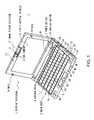
- FIG. 1is a schematic perspective view showing an overall configuration of a notebook personal computer according to a first embodiment of the present invention
- FIG. 2is a schematic diagram showing a configuration of the left side of the main body
- FIG. 3is a schematic diagram showing the configurations of the backside and the bottom of the main body
- FIG. 4is a block diagram showing a circuit configuration of the notebook personal computer
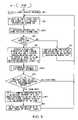
- FIG. 5is a flowchart showing a gesture recognizing processing procedure
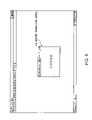
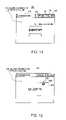
- FIG. 6is a schematic diagram showing a gesture recognition screen displayed overlapping on the active window screen
- FIG. 7is a schematic diagram showing a configuration of the gesture recognition screen
- FIG. 8is a schematic diagram showing a configuration of a target
- FIG. 9is a flowchart showing a processing procedure for obtaining information about a hand position
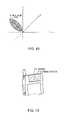
- FIG. 10is a schematic diagram showing a color area displayed in YUV chromatic space
- FIG. 11is a schematic diagram showing the gesture recognition screen under a search state
- FIG. 12is a schematic diagram showing the gesture recognition screen with a pointer and a palm area recognition frame overlapped thereon;
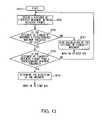
- FIG. 13is a flowchart showing a processing procedure for judging gesture movement
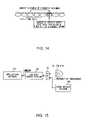
- FIG. 14is a schematic diagram explaining calculation of a distance of fingertip movement
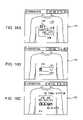
- FIGS. 16A to 16Care schematic diagrams showing visual feedback screens
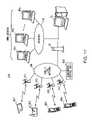
- FIG. 17is a schematic diagram showing an overall configuration of a network system in a second embodiment
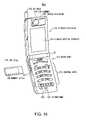
- FIG. 18is a schematic perspective view showing exterior features of a digital portable telephone with a camera
- FIG. 19is a schematic perspective view showing a display division when the camera division is rotated.
- FIG. 20is a block diagram showing a circuit configuration of the digital portable telephone with a camera.
- a reference numeral 1shows, as a whole, a notebook personal computer (hereafter referred to as a notebook PC) as an information processing apparatus to which the present invention is applied, and it is configured by a main unit 2 and a display division 3 attached to the main unit 2 so as to be closed or opened.
- a notebook personal computerhereafter referred to as a notebook PC
- the main unit 2has on its topside a plurality of control keys 4 for inputting various characters, codes and numbers, a stick pointing device (hereafter, simply referred to as a stick) 5 used for moving a mouse cursor, left and right click buttons 5 A and 5 B that are equivalent to the left and right buttons of an ordinary mouse, a center button SC for controlling a scroll bar without putting the mouse cursor on a scroll button, built-in speakers 6 A and 6 B, a push-type power switch 7 , a shutter button 9 for a charge coupled device (CCD) camera 8 provided in the display division 3 , a power lamp PL, a battery lamp BL and a message lamp ML which are light emitting diodes (LEDs), and so on.
- a stick pointing devicehereafter, simply referred to as a stick
- left and right click buttons 5 A and 5 Bthat are equivalent to the left and right buttons of an ordinary mouse
- a center button SCfor controlling a scroll bar without putting the mouse cursor on a scroll
- a liquid crystal display 10being a thin film transistor (TFT) color liquid crystal of 8.9-inch (1,024 ⁇ 480 pixels) is provided, and besides, at the upper-center of its front, an image pickup division 11 equipped with the CCD camera 8 serving as an image pickup means is rotatably provided.
- TFTthin film transistor
- the CCD camera 8can be rotated and positioned within an angle of 180°, facing the front direction to the back direction of the display division 3 , and also focus adjustment in photographing a desired image pickup subject with the CCD camera 8 can be performed easily by rotating an adjustment ring 12 provided at the top of the image pickup division 11 .
- the display division 3also has a microphone 13 provided on the front and on the back of the image pickup division 11 close to its left and it is possible to collect sounds via the microphone 13 in a large extent from the front to the back of the display division 3 .
- the display division 3has nails 14 and 15 provided close to the left and right of the liquid crystal display 10 respectively, and openings 16 and 17 are provided at the predetermined positions of the main unit 2 corresponding to the nails 14 and 15 , so that the nails 14 and 15 are fitted into the corresponding openings 16 and 17 with the front surface of the display division 3 contacted with the top surface of the main unit 2 .
- the main unit 2has on its right side an infrared port 18 based on the Infrared Data Association (IrDA), a headphone terminal 19 , a microphone input terminal 20 , a universal serial bus (USB) terminal 21 , an external power connector 22 , an external display output connector 23 , a jog dial 24 capable of inputting an instruction to execute a predetermined process by rotating and pushing the rotating controller, and a modem terminal 25 for a modular jack.
- IrDAInfrared Data Association
- a headphone terminal 19a microphone input terminal 20 , a universal serial bus (USB) terminal 21 , an external power connector 22 , an external display output connector 23 , a jog dial 24 capable of inputting an instruction to execute a predetermined process by rotating and pushing the rotating controller, and a modem terminal 25 for a modular jack.
- the main unit 2has on its left side an exhaust hole 26 , a personal computer (PC) card slot 27 for a PC card based on the Personal Computer Memory Card International Association (PCMCIA), and an institute of electrical and electronics engineers (IEEE) 1394 terminal 28 for four pins.
- PCpersonal computer
- IEEEinstitute of electrical and electronics engineers
- the main unit 2has on its backside a battery connector 29 , and it has at its bottom a sliding removing lever 31 for removing a battery pack 30 ( FIG. 1 ) and a lock lever 32 for locking the sliding removing lever 31 and also a reset switch 33 for interrupting operation of the main unit 2 and reconstructing its environment on power-up.
- the battery pack 30is detachably connected to the battery connector 29 .
- a central processing unit (CPU) 50 for controlling the whole functions of the main unit 2is connected with a host bus 52 .
- the CPU 50executes processes according to programs and application software loaded into a random access memory (RAM) 53 , at a predetermined operating speed based on a system clock given from a clock generator 60 so as to realize various functions.
- RAMrandom access memory
- the host bus 52is connected to a cache memory 51 in order to cache data to be used by the CPU 50 and to realize high-speed access.
- This host bus 52is connected to a peripheral component interconnect (PCI) bus 55 with a host-PCI bridge 54 , and the PCI bus 55 is connected to a video controller 56 , an IEEE 1349 interface 57 , a video capture processing chip 83 , and a PC card interface 58 .
- PCIperipheral component interconnect
- the host-PCI bridge 54controls sending and receiving of various data between the CPU 50 and the video controller 56 , the video capture processing chip 83 , the IEEE 1349 interface 57 and the PC card interface 58 , and also performs memory control of the RAM 53 connected with a memory bus 59 .
- the host-PCI bridge 54is connected to the video controller 56 with a signal wire being an accelerated graphics port (AGP), and it is thereby possible to transfer image data at high speed between the video controller 56 and the hostPCI bridge 54 .
- AGPaccelerated graphics port
- the video capture processing chip 83is connected with an I 2 C bus 82 (also referred to as system management (SM) bus generally) being a serial bus, and if image data photographed by the CCD camera 8 is supplied through the I 2 C bus 82 , it is stored in a built-in frame memory (not shown) once to generate JPEG image data by performing an image compression process based on the joint photographic experts group (JPEG) standards, and then the JPEG image data is stored in the frame memory again.
- I 2 C bus 82also referred to as system management (SM) bus generally
- SMsystem management
- the video capture processing chip 83transfers the JPEG image data stored in the frame memory to the RAM 53 in response to a request from the CPU 50 by using a bus master function, and then the JPEG image data is transferred to a hard disk drive (HDD) 67 as JPEG image (still picture) data or Motion JPEG (motion picture) data.
- HDDhard disk drive
- the video controller 56outputs image data based on various application software provided at appropriate times and image data photographed by the CCD camera 8 , to the liquid crystal display 10 of the display division 3 so as to display a plurality of window screens.
- the IEEE 1349 interface 57is directly connected to the IEEE 1394 terminal 28 , and can be connected to another computer apparatus and an external device such as a digital video camera with the IEEE 1394 terminal 28 .
- the PC card interface 58is to be connected to a PC card (not shown) which is loaded in a PC card slot 27 when an optional function is to be added, and can be connected to an external device such as a compact disc-read only memory (CD-ROM) drive or a digital versatile disc (DVD) drive with the PC card.
- a PC cardnot shown
- CD-ROMcompact disc-read only memory
- DVDdigital versatile disc
- the PCI bus 55is connected to an industrial standard architecture (ISA) bus 65 with the PCI-ISA bridge 66 , and the PCI-ISA bridge 66 is connected to the HDD 67 and a USB terminal 21 .
- ISAindustrial standard architecture
- the PCI-ISA bridge 66is comprised of an integrated drive electronics (IDE) interface, a configuration register, a real-time clock (RTC) circuit, a USB interface and so on, and it controls the HDD 67 via the IDE interface based on the system clock given from the clock generator 60 .
- IDEintegrated drive electronics
- RTCreal-time clock
- a hard disk of HDD 67stores an operating system (OS) such as Windows 98 (trademark), an electronic mail program, an auto pilot program, a jog dial server program, a jog dial driver, capture software, digital map software and other various application software, which are transferred and loaded into the RAM 53 at appropriate times in a starting process.
- OSoperating system
- the PCI-ISA bridge 66controls via the USB interface (not shown) external devices such as a floppy disk drive, a printer and a USB mouse connected to the USB terminal 21 , and also controls a modem 69 and a sound controller 70 connected with the ISA bus 65 .
- the modem 69is connected to an Internet service provider (hereafter referred to as a provider) using the modem terminal 25 with the public telephone circuit (not shown), and performs dialup IP connection to the Internet via the provider.
- a provideran Internet service provider
- the sound controller 70generates audio data by converting an audio signal collected by the microphone 13 into an analog form, and outputs it to the CPU 50 , and also converts the audio data supplied from the CPU 50 into an analog form to generate an audio signal which is outputted to outside via the built-in speaker 6 .
- the ISA bus 65is connected to an in/out (I/O) controller 73 , and it receives electric power supplied from an external power source via an external power connector 22 and a power supply and charging control circuit 85 to supply power to each circuit when the power switch 7 is turned on.
- I/O controller 73also operates based on the system clock given from the clock generator 60 .
- the power supply and charging control circuit 85controls charging of the battery pack 30 connected to the battery connector 29 ( FIG. 3 ) under the control of the I/O controller 73 .
- the I/O controller 73is composed of a microcontroller, an I/O interface, a CPU, a ROM, a RAM and so on, and controls input/output of data between the OS and application software and various peripherals such as the liquid crystal display 10 and the HDD 67 , based on a basic input/output system (BIOS) stored in a flash memory 79 .
- BIOSbasic input/output system
- the I/O controller 73is connected to the infrared port 18 and is capable of performing infrared communication with another computer apparatus for instance.
- the I/O controller 73is connected to a reversing switch 77 which is turned on when the image pickup division 11 is rotated toward the backside of the liquid crystal display 10 by 180 degrees. Then, the I/O controller 73 informs the CPU 50 of this situation, via the PCI-ISA bridge 66 and the host-PCI bridge 54 .
- the I/O controller 73is connected to a full/half push switch 78 , and the full/half push switch 78 is in a half push state when the shutter button 9 provided on the topside of the main unit 2 is half pushed. Then, the I/O controller 73 informs the CPU 50 of this situation. On the other hand, the switch 78 is in a full push state when the button 9 is fully pushed, and then the I/O controller 73 informs the CPU 50 of this situation.
- the CPU 50enters a still picture mode when the shutter button 9 is half pushed by a user in a state where capture software is started up from the hard disk of the HDD 67 on the RAM 53 , and it controls the CCD camera 8 to freeze the still picture, and then when the shutter button 9 is fully pushed, it captures the frozen still picture data and sends it to the video controller 56 .
- the CPU 50enters a motion picture mode when the shutter button 9 is fully pushed by the user without starting up the capture software, and it captures a motion picture for 60 seconds at maximum and sends it to the video controller 56 .
- the ROM of the I/O controller 73stores a wakeup program, a key input monitoring program, an LED control program, a jog dial state monitoring program and other various control programs.
- the jog dial state monitoring programis a program used accompanying with the jog dial server program stored in the hard disk of the HDD 67 and is intended to monitor whether or not the jog dial 24 is rotated or pushed.
- the wakeup programis a program which executes a given process when a current time from an RTC circuit in the PCI-ISA bridge 66 coincides with a preset starting time, under the control of the CPU 50 .
- the key input monitoring programis a program for monitoring input from the control keys 4 and other various key switches.
- the LED control programis a program for controlling lighting of various lamps such as the power lamp PL, the battery lamp BL and the message lamp ML ( FIG. 1 ).
- the RAM of the I/O controller 73has an I/O register for the jog dial state monitoring program, a set time register for the wakeup program, a key input monitoring register for the key input monitoring program, a LED control register for the LED control program and registers for other various programs.
- the set time registerstores time information on a starting time preset by the user in order to use in the wakeup program. Therefore, the I/O controller 73 determines whether or not the current time from the RTC circuit coincides with the preset starting time based on the wakeup program, and when they coincide with each other, the register informs the CPU 50 of this situation.
- the CPU 50starts up predetermined application software at the preset starting time, and executes a predetermined process according to the application software.
- the key input monitoring registerstores control key flags corresponding to input operations of the control keys 4 , the stick 5 , the left click button 5 A, the right click button 5 B, the center button 5 C and so on.
- the I/O controller 73determines, according to the key input monitoring program, whether or not the stick 5 is pointed or the left click button 5 A, the right click button SB or the center button 5 C was clicked, based on the control key flags, and when the pointing or click operation was performed, the I/O controller 73 informs the CPU 50 of this situation.
- This pointing operationhere is an operation of manipulating the stick 5 up and down and right and left by a finger to move the mouse cursor to a desired position on the screen
- the click operationis an operation of swiftly pushing and releasing the left click button 5 A or the right click button 5 B by a finger.
- the CPU 50executes a predetermined process depending on the movement of the cursor by the pointing operation or the click operation.
- the LED control registerstores lighting flags for indicating a lighting state of various lamps such as the power lamp PL, the battery lamp BL and the message lamp ML.
- the I/O controller 73stores the lighting flags and controls the LEDs 81 based on the lighting flags and for example, lights the message lamp ML when the CPU 50 starts up the electronic mail program from the hard disk of the HDD 67 in response to the pushing operation of the jog dial 24 and receives electronic mail according to the electronic mail program.
- the I/O register for the jog dial state monitoring programstores a rotation flag and a push flag corresponding to rotating and pushing operations of the jog dial 24 .
- the I/O controller 73sets the rotation flag and the push flag stored in the I/O register and informs the CPU 50 of this situation.
- the CPU 50starts up application software corresponding to the menu item determined by rotating and pushing the jog dial 24 to execute the predetermined process, according to the jog dial server program read from the HDD 67 and started up on the RAM 53 .
- the I/O controller 73is always in operation under the control of the power supply and charging control circuit 85 even if the power switch 7 is off and the OS is not active, so that application software or a script file desired by the user can be started up by pushing the jog dial 24 which is in a power-saving state or in a power-off state, without providing a special key.
- the I/O controller 73is also connected with the I 2 C bus 82 , and adjusts brightness and contrast in the CCD camera 8 by supplying various setting parameters for the CCD camera 8 set by the control keys 4 or the jog dial 24 through the I 2 C bus 82 .
- the notebook PC 1starts up application software called a cyber gesture program for recognizing the movement of the user's hand (gesture) photographed by the CCD camera 8 , from the hard disk of the HDD 67 , and recognizes the movement of the user's hand photographed by the CCD camera 8 in accordance with the cyber gesture program and executes a predetermined process depending on the recognition result on the active window screen based on the application software.
- a cyber gesture programfor recognizing the movement of the user's hand (gesture) photographed by the CCD camera 8 , from the hard disk of the HDD 67 , and recognizes the movement of the user's hand photographed by the CCD camera 8 in accordance with the cyber gesture program and executes a predetermined process depending on the recognition result on the active window screen based on the application software.
- the notebook PC 1performs an image forwarding operation such as forwarding and playing back the still pictures displayed on the liquid crystal display 10 one by one in response to the rotating operation of the jog dial 24 by the user.
- the present inventionallows the above-mentioned image forwarding operation to be executed under the control of the CPU 50 without contacting the jog dial 24 , by having the CPU 50 recognize the movement of the user's hand photographed by the CCD camera 8 .
- the notebook PC 1forwards the still picture by only one on the liquid crystal display 10 when the jog dial 24 is rotated further toward the depth from the user by more than a predetermined angle and on the contrary, plays back the still pictures by only one on the liquid crystal display 10 when the jog dial 24 is rotated toward the user by more than a predetermined angle.
- the CPU 50 of the notebook PC 1enters a routine RT 1 at starting step in FIG. 5 and moves to the next step SP 1 , and starts up the cyber gesture program from the hard disk of the HDD 67 by the user's operation, and creates a gesture recognition screen 100 as shown in FIG. 6 according to the cyber gesture program, and then moves on to the next step SP 2 after overlapping and displaying it on the still picture of the active window screen according to the image editing program.
- the gesture recognition screen 100has a screen size of 164 ⁇ 136 pixels, in which a title character division 101 of “CYBERGESTURE” (trademark of Sony Corp.) indicating the cyber gesture program, an option button 102 for optionally selecting a function, a help button 103 , a minimizing button 104 and a closing button 105 are provided at the top.
- CYBERGESTUREtrademark of Sony Corp.
- This gesture recognition screen 100is formed in a screen size much smaller than that of the liquid crystal display 10 (1,024 ⁇ 480 pixels) so that the area concealing the still picture displayed behind the gesture recognition screen 100 on the active window screen becomes as small as possible.
- the CPU 50 of the notebook PC 1displays the put button in a convex state, and displays it in a concave state after selection by clicking, which allows the selecting and determining operation of the buttons to be easily and visually recognized.
- the CPU 50 of the notebook PC 1displays the gesture recognition display area 106 on the gesture recognition screen 100 on a 256-level gray scale, and also displays a target division 107 comprised of five square targets 107 A to 107 E arranged in a horizontal line approximately at the center of the gesture recognition display area 106 .
- the CPU 50is capable of easily making him/her visualize that the notebook PC 1 can recognize right and left movement of the user's hand, by using the target division 107 displayed in the gesture recognition display area 106 on the gesture recognition screen 100 .
- each target 107 A to 107 Ehas a size of 8 ⁇ 8 pixels, with a frame 107 AF to 107 EF of 1-pixel width.
- the frames 107 AF to 107 EFare colored in red so as to make the targets 107 A to 107 E more visually remarkable against the gray scale display behind.
- the gesture recognition display area 106 on the gesture recognition screen 100has a black line (not shown) for every two horizontal lines of scan lines, so that the user can easily recognize this area as the gesture recognition screen 100 , which is different from a screen showing an ordinary image.
- the CPU 50photographs the user existing in front of the display division 3 with the CCD camera 8 , and displays the resultant input image in the gesture recognition display area 106 on the gesture recognition screen 100 , and then moves on to the next subroutine SRT 2 .
- step SP 21 of the subroutine SRT 2the CPU 50 divides the input image displayed in the gesture recognition display area 106 on the gesture recognition screen 100 into a plurality of color areas based on the color components, and then moves on to the next step SP 22 .
- the color areais expressed by predetermined YUV chromatic space, as shown in FIG. 10 , and for example, a predetermined area of quadrants +Y, ⁇ U and ⁇ V indicated by oblique lines in the YUV chromatic space is regarded as a color area R (hereafter referred to as a skin-color area R) equivalent to color of a user's palm.
- a predetermined area of quadrants +Y, ⁇ U and ⁇ V indicated by oblique lines in the YUV chromatic spaceis regarded as a color area R (hereafter referred to as a skin-color area R) equivalent to color of a user's palm.
- the CPU 50compares a predetermined skin-color table corresponding to the skin-color area R in the YUV (brightness, color difference) chromatic space with the corresponding color areas of the input image, and then moves on to the next step SP 23 .
- the color areas of the input imageare roughly divided into the skin-color area R such as the user's face area and palm area and a non-skin-color area such as clothing.
- the CPU 50determines whether or not the skin color area R recognized as a skin-color exists in the input image, by comparing the skin-color table with the color areas of the input image.
- step SP 29the CPU 50 moves on to an input image of the next frame since the skin-color area R does not exist in the input image and the movement of the user's hand cannot be recognized, and returns to the above-mentioned step SP 21 .
- step SP 23if a positive result is obtained at step SP 23 , it represents that the skin-color area R matching the skin-color table exists, and then the CPU 50 moves on to the next step SP 24 .
- the CPU 50detects movement of the skin-color area R in the input image of the current frame based on change in coordinate values between the current frame and the previous frame, and then moves on to the next step SP 25 .
- step SP 25the CPU 50 determines whether or not the moving skin-color area R exists in the input image. If a negative result is obtained here, it represents that the moving skin-color area R does not exist in the input image, and then the CPU 50 moves on to the next step SP 29 , proceeds to the input image of the next frame and returns to the above-mentioned step SP 21 .
- step SP 25it represents that the moving skin-color area R exists in the input image, and then the CPU 50 moves on to the next step SP 26 .
- the CPU 50detects the largest skin-color area R out of the moving skin-color areas R, and regards it as a palm area and then moves on to the next step SP 27 .
- step SP 27the CPU 50 acquires the coordinate values of the entire palm area determined at step SP 26 , and then moves on to the next step SP 28 .
- the CPU 50calculates the center of gravity of the palm area based on the coordinate values of the entire palm area obtained at step SP 27 , detects the coordinates of the uppermost of the palm area in a vertical direction with respective to the center of gravity, as the upper-part-of-center-of-gravity data equivalent to a fingertip of the hand, finishes a process of obtaining information about the hand position in the subroutine SRT 2 , and then returns to the step SP 3 of the routine RT 1 ( FIG. 5 ).
- the CPU 50determines whether or not the user's hand exists in the gesture recognition display area 106 on the gesture recognition screen 100 based on the upper-part-of-center-of-gravity data obtained in the subroutine SRT 2 .
- step SP 4the CPU 50 displays an animation indicating that it is searching for the user's hand because the hand is not displayed in the gesture recognition display area 106 on the gesture recognition screen 100 , and then returns to the above-mentioned step SP 2 .
- the CPU 50can display an animation by using the target division 107 to make the user easily recognize that it is searching for the skin-color area R since the user's skin-color portion is hardly displayed in the gesture recognition display area 106 on the gesture recognition screen 100 and the user's hand has not be recognized yet.
- the CPU 50produces a graduation effect by alternately coloring the areas (shown by broken lines) inside the frames 107 AF to 107 EF of the targets 107 A to 107 E in red in sequence in the left and right directions indicated by the arrows A and B, so that the user can easily visualize that the cyber gesture program has started up and the user's hand is being searched.
- step SP 3it represents that the upper-part-of-center-of-gravity data has been obtained in the subroutine SRT 2 , that is, the user's hand exists in the gesture recognition display area 106 on the gesture recognition screen 100 , and then the CPU 50 moves on to the next step SP 5 .
- the CPU 50displays a pointer 108 of a predetermined shape at the position corresponding to the obtained upper-part-of-center-of-gravity data, and also overlaps and displays a palm area recognition frame 109 including the pointer 108 and covering the user's entire palm area, on the input image in the gesture recognition display area 106 , and moves on to the next subroutine SRT 3 .
- the CPU 50colors the palm area recognition frame 109 of 1-pixel width in white, and colors a pointer frame 108 F of 1-pixel width of the pointer 108 which is the same in shape and size as the 107 A to 107 E of the target division 107 , in white and also colors its inside in red.
- the CPU 50can make the user clearly distinguish between the targets 107 A to 107 E and the pointer 108 by coloring the frames 107 AF to 107 EF of the targets 107 A to 107 E in red and coloring the pointer frame 108 F of the pointer 108 in white.
- the CPU 50displays the palm area recognition frame 109 and the pointer 108 while moving them together with the movement of the user's hand.
- the CPU 50obtains a distance of fingertip movement based on the differences in the coordinate values of the upper-part-of-center-of-gravity data between adjacent frames, that is, the current frame stored in a ring buffer form in the RAM 53 and the previous frame adjacent to the current frame, and then moves on to the next step SP 32 .
- the CPU 50determines whether or not the distance of fingertip movement calculated at step SP 31 is a predetermined maximum threshold or less. If a negative result is obtained here, it represents that the distance of fingertip movement is inadequate as data for recognizing movement of the hand because it is extremely distant between the position showing the fingertip in the previous frame and the position showing the fingertip in the current frame, and then the CPU 50 moves on to the next step SP 33 .
- step SP 33the CPU 50 stops the calculation of the distance of fingertip movement between adjacent frames after step SP 34 and thereafter since the distance of fingertip movement is inadequate to use as data, and returns to step SP 2 of the routine RT 1 ( FIG. 5 ) to repeat the above-mentioned process.
- step SP 32it represents that the distance of fingertip movement is adequate as data for recognizing movement of the hand because it is not extremely distant between the position showing the fingertip in the previous frame and the position showing the fingertip in the current frame, and then the CPU 50 moves on to the next step SP 34 .
- the CPU 50obtains as a longest distance of fingertip movement, the longest length in coordinate values between the upper-part-of-center-of-gravity data indicating the fingertip in the current frame and the upper-part-of-center-of-gravity data indicating the fingertip in an arbitrary past frame selected out of several past frames for a predetermined time, which are sequentially stored in the ring buffer form, and determines whether or not the longest distance of fingertip movement is larger than a predetermined minimum threshold.
- step SP 34it represents that the longest distance of the fingertip movement is larger than the predetermined minimum threshold, that is, the fingertips certainly moved to the right or left, and then the CPU 50 moves on to the next step SP 35 .
- the CPU 50detects the direction (rightward or leftward) of the fingertip movement based on a movement vector between the upper-part-of-center-of-gravity data indicating the fingertip in the current frame and the upper-part-of-center-of-gravity data indicating the fingertip in the past frame used when calculating the longest distance of the fingertip movement, and then returns to step SP 6 of the routine RT 1 ( FIG. 5 ).
- the CPU 50determines whether or not the speed of movement of the detected entire palm area is exceeding a predetermined speed based on change per unit time in the coordinate values between pixel data of the current frame and pixel data of the previous frame of the detected entire palm area.
- step SP 2determines that the speed of movement of the detected entire palm area is not exceeding the predetermined speed, that is, it may be the face area rather than the palm area in reality since it is moving rather slowly, and returns to step SP 2 again to repeat the above-mentioned process.
- step SP 6determines that the speed of movement of the detected entire palm area is exceeding the predetermined speed, that is, it is much more likely to be the palm area since it is moving rather fast, and moves on to the next step SP 7 .
- the CPU 50can determine the palm area and the face area much more correctly in the case where there are two or more candidates that seem to be the palm area.
- the CPU 50supplies to a jog dial server program 182 the recognition result of gesture movement of the palm area recognized by a cyber gesture program 180 , via an application programming interface (API) for a jog dial 181 , and also performs visual feedback display of a trail indicating the movement of the hand (gesture) moved by the user and the recognizing process indicating how the notebook PC 1 recognized the gesture, on the gesture recognition screen 100 , and moves on to the next step SP 8 .
- APIapplication programming interface
- the APIis a program interface for the application software by the OS, where the application software basically executes all processes via the API.
- the API of the currently general OStakes the form of a function, and an appropriate argument (parameter) is specified by the application software to invoke the API's functions.
- the CPU 50takes in an operation of the jog dial 24 and the recognition result by the cyber gesture program 180 in the same input form, and supplies them to the jog dial server program 182 via the common API for a jog dial 181 , so as to allow the software process to be simplified.
- the CPU 50generates a visual feedback screen 191 as shown in FIG. 16A , and displays the pointer 108 with overlapped on the targets 107 A to 107 E obliquely placed in advance in a trail display frame 120 while moving it in a direction of an arrow C according to the trail indicating the movement of the hand (gesture) actually moved by the user so that the user can visually check the actual recognizing process of the movement of the user's hand on the visual feedback screen 191 .
- the CPU 50creates a visual feedback screen 192 as shown in FIG. 16B , and displays it by replacing it with the visual feedback screen 191 .
- This visual feedback screen 192deforms the trail display frame 120 in the visual feedback screen 191 to form a direction display frame 121 where the targets 107 A to 107 E are arranged in a horizontal line, and also displays the target 107 E at the right end in the direction display frame 121 and the pointer 108 at the left end so as to sketchily indicate that the user's hand was moved in a direction of an arrow D (right to left) using the direction display frame 121 .
- the CPU 50generates a visual feedback screen 193 as shown in FIG. 16C , and displays it by replacing it with the visual feedback screen 192 .
- This visual feedback screen 193erases the direction display frame 121 on the visual feedback screen 192 and sequentially moves and displays the pointer 108 on the targets 107 A to 107 E, which are arranged in a horizontal line, in the direction shown by the arrow D, so that the user to easily recognize that the notebook PC 1 has recognized the user's hand moved from the right side to the left side (direction shown by the arrow D).
- the CPU 50moves the pointer 108 at the same speed as the movement of the recognized user's hand, so that the user can know the speed of movement of the hand that the notebook PC 1 can handle with.
- the CPU 50recognizes the movement of the user's hand and then supplies a predetermined command corresponding the movement of the hand, from the jog dial server program 182 ( FIG. 15 ) to application software 183 , to execute a predetermined process.
- the CPU 50is executing a predetermined process according to the recognition result, so that it does not execute a gesture recognizing process for input images of several frames immediately after recognizing the movement of the hand, and returns to step SP 2 again to repeat the above-mentioned process.
- the CPU 50can execute a process according to the movement of the user's hand on the active window without any malfunction and then execute a process according to the next movement of the user's hand.
- the CPU 50 of the notebook PC 1recognizes the movement of the user's hand by the cyber gesture program 180 , and then supplies a predetermined command corresponding to the recognition result to the application software 183 by the jog dial server program 182 , so as to execute the predetermined image forwarding operation according to the command on the active window screen based on the application software 183 .
- the CPU 50 of the notebook PC 1forwards still pictures by only one on the active window screen displayed as the background on the gesture recognition screen 100 in the case of recognizing that the gesture of the hand is a movement from the left side to the right side (opposite direction of the arrow D) and on the other hand, plays back the still pictures by only one on the active window screen displayed as the background on the gesture recognition screen 100 in the case of recognizing that the gesture of the hand is a movement from the right side to the left side (direction shown by the arrow D).
- the usercan forward or play back the still pictures on the active window screen displayed as the background on the gesture recognition screen 100 just by holding his/her hand over the CCD camera 8 of the image pickup division 11 and moving either to the right or the left, even he/she does not directly manipulates the jog dial 24 .
- the CPU 50 of the notebook PC 1displays a still picture on which the gesture recognition screen 100 is overlapped, on the active window screen by starting the cyber gesture program 180 in a state where the image editing program has started and the active window screen has been displayed on the liquid crystal display 10 .
- the CPU 50 of the notebook PC 1photographs the user existing in front of the display division 3 , with the CCD camera 8 of the image pickup division 11 , and displays the resultant input image in the gesture recognition display area 106 on the gesture recognition screen 100 .
- the CPU 50 of the notebook PC 1first divides the input image in the gesture recognition display area 106 into a plurality of color areas to search for the skin-color area R therein. If the CPU 50 can not detect the skin-color area R, it produces a graduation effect by alternately coloring the areas inside the frames 107 AF to 107 EF of the targets 107 A to 107 E in the target division 107 ( FIG. 11 ) in red in sequence in the left and right directions indicated by arrows A and B, so as to certainly notify the user that it is searching for the user's hand.
- the CPU 50 of the notebook PC 1can make the user recognize that it has not recognized the movement of the hand yet, it can immediately prompt the user to perform an input operation such as holding his/her hand over the CCD camera 8 and moving either to the right or the left.
- the CPU 50 of the notebook PC 1can recognize the movement of the user's hand in a short time, generate a command according to the recognized movement of the hand, and forward or play back the still pictures displayed on the active window screen in response to the command.
- the notebook PC 1in the case where the notebook PC 1 does not recognize the movement of the user's hand photographed by the CCD camera 8 , it can certainly notify the user that it is searching for the user's hand and is in a recognizable standby state, by alternately coloring the areas inside the frames 107 AF to 107 EF of the targets 107 A to 107 E in red in sequence in the left and right directions indicated by arrows A and B.
- the CPU 50 of the notebook PC 1displays the still picture on which the gesture recognition screen 100 is overlapped, on the active window screen by starting the cyber gesture program 180 in a state where the image editing program has started and the active window screen has been displayed on the liquid crystal display 10 .
- the CPU 50 of the notebook PC 1displays the target division 107 comprised of the five square targets 107 A to 107 E sequentially arranged in a horizontal line approximately at the center of the gesture recognition display area 106 on the gesture recognition screen 100 .
- the CPU 50 of the notebook PC 1makes the user easily visualize that the notebook PC 1 can recognize the right-and-left movement out of the movement directions of the user's hand, so that the CPU 50 can certainly notify the user of the recognizable movement direction in advance.
- the CPU 50 of the notebook PC 1can color the frames 107 AF to 107 EF of the targets 107 A to 107 E in red so as to make the user visually distinguish the targets 107 A to 107 E from the gray scale display as the background.
- the notebook PC 1can certainly notify the user in advance that the notebook PC 1 can recognize the right-and-left movement out of the movement directions of the user's hand by displaying the target division 107 comprised of the five square targets 107 A to 107 E sequentially arranged in a horizontal line approximately at the center of the gesture recognition display area 106 on the gesture recognition screen 100 , by the cyber gesture program 180 .
- the CPU 50 of the notebook PC 1displays the still picture on which the gesture recognition screen 100 is overlapped, on the active window screen by starting the cyber gesture program 180 in a state wherein the image editing program has started and the active window screen has been displayed on the liquid crystal display 10 .
- the CPU 50 of the notebook PC 1photographs the user existing in front of the display division 3 with the CCD camera 8 of the image pickup division 11 , and displays the resultant input image in the gesture recognition display area 106 on the gesture recognition screen 100 and also recognizes the movement of the user's hand to generate a command according to the movement of the recognized hand.
- the CPU 50 of the notebook PC 1obliquely places the targets 107 A to 107 E in a trail display frame 120 in advance as shown in FIG. 16A corresponding to the trail showing the movement of the hand actually made by the user (gesture), in order to allow the user to visually check the trail of the recognizing process of the movement of the user's hand by alternately moving and displaying the pointer 108 on the targets 107 A to 107 E in sequence in the direction shown by the arrow C.
- the CPU 50deforms the trail display frame 120 as shown in FIG. 16B to form a direction display frame 121 in a state where the targets 107 A to 107 E are arranged in a horizontal line, and also displays the target 107 E at the right end in the direction display frame 121 and the pointer 108 at the left end so as to sketchily indicate that the user's hand was moved in the direction shown by an arrow D (leftward).
- the CPU 50erases the direction display frame 121 and moves and displays the pointer 108 on the targets 107 A to 107 E in the direction shown by the arrow D at the speed of movement of the recognized user's hand, so as to certainly notify the user that it recognized the movement of the user's hand from the right side to the left side (direction shown by the arrow D).
- the notebook PC 1can display the trail of the recognizing process and the recognition 9 result of the movement of the user's hand photographed by the CCD camera 8 as an animation using the targets 107 A to 107 E and the pointer 108 , so as to make the user learn on how and in what recognizing process the movement of the user's hand was recognized, by feedback.
- the usermakes the notebook PC 1 recognize the movement of his/her hand, taking the direction and speed of the movement of the hand into consideration, so that an input operation of a command for forwarding images, for instance, can be performed in a short time.
- a reference numeral 200shows, as a whole, a network system including a portable telephone MS 3 to which the present invention is applied, in which base stations CS 1 to CS 4 which are fixed radio stations are set up in areas obtained by dividing a communication service area into a desired size.
- These base stations CS 1 to CS 4are connected by radio to personal digital assistants MS 1 and MS 2 and digital portable telephones with a camera MS 3 and MS 4 that are mobile radio stations by the code division multiple access method called a wideband-code division multiple access (W-CDMA) for instance, and can perform high-speed data communication of mass data at a maximum of data transfer rate of 2 Mbps by using 2 GHz frequency band.
- W-CDMAwideband-code division multiple access
- the personal digital assistants MS 1 and MS 2 and the digital portable telephones with a camera MS 3 and MS 4are capable of high-speed data communication of mass data by the W-CDMA method, so that they can realize various data communications such as sending and receiving electronic mail, viewing simple home pages, sending and receiving images, in addition to the audio communication.
- the base stations CS 1 to CS 4are connected to a public line network INW with a wire circuit, and the public line network INW is connected with the Internet ITN and a number of unillustrated subscriber's wire terminals, computer networks, local area networks and so on.
- the public line network INWis also connected to an access server AS of an Internet service provider, and the access server AS is connected to a contents server TS owned by the Internet service provider.
- This contents server TSprovides contents such as a simple home page as a file in a compact hyper text markup language (HTML) format in response to a request from the subscriber's wire terminals, the personal digital assistants MS 1 and MS 2 and the digital portable telephones with a camera MS 3 and MS 4 .
- HTMLhyper text markup language
- the Internet ITNis connected to a number of WWW servers WS 1 to WSn, so that the WWW servers WS 1 to WSn can be accessed from the subscriber's wire terminals, the personal digital assistants MS 1 and MS 2 and the digital portable telephones with a camera MS 3 and MS 4 in the TCP/IP protocol.
- the communication between the devices MS 1 to MS 4 and the base stations CS 1 to CS 4is performed in a 2 Mbps simple transport protocol, and the communication between the base stations CS 1 to CS 4 and the WWW servers WS 1 to WSn via the Internet ITN is performed in the TCP/IP protocol.
- a management control unit MCUis connected to the subscriber's wire terminals, the personal digital assistants MS 1 and MS 2 and the digital portable telephones with a camera MS 3 and MS 4 with he public line network INW so as to perform identification and accounting processes for the subscriber's wire terminals, the personal digital assistants MS 1 and MS 2 and the digital portable telephones with a camera MS 3 and MS 4 .
- the digital portable telephone with a camera MS 3is divided into a display division 212 and a main body 213 bordered with a hinge division 211 at the center, and is formed to be folded down the hinge division 211 .
- the display division 212has an antenna 214 for transmission and reception mounted at the upper-left so as to be drowned or contained, so that radio waves can be sent and received to and from the base station CS 3 via the antenna 214 .
- the display division 212also has a camera division 215 mounted at the upper-center which is rotatable within an angular range of approximately 180°, so that a desired subject to be photographed can be photographed by the CCD camera 216 of the camera division 215 .
- a speaker 217 of the display division 212 provided at the center of the backside as shown in FIG. 19is positioned in front so as to switch to an ordinary audio communication state.
- the display division 212has a liquid crystal display 218 provided in front, which can display a radio wave receiving state, a remaining battery level, contact names, telephone numbers, an outgoing history and so on registered as a telephone book, and besides, contents of electronic mail, a simple home page, an image photographed by the CCD camera 216 of the camera division 215 .
- control keys 219including namely numeric keys of “0” to “9,” a call key, a redial key, a clearing and power key, a clear key, an electronic mail key, on its surface, so that various instructions can be inputted by using the control keys 219 .
- the main body 213also has a memo button 220 and a microphone 221 under the control keys 219 , so that voice of the other party can be recorded with the memo button 220 and the user's voice during a call is collected with the microphone 221 .
- the main body 213has a rotatable jog dial 222 above the control keys 219 , stuck out a bit from the main body 213 , to perform various operations including scroll operations of a telephone book list and electronic mail displayed on the liquid crystal display 218 , a page turning operation of the simple home page and an image forwarding operation by the rotating operation of the jog dial 222 .
- the main body 213if a desired telephone number is selected out of a plurality of telephone numbers on the telephone book list displayed on the liquid crystal display 218 by the rotating operation of the jog dial 222 by the user and the jog dial 222 is pushed into the main body 213 , it determines the selected telephone number and automatically makes a call on the telephone number.
- the main body 213has a battery pack placed on its backside (not shown), and if the clearing and power key is put in an ON state, power is supplied from the battery pack to each circuit division and it starts up in an operable state.
- the main body 213has a memory stick slot 224 for inserting a detachable Memory Stick (trademark of Sony Corp.) 223 therein at the upper part of the left side so that, if the memo button 220 is pressed, it can record voice of a communication party on the phone as well as the electronic mails, the simple home pages and the images photographed by the CCD camera 216 on the Memory Stick 223 by the user's operation.
- a detachable Memory Sticktrademark of Sony Corp.
- the Memory Stick 223is a kind of a flash memory card developed by Sony Corp., the applicant hereof.
- This Memory Stick 223is a small and slim plastic case of 21.5 mm high ⁇ 50 mm wide ⁇ 2.8 mm thick containing a flash memory element that is a kind of electrically erasable and programmable read only memory (EEPROM), namely a nonvolatile memory capable of electrically rewriting and erasing, and it allows various data such as images, audio and music to be written and read via a 10-pin terminal.
- EEPROMelectrically erasable and programmable read only memory
- the Memory Stick 223adopts a unique serial protocol capable of securing compatibility with a used apparatus even in the case of a change of the built-in flash memory in specification such as enlarged capacity, and thus implements high performance of maximum writing speed of 1.5 MB/S and maximum reading speed of 2.45 MB/S and also secures high reliability by providing an erroneous erasure prevention switch.
- the digital portable telephone with a camera MS 3can insert such a Memory Stick 223 therein, so that it can share data with other electronic apparatuses via the Memory Stick 223 .
- the digital portable telephone with a camera MS 3has the main control division 250 for centrally controlling the display division 212 and the main body 213 connected to a power circuit division 251 , an operation input control division 252 , an image encoder 253 , a camera interface division 254 , a liquid crystal display (LCD) control division 255 , an image decoder 256 , a demultiplexing division 257 , a recording and reproducing division 262 , a modulator and demodulator circuit division 258 and an audio CODEC 259 with a main bus 260 , and also to the image encoder 253 , the image decoder 256 , the demultiplexing division 257 , the modulator and demodulator circuit division 258 and the audio CODEC 259 with a synchronous bus 261 .
- a power circuit division 251an operation input control division 252 , an image encoder 253 , a camera interface division 254 , a liquid crystal display (LCD) control division 255 , an image
- the power circuit division 251starts up the digital portable telephone with a camera MS 3 in an operable state by providing power from the battery pack to each division.
- the digital portable telephone with a camera MS 3converts an audio signal collected with the microphone 221 in an audio communication mode, into digital audio data through the audio CODEC 259 and performs a spread spectrum process on it at the modulator and demodulator circuit division 258 , and performs digital-to-analog conversion and frequency conversion processes at the sending and receiving circuit division 263 , and then sends it via the antenna 214 .
- the digital portable telephone with a camera MS 3amplifies a received signal received by the antenna 214 in the audio communication mode and performs frequency conversion and analog-to-digital conversion processes, performs a de-spread spectrum process at the modulator and demodulator circuit division 258 and converts it into an analog audio signal by the audio CODEC 259 , and then outputs it via the speaker 217 .
- the digital portable telephone with a camera MS 3sends text data of the electronic mail inputted by operating the control keys 219 and the jog dial 222 to the main control division 250 via the operation input control division 252 .
- the main control division 250performs the spread spectrum process on the text data at the modulator and demodulator circuit division 258 and performs digital-to-analog conversion and frequency conversion processes on it at the sending and receiving circuit division 263 , and then sends it to the base station CS 3 ( FIG. 17 ) via the antenna 214 .
- the digital portable telephone with a camera MS 3performs a de-spread spectrum process on the received signal, received from the base station CS 3 via the antenna 214 , at the modulator and demodulator circuit division 258 to restore the original text data, and then displays it as the electronic mail on the liquid crystal display 218 via the LCD control division 255 .
- the digital portable telephone with a camera MS 3supplies the image data photographed by the CCD camera 216 to the image encoder 253 via the camera interface division 254 .
- the digital portable telephone with a camera MS 3in the case of not sending the image data, it is also possible for the digital portable telephone with a camera MS 3 to directly display the image data photographed by the CCD camera 216 on the liquid crystal display 218 via the camera interface division 254 and the LCD control division 255 .
- the image encoder 253converts the image data supplied from the CCD camera 216 into coded image data by compression-coding it by a predetermined encoding method such as the moving picture experts group (MPEG) 2 or MPEG4, and sends the resultant to the demultiplexing division 257 .
- MPEGmoving picture experts group
- the digital portable telephone with a camera MS 3simultaneously sends the audio collected with the microphone 221 during photographing by the CCD camera 216 as digital audio data to the demultiplexing division 257 via the audio CODEC 259 .
- the demultiplexing division 257multiplexes the coded image data supplied from the image encoder 253 and the audio data supplied from the audio CODEC 259 by a predetermined method, and performs the spread spectrum process on the resultant multiplexed data at the modulator and demodulator circuit division 258 and performs digital-to-analog conversion and frequency conversion processes on it at the sending and receiving circuit division 263 , and then sends the resultant via the antenna 214 .
- the digital portable telephone with a camera MS 3performs the de-spread spectrum process on the received signal received from the base station CS 3 via the antenna 214 at the modulator and demodulator circuit division 258 and sends the resultant multiplexed data to the demultiplexing division 257 .
- the demultiplexing division 257demultiplexes the multiplexed data to divide it into coded image data and audio data, and supplies the coded image data to the image decoder 256 and also supplies the audio data to the audio CODEC 259 , through the synchronous bus 261 .
- the image decoder 256generates reproduction image data by decoding the coded image data by the decoding method corresponding to the predetermined encoding method such as MPEG2 or MPEG4, and displays it as, for instance, an image linked to the simple home page on the liquid crystal display 218 via the LCD control division 255 .
- the predetermined encoding methodsuch as MPEG2 or MPEG4
- the audio CODEC 259converts the audio data into analog audio data, and then outputs it as, for instance, sounds linked to the simple home page via the speaker 217 .
- the digital portable telephone with a camera MS 3can record the received image data of the simple home page on the Memory Stick 223 via the recording and reproducing division 262 by the user's operation.
- the digital portable telephone with a camera MS 3has the cyber gesture program 180 ( FIG. 15 ) and the jog dial server program 182 which are the same as those in the first embodiment, in the ROM of the main control division 250 , and it can overlap and display the gesture recognition screen 100 ( FIG. 6 ) on the active window screen by the cyber gesture program 180 and also display an image of the user photographed by the CCD camera 216 in the gesture recognition display area 106 on the gesture recognition screen 100 while displaying the active window screen based on the predetermined application software 183 on the liquid crystal display 218 .
- the digital portable telephone with a camera MS 3detects the skin-color area R in the user's image displayed in the gesture recognition display area 106 on the gesture recognition screen 100 under the control of the main control division 250 , and recognizes the moving skin-color area R therein as the palm area, and then it supplies a predetermined command corresponding to the gesture movement of the palm area to the application software 183 by the jog dial server program 182 .
- the digital portable telephone with a camera MS 3can forward or play back still pictures on the active window screen displayed as the background on the gesture recognition screen 100 by the application software 183 under the control of the main control division 250 , in response to the command.
- the main control division 250starts the cyber gesture program 180 , and the digital portable telephone with a camera MS 3 displays the target division 107 comprised of the five square targets 107 A to 107 E arranged in a horizontal line approximately at the center of the gesture recognition display area 106 on the gesture recognition screen 100 .
- the digital portable telephone with a camera MS 3cannot recognize the right and left movement of the user's hand, it produces a graduation effect by alternately coloring the areas inside the frames 107 AF to 107 EF of the targets 107 A to 107 E in red in sequence in the left and right directions indicated by the arrows A and B so as to certainly notify the user that it is searching for the user's hand.
- the digital portable telephone with a camera MS 3can prompt the user to perform an input operation for recognizing the movement of his/her hand, so that it can recognize the movement of the user's hand in a short time, and can generate a command according to the recognized movement of the hand, and then forward or play back the still pictures displayed on the active window screen in response to the command.
- the digital portable telephone with a camera MS 3does not recognize the movement of the user's hand photographed by the CCD camera 216 , it can certainly notify the user that it is searching for the user's hand and is in a recognizable standby state by alternately coloring the areas inside the frames 107 AF to 107 EF of the targets 107 A to 107 E in red in sequence in the left and right directions indicated by the arrows A and B.
- the main control division 250starts the cyber gesture program 180 , and the digital portable telephone with a camera MS 3 displays the target division 107 comprised of the five square targets 107 A to 107 E arranged in a horizontal line approximately at the center of the gesture recognition display area 106 on the gesture recognition screen 100 .
- the digital portable telephone with a camera MS 3can make the user visualize that the digital portable telephone with a camera MS 3 can recognize the right-and-left movement of the user's hand, so that the user can certainly recognize the recognizable movement direction in advance.
- the digital portable telephone with a camera MS 3can color the frames 107 AF to 107 EF of the targets 107 A to 107 E in red so as to make the targets 107 A to 107 E more visually remarkable against the gray scale display as the background.
- the digital portable telephone with a camera MS 3can certainly notify the user in advance that the digital portable telephone with a camera MS 3 can recognize the right-and-left movement of the user's hand by displaying the target division 107 comprised of the five square targets 107 A to 107 E sequentially arranged in a horizontal line approximately at the center of the gesture recognition display area 106 on the gesture recognition screen 100 , by the cyber gesture program 180 .
- the main control division 250starts the cyber gesture program 180 , and the digital portable telephone with a camera MS 3 displays the target division 107 comprised of the five square targets 107 A to 107 E arranged in a horizontal line approximately at the center of the gesture recognition display area 106 on the gesture recognition screen 100 .
- the digital portable telephone with a camera MS 3can recognize the right-and-left movement of the user's hand is moved and also allow the user to check the trail and the recognition result of the movement of the hand by moving and displaying the pointer 108 on the targets 107 A to 107 E in sequence according to the movement of the hand.
- the digital portable telephone with a camera MS 3can make the user learn how to move his/her hand so that the his/her hand can be easily recognized by the digital portable telephone with a camera MS 3 by feedback on the trail and the recognition resultant of the movement of the recognized user's hand, as a result, the time until a command is inputted by the user can be shortened.
- the digital portable telephone with a camera MS 3can display the trail and the recognition resultant of the movement of the user's hand as a result of recognizing the movement of the hand photographed by the CCD camera 216 , by an animation using the targets 107 A to 107 E and the pointer 108 , so as to make the user learn by feedback on the trail and the recognition result of the movement of the hand.
- the present inventionis not limited thereto and it is also feasible to blink the targets 107 A to 107 E in sequence in the left and right directions indicated by the arrows A and B or to directly display “Cannot recognize the movement of your hand” on the liquid crystal display 10 .
- the present inventionis not limited thereto and it is also feasible to visually notify the user that the up-and-down movement can be recognized by the gesture recognition screen including the target division 107 arranged in a vertical line.
- the present inventionis not limited thereto and it is also feasible to use various other shapes of targets such as circles, or arbitrary animation images.
- the present inventionis not limited thereto and it is also feasible to recognize movement of various recognition subjects such as a robot and an animal other than the user.
- the present inventionis not limited thereto and it is also feasible, by inserting a program storage medium storing the cyber gesture program 180 into the notebook PC 1 and the digital portable telephone with a camera MS 3 , to notify the user that they are in a recognizable standby state.
- the CPUs 50 and 250 as movement direction recognizing means and control meansnotify the user of the recognizable movement direction in advance by displaying the gesture recognition screen 100 based on the cyber gesture program 180 stored in advance in the hard disk of the HDD 67 or the ROM
- the present inventionis not limited thereto and it is also feasible to display the above-mentioned gesture recognition screen 100 by inserting a program storage medium storing the cyber gesture program 180 into the notebook PC 1 and the digital portable telephone with a camera MS 3 .
- the CPUs 50 and 250as movement direction recognizing means and control means notify the user of the trail and the recognition result of the movement of the user's hand by displaying an animation in which the pointer 108 is moved and overlapped on the targets 107 A to 107 E according to the movement of his/her hand by the cyber gesture program 180 stored in advance in the hard disk of the HDD 67 or the ROM
- the present inventionis not limited thereto and it is also feasible to display an animation to notify the user of the movement and the recognition result of the user's hand by inserting a program storage medium storing the cyber gesture program 180 into the notebook PC 1 and the digital portable telephone with a camera MS 3 .
- the program storage medium used for installing the cyber gesture program 180that is used to perform the above-mentioned series of processes in the notebook PC 1 and the digital portable telephone with a camera MS 3 and executing it in the notebook PC 1 and the digital portable telephone with a camera MS 3
- not only package mediasuch as a floppy disk, a compact disc-read only memory (CD-ROM) and a digital versatile disc (DVD) but also a semiconductor memory and a magnetic disk that store the cyber gesture program 180 temporarily or permanently can be used.
- wire and radio communication mediasuch as a local area network
- the Internet and digital satellite broadcastingcan be utilized and it can also be stored via another various communication interface such as a router or a modem.
- the present inventionallows, based on an image obtained by photographing a recognition subject by an image pickup means, to recognize the movement direction of the recognition subject and when generating a predetermined command corresponding to the movement direction of the recognition subject recognized, to create a predetermined standby state image while not recognizing the movement direction of the recognition subject, indicating the situation of searching for the recognition subject in the image and to display it on predetermined display means so as to certainly notify the user that the movement direction of the recognition subject is recognizable and the apparatus is in a standby state.
- the present inventionallows, before recognizing the movement direction of a recognition subject based on an image obtained by photographing the recognition subject by an image pickup means, to generate a predetermined recognizable movement direction image picture for making the user imagine a recognizable movement direction in advance and to display it on a predetermined display means so as to notify the user of the recognizable movement direction in advance using the recognizable movement direction image picture.
- the present inventionallows, based on an image obtained by photographing a recognition subject by an image pickup means, to recognize the movement direction of the recognition subject in the image and generate a recognizing process image representing the trail of the movement direction of the recognized recognition subject and then display it on predetermined display means so as to make the user learn on how the movement of the recognition subject was recognized, by feedback.
Landscapes
- Engineering & Computer Science (AREA)
- Theoretical Computer Science (AREA)
- General Engineering & Computer Science (AREA)
- Human Computer Interaction (AREA)
- Physics & Mathematics (AREA)
- General Physics & Mathematics (AREA)
- Health & Medical Sciences (AREA)
- Computer Vision & Pattern Recognition (AREA)
- General Health & Medical Sciences (AREA)
- Psychiatry (AREA)
- Social Psychology (AREA)
- Multimedia (AREA)
- User Interface Of Digital Computer (AREA)
- Image Analysis (AREA)
Abstract
Description
1. Field of the Invention
The present invention relates to an information processing apparatus, a method of displaying movement recognizable standby state, a method of showing recognizable movement, a method of displaying movement recognizing process, and a program storage medium, and more particularly, is preferably applicable to a notebook personal computer (hereafter referred to as a notebook PC).
2. Description of the Related Art
A notebook PC is composed of a display means such as a liquid crystal display and an input means for inputting commands and characters, such as a keyboard and a mouse so as to execute predetermined processes according to commands entered by key operations and to display the execution results on the display means.
In addition, as the input means other than a keyboard and a mouse, some recent notebook PCs each has a rotating controller of a predetermined shape, that is, a jog dial, sticking out a bit from a side of the notebook PC, so that instructions such as selection of a menu item and determination of a command can be inputted by turning and pressing the jog dial.
By the way, as for such a notebook PC, while a command is inputted by directly operating the input means such as a keyboard, a mouse or a jog dial, on a predetermined active window screen, the active window screen does not necessarily show a user of which input means is effective and that the input means is on standby for the user's input operation. As a result, a problem occurs that it is unfriendly and not easy to use for the user who is unaccustomed to the computer.
Further, such a notebook PC has a problem in that, in the case where a menu item is selected by rotating the jog dial, a user cannot recognize which direction is effective, a right-and left direction or an up-and-down direction, until the user actually manipulates the jog dial.
Furthermore, in such a notebook PC, while it is proposed to photograph a user using an externally connected camera and automatically input a command according to the user's movement, in addition to the above-mentioned keyboard, the mouse and the jog dial, there is a not-friendly and not-easy-to-use problem because when the user inputs a different command by mistake, he/she cannot know what movement brings about the wrong recognition.
In view of the foregoing, an object of this invention is to provide an information processing apparatus, a method of displaying movement recognizable standby state, and a program storage medium which are much easier to use even for the unaccustomed user.
The foregoing object and other objects of the invention have been achieved by the provision of an information processing apparatus, a method of displaying movement recognizable standby state and a program storage medium, which are capable of certainly informing a user that the apparatus can recognize the movement direction of a recognition subject and also is in a standby state, by recognizing the movement direction of the recognition subject based on a picture obtained by photographing the recognition subject by an image pickup means, and displaying a predetermined standby state picture indicating that the apparatus is searching the recognition subject in the picture on a predetermined display means if the apparatus does not recognize the movement direction of the recognition subject at the time of generating a predetermined command corresponding to the movement direction of the recognition subject recognized.
Another object of the invention is to provide an information processing apparatus, a method of showing recognizable movement, and a program storage medium which are capable of notifying a user in advance of how his/her input operation will be recognized.
The foregoing object and other objects of the invention have been achieved by a provision of an information processing apparatus, a method of showing recognizable movement and a program storage medium which are capable of informing a user of recognizable movement direction using a predetermined recognizable movement direction image picture, by previously creating the recognizable movement direction image which makes the user visualize recognizable movement direction and displaying the image on a predetermined display means, before recognizing the movement direction of a recognition subject based on a picture obtained by photographing the recognition subject by an image pickup means.
Another object of the invention is to provide an information processing apparatus, a method of displaying movement recognizing process and a program storage medium which are capable of making a user learn by feedback on the recognizing process until the movement of the recognition subject is recognized.
The foregoing object and other objects of the invention have been achieved by a provision of an information processing apparatus, a method of displaying movement recognizing process and a program storage medium which are capable of making learn by feedback on how a movement direction of a recognition subject is recognized, by recognizing the movement direction of the recognition subject in a picture obtained by photographing the recognition subject by an image pickup means, creating an recognizing process image indicating a trail of the movement of the recognition subject recognized and displaying the image on a predetermined display means.
The nature, principle and utility of the invention will become more apparent from the following detailed description when read in conjunction with the accompanying drawings in which like parts are designated by like reference numerals or characters.
In the accompanying drawings:
Preferred embodiments of this invention will be described with reference to the accompanying drawings:
(1) First Embodiment
(1-1) Exterior Features of a Notebook Personal Computer
InFIG. 1 , areference numeral 1 shows, as a whole, a notebook personal computer (hereafter referred to as a notebook PC) as an information processing apparatus to which the present invention is applied, and it is configured by amain unit 2 and adisplay division 3 attached to themain unit 2 so as to be closed or opened.
Themain unit 2 has on its topside a plurality ofcontrol keys 4 for inputting various characters, codes and numbers, a stick pointing device (hereafter, simply referred to as a stick)5 used for moving a mouse cursor, left andright click buttons speakers type power switch 7, ashutter button 9 for a charge coupled device (CCD)camera 8 provided in thedisplay division 3, a power lamp PL, a battery lamp BL and a message lamp ML which are light emitting diodes (LEDs), and so on.
In thedisplay division 3, on its front, for instance, aliquid crystal display 10 being a thin film transistor (TFT) color liquid crystal of 8.9-inch (1,024×480 pixels) is provided, and besides, at the upper-center of its front, animage pickup division 11 equipped with theCCD camera 8 serving as an image pickup means is rotatably provided.
In thisimage pickup division 11, theCCD camera 8 can be rotated and positioned within an angle of 180°, facing the front direction to the back direction of thedisplay division 3, and also focus adjustment in photographing a desired image pickup subject with theCCD camera 8 can be performed easily by rotating anadjustment ring 12 provided at the top of theimage pickup division 11.
Thedisplay division 3 also has amicrophone 13 provided on the front and on the back of theimage pickup division 11 close to its left and it is possible to collect sounds via themicrophone 13 in a large extent from the front to the back of thedisplay division 3.
In addition, thedisplay division 3 hasnails liquid crystal display 10 respectively, andopenings 16 and17 are provided at the predetermined positions of themain unit 2 corresponding to thenails nails corresponding openings 16 and17 with the front surface of thedisplay division 3 contacted with the top surface of themain unit 2.
In this connection, when thedisplay division 3 contacted with themain unit 2 is tilted, the fitting states between theopenings 16 and17 and thenails display division 3 can be opened up from themain unit 2.
Moreover, themain unit 2 has on its right side aninfrared port 18 based on the Infrared Data Association (IrDA), aheadphone terminal 19, amicrophone input terminal 20, a universal serial bus (USB)terminal 21, anexternal power connector 22, an externaldisplay output connector 23, ajog dial 24 capable of inputting an instruction to execute a predetermined process by rotating and pushing the rotating controller, and amodem terminal 25 for a modular jack.
On the other hand, as shown inFIG. 2 , themain unit 2 has on its left side anexhaust hole 26, a personal computer (PC)card slot 27 for a PC card based on the Personal Computer Memory Card International Association (PCMCIA), and an institute of electrical and electronics engineers (IEEE) 1394terminal 28 for four pins.
Furthermore, as shown inFIG. 3 , themain unit 2 has on its backside abattery connector 29, and it has at its bottom a sliding removinglever 31 for removing a battery pack30 (FIG. 1 ) and alock lever 32 for locking the sliding removinglever 31 and also areset switch 33 for interrupting operation of themain unit 2 and reconstructing its environment on power-up. Thebattery pack 30 is detachably connected to thebattery connector 29.
(1-2) Circuit Configuration of the Notebook Personal Computer
Next, the circuit configuration of the notebook PC1 will be described in detail with reference toFIG. 4 . In themain unit 2 of the notebook PC1, a central processing unit (CPU)50 for controlling the whole functions of themain unit 2 is connected with a host bus52. TheCPU 50 executes processes according to programs and application software loaded into a random access memory (RAM)53, at a predetermined operating speed based on a system clock given from aclock generator 60 so as to realize various functions.
In addition, the host bus52 is connected to acache memory 51 in order to cache data to be used by theCPU 50 and to realize high-speed access.
This host bus52 is connected to a peripheral component interconnect (PCI) bus55 with a host-PCI bridge 54, and the PCI bus55 is connected to avideo controller 56, an IEEE1349interface 57, a videocapture processing chip 83, and aPC card interface 58.
Here, the host-PCI bridge 54 controls sending and receiving of various data between theCPU 50 and thevideo controller 56, the videocapture processing chip 83, the IEEE 1349interface 57 and thePC card interface 58, and also performs memory control of theRAM 53 connected with a memory bus59.
In addition, the host-PCI bridge 54 is connected to thevideo controller 56 with a signal wire being an accelerated graphics port (AGP), and it is thereby possible to transfer image data at high speed between thevideo controller 56 and thehostPCI bridge 54.
The videocapture processing chip 83 is connected with an I2C bus82 (also referred to as system management (SM) bus generally) being a serial bus, and if image data photographed by theCCD camera 8 is supplied through the I2C bus82, it is stored in a built-in frame memory (not shown) once to generate JPEG image data by performing an image compression process based on the joint photographic experts group (JPEG) standards, and then the JPEG image data is stored in the frame memory again.
Then, the videocapture processing chip 83 transfers the JPEG image data stored in the frame memory to theRAM 53 in response to a request from theCPU 50 by using a bus master function, and then the JPEG image data is transferred to a hard disk drive (HDD)67 as JPEG image (still picture) data or Motion JPEG (motion picture) data.
In addition, thevideo controller 56 outputs image data based on various application software provided at appropriate times and image data photographed by theCCD camera 8, to theliquid crystal display 10 of thedisplay division 3 so as to display a plurality of window screens.
The IEEE 1349interface 57 is directly connected to theIEEE 1394terminal 28, and can be connected to another computer apparatus and an external device such as a digital video camera with theIEEE 1394terminal 28.
ThePC card interface 58 is to be connected to a PC card (not shown) which is loaded in aPC card slot 27 when an optional function is to be added, and can be connected to an external device such as a compact disc-read only memory (CD-ROM) drive or a digital versatile disc (DVD) drive with the PC card.
The PCI bus55 is connected to an industrial standard architecture (ISA) bus65 with the PCI-ISA bridge 66, and the PCI-ISA bridge 66 is connected to theHDD 67 and aUSB terminal 21.
Here, the PCI-ISA bridge 66 is comprised of an integrated drive electronics (IDE) interface, a configuration register, a real-time clock (RTC) circuit, a USB interface and so on, and it controls theHDD 67 via the IDE interface based on the system clock given from theclock generator 60.
A hard disk ofHDD 67 stores an operating system (OS) such as Windows 98 (trademark), an electronic mail program, an auto pilot program, a jog dial server program, a jog dial driver, capture software, digital map software and other various application software, which are transferred and loaded into theRAM 53 at appropriate times in a starting process.
Moreover, the PCI-ISA bridge 66 controls via the USB interface (not shown) external devices such as a floppy disk drive, a printer and a USB mouse connected to theUSB terminal 21, and also controls amodem 69 and asound controller 70 connected with the ISA bus65.
Themodem 69 is connected to an Internet service provider (hereafter referred to as a provider) using themodem terminal 25 with the public telephone circuit (not shown), and performs dialup IP connection to the Internet via the provider.
Thesound controller 70 generates audio data by converting an audio signal collected by themicrophone 13 into an analog form, and outputs it to theCPU 50, and also converts the audio data supplied from theCPU 50 into an analog form to generate an audio signal which is outputted to outside via the built-inspeaker 6.
In addition, the ISA bus65 is connected to an in/out (I/O)controller 73, and it receives electric power supplied from an external power source via anexternal power connector 22 and a power supply and chargingcontrol circuit 85 to supply power to each circuit when thepower switch 7 is turned on. Note that, the I/O controller 73 also operates based on the system clock given from theclock generator 60.
Moreover, the power supply and chargingcontrol circuit 85 controls charging of thebattery pack 30 connected to the battery connector29 (FIG. 3 ) under the control of the I/O controller 73.
The I/O controller 73 is composed of a microcontroller, an I/O interface, a CPU, a ROM, a RAM and so on, and controls input/output of data between the OS and application software and various peripherals such as theliquid crystal display 10 and theHDD 67, based on a basic input/output system (BIOS) stored in aflash memory 79.
In addition, the I/O controller 73 is connected to theinfrared port 18 and is capable of performing infrared communication with another computer apparatus for instance.
Furthermore, the I/O controller 73 is connected to a reversingswitch 77 which is turned on when theimage pickup division 11 is rotated toward the backside of theliquid crystal display 10 by 180 degrees. Then, the I/O controller 73 informs theCPU 50 of this situation, via the PCI-ISA bridge 66 and the host-PCI bridge 54.
In addition, the I/O controller 73 is connected to a full/half push switch 78, and the full/half push switch 78 is in a half push state when theshutter button 9 provided on the topside of themain unit 2 is half pushed. Then, the I/O controller 73 informs theCPU 50 of this situation. On the other hand, theswitch 78 is in a full push state when thebutton 9 is fully pushed, and then the I/O controller 73 informs theCPU 50 of this situation.
To be more specific, theCPU 50 enters a still picture mode when theshutter button 9 is half pushed by a user in a state where capture software is started up from the hard disk of theHDD 67 on theRAM 53, and it controls theCCD camera 8 to freeze the still picture, and then when theshutter button 9 is fully pushed, it captures the frozen still picture data and sends it to thevideo controller 56.
On the contrary, theCPU 50 enters a motion picture mode when theshutter button 9 is fully pushed by the user without starting up the capture software, and it captures a motion picture for60 seconds at maximum and sends it to thevideo controller 56.
Incidentally, the ROM of the I/O controller 73 stores a wakeup program, a key input monitoring program, an LED control program, a jog dial state monitoring program and other various control programs.
Here, the jog dial state monitoring program is a program used accompanying with the jog dial server program stored in the hard disk of theHDD 67 and is intended to monitor whether or not thejog dial 24 is rotated or pushed.
The wakeup program is a program which executes a given process when a current time from an RTC circuit in the PCI-ISA bridge 66 coincides with a preset starting time, under the control of theCPU 50. The key input monitoring program is a program for monitoring input from thecontrol keys 4 and other various key switches. The LED control program is a program for controlling lighting of various lamps such as the power lamp PL, the battery lamp BL and the message lamp ML (FIG. 1 ).
In addition, the RAM of the I/O controller 73 has an I/O register for the jog dial state monitoring program, a set time register for the wakeup program, a key input monitoring register for the key input monitoring program, a LED control register for the LED control program and registers for other various programs.
The set time register stores time information on a starting time preset by the user in order to use in the wakeup program. Therefore, the I/O controller 73 determines whether or not the current time from the RTC circuit coincides with the preset starting time based on the wakeup program, and when they coincide with each other, the register informs theCPU 50 of this situation.
Then, theCPU 50 starts up predetermined application software at the preset starting time, and executes a predetermined process according to the application software.
Moreover, the key input monitoring register stores control key flags corresponding to input operations of thecontrol keys 4, thestick 5, theleft click button 5A, theright click button 5B, thecenter button 5C and so on.
Therefore, the I/O controller 73 determines, according to the key input monitoring program, whether or not thestick 5 is pointed or theleft click button 5A, the right click button SB or thecenter button 5C was clicked, based on the control key flags, and when the pointing or click operation was performed, the I/O controller 73 informs theCPU 50 of this situation.
This pointing operation here is an operation of manipulating thestick 5 up and down and right and left by a finger to move the mouse cursor to a desired position on the screen, and the click operation is an operation of swiftly pushing and releasing theleft click button 5A or theright click button 5B by a finger.
Then, theCPU 50 executes a predetermined process depending on the movement of the cursor by the pointing operation or the click operation.
In addition, the LED control register stores lighting flags for indicating a lighting state of various lamps such as the power lamp PL, the battery lamp BL and the message lamp ML.
Therefore, the I/O controller 73 stores the lighting flags and controls theLEDs 81 based on the lighting flags and for example, lights the message lamp ML when theCPU 50 starts up the electronic mail program from the hard disk of theHDD 67 in response to the pushing operation of thejog dial 24 and receives electronic mail according to the electronic mail program.
Moreover, the I/O register for the jog dial state monitoring program stores a rotation flag and a push flag corresponding to rotating and pushing operations of thejog dial 24.
Therefore, when a desired menu item is selected by the user out of a plurality of menu items by rotating and pushing thejog dial 24 connected to arotation detecting division 88, the I/O controller 73 sets the rotation flag and the push flag stored in the I/O register and informs theCPU 50 of this situation.
Thus, theCPU 50 starts up application software corresponding to the menu item determined by rotating and pushing thejog dial 24 to execute the predetermined process, according to the jog dial server program read from theHDD 67 and started up on theRAM 53.
Here, the I/O controller 73 is always in operation under the control of the power supply and chargingcontrol circuit 85 even if thepower switch 7 is off and the OS is not active, so that application software or a script file desired by the user can be started up by pushing thejog dial 24 which is in a power-saving state or in a power-off state, without providing a special key.
Moreover, the I/O controller 73 is also connected with the I2C bus82, and adjusts brightness and contrast in theCCD camera 8 by supplying various setting parameters for theCCD camera 8 set by thecontrol keys 4 or thejog dial 24 through the I2C bus82.
(1-3) Gesture Recognizing Process
In addition to such configuration, thenotebook PC 1 starts up application software called a cyber gesture program for recognizing the movement of the user's hand (gesture) photographed by theCCD camera 8, from the hard disk of theHDD 67, and recognizes the movement of the user's hand photographed by theCCD camera 8 in accordance with the cyber gesture program and executes a predetermined process depending on the recognition result on the active window screen based on the application software.
To be more specific, for instance, in the case of starting up the image editing program capable of processing photographed still pictures and sequentially displaying a plurality of still pictures stored in the hard disk of theHDD 67 on theliquid crystal display 10 in order to select still pictures to be processed, thenotebook PC 1 performs an image forwarding operation such as forwarding and playing back the still pictures displayed on theliquid crystal display 10 one by one in response to the rotating operation of thejog dial 24 by the user. The present invention, however, allows the above-mentioned image forwarding operation to be executed under the control of theCPU 50 without contacting thejog dial 24, by having theCPU 50 recognize the movement of the user's hand photographed by theCCD camera 8.
In this connection, thenotebook PC 1 forwards the still picture by only one on theliquid crystal display 10 when thejog dial 24 is rotated further toward the depth from the user by more than a predetermined angle and on the contrary, plays back the still pictures by only one on theliquid crystal display 10 when thejog dial 24 is rotated toward the user by more than a predetermined angle.
In actual, theCPU 50 of thenotebook PC 1 enters a routine RT1 at starting step inFIG. 5 and moves to the next step SP1, and starts up the cyber gesture program from the hard disk of theHDD 67 by the user's operation, and creates agesture recognition screen 100 as shown inFIG. 6 according to the cyber gesture program, and then moves on to the next step SP2 after overlapping and displaying it on the still picture of the active window screen according to the image editing program.
Here, as shown inFIG. 7 , thegesture recognition screen 100 has a screen size of 164×136 pixels, in which atitle character division 101 of “CYBERGESTURE” (trademark of Sony Corp.) indicating the cyber gesture program, anoption button 102 for optionally selecting a function, ahelp button 103, a minimizingbutton 104 and aclosing button 105 are provided at the top.
Thisgesture recognition screen 100 is formed in a screen size much smaller than that of the liquid crystal display10 (1,024×480 pixels) so that the area concealing the still picture displayed behind thegesture recognition screen 100 on the active window screen becomes as small as possible.
Moreover, when the mouse cursor is put on any of theoption button 102, thehelp button 103, the minimizingbutton 104 and theclosing button 105 on thegesture recognition screen 100, theCPU 50 of thenotebook PC 1 displays the put button in a convex state, and displays it in a concave state after selection by clicking, which allows the selecting and determining operation of the buttons to be easily and visually recognized.
In addition, theCPU 50 of thenotebook PC 1 displays the gesturerecognition display area 106 on thegesture recognition screen 100 on a 256-level gray scale, and also displays atarget division 107 comprised of fivesquare targets 107A to107E arranged in a horizontal line approximately at the center of the gesturerecognition display area 106.
Thus, theCPU 50 is capable of easily making him/her visualize that thenotebook PC 1 can recognize right and left movement of the user's hand, by using thetarget division 107 displayed in the gesturerecognition display area 106 on thegesture recognition screen 100.
In addition, eachtarget 107A to107E has a size of 8×8 pixels, with a frame107AF to107EF of 1-pixel width. The frames107AF to107EF are colored in red so as to make thetargets 107A to107E more visually remarkable against the gray scale display behind.
Moreover, the gesturerecognition display area 106 on thegesture recognition screen 100 has a black line (not shown) for every two horizontal lines of scan lines, so that the user can easily recognize this area as thegesture recognition screen 100, which is different from a screen showing an ordinary image.
At step SP2, theCPU 50 photographs the user existing in front of thedisplay division 3 with theCCD camera 8, and displays the resultant input image in the gesturerecognition display area 106 on thegesture recognition screen 100, and then moves on to the next subroutine SRT2.
As shown inFIG. 9 , at step SP21 of the subroutine SRT2, theCPU 50 divides the input image displayed in the gesturerecognition display area 106 on thegesture recognition screen 100 into a plurality of color areas based on the color components, and then moves on to the next step SP22.
In this connection, the color area is expressed by predetermined YUV chromatic space, as shown inFIG. 10 , and for example, a predetermined area of quadrants +Y, −U and −V indicated by oblique lines in the YUV chromatic space is regarded as a color area R (hereafter referred to as a skin-color area R) equivalent to color of a user's palm.
At step SP22, theCPU 50 compares a predetermined skin-color table corresponding to the skin-color area R in the YUV (brightness, color difference) chromatic space with the corresponding color areas of the input image, and then moves on to the next step SP23.
In this case, the color areas of the input image are roughly divided into the skin-color area R such as the user's face area and palm area and a non-skin-color area such as clothing.
At step SP23, theCPU 50 determines whether or not the skin color area R recognized as a skin-color exists in the input image, by comparing the skin-color table with the color areas of the input image.
If a negative result is obtained here, it represents that the skin-color area R matching the skin-color table does not exist in the input image, and then theCPU 50 moves on to the next step SP29.
At step SP29, theCPU 50 moves on to an input image of the next frame since the skin-color area R does not exist in the input image and the movement of the user's hand cannot be recognized, and returns to the above-mentioned step SP21.
On the contrary, if a positive result is obtained at step SP23, it represents that the skin-color area R matching the skin-color table exists, and then theCPU 50 moves on to the next step SP24.
At step SP24, theCPU 50 detects movement of the skin-color area R in the input image of the current frame based on change in coordinate values between the current frame and the previous frame, and then moves on to the next step SP25.
At step SP25, theCPU 50 determines whether or not the moving skin-color area R exists in the input image. If a negative result is obtained here, it represents that the moving skin-color area R does not exist in the input image, and then theCPU 50 moves on to the next step SP29, proceeds to the input image of the next frame and returns to the above-mentioned step SP21.
On the contrary, if a positive result is obtained at step SP25, it represents that the moving skin-color area R exists in the input image, and then theCPU 50 moves on to the next step SP26.
At step SP26, theCPU 50 detects the largest skin-color area R out of the moving skin-color areas R, and regards it as a palm area and then moves on to the next step SP27.
At step SP27, theCPU 50 acquires the coordinate values of the entire palm area determined at step SP26, and then moves on to the next step SP28.
At step SP28, theCPU 50 calculates the center of gravity of the palm area based on the coordinate values of the entire palm area obtained at step SP27, detects the coordinates of the uppermost of the palm area in a vertical direction with respective to the center of gravity, as the upper-part-of-center-of-gravity data equivalent to a fingertip of the hand, finishes a process of obtaining information about the hand position in the subroutine SRT2, and then returns to the step SP3 of the routine RT1 (FIG. 5 ).
At step SP3, theCPU 50 determines whether or not the user's hand exists in the gesturerecognition display area 106 on thegesture recognition screen 100 based on the upper-part-of-center-of-gravity data obtained in the subroutine SRT2.
If a negative result is obtained here, it represents that the upper-part-of-center-of-gravity data is not obtained in the subroutine SRT2, that is, the user's hand does not exist in the gesturerecognition display area 106 on thegesture recognition screen 100, and then theCPU 50 moves on to the next step SP4.
At step SP4, theCPU 50 displays an animation indicating that it is searching for the user's hand because the hand is not displayed in the gesturerecognition display area 106 on thegesture recognition screen 100, and then returns to the above-mentioned step SP2.
In this case, as shown inFIG. 11 , theCPU 50 can display an animation by using thetarget division 107 to make the user easily recognize that it is searching for the skin-color area R since the user's skin-color portion is hardly displayed in the gesturerecognition display area 106 on thegesture recognition screen 100 and the user's hand has not be recognized yet.
To be more specific, theCPU 50 produces a graduation effect by alternately coloring the areas (shown by broken lines) inside the frames107AF to107EF of thetargets 107A to107E in red in sequence in the left and right directions indicated by the arrows A and B, so that the user can easily visualize that the cyber gesture program has started up and the user's hand is being searched.
On the contrary, if a positive result is obtained at step SP3, it represents that the upper-part-of-center-of-gravity data has been obtained in the subroutine SRT2, that is, the user's hand exists in the gesturerecognition display area 106 on thegesture recognition screen 100, and then theCPU 50 moves on to the next step SP5.
At step SP5, as shown inFIG. 12 , theCPU 50 displays apointer 108 of a predetermined shape at the position corresponding to the obtained upper-part-of-center-of-gravity data, and also overlaps and displays a palmarea recognition frame 109 including thepointer 108 and covering the user's entire palm area, on the input image in the gesturerecognition display area 106, and moves on to the next subroutine SRT3.
Here, theCPU 50 colors the palmarea recognition frame 109 of 1-pixel width in white, and colors apointer frame 108F of 1-pixel width of thepointer 108 which is the same in shape and size as the107A to107E of thetarget division 107, in white and also colors its inside in red.
As a result, theCPU 50 can make the user clearly distinguish between thetargets 107A to107E and thepointer 108 by coloring the frames107AF to107EF of thetargets 107A to107E in red and coloring thepointer frame 108F of thepointer 108 in white.
Moreover, theCPU 50 displays the palmarea recognition frame 109 and thepointer 108 while moving them together with the movement of the user's hand.
As subsequently shown inFIG. 13 , at step SP31 of the subroutine SRT3, theCPU 50 obtains a distance of fingertip movement based on the differences in the coordinate values of the upper-part-of-center-of-gravity data between adjacent frames, that is, the current frame stored in a ring buffer form in theRAM 53 and the previous frame adjacent to the current frame, and then moves on to the next step SP32.
At step SP32, theCPU 50 determines whether or not the distance of fingertip movement calculated at step SP31 is a predetermined maximum threshold or less. If a negative result is obtained here, it represents that the distance of fingertip movement is inadequate as data for recognizing movement of the hand because it is extremely distant between the position showing the fingertip in the previous frame and the position showing the fingertip in the current frame, and then theCPU 50 moves on to the next step SP33.
At step SP33, theCPU 50 stops the calculation of the distance of fingertip movement between adjacent frames after step SP34 and thereafter since the distance of fingertip movement is inadequate to use as data, and returns to step SP2 of the routine RT1 (FIG. 5 ) to repeat the above-mentioned process.
On the contrary, if a positive result is obtained at step SP32, it represents that the distance of fingertip movement is adequate as data for recognizing movement of the hand because it is not extremely distant between the position showing the fingertip in the previous frame and the position showing the fingertip in the current frame, and then theCPU 50 moves on to the next step SP34.
At step SP34, as shown inFIG. 14 , theCPU 50 obtains as a longest distance of fingertip movement, the longest length in coordinate values between the upper-part-of-center-of-gravity data indicating the fingertip in the current frame and the upper-part-of-center-of-gravity data indicating the fingertip in an arbitrary past frame selected out of several past frames for a predetermined time, which are sequentially stored in the ring buffer form, and determines whether or not the longest distance of fingertip movement is larger than a predetermined minimum threshold.
If a negative result is obtained here, it represents that the longest distance of the fingertip movement based on state transition of the input image over a plurality of frames is smaller than the predetermined minimum threshold, that is, the movement of the hand is not enough to be recognized, and then theCPU 50 excludes the longest distance of fingertip movement from the recognizing process and returns to step SP31 to repeat the above-mentioned process.
On the contrary, if a positive result is obtained at step SP34, it represents that the longest distance of the fingertip movement is larger than the predetermined minimum threshold, that is, the fingertips certainly moved to the right or left, and then theCPU 50 moves on to the next step SP35.
At step SP35, theCPU 50 detects the direction (rightward or leftward) of the fingertip movement based on a movement vector between the upper-part-of-center-of-gravity data indicating the fingertip in the current frame and the upper-part-of-center-of-gravity data indicating the fingertip in the past frame used when calculating the longest distance of the fingertip movement, and then returns to step SP6 of the routine RT1 (FIG. 5 ).
As theCPU 50 detected the longest distance of the fingertip movement and the movement direction thereof at step SP6, it determines whether or not the speed of movement of the detected entire palm area is exceeding a predetermined speed based on change per unit time in the coordinate values between pixel data of the current frame and pixel data of the previous frame of the detected entire palm area.
If a negative result is obtained here, it determines that the speed of movement of the detected entire palm area is not exceeding the predetermined speed, that is, it may be the face area rather than the palm area in reality since it is moving rather slowly, and returns to step SP2 again to repeat the above-mentioned process.
On the contrary, if a positive result is obtained at step SP6, it determines that the speed of movement of the detected entire palm area is exceeding the predetermined speed, that is, it is much more likely to be the palm area since it is moving rather fast, and moves on to the next step SP7.
In the above process, theCPU 50 can determine the palm area and the face area much more correctly in the case where there are two or more candidates that seem to be the palm area.
At step SP7, as shown inFIG. 15 , theCPU 50 supplies to a jogdial server program 182 the recognition result of gesture movement of the palm area recognized by acyber gesture program 180, via an application programming interface (API) for ajog dial 181, and also performs visual feedback display of a trail indicating the movement of the hand (gesture) moved by the user and the recognizing process indicating how thenotebook PC 1 recognized the gesture, on thegesture recognition screen 100, and moves on to the next step SP8.
Here, the API is a program interface for the application software by the OS, where the application software basically executes all processes via the API. In this connection, the API of the currently general OS takes the form of a function, and an appropriate argument (parameter) is specified by the application software to invoke the API's functions.
Incidentally, theCPU 50 takes in an operation of thejog dial 24 and the recognition result by thecyber gesture program 180 in the same input form, and supplies them to the jogdial server program 182 via the common API for ajog dial 181, so as to allow the software process to be simplified.
In reality, theCPU 50 generates avisual feedback screen 191 as shown inFIG. 16A , and displays thepointer 108 with overlapped on thetargets 107A to107E obliquely placed in advance in atrail display frame 120 while moving it in a direction of an arrow C according to the trail indicating the movement of the hand (gesture) actually moved by the user so that the user can visually check the actual recognizing process of the movement of the user's hand on thevisual feedback screen 191.
Subsequently, theCPU 50 creates avisual feedback screen 192 as shown inFIG. 16B , and displays it by replacing it with thevisual feedback screen 191.
Thisvisual feedback screen 192 deforms thetrail display frame 120 in thevisual feedback screen 191 to form adirection display frame 121 where thetargets 107A to107E are arranged in a horizontal line, and also displays thetarget 107E at the right end in thedirection display frame 121 and thepointer 108 at the left end so as to sketchily indicate that the user's hand was moved in a direction of an arrow D (right to left) using thedirection display frame 121.
Lastly, theCPU 50 generates avisual feedback screen 193 as shown inFIG. 16C , and displays it by replacing it with thevisual feedback screen 192.
Thisvisual feedback screen 193 erases thedirection display frame 121 on thevisual feedback screen 192 and sequentially moves and displays thepointer 108 on thetargets 107A to107E, which are arranged in a horizontal line, in the direction shown by the arrow D, so that the user to easily recognize that thenotebook PC 1 has recognized the user's hand moved from the right side to the left side (direction shown by the arrow D).
Moreover, in the case of moving and displaying thepointer 108 on thetargets 107A to107E in the direction shown by the arrow D, theCPU 50 moves thepointer 108 at the same speed as the movement of the recognized user's hand, so that the user can know the speed of movement of the hand that thenotebook PC 1 can handle with.
At step SP8, theCPU 50 recognizes the movement of the user's hand and then supplies a predetermined command corresponding the movement of the hand, from the jog dial server program182 (FIG. 15 ) toapplication software 183, to execute a predetermined process. TheCPU 50, however, is executing a predetermined process according to the recognition result, so that it does not execute a gesture recognizing process for input images of several frames immediately after recognizing the movement of the hand, and returns to step SP2 again to repeat the above-mentioned process.
In this way, theCPU 50 can execute a process according to the movement of the user's hand on the active window without any malfunction and then execute a process according to the next movement of the user's hand.
As described above, theCPU 50 of thenotebook PC 1 recognizes the movement of the user's hand by thecyber gesture program 180, and then supplies a predetermined command corresponding to the recognition result to theapplication software 183 by the jogdial server program 182, so as to execute the predetermined image forwarding operation according to the command on the active window screen based on theapplication software 183.
In reality, theCPU 50 of thenotebook PC 1 forwards still pictures by only one on the active window screen displayed as the background on thegesture recognition screen 100 in the case of recognizing that the gesture of the hand is a movement from the left side to the right side (opposite direction of the arrow D) and on the other hand, plays back the still pictures by only one on the active window screen displayed as the background on thegesture recognition screen 100 in the case of recognizing that the gesture of the hand is a movement from the right side to the left side (direction shown by the arrow D).
In this way, the user can forward or play back the still pictures on the active window screen displayed as the background on thegesture recognition screen 100 just by holding his/her hand over theCCD camera 8 of theimage pickup division 11 and moving either to the right or the left, even he/she does not directly manipulates thejog dial 24.
(1-4) Operations and Effects in the First Embodiment
In the above configuration, theCPU 50 of thenotebook PC 1 displays a still picture on which thegesture recognition screen 100 is overlapped, on the active window screen by starting thecyber gesture program 180 in a state where the image editing program has started and the active window screen has been displayed on theliquid crystal display 10.
And theCPU 50 of thenotebook PC 1 photographs the user existing in front of thedisplay division 3, with theCCD camera 8 of theimage pickup division 11, and displays the resultant input image in the gesturerecognition display area 106 on thegesture recognition screen 100.
At this time, in order to recognize the movement of the user's hand, theCPU 50 of thenotebook PC 1 first divides the input image in the gesturerecognition display area 106 into a plurality of color areas to search for the skin-color area R therein. If theCPU 50 can not detect the skin-color area R, it produces a graduation effect by alternately coloring the areas inside the frames107AF to107EF of thetargets 107A to107E in the target division107 (FIG. 11 ) in red in sequence in the left and right directions indicated by arrows A and B, so as to certainly notify the user that it is searching for the user's hand.
In this way, as theCPU 50 of thenotebook PC 1 can make the user recognize that it has not recognized the movement of the hand yet, it can immediately prompt the user to perform an input operation such as holding his/her hand over theCCD camera 8 and moving either to the right or the left.
Thus, theCPU 50 of thenotebook PC 1 can recognize the movement of the user's hand in a short time, generate a command according to the recognized movement of the hand, and forward or play back the still pictures displayed on the active window screen in response to the command.
According to the above configuration, in the case where thenotebook PC 1 does not recognize the movement of the user's hand photographed by theCCD camera 8, it can certainly notify the user that it is searching for the user's hand and is in a recognizable standby state, by alternately coloring the areas inside the frames107AF to107EF of thetargets 107A to107E in red in sequence in the left and right directions indicated by arrows A and B.
Further, in the above configuration, theCPU 50 of thenotebook PC 1 displays the still picture on which thegesture recognition screen 100 is overlapped, on the active window screen by starting thecyber gesture program 180 in a state where the image editing program has started and the active window screen has been displayed on theliquid crystal display 10.
At this time, theCPU 50 of thenotebook PC 1 displays thetarget division 107 comprised of the fivesquare targets 107A to107E sequentially arranged in a horizontal line approximately at the center of the gesturerecognition display area 106 on thegesture recognition screen 100.
Thereby, theCPU 50 of thenotebook PC 1 makes the user easily visualize that thenotebook PC 1 can recognize the right-and-left movement out of the movement directions of the user's hand, so that theCPU 50 can certainly notify the user of the recognizable movement direction in advance.
In addition, theCPU 50 of thenotebook PC 1 can color the frames107AF to107EF of thetargets 107A to107E in red so as to make the user visually distinguish thetargets 107A to107E from the gray scale display as the background.
According to the above configuration, thenotebook PC 1 can certainly notify the user in advance that thenotebook PC 1 can recognize the right-and-left movement out of the movement directions of the user's hand by displaying thetarget division 107 comprised of the fivesquare targets 107A to107E sequentially arranged in a horizontal line approximately at the center of the gesturerecognition display area 106 on thegesture recognition screen 100, by thecyber gesture program 180.
Furthermore, in the above configuration, theCPU 50 of thenotebook PC 1 displays the still picture on which thegesture recognition screen 100 is overlapped, on the active window screen by starting thecyber gesture program 180 in a state wherein the image editing program has started and the active window screen has been displayed on theliquid crystal display 10.
And theCPU 50 of thenotebook PC 1 photographs the user existing in front of thedisplay division 3 with theCCD camera 8 of theimage pickup division 11, and displays the resultant input image in the gesturerecognition display area 106 on thegesture recognition screen 100 and also recognizes the movement of the user's hand to generate a command according to the movement of the recognized hand.
At this time, theCPU 50 of thenotebook PC 1 obliquely places thetargets 107A to107E in atrail display frame 120 in advance as shown inFIG. 16A corresponding to the trail showing the movement of the hand actually made by the user (gesture), in order to allow the user to visually check the trail of the recognizing process of the movement of the user's hand by alternately moving and displaying thepointer 108 on thetargets 107A to107E in sequence in the direction shown by the arrow C.
After that, theCPU 50 deforms thetrail display frame 120 as shown inFIG. 16B to form adirection display frame 121 in a state where thetargets 107A to107E are arranged in a horizontal line, and also displays thetarget 107E at the right end in thedirection display frame 121 and thepointer 108 at the left end so as to sketchily indicate that the user's hand was moved in the direction shown by an arrow D (leftward).
Lastly, as shown inFIG. 16C , theCPU 50 erases thedirection display frame 121 and moves and displays thepointer 108 on thetargets 107A to107E in the direction shown by the arrow D at the speed of movement of the recognized user's hand, so as to certainly notify the user that it recognized the movement of the user's hand from the right side to the left side (direction shown by the arrow D).
According to the above configuration, thenotebook PC 1 can display the trail of the recognizing process and therecognition 9 result of the movement of the user's hand photographed by theCCD camera 8 as an animation using thetargets 107A to107E and thepointer 108, so as to make the user learn on how and in what recognizing process the movement of the user's hand was recognized, by feedback.
Thus, the user makes thenotebook PC 1 recognize the movement of his/her hand, taking the direction and speed of the movement of the hand into consideration, so that an input operation of a command for forwarding images, for instance, can be performed in a short time.
(2) Second Embodiment
(2-1) Overall Configuration of Network System
InFIG. 17 , areference numeral 200 shows, as a whole, a network system including a portable telephone MS3 to which the present invention is applied, in which base stations CS1 to CS4 which are fixed radio stations are set up in areas obtained by dividing a communication service area into a desired size.
These base stations CS1 to CS4 are connected by radio to personal digital assistants MS1 and MS2 and digital portable telephones with a camera MS3 and MS4 that are mobile radio stations by the code division multiple access method called a wideband-code division multiple access (W-CDMA) for instance, and can perform high-speed data communication of mass data at a maximum of data transfer rate of 2 Mbps by using 2 GHz frequency band.
Thus, the personal digital assistants MS1 and MS2 and the digital portable telephones with a camera MS3 and MS4 are capable of high-speed data communication of mass data by the W-CDMA method, so that they can realize various data communications such as sending and receiving electronic mail, viewing simple home pages, sending and receiving images, in addition to the audio communication.
In addition, the base stations CS1 to CS4 are connected to a public line network INW with a wire circuit, and the public line network INW is connected with the Internet ITN and a number of unillustrated subscriber's wire terminals, computer networks, local area networks and so on.
The public line network INW is also connected to an access server AS of an Internet service provider, and the access server AS is connected to a contents server TS owned by the Internet service provider.
This contents server TS provides contents such as a simple home page as a file in a compact hyper text markup language (HTML) format in response to a request from the subscriber's wire terminals, the personal digital assistants MS1 and MS2 and the digital portable telephones with a camera MS3 and MS4.
Incidentally, the Internet ITN is connected to a number of WWW servers WS1 to WSn, so that the WWW servers WS1 to WSn can be accessed from the subscriber's wire terminals, the personal digital assistants MS1 and MS2 and the digital portable telephones with a camera MS3 and MS4 in the TCP/IP protocol.
In this connection, when the personal digital assistants MS1 and MS2 and the digital portable telephones with a camera MS3 and MS4 perform communication, the communication between the devices MS1 to MS4 and the base stations CS1 to CS4 is performed in a 2 Mbps simple transport protocol, and the communication between the base stations CS1 to CS4 and the WWW servers WS1 to WSn via the Internet ITN is performed in the TCP/IP protocol.
Moreover, a management control unit MCU is connected to the subscriber's wire terminals, the personal digital assistants MS1 and MS2 and the digital portable telephones with a camera MS3 and MS4 with he public line network INW so as to perform identification and accounting processes for the subscriber's wire terminals, the personal digital assistants MS1 and MS2 and the digital portable telephones with a camera MS3 and MS4.
(2-2) Exterior Features of a Digital Portable Telephone with a Camera
Next, the exterior features of the digital portable telephone with a camera MS3 to which the present invention is applied will be described. As shown inFIG. 18 , the digital portable telephone with a camera MS3 is divided into adisplay division 212 and amain body 213 bordered with ahinge division 211 at the center, and is formed to be folded down thehinge division 211.
Thedisplay division 212 has anantenna 214 for transmission and reception mounted at the upper-left so as to be drowned or contained, so that radio waves can be sent and received to and from the base station CS3 via theantenna 214.
Thedisplay division 212 also has acamera division 215 mounted at the upper-center which is rotatable within an angular range of approximately 180°, so that a desired subject to be photographed can be photographed by theCCD camera 216 of thecamera division 215.
Here, in the case where thecamera division 215 is rotated and positioned by approximately 180° by the user, aspeaker 217 of thedisplay division 212 provided at the center of the backside as shown inFIG. 19 is positioned in front so as to switch to an ordinary audio communication state.
Furthermore, thedisplay division 212 has aliquid crystal display 218 provided in front, which can display a radio wave receiving state, a remaining battery level, contact names, telephone numbers, an outgoing history and so on registered as a telephone book, and besides, contents of electronic mail, a simple home page, an image photographed by theCCD camera 216 of thecamera division 215.
On the other hand, themain body 213 hascontrol keys 219 including namely numeric keys of “0” to “9,” a call key, a redial key, a clearing and power key, a clear key, an electronic mail key, on its surface, so that various instructions can be inputted by using thecontrol keys 219.
Themain body 213 also has amemo button 220 and amicrophone 221 under thecontrol keys 219, so that voice of the other party can be recorded with thememo button 220 and the user's voice during a call is collected with themicrophone 221.
In addition, themain body 213 has arotatable jog dial 222 above thecontrol keys 219, stuck out a bit from themain body 213, to perform various operations including scroll operations of a telephone book list and electronic mail displayed on theliquid crystal display 218, a page turning operation of the simple home page and an image forwarding operation by the rotating operation of thejog dial 222.
For instance, as for themain body 213, if a desired telephone number is selected out of a plurality of telephone numbers on the telephone book list displayed on theliquid crystal display 218 by the rotating operation of thejog dial 222 by the user and thejog dial 222 is pushed into themain body 213, it determines the selected telephone number and automatically makes a call on the telephone number.
Moreover, themain body 213 has a battery pack placed on its backside (not shown), and if the clearing and power key is put in an ON state, power is supplied from the battery pack to each circuit division and it starts up in an operable state.
Incidentally, themain body 213 has amemory stick slot 224 for inserting a detachable Memory Stick (trademark of Sony Corp.)223 therein at the upper part of the left side so that, if thememo button 220 is pressed, it can record voice of a communication party on the phone as well as the electronic mails, the simple home pages and the images photographed by theCCD camera 216 on theMemory Stick 223 by the user's operation.
Here, theMemory Stick 223 is a kind of a flash memory card developed by Sony Corp., the applicant hereof. ThisMemory Stick 223 is a small and slim plastic case of 21.5 mm high × 50 mm wide × 2.8 mm thick containing a flash memory element that is a kind of electrically erasable and programmable read only memory (EEPROM), namely a nonvolatile memory capable of electrically rewriting and erasing, and it allows various data such as images, audio and music to be written and read via a 10-pin terminal.
In addition, theMemory Stick 223 adopts a unique serial protocol capable of securing compatibility with a used apparatus even in the case of a change of the built-in flash memory in specification such as enlarged capacity, and thus implements high performance of maximum writing speed of 1.5 MB/S and maximum reading speed of 2.45 MB/S and also secures high reliability by providing an erroneous erasure prevention switch.
As described above, the digital portable telephone with a camera MS3 can insert such aMemory Stick 223 therein, so that it can share data with other electronic apparatuses via theMemory Stick 223.
(2-3) Circuit Configuration of the Digital Portable Telephone with a Camera
As shown inFIG. 20 , the digital portable telephone with a camera MS3 has themain control division 250 for centrally controlling thedisplay division 212 and themain body 213 connected to apower circuit division 251, an operationinput control division 252, animage encoder 253, acamera interface division 254, a liquid crystal display (LCD)control division 255, animage decoder 256, ademultiplexing division 257, a recording and reproducingdivision 262, a modulator anddemodulator circuit division 258 and anaudio CODEC 259 with amain bus 260, and also to theimage encoder 253, theimage decoder 256, thedemultiplexing division 257, the modulator anddemodulator circuit division 258 and theaudio CODEC 259 with asynchronous bus 261.
When the clearing and power key is turned on by the user, thepower circuit division 251 starts up the digital portable telephone with a camera MS3 in an operable state by providing power from the battery pack to each division.
Under the control of themain control division 250 comprised of the CPU, ROM, RAM and so on, the digital portable telephone with a camera MS3 converts an audio signal collected with themicrophone 221 in an audio communication mode, into digital audio data through theaudio CODEC 259 and performs a spread spectrum process on it at the modulator anddemodulator circuit division 258, and performs digital-to-analog conversion and frequency conversion processes at the sending and receivingcircuit division 263, and then sends it via theantenna 214.
In addition, the digital portable telephone with a camera MS3 amplifies a received signal received by theantenna 214 in the audio communication mode and performs frequency conversion and analog-to-digital conversion processes, performs a de-spread spectrum process at the modulator anddemodulator circuit division 258 and converts it into an analog audio signal by theaudio CODEC 259, and then outputs it via thespeaker 217.
Furthermore, in the case of sending an electronic mail in a data communication mode, the digital portable telephone with a camera MS3 sends text data of the electronic mail inputted by operating thecontrol keys 219 and thejog dial 222 to themain control division 250 via the operationinput control division 252.
Themain control division 250 performs the spread spectrum process on the text data at the modulator anddemodulator circuit division 258 and performs digital-to-analog conversion and frequency conversion processes on it at the sending and receivingcircuit division 263, and then sends it to the base station CS3 (FIG. 17 ) via theantenna 214.
On the other hand, in the case of receiving an electronic mail in the data communication mode, the digital portable telephone with a camera MS3 performs a de-spread spectrum process on the received signal, received from the base station CS3 via theantenna 214, at the modulator anddemodulator circuit division 258 to restore the original text data, and then displays it as the electronic mail on theliquid crystal display 218 via theLCD control division 255.
It is also possible thereafter for the digital portable telephone with a camera MS3 to record the received electronic mail on theMemory Stick 223 via the recording and reproducingdivision 262 by the user's operation.
On the other hand, in the case of sending image data in the data communication mode, the digital portable telephone with a camera MS3 supplies the image data photographed by theCCD camera 216 to theimage encoder 253 via thecamera interface division 254.
In this connection, in the case of not sending the image data, it is also possible for the digital portable telephone with a camera MS3 to directly display the image data photographed by theCCD camera 216 on theliquid crystal display 218 via thecamera interface division 254 and theLCD control division 255.
Theimage encoder 253 converts the image data supplied from theCCD camera 216 into coded image data by compression-coding it by a predetermined encoding method such as the moving picture experts group (MPEG) 2 or MPEG4, and sends the resultant to thedemultiplexing division 257.
At this time, the digital portable telephone with a camera MS3 simultaneously sends the audio collected with themicrophone 221 during photographing by theCCD camera 216 as digital audio data to thedemultiplexing division 257 via theaudio CODEC 259.
Thedemultiplexing division 257 multiplexes the coded image data supplied from theimage encoder 253 and the audio data supplied from theaudio CODEC 259 by a predetermined method, and performs the spread spectrum process on the resultant multiplexed data at the modulator anddemodulator circuit division 258 and performs digital-to-analog conversion and frequency conversion processes on it at the sending and receivingcircuit division 263, and then sends the resultant via theantenna 214.
On the other hand, in the case of receiving image data such as a simple home page in the data communication mode, the digital portable telephone with a camera MS3 performs the de-spread spectrum process on the received signal received from the base station CS3 via theantenna 214 at the modulator anddemodulator circuit division 258 and sends the resultant multiplexed data to thedemultiplexing division 257.
Thedemultiplexing division 257 demultiplexes the multiplexed data to divide it into coded image data and audio data, and supplies the coded image data to theimage decoder 256 and also supplies the audio data to theaudio CODEC 259, through thesynchronous bus 261.
Theimage decoder 256 generates reproduction image data by decoding the coded image data by the decoding method corresponding to the predetermined encoding method such as MPEG2 or MPEG4, and displays it as, for instance, an image linked to the simple home page on theliquid crystal display 218 via theLCD control division 255.
At this time, theaudio CODEC 259 converts the audio data into analog audio data, and then outputs it as, for instance, sounds linked to the simple home page via thespeaker 217.
Also in this case, just as in the case of the electronic mail, the digital portable telephone with a camera MS3 can record the received image data of the simple home page on theMemory Stick 223 via the recording and reproducingdivision 262 by the user's operation.
In addition to such configuration, the digital portable telephone with a camera MS3 has the cyber gesture program180 (FIG. 15 ) and the jogdial server program 182 which are the same as those in the first embodiment, in the ROM of themain control division 250, and it can overlap and display the gesture recognition screen100 (FIG. 6 ) on the active window screen by thecyber gesture program 180 and also display an image of the user photographed by theCCD camera 216 in the gesturerecognition display area 106 on thegesture recognition screen 100 while displaying the active window screen based on thepredetermined application software 183 on theliquid crystal display 218.
Next, just as in the first embodiment and as shown inFIGS. 5 to 16 , the digital portable telephone with a camera MS3 detects the skin-color area R in the user's image displayed in the gesturerecognition display area 106 on thegesture recognition screen 100 under the control of themain control division 250, and recognizes the moving skin-color area R therein as the palm area, and then it supplies a predetermined command corresponding to the gesture movement of the palm area to theapplication software 183 by the jogdial server program 182.
Thus, just like thenotebook PC 1 in the first embodiment, the digital portable telephone with a camera MS3 can forward or play back still pictures on the active window screen displayed as the background on thegesture recognition screen 100 by theapplication software 183 under the control of themain control division 250, in response to the command.
(2-4) Operations and Effects in the Second Embodiment
In the above configuration, themain control division 250 starts thecyber gesture program 180, and the digital portable telephone with a camera MS3 displays thetarget division 107 comprised of the fivesquare targets 107A to107E arranged in a horizontal line approximately at the center of the gesturerecognition display area 106 on thegesture recognition screen 100.
At this time, just as in the first embodiment, in the case where the digital portable telephone with a camera MS3 cannot recognize the right and left movement of the user's hand, it produces a graduation effect by alternately coloring the areas inside the frames107AF to107EF of thetargets 107A to107E in red in sequence in the left and right directions indicated by the arrows A and B so as to certainly notify the user that it is searching for the user's hand.
In this way, the digital portable telephone with a camera MS3 can prompt the user to perform an input operation for recognizing the movement of his/her hand, so that it can recognize the movement of the user's hand in a short time, and can generate a command according to the recognized movement of the hand, and then forward or play back the still pictures displayed on the active window screen in response to the command.
According to the above configuration, in the case where the digital portable telephone with a camera MS3 does not recognize the movement of the user's hand photographed by theCCD camera 216, it can certainly notify the user that it is searching for the user's hand and is in a recognizable standby state by alternately coloring the areas inside the frames107AF to107EF of thetargets 107A to107E in red in sequence in the left and right directions indicated by the arrows A and B.
Further, in the above configuration, themain control division 250 starts thecyber gesture program 180, and the digital portable telephone with a camera MS3 displays thetarget division 107 comprised of the fivesquare targets 107A to107E arranged in a horizontal line approximately at the center of the gesturerecognition display area 106 on thegesture recognition screen 100.
Therefore, just as in the first embodiment, the digital portable telephone with a camera MS3 can make the user visualize that the digital portable telephone with a camera MS3 can recognize the right-and-left movement of the user's hand, so that the user can certainly recognize the recognizable movement direction in advance.
In addition, the digital portable telephone with a camera MS3 can color the frames107AF to107EF of thetargets 107A to107E in red so as to make thetargets 107A to107E more visually remarkable against the gray scale display as the background.
According to the above configuration, the digital portable telephone with a camera MS3 can certainly notify the user in advance that the digital portable telephone with a camera MS3 can recognize the right-and-left movement of the user's hand by displaying thetarget division 107 comprised of the fivesquare targets 107A to107E sequentially arranged in a horizontal line approximately at the center of the gesturerecognition display area 106 on thegesture recognition screen 100, by thecyber gesture program 180.
Furthermore, in the above configuration, themain control division 250 starts thecyber gesture program 180, and the digital portable telephone with a camera MS3 displays thetarget division 107 comprised of the fivesquare targets 107A to107E arranged in a horizontal line approximately at the center of the gesturerecognition display area 106 on thegesture recognition screen 100.
Then, just as in the first embodiment, the digital portable telephone with a camera MS3 can recognize the right-and-left movement of the user's hand is moved and also allow the user to check the trail and the recognition result of the movement of the hand by moving and displaying thepointer 108 on thetargets 107A to107E in sequence according to the movement of the hand.
Thus, the digital portable telephone with a camera MS3 can make the user learn how to move his/her hand so that the his/her hand can be easily recognized by the digital portable telephone with a camera MS3 by feedback on the trail and the recognition resultant of the movement of the recognized user's hand, as a result, the time until a command is inputted by the user can be shortened.
According to the above configuration, the digital portable telephone with a camera MS3 can display the trail and the recognition resultant of the movement of the user's hand as a result of recognizing the movement of the hand photographed by theCCD camera 216, by an animation using thetargets 107A to107E and thepointer 108, so as to make the user learn by feedback on the trail and the recognition result of the movement of the hand.
(3) Other Embodiments
Moreover, while the above first and second embodiments described the cases where, when thenotebook PC 1 and the digital portable telephone with a camera MS3 do not recognize the movement of the user's hand in the left and right directions, they notify the user that they do not recognize the movement of the hand by alternately coloring the areas inside the frames107AF to107EF of thetargets 107A to107E in red and in sequence in the left and right directions indicated by the arrows A and B on the gesture recognition screen100 (FIG. 11 ) in the search state as a standby state image, the present invention is not limited thereto and it is also feasible to blink thetargets 107A to107E in sequence in the left and right directions indicated by the arrows A and B or to directly display “Cannot recognize the movement of your hand” on theliquid crystal display 10.
Moreover, while the above first and second embodiments described the cases where thenotebook PC 1 and the digital portable telephone with a camera MS3 visually notify the user that they can recognize the right-and-left movement of the user's hand on thegesture recognition screen 100 as a recognizable movement direction image picture, the present invention is not limited thereto and it is also feasible to visually notify the user that the up-and-down movement can be recognized by the gesture recognition screen including thetarget division 107 arranged in a vertical line.
In addition, while the above first and second embodiments described the cases where thesquare targets 107A to107E are used as marks of a predetermined shape displayed on thegesture recognition screen 100, the present invention is not limited thereto and it is also feasible to use various other shapes of targets such as circles, or arbitrary animation images.
In addition, while the above first and second embodiments described the cases where the user's movement is recognized as a recognition subject, the present invention is not limited thereto and it is also feasible to recognize movement of various recognition subjects such as a robot and an animal other than the user.
Furthermore, while the above first and second embodiments described the cases where theCPUs gesture recognition screen 100 based on thecyber gesture program 180 stored in advance on the hard disk of theHDD 67 or the ROM, the present invention is not limited thereto and it is also feasible, by inserting a program storage medium storing thecyber gesture program 180 into thenotebook PC 1 and the digital portable telephone with a camera MS3, to notify the user that they are in a recognizable standby state.
Furthermore, while the above first and second embodiments described the cases where theCPUs gesture recognition screen 100 based on thecyber gesture program 180 stored in advance in the hard disk of theHDD 67 or the ROM, the present invention is not limited thereto and it is also feasible to display the above-mentionedgesture recognition screen 100 by inserting a program storage medium storing thecyber gesture program 180 into thenotebook PC 1 and the digital portable telephone with a camera MS3.
Furthermore, while the above first and second embodiments describes the cases where theCPUs pointer 108 is moved and overlapped on thetargets 107A to107E according to the movement of his/her hand by thecyber gesture program 180 stored in advance in the hard disk of theHDD 67 or the ROM, the present invention is not limited thereto and it is also feasible to display an animation to notify the user of the movement and the recognition result of the user's hand by inserting a program storage medium storing thecyber gesture program 180 into thenotebook PC 1 and the digital portable telephone with a camera MS3.
As the program storage medium used for installing thecyber gesture program 180 that is used to perform the above-mentioned series of processes in thenotebook PC 1 and the digital portable telephone with a camera MS3 and executing it in thenotebook PC 1 and the digital portable telephone with a camera MS3, not only package media such as a floppy disk, a compact disc-read only memory (CD-ROM) and a digital versatile disc (DVD) but also a semiconductor memory and a magnetic disk that store thecyber gesture program 180 temporarily or permanently can be used. In addition, as a means for storing thecyber gesture program 180 on these program storage media, wire and radio communication media such as a local area network, the Internet and digital satellite broadcasting can be utilized and it can also be stored via another various communication interface such as a router or a modem.
Moreover, while the above first and second embodiments described the cases where the information processing apparatuses in the present invention is applied to thenotebook PC 1 and the digital portable telephone with a camera MS3, they can also be applied to other various information processing apparatuses such as personal digital assistants MS1 and MS2.
As mentioned above, the present invention allows, based on an image obtained by photographing a recognition subject by an image pickup means, to recognize the movement direction of the recognition subject and when generating a predetermined command corresponding to the movement direction of the recognition subject recognized, to create a predetermined standby state image while not recognizing the movement direction of the recognition subject, indicating the situation of searching for the recognition subject in the image and to display it on predetermined display means so as to certainly notify the user that the movement direction of the recognition subject is recognizable and the apparatus is in a standby state.
Further, as mentioned above, the present invention allows, before recognizing the movement direction of a recognition subject based on an image obtained by photographing the recognition subject by an image pickup means, to generate a predetermined recognizable movement direction image picture for making the user imagine a recognizable movement direction in advance and to display it on a predetermined display means so as to notify the user of the recognizable movement direction in advance using the recognizable movement direction image picture.
Furthermore, as mentioned above, the present invention allows, based on an image obtained by photographing a recognition subject by an image pickup means, to recognize the movement direction of the recognition subject in the image and generate a recognizing process image representing the trail of the movement direction of the recognized recognition subject and then display it on predetermined display means so as to make the user learn on how the movement of the recognition subject was recognized, by feedback.
While there has been described in connection with the preferred embodiments of the invention, it will be obvious to those skilled in the art that various changes and modifications may be aimed, therefore, to cover in the appended claims all such changes and modifications as fall within the true spirit and scope of the invention.
Claims (7)
1. An information processing apparatus, comprising:
a movement trail recognizing unit configured to, based on an image obtained by photographing a recognition subject by an image pickup unit, recognize the movement trail of said recognition subject;
a control unit configured to generate a predetermined recognizable movement direction image picture in advance for making a user visualize said recognizable movement direction and displaying it on a predetermined display unit; and
a transformation unit, configured to transform said movement trail recognized by said movement trail recognizing unit to correspond with said displayed predetermined recognizable movement direction.
2. The information processing apparatus according toclaim 1 , wherein said control unit notifies said user, by displaying as said recognizable movement direction image picture a plurality of marks of a predetermined shape sequentially arranged in a predetermined direction on said display unit, that said movement trail unit can recognize the movement direction of said recognition subject in said predetermined direction.
3. The information processing apparatus according toclaim 2 , wherein said control unit colors said marks of a predetermined shape in a different color from that of a background image on said display unit.
4. A method of showing a recognizable movement comprising:
a movement trail recognizing step of, based on an image obtained by photographing a recognition subject by an image pickup unit, recognizing the movement trail of said recognition subject;
an image generation processing step of, generating a predetermined recognizable movement trail image picture in advance for making a user visualize said recognizable movement direction which can be recognized by said movement direction recognizing processing step;
a display processing step of displaying said recognizable movement direction image picture generated by said image generation processing step in predetermined display means;
transforming said movement trail recognized by said movement trail recognizing step to correspond with said displayed predetermined recognizable movement direction.
5. A program storage medium causing an information processing apparatus to execute a program, wherein said program comprises:
a movement trail recognizing processing step of, based on an image obtained by photographing a recognition subject by an image pickup unit, recognizing the movement trail of said recognition subject;
an image generation processing step of, generating a predetermined recognizable movement direction image picture in advance for making a user visualize said movement recognizable direction which can be recognized by said movement direction recognizing processing step; and
a display processing step of displaying said recognizable movement direction image picture generated by said image generation processing step on a predetermined display unit; and
transforming said movement trail recognized by said movement trial recognizing step to correspond with said displayed predetermined recognizable movement direction.
6. The information processing apparatus according toclaim 1 , wherein the control unit is configured to, while not recognizing the movement trail of said recognition subject, generating a predetermined standby state image indicating that said movement trail recognizing unit is searching for said recognition subject in said image and displaying the standby state image on the predetermined display unit.
7. The information processing apparatus according toclaim 6 , wherein said control unit alternately displays, as said standby state image, a plurality of marks of a predetermined shape sequentially arranged in a predetermined direction, in said direction and in a reverse direction thereof in order.
Applications Claiming Priority (6)
| Application Number | Priority Date | Filing Date | Title |
|---|---|---|---|
| JP2000126344AJP2001306049A (en) | 2000-04-21 | 2000-04-21 | Information processor, movement recognition process displaying method and program storage medium |
| JP2000-126342 | 2000-04-21 | ||
| JP2000-126343 | 2000-04-21 | ||
| JP2000126343AJP4415227B2 (en) | 2000-04-21 | 2000-04-21 | Information processing apparatus, information processing method, and recording medium |
| JP2000-126344 | 2000-04-21 | ||
| JP2000126342AJP2001307108A (en) | 2000-04-21 | 2000-04-21 | Information processor, method for displaying operation recognizing waiting state and program storage medium |
Publications (2)
| Publication Number | Publication Date |
|---|---|
| US20020006222A1 US20020006222A1 (en) | 2002-01-17 |
| US7046232B2true US7046232B2 (en) | 2006-05-16 |
Family
ID=27343207
Family Applications (1)
| Application Number | Title | Priority Date | Filing Date |
|---|---|---|---|
| US09/838,644Expired - LifetimeUS7046232B2 (en) | 2000-04-21 | 2001-04-19 | Information processing apparatus, method of displaying movement recognizable standby state, method of showing recognizable movement, method of displaying movement recognizing process, and program storage medium |
Country Status (4)
| Country | Link |
|---|---|
| US (1) | US7046232B2 (en) |
| EP (1) | EP1148411A3 (en) |
| KR (1) | KR100843811B1 (en) |
| CN (1) | CN100487633C (en) |
Cited By (39)
| Publication number | Priority date | Publication date | Assignee | Title |
|---|---|---|---|---|
| US20040258292A1 (en)* | 2003-06-19 | 2004-12-23 | Hiroyuki Matsuno | Imaging method and apparatus |
| US20050116911A1 (en)* | 2003-10-07 | 2005-06-02 | Tomohiro Mukai | Information display |
| US20060267925A1 (en)* | 2005-05-30 | 2006-11-30 | Renesas Technology Corp. | Liquid crystal display drive and control device, morbile terminal system, and data processing system |
| US20070124694A1 (en)* | 2003-09-30 | 2007-05-31 | Koninklijke Philips Electronics N.V. | Gesture to define location, size, and/or content of content window on a display |
| US20080089587A1 (en)* | 2006-10-11 | 2008-04-17 | Samsung Electronics Co.; Ltd | Hand gesture recognition input system and method for a mobile phone |
| US20080155481A1 (en)* | 2006-12-01 | 2008-06-26 | Samsung Electronics Co., Ltd. | Idle screen arrangement structure and idle screen display method for mobile terminal |
| US20090172606A1 (en)* | 2007-12-31 | 2009-07-02 | Motorola, Inc. | Method and apparatus for two-handed computer user interface with gesture recognition |
| US20100045469A1 (en)* | 2006-08-07 | 2010-02-25 | Koninklijke Philips Electronics N.V. | Method and apparatus for monitoring user activity at a computer screen to stimulate motility |
| US20100295783A1 (en)* | 2009-05-21 | 2010-11-25 | Edge3 Technologies Llc | Gesture recognition systems and related methods |
| US20100306713A1 (en)* | 2009-05-29 | 2010-12-02 | Microsoft Corporation | Gesture Tool |
| US20110134064A1 (en)* | 2001-11-02 | 2011-06-09 | Neonode, Inc. | On a substrate formed or resting display arrangement |
| US20120094723A1 (en)* | 2002-12-10 | 2012-04-19 | Neonode, Inc. | User interface |
| US20120194692A1 (en)* | 2011-01-31 | 2012-08-02 | Hand Held Products, Inc. | Terminal operative for display of electronic record |
| US8396252B2 (en) | 2010-05-20 | 2013-03-12 | Edge 3 Technologies | Systems and related methods for three dimensional gesture recognition in vehicles |
| US8467599B2 (en) | 2010-09-02 | 2013-06-18 | Edge 3 Technologies, Inc. | Method and apparatus for confusion learning |
| US8582866B2 (en) | 2011-02-10 | 2013-11-12 | Edge 3 Technologies, Inc. | Method and apparatus for disparity computation in stereo images |
| US8620024B2 (en) | 2010-09-17 | 2013-12-31 | Sony Corporation | System and method for dynamic gesture recognition using geometric classification |
| US8643628B1 (en) | 2012-10-14 | 2014-02-04 | Neonode Inc. | Light-based proximity detection system and user interface |
| US8655093B2 (en) | 2010-09-02 | 2014-02-18 | Edge 3 Technologies, Inc. | Method and apparatus for performing segmentation of an image |
| US8666144B2 (en) | 2010-09-02 | 2014-03-04 | Edge 3 Technologies, Inc. | Method and apparatus for determining disparity of texture |
| US8705877B1 (en) | 2011-11-11 | 2014-04-22 | Edge 3 Technologies, Inc. | Method and apparatus for fast computational stereo |
| US8775023B2 (en) | 2009-02-15 | 2014-07-08 | Neanode Inc. | Light-based touch controls on a steering wheel and dashboard |
| US8917239B2 (en) | 2012-10-14 | 2014-12-23 | Neonode Inc. | Removable protective cover with embedded proximity sensors |
| US8970589B2 (en) | 2011-02-10 | 2015-03-03 | Edge 3 Technologies, Inc. | Near-touch interaction with a stereo camera grid structured tessellations |
| US9092093B2 (en) | 2012-11-27 | 2015-07-28 | Neonode Inc. | Steering wheel user interface |
| US9134800B2 (en) | 2010-07-20 | 2015-09-15 | Panasonic Intellectual Property Corporation Of America | Gesture input device and gesture input method |
| US9164625B2 (en) | 2012-10-14 | 2015-10-20 | Neonode Inc. | Proximity sensor for determining two-dimensional coordinates of a proximal object |
| US9213890B2 (en) | 2010-09-17 | 2015-12-15 | Sony Corporation | Gesture recognition system for TV control |
| US9336456B2 (en) | 2012-01-25 | 2016-05-10 | Bruno Delean | Systems, methods and computer program products for identifying objects in video data |
| US9741184B2 (en) | 2012-10-14 | 2017-08-22 | Neonode Inc. | Door handle with optical proximity sensors |
| US9921661B2 (en) | 2012-10-14 | 2018-03-20 | Neonode Inc. | Optical proximity sensor and associated user interface |
| US10282034B2 (en) | 2012-10-14 | 2019-05-07 | Neonode Inc. | Touch sensitive curved and flexible displays |
| US10324565B2 (en) | 2013-05-30 | 2019-06-18 | Neonode Inc. | Optical proximity sensor |
| US10585530B2 (en) | 2014-09-23 | 2020-03-10 | Neonode Inc. | Optical proximity sensor |
| US10721448B2 (en) | 2013-03-15 | 2020-07-21 | Edge 3 Technologies, Inc. | Method and apparatus for adaptive exposure bracketing, segmentation and scene organization |
| US11153472B2 (en) | 2005-10-17 | 2021-10-19 | Cutting Edge Vision, LLC | Automatic upload of pictures from a camera |
| US11429230B2 (en) | 2018-11-28 | 2022-08-30 | Neonode Inc | Motorist user interface sensor |
| US11842014B2 (en) | 2019-12-31 | 2023-12-12 | Neonode Inc. | Contactless touch input system |
| US12032817B2 (en) | 2012-11-27 | 2024-07-09 | Neonode Inc. | Vehicle user interface |
Families Citing this family (41)
| Publication number | Priority date | Publication date | Assignee | Title |
|---|---|---|---|---|
| US6901561B1 (en)* | 1999-10-19 | 2005-05-31 | International Business Machines Corporation | Apparatus and method for using a target based computer vision system for user interaction |
| JP3948986B2 (en)* | 2002-03-14 | 2007-07-25 | 三洋電機株式会社 | Captured image display device and captured image display method |
| US8225224B1 (en)* | 2003-02-25 | 2012-07-17 | Microsoft Corporation | Computer desktop use via scaling of displayed objects with shifts to the periphery |
| JP4048435B2 (en) | 2003-10-23 | 2008-02-20 | ソニー株式会社 | Electronics |
| US7646896B2 (en)* | 2005-08-02 | 2010-01-12 | A4Vision | Apparatus and method for performing enrollment of user biometric information |
| WO2006031143A1 (en)* | 2004-08-12 | 2006-03-23 | A4 Vision S.A. | Device for contactlessly controlling the surface profile of objects |
| WO2006031147A1 (en)* | 2004-08-12 | 2006-03-23 | A4 Vision S.A. | Device for biometrically controlling a face surface |
| US7583819B2 (en) | 2004-11-05 | 2009-09-01 | Kyprianos Papademetriou | Digital signal processing methods, systems and computer program products that identify threshold positions and values |
| US20070047774A1 (en)* | 2005-08-31 | 2007-03-01 | Artiom Yukhin | Method and apparatus for performing enrollment of 2D and 3D face biometrics |
| US9317124B2 (en)* | 2006-09-28 | 2016-04-19 | Nokia Technologies Oy | Command input by hand gestures captured from camera |
| KR101304461B1 (en)* | 2006-12-04 | 2013-09-04 | 삼성전자주식회사 | Method and apparatus of gesture-based user interface |
| US8726194B2 (en)* | 2007-07-27 | 2014-05-13 | Qualcomm Incorporated | Item selection using enhanced control |
| US8555207B2 (en) | 2008-02-27 | 2013-10-08 | Qualcomm Incorporated | Enhanced input using recognized gestures |
| US9772689B2 (en)* | 2008-03-04 | 2017-09-26 | Qualcomm Incorporated | Enhanced gesture-based image manipulation |
| US8514251B2 (en)* | 2008-06-23 | 2013-08-20 | Qualcomm Incorporated | Enhanced character input using recognized gestures |
| JP5024632B2 (en)* | 2008-09-19 | 2012-09-12 | ソニー株式会社 | Image processing apparatus and method, and program |
| FR2936546B1 (en)* | 2008-10-01 | 2017-03-10 | Valeo Securite Habitacle | DEVICE FOR AUTOMATICALLY UNLOCKING AN AUTOMATIC VEHICLE OPENING. |
| JP5500812B2 (en)* | 2008-10-20 | 2014-05-21 | 株式会社ソニー・コンピュータエンタテインメント | Captured image storage control device, captured image storage control method, captured image storage control program, and storage medium storing captured image storage control program |
| EP2441254A4 (en)* | 2009-04-16 | 2016-12-21 | Hewlett Packard Development Co | Communicating visual representations in virtual collaboration systems |
| US8719714B2 (en) | 2009-07-08 | 2014-05-06 | Steelseries Aps | Apparatus and method for managing operations of accessories |
| TW201106200A (en)* | 2009-08-12 | 2011-02-16 | Inventec Appliances Corp | Electronic device, operating method thereof, and computer program product thereof |
| US8988190B2 (en)* | 2009-09-03 | 2015-03-24 | Dell Products, Lp | Gesture based electronic latch for laptop computers |
| US8843857B2 (en)* | 2009-11-19 | 2014-09-23 | Microsoft Corporation | Distance scalable no touch computing |
| WO2012142323A1 (en)* | 2011-04-12 | 2012-10-18 | Captimo, Inc. | Method and system for gesture based searching |
| US20110158605A1 (en)* | 2009-12-18 | 2011-06-30 | Bliss John Stuart | Method and system for associating an object to a moment in time in a digital video |
| WO2011075740A2 (en)* | 2009-12-18 | 2011-06-23 | Blipsnips, Inc. | Method and system for associating an object to a moment in time in a digital video |
| JP2011253292A (en)* | 2010-06-01 | 2011-12-15 | Sony Corp | Information processing system, method and program |
| US9195345B2 (en) | 2010-10-28 | 2015-11-24 | Microsoft Technology Licensing, Llc | Position aware gestures with visual feedback as input method |
| KR102086495B1 (en)* | 2011-05-27 | 2020-03-10 | 엘지디스플레이 주식회사 | Method and device of recognizing user's movement, and electric-using apparatus using the device |
| EP2817693B1 (en)* | 2012-02-24 | 2023-04-05 | Moscarillo, Thomas, J. | Gesture recognition device |
| US9575652B2 (en) | 2012-03-31 | 2017-02-21 | Microsoft Technology Licensing, Llc | Instantiable gesture objects |
| US9619036B2 (en)* | 2012-05-11 | 2017-04-11 | Comcast Cable Communications, Llc | System and methods for controlling a user experience |
| US9423874B2 (en) | 2013-03-15 | 2016-08-23 | Steelseries Aps | Gaming accessory with sensory feedback device |
| US9687730B2 (en)* | 2013-03-15 | 2017-06-27 | Steelseries Aps | Gaming device with independent gesture-sensitive areas |
| CN104460959B (en)* | 2013-09-18 | 2018-03-27 | 联想(北京)有限公司 | Information processing method and electronic equipment |
| CN104914982B (en)* | 2014-03-12 | 2017-12-26 | 联想(北京)有限公司 | Method and device for controlling electronic equipment |
| KR102171817B1 (en)* | 2014-03-14 | 2020-10-29 | 삼성전자주식회사 | Display apparatus and method for controlling display apparatus thereof |
| US10146318B2 (en) | 2014-06-13 | 2018-12-04 | Thomas Malzbender | Techniques for using gesture recognition to effectuate character selection |
| US10409443B2 (en)* | 2015-06-24 | 2019-09-10 | Microsoft Technology Licensing, Llc | Contextual cursor display based on hand tracking |
| CN109558000B (en)* | 2017-09-26 | 2021-01-22 | 京东方科技集团股份有限公司 | Man-machine interaction method and electronic equipment |
| CN112861641B (en)* | 2021-01-15 | 2022-05-20 | 复旦大学 | A Dynamic Gesture Recognition Hardware Accelerator for Human-Computer Interaction |
Citations (10)
| Publication number | Priority date | Publication date | Assignee | Title |
|---|---|---|---|---|
| US5018082A (en)* | 1987-05-25 | 1991-05-21 | Fujitsu Limited | Guidance message display timing control using time intervals |
| US5214414A (en)* | 1991-04-12 | 1993-05-25 | International Business Machines Corp. | Cursor for lcd displays |
| US5864334A (en) | 1997-06-27 | 1999-01-26 | Compaq Computer Corporation | Computer keyboard with switchable typing/cursor control modes |
| US6009210A (en)* | 1997-03-05 | 1999-12-28 | Digital Equipment Corporation | Hands-free interface to a virtual reality environment using head tracking |
| US6043805A (en) | 1998-03-24 | 2000-03-28 | Hsieh; Kuan-Hong | Controlling method for inputting messages to a computer |
| WO2000021023A1 (en) | 1998-10-07 | 2000-04-13 | Intel Corporation | Controlling a pointer using digital video |
| US6222538B1 (en)* | 1998-02-27 | 2001-04-24 | Flashpoint Technology, Inc. | Directing image capture sequences in a digital imaging device using scripts |
| US6388665B1 (en)* | 1994-07-08 | 2002-05-14 | Microsoft Corporation | Software platform having a real world interface with animated characters |
| US6388181B2 (en)* | 1999-12-06 | 2002-05-14 | Michael K. Moe | Computer graphic animation, live video interactive method for playing keyboard music |
| US6392675B1 (en)* | 1999-02-24 | 2002-05-21 | International Business Machines Corporation | Variable speed cursor movement |
Family Cites Families (3)
| Publication number | Priority date | Publication date | Assignee | Title |
|---|---|---|---|---|
| JP3355708B2 (en) | 1993-06-29 | 2002-12-09 | カシオ計算機株式会社 | Command processing device |
| JPH08315118A (en) | 1995-05-19 | 1996-11-29 | Sony Corp | Man-machine interface |
| US6144366A (en)* | 1996-10-18 | 2000-11-07 | Kabushiki Kaisha Toshiba | Method and apparatus for generating information input using reflected light image of target object |
- 2001
- 2001-04-18EPEP01303523Apatent/EP1148411A3/ennot_activeWithdrawn
- 2001-04-19USUS09/838,644patent/US7046232B2/ennot_activeExpired - Lifetime
- 2001-04-20CNCNB01116655XApatent/CN100487633C/ennot_activeExpired - Fee Related
- 2001-04-20KRKR1020010021420Apatent/KR100843811B1/ennot_activeExpired - Fee Related
Patent Citations (11)
| Publication number | Priority date | Publication date | Assignee | Title |
|---|---|---|---|---|
| US5018082A (en)* | 1987-05-25 | 1991-05-21 | Fujitsu Limited | Guidance message display timing control using time intervals |
| US5214414A (en)* | 1991-04-12 | 1993-05-25 | International Business Machines Corp. | Cursor for lcd displays |
| US6388665B1 (en)* | 1994-07-08 | 2002-05-14 | Microsoft Corporation | Software platform having a real world interface with animated characters |
| US6009210A (en)* | 1997-03-05 | 1999-12-28 | Digital Equipment Corporation | Hands-free interface to a virtual reality environment using head tracking |
| US5864334A (en) | 1997-06-27 | 1999-01-26 | Compaq Computer Corporation | Computer keyboard with switchable typing/cursor control modes |
| US6222538B1 (en)* | 1998-02-27 | 2001-04-24 | Flashpoint Technology, Inc. | Directing image capture sequences in a digital imaging device using scripts |
| US6043805A (en) | 1998-03-24 | 2000-03-28 | Hsieh; Kuan-Hong | Controlling method for inputting messages to a computer |
| WO2000021023A1 (en) | 1998-10-07 | 2000-04-13 | Intel Corporation | Controlling a pointer using digital video |
| US6690357B1 (en)* | 1998-10-07 | 2004-02-10 | Intel Corporation | Input device using scanning sensors |
| US6392675B1 (en)* | 1999-02-24 | 2002-05-21 | International Business Machines Corporation | Variable speed cursor movement |
| US6388181B2 (en)* | 1999-12-06 | 2002-05-14 | Michael K. Moe | Computer graphic animation, live video interactive method for playing keyboard music |
Non-Patent Citations (2)
| Title |
|---|
| Alberto Tomita, Jr. et al., "Extraction of a Person's Handshape for Application in a Human Interface", 2334a IEICE Transactions on Fundamentals of Electronics, Communications and Computer Sciences, vol. E78-A, No. 8, XP-000536050, Aug. 1995, pp. 951-956. |
| Byong K. KO, et al., "Finger Mouse and Gesture Recognition System As a New Human Computer Interface", Computers and Graphics, vol. 21, No. 5, XP-004101109, Sep. 10, 1997, pp. 555-561. |
Cited By (101)
| Publication number | Priority date | Publication date | Assignee | Title |
|---|---|---|---|---|
| US20110134064A1 (en)* | 2001-11-02 | 2011-06-09 | Neonode, Inc. | On a substrate formed or resting display arrangement |
| US8692806B2 (en) | 2001-11-02 | 2014-04-08 | Neonode Inc. | On a substrate formed or resting display arrangement |
| US8812993B2 (en)* | 2002-12-10 | 2014-08-19 | Neonode Inc. | User interface |
| US20120094723A1 (en)* | 2002-12-10 | 2012-04-19 | Neonode, Inc. | User interface |
| US20040258292A1 (en)* | 2003-06-19 | 2004-12-23 | Hiroyuki Matsuno | Imaging method and apparatus |
| US7606406B2 (en)* | 2003-06-19 | 2009-10-20 | Canon Kabushiki Kaisha | Imaging method and apparatus |
| US20070124694A1 (en)* | 2003-09-30 | 2007-05-31 | Koninklijke Philips Electronics N.V. | Gesture to define location, size, and/or content of content window on a display |
| US20050116911A1 (en)* | 2003-10-07 | 2005-06-02 | Tomohiro Mukai | Information display |
| US7385599B2 (en)* | 2003-10-07 | 2008-06-10 | Seiko Epson Corporation | Information display |
| US8253683B2 (en)* | 2005-05-30 | 2012-08-28 | Renesas Electronics Corporation | Liquid crystal display drive and control device, mobile terminal system, and data processing system |
| US20060267925A1 (en)* | 2005-05-30 | 2006-11-30 | Renesas Technology Corp. | Liquid crystal display drive and control device, morbile terminal system, and data processing system |
| US11818458B2 (en) | 2005-10-17 | 2023-11-14 | Cutting Edge Vision, LLC | Camera touchpad |
| US11153472B2 (en) | 2005-10-17 | 2021-10-19 | Cutting Edge Vision, LLC | Automatic upload of pictures from a camera |
| US20100045469A1 (en)* | 2006-08-07 | 2010-02-25 | Koninklijke Philips Electronics N.V. | Method and apparatus for monitoring user activity at a computer screen to stimulate motility |
| US8487750B2 (en)* | 2006-08-07 | 2013-07-16 | Koninklijke Philips Electronics N.V. | Method and apparatus for monitoring user activity at a computer screen to stimulate motility |
| US20080089587A1 (en)* | 2006-10-11 | 2008-04-17 | Samsung Electronics Co.; Ltd | Hand gesture recognition input system and method for a mobile phone |
| US8064704B2 (en)* | 2006-10-11 | 2011-11-22 | Samsung Electronics Co., Ltd. | Hand gesture recognition input system and method for a mobile phone |
| US8612897B2 (en) | 2006-12-01 | 2013-12-17 | Samsung Electronics Co., Ltd | Idle screen arrangement structure and idle screen display method for mobile terminal |
| US20080155481A1 (en)* | 2006-12-01 | 2008-06-26 | Samsung Electronics Co., Ltd. | Idle screen arrangement structure and idle screen display method for mobile terminal |
| US20090172606A1 (en)* | 2007-12-31 | 2009-07-02 | Motorola, Inc. | Method and apparatus for two-handed computer user interface with gesture recognition |
| US10007422B2 (en) | 2009-02-15 | 2018-06-26 | Neonode Inc. | Light-based controls in a toroidal steering wheel |
| US8918252B2 (en) | 2009-02-15 | 2014-12-23 | Neonode Inc. | Light-based touch controls on a steering wheel |
| US8775023B2 (en) | 2009-02-15 | 2014-07-08 | Neanode Inc. | Light-based touch controls on a steering wheel and dashboard |
| US9389710B2 (en) | 2009-02-15 | 2016-07-12 | Neonode Inc. | Light-based controls on a toroidal steering wheel |
| US11703951B1 (en) | 2009-05-21 | 2023-07-18 | Edge 3 Technologies | Gesture recognition systems |
| US9417700B2 (en) | 2009-05-21 | 2016-08-16 | Edge3 Technologies | Gesture recognition systems and related methods |
| US20100295783A1 (en)* | 2009-05-21 | 2010-11-25 | Edge3 Technologies Llc | Gesture recognition systems and related methods |
| US12105887B1 (en) | 2009-05-21 | 2024-10-01 | Golden Edge Holding Corporation | Gesture recognition systems |
| US8856691B2 (en) | 2009-05-29 | 2014-10-07 | Microsoft Corporation | Gesture tool |
| US20100306713A1 (en)* | 2009-05-29 | 2010-12-02 | Microsoft Corporation | Gesture Tool |
| US9891716B2 (en) | 2010-05-20 | 2018-02-13 | Microsoft Technology Licensing, Llc | Gesture recognition in vehicles |
| US8625855B2 (en) | 2010-05-20 | 2014-01-07 | Edge 3 Technologies Llc | Three dimensional gesture recognition in vehicles |
| US9152853B2 (en) | 2010-05-20 | 2015-10-06 | Edge 3Technologies, Inc. | Gesture recognition in vehicles |
| US8396252B2 (en) | 2010-05-20 | 2013-03-12 | Edge 3 Technologies | Systems and related methods for three dimensional gesture recognition in vehicles |
| US9134800B2 (en) | 2010-07-20 | 2015-09-15 | Panasonic Intellectual Property Corporation Of America | Gesture input device and gesture input method |
| US8655093B2 (en) | 2010-09-02 | 2014-02-18 | Edge 3 Technologies, Inc. | Method and apparatus for performing segmentation of an image |
| US11398037B2 (en) | 2010-09-02 | 2022-07-26 | Edge 3 Technologies | Method and apparatus for performing segmentation of an image |
| US8891859B2 (en) | 2010-09-02 | 2014-11-18 | Edge 3 Technologies, Inc. | Method and apparatus for spawning specialist belief propagation networks based upon data classification |
| US8798358B2 (en) | 2010-09-02 | 2014-08-05 | Edge 3 Technologies, Inc. | Apparatus and method for disparity map generation |
| US12087044B2 (en) | 2010-09-02 | 2024-09-10 | Golden Edge Holding Corporation | Method and apparatus for employing specialist belief propagation networks |
| US8983178B2 (en) | 2010-09-02 | 2015-03-17 | Edge 3 Technologies, Inc. | Apparatus and method for performing segment-based disparity decomposition |
| US11967083B1 (en) | 2010-09-02 | 2024-04-23 | Golden Edge Holding Corporation | Method and apparatus for performing segmentation of an image |
| US8467599B2 (en) | 2010-09-02 | 2013-06-18 | Edge 3 Technologies, Inc. | Method and apparatus for confusion learning |
| US11710299B2 (en) | 2010-09-02 | 2023-07-25 | Edge 3 Technologies | Method and apparatus for employing specialist belief propagation networks |
| US9723296B2 (en) | 2010-09-02 | 2017-08-01 | Edge 3 Technologies, Inc. | Apparatus and method for determining disparity of textured regions |
| US8644599B2 (en) | 2010-09-02 | 2014-02-04 | Edge 3 Technologies, Inc. | Method and apparatus for spawning specialist belief propagation networks |
| US8666144B2 (en) | 2010-09-02 | 2014-03-04 | Edge 3 Technologies, Inc. | Method and apparatus for determining disparity of texture |
| US11023784B2 (en) | 2010-09-02 | 2021-06-01 | Edge 3 Technologies, Inc. | Method and apparatus for employing specialist belief propagation networks |
| US10909426B2 (en) | 2010-09-02 | 2021-02-02 | Edge 3 Technologies, Inc. | Method and apparatus for spawning specialist belief propagation networks for adjusting exposure settings |
| US10586334B2 (en) | 2010-09-02 | 2020-03-10 | Edge 3 Technologies, Inc. | Apparatus and method for segmenting an image |
| US9990567B2 (en) | 2010-09-02 | 2018-06-05 | Edge 3 Technologies, Inc. | Method and apparatus for spawning specialist belief propagation networks for adjusting exposure settings |
| US9213890B2 (en) | 2010-09-17 | 2015-12-15 | Sony Corporation | Gesture recognition system for TV control |
| US8620024B2 (en) | 2010-09-17 | 2013-12-31 | Sony Corporation | System and method for dynamic gesture recognition using geometric classification |
| US20120194692A1 (en)* | 2011-01-31 | 2012-08-02 | Hand Held Products, Inc. | Terminal operative for display of electronic record |
| US9652084B2 (en) | 2011-02-10 | 2017-05-16 | Edge 3 Technologies, Inc. | Near touch interaction |
| US10061442B2 (en) | 2011-02-10 | 2018-08-28 | Edge 3 Technologies, Inc. | Near touch interaction |
| US8970589B2 (en) | 2011-02-10 | 2015-03-03 | Edge 3 Technologies, Inc. | Near-touch interaction with a stereo camera grid structured tessellations |
| US10599269B2 (en) | 2011-02-10 | 2020-03-24 | Edge 3 Technologies, Inc. | Near touch interaction |
| US8582866B2 (en) | 2011-02-10 | 2013-11-12 | Edge 3 Technologies, Inc. | Method and apparatus for disparity computation in stereo images |
| US9323395B2 (en) | 2011-02-10 | 2016-04-26 | Edge 3 Technologies | Near touch interaction with structured light |
| US8705877B1 (en) | 2011-11-11 | 2014-04-22 | Edge 3 Technologies, Inc. | Method and apparatus for fast computational stereo |
| US8718387B1 (en) | 2011-11-11 | 2014-05-06 | Edge 3 Technologies, Inc. | Method and apparatus for enhanced stereo vision |
| US9324154B2 (en) | 2011-11-11 | 2016-04-26 | Edge 3 Technologies | Method and apparatus for enhancing stereo vision through image segmentation |
| US10037602B2 (en) | 2011-11-11 | 2018-07-31 | Edge 3 Technologies, Inc. | Method and apparatus for enhancing stereo vision |
| US11455712B2 (en) | 2011-11-11 | 2022-09-27 | Edge 3 Technologies | Method and apparatus for enhancing stereo vision |
| US10825159B2 (en) | 2011-11-11 | 2020-11-03 | Edge 3 Technologies, Inc. | Method and apparatus for enhancing stereo vision |
| US12131452B1 (en) | 2011-11-11 | 2024-10-29 | Golden Edge Holding Corporation | Method and apparatus for enhancing stereo vision |
| US8761509B1 (en) | 2011-11-11 | 2014-06-24 | Edge 3 Technologies, Inc. | Method and apparatus for fast computational stereo |
| US9672609B1 (en) | 2011-11-11 | 2017-06-06 | Edge 3 Technologies, Inc. | Method and apparatus for improved depth-map estimation |
| US9336456B2 (en) | 2012-01-25 | 2016-05-10 | Bruno Delean | Systems, methods and computer program products for identifying objects in video data |
| US8643628B1 (en) | 2012-10-14 | 2014-02-04 | Neonode Inc. | Light-based proximity detection system and user interface |
| US10949027B2 (en) | 2012-10-14 | 2021-03-16 | Neonode Inc. | Interactive virtual display |
| US8917239B2 (en) | 2012-10-14 | 2014-12-23 | Neonode Inc. | Removable protective cover with embedded proximity sensors |
| US10928957B2 (en) | 2012-10-14 | 2021-02-23 | Neonode Inc. | Optical proximity sensor |
| US9001087B2 (en) | 2012-10-14 | 2015-04-07 | Neonode Inc. | Light-based proximity detection system and user interface |
| US11733808B2 (en) | 2012-10-14 | 2023-08-22 | Neonode, Inc. | Object detector based on reflected light |
| US10802601B2 (en) | 2012-10-14 | 2020-10-13 | Neonode Inc. | Optical proximity sensor and associated user interface |
| US10140791B2 (en) | 2012-10-14 | 2018-11-27 | Neonode Inc. | Door lock user interface |
| US10496180B2 (en) | 2012-10-14 | 2019-12-03 | Neonode, Inc. | Optical proximity sensor and associated user interface |
| US10534479B2 (en) | 2012-10-14 | 2020-01-14 | Neonode Inc. | Optical proximity sensors |
| US10282034B2 (en) | 2012-10-14 | 2019-05-07 | Neonode Inc. | Touch sensitive curved and flexible displays |
| US10004985B2 (en) | 2012-10-14 | 2018-06-26 | Neonode Inc. | Handheld electronic device and associated distributed multi-display system |
| US11073948B2 (en) | 2012-10-14 | 2021-07-27 | Neonode Inc. | Optical proximity sensors |
| US9164625B2 (en) | 2012-10-14 | 2015-10-20 | Neonode Inc. | Proximity sensor for determining two-dimensional coordinates of a proximal object |
| US11379048B2 (en) | 2012-10-14 | 2022-07-05 | Neonode Inc. | Contactless control panel |
| US9921661B2 (en) | 2012-10-14 | 2018-03-20 | Neonode Inc. | Optical proximity sensor and associated user interface |
| US11714509B2 (en) | 2012-10-14 | 2023-08-01 | Neonode Inc. | Multi-plane reflective sensor |
| US9569095B2 (en) | 2012-10-14 | 2017-02-14 | Neonode Inc. | Removable protective cover with embedded proximity sensors |
| US9741184B2 (en) | 2012-10-14 | 2017-08-22 | Neonode Inc. | Door handle with optical proximity sensors |
| US10254943B2 (en) | 2012-11-27 | 2019-04-09 | Neonode Inc. | Autonomous drive user interface |
| US11650727B2 (en) | 2012-11-27 | 2023-05-16 | Neonode Inc. | Vehicle user interface |
| US9092093B2 (en) | 2012-11-27 | 2015-07-28 | Neonode Inc. | Steering wheel user interface |
| US10719218B2 (en) | 2012-11-27 | 2020-07-21 | Neonode Inc. | Vehicle user interface |
| US12032817B2 (en) | 2012-11-27 | 2024-07-09 | Neonode Inc. | Vehicle user interface |
| US9710144B2 (en) | 2012-11-27 | 2017-07-18 | Neonode Inc. | User interface for curved input device |
| US10721448B2 (en) | 2013-03-15 | 2020-07-21 | Edge 3 Technologies, Inc. | Method and apparatus for adaptive exposure bracketing, segmentation and scene organization |
| US10324565B2 (en) | 2013-05-30 | 2019-06-18 | Neonode Inc. | Optical proximity sensor |
| US10585530B2 (en) | 2014-09-23 | 2020-03-10 | Neonode Inc. | Optical proximity sensor |
| US11429230B2 (en) | 2018-11-28 | 2022-08-30 | Neonode Inc | Motorist user interface sensor |
| US11842014B2 (en) | 2019-12-31 | 2023-12-12 | Neonode Inc. | Contactless touch input system |
| US12299238B2 (en) | 2019-12-31 | 2025-05-13 | Neonode Inc. | Contactless touch input system |
Also Published As
| Publication number | Publication date |
|---|---|
| EP1148411A3 (en) | 2005-09-14 |
| CN100487633C (en) | 2009-05-13 |
| KR100843811B1 (en) | 2008-07-04 |
| US20020006222A1 (en) | 2002-01-17 |
| EP1148411A2 (en) | 2001-10-24 |
| CN1320854A (en) | 2001-11-07 |
| KR20010098781A (en) | 2001-11-08 |
Similar Documents
| Publication | Publication Date | Title |
|---|---|---|
| US7046232B2 (en) | Information processing apparatus, method of displaying movement recognizable standby state, method of showing recognizable movement, method of displaying movement recognizing process, and program storage medium | |
| CN113132618B (en) | Auxiliary photographing method, device, terminal device and storage medium | |
| CN110572716B (en) | Multimedia data playing method, device and storage medium | |
| CN111556278A (en) | Video processing method, video display device and storage medium | |
| CN112954046B (en) | Information transmission method, information transmission device and electronic equipment | |
| US7064742B2 (en) | Input devices using infrared trackers | |
| WO2021093583A1 (en) | Video stream processing method and apparatus, terminal device, and computer readable storage medium | |
| CN110559645B (en) | An application operation method and electronic device | |
| CN108108214A (en) | A kind of guiding method of operating, device and mobile terminal | |
| CN110601959B (en) | Session message display method, device, terminal and storage medium | |
| CN110795007A (en) | Method and device for acquiring screenshot information | |
| CN111400552B (en) | Note creation method and electronic equipment | |
| CN107835366A (en) | Multimedia playing method, device, storage medium and electronic equipment | |
| CN109947988A (en) | A kind of information processing method, device, terminal device and server | |
| CN114489422A (en) | Display method of sidebar and electronic equipment | |
| JP2002083302A (en) | Information processing device, action recognition processing method, and program storage medium | |
| KR20230061519A (en) | Screen capture methods, devices and electronics | |
| CN109618218A (en) | A video processing method and mobile terminal | |
| WO2020045909A1 (en) | Apparatus and method for user interface framework for multi-selection and operation of non-consecutive segmented information | |
| CN107396178A (en) | A kind of method and apparatus for editing video | |
| CN113095163B (en) | Video processing method, device, electronic equipment and storage medium | |
| KR100466855B1 (en) | Method and System for Providing User Interface by Using Image Signal for Mobile Communication Terminal Equipped with Camera Function | |
| JP4415227B2 (en) | Information processing apparatus, information processing method, and recording medium | |
| US20130076622A1 (en) | Method and apparatus for determining input | |
| CN108984677B (en) | An image stitching method and terminal |
Legal Events
| Date | Code | Title | Description |
|---|---|---|---|
| AS | Assignment | Owner name:SONY CORPORATION, JAPAN Free format text:ASSIGNMENT OF ASSIGNORS INTEREST;ASSIGNORS:INAGAKI, TAKEO;SAITO, JUNKO;IHARA, KEIGO;AND OTHERS;REEL/FRAME:012063/0891;SIGNING DATES FROM 20010725 TO 20010731 | |
| STCF | Information on status: patent grant | Free format text:PATENTED CASE | |
| FEPP | Fee payment procedure | Free format text:PAYOR NUMBER ASSIGNED (ORIGINAL EVENT CODE: ASPN); ENTITY STATUS OF PATENT OWNER: LARGE ENTITY Free format text:PAYER NUMBER DE-ASSIGNED (ORIGINAL EVENT CODE: RMPN); ENTITY STATUS OF PATENT OWNER: LARGE ENTITY | |
| FPAY | Fee payment | Year of fee payment:4 | |
| FPAY | Fee payment | Year of fee payment:8 | |
| MAFP | Maintenance fee payment | Free format text:PAYMENT OF MAINTENANCE FEE, 12TH YEAR, LARGE ENTITY (ORIGINAL EVENT CODE: M1553) Year of fee payment:12 |