US6135801A - Computer underside docking method and apparatus - Google Patents
Computer underside docking method and apparatusDownload PDFInfo
- Publication number
- US6135801A US6135801AUS09/071,126US7112698AUS6135801AUS 6135801 AUS6135801 AUS 6135801AUS 7112698 AUS7112698 AUS 7112698AUS 6135801 AUS6135801 AUS 6135801A
- Authority
- US
- United States
- Prior art keywords
- ramp
- docking
- computer
- docking station
- portable computer
- Prior art date
- Legal status (The legal status is an assumption and is not a legal conclusion. Google has not performed a legal analysis and makes no representation as to the accuracy of the status listed.)
- Expired - Lifetime
Links
Images
Classifications
- G—PHYSICS
- G06—COMPUTING OR CALCULATING; COUNTING
- G06F—ELECTRIC DIGITAL DATA PROCESSING
- G06F1/00—Details not covered by groups G06F3/00 - G06F13/00 and G06F21/00
- G06F1/16—Constructional details or arrangements
- G06F1/1613—Constructional details or arrangements for portable computers
- G06F1/1632—External expansion units, e.g. docking stations
- H—ELECTRICITY
- H01—ELECTRIC ELEMENTS
- H01R—ELECTRICALLY-CONDUCTIVE CONNECTIONS; STRUCTURAL ASSOCIATIONS OF A PLURALITY OF MUTUALLY-INSULATED ELECTRICAL CONNECTING ELEMENTS; COUPLING DEVICES; CURRENT COLLECTORS
- H01R13/00—Details of coupling devices of the kinds covered by groups H01R12/70 or H01R24/00 - H01R33/00
- H01R13/62—Means for facilitating engagement or disengagement of coupling parts or for holding them in engagement
- H01R13/629—Additional means for facilitating engagement or disengagement of coupling parts, e.g. aligning or guiding means, levers, gas pressure electrical locking indicators, manufacturing tolerances
- Y—GENERAL TAGGING OF NEW TECHNOLOGICAL DEVELOPMENTS; GENERAL TAGGING OF CROSS-SECTIONAL TECHNOLOGIES SPANNING OVER SEVERAL SECTIONS OF THE IPC; TECHNICAL SUBJECTS COVERED BY FORMER USPC CROSS-REFERENCE ART COLLECTIONS [XRACs] AND DIGESTS
- Y10—TECHNICAL SUBJECTS COVERED BY FORMER USPC
- Y10S—TECHNICAL SUBJECTS COVERED BY FORMER USPC CROSS-REFERENCE ART COLLECTIONS [XRACs] AND DIGESTS
- Y10S439/00—Electrical connectors
- Y10S439/929—Connecting base plate or shelf type holder
Definitions
- This inventionrelates generally to portable computer docking at a docking connector, and more particularly, to docking a portable computer at an underside docking connector.
- Portable “personal” computershave developed from the early cumbersome suitcase design to smaller laptop designs to the now commercially-predominant notebook, sub-notebook and palm top computers.
- the evolutionhas been toward smaller, lighter computers with increasing transportability and usability.
- the state of the artcontinues to improve by (i) increasing battery life, (ii) decreasing circuitry and system weight, (iii) adapting compartments for add-in cards, and (iv) decreasing housing size.
- the typical portable computerincludes a display screen housing hinged to a keyboard housing.
- the display screen housingfolds down against the keyboard where the two housings latch together.
- a disk driveoften is mounted in the keyboard housing.
- Additional featuresinclude a docking connector, input/output ports and one or more compartments for receiving PCMCIA cards, (peripheral devices conforming to the Personal Computer Memory Card International Association (PCMCIA) standards for personal computer-based peripherals).
- PCMCIA cardsperipheral devices conforming to the Personal Computer Memory Card International Association (PCMCIA) standards for personal computer-based peripherals).
- keyboard and displayare smaller than are used for desktop computers. Larger displays and keyboards are desired for usability and ergonomic reasons. As a result, it is common to have a docking station in a desktop environment. A full-size keyboard, a desk top display monitor, additional memory storage devices, network resources, and peripherals, typically are accessible through the docking station.
- connection and disconnection between the notebook computer and the docking stationbe easy, convenient and reliable.
- Portable computersoften are used in an office environment with a docking station.
- One concern with such usageis the ease with which a portable computer can be removed and stolen. Accordingly, there is a desire for including security precautions in a docked notebook computing environment.
- a notebook computerincludes an underside docking connector which connects to a docking station with a vertical action.
- Features for securing the computerare included in the docking action.
- docking of a notebook computer having an underside docking connectoris facilitated relative motion between a ramp at the docking station and a docking connector of the notebook computer.
- the computeris slid onto the ramp and guided into a prescribed position.
- the userthen pushes the computer down, depressing the ramp about a pivot line.
- the usermoves a lever which moves the ramp about the pivot line.
- the docking station's connectormoves with the lever, instead of the ramp, to cause docking.
- the computerincludes guide tracks and an alignment member along the undersurface of the computer housing.
- Such undersurfaceis the surface upon which the computer normally rests, while in use.
- the computer's docking connectoris accessible from such undersurface during a docking process.
- the docking stationincludes a ramp having rails upon which the computer slides.
- the docking stationalso includes an alignment member corresponding to the alignment member of the computer.
- the computeris placed on the docking station and slid along the ramp with the ramp rails running within the computer's undersurface tracks.
- the alignment members of the computer and docking stationmate or otherwise align. While in the alignment position, the docking connector's of the computer and docking station are poised for mating.
- the rampincludes an opening through which the station's docking connector is accessible during docking.
- the ramprotates about a pivot line relative to the remainder of the docking station.
- the docking connector of the computermoves toward and mates with the docking connector in the docking station accessible through the ramp.
- Undockingis achieved by a lever release.
- the docking stationincludes hooking mechanisms which hook into an opening along a rear edge of the computer.
- the hooking mechanismsensure that the portable computer and docking station docking connectors are aligned before docking is attempted. This prevents connector damage.
- Such hooking mechanismsalso serve to prevent an operator from removing the notebook computer while docked without going through an appropriate undocking sequence.
- the underside docking and the rear edge hookingfix the computer relative to the docking station along three axes of motion.
- the computeris secure. Additional security is achieved by locking the lever in position so that the computer cannot be undocked or removed.
- a physical lock or solenoidare exemplary locking mechanisms to secure the lever.
- the hooking mechanisms and the locked leverserve to secure the notebook computer in the docked position.
- the docking connector at the undersurface of the notebook computeris normally unexposed.
- a door in the computer housingopens allowing access to the docking connector.
- a docking station structurepushes the notebook computer's connector door open as the computer slides along the ramp into the alignment position.
- the docking station docking connectornormally is covered by a door. During docking such door is opened allowing access to the station's docking connector.
- the station's dooris in the docking ramp and is opened by the station docking connector pushing open the door as the ramp rotates down toward the station's docking connector.
- a notebook computer with an underside expansion moduleis capable of docking at the docking station using underside connectors.
- Another advantage of the inventionis that the docking process is easy, convenient and reliable. The operator slides the computer onto the ramp, then pushes down on the computer or moves a lever. Such manual docking has the ease and reliability of an automated process, but is achieved at substantially less cost. Another advantage is that the docking connectors are unexposed while the computer is away from the docking station.
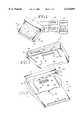
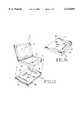
- FIG. 1is a perspective view of a notebook computer docked at a docking station according to an embodiment of this invention
- FIG. 2is a perspective view showing an undersurface and rear edge of the notebook computer of FIG. 1;
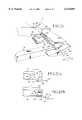
- FIG. 3is a perspective view of a docking station according to an embodiment of this invention.
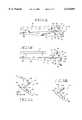
- FIGS. 4a-bare diagrams of the notebook computer position relative to the docking station at steps of the docking process according to an embodiment of this invention
- FIGS. 5a-bare diagrams of a linkage for raising and lowering the ramp of FIG. 3;
- FIG. 6is a partial perspective view of the docking components of the notebook computer and docking station according to an alternative embodiment of this invention.
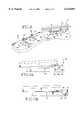
- FIGS. 7a-bare diagrams of the notebook computer position relative to the docking station at steps of a docking process for the embodiment of FIG. 6;
- FIG. 8is a partial perspective view showing a protective docking connector door in the computer housing
- FIG. 9is a perspective view showing a protective docking connector door in the docking station.
- FIGS. 10a-care diagrams of steps for opening the protective doors of FIGS. 8 and 9 during a docking process.
- FIG. 11is a partial cut-away view of a rotating docking connector for a docking station according to an alternative embodiment of this invention.
- FIGS. 12a-bare diagrams of the notebook computer position relative to the docking station of FIG. 11 at steps of a docking process
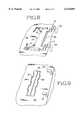
- FIG. 13is a perspective view of a notebook computer and computer expansion module
- FIG. 14is a planar view of an undersurface of the expansion module of FIG. 13.
- FIG. 1shows a notebook computer 10 docked at a docking station 12 according to an embodiment of this invention.
- the notebook computer 10includes a lower housing compartment 14 and an upper housing compartment 16.
- the lower housing compartment 14includes an embedded keyboard 15, main computer board 17, and one or more compartments for receiving peripheral devices.
- Many portable computers 10also include a floppy disk drive, hard disk drive, CD-ROM and battery pack in the lower compartment 14.
- Other common internal or plug-in peripheralsinclude fax devices and modems devices.
- the upper housing compartment 16typically includes the display screen 19 and related display driver circuitry.
- the docking station 12includes multiple ports for connecting to an external full-size keyboard 21, a display monitor 23 and other computer devices and resources (e.g., a printer 25 and network resources 27). This invention is directed toward components of the computer 10 and docking station 12 which facilitate docking.
- FIG. 2shows the undersurface 18 and rear edge 20 of the notebook computer 10.
- "Undersurface” as used hereinrefers to the portion of the lower compartment 14 upon which the computer 10 rests during docking and normal operation.
- "Rear edge”refers to the portion of the lower compartment 14 facing away from an operator during normal operation of the notebook computer (e.g., operator faces display of open upper compartment 16 with access to an internal keyboard.)
- One or more parallel tracks 22are located in the computer undersurface 18. These tracks 22 extend in a direction 24 parallel to a direction of motion of the computer 10 relative to the docking station 14 during a docking process. In the embodiment illustrated there are two tracks 22 formed as indentations. In an alternative embodiment the tracks 22 are protruding rails. The tracks 22 are flared at the distal portion providing a wider lead-in that allows the computer 10 to slide into a desired lateral alignment. In such lateral alignment the tracks 22 mate with corresponding members 60 at the docking station 12.
- an alignment member 26is located at the undersurface 18 .
- a docking connector 30is accessible through the connector opening 28.
- a doorblocks the opening 28 preventing access to the docking connector 30 while the computer 10 is undocked. The door prevents damage to the connector 30 and prevents dust from accumulating on the connector 30.
- the alignment member 26is for mating to a corresponding alignment member 32 at the docking station 12 (see FIG. 3).
- the alignment member 26is formed as an opening in the computer undersurface 18 while the alignment member 32 is formed as a protruding rail at the docking station 12. It is preferable that the alignment members 26, 32 have a mating relation. In alternative embodiments the mating structures may vary.
- the member 26may be a protrusion instead of an indentation or opening, while the member 32 is an indentation or opening instead of a protrusion.
- the members 26, 32need not be single elongated members, but may be multiple elongated members, or may be one or more corresponding posts, ridges or other protrusions and one or more opening, notches or other indentations.
- the docking station 12includes a platform 36 and a ramp 40.
- the platform 36includes a back panel 37 with connectors (not shown) for interfacing to the full size keyboard 21, the display monitor 23, the printer 25, and the network resources 27.
- the ramp 40is coupled to the platform 36.
- a distal portion 41 of the ramp 40is movable up and down (depicted by bi-directional arrow 42) relative to the platform 36 about an axis 44.
- the ramp 40includes an opening 46 for exposing the docking station docking connector 50.
- the docking connector 50is a mechanical connector having electrical contacts for forming and maintaining an electrical interface with the notebook computer 10.
- the docking connector 50is fixed relative to the platform 36.
- the ramp 40includes one or more doors (see FIG. 9) for protecting the docking connector 50 in the absence of the computer 10. The door prevents damage to the connector 50 and prevents dust from accumulating on the connector 50.
- the ramp 40also includes guide rails 60 and hooking members 52.
- the hooking members 52are located at the distal portion 41 of the ramp.
- the hooking members 52mate with the computer 10 during docking and secure the computer 10 to the docking station 12.
- the hooking members 52ensure that the portable computer and docking station docking connectors are aligned before docking is attempted. This prevents connector damage.
- Such hooking mechanismsalso serve to prevent an operator from removing the notebook computer while docked. To release the hooking mechanisms an appropriate undocking sequence is to be followed.
- the docking station 12also includes a lever 54.
- the leveris moved in one direction 66 to facilitate docking and in another direction 64 to facilitate undocking of the computer 10 relative to the docking station 12.
- an exemplary embodiment of the lever 54includes a handle 63 and multiple links 65, 67, 69.
- the handle 63is attached to link 65 which is anchored to the platform 36 at a node 68.
- the link 65has one degree of freedom relative to the platform 36 for motion about an axis 71.
- the link 65extends substantially the width of the platform to enable leverage motion of the lever 54.
- An end link 69is fastened to an undersurface of the ramp 40.
- the end link 65has one degree of freedom relative to the ramp 40 for rotational motion 73a, 73b about axis 75.
- a middle link 67couples the end link 69 to the first link 65.
- the handle 63is moved in direction 64 to rotate the link 69 in direction 73a, which raises the ramp 40 relative to the platform 36 and undocks the computer 10.
- the handle 63is moved in direction 66 to rotate the link 69 in direction 73b, which lowers the ramp 40 and docks the computer 10.
- the computer undersurface 18is placed in contact with the platform 36 and slid in direction 24 along the platform 36 and up the ramp 40.
- the computer 10is slid manually by an operator, although in other embodiments an automated mechanism may cause the motion of the computer 10 relative to the platform 36.
- the docking station rails 60mate into the tracks 22 at the computer undersurface 18.
- the tracks 22have a wide opening toward the computer rear edge 20 to facilitate the mating.
- the rails 60 and tracks 22come into alignment.
- the computer 10slides into a prescribed alignment position as shown in FIG. 4a.
- the hooking members 52 at the ramp distal portion 41mate into corresponding openings 62 (see FIGS. 2 and 4a) at the computer rear edge 20.
- the respective alignment members 26 and 32 of the computer 10 and docking station 12line up and mate (see FIG. 4a).
- the computer docking connector 30is exposed to the docking station 12 through the opening 28.
- the docking station connector 50is exposed to the computer 10 through the opening 46.
- the next stepis to move the computer 10 down in the direction 42.
- the operatormanually pushes downward on the rear portion of the computer 10 (e.g., along the upper housing 16 toward rear edge 20). This action rotates the ramp distal portion 41 toward the platform 36 as shown in FIG. 4b.
- a lever 54is moved by the operator.
- the lever 54is linked to the ramp 40.
- the lever handle 63is moved from a first position to a second position in direction 66, the distal ramp portion 41 rotates down toward the platform 36.
- the docking connectors 30 and 50mate. Once properly mated, the docking operation is complete.
- connection of the docking connectors 30, 50is sufficient to hold the ramp 40 in the docked position of FIG. 4b.
- the lever 54is moved in direction 64 from the second position back to the first position. Movement of the lever 54 from the second position to the first position disconnects the docking connectors 30, 50 and pushes the ramp 40 upward (into the position shown in FIG. 4a).
- a locking mechanism 81(e.g., a Kensington lock) is provided for locking the lever 54 in the second position.
- the lock 81fits into an opening 83 adjacent to a lever slot 85.
- the lever 54moves along the slot 85.
- the lockis inserted into the adjacent opening 83 while the lever 54 is in the second position.
- the lockblocks the movement of the lever 54 along track 85 preventing the lever 54 from leaving the second position.
- the lockprevents the lever from moving into the second position.
- the lock 81also prevents unauthorized users from docking a computer 10 at a docking station 12.
- the lock 81serves as a security device (i) for preventing someone from removing and stealing the computer 10, and (ii) for preventing someone from docking a computer without permission.
- the hooking members 52 and locked lever 54prevent haphazard undocking which can lead to data loss.
- FIG. 6shows the computer 10' and docking station 12' having docking components according to an alternative embodiment of this invention.
- One or more parallel tracks 22'are located in the computer undersurface 18. These tracks 22' extend in a direction 24 parallel to a direction of motion of the computer 10' relative to the docking station 14 during a docking process. In the embodiment illustrated there are two tracks 22' formed as indentations.
- an alignment member 26' and the docking connector opening 28are also located at the undersurface 18.
- the docking connector 30is accessible through the connector opening 28.
- a doorblocks the opening 28 preventing access to the docking connector 30 while the computer 10 is undocked.
- An alignment member 26'is formed within each track 22' and serves to mate with a corresponding alignment member 32' at the docking station 12'.
- each alignment member 26'is formed as a further indentation within each track 22', while each corresponding alignment member 32' is formed as a protrusion extending above the surface 86 of the corresponding ramp 40'. It is preferable that the alignment members 26', 32' have a mating relation. In alternative embodiments the mating structures may vary as described for the prior embodiment.
- the docking station 12'includes a base platform 36 and a pair of ramps 40'. A distal portion 41 of each ramp 40 is movable up and down relative to the platform 36 about an axis 44 (see FIGS. 7a-b).
- the platform 36includes a docking connector 50 for mating to the connector 30 of computer 10'.
- the docking connector 50is fixed relative to the platform 36 protruding upward from the platform 36 to a height less than the height of upper surface 86 of the ramps 40'.
- the ramps 40'serve as guide rails for running within the tracks 22' of the computer 10'.
- the docking station 12'also includes hooking members 52'. Unlike the first embodiment, in the FIG. 6 embodiment the hooking members 52' extend from the platform 36. The hooking members 52' are pivotable about an axis 45 (see FIGS. 7a-b). During docking the computer 10' is moved along the ramps 40' with the ramps 40' mated to the tracks 22. The hooking members 52' mate with the computer 10' during docking and secure the computer 10' to the docking station 12'.
- the computer undersurface 18is placed in contact with the platform 36 and slid in direction 24 along the platform and up the ramps 40'.
- the computeris slid manually by an operator, although in other embodiments an automated mechanism may cause the motion of the computer relative to the platform 36.
- the docking stationramps 40' mate into the tracks 22 at the computer undersurface 18.
- the trackshave a wide opening toward the computer rear edge 20 to facilitate the mating.
- the ramps 40' and tracks 22come into alignment.
- the computer 20slides into a prescribed alignment position as shown in FIG. 7a.
- the next stepis to move the computer 10' down in the direction 42.
- the operatormanually pushes downward at the rear portion of the computer 10' (e.g., along the upper housing 16 toward rear edge 20).
- a lever structure as described for the first embodimentmay be used to perform the movement of the ramp. This downward action rotates the ramp distal portions 41 toward the platform 36 as shown in FIG. 7b.
- the leverincludes a linkage to the hooking members 52'. The motion of the lever causes rotation of the hooking members 52' toward corresponding openings 62 (see FIGS. 6 and 7b) at the computer rear edge 20.
- the ramps 40'come into contact with a cam connected to the hooking members 52', rotating the cam and hooking members 52'. As the computer 10' and ramps 40' come down, the docking connectors 30 and 50 mate. Once properly mated, the docking operation is complete.
- the computer 10includes a door 72 which covers the opening 28 (see FIG. 8).
- the door 72serves to protect the docking connector 30 (see FIG. 2) from exposure through the opening 28 during times when access to the docking connector 30 is not needed (i.e., while undocked).
- the door 72is located within the lower housing 14 of the computer adjacent to the undersurface 18.
- the door 72is biased by springs 74 into a closed position.
- the docking station hooking members 52extend through the computer rear edge openings 62.
- the hooking members 52contact blocking corresponding blocking members 76 of the door 72.
- the hooking members 52open the door 72 and hold the door 72 in the open position.
- the docking station 12includes one or more doors 80 which cover the opening 46 (see FIG. 9).
- the doors 80serve to protect the docking station's docking connector 50 (see FIG. 3) from exposure through the opening 46 during times when access to the docking connector 50 is not needed (i.e., while undocked).
- FIGS. 10a-cshow the doors 72, 80 opening during the docking process.
- the doors 72, 80are closed as the computer 10 moves along the platform 36 up the ramp 40.
- the docking station hooking mechanisms 52push against the blocking mechanisms 76 of the door 72.
- the hooking mechanisms 52slide the door 72 parallel to the direction of motion 24 revealing the opening 28 and the docking connector 30.
- FIG. 10bshows the computer 10 in the prescribed alignment position with the door 72 open. Note that the docking station door 80 is still closed.
- the ramp 40moves toward the platform 36 and the docking station docking connector 50.
- FIG. 10cshows the docked position with the doors 72, 80 opened and the docking connectors 30, 50 connected.
- the docking connector of the docking station 12"moves toward the computer 10, instead of the computer moving toward the docking connector (see FIG. 11).
- a rotating or elevating rampis not needed. This is desirable for settings in which a user prefers to place a display monitor on top of the computer. With the computer inserted at the docking station and the monitor positioned, final docking steps occur without moving the computer and monitor.
- the rails and alignment mechanisms for positioning the computer into a prescribed alignment position relative to the docking stationare the same as previously described for the other embodiments.
- FIG. 11shows an alternative lever mechanism 100 coupled to the docking station docking connector 50'.
- the lever mechanism 100includes a handle 63 and an elongated shaft 104.
- the handle 63rotates about an axis 106 defined by the elongated shaft 104.
- the shaftis anchored to the docking station platform 36 allowing motion about the axis 106.
- the docking connector 50'is fixedly coupled to the shaft 104 by a link 108.
- a connector cable 110is shown in FIG. 11 which electrically couples the docking connector 50' contacts to various ports along a rear face of the docking station 12".
- the computer 10is slid along the platform 36 and up the ramp 40 or 40' as previously described for the embodiments of FIGS. 3 and 6.
- the operatormanually turns the lever handle 63 in a first direction 112. Such turning rotates the shaft 104 and docking connector 50' toward the docking connector 30 at the undersurface of the computer 10 (see FIG. 2).
- the connection achieved between the docking connectors 30, 50'is strong enough to keep the connectors 30, 50' in a mated position once the handle 63 is released.
- the handle 63is turned in the opposite direction 114 causing the connectors 30, 50' to disengage.
- an opening 116is included in some embodiments.
- a lock 81as previously described, is inserted into the opening 116 to prevent turning of the handle 63.
- the lock 81With the lock 81 inserted prior to docking, the lock 81 prevents the handle 63 from rotating in the first direction 112.
- the handle 63may turn slightly, but not enough to move the connector 50' to the computer 10. As a result, the docking connectors 30, 50' cannot mate and docking can not occur.
- the lock 81prevents the turning of the handle 63 in the other direction 114.
- the handle 63may turn slightly, but not enough to separate the connector 50' from the computer 10. As a result, undocking is prevented.
- FIG. 12a-bshow posts 122 which prevent movement of the computer 10 vertically or laterally relative to the docking station 12".
- the docking connectors 30, 50'prevent movement of the computer 10 horizontally and laterally relative to the docking station 12".
- hooking mechanisms 52 or 52'secure the computer 10 to the docking station 12" as described for the prior embodiments.
- an expansion module 160mounts to the undersurface 18 of notebook computer 10.
- the expansion module 160is a thin generally planar module having approximately the same length and width as the lower compartment 14 of the notebook computer 10.
- the module 160houses extra batteries 161, and/or added devices (e.g., CD-ROM drive 162; floppy disk drive 163) to make the computer 10 more functional.
- the module 160includes an electrical interface connector 164 which mates to the underside docking connector 30 of the computer 10.
- the connector 164is accessible to the computer 10 from an upper surface 166 of the module 160.
- the module 160also includes guide structures 168 along upper surface 166 for aligning to the undersurface 18 of the computer 10.
- the guide structures 168are similar in function to the guide rails 60 of the docking station 12 (see FIG. 3).
- the bottom surface 170 of the module 160has similar structures as the undersurface 18 of the computer 10 so that the module 160 with computer 10 may dock to the docking station 12.
- the module 160includes guide tracks 172 or rails at the undersurface 170 along with a docking connector 174 (see FIG. 16).
- the tracks 172are similar in function to the tracks 22 at the undersurface of the computer 10 (see FIG. 2).
- Openings 176similar in function to openings 62 on the computer 10 are included along a rear edge 178 of the module 160.
- the computer 10 with expansion module 160dock to the station 12 according to any of the methods described above.
- One advantage of the inventionis that the docking process is easy, convenient and reliable. The operator slides the computer onto the ramp, then pushes down on the computer or actuates a lever. Such manual docking has the ease and reliability of an automated process, but is achieved at substantially less cost. Another advantage is that the docking connectors are unexposed while the computer is away from the docking station preventing damage and avoiding exposure to dust. Another advantage of the invention is that the lever can be locked in place preventing theft, and unauthorized docking and undocking.
Landscapes
- Engineering & Computer Science (AREA)
- Theoretical Computer Science (AREA)
- Computer Hardware Design (AREA)
- Human Computer Interaction (AREA)
- Physics & Mathematics (AREA)
- General Engineering & Computer Science (AREA)
- General Physics & Mathematics (AREA)
- Details Of Connecting Devices For Male And Female Coupling (AREA)
- Casings For Electric Apparatus (AREA)
Abstract
Description
This invention relates generally to portable computer docking at a docking connector, and more particularly, to docking a portable computer at an underside docking connector.
Portable "personal" computers have developed from the early cumbersome suitcase design to smaller laptop designs to the now commercially-predominant notebook, sub-notebook and palm top computers. The evolution has been toward smaller, lighter computers with increasing transportability and usability. The state of the art continues to improve by (i) increasing battery life, (ii) decreasing circuitry and system weight, (iii) adapting compartments for add-in cards, and (iv) decreasing housing size.
The typical portable computer includes a display screen housing hinged to a keyboard housing. The display screen housing folds down against the keyboard where the two housings latch together. A disk drive often is mounted in the keyboard housing. Additional features include a docking connector, input/output ports and one or more compartments for receiving PCMCIA cards, (peripheral devices conforming to the Personal Computer Memory Card International Association (PCMCIA) standards for personal computer-based peripherals).
Even though the processing throughput, memory and other performance features of a notebook computer are achieving similar levels to desktop computers, there still are trade-offs for using a notebook computer. Typically, the keyboard and display are smaller than are used for desktop computers. Larger displays and keyboards are desired for usability and ergonomic reasons. As a result, it is common to have a docking station in a desktop environment. A full-size keyboard, a desk top display monitor, additional memory storage devices, network resources, and peripherals, typically are accessible through the docking station.
It is desirable that the connection and disconnection between the notebook computer and the docking station be easy, convenient and reliable.
Portable computers often are used in an office environment with a docking station. One concern with such usage is the ease with which a portable computer can be removed and stolen. Accordingly, there is a desire for including security precautions in a docked notebook computing environment.
According to the invention, a notebook computer includes an underside docking connector which connects to a docking station with a vertical action. Features for securing the computer are included in the docking action.
According to one aspect of the invention, docking of a notebook computer having an underside docking connector is facilitated relative motion between a ramp at the docking station and a docking connector of the notebook computer. To dock the notebook computer, the computer is slid onto the ramp and guided into a prescribed position. In one docking method, the user then pushes the computer down, depressing the ramp about a pivot line. In an alternative docking method, the user moves a lever which moves the ramp about the pivot line. As the computer and ramp move downward, the computer's docking connector mates to a docking connector in the docking station. In an alternative apparatus, the docking station's connector moves with the lever, instead of the ramp, to cause docking.
According to one aspect of this invention, the computer includes guide tracks and an alignment member along the undersurface of the computer housing. Such undersurface is the surface upon which the computer normally rests, while in use. The computer's docking connector is accessible from such undersurface during a docking process.
According to another aspect of the invention, the docking station includes a ramp having rails upon which the computer slides. The docking station also includes an alignment member corresponding to the alignment member of the computer. During docking, the computer is placed on the docking station and slid along the ramp with the ramp rails running within the computer's undersurface tracks. When the computer reaches a prescribed position the alignment members of the computer and docking station mate or otherwise align. While in the alignment position, the docking connector's of the computer and docking station are poised for mating.
According to another aspect of this invention, the ramp includes an opening through which the station's docking connector is accessible during docking. The ramp rotates about a pivot line relative to the remainder of the docking station. As the notebook computer and ramp come down, the docking connector of the computer moves toward and mates with the docking connector in the docking station accessible through the ramp. Undocking is achieved by a lever release.
According to another aspect of this invention, the docking station includes hooking mechanisms which hook into an opening along a rear edge of the computer. The hooking mechanisms ensure that the portable computer and docking station docking connectors are aligned before docking is attempted. This prevents connector damage. Such hooking mechanisms also serve to prevent an operator from removing the notebook computer while docked without going through an appropriate undocking sequence.
According to another aspect of this invention, the underside docking and the rear edge hooking fix the computer relative to the docking station along three axes of motion. Thus, the computer is secure. Additional security is achieved by locking the lever in position so that the computer cannot be undocked or removed. A physical lock or solenoid are exemplary locking mechanisms to secure the lever. The hooking mechanisms and the locked lever serve to secure the notebook computer in the docked position.
According to another aspect of the invention, the docking connector at the undersurface of the notebook computer is normally unexposed. During the docking process a door in the computer housing opens allowing access to the docking connector. In one embodiment, a docking station structure pushes the notebook computer's connector door open as the computer slides along the ramp into the alignment position.
According to another aspect of this invention, the docking station docking connector normally is covered by a door. During docking such door is opened allowing access to the station's docking connector. In one embodiment the station's door is in the docking ramp and is opened by the station docking connector pushing open the door as the ramp rotates down toward the station's docking connector.
According to another aspect of the invention, a notebook computer with an underside expansion module is capable of docking at the docking station using underside connectors.
Another advantage of the invention is that the docking process is easy, convenient and reliable. The operator slides the computer onto the ramp, then pushes down on the computer or moves a lever. Such manual docking has the ease and reliability of an automated process, but is achieved at substantially less cost. Another advantage is that the docking connectors are unexposed while the computer is away from the docking station. These and other aspects and advantages of the invention will be better understood by reference to the following detailed description taken in conjunction with the accompanying drawings.
FIG. 1 is a perspective view of a notebook computer docked at a docking station according to an embodiment of this invention;
FIG. 2 is a perspective view showing an undersurface and rear edge of the notebook computer of FIG. 1;
FIG. 3 is a perspective view of a docking station according to an embodiment of this invention;
FIGS. 4a-b are diagrams of the notebook computer position relative to the docking station at steps of the docking process according to an embodiment of this invention;
FIGS. 5a-b are diagrams of a linkage for raising and lowering the ramp of FIG. 3;
FIG. 6 is a partial perspective view of the docking components of the notebook computer and docking station according to an alternative embodiment of this invention;
FIGS. 7a-b are diagrams of the notebook computer position relative to the docking station at steps of a docking process for the embodiment of FIG. 6;
FIG. 8 is a partial perspective view showing a protective docking connector door in the computer housing;
FIG. 9 is a perspective view showing a protective docking connector door in the docking station;
FIGS. 10a-c are diagrams of steps for opening the protective doors of FIGS. 8 and 9 during a docking process.
FIG. 11 is a partial cut-away view of a rotating docking connector for a docking station according to an alternative embodiment of this invention;
FIGS. 12a-b are diagrams of the notebook computer position relative to the docking station of FIG. 11 at steps of a docking process;
FIG. 13 is a perspective view of a notebook computer and computer expansion module; and
FIG. 14 is a planar view of an undersurface of the expansion module of FIG. 13.
Overview
FIG. 1 shows anotebook computer 10 docked at adocking station 12 according to an embodiment of this invention. Thenotebook computer 10 includes alower housing compartment 14 and anupper housing compartment 16. As one or ordinary skill in the art would appreciate, thelower housing compartment 14 includes an embeddedkeyboard 15, main computer board 17, and one or more compartments for receiving peripheral devices. Manyportable computers 10 also include a floppy disk drive, hard disk drive, CD-ROM and battery pack in thelower compartment 14. Other common internal or plug-in peripherals include fax devices and modems devices. Theupper housing compartment 16 typically includes thedisplay screen 19 and related display driver circuitry. Typically thedocking station 12 includes multiple ports for connecting to an external full-size keyboard 21, adisplay monitor 23 and other computer devices and resources (e.g., aprinter 25 and network resources 27). This invention is directed toward components of thecomputer 10 anddocking station 12 which facilitate docking.
FIG. 2 shows theundersurface 18 andrear edge 20 of thenotebook computer 10. "Undersurface" as used herein refers to the portion of thelower compartment 14 upon which thecomputer 10 rests during docking and normal operation. "Rear edge" refers to the portion of thelower compartment 14 facing away from an operator during normal operation of the notebook computer (e.g., operator faces display of openupper compartment 16 with access to an internal keyboard.) One or moreparallel tracks 22 are located in thecomputer undersurface 18. Thesetracks 22 extend in adirection 24 parallel to a direction of motion of thecomputer 10 relative to thedocking station 14 during a docking process. In the embodiment illustrated there are twotracks 22 formed as indentations. In an alternative embodiment thetracks 22 are protruding rails. Thetracks 22 are flared at the distal portion providing a wider lead-in that allows thecomputer 10 to slide into a desired lateral alignment. In such lateral alignment thetracks 22 mate withcorresponding members 60 at thedocking station 12.
Also located at theundersurface 18 is analignment member 26 and adocking connector opening 28. Adocking connector 30 is accessible through theconnector opening 28. In some embodiments a door (see FIG. 8) blocks theopening 28 preventing access to thedocking connector 30 while thecomputer 10 is undocked. The door prevents damage to theconnector 30 and prevents dust from accumulating on theconnector 30. Thealignment member 26 is for mating to acorresponding alignment member 32 at the docking station 12 (see FIG. 3). In the embodiment illustrated thealignment member 26 is formed as an opening in thecomputer undersurface 18 while thealignment member 32 is formed as a protruding rail at thedocking station 12. It is preferable that thealignment members member 26 may be a protrusion instead of an indentation or opening, while themember 32 is an indentation or opening instead of a protrusion. In addition themembers
Referring to FIG. 3 thedocking station 12 includes aplatform 36 and aramp 40. Theplatform 36 includes aback panel 37 with connectors (not shown) for interfacing to thefull size keyboard 21, thedisplay monitor 23, theprinter 25, and thenetwork resources 27. Theramp 40 is coupled to theplatform 36. Adistal portion 41 of theramp 40 is movable up and down (depicted by bi-directional arrow 42) relative to theplatform 36 about anaxis 44. Theramp 40 includes anopening 46 for exposing the dockingstation docking connector 50. Thedocking connector 50 is a mechanical connector having electrical contacts for forming and maintaining an electrical interface with thenotebook computer 10. Thedocking connector 50 is fixed relative to theplatform 36. As the rampdistal portion 41 rotates downward toward theplatform 36, thedocking connector 50 protrudes through theopening 46. In one embodiment theramp 40 includes one or more doors (see FIG. 9) for protecting thedocking connector 50 in the absence of thecomputer 10. The door prevents damage to theconnector 50 and prevents dust from accumulating on theconnector 50.
Theramp 40 also includesguide rails 60 and hookingmembers 52. During docking, thecomputer 10 is moved along therails 60 with therails 60 mating to the computer undersurface's tracks 22. The hookingmembers 52 are located at thedistal portion 41 of the ramp. The hookingmembers 52 mate with thecomputer 10 during docking and secure thecomputer 10 to thedocking station 12. In particular the hookingmembers 52 ensure that the portable computer and docking station docking connectors are aligned before docking is attempted. This prevents connector damage. Such hooking mechanisms also serve to prevent an operator from removing the notebook computer while docked. To release the hooking mechanisms an appropriate undocking sequence is to be followed.
In a preferred embodiment thedocking station 12 also includes alever 54. The lever is moved in onedirection 66 to facilitate docking and in anotherdirection 64 to facilitate undocking of thecomputer 10 relative to thedocking station 12. Referring to FIGS. 5a and 5b, an exemplary embodiment of thelever 54 includes ahandle 63 andmultiple links handle 63 is attached to link 65 which is anchored to theplatform 36 at anode 68. Thelink 65 has one degree of freedom relative to theplatform 36 for motion about anaxis 71. Thelink 65 extends substantially the width of the platform to enable leverage motion of thelever 54. Anend link 69 is fastened to an undersurface of theramp 40. Theend link 65 has one degree of freedom relative to theramp 40 forrotational motion 73a, 73b aboutaxis 75. Amiddle link 67 couples theend link 69 to thefirst link 65. Referring to FIG. 5a, thehandle 63 is moved indirection 64 to rotate thelink 69 in direction 73a, which raises theramp 40 relative to theplatform 36 and undocks thecomputer 10. Referring to FIG. 5b, thehandle 63 is moved indirection 66 to rotate thelink 69 indirection 73b, which lowers theramp 40 and docks thecomputer 10. Although a specific linkage is described other linkages, lever structures and manual or automatic docking mechanisms may be used.
Docking Method
To perform docking of thecomputer 10 to thedocking station 12, thecomputer undersurface 18 is placed in contact with theplatform 36 and slid indirection 24 along theplatform 36 and up theramp 40. In a preferred embodiment thecomputer 10 is slid manually by an operator, although in other embodiments an automated mechanism may cause the motion of thecomputer 10 relative to theplatform 36. As thecomputer 10 is moved, the docking station rails 60 mate into thetracks 22 at thecomputer undersurface 18. In some embodiment thetracks 22 have a wide opening toward the computerrear edge 20 to facilitate the mating. As thecomputer 10 is slid up theramp 40, therails 60 and tracks 22 come into alignment. Eventually, thecomputer 10 slides into a prescribed alignment position as shown in FIG. 4a. In the alignment position the hookingmembers 52 at the rampdistal portion 41 mate into corresponding openings 62 (see FIGS. 2 and 4a) at the computerrear edge 20. In addition, while in the prescribed alignment position, therespective alignment members computer 10 anddocking station 12 line up and mate (see FIG. 4a). Thecomputer docking connector 30 is exposed to thedocking station 12 through theopening 28. Similarly, thedocking station connector 50 is exposed to thecomputer 10 through theopening 46.
With thecomputer 10 slid into the prescribed alignment position, the next step is to move thecomputer 10 down in thedirection 42. For example, the operator manually pushes downward on the rear portion of the computer 10 (e.g., along theupper housing 16 toward rear edge 20). This action rotates the rampdistal portion 41 toward theplatform 36 as shown in FIG. 4b. In a preferred embodiment alever 54 is moved by the operator. Thelever 54 is linked to theramp 40. As the lever handle 63 is moved from a first position to a second position indirection 66, thedistal ramp portion 41 rotates down toward theplatform 36. As thecomputer 10 andramp 40 come down, thedocking connectors
In one embodiment the connection of thedocking connectors ramp 40 in the docked position of FIG. 4b. To undock thecomputer 10 thelever 54 is moved indirection 64 from the second position back to the first position. Movement of thelever 54 from the second position to the first position disconnects thedocking connectors ramp 40 upward (into the position shown in FIG. 4a).
The computer is docked with thelever 54 in the second position (see FIGS. 4b and 5b). While docked, the hookingmechanisms 52 prevent vertical movement of thecomputer 10 computer relative to thedocking station 12. Thedocking connector platform 36. Further the hookingmechanisms 52 also prevent lateral movement of thecomputer 10 relative to thedocking station 12. According to one embodiment a locking mechanism 81 (e.g., a Kensington lock) is provided for locking thelever 54 in the second position. Thelock 81 fits into anopening 83 adjacent to alever slot 85. Thelever 54 moves along theslot 85. The lock is inserted into theadjacent opening 83 while thelever 54 is in the second position. The lock blocks the movement of thelever 54 alongtrack 85 preventing thelever 54 from leaving the second position. In addition, ifsuch lock 81 is inserted and locked prior to docking thecomputer 10, the lock prevents the lever from moving into the second position. Thus thelock 81 also prevents unauthorized users from docking acomputer 10 at adocking station 12. Accordingly, thelock 81 serves as a security device (i) for preventing someone from removing and stealing thecomputer 10, and (ii) for preventing someone from docking a computer without permission. The hookingmembers 52 and lockedlever 54 prevent haphazard undocking which can lead to data loss.
Alternative Embodiment
FIG. 6 shows the computer 10' and docking station 12' having docking components according to an alternative embodiment of this invention. One or more parallel tracks 22' are located in thecomputer undersurface 18. These tracks 22' extend in adirection 24 parallel to a direction of motion of the computer 10' relative to thedocking station 14 during a docking process. In the embodiment illustrated there are two tracks 22' formed as indentations.
Also located at theundersurface 18 is an alignment member 26' and thedocking connector opening 28. Thedocking connector 30 is accessible through theconnector opening 28. In some embodiments a door (see FIG. 8) blocks theopening 28 preventing access to thedocking connector 30 while thecomputer 10 is undocked. An alignment member 26' is formed within each track 22' and serves to mate with a corresponding alignment member 32' at the docking station 12'. In the embodiment illustrated each alignment member 26' is formed as a further indentation within each track 22', while each corresponding alignment member 32' is formed as a protrusion extending above thesurface 86 of the corresponding ramp 40'. It is preferable that the alignment members 26', 32' have a mating relation. In alternative embodiments the mating structures may vary as described for the prior embodiment.
The docking station 12' includes abase platform 36 and a pair of ramps 40'. Adistal portion 41 of eachramp 40 is movable up and down relative to theplatform 36 about an axis 44 (see FIGS. 7a-b). Theplatform 36 includes adocking connector 50 for mating to theconnector 30 of computer 10'. Thedocking connector 50 is fixed relative to theplatform 36 protruding upward from theplatform 36 to a height less than the height ofupper surface 86 of the ramps 40'. The ramps 40' serve as guide rails for running within the tracks 22' of the computer 10'.
The docking station 12' also includes hooking members 52'. Unlike the first embodiment, in the FIG. 6 embodiment the hooking members 52' extend from theplatform 36. The hooking members 52' are pivotable about an axis 45 (see FIGS. 7a-b). During docking the computer 10' is moved along the ramps 40' with the ramps 40' mated to thetracks 22. The hooking members 52' mate with the computer 10' during docking and secure the computer 10' to the docking station 12'.
Docking Method for the Alternative Embodiment
To perform docking of the computer 10' to the docking station 12', thecomputer undersurface 18 is placed in contact with theplatform 36 and slid indirection 24 along the platform and up the ramps 40'. In a preferred embodiment the computer is slid manually by an operator, although in other embodiments an automated mechanism may cause the motion of the computer relative to theplatform 36. As the computer 10' is moved the docking station ramps 40' mate into thetracks 22 at thecomputer undersurface 18. In some embodiment the tracks have a wide opening toward the computerrear edge 20 to facilitate the mating. As the computer 10' is slid up the ramps, the ramps 40' and tracks 22 come into alignment. Eventually, thecomputer 20 slides into a prescribed alignment position as shown in FIG. 7a. While in the prescribed alignment position, the respective alignment members 26' and 32' of the computer 10' and docking station 12' line up and mate (see FIG. 7a). Thecomputer docking connector 30 is exposed to the docking station 12' through theopening 28. Similarly, thedocking station connector 50 is exposed to the computer 10' between the ramps 40'.
With the computer 10' slid into the prescribed alignment position, the next step is to move the computer 10' down in thedirection 42. For example, the operator manually pushes downward at the rear portion of the computer 10' (e.g., along theupper housing 16 toward rear edge 20). Alternatively, a lever structure as described for the first embodiment may be used to perform the movement of the ramp. This downward action rotates the rampdistal portions 41 toward theplatform 36 as shown in FIG. 7b. In addition, the lever includes a linkage to the hooking members 52'. The motion of the lever causes rotation of the hooking members 52' toward corresponding openings 62 (see FIGS. 6 and 7b) at the computerrear edge 20. In an alternative embodiment the ramps 40' come into contact with a cam connected to the hooking members 52', rotating the cam and hooking members 52'. As the computer 10' and ramps 40' come down, thedocking connectors
Docking Connector Doors
In some embodiments thecomputer 10 includes adoor 72 which covers the opening 28 (see FIG. 8). Thedoor 72 serves to protect the docking connector 30 (see FIG. 2) from exposure through theopening 28 during times when access to thedocking connector 30 is not needed (i.e., while undocked). Thedoor 72 is located within thelower housing 14 of the computer adjacent to theundersurface 18. Thedoor 72 is biased bysprings 74 into a closed position. During docking, the dockingstation hooking members 52 extend through the computerrear edge openings 62. The hookingmembers 52 contact blocking corresponding blockingmembers 76 of thedoor 72. As the computer is pushed toward the alignment position of FIG. 4a or 7a, the hookingmembers 52 open thedoor 72 and hold thedoor 72 in the open position.
In some embodiments, thedocking station 12 includes one ormore doors 80 which cover the opening 46 (see FIG. 9). Thedoors 80 serve to protect the docking station's docking connector 50 (see FIG. 3) from exposure through theopening 46 during times when access to thedocking connector 50 is not needed (i.e., while undocked).
FIGS. 10a-c show thedoors doors computer 10 moves along theplatform 36 up theramp 40. As thecomputer 10 moves toward the prescribed alignment position, the dockingstation hooking mechanisms 52 push against the blockingmechanisms 76 of thedoor 72. The hookingmechanisms 52 slide thedoor 72 parallel to the direction ofmotion 24 revealing theopening 28 and thedocking connector 30. FIG. 10b shows thecomputer 10 in the prescribed alignment position with thedoor 72 open. Note that thedocking station door 80 is still closed. As the operator pushes thecomputer 10 andramp 40 downward, theramp 40 moves toward theplatform 36 and the dockingstation docking connector 50. As the downward push continues, thedocking connector 50 pushes thedoors 80 open, protrudes upward through theopening 46 and eventually mates with the computer'sdocking connector 30. FIG. 10c shows the docked position with thedoors docking connectors
Rotating Docking Connector Embodiment
In an alternative embodiment the docking connector of thedocking station 12" moves toward thecomputer 10, instead of the computer moving toward the docking connector (see FIG. 11). In such embodiment a rotating or elevating ramp is not needed. This is desirable for settings in which a user prefers to place a display monitor on top of the computer. With the computer inserted at the docking station and the monitor positioned, final docking steps occur without moving the computer and monitor. In this embodiment the rails and alignment mechanisms for positioning the computer into a prescribed alignment position relative to the docking station are the same as previously described for the other embodiments.
FIG. 11 shows analternative lever mechanism 100 coupled to the docking station docking connector 50'. Thelever mechanism 100 includes ahandle 63 and anelongated shaft 104. Thehandle 63 rotates about anaxis 106 defined by theelongated shaft 104. The shaft is anchored to thedocking station platform 36 allowing motion about theaxis 106. The docking connector 50' is fixedly coupled to theshaft 104 by alink 108. A connector cable 110 is shown in FIG. 11 which electrically couples the docking connector 50' contacts to various ports along a rear face of thedocking station 12".
To perform docking, thecomputer 10 is slid along theplatform 36 and up theramp 40 or 40' as previously described for the embodiments of FIGS. 3 and 6. With thecomputer 10 in a prescribed alignment position, the operator manually turns the lever handle 63 in afirst direction 112. Such turning rotates theshaft 104 and docking connector 50' toward thedocking connector 30 at the undersurface of the computer 10 (see FIG. 2). Continued rotational motion results in mating of thedocking connectors 30, 50' (see FIG. 12b). The connection achieved between thedocking connectors 30, 50' is strong enough to keep theconnectors 30, 50' in a mated position once thehandle 63 is released. To undock the computer, thehandle 63 is turned in theopposite direction 114 causing theconnectors 30, 50' to disengage.
For added security anopening 116 is included in some embodiments. Alock 81, as previously described, is inserted into theopening 116 to prevent turning of thehandle 63. With thelock 81 inserted prior to docking, thelock 81 prevents thehandle 63 from rotating in thefirst direction 112. Thehandle 63 may turn slightly, but not enough to move the connector 50' to thecomputer 10. As a result, thedocking connectors 30, 50' cannot mate and docking can not occur. Similarly, with thelock 81 inserted after docking, thelock 81 prevents the turning of thehandle 63 in theother direction 114. Thehandle 63 may turn slightly, but not enough to separate the connector 50' from thecomputer 10. As a result, undocking is prevented. FIGS. 12a-b show posts 122 which prevent movement of thecomputer 10 vertically or laterally relative to thedocking station 12". Thedocking connectors 30, 50' prevent movement of thecomputer 10 horizontally and laterally relative to thedocking station 12". In an alternativeembodiment hooking mechanisms 52 or 52' secure thecomputer 10 to thedocking station 12" as described for the prior embodiments.
Docking Computer with Expansion Module
In another application anexpansion module 160 mounts to theundersurface 18 ofnotebook computer 10. Referring to FIGS. 13 and 14, theexpansion module 160 is a thin generally planar module having approximately the same length and width as thelower compartment 14 of thenotebook computer 10. Themodule 160 housesextra batteries 161, and/or added devices (e.g., CD-ROM drive 162; floppy disk drive 163) to make thecomputer 10 more functional. Themodule 160 includes anelectrical interface connector 164 which mates to theunderside docking connector 30 of thecomputer 10. Theconnector 164 is accessible to thecomputer 10 from anupper surface 166 of themodule 160. Themodule 160 also includesguide structures 168 alongupper surface 166 for aligning to theundersurface 18 of thecomputer 10. Theguide structures 168 are similar in function to the guide rails 60 of the docking station 12 (see FIG. 3). Thebottom surface 170 of themodule 160 has similar structures as theundersurface 18 of thecomputer 10 so that themodule 160 withcomputer 10 may dock to thedocking station 12. In particular themodule 160 includes guide tracks 172 or rails at theundersurface 170 along with a docking connector 174 (see FIG. 16). Thetracks 172 are similar in function to thetracks 22 at the undersurface of the computer 10 (see FIG. 2).Openings 176 similar in function toopenings 62 on thecomputer 10 are included along arear edge 178 of themodule 160. Thecomputer 10 withexpansion module 160 dock to thestation 12 according to any of the methods described above.
Meritorious and Advantageous Effects
One advantage of the invention is that the docking process is easy, convenient and reliable. The operator slides the computer onto the ramp, then pushes down on the computer or actuates a lever. Such manual docking has the ease and reliability of an automated process, but is achieved at substantially less cost. Another advantage is that the docking connectors are unexposed while the computer is away from the docking station preventing damage and avoiding exposure to dust. Another advantage of the invention is that the lever can be locked in place preventing theft, and unauthorized docking and undocking.
Although a preferred embodiment of the invention has been illustrated and described, various alternatives, modifications and equivalents may be used. Therefore, the foregoing description should not be taken as limiting the scope of the inventions which are defined by the appended claims.
Claims (12)
1. A docking station for a portable computer, comprising:
a platform having a first surface upon which an undersurface of the portable computer rests while docked at the docking station;
a docking connector extending through the first surface while the computer is docked, the docking connector serving as an electrical interface with the portable computer;
a ramp having a proximal portion and a distal portion, the proximal portion rotatably coupled to the platform, the ramp having a relaxed position in which the distal portion is elevated relative to the platform and a depressed position in which the distal portion is rotated down to the platform upward surface, wherein the docking connector protrudes beyond a height of the ramp relative to the platform while the ramp is in the depressed position and protrudes less than the height of the ramp relative to the platform while the ramp is in the relaxed position, wherein the docking connector is positioned relative to the ramp so as not to contact the portable computer while the ramp is in the relaxed position; and
a guide rail for aligning the computer relative to the docking station during docking.
2. The docking station of claim 1, in which the guide rail is located on the ramp, and in which the ramp has an opening through which the docking connector protrudes while the ramp is in the depressed position.
3. The docking station of claim 1, in which the ramp comprises a hooking mechanism for mating into an opening in the portable computer while the portable computer is docked to the docking station.
4. The docking station of claim 1, in which the ramp serves as the guide rail for aligning the computer relative to the docking station during docking.
5. The docking station of claim 1, in which the ramp has an opening aligned with the docking connector and has a door for the opening, wherein while the ramp is in the relaxed position the door blocks the opening protecting the docking connector.
6. A docking station and portable computer combination,
the portable computer having an undersurface upon which the portable computer rests, the portable computer having a first opening at the undersurface, the portable computer including a first docking connector located within the first opening and a guide structure;
the docking station comprising:
a platform having a first surface upon which the portable computer undersurface rests while docked at the docking station;
a second docking connector extending through the first surface while the computer is docked, the second docking connector serving as an electrical interface with the portable computer;
a ramp having a proximal portion and a distal portion, the proximal portion rotatably coupled to the platform, the ramp having a relaxed position in which the distal portion is elevated relative to the platform and a depressed position in which the distal portion is rotated down to the platform upward surface, wherein the second docking connector protrudes beyond a height of the ramp relative to the platform while the ramp is in the depressed position and protrudes less than the height of the ramp relative to the platform while the ramp is in the relaxed position, wherein the second docking connector is positioned relative to the ramp so as not to contact the portable computer while the ramp is in the relaxed position; and
a guide rail for mating with the guide structure of the portable computer during docking of the portable computer to the docking station.
7. The combination of claim 6, in which the guide rail is located on the ramp, and in which the ramp has an opening through which the second docking connector protrudes while the ramp is in the depressed position.
8. The combination of claim 6, in which the portable computer includes a second opening, in which the ramp comprises a hooking mechanism for mating into the second opening while the portable computer is docked to the docking station.
9. The combination of claim 6, in which the ramp serves as the guide rail for aligning the portable computer relative to the docking station during docking.
10. The combination of claim 6, in which the portable computer includes a second opening, in which the docking station further comprises a hooking mechanism for mating into the second opening in the portable computer while the portable computer is docked to the docking station, and wherein the hooking mechanism moves between an engaged position and a disengaged position.
11. The combination of claim 6, in which the ramp has an opening aligned with the second docking connector and includes a door for the ramp opening, wherein while the ramp is in the relaxed position the door blocks the ramp opening protecting the docking connector.
12. The combination of claim 6, in which the portable computer further includes a door blocking the first opening, and in which the docking station comprises means for opening the door during docking of the portable computer to the docking station.
Priority Applications (4)
| Application Number | Priority Date | Filing Date | Title |
|---|---|---|---|
| US09/071,126US6135801A (en) | 1998-04-30 | 1998-04-30 | Computer underside docking method and apparatus |
| JP11703799AJP3679267B2 (en) | 1998-04-30 | 1999-04-23 | Computer docking station, docking method and notebook computer |
| US09/566,856US6220883B1 (en) | 1998-04-30 | 2000-05-08 | Computer underside docking method and apparatus |
| US09/566,640US6264488B1 (en) | 1998-04-30 | 2000-05-08 | Computer underside docking method and apparatus |
Applications Claiming Priority (1)
| Application Number | Priority Date | Filing Date | Title |
|---|---|---|---|
| US09/071,126US6135801A (en) | 1998-04-30 | 1998-04-30 | Computer underside docking method and apparatus |
Related Child Applications (2)
| Application Number | Title | Priority Date | Filing Date |
|---|---|---|---|
| US09/566,640ContinuationUS6264488B1 (en) | 1998-04-30 | 2000-05-08 | Computer underside docking method and apparatus |
| US09/566,856ContinuationUS6220883B1 (en) | 1998-04-30 | 2000-05-08 | Computer underside docking method and apparatus |
Publications (1)
| Publication Number | Publication Date |
|---|---|
| US6135801Atrue US6135801A (en) | 2000-10-24 |
Family
ID=22099401
Family Applications (3)
| Application Number | Title | Priority Date | Filing Date |
|---|---|---|---|
| US09/071,126Expired - LifetimeUS6135801A (en) | 1998-04-30 | 1998-04-30 | Computer underside docking method and apparatus |
| US09/566,856Expired - LifetimeUS6220883B1 (en) | 1998-04-30 | 2000-05-08 | Computer underside docking method and apparatus |
| US09/566,640Expired - LifetimeUS6264488B1 (en) | 1998-04-30 | 2000-05-08 | Computer underside docking method and apparatus |
Family Applications After (2)
| Application Number | Title | Priority Date | Filing Date |
|---|---|---|---|
| US09/566,856Expired - LifetimeUS6220883B1 (en) | 1998-04-30 | 2000-05-08 | Computer underside docking method and apparatus |
| US09/566,640Expired - LifetimeUS6264488B1 (en) | 1998-04-30 | 2000-05-08 | Computer underside docking method and apparatus |
Country Status (2)
| Country | Link |
|---|---|
| US (3) | US6135801A (en) |
| JP (1) | JP3679267B2 (en) |
Cited By (40)
| Publication number | Priority date | Publication date | Assignee | Title |
|---|---|---|---|---|
| US6270371B1 (en)* | 1998-04-28 | 2001-08-07 | Yazaki Corporation | Connector connecting structure |
| FR2808623A1 (en)* | 2000-05-02 | 2001-11-09 | Gateway Inc | CONNECTOR MECHANISM |
| WO2002049159A1 (en)* | 2000-12-15 | 2002-06-20 | Brigham Young University | Constant force apparatus and method |
| US6490155B2 (en)* | 2000-07-07 | 2002-12-03 | Palm, Inc. | Detachable coupling for handheld computer and peripheral attachment scheme |
| US6549416B2 (en)* | 2001-03-15 | 2003-04-15 | Hewlett Packard Development Company, L.P. | Portable computer docking station with protected connector |
| US6560101B1 (en)* | 2000-07-28 | 2003-05-06 | Hewlett-Packard Company | Alignment mechanism for a computer system having a portable computer and a docking station |
| US20030128506A1 (en)* | 2002-01-08 | 2003-07-10 | Samsung Electronics Co., Ltd. | Notebook computer and docking station having anti-theft lock |
| US6594146B2 (en)* | 2000-12-26 | 2003-07-15 | Ge Medical Systems Information Technologies, Inc. | Docking station for patient monitor or other electronic device |
| US20030197109A1 (en)* | 2002-04-17 | 2003-10-23 | Dui-Ming Tsai | Port replicator and resilient piece used therein |
| US20040075980A1 (en)* | 2002-10-16 | 2004-04-22 | Samsung Electronics Co., Ltd. Of Republic Of Korea | Docking station and notebook computer using the same |
| KR100439722B1 (en)* | 2002-01-08 | 2004-07-12 | 삼성전자주식회사 | Portable Computer |
| US20040150963A1 (en)* | 2003-01-31 | 2004-08-05 | Sonosite, Inc. | System for use with a modular apparatus for diagnostic ultrasound |
| US6780064B2 (en) | 2001-07-18 | 2004-08-24 | Roche Diagnostics Operations, Inc. | Modular analytical system having at least two modules connected by a connecting plug |
| US20040198571A1 (en)* | 2003-04-02 | 2004-10-07 | Brigham Young University. | Substantially constant-force exercise machine |
| US20040201601A1 (en)* | 2003-04-09 | 2004-10-14 | Fa-Chih Ke | One-touch release apparatus |
| US20050248917A1 (en)* | 2004-05-07 | 2005-11-10 | Koichi Hiroyoshi | Docking device for portable computer and docking structure |
| US20060066438A1 (en)* | 2004-09-27 | 2006-03-30 | David Altounian | Method and system for controllably and selectively securing a portable computing device to a physical holding device |
| US20070076367A1 (en)* | 2005-09-30 | 2007-04-05 | Chih-Wei Chien | Fastenable docking device with fastening device |
| US20070101372A1 (en)* | 2005-11-02 | 2007-05-03 | Chang Chung L | Headrest mounted entertainment system |
| US20070097618A1 (en)* | 2005-10-31 | 2007-05-03 | Searby Tom J | Display device quick connect system |
| US20070177347A1 (en)* | 2006-01-31 | 2007-08-02 | Kabushiki Kaisha Toshiba | Docking device having a hook to be engaged with an electronic apparatus |
| US20080121004A1 (en)* | 2006-11-24 | 2008-05-29 | Hon Hai Precision Industry Co., Ltd. | Double-sided lock device and electronic device using same |
| DE202008009578U1 (en) | 2008-05-28 | 2008-09-18 | MICRO-STAR INT'L Co., Ltd., Jung-He City | computer arrangement |
| US7534211B2 (en) | 2002-03-29 | 2009-05-19 | Sonosite, Inc. | Modular apparatus for diagnostic ultrasound |
| US7636930B2 (en) | 2002-10-28 | 2009-12-22 | Johnson Safety, Inc. | Mobile video system |
| US7758117B2 (en) | 2005-11-02 | 2010-07-20 | Chung Lung Chang | Headrest-mounted entertainment systems |
| US7762627B2 (en) | 2005-11-02 | 2010-07-27 | Chung Lung Chang | Headrest-mounted entertainment systems |
| US20100265652A1 (en)* | 2009-04-17 | 2010-10-21 | Hiroaki Agata | Docking Device for Portable Computers |
| US7894003B2 (en) | 2000-11-14 | 2011-02-22 | Chang Chung L | Flat thin screen TV/monitor automotive roof mount |
| CN101083886B (en)* | 2006-06-02 | 2011-06-22 | 鸿富锦精密工业(深圳)有限公司 | Clamp device |
| US20120206875A1 (en)* | 2010-08-18 | 2012-08-16 | Carnevali Jeffrey D | Docking Station Having Preload and Connector Isolator System |
| US8388060B2 (en) | 2007-04-16 | 2013-03-05 | Chung Lung Chang | Headrest-mounted entertainment systems |
| US20130100605A1 (en)* | 2011-10-21 | 2013-04-25 | Nokia Corporation | Apparatus for Electrically Connecting to a Portable Electronic Device |
| US8585140B2 (en) | 2002-08-14 | 2013-11-19 | Chung L. Chang | Headrest-mounted monitor |
| US9329634B1 (en)* | 2011-09-16 | 2016-05-03 | Hewlett-Packard Development Company, L.P. | Docking system |
| US9882310B2 (en)* | 2016-02-18 | 2018-01-30 | Omron Corporation | Connection structure and apparatus unit |
| US9910457B2 (en) | 2015-05-27 | 2018-03-06 | Fujitsu Limited | Expansion device and electronic apparatus |
| USD826943S1 (en)* | 2017-02-22 | 2018-08-28 | Panasonic Intellectual Property Management Co., Ltd. | Port replicator |
| US20220342445A1 (en)* | 2020-01-17 | 2022-10-27 | Panasonic Intellectual Property Management Co., Ltd. | Port replicator |
| CN115617126A (en)* | 2022-11-22 | 2023-01-17 | 深圳市湘凡科技有限公司 | Folded cascade docking station that possesses safeguard function |
Families Citing this family (47)
| Publication number | Priority date | Publication date | Assignee | Title |
|---|---|---|---|---|
| JP4013378B2 (en)* | 1998-12-18 | 2007-11-28 | 株式会社デンソー | Electronic control device and jig structure thereof |
| JP3582782B2 (en)* | 1999-08-20 | 2004-10-27 | ワールドピーコム株式会社 | Hospitality management device for restaurants |
| AU147544S (en) | 2001-05-17 | 2002-04-23 | Sony Computer Entertainment Inc | Electric connector |
| US6533599B1 (en) | 2001-10-30 | 2003-03-18 | Hewlett-Packard Company | Self-aligning information processing device docking apparatus and method of use therefor |
| US6683786B2 (en)* | 2002-01-07 | 2004-01-27 | Hewlett-Packard Development Company, L.P. | Portable computer docking station with movable electrical interface |
| US6625015B2 (en)* | 2002-02-27 | 2003-09-23 | Hewlett-Packard Development Company, L.P. | Portable computer docking tray system |
| US6757166B2 (en)* | 2002-06-11 | 2004-06-29 | Hewlett-Packard Development Company, Lp. | System and method for multistage security of portable computing device and attachable expansion device |
| US6952343B2 (en)* | 2002-06-11 | 2005-10-04 | Fujitsu Limited | Functional expansion apparatus and method for attaching electronic apparatus to the functional expansion apparatus |
| TW547905U (en)* | 2002-06-13 | 2003-08-11 | Wistron Corp | Fastener |
| US6768652B2 (en)* | 2002-09-16 | 2004-07-27 | Hewlett-Packard Development Company, L.P. | Multistage undocking assembly and system and method incorporating same |
| US20040177380A1 (en)* | 2003-03-06 | 2004-09-09 | Comcast Cable Holdings, Llc | Method and system using docking stations to distribute a set top box between multiple monitors |
| GB2412503B (en)* | 2004-03-23 | 2008-07-09 | Tempus Computers Ltd | Improved docking station |
| US7306386B2 (en)* | 2004-07-29 | 2007-12-11 | Zih Corp. | Docking station and associated method for docking a portable printer |
| USD519450S1 (en) | 2004-07-29 | 2006-04-25 | Zih Corp. | Cradle for a portable electronic device |
| USD516562S1 (en)* | 2004-09-22 | 2006-03-07 | Hewlett-Packard Development Company, L.P. | Computer docking station |
| US7382611B2 (en)* | 2004-11-12 | 2008-06-03 | Hewlett-Packard Development Company, L.P. | Connector protection system |
| JP4524211B2 (en)* | 2005-03-11 | 2010-08-11 | キヤノン電子株式会社 | Image reading device |
| KR100739783B1 (en)* | 2006-01-04 | 2007-07-13 | 삼성전자주식회사 | Cradle for portable electronic device and set of portable electronic device having same |
| US20070190843A1 (en)* | 2006-02-16 | 2007-08-16 | Jody Snow | Mechanical docking and latching system |
| US7522407B2 (en)* | 2006-03-21 | 2009-04-21 | Lenovo (Singapore) Pte. Ltd. | System and method for facilitating engaging computer with dock |
| TWM323130U (en)* | 2007-06-14 | 2007-12-01 | Quanta Comp Inc | Connecting and releasing structure for connector |
| JP2009026234A (en)* | 2007-07-23 | 2009-02-05 | Fujitsu Ltd | Function expansion device and electronic device system |
| US7967610B2 (en)* | 2008-01-13 | 2011-06-28 | Apple Inc. | Connector assembly |
| US8225998B2 (en)* | 2008-07-11 | 2012-07-24 | Es&S Innovations Llc | Secure ballot box |
| TWI355783B (en)* | 2008-12-29 | 2012-01-01 | Asustek Comp Inc | Embedded slot |
| US8233272B2 (en)* | 2009-08-25 | 2012-07-31 | Mindray Ds Usa, Inc. | Display units for use in monitoring patients and related systems and methods |
| US7911779B1 (en) | 2009-09-30 | 2011-03-22 | L&P Property Management Company | Computer docking station |
| US8649169B2 (en)* | 2010-11-23 | 2014-02-11 | Infiniwing, Inc. | Systems and methods for securing mobile computing devices |
| CN102544957B (en)* | 2010-12-24 | 2016-03-02 | 富泰华工业(深圳)有限公司 | Electronic installation base and apply the electronic equipment of this base |
| US9131774B2 (en) | 2011-01-24 | 2015-09-15 | Carefusion 303, Inc. | Self-guiding insertion and bias mechanism |
| US8929065B2 (en) | 2011-08-23 | 2015-01-06 | L&P Property Management Company | Docking station with ruggedized case |
| US8867202B2 (en)* | 2011-08-23 | 2014-10-21 | L&P Property Management Company | Docking station |
| CN103076860A (en)* | 2011-10-26 | 2013-05-01 | 鸿富锦精密工业(深圳)有限公司 | Compact disc read-only memory fixing device |
| US9179567B2 (en)* | 2012-05-23 | 2015-11-03 | Asustek Computer Inc. | Electronic device |
| US9235237B2 (en) | 2012-09-28 | 2016-01-12 | Dell Products L.P. | Retractable docking system |
| US9164537B2 (en)* | 2013-03-15 | 2015-10-20 | Toshiba Global Commerce Solutions Holding Corporation | Display screen assembly having a selectively engageable mount assembly |
| KR101863404B1 (en)* | 2014-09-30 | 2018-05-31 | 지멘스 메디컬 솔루션즈 유에스에이, 인크. | Docking device and diagnostic imaging apparatus including the same |
| USD771051S1 (en)* | 2015-02-16 | 2016-11-08 | Zih Corp. | Printer cradle |
| US9623690B2 (en) | 2015-02-16 | 2017-04-18 | Zih Corp. | Cradle apparatus and printing device interface |
| US10061354B2 (en) | 2016-10-14 | 2018-08-28 | Gamber-Johnson Llc | Docking station for electronic device |
| WO2018160854A1 (en) | 2017-03-01 | 2018-09-07 | ACCO Brands Corporation | Dock for a portable electronic device |
| KR102400745B1 (en)* | 2017-03-28 | 2022-05-23 | 삼성전자주식회사 | Docking station for electronic device |
| US10917986B2 (en) | 2018-03-08 | 2021-02-09 | ACCO Brands Corporation | Dock for a portable electronic device |
| USD892123S1 (en) | 2018-07-16 | 2020-08-04 | ACCO Brands Corporation | Dock for a portable electronic device |
| JP2020053846A (en) | 2018-09-27 | 2020-04-02 | レノボ・シンガポール・プライベート・リミテッド | Transceiver and electronic apparatus |
| US11091154B2 (en) | 2018-09-27 | 2021-08-17 | Gary L. Reinert, Sr. | Method and apparatus for rapid stopping of a motor vehicle particularly on snow or ice |
| US10976777B2 (en) | 2019-08-15 | 2021-04-13 | Gamber-Johnson Llc | Docking station |
Citations (4)
| Publication number | Priority date | Publication date | Assignee | Title |
|---|---|---|---|---|
| US4969830A (en)* | 1989-06-12 | 1990-11-13 | Grid Systems Corporation | Connection between portable computer components |
| US5310358A (en)* | 1992-12-22 | 1994-05-10 | The Whitaker Corporation | Computer docking system |
| US5535093A (en)* | 1994-06-20 | 1996-07-09 | International Business Machines Corporation | Portable computer docking device having a first rotatable connector and a second connector |
| US5619398A (en)* | 1995-12-27 | 1997-04-08 | Compaq Computer Corporation | Manual docking apparatus having latch and drive mechanism for a portable computer |
Family Cites Families (4)
| Publication number | Priority date | Publication date | Assignee | Title |
|---|---|---|---|---|
| US5156558A (en)* | 1991-06-03 | 1992-10-20 | Ford Motor Company | Horizontal mating connector |
| US5488572A (en)* | 1994-05-04 | 1996-01-30 | Compaq Computer Corp. | Portable computer system for docking to an expansion base unit |
| US5768100A (en)* | 1996-03-01 | 1998-06-16 | Compaq Computer Corporation | Modular computer having configuration-specific performance characteristics |
| JP3383514B2 (en)* | 1996-05-13 | 2003-03-04 | 株式会社東芝 | Electronic processing system |
- 1998
- 1998-04-30USUS09/071,126patent/US6135801A/ennot_activeExpired - Lifetime
- 1999
- 1999-04-23JPJP11703799Apatent/JP3679267B2/ennot_activeExpired - Fee Related
- 2000
- 2000-05-08USUS09/566,856patent/US6220883B1/ennot_activeExpired - Lifetime
- 2000-05-08USUS09/566,640patent/US6264488B1/ennot_activeExpired - Lifetime
Patent Citations (4)
| Publication number | Priority date | Publication date | Assignee | Title |
|---|---|---|---|---|
| US4969830A (en)* | 1989-06-12 | 1990-11-13 | Grid Systems Corporation | Connection between portable computer components |
| US5310358A (en)* | 1992-12-22 | 1994-05-10 | The Whitaker Corporation | Computer docking system |
| US5535093A (en)* | 1994-06-20 | 1996-07-09 | International Business Machines Corporation | Portable computer docking device having a first rotatable connector and a second connector |
| US5619398A (en)* | 1995-12-27 | 1997-04-08 | Compaq Computer Corporation | Manual docking apparatus having latch and drive mechanism for a portable computer |
Non-Patent Citations (2)
| Title |
|---|
| ThinkPad 560 Port Replicator, http://www6.pc.ibm.com/cgi bin/nco, Apr. 30, 1998.* |
| ThinkPad 560 Port Replicator, http://www6.pc.ibm.com/cgi-bin/nco, Apr. 30, 1998. |
Cited By (72)
| Publication number | Priority date | Publication date | Assignee | Title |
|---|---|---|---|---|
| US6270371B1 (en)* | 1998-04-28 | 2001-08-07 | Yazaki Corporation | Connector connecting structure |
| FR2808623A1 (en)* | 2000-05-02 | 2001-11-09 | Gateway Inc | CONNECTOR MECHANISM |
| US6490155B2 (en)* | 2000-07-07 | 2002-12-03 | Palm, Inc. | Detachable coupling for handheld computer and peripheral attachment scheme |
| US6560101B1 (en)* | 2000-07-28 | 2003-05-06 | Hewlett-Packard Company | Alignment mechanism for a computer system having a portable computer and a docking station |
| US6667881B2 (en) | 2000-07-28 | 2003-12-23 | Hewlett-Packard Development Company, L.P. | Alignment mechanism for a computer system having a portable computer and a docking station |
| US7894003B2 (en) | 2000-11-14 | 2011-02-22 | Chang Chung L | Flat thin screen TV/monitor automotive roof mount |
| US20040137785A1 (en)* | 2000-12-15 | 2004-07-15 | Weight Brent L. | Constant force apparatus and method |
| WO2002049159A1 (en)* | 2000-12-15 | 2002-06-20 | Brigham Young University | Constant force apparatus and method |
| US6945800B2 (en) | 2000-12-15 | 2005-09-20 | Brigham Young University | Constant force apparatus and method |
| US6594146B2 (en)* | 2000-12-26 | 2003-07-15 | Ge Medical Systems Information Technologies, Inc. | Docking station for patient monitor or other electronic device |
| US6549416B2 (en)* | 2001-03-15 | 2003-04-15 | Hewlett Packard Development Company, L.P. | Portable computer docking station with protected connector |
| US6780064B2 (en) | 2001-07-18 | 2004-08-24 | Roche Diagnostics Operations, Inc. | Modular analytical system having at least two modules connected by a connecting plug |
| KR100439722B1 (en)* | 2002-01-08 | 2004-07-12 | 삼성전자주식회사 | Portable Computer |
| US6744627B2 (en)* | 2002-01-08 | 2004-06-01 | Samsung Electronics Co., Ltd. | Notebook computer and docking station having anti-theft lock |
| US20030128506A1 (en)* | 2002-01-08 | 2003-07-10 | Samsung Electronics Co., Ltd. | Notebook computer and docking station having anti-theft lock |
| US7534211B2 (en) | 2002-03-29 | 2009-05-19 | Sonosite, Inc. | Modular apparatus for diagnostic ultrasound |
| US20130006110A1 (en)* | 2002-03-29 | 2013-01-03 | Sonosite, Inc. | Modular apparatus for diagnostic ultrasound |
| US20090275835A1 (en)* | 2002-03-29 | 2009-11-05 | Sonosite, Inc. | Modular apparatus for diagnostic ultrasound |
| US8088071B2 (en) | 2002-03-29 | 2012-01-03 | Sonosite, Inc. | Modular apparatus for diagnostic ultrasound |
| US20030197109A1 (en)* | 2002-04-17 | 2003-10-23 | Dui-Ming Tsai | Port replicator and resilient piece used therein |
| US6817588B2 (en)* | 2002-04-17 | 2004-11-16 | Quanta Computer, Inc. | Port replicator and resilient piece used therein |
| US10421411B2 (en) | 2002-08-14 | 2019-09-24 | Voxx International Corporation | Headrest-mounted monitor |
| US8585140B2 (en) | 2002-08-14 | 2013-11-19 | Chung L. Chang | Headrest-mounted monitor |
| US9340133B2 (en) | 2002-08-14 | 2016-05-17 | Johnson Safety, Inc. | Headrest-mounted monitor |
| US6898079B2 (en)* | 2002-10-16 | 2005-05-24 | Samsung Electronics Co., Ltd. | Docking station and notebook computer using the same |
| US20040075980A1 (en)* | 2002-10-16 | 2004-04-22 | Samsung Electronics Co., Ltd. Of Republic Of Korea | Docking station and notebook computer using the same |
| US8429694B2 (en) | 2002-10-28 | 2013-04-23 | Chung L Chang | Mobile video system |
| US8893193B2 (en) | 2002-10-28 | 2014-11-18 | Johnson Safety, Inc. | Mobile video system |
| US7636930B2 (en) | 2002-10-28 | 2009-12-22 | Johnson Safety, Inc. | Mobile video system |
| US20080316700A1 (en)* | 2003-01-08 | 2008-12-25 | Flextronics Computer Sales & Marketing (L) Ltd. | One-Touch Release Apparatus |
| US7591786B2 (en) | 2003-01-31 | 2009-09-22 | Sonosite, Inc. | Dock for connecting peripheral devices to a modular diagnostic ultrasound apparatus |
| US20040150963A1 (en)* | 2003-01-31 | 2004-08-05 | Sonosite, Inc. | System for use with a modular apparatus for diagnostic ultrasound |
| US20040198571A1 (en)* | 2003-04-02 | 2004-10-07 | Brigham Young University. | Substantially constant-force exercise machine |
| US7060012B2 (en) | 2003-04-02 | 2006-06-13 | Brigham Young University | Substantially constant-force exercise machine |
| US7379295B2 (en)* | 2003-04-09 | 2008-05-27 | Arima Computer Corporation | One-touch release apparatus |
| US20040201601A1 (en)* | 2003-04-09 | 2004-10-14 | Fa-Chih Ke | One-touch release apparatus |
| US7359185B2 (en)* | 2004-05-07 | 2008-04-15 | Sony Corporation | Docking device for portable computer and docking structure |
| US20050248917A1 (en)* | 2004-05-07 | 2005-11-10 | Koichi Hiroyoshi | Docking device for portable computer and docking structure |
| US20060066438A1 (en)* | 2004-09-27 | 2006-03-30 | David Altounian | Method and system for controllably and selectively securing a portable computing device to a physical holding device |
| US20070076367A1 (en)* | 2005-09-30 | 2007-04-05 | Chih-Wei Chien | Fastenable docking device with fastening device |
| US7515409B2 (en) | 2005-09-30 | 2009-04-07 | Hon Hai Precision Industry Co., Ltd. | Fastenable docking device with fastening device |
| US7499272B2 (en)* | 2005-10-31 | 2009-03-03 | Hewlett-Packard Development Company, L.P. | Display device quick connect system |
| US20070097618A1 (en)* | 2005-10-31 | 2007-05-03 | Searby Tom J | Display device quick connect system |
| US7758117B2 (en) | 2005-11-02 | 2010-07-20 | Chung Lung Chang | Headrest-mounted entertainment systems |
| US10696238B2 (en)* | 2005-11-02 | 2020-06-30 | Voxx International Corporation | Headrest-mounted entertainment systems |
| US7762627B2 (en) | 2005-11-02 | 2010-07-27 | Chung Lung Chang | Headrest-mounted entertainment systems |
| US20070101372A1 (en)* | 2005-11-02 | 2007-05-03 | Chang Chung L | Headrest mounted entertainment system |
| US20180222401A1 (en)* | 2005-11-02 | 2018-08-09 | Johnson Safety, Inc. | Headrest-Mounted Entertainment Systems |
| US8449031B2 (en) | 2005-11-02 | 2013-05-28 | Chung Lung Chang | Headrest-mounted entertainment systems |
| US9004588B2 (en) | 2005-11-02 | 2015-04-14 | Johnson Safety, Inc | Headrest-mounted entertainment systems |
| US20070177347A1 (en)* | 2006-01-31 | 2007-08-02 | Kabushiki Kaisha Toshiba | Docking device having a hook to be engaged with an electronic apparatus |
| US7505265B2 (en) | 2006-01-31 | 2009-03-17 | Kabushiki Kaisha Toshiba | Docking device having a hook to be engaged with an electronic apparatus |
| CN101083886B (en)* | 2006-06-02 | 2011-06-22 | 鸿富锦精密工业(深圳)有限公司 | Clamp device |
| US7997631B2 (en) | 2006-11-24 | 2011-08-16 | Hon Hai Precision Industry Co., Ltd. | Double-sided lock device and electronic device using same |
| US20080121004A1 (en)* | 2006-11-24 | 2008-05-29 | Hon Hai Precision Industry Co., Ltd. | Double-sided lock device and electronic device using same |
| US8388060B2 (en) | 2007-04-16 | 2013-03-05 | Chung Lung Chang | Headrest-mounted entertainment systems |
| DE202008009578U1 (en) | 2008-05-28 | 2008-09-18 | MICRO-STAR INT'L Co., Ltd., Jung-He City | computer arrangement |
| US20090300251A1 (en)* | 2008-05-28 | 2009-12-03 | Micro-Star International Co., Ltd. | Computer equipment |
| US20100265652A1 (en)* | 2009-04-17 | 2010-10-21 | Hiroaki Agata | Docking Device for Portable Computers |
| US20120206875A1 (en)* | 2010-08-18 | 2012-08-16 | Carnevali Jeffrey D | Docking Station Having Preload and Connector Isolator System |
| US8821173B2 (en)* | 2010-08-18 | 2014-09-02 | Jeffrey D. Carnevali | Docking station having preload and connector isolator system |
| US9329634B1 (en)* | 2011-09-16 | 2016-05-03 | Hewlett-Packard Development Company, L.P. | Docking system |
| US9442528B2 (en)* | 2011-09-16 | 2016-09-13 | Hewlett-Packard Development Company, L.P. | Docking system |
| US9778694B2 (en) | 2011-09-16 | 2017-10-03 | Hewlett-Packard Development Company, L.P. | Docking system |
| US9170608B2 (en)* | 2011-10-21 | 2015-10-27 | Nokia Technologies Oy | Apparatus for electrically connecting to a portable electronic device |
| US20130100605A1 (en)* | 2011-10-21 | 2013-04-25 | Nokia Corporation | Apparatus for Electrically Connecting to a Portable Electronic Device |
| US9910457B2 (en) | 2015-05-27 | 2018-03-06 | Fujitsu Limited | Expansion device and electronic apparatus |
| US9882310B2 (en)* | 2016-02-18 | 2018-01-30 | Omron Corporation | Connection structure and apparatus unit |
| USD826943S1 (en)* | 2017-02-22 | 2018-08-28 | Panasonic Intellectual Property Management Co., Ltd. | Port replicator |
| US20220342445A1 (en)* | 2020-01-17 | 2022-10-27 | Panasonic Intellectual Property Management Co., Ltd. | Port replicator |
| US12153467B2 (en)* | 2020-01-17 | 2024-11-26 | Panasonic Intellectual Property Management Co., Ltd. | Port replicator |
| CN115617126A (en)* | 2022-11-22 | 2023-01-17 | 深圳市湘凡科技有限公司 | Folded cascade docking station that possesses safeguard function |
Also Published As
| Publication number | Publication date |
|---|---|
| US6220883B1 (en) | 2001-04-24 |
| JP2000010658A (en) | 2000-01-14 |
| JP3679267B2 (en) | 2005-08-03 |
| US6264488B1 (en) | 2001-07-24 |
Similar Documents
| Publication | Publication Date | Title |
|---|---|---|
| US6135801A (en) | Computer underside docking method and apparatus | |
| US6549416B2 (en) | Portable computer docking station with protected connector | |
| JP4071325B2 (en) | Portable computer equipment | |
| US6331934B1 (en) | Computer docking station with anti-theft locking mechanisms for removable components | |
| US6583985B2 (en) | Elevationally adjustable portable computer docking station | |
| US6424524B2 (en) | Wedge-shaped port replicator for portable computer | |
| US5818691A (en) | Portable computer docking system with push to engage and push to disengage connection module | |
| US6169655B1 (en) | Computer docking drawer | |
| KR100439719B1 (en) | Notebook computer | |
| US5751547A (en) | Electronic device system including a portable electronic device having a handwriting input device locked to an expansion station when the power switch of the portable electronic device is turned on | |
| US6151218A (en) | Physical security system for portable computer/port replicator | |
| US6803904B2 (en) | Keyboard input device to be reliably connected to portable device | |
| US6064564A (en) | Portable computer with vertically positionable keyboard | |
| US6570758B1 (en) | Docking unit for portable computer | |
| US5313596A (en) | Motorized portable computer/expansion chassis docking system | |
| US5619398A (en) | Manual docking apparatus having latch and drive mechanism for a portable computer | |
| JP4091629B2 (en) | Computer fixing device | |
| US5995366A (en) | Computer anti-theft system and method | |
| KR100906248B1 (en) | Docking station and laptop computer using same | |
| US6332658B1 (en) | Lock device for expansion unit in computer | |
| US6023411A (en) | Modular docking tray and method | |
| US6533599B1 (en) | Self-aligning information processing device docking apparatus and method of use therefor | |
| US7261573B2 (en) | Latch structure and electronic apparatus | |
| US5544011A (en) | Bracket and module assembly for a portable personal computer | |
| JPH07230343A (en) | Portable electronic devices |
Legal Events
| Date | Code | Title | Description |
|---|---|---|---|
| AS | Assignment | Owner name:HEWLETT-PACKARD COMPANY, CALIFORNIA Free format text:ASSIGNMENT OF ASSIGNORS INTEREST;ASSIGNORS:HELOT, JACQUES H.;DEROCHER, MICHAEL D.;REEL/FRAME:009268/0494;SIGNING DATES FROM 19980429 TO 19980430 | |
| STCF | Information on status: patent grant | Free format text:PATENTED CASE | |
| AS | Assignment | Owner name:HEWLETT-PACKARD COMPANY, COLORADO Free format text:MERGER;ASSIGNOR:HEWLETT-PACKARD COMPANY;REEL/FRAME:011523/0469 Effective date:19980520 | |
| FEPP | Fee payment procedure | Free format text:PAYOR NUMBER ASSIGNED (ORIGINAL EVENT CODE: ASPN); ENTITY STATUS OF PATENT OWNER: LARGE ENTITY | |
| FPAY | Fee payment | Year of fee payment:4 | |
| FPAY | Fee payment | Year of fee payment:8 | |
| AS | Assignment | Owner name:HEWLETT-PACKARD DEVELOPMENT COMPANY, L.P., TEXAS Free format text:ASSIGNMENT OF ASSIGNORS INTEREST;ASSIGNOR:HEWLETT-PACKARD COMPANY;REEL/FRAME:026945/0699 Effective date:20030131 | |
| FPAY | Fee payment | Year of fee payment:12 |