US6075519A - Operational mode setting apparatus for display screen - Google Patents
Operational mode setting apparatus for display screenDownload PDFInfo
- Publication number
- US6075519A US6075519AUS08/692,615US69261596AUS6075519AUS 6075519 AUS6075519 AUS 6075519AUS 69261596 AUS69261596 AUS 69261596AUS 6075519 AUS6075519 AUS 6075519A
- Authority
- US
- United States
- Prior art keywords
- screen
- mode
- mode setting
- screens
- display
- Prior art date
- Legal status (The legal status is an assumption and is not a legal conclusion. Google has not performed a legal analysis and makes no representation as to the accuracy of the status listed.)
- Expired - Lifetime
Links
Images



Classifications
- G—PHYSICS
- G06—COMPUTING OR CALCULATING; COUNTING
- G06F—ELECTRIC DIGITAL DATA PROCESSING
- G06F3/00—Input arrangements for transferring data to be processed into a form capable of being handled by the computer; Output arrangements for transferring data from processing unit to output unit, e.g. interface arrangements
- G06F3/01—Input arrangements or combined input and output arrangements for interaction between user and computer
- G06F3/048—Interaction techniques based on graphical user interfaces [GUI]
- G06F3/0484—Interaction techniques based on graphical user interfaces [GUI] for the control of specific functions or operations, e.g. selecting or manipulating an object, an image or a displayed text element, setting a parameter value or selecting a range
- G06F3/04847—Interaction techniques to control parameter settings, e.g. interaction with sliders or dials
- G—PHYSICS
- G03—PHOTOGRAPHY; CINEMATOGRAPHY; ANALOGOUS TECHNIQUES USING WAVES OTHER THAN OPTICAL WAVES; ELECTROGRAPHY; HOLOGRAPHY
- G03G—ELECTROGRAPHY; ELECTROPHOTOGRAPHY; MAGNETOGRAPHY
- G03G15/00—Apparatus for electrographic processes using a charge pattern
- G03G15/50—Machine control of apparatus for electrographic processes using a charge pattern, e.g. regulating differents parts of the machine, multimode copiers, microprocessor control
- G03G15/5016—User-machine interface; Display panels; Control console
- G03G15/502—User-machine interface; Display panels; Control console relating to the structure of the control menu, e.g. pop-up menus, help screens
- G—PHYSICS
- G06—COMPUTING OR CALCULATING; COUNTING
- G06F—ELECTRIC DIGITAL DATA PROCESSING
- G06F9/00—Arrangements for program control, e.g. control units
- G06F9/06—Arrangements for program control, e.g. control units using stored programs, i.e. using an internal store of processing equipment to receive or retain programs
- G06F9/44—Arrangements for executing specific programs
- G06F9/451—Execution arrangements for user interfaces
- G06F9/453—Help systems
- H—ELECTRICITY
- H04—ELECTRIC COMMUNICATION TECHNIQUE
- H04N—PICTORIAL COMMUNICATION, e.g. TELEVISION
- H04N1/00—Scanning, transmission or reproduction of documents or the like, e.g. facsimile transmission; Details thereof
- H04N1/0035—User-machine interface; Control console
- H04N1/00352—Input means
- H—ELECTRICITY
- H04—ELECTRIC COMMUNICATION TECHNIQUE
- H04N—PICTORIAL COMMUNICATION, e.g. TELEVISION
- H04N1/00—Scanning, transmission or reproduction of documents or the like, e.g. facsimile transmission; Details thereof
- H04N1/0035—User-machine interface; Control console
- H04N1/00352—Input means
- H04N1/00384—Key input means, e.g. buttons or keypads
- H—ELECTRICITY
- H04—ELECTRIC COMMUNICATION TECHNIQUE
- H04N—PICTORIAL COMMUNICATION, e.g. TELEVISION
- H04N1/00—Scanning, transmission or reproduction of documents or the like, e.g. facsimile transmission; Details thereof
- H04N1/0035—User-machine interface; Control console
- H04N1/00352—Input means
- H04N1/00397—Switches, knobs or the like
- H—ELECTRICITY
- H04—ELECTRIC COMMUNICATION TECHNIQUE
- H04N—PICTORIAL COMMUNICATION, e.g. TELEVISION
- H04N1/00—Scanning, transmission or reproduction of documents or the like, e.g. facsimile transmission; Details thereof
- H04N1/0035—User-machine interface; Control console
- H04N1/00405—Output means
- H04N1/00408—Display of information to the user, e.g. menus
- H04N1/00411—Display of information to the user, e.g. menus the display also being used for user input, e.g. touch screen
- H—ELECTRICITY
- H04—ELECTRIC COMMUNICATION TECHNIQUE
- H04N—PICTORIAL COMMUNICATION, e.g. TELEVISION
- H04N1/00—Scanning, transmission or reproduction of documents or the like, e.g. facsimile transmission; Details thereof
- H04N1/0035—User-machine interface; Control console
- H04N1/00405—Output means
- H04N1/00408—Display of information to the user, e.g. menus
- H04N1/00413—Display of information to the user, e.g. menus using menus, i.e. presenting the user with a plurality of selectable options
- H04N1/00437—Intelligent menus, e.g. anticipating user selections
Definitions
- the present inventionrelates to mode setting apparatus, and more particularly to mode setting apparatus, such as copying machines, printers and facsimile apparatus, which are adapted to set a desired mode as slected from among a plurality of modes using mode setting screens of hierarchical structure.
- a liquid crystal display, CRT or the likeis used in the operation panels of copying machines which are one type of conventional mode setting apparatus to give the panel apparent simplicity and improved operability.
- the operation panelis adapted to present items of information in time series on the liquid crystal display, or like display device, to enable the user to select different items using a key. This serves to reduce the number of keys on the operation panel. Furthermore, various sentences and messages can also be presented on the display device, which therefore enables the user to readily understand methods of manipulation and instructions as to modes.
- the conventional mode setting apparatus describedis limited in the number of keys assigned to the selection items in view of the installation space.
- the restrictions to the size of display screen of the display device, the clarity of the display screen, etc.impose limitations on the information to be displayed on one screen. Accordingly, when a plurality of modes are to be set, the modes need to be classified into a hierarchical structure and displayed hierarchically.
- a plurality of mode setting screensare to be provided between the mode setting screen at a high level and those at a low level. Consequently, the user is unable to identify the mode setting screen of a particular stratum in which the mode to be set is present, and also to understand how to manipulate keys to select the desired mode, hence arises the present problem of the user failing to readily set the desired mode.
- Conventional apparatusfurther have the problem that when a mode setting screen at a low level is to be changed to a mode setting screen at a low level in a different stratum, it is necessary to follow the hierarchical order first upward to the mode setting screen at the top stratum and then follow the order downward to the contemplated mode setting screen in the desired stratum.
- mode setting screensneed to be traced from stratum to stratum although the user is aware what mode setting screen is to be displayed.
- An object of the present inventionis to provide a mode setting apparatus which can be manipulated by a simplified procedure to readily set a desired mode.
- Another object of the inventionis to provide a mode setting apparatus wherein when a mode setting screen at a low level is to be changed to a mode setting screen at a low level in a different stratum, the changeover to the desired mode setting screen can be accomplished directly using a medium screen.
- Another object of the inventionis to provide a mode setting apparatus wherein when a plurality of modes are to be set, mode setting screens corresponding to these modes are displayed in succession.
- Another object of the present inventionis to provide a mode setting apparatus wherein a help screen can be changed directly to a mode setting screen corresponding to the help screen.
- a desired mode setting screencan be directly selected using a medium screen, and the desired mode can be set with use of the selected mode setting screen.
- the change to the desired mode setting screencan be accomplished directly using a medium screen, allowing the desired mode to be set.
- a plurality of modescan be selected using the medium screen.
- a help screencan be changed over directly to a mode setting screen corresponding to the help screen, whereby the desired mode can be set.
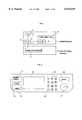
- FIG. 1is a diagram showing the construction of a mode setting apparatus embodying the present invention
- FIG. 2is a diagram showing the appearance of an operation panel shown in FIG. 1;
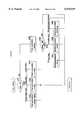
- FIG. 3is a diagram for illustrating display screens classified into a hierarchical structure
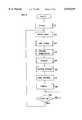
- FIG. 4is a flow chart illustrating the main routine to be executed by the mode setting apparatus shown in FIG. 1;
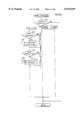
- FIG. 5is a flow chart illustrating a key check process shown in FIG. 4.
- FIGS. 6(a)-6(b)are a flow chart illustrating a display preparation process shown in FIG. 4;
- FIGS. 7(a)-7(b)are a flow chart illustrating a display process shown in FIG. 4;
- FIG. 8is a flow chart illustrating a setting process shown in FIG. 4.
- FIG. 9is a diagram illustrating changes of help screens on display
- FIG. 10is a diagram showing an example of mode check screen
- FIG. 11is a diagram showing an example of index screen
- FIG. 12is a diagram showing an example of basic screen
- FIG. 13is a diagram showing an example of filing screen.
- FIG. 14is a diagram showing an example of sort screen.
- FIG. 1is a block diagram showing the construction of the copying machine.
- the copying machineincludes an operation panel 1, and the body 2 of the copying machine.
- the operation panel 1includes a CPU (central processing unit) 3, key arrangement 4, touch panel key arrangement 5 and LCD (liquid crystal display) 6.
- the machine body 2includes an image processing unit 7.
- the usermanipulates the key arrangement 4 or touch panel key arrangement 5 to set a desired mode setting screen as displayed on the LCD 6, and sets a desired mode using the setting screen.
- the CPU 3identifies the input signal from the key arrangement 4 or touch key arrangement 5 to display a specified mode setting screen on the LCD 6 or controls the operation of the image processing unit 7.
- FIG. 2is a diagram showing the construction of the operation panel 1.
- the operation panel 1includes a mode check key 11, help key 12, index key 13, clear key 14, number entry keys 15, panel reset key 16, and start/stop key 17.
- the mode check key 11is a key for displaying a mode check screen for showing a list of all modes currently set.
- the help key 12is a key for displaying a help screen for showing instructions as to the mode provided for the apparatus.
- the index key 13is a key for displaying an index screen showing a list of modes which can be utilized by the user.
- the number entry keys 15 and the clear key 14are used for inputting, for example, the number of sheets or a magnification, or for correcting the input.
- the panel reset key 16is a key for canceling all set modes.
- the start/stop key 17is a key for starting or stopping a copying operation.
- the touch panel key arrangement 5is provided on the surface of the LCD 6 for enabling the user to give a desired input by directly touching the screen displayed.
- FIG. 3is a diagram showing the hierarchical structure of display screens.
- the display screensare hierarchically divided into three strata, i.e., a first screen, second screens and third screens.
- a basic screen H1is provided as the first screen.
- the second screensare a filing screen M1, create screen M2 and finishing screen M3.
- Provided as the third screensare a paper size screen L1, zoom screen L2, exposure screen L3, file margin screen L4, erase screen L5, book copy screen L6, X/Y zoom screen L7, negative-positive reversal screen L8, mirror image screen L9, multi-page enlarge screen L10, image outline screen L11, sort screen L12 and staple screen L13.
- the third screenscorrespond to the following respective modes.
- the paper size screen L1is used for setting a paper size mode in which the size of copy paper is specified.
- the zoom screen L2is used for setting a zoom mode in which a magnification is specified at which documents are to be copied.
- the exposure screen L3is used for setting an exposure mode in which the density of copies is specified.
- the file margin screen L4is used for setting a file margin mode in which copies are made with a blank area provided for filing.
- the erase screen L5is used for setting an erase mode in which documents are copied as masked over a specified area measured from one end.
- the book copy screen L6is used for setting a book copy mode in which whether a book used as an original is to be opened rightward or leftward is specified.
- the X/Y zoom screen L7is used for setting an X/Y zoom mode in which documents are copied at different magnifications in the X and Y directions.
- the negative-positive reversal screen L8is used for setting a negative-positive reversal mode in which documents are copied with the negative and positive areas thereof reversed.
- the mirror image screen L9is used for setting a mirror image mode in which mirror-image copies of documents are produced.
- the multi-page enlarge screen L10is used for setting a multi-page enlarge mode in which documents are copied each as divided into a plurality of sheets and as enlarged to the size of specified paper, on a specified scale or to a specified size.
- the image outline screen L11is used for setting an image outline mode in which only the outlines of document images are extracted and copied.
- the sort screen L12is used for setting a sort mode in which copy sheets are discharged as sorted.
- the staple screen L13is used for setting a staple mode in which copy sheets are discharged as stapled.
- the mode setting screens described aboveare examples; other mode setting screens may be used additionally.
- the hierarchical structureneed not be limited to a three-stratum structure but can be other structure.
- a mode check screen H2, help screen H3 and index screen H4are used as medium screens according to the present embodiment. More specifically, the mode check screen H2, help screen H3 or index screen H4 can be changed over directly to the desired one of the mode setting screens. Accordingly, the user can cause the LCD to directly display the desired mode setting screen by directly pressing the mode check key 11, help key 12 or index key 13 shown in FIG. 2 and selecting the desired mode setting screen with use of the medium screen instead of resorting to the mode setting method in conformity with the usual hierarchical structure, whereby the desired mode can be directly set.
- the medium screenmay be a screen which is provided for another purpose as in the present embodiment, or may be a medium screen additionally provided specifically for use as such.
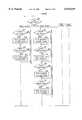
- FIG. 4is a flow chart illustrating the main routine to be executed by the present apparatus.
- the flow chart shown in FIG. 4is stored in advance in a memory (not shown) within the CPU 3 of FIG. 1, and is read out as required by the CPU 3 for execution.
- the CPU 3When the power supply for the machine body 2 is turned on, the CPU 3 initializes various devices and displays the basic screen H1 in step S1.
- step S2the CPU 3 starts an internal timer to measure time.
- the sequencereturns to step S2 for the execution of the same processes again.
- the flow chartshows a cyclic program. Accordingly, the processes to be described below are not always executed in time series but the state of execution differs with the time setting.
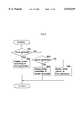
- Step S3is a key check process, which will be described next in reference to FIG. 5, which is a flow chart illustrating the key check process.
- step S31an inquiry is made as to whether a key input has been given in step S31.
- keythus used refers to the mode check key 11, help key 12 or index key 13.
- step S31is followed by step S32 if the key is identified as the mode check key 11, or by step S33 if it is found to be the help key 12, or by step S34 if it is found to be the index key 13.
- step S35follows.
- steps S32 to S34the mode check screen, help screen and index screen are set, respectively, as a specified first parameter, and the sequence returns to the main routine of FIG. 4.
- the basic screenis set as the first parameter in step S35.
- step S36an inquiry is made as to whether a panel key has been depressed.
- panel keyrefers to the touch panel key arrangement 5 provided on the LCD 6, and the inquiry checks whether the user has pressed a specified key on the screen using the key arrangement 5.
- step S36is followed by step S37 when a filing key is pressed for displaying the corresponding second screen, or by step S38 when a create key is pressed, or by step S39 when a finishing key is pressed.
- the sequencereturns to the main routine of FIG. 4 in the presence of other key input and in the absence of panel key input.
- steps S37 to S39the filing screen, create screen and finishing screen are set respectively as a second parameter, and the sequence returns to the main routine shown in FIG. 4.
- the first screen or medium screenis set as the first parameter, and the second screen is set as the second parameter by the foregoing key check process.
- Step S4 of FIG. 4is a display preparation process, which will now be described in reference to FIGS. 6(a)-6(b), which are a flow chart illustrating the display preparation process.
- step S41an inquiry is made as to whether the second parameter has been set.
- step S42follows.
- step S42follows.
- the answer is affirmativethe following procedure is executed.
- the erase modefor example, is set. More specifically, the user selects the erase mode, and an inquiry is made as to whether erasure is requested in step S43. When the request is made, the erase screen is set as a third parameter in step S44.
- step S45follows.
- step S45checks whether the erase mode has been completely set.
- the second and third parametersare reset in step S46. If otherwise, step S46 is skipped.
- the erase screencan be set as the third parameter, and the second and third parameters reset after the completion of erase mode setting.
- the filing screeninvolves the file margin mode and book copy mode in addition to the erase mode described.
- the screen for setting each of these modesis set as the third parameter, and the second and third parameters are reset after the mode has been set as in steps S43 to S46, whereupon the sequence returns to the main routine shown in FIG. 4.
- the procedure for each of these modesincludes manipulation by the user, and the manipulation by the user will not be completed within a short period of time, while the main routine is executed cyclically within a specified period of time. It is therefore unlikely that a plurality of mode setting screens will be set in an overlapping relation as the third parameter or that the second and third parameters will be reset before a specified mode screen will be displayed in accordance with the third parameter.
- the second parameteris the create screen
- a procedure similar to that of steps S43 to S46is executed for each of the X/Y zoom screen, negative-positive reversal screen, mirror image screen, multi-page enlarge screen and image outline screen to set a mode setting screen specified by the user as the third parameter and reset the second and third parameters after the completion of mode setting.
- a similar procedureis executed also in the case where the second parameter is the finishing screen to set sort mode or staple mode setting screen as the third parameter and reset the second and third parameters after the completion of mode setting.
- step S42an inquiry is made in step S42 as to whether the first parameter has been set.
- step S47 to step S50similar to steps S43 to S46, follow to set the zoom screen as the third parameter and reset the second and third parameters after the completion of zoom mode setting.
- Other modes of the basic screensuch as paper size mode and exposure mode, are also set similarly.
- step S51 to step S54follow to set the zoom screen as the third parameter and reset the second and third parameters after the completion of zoom mode setting as in steps S43 to S46.
- Other modes of the mode check screensuch as erase mode, are set similarly.
- the same procedure as aboveis executed also when the first parameter is the help screen or index screen.
- the display preparation processwherein mode setting screens based on a usual hierarchical structure are used sets third screens, i.e., these mode setting screens, as the third parameter.
- the mode setting screenscan also be set directly as the third parameter using a mode check screen, help screen and index screen.
- Step S5 of FIG. 4is a display process, which will be described next with regard to FIG. 7, which is a flow chart illustrating the display process.
- step S61an inquiry is made in step S61 as to whether the third parameter has been set.
- step S62follows. If otherwise, step S63 follows.
- the mode setting screen set as the third parameteris displayed in step S62.
- step S63an inquiry is made in step S63 as to whether the second parameter has been set. When the answer is affirmative, the second screen set as the second parameter is displayed in step S64. If otherwise, the first screen or medium screen set as the first paremeter is displayed in step S65.
- the third screeni.e., mode setting screen
- the specified mode setting screencan be displayed which enables the user to directly select the desired mode.
- the second screen set as the second parameteris displayed, so that the user can select a third screen below the second screen.
- a screen corresponding to the first parameteris set. Accordingly, when the second and third parameters are reset by the display preparation process of FIG. 6, the basic screen or medium screen set as the first parameter is to be displayed, and upon completion of setting, the original basics screen or medium screen is resumed on the display, so that other mode can further be set easily.
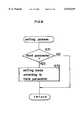
- Step S6 of FIG. 4is a setting process, which will be described next with regard to FIG. 8, which is a flow chart illustrating the setting process.
- step S71an inquiry is made in step S71 as to whether the third parameter has been set.
- step S72follows in which the mode corresponding to the third parameter is set in the machine body 2.
- step S72is skipped, and the sequence returns to the main routine of FIG. 4.
- step S9An inquiry is made in step S9 as to whether the time measured by the timer set in step S2 is in excess of the predetermined time. When the time measurement is in excess of the predetermined value, step S2 follows again. Step S9 is repeated if otherwise.
- a mode check screen, help screen or index screenis usable to directly display a desired mode setting screen and set the desired mode.
- FIGS. 9(a) and 9(b)are diagrams illustrating changes of help screens on display.
- a mode list screen 91which is a help screen, is displayed when the help key 12 shown in FIG. 2 is depressed.
- the userusually selects a desired mode from the mode list screen 91, whereupon the user can view a mode instruction screen giving instructions as to the mode.
- a paper size instruction screeni.e., help screen (paper size) 92
- a zoom instruction screeni.e., help screen (zoom) 93
- the userdesires to set the displayed mode at this time, he presses "select” key, whereby a screen for setting the displayed mode is presented.
- the mode list screen 91can be resumed by depressing a "menu" key, or depression of " ⁇ " or “ ⁇ ” key changes over the current screen to the preceeding or following mode instruction screen.
- the help key 12 shown in FIG. 2is depressed again, whereby the basic screen can be resumed. Consequently, while reading the instructions as to the desired mode in the usual help mode, the user is able to change over the help screen directly to the corresponding mode setting screen, which enables him to set the desired mode.
- the desired modecan be set easily by a simplified manipulation procedure.
- FIG. 10is a diagram showing an example of mode check screen.
- selected mode namesare indicated by hatching, as distinguished from unselected mode names which remain unhatched.
- the mode check key 11 shown in FIG. 2By pressing the mode check key 11 shown in FIG. 2, the user can display the mode check screen as changed over from any display screen. The original screen can be resumed by pressing the mode check key 11 again.
- the screen for setting the selected modecan be displayed upon a change-over.
- the corresponding mode setting screenscan be displayed by displaying an optional one of these mode setting screens first, followed by setting of the mode concerned, thereafter displaying another one of the mode setting screens and repeating this procedure. In this way, all the modes selected on the mode check screen can be set.
- the mode check screenis used as a medium screen as described above, the user can set modes while recognizing the current setting and will not be perplexed with the method of manipulation, which is a great convenience. Since the mode check screen can be changed over to a desired mode setting screen, the manual procedure needed is definite and is always less than the usual method of manipulation. The desired mode can therefore be set easily by a simplified procedure.
- FIG. 11is a diagram showing an example of the index screen.
- the index screenis displayed to show a list of modes available to the user as shown in FIG. 11. Since the index screen can be changed over to a desired mode setting screen, the desired mode can be set easily by a simplified manual procedure.
- desired keys on the display screenis settable with use of the selected mode setting screen. Accordingly, the desired mode can be set easily by a simplified manipulation procedure.
- the change-over to the desired mode setting screencan be accomplished directly using a medium screen.
- the mode of different stratumcan therefore be set with ease.
- the medium screenis further usable for selecting a plurality of modes, which can therefore be set easily.
- the help screencan be changed over directly to a mode setting screen corresponding to the help screen to set the desired mode, so that the mode corresponding to the help screen can be set with ease.
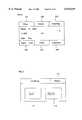
- the basic screen H1 as shown in FIG. 12is displayed on the LCD 6.
- Touch panel key arrangement 5is provided on the basic screen H1 on the LCD 6.
- the basic screen H1changes into the filing screen M1.
- the basic screen H1changes into the create screen M2 in response to touch of create key 102, and changes into the finishing screen M3 in response to touch of finishing key 103.
- the basic screen H1changes into the paper size screen L1 in response to touch of paper size key 104, changes into the zoom screen L2 in response to touch of zoom key 105, and changes into the exposure screen L3 in response to touch of exposure key 106.
- the sort modebelongs to "finishing", therefore the user touches the finishing key 103 on the basic screen H1. Then, the basic screen H1 changes into the finishing screen M3 as shown in FIG. 13 as a second screen.
- the touch panel key arrangement 5is also provided on the surface of the finishing screen M3. When sort key 112 is touched, the finishing screen M3 changes into sort screen L12. When staple key 113 is touched, the finishing screen M3 changes into the staple screen L13. Further, the finishing screen M3 returns to the basic screen HI by touch of return key 111.
- the finishing screen M3changes into the sort screen L12 as shown in FIG. 14.
- the touch panel key arrangement 5is also provided on the surface of the sort screen L12, therefore a function of the sort mode is set in response to touch of the touch panel key.
- usual sortis set by touch of sort key 122
- grouping sortwhich sorts copies according to each original is set by touch of grouping key 123.
- the usercan set the desired function of sort mode by a touch of the touch panel key on condition that the sort screen L12 is displayed on the LCD 6.
- the usercan cancel the function of sort mode which has been once set by a touch of non-sort key 124.
- the sort screen L12returns to the finishing screen M3 by touch or return key 121.
- the userwhen the user does not know which second screen the sort mode belongs to on condition that the basic screen H1 is displayed on the LCD 6, or the user wants to change the screen directly from the basic screen H1 into the sort screen L12, the user presses index key 13. Then the index screen H4 as shown in FIG. 11 is displayed on the LCD 6. The user selects the sort mode on the index screen H4. In response to the selection of the sort mode, the index screen H4 changes directly into the sort screen L12. The user can set the desired function of the sort mode by a touch of the touch panel key on condition that the sort screen L12 is displayed on the LCD 6.
- Changes of screenswill be explained in detail in case of where a plurality of modes are selected on the index screen H4 by giving an example that the user sets the file margin mode and the sort mode.
- the userselects the file margin mode and the sort mode on condition that the index screen H4 is displayed on the LCD 6, and the index screen H4 changes into the file margin screen L4.
- the usersets a direction or margin, a way or making file margin (shift or reduction), and a size of file margin.
- the file margin screen L4changes into the sort screen L12.
- the usercan set a desired function of sort mode by touch of the touch panel key on condition that the sort, screen L12 is displayed on the LCD 6.
Landscapes
- Engineering & Computer Science (AREA)
- Human Computer Interaction (AREA)
- Multimedia (AREA)
- Signal Processing (AREA)
- Theoretical Computer Science (AREA)
- General Physics & Mathematics (AREA)
- Physics & Mathematics (AREA)
- General Engineering & Computer Science (AREA)
- Software Systems (AREA)
- Microelectronics & Electronic Packaging (AREA)
- Control Or Security For Electrophotography (AREA)
- Facsimiles In General (AREA)
- User Interface Of Digital Computer (AREA)
Abstract
Description
This application is a continuation of application Ser. No. 08/286,278, filed Aug. 5, 1994 now abandoned.
1. Field of the Invention
The present invention relates to mode setting apparatus, and more particularly to mode setting apparatus, such as copying machines, printers and facsimile apparatus, which are adapted to set a desired mode as slected from among a plurality of modes using mode setting screens of hierarchical structure.
2. Description of the Related Art
A liquid crystal display, CRT or the like is used in the operation panels of copying machines which are one type of conventional mode setting apparatus to give the panel apparent simplicity and improved operability. The operation panel is adapted to present items of information in time series on the liquid crystal display, or like display device, to enable the user to select different items using a key. This serves to reduce the number of keys on the operation panel. Furthermore, various sentences and messages can also be presented on the display device, which therefore enables the user to readily understand methods of manipulation and instructions as to modes.
The conventional mode setting apparatus described is limited in the number of keys assigned to the selection items in view of the installation space. The restrictions to the size of display screen of the display device, the clarity of the display screen, etc. impose limitations on the information to be displayed on one screen. Accordingly, when a plurality of modes are to be set, the modes need to be classified into a hierarchical structure and displayed hierarchically. When the hierarchical structure is used for setting an increased number of modes, a plurality of mode setting screens are to be provided between the mode setting screen at a high level and those at a low level. Consequently, the user is unable to identify the mode setting screen of a particular stratum in which the mode to be set is present, and also to understand how to manipulate keys to select the desired mode, hence arises the present problem of the user failing to readily set the desired mode.
Conventional apparatus further have the problem that when a mode setting screen at a low level is to be changed to a mode setting screen at a low level in a different stratum, it is necessary to follow the hierarchical order first upward to the mode setting screen at the top stratum and then follow the order downward to the contemplated mode setting screen in the desired stratum.
Further, when a plurality of modes are to be set, another problem is encountered in that the hierarchical order must be followed upward and downward to a particular mode setting screen for each of these modes.
Further, when a help screen is to be changed to a mode setting screen corresponding to the help, mode setting screens need to be traced from stratum to stratum although the user is aware what mode setting screen is to be displayed.
An object of the present invention is to provide a mode setting apparatus which can be manipulated by a simplified procedure to readily set a desired mode.
Another object of the invention is to provide a mode setting apparatus wherein when a mode setting screen at a low level is to be changed to a mode setting screen at a low level in a different stratum, the changeover to the desired mode setting screen can be accomplished directly using a medium screen.
Another object of the invention is to provide a mode setting apparatus wherein when a plurality of modes are to be set, mode setting screens corresponding to these modes are displayed in succession.
Another object of the present invention is to provide a mode setting apparatus wherein a help screen can be changed directly to a mode setting screen corresponding to the help screen.
With the mode setting apparatus of the present invention, a desired mode setting screen can be directly selected using a medium screen, and the desired mode can be set with use of the selected mode setting screen.
Further in the case where a mode setting screen at a low level is to be changed to a mode setting screen at a low level in a different stratum, the change to the desired mode setting screen can be accomplished directly using a medium screen, allowing the desired mode to be set.
A plurality of modes can be selected using the medium screen.
A help screen can be changed over directly to a mode setting screen corresponding to the help screen, whereby the desired mode can be set.
These and other objects, advantages and features of the invention will become apparent from the following description thereof taken in conjunction with the accompanying drawings which illustrate specific embodiments of the invention.
In the following description, like parts are designated by like reference numbers throughout the several drawings.
FIG. 1 is a diagram showing the construction of a mode setting apparatus embodying the present invention;
FIG. 2 is a diagram showing the appearance of an operation panel shown in FIG. 1;
FIG. 3 is a diagram for illustrating display screens classified into a hierarchical structure;
FIG. 4 is a flow chart illustrating the main routine to be executed by the mode setting apparatus shown in FIG. 1;
FIG. 5 is a flow chart illustrating a key check process shown in FIG. 4;
FIGS. 6(a)-6(b) are a flow chart illustrating a display preparation process shown in FIG. 4;
FIGS. 7(a)-7(b) are a flow chart illustrating a display process shown in FIG. 4;
FIG. 8 is a flow chart illustrating a setting process shown in FIG. 4;
FIG. 9 is a diagram illustrating changes of help screens on display;
FIG. 10 is a diagram showing an example of mode check screen;
FIG. 11 is a diagram showing an example of index screen;
FIG. 12 is a diagram showing an example of basic screen;
FIG. 13 is a diagram showing an example of filing screen; and
FIG. 14 is a diagram showing an example of sort screen.
A copying machine which has a mode setting apparatus embodying the invention will be described next with reference to the drawings. FIG. 1 is a block diagram showing the construction of the copying machine.
Referring to FIG. 1, the copying machine includes anoperation panel 1, and thebody 2 of the copying machine. Theoperation panel 1 includes a CPU (central processing unit) 3,key arrangement 4, touchpanel key arrangement 5 and LCD (liquid crystal display) 6. Themachine body 2 includes animage processing unit 7.
The user manipulates thekey arrangement 4 or touchpanel key arrangement 5 to set a desired mode setting screen as displayed on theLCD 6, and sets a desired mode using the setting screen. TheCPU 3 identifies the input signal from thekey arrangement 4 ortouch key arrangement 5 to display a specified mode setting screen on theLCD 6 or controls the operation of theimage processing unit 7.
Theoperation panel 1 will be described next in detail with reference to the drawing concerned. FIG. 2 is a diagram showing the construction of theoperation panel 1.
Theoperation panel 1 includes a mode check key 11, helpkey 12,index key 13,clear key 14,number entry keys 15,panel reset key 16, and start/stop key 17.
The mode check key 11 is a key for displaying a mode check screen for showing a list of all modes currently set. Thehelp key 12 is a key for displaying a help screen for showing instructions as to the mode provided for the apparatus. Theindex key 13 is a key for displaying an index screen showing a list of modes which can be utilized by the user. Thenumber entry keys 15 and theclear key 14 are used for inputting, for example, the number of sheets or a magnification, or for correcting the input. Thepanel reset key 16 is a key for canceling all set modes. The start/stop key 17 is a key for starting or stopping a copying operation. The touchpanel key arrangement 5 is provided on the surface of theLCD 6 for enabling the user to give a desired input by directly touching the screen displayed.
A description will be given next of display screens corresponding to the respective modes provided for the copying machine. The modes of the copying machine are hierarchically divided according to what they are, and the display screens for the respective modes are also hierarchically divided. FIG. 3 is a diagram showing the hierarchical structure of display screens.
As shown in FIG. 3, the display screens are hierarchically divided into three strata, i.e., a first screen, second screens and third screens. A basic screen H1 is provided as the first screen. The second screens are a filing screen M1, create screen M2 and finishing screen M3. Provided as the third screens are a paper size screen L1, zoom screen L2, exposure screen L3, file margin screen L4, erase screen L5, book copy screen L6, X/Y zoom screen L7, negative-positive reversal screen L8, mirror image screen L9, multi-page enlarge screen L10, image outline screen L11, sort screen L12 and staple screen L13.
The third screens correspond to the following respective modes. The paper size screen L1 is used for setting a paper size mode in which the size of copy paper is specified. The zoom screen L2 is used for setting a zoom mode in which a magnification is specified at which documents are to be copied. The exposure screen L3 is used for setting an exposure mode in which the density of copies is specified. The file margin screen L4 is used for setting a file margin mode in which copies are made with a blank area provided for filing. The erase screen L5 is used for setting an erase mode in which documents are copied as masked over a specified area measured from one end. The book copy screen L6 is used for setting a book copy mode in which whether a book used as an original is to be opened rightward or leftward is specified. The X/Y zoom screen L7 is used for setting an X/Y zoom mode in which documents are copied at different magnifications in the X and Y directions. The negative-positive reversal screen L8 is used for setting a negative-positive reversal mode in which documents are copied with the negative and positive areas thereof reversed. The mirror image screen L9 is used for setting a mirror image mode in which mirror-image copies of documents are produced. The multi-page enlarge screen L10 is used for setting a multi-page enlarge mode in which documents are copied each as divided into a plurality of sheets and as enlarged to the size of specified paper, on a specified scale or to a specified size. The image outline screen L11 is used for setting an image outline mode in which only the outlines of document images are extracted and copied. The sort screen L12 is used for setting a sort mode in which copy sheets are discharged as sorted. The staple screen L13 is used for setting a staple mode in which copy sheets are discharged as stapled.
The mode setting screens described above are examples; other mode setting screens may be used additionally. The hierarchical structure need not be limited to a three-stratum structure but can be other structure.
Besides the mode setting screens described, a mode check screen H2, help screen H3 and index screen H4 are used as medium screens according to the present embodiment. More specifically, the mode check screen H2, help screen H3 or index screen H4 can be changed over directly to the desired one of the mode setting screens. Accordingly, the user can cause the LCD to directly display the desired mode setting screen by directly pressing the mode check key 11,help key 12 or index key 13 shown in FIG. 2 and selecting the desired mode setting screen with use of the medium screen instead of resorting to the mode setting method in conformity with the usual hierarchical structure, whereby the desired mode can be directly set. The medium screen may be a screen which is provided for another purpose as in the present embodiment, or may be a medium screen additionally provided specifically for use as such.
Next, the operation of the mode setting apparatus of the present embodiment will be described. FIG. 4 is a flow chart illustrating the main routine to be executed by the present apparatus. The flow chart shown in FIG. 4 is stored in advance in a memory (not shown) within theCPU 3 of FIG. 1, and is read out as required by theCPU 3 for execution.
When the power supply for themachine body 2 is turned on, theCPU 3 initializes various devices and displays the basic screen H1 in step S1.
Next in step S2, theCPU 3 starts an internal timer to measure time. In the case where the time measurement is found to be in excess of a predetermined period of time in step S9 after the processes to be described below have been practiced, the sequence returns to step S2 for the execution of the same processes again. Thus, the flow chart shows a cyclic program. Accordingly, the processes to be described below are not always executed in time series but the state of execution differs with the time setting.
Step S3 is a key check process, which will be described next in reference to FIG. 5, which is a flow chart illustrating the key check process.
First, an inquiry is made as to whether a key input has been given in step S31. The term "key" thus used refers to the mode check key 11,help key 12 orindex key 13. Step S31 is followed by step S32 if the key is identified as the mode check key 11, or by step S33 if it is found to be thehelp key 12, or by step S34 if it is found to be theindex key 13. When the inquiry is answered in the negative, step S35 follows.
In steps S32 to S34, the mode check screen, help screen and index screen are set, respectively, as a specified first parameter, and the sequence returns to the main routine of FIG. 4.
In the absence of key input, on the other hand, the basic screen is set as the first parameter in step S35.
Subsequently in step S36, an inquiry is made as to whether a panel key has been depressed. The term "panel key" refers to the touch panelkey arrangement 5 provided on theLCD 6, and the inquiry checks whether the user has pressed a specified key on the screen using thekey arrangement 5. Step S36 is followed by step S37 when a filing key is pressed for displaying the corresponding second screen, or by step S38 when a create key is pressed, or by step S39 when a finishing key is pressed. The sequence returns to the main routine of FIG. 4 in the presence of other key input and in the absence of panel key input.
In steps S37 to S39, the filing screen, create screen and finishing screen are set respectively as a second parameter, and the sequence returns to the main routine shown in FIG. 4.
The first screen or medium screen is set as the first parameter, and the second screen is set as the second parameter by the foregoing key check process.
Step S4 of FIG. 4 is a display preparation process, which will now be described in reference to FIGS. 6(a)-6(b), which are a flow chart illustrating the display preparation process.
First in step S41, an inquiry is made as to whether the second parameter has been set. When the answer is negative, step S42 follows. When the answer is affirmative, the following procedure is executed.
In the case where the filing screen is set as the second parameter, the erase mode, for example, is set. More specifically, the user selects the erase mode, and an inquiry is made as to whether erasure is requested in step S43. When the request is made, the erase screen is set as a third parameter in step S44.
If otherwise, step S45 follows.
Next, step S45 checks whether the erase mode has been completely set. When the erase mode has been set, the second and third parameters are reset in step S46. If otherwise, step S46 is skipped. By the procedure described, the erase screen can be set as the third parameter, and the second and third parameters reset after the completion of erase mode setting. The filing screen involves the file margin mode and book copy mode in addition to the erase mode described. The screen for setting each of these modes is set as the third parameter, and the second and third parameters are reset after the mode has been set as in steps S43 to S46, whereupon the sequence returns to the main routine shown in FIG. 4. The procedure for each of these modes includes manipulation by the user, and the manipulation by the user will not be completed within a short period of time, while the main routine is executed cyclically within a specified period of time. It is therefore unlikely that a plurality of mode setting screens will be set in an overlapping relation as the third parameter or that the second and third parameters will be reset before a specified mode screen will be displayed in accordance with the third parameter.
In the case where the second parameter is the create screen, a procedure similar to that of steps S43 to S46 is executed for each of the X/Y zoom screen, negative-positive reversal screen, mirror image screen, multi-page enlarge screen and image outline screen to set a mode setting screen specified by the user as the third parameter and reset the second and third parameters after the completion of mode setting.
A similar procedure is executed also in the case where the second parameter is the finishing screen to set sort mode or staple mode setting screen as the third parameter and reset the second and third parameters after the completion of mode setting.
On the other hand, when the second parameter has not been set an inquiry is made in step S42 as to whether the first parameter has been set. In the case where the first parameter is the basic screen, step S47 to step S50, similar to steps S43 to S46, follow to set the zoom screen as the third parameter and reset the second and third parameters after the completion of zoom mode setting. Other modes of the basic screen, such as paper size mode and exposure mode, are also set similarly.
Further in the case where the first parameter is the mode check screen, step S51 to step S54 follow to set the zoom screen as the third parameter and reset the second and third parameters after the completion of zoom mode setting as in steps S43 to S46. Other modes of the mode check screen, such as erase mode, are set similarly. The same procedure as above is executed also when the first parameter is the help screen or index screen.
Thus, the display preparation process wherein mode setting screens based on a usual hierarchical structure are used sets third screens, i.e., these mode setting screens, as the third parameter. The mode setting screens can also be set directly as the third parameter using a mode check screen, help screen and index screen.
Step S5 of FIG. 4 is a display process, which will be described next with regard to FIG. 7, which is a flow chart illustrating the display process.
First, an inquiry is made in step S61 as to whether the third parameter has been set. When the parameter is set, step S62 follows. If otherwise, step S63 follows.
When the third parameter is set, the mode setting screen set as the third parameter is displayed in step S62.
If the third parameter is not set, on the other hand, an inquiry is made in step S63 as to whether the second parameter has been set. When the answer is affirmative, the second screen set as the second parameter is displayed in step S64. If otherwise, the first screen or medium screen set as the first paremeter is displayed in step S65.
When the third parameter has been set, the third screen, i.e., mode setting screen, set as the third parameter is displayed as described above. Thus, based on the third parameter set by the above display preparation process, the specified mode setting screen can be displayed which enables the user to directly select the desired mode. Further in the case where the third parameter is not set but the second parameter is set, the second screen set as the second parameter is displayed, so that the user can select a third screen below the second screen. Further in the case where the third and second parameters are not set, a screen corresponding to the first parameter is set. Accordingly, when the second and third parameters are reset by the display preparation process of FIG. 6, the basic screen or medium screen set as the first parameter is to be displayed, and upon completion of setting, the original basics screen or medium screen is resumed on the display, so that other mode can further be set easily.
Step S6 of FIG. 4 is a setting process, which will be described next with regard to FIG. 8, which is a flow chart illustrating the setting process.
First, an inquiry is made in step S71 as to whether the third parameter has been set. When the answer is affirmative, step S72 follows in which the mode corresponding to the third parameter is set in themachine body 2. When the third parameter is not set, on the other hand, step S72 is skipped, and the sequence returns to the main routine of FIG. 4.
Subsequently, a copying process and other processes are executed in steps S7 and S8, followed by step S9.
An inquiry is made in step S9 as to whether the time measured by the timer set in step S2 is in excess of the predetermined time. When the time measurement is in excess of the predetermined value, step S2 follows again. Step S9 is repeated if otherwise.
Besides mode setting with use of mode setting screens provided by the usual hierarchical structure, a mode check screen, help screen or index screen, each of which is a medium screen, is usable to directly display a desired mode setting screen and set the desired mode.
The help screen will be described next. FIGS. 9(a) and 9(b) are diagrams illustrating changes of help screens on display.
With the mode setting apparatus of the present embodiment, amode list screen 91, which is a help screen, is displayed when thehelp key 12 shown in FIG. 2 is depressed. The user usually selects a desired mode from themode list screen 91, whereupon the user can view a mode instruction screen giving instructions as to the mode. For example, when "paper size" is selected, a paper size instruction screen, i.e., help screen (paper size) 92, is displayed. In the case where "zoom" is selected, a zoom instruction screen, i.e., help screen (zoom) 93, is displayed. When the user desires to set the displayed mode at this time, he presses "select" key, whereby a screen for setting the displayed mode is presented. Alternatively, themode list screen 91 can be resumed by depressing a "menu" key, or depression of "Δ" or "∇" key changes over the current screen to the preceeding or following mode instruction screen. When it is desired to discontinue the procedure with the help screens, thehelp key 12 shown in FIG. 2 is depressed again, whereby the basic screen can be resumed. Consequently, while reading the instructions as to the desired mode in the usual help mode, the user is able to change over the help screen directly to the corresponding mode setting screen, which enables him to set the desired mode. Thus, the desired mode can be set easily by a simplified manipulation procedure.
Next, the mode check screen will be described. FIG. 10 is a diagram showing an example of mode check screen.
As shown in FIG. 10, selected mode names are indicated by hatching, as distinguished from unselected mode names which remain unhatched. By pressing the mode check key 11 shown in FIG. 2, the user can display the mode check screen as changed over from any display screen. The original screen can be resumed by pressing the mode check key 11 again. Further by selecting a desired mode in the mode check screen with the touch panelkey arrangement 5, the screen for setting the selected mode can be displayed upon a change-over. Further with a plurality of modes selected on the mode check screen, the corresponding mode setting screens can be displayed by displaying an optional one of these mode setting screens first, followed by setting of the mode concerned, thereafter displaying another one of the mode setting screens and repeating this procedure. In this way, all the modes selected on the mode check screen can be set.
In the case where the mode check screen is used as a medium screen as described above, the user can set modes while recognizing the current setting and will not be perplexed with the method of manipulation, which is a great convenience. Since the mode check screen can be changed over to a desired mode setting screen, the manual procedure needed is definite and is always less than the usual method of manipulation. The desired mode can therefore be set easily by a simplified procedure.
The index screen will be described next. FIG. 11 is a diagram showing an example of the index screen. The index screen is displayed to show a list of modes available to the user as shown in FIG. 11. Since the index screen can be changed over to a desired mode setting screen, the desired mode can be set easily by a simplified manual procedure.
Although desired keys on the display screen is settable with use of the selected mode setting screen. Accordingly, the desired mode can be set easily by a simplified manipulation procedure.
Further in the case where a mode setting screen at a low level is to be changed over to a mode setting screen of low level in a different stratum, the change-over to the desired mode setting screen can be accomplished directly using a medium screen. The mode of different stratum can therefore be set with ease.
The medium screen is further usable for selecting a plurality of modes, which can therefore be set easily.
The help screen can be changed over directly to a mode setting screen corresponding to the help screen to set the desired mode, so that the mode corresponding to the help screen can be set with ease.
Although the present invention has been fully described by way of examples with reference to the accompanying drawings, it is to be noted that various changes and modifications will be apparent to those skilled in the art. Therefore, unless otherwise such changes and modifications depart from the scope of the present invention, they should be construed as being included therein.
Finally, changes of screens will be explained in detail hereinafter by giving an example that a user sets the sort mode.
When the power supply for themachine body 2 is turned on, the basic screen H1 as shown in FIG. 12 is displayed on theLCD 6. Touch panelkey arrangement 5 is provided on the basic screen H1 on theLCD 6. When filing key 101 is touched, the basic screen H1 changes into the filing screen M1. Similarly, the basic screen H1 changes into the create screen M2 in response to touch of create key 102, and changes into the finishing screen M3 in response to touch of finishing key 103. Further, the basic screen H1 changes into the paper size screen L1 in response to touch ofpaper size key 104, changes into the zoom screen L2 in response to touch ofzoom key 105, and changes into the exposure screen L3 in response to touch ofexposure key 106.
The sort mode belongs to "finishing", therefore the user touches the finishing key 103 on the basic screen H1. Then, the basic screen H1 changes into the finishing screen M3 as shown in FIG. 13 as a second screen. The touch panelkey arrangement 5 is also provided on the surface of the finishing screen M3. Whensort key 112 is touched, the finishing screen M3 changes into sort screen L12. Whenstaple key 113 is touched, the finishing screen M3 changes into the staple screen L13. Further, the finishing screen M3 returns to the basic screen HI by touch ofreturn key 111.
When the user selects the sort mode, the finishing screen M3 changes into the sort screen L12 as shown in FIG. 14. The touch panelkey arrangement 5 is also provided on the surface of the sort screen L12, therefore a function of the sort mode is set in response to touch of the touch panel key. For example, usual sort is set by touch ofsort key 122, grouping sort, which sorts copies according to each original is set by touch of groupingkey 123. In this way the user can set the desired function of sort mode by a touch of the touch panel key on condition that the sort screen L12 is displayed on theLCD 6. Moreover the user can cancel the function of sort mode which has been once set by a touch ofnon-sort key 124. Further, the sort screen L12 returns to the finishing screen M3 by touch orreturn key 121.
Furthermore, when the user does not know which second screen the sort mode belongs to on condition that the basic screen H1 is displayed on theLCD 6, or the user wants to change the screen directly from the basic screen H1 into the sort screen L12, the user pressesindex key 13. Then the index screen H4 as shown in FIG. 11 is displayed on theLCD 6. The user selects the sort mode on the index screen H4. In response to the selection of the sort mode, the index screen H4 changes directly into the sort screen L12. The user can set the desired function of the sort mode by a touch of the touch panel key on condition that the sort screen L12 is displayed on theLCD 6.
Changes of screens will be explained in detail in case of where a plurality of modes are selected on the index screen H4 by giving an example that the user sets the file margin mode and the sort mode. The user selects the file margin mode and the sort mode on condition that the index screen H4 is displayed on theLCD 6, and the index screen H4 changes into the file margin screen L4. The user sets a direction or margin, a way or making file margin (shift or reduction), and a size of file margin. When the user finishes setting the function of file margin mode, the file margin screen L4 changes into the sort screen L12. The user can set a desired function of sort mode by touch of the touch panel key on condition that the sort, screen L12 is displayed on theLCD 6.
Although the present invention has been fully described by way of examples with reference to the accompanying drawings, it is to be noted that various changes and modifications will be apparent to those skilled in the art. Therefore, unless such changes and modifications depart from the scope of the present invention, they should be construed as being included therein.
Claims (26)
1. A mode setting apparatus, comprising:
a switch device;
a plurality of mode setting screens each of which prompts a user to set a function corresponding to each mode, said mode setting screens being arranged in a hierarchical structure;
a mode list screen which lists each one of the plurality of mode setting screens, said mode list screen being independent of the hierarchical structure;
a display for displaying said mode setting screens and said mode list screen, said display displaying only one screen at a time, said one screen being a screen selected from said plurality of mode setting screens and said mode list screen; and
a display controller which displays one of said plurality of mode setting screens on the display according to the hierarchical structure in response to a first operation of the switch device, said first operation of said switch device causing said display controller to change a displayed screen from a first mode setting screen to a mode setting screen that is hierarchically adjacent to said first mode setting screen,
said display controller displaying said mode list screen on the display in response to a second operation of the switch device, said second operation of said switch device causing said display controller to chance a displayed screen to said mode setting screen without regard to the hierarchical structure,
and said display controller further displaying, when a mode setting screen is selected on the mode list screen, the specific mode setting screen selected.
2. A mode setting apparatus as claimed in claim 1, wherein the plurality of mode setting screens are hierarchically divided into three strata.
3. A mode setting apparatus as claimed in claim 2, wherein the mode setting screen displayed by the display controller is the lowest hierarchy in response to the third operation of the switch device.
4. A mode setting apparatus as claimed in claim 1, wherein the plurality of mode setting screens are divided into a plurality of groups.
5. A mode setting apparatus as claimed in claim 4, wherein the mode list screen indicates a list of mode setting screens which belong to at least groups other than the group to which the mode setting screen displayed prior to the second operation of the switch device belongs.
6. A mode setting apparatus as claimed in claim 4, wherein the number of strata divided hierarchically varies on each of the groups.
7. A mode setting apparatus as claimed in claim 1, wherein the mode list screen also indicates a setting condition of each mode.
8. A mode setting apparatus as claimed in claim 1, wherein the mode list screen indicates a list of all modes available to the user.
9. A mode setting apparatus, comprising:
a plurality of mode setting screens each of which prompts a user to set a function corresponding to each mode, said mode setting screens being arranged in a hierarchical structure;
a mode list screen which lists each one of the plurality of mode setting screens, said mode list screen being independent of the hierarchical structure;
a display for displaying said mode setting screens and said mode list screen, said display displaying only one screen at a time, said one screen being selected from said plurality of mode setting screens and said mode list screen;
first displaying means for sequentially displaying one of said plurality of mode setting screens on the display according to the hierarchical structure in response to a first manual operation, said first displaying means chancing a displayed screen from a first mode setting screen to a mode setting screen that is hierarchically adjacent to said first mode setting screen in response to said first manual operation;
second displaying means for displaying the mode list screen on the display in response to a second manual operation on condition that any mode setting screen is displayed on the display, said second displaying means changing a displayed screen to said mode setting screen without regard to the hierarchical structure in response to said second manual operation;
means for selecting one of the listed mode setting screens in response to a third manual operation on said mode list screen; and
third displaying means for displaying a specific mode setting screen corresponding to the selected mode setting screen on the display.
10. A mode setting apparatus as claimed in claim 9, wherein a touch panel key is displayed on the display and the first and second operations are carried out by touching said touch panel key.
11. A mode setting apparatus, comprising:
a plurality of mode setting screens each of which prompts a user to set a function corresponding to a respective mode, said plurality of mode setting screens being arranged in a hierarchical structure;
a mode list screen which lists all mode setting screens available to the user, said mode list screen being independent of the hierarchical structure;
a display for displaying said mode setting screens and said mode list screen, said display displaying only one screen at a time, said one screen being selected from said plurality of mode setting screens and said mode list screen; and
a display controller which displays one of said plurality of mode setting screens on the display in response to a first command, said display controller changing a displayed screen from a first mode setting to a mode setting screen that is hierarchically adjacent to said first mode setting screen in response to said first command, said display controller displaying, in response to a second command, said mode list screen on the display,
said display controller further displaying, when a mode setting screen is selected on said mode list screen, the specific mode setting screen selected.
12. The mode setting apparatus as claimed in claim 11, further comprising:
a second mode list screen which lists a plurality of mode setting screens including at least one mode setting screens listed on the mode list screen;
wherein the display controller further displays the second mode list screen,
and said display controller further displays said mode setting screen corresponding to a mode setting screen selected from said second mode list screen.
13. The mode setting apparatus as claimed in claim 11, further comprising:
a third mode list screen which lists a plurality of mode setting screens including at least one mode setting screen listed on the mode list screen and which is not included in the second mode list screen,
wherein the display controller further displays the third mode list screen,
and said display controller further displays said mode setting screen corresponding to a mode setting screen selected from said third mode list screen.
14. The mode setting apparatus as claimed in claim 11, wherein the mode setting apparatus is used in a copier, and the mode list screen lists all modes of function of the copier.
15. The mode setting apparatus as claimed in claim 11, wherein the display is a liquid crystal display.
16. A mode setting apparatus comprising:
a switch device;
a plurality of mode setting screens each of which prompts a user to set a function corresponding to each mode;
a first mode list screen which lists a plurality of mode setting screens;
a second mode list screen which lists a plurality of mode setting screens;
a display for displaying said mode setting screens and said mode list screens, said display displaying only one screen at a time, said one screen being a screen selected from said plurality of mode setting screens, said first mode list screen and said second mode list screen; and
a display controller which displays, when a mode setting screen is selected on the first or second mode list screens, a specific mode setting screen;
wherein at least one of said plurality of mode setting screens listed on said first mode list screen is also among said plurality of mode setting screens listed on said second mode list screen.
17. The mode setting apparatus as claimed in claim 16, further comprising:
a third mode list screen which lists a plurality of mode setting screens;
wherein at least one of said plurality of mode setting screens listed on said first mode list screen is also among said plurality of mode setting screens listed on said third mode list screen, and
wherein said display displays only one screen at a time, said one screen being a screen selected from said plurality of mode setting screens, said first mode list screen, said second mode list screen, and said third mode list screen, and wherein the display controller further displays, when a mode setting screen is selected on the third mode list screen, a specific mode setting screen.
18. The mode setting apparatus as claimed in claim 16, wherein the display is a liquid crystal display.
19. The mode setting apparatus as claimed in claim 16, wherein the switch device is a touch panel switch.
20. A mode setting apparatus which comprises:
a plurality of display screens that are hierarchically divided into strata, said strata including at least a first-level strata having a high-level basic screen and a low-level strata including a plurality of low-level mode setting screens;
at least one medium screen that is independent of said hierarchically divided display screens;
a display for displaying said plurality of display screens and said at least one medium screen, said display displaying only one screen at a time, said one screen being selected from said plurality of display screens and said at least one medium screen;
said plurality of low-level mode setting screens providing for setting operating modes, one low-level mode setting screen being provided for each one of a plurality of operating modes that are capable of being set;
said at least one medium screen including a mode list screen, said mode list screen listing each one of said plurality of low-level mode setting screens;
a display controller for sequentially controlling display of said plurality of display screens and said at least one medium screen;
a first means responsive to an operator input, to switch sequentially between said plurality of display screens according to the display screen hierarchical structure, said first means switching a displayed screen from a first display screen to a display screen that is hierarchically adjacent to said first display screen in response to an operator input;
a second means responsive to an operator input, to switch to a medium screen, including said mode list screen, directly from any display screen, said switch to a medium screen occurring independently of said display screen hierarchical structure; and
a third means responsive to an operator input, on condition that said mode list screen is displayed, to switch directly from said mode list screen to a selected one of any of said low-level mode setting screens so that an operating mode may be set, said third means switching a displayed screen from said mode list screen to said selected one of any of said low-level mode setting screens without regard to the hierarchical structure.
21. The mode setting apparatus of claim 20, wherein:
said mode list screen indicates a condition of each operating mode set.
22. The mode setting apparatus of claim 20, wherein:
said plurality of display screens includes a second-level strata including at least one intermediate-level screen, said second-level strata being hierarchically positioned between said first-level strata and said low-level strata.
23. The mode setting apparatus of claim 20 further comprising:
a plurality of help screens, one help screen for each low-level mode screen, each of said plurality of help screens providing information about a respective one of said plurality of operating modes that are capable of being set from said low-level mode setting screens, said plurality of help screens being independent of said hierarchically divided display screens;
said at least one medium screen further including a help list screen, said help list screen listing each one of said plurality of operating modes that are capable of being set for which a corresponding help screen is provided; and
a fourth means responsive to an operator input, on condition that said help list screen is displayed, to switch directly from said help list screen to any one of the thus listed help screens;
wherein said display displays said plurality of help screens, said display displaying only one of said plurality of display screens, only one of said at least one medium screen, or only one of said plurality of help screens at a time.
24. The mode setting apparatus of claim 23 further comprising:
a switch device responsive to an operator input, on condition that one of said plurality of help screens is displayed, to switch directly from the thus displayed help screen to said corresponding low-level mode setting screen so that an operating mode may be set.
25. A mode setting apparatus comprising:
a display;
a switch device;
a plurality of mode setting screens each of which prompts a user to set a function corresponding to each mode, said plurality of mode setting screens being arranged according to a hierarchical structure;
a first mode list screen which lists a plurality of mode setting screens;
a second mode list screen which lists a plurality of mode setting screens, each of said first and second mode list screens being independent of the hierarchical structure of said mode setting screens; and
a display controller for changing a displayed screen in response to a command;
wherein, in response to said command, when one of said plurality of mode setting screens is displayed on said display, said display controller changing a displayed screen to a second mode setting screen that is hierarchically adjacent to said one of said plurality of mode setting screens displayed;
wherein, in response to said command, when one of said first and second mode setting screens is displayed on said display, said display controller changing a displayed screen to a specific mode setting screen selected from said one of said first and second mode setting screens displayed; and
wherein at least one of said plurality of mode setting screens listed on said first mode list screen is also among said plurality of mode setting screens listed on said second mode list screen.
26. An image forming apparatus comprising:
a display;
a plurality of mode setting screens each of which prompts a user to set an image forming condition to each mode, each mode being an operation mode of the image forming apparatus;
a first mode list screen which lists a plurality of mode setting screens;
a second mode list screen which lists a plurality of mode setting screens; and
a display controller which displays, when a mode setting screen is selected on the first or second mode list screens, a specific mode setting screen;
wherein at least one of said plurality of mode setting screens listed on said first mode list screen is also among said plurality of mode setting screens listed on said second mode list screen.
Priority Applications (1)
| Application Number | Priority Date | Filing Date | Title |
|---|---|---|---|
| US08/692,615US6075519A (en) | 1993-08-06 | 1996-08-06 | Operational mode setting apparatus for display screen |
Applications Claiming Priority (4)
| Application Number | Priority Date | Filing Date | Title |
|---|---|---|---|
| JP5-196236 | 1993-08-06 | ||
| JP5196236AJPH0749643A (en) | 1993-08-06 | 1993-08-06 | Function setting device |
| US28627894A | 1994-08-05 | 1994-08-05 | |
| US08/692,615US6075519A (en) | 1993-08-06 | 1996-08-06 | Operational mode setting apparatus for display screen |
Related Parent Applications (1)
| Application Number | Title | Priority Date | Filing Date |
|---|---|---|---|
| US28627894AContinuation | 1993-08-06 | 1994-08-05 |
Publications (1)
| Publication Number | Publication Date |
|---|---|
| US6075519Atrue US6075519A (en) | 2000-06-13 |
Family
ID=16354470
Family Applications (1)
| Application Number | Title | Priority Date | Filing Date |
|---|---|---|---|
| US08/692,615Expired - LifetimeUS6075519A (en) | 1993-08-06 | 1996-08-06 | Operational mode setting apparatus for display screen |
Country Status (2)
| Country | Link |
|---|---|
| US (1) | US6075519A (en) |
| JP (1) | JPH0749643A (en) |
Cited By (48)
| Publication number | Priority date | Publication date | Assignee | Title |
|---|---|---|---|---|
| US20020054008A1 (en)* | 2000-02-04 | 2002-05-09 | Masafumi Aikawa | Image processing apparatus, and method of controlling the image processing apparatus |
| US6418394B1 (en)* | 1997-05-21 | 2002-07-09 | Polar Electro Oy | Measuring device and method of controlling same |
| WO2002027452A3 (en)* | 2000-09-27 | 2003-03-13 | Siemens Ag | Computer-assisted method for setting parameters for a memory-driven device |
| US20030052441A1 (en)* | 2001-09-14 | 2003-03-20 | Koji Nakagiri | Document processing system, information processing apparatus, and setting methods therefor |
| US6684260B1 (en)* | 1999-05-04 | 2004-01-27 | Hewlett-Packard Development Company, L.P. | Maintaining consistency of device driver settings |
| US20040021698A1 (en)* | 2002-08-05 | 2004-02-05 | Baldwin Amanda K. | Intuitive touchscreen interface for a multifunction device and method therefor |
| US20040095370A1 (en)* | 2001-08-02 | 2004-05-20 | Maytag Corporation | Installation instruction system for an appliance incorporating electronic interface screen |
| US6745252B1 (en)* | 1998-05-13 | 2004-06-01 | Matsushita Electric Industrial Co., Ltd. | Network control system, controller, and device |
| US20060098221A1 (en)* | 2004-11-08 | 2006-05-11 | Sharp Laboratories Of America, Inc. | Systems and methods for providing a configurable user interface on an imaging device |
| US7143174B2 (en) | 2002-06-12 | 2006-11-28 | The Jpmorgan Chase Bank, N.A. | Method and system for delayed cookie transmission in a client-server architecture |
| US7155614B2 (en) | 1999-07-02 | 2006-12-26 | Kimberly Ellmore | System and method for single sign on process for websites with multiples applications and services |
| US20070041055A1 (en)* | 2005-08-22 | 2007-02-22 | Murata Kikai Kabushiki Kaisha | Image Forming Device |
| US7246324B2 (en) | 2002-05-23 | 2007-07-17 | Jpmorgan Chase Bank | Method and system for data capture with hidden applets |
| US7246263B2 (en) | 2000-09-20 | 2007-07-17 | Jpmorgan Chase Bank | System and method for portal infrastructure tracking |
| US7266839B2 (en) | 2001-07-12 | 2007-09-04 | J P Morgan Chase Bank | System and method for providing discriminated content to network users |
| US7321864B1 (en) | 1999-11-04 | 2008-01-22 | Jpmorgan Chase Bank, N.A. | System and method for providing funding approval associated with a project based on a document collection |
| US7353383B2 (en) | 2002-03-18 | 2008-04-01 | Jpmorgan Chase Bank, N.A. | System and method for single session sign-on with cryptography |
| US7376838B2 (en) | 2003-07-17 | 2008-05-20 | Jp Morgan Chase Bank | Method for controlled and audited access to privileged accounts on computer systems |
| US7421696B2 (en) | 2003-12-22 | 2008-09-02 | Jp Morgan Chase Bank | Methods and systems for managing successful completion of a network of processes |
| US7426530B1 (en) | 2000-06-12 | 2008-09-16 | Jpmorgan Chase Bank, N.A. | System and method for providing customers with seamless entry to a remote server |
| US7472171B2 (en) | 2002-06-21 | 2008-12-30 | Jpmorgan Chase Bank, National Association | Method and system for determining receipt of a delayed cookie in a client-server architecture |
| US20090037839A1 (en)* | 2007-07-31 | 2009-02-05 | Kyocera Mita Corporation | Display control device and image forming apparatus |
| US7685013B2 (en) | 1999-11-04 | 2010-03-23 | Jpmorgan Chase Bank | System and method for automatic financial project management |
| US7689504B2 (en) | 2001-11-01 | 2010-03-30 | Jpmorgan Chase Bank, N.A. | System and method for establishing or modifying an account with user selectable terms |
| US7756816B2 (en) | 2002-10-02 | 2010-07-13 | Jpmorgan Chase Bank, N.A. | System and method for network-based project management |
| US7783578B2 (en) | 2001-09-21 | 2010-08-24 | Jpmorgan Chase Bank, N.A. | System for providing cardless payment |
| US20100333035A1 (en)* | 2008-02-20 | 2010-12-30 | Canon Kabushiki Kaisha | Information processing apparatus, control method of the information processing apparatus, program thereof and storage medium storing the program |
| US7941533B2 (en) | 2002-02-19 | 2011-05-10 | Jpmorgan Chase Bank, N.A. | System and method for single sign-on session management without central server |
| US7987501B2 (en) | 2001-12-04 | 2011-07-26 | Jpmorgan Chase Bank, N.A. | System and method for single session sign-on |
| US8160960B1 (en) | 2001-06-07 | 2012-04-17 | Jpmorgan Chase Bank, N.A. | System and method for rapid updating of credit information |
| US8185877B1 (en) | 2005-06-22 | 2012-05-22 | Jpmorgan Chase Bank, N.A. | System and method for testing applications |
| US8190893B2 (en) | 2003-10-27 | 2012-05-29 | Jp Morgan Chase Bank | Portable security transaction protocol |
| US20120216120A1 (en)* | 2009-11-06 | 2012-08-23 | Koninklijke Philips Electronics N.V. | Method and apparatus for rendering a multimedia item with a plurality of modalities |
| US8301493B2 (en) | 2002-11-05 | 2012-10-30 | Jpmorgan Chase Bank, N.A. | System and method for providing incentives to consumers to share information |
| US8321682B1 (en) | 2008-01-24 | 2012-11-27 | Jpmorgan Chase Bank, N.A. | System and method for generating and managing administrator passwords |
| US8335855B2 (en) | 2001-09-19 | 2012-12-18 | Jpmorgan Chase Bank, N.A. | System and method for portal infrastructure tracking |
| US8473735B1 (en) | 2007-05-17 | 2013-06-25 | Jpmorgan Chase | Systems and methods for managing digital certificates |
| US8571975B1 (en) | 1999-11-24 | 2013-10-29 | Jpmorgan Chase Bank, N.A. | System and method for sending money via E-mail over the internet |
| US8583926B1 (en) | 2005-09-19 | 2013-11-12 | Jpmorgan Chase Bank, N.A. | System and method for anti-phishing authentication |
| US8793490B1 (en) | 2006-07-14 | 2014-07-29 | Jpmorgan Chase Bank, N.A. | Systems and methods for multifactor authentication |
| US8849716B1 (en) | 2001-04-20 | 2014-09-30 | Jpmorgan Chase Bank, N.A. | System and method for preventing identity theft or misuse by restricting access |
| USD753706S1 (en)* | 2013-11-25 | 2016-04-12 | Tencent Technology (Shenzhen) Company Limited | Display screen portion with animated graphical user interface |
| US9419957B1 (en) | 2013-03-15 | 2016-08-16 | Jpmorgan Chase Bank, N.A. | Confidence-based authentication |
| USD767583S1 (en)* | 2013-11-25 | 2016-09-27 | Tencent Technology (Shenzhen) Company Limited | Display screen portion with graphical user interface |
| US9608826B2 (en) | 2009-06-29 | 2017-03-28 | Jpmorgan Chase Bank, N.A. | System and method for partner key management |
| US10148726B1 (en) | 2014-01-24 | 2018-12-04 | Jpmorgan Chase Bank, N.A. | Initiating operating system commands based on browser cookies |
| US10185936B2 (en) | 2000-06-22 | 2019-01-22 | Jpmorgan Chase Bank, N.A. | Method and system for processing internet payments |
| US10275780B1 (en) | 1999-11-24 | 2019-04-30 | Jpmorgan Chase Bank, N.A. | Method and apparatus for sending a rebate via electronic mail over the internet |
Families Citing this family (3)
| Publication number | Priority date | Publication date | Assignee | Title |
|---|---|---|---|---|
| JP2001016371A (en)* | 1999-06-28 | 2001-01-19 | Toshiba Tec Corp | Communication terminal device |
| JP4178474B2 (en)* | 2004-07-02 | 2008-11-12 | 村田機械株式会社 | Image forming apparatus with voice guidance |
| JP2007158929A (en)* | 2005-12-07 | 2007-06-21 | Ricoh Co Ltd | Setting management apparatus and setting management program |
Citations (10)
| Publication number | Priority date | Publication date | Assignee | Title |
|---|---|---|---|---|
| JPS58200330A (en)* | 1982-05-17 | 1983-11-21 | Fuji Xerox Co Ltd | Sentence display |
| GB2130837A (en)* | 1982-10-01 | 1984-06-06 | Canon Kk | Facsimile processing control |
| US4682158A (en)* | 1984-03-23 | 1987-07-21 | Ricoh Company, Ltd. | Guidance device for manipulation of machine |
| US4763356A (en)* | 1986-12-11 | 1988-08-09 | AT&T Information Systems, Inc. American Telephone and Telegraph Company | Touch screen form entry system |
| US4896223A (en)* | 1987-03-19 | 1990-01-23 | Kabushiki Kaisha Toshiba | Display and input device |
| US4970549A (en)* | 1988-11-28 | 1990-11-13 | Mita Industrial Co., Ltd. | Display device in image forming apparatus |
| US5061958A (en)* | 1990-07-12 | 1991-10-29 | Xerox Corporation | Display of user selectable paper feed options |
| JPH04349526A (en)* | 1991-05-28 | 1992-12-04 | Sharp Corp | information terminal |
| US5235509A (en)* | 1989-06-28 | 1993-08-10 | Management Information Support, Inc. | Customer self-ordering system using information displayed on a screen |
| US5406307A (en)* | 1989-12-05 | 1995-04-11 | Sony Corporation | Data processing apparatus having simplified icon display |
- 1993
- 1993-08-06JPJP5196236Apatent/JPH0749643A/enactivePending
- 1996
- 1996-08-06USUS08/692,615patent/US6075519A/ennot_activeExpired - Lifetime
Patent Citations (10)
| Publication number | Priority date | Publication date | Assignee | Title |
|---|---|---|---|---|
| JPS58200330A (en)* | 1982-05-17 | 1983-11-21 | Fuji Xerox Co Ltd | Sentence display |
| GB2130837A (en)* | 1982-10-01 | 1984-06-06 | Canon Kk | Facsimile processing control |
| US4682158A (en)* | 1984-03-23 | 1987-07-21 | Ricoh Company, Ltd. | Guidance device for manipulation of machine |
| US4763356A (en)* | 1986-12-11 | 1988-08-09 | AT&T Information Systems, Inc. American Telephone and Telegraph Company | Touch screen form entry system |
| US4896223A (en)* | 1987-03-19 | 1990-01-23 | Kabushiki Kaisha Toshiba | Display and input device |
| US4970549A (en)* | 1988-11-28 | 1990-11-13 | Mita Industrial Co., Ltd. | Display device in image forming apparatus |
| US5235509A (en)* | 1989-06-28 | 1993-08-10 | Management Information Support, Inc. | Customer self-ordering system using information displayed on a screen |
| US5406307A (en)* | 1989-12-05 | 1995-04-11 | Sony Corporation | Data processing apparatus having simplified icon display |
| US5061958A (en)* | 1990-07-12 | 1991-10-29 | Xerox Corporation | Display of user selectable paper feed options |
| JPH04349526A (en)* | 1991-05-28 | 1992-12-04 | Sharp Corp | information terminal |
Non-Patent Citations (2)
| Title |
|---|
| Microsoft Windows 3.1, Step by Step, pp. 59, 82 85, 1992.* |
| Microsoft Windows 3.1, Step by Step, pp. 59, 82-85, 1992. |
Cited By (78)
| Publication number | Priority date | Publication date | Assignee | Title |
|---|---|---|---|---|
| US6418394B1 (en)* | 1997-05-21 | 2002-07-09 | Polar Electro Oy | Measuring device and method of controlling same |
| US6745252B1 (en)* | 1998-05-13 | 2004-06-01 | Matsushita Electric Industrial Co., Ltd. | Network control system, controller, and device |
| US6684260B1 (en)* | 1999-05-04 | 2004-01-27 | Hewlett-Packard Development Company, L.P. | Maintaining consistency of device driver settings |
| US7444672B2 (en) | 1999-07-02 | 2008-10-28 | Jpmorgan Chase Bank, N.A. | System and method for single sign on process for websites with multiple applications and services |
| US8590008B1 (en) | 1999-07-02 | 2013-11-19 | Jpmorgan Chase Bank, N.A. | System and method for single sign on process for websites with multiple applications and services |
| US7966496B2 (en) | 1999-07-02 | 2011-06-21 | Jpmorgan Chase Bank, N.A. | System and method for single sign on process for websites with multiple applications and services |
| US7155614B2 (en) | 1999-07-02 | 2006-12-26 | Kimberly Ellmore | System and method for single sign on process for websites with multiples applications and services |
| US7461265B2 (en) | 1999-07-02 | 2008-12-02 | Jpmorgan Chase Bank, N.A. | System and method for single sign on process for websites with multiple applications and services |
| US7685013B2 (en) | 1999-11-04 | 2010-03-23 | Jpmorgan Chase Bank | System and method for automatic financial project management |
| US20080027861A1 (en)* | 1999-11-04 | 2008-01-31 | Gendler Joseph | System and method for automatic financial project management |
| US7321864B1 (en) | 1999-11-04 | 2008-01-22 | Jpmorgan Chase Bank, N.A. | System and method for providing funding approval associated with a project based on a document collection |
| US10275780B1 (en) | 1999-11-24 | 2019-04-30 | Jpmorgan Chase Bank, N.A. | Method and apparatus for sending a rebate via electronic mail over the internet |
| US8571975B1 (en) | 1999-11-24 | 2013-10-29 | Jpmorgan Chase Bank, N.A. | System and method for sending money via E-mail over the internet |
| US20020054008A1 (en)* | 2000-02-04 | 2002-05-09 | Masafumi Aikawa | Image processing apparatus, and method of controlling the image processing apparatus |
| US7103849B2 (en)* | 2000-02-04 | 2006-09-05 | Masafumi Aikawa | Image processing apparatus, and method of controlling the image processing apparatus |
| US7426530B1 (en) | 2000-06-12 | 2008-09-16 | Jpmorgan Chase Bank, N.A. | System and method for providing customers with seamless entry to a remote server |
| US8458070B2 (en) | 2000-06-12 | 2013-06-04 | Jpmorgan Chase Bank, N.A. | System and method for providing customers with seamless entry to a remote server |
| US8438086B2 (en) | 2000-06-12 | 2013-05-07 | Jpmorgan Chase Bank, N.A. | System and method for providing customers with seamless entry to a remote server |
| US10185936B2 (en) | 2000-06-22 | 2019-01-22 | Jpmorgan Chase Bank, N.A. | Method and system for processing internet payments |
| US7246263B2 (en) | 2000-09-20 | 2007-07-17 | Jpmorgan Chase Bank | System and method for portal infrastructure tracking |
| WO2002027452A3 (en)* | 2000-09-27 | 2003-03-13 | Siemens Ag | Computer-assisted method for setting parameters for a memory-driven device |
| US10380374B2 (en) | 2001-04-20 | 2019-08-13 | Jpmorgan Chase Bank, N.A. | System and method for preventing identity theft or misuse by restricting access |
| US8849716B1 (en) | 2001-04-20 | 2014-09-30 | Jpmorgan Chase Bank, N.A. | System and method for preventing identity theft or misuse by restricting access |
| US8160960B1 (en) | 2001-06-07 | 2012-04-17 | Jpmorgan Chase Bank, N.A. | System and method for rapid updating of credit information |
| US7266839B2 (en) | 2001-07-12 | 2007-09-04 | J P Morgan Chase Bank | System and method for providing discriminated content to network users |
| US8185940B2 (en) | 2001-07-12 | 2012-05-22 | Jpmorgan Chase Bank, N.A. | System and method for providing discriminated content to network users |
| US20040095370A1 (en)* | 2001-08-02 | 2004-05-20 | Maytag Corporation | Installation instruction system for an appliance incorporating electronic interface screen |
| US6896426B2 (en)* | 2001-09-14 | 2005-05-24 | Canon Kabushiki Kaisha | Document processing system, information processing apparatus, and setting methods therefor |
| US8243324B2 (en) | 2001-09-14 | 2012-08-14 | Canon Kabushiki Kaisha | Document processing system, information processing apparatus, and setting methods therefor |
| US20030052441A1 (en)* | 2001-09-14 | 2003-03-20 | Koji Nakagiri | Document processing system, information processing apparatus, and setting methods therefor |
| US8335855B2 (en) | 2001-09-19 | 2012-12-18 | Jpmorgan Chase Bank, N.A. | System and method for portal infrastructure tracking |
| US9646304B2 (en) | 2001-09-21 | 2017-05-09 | Jpmorgan Chase Bank, N.A. | System for providing cardless payment |
| US7783578B2 (en) | 2001-09-21 | 2010-08-24 | Jpmorgan Chase Bank, N.A. | System for providing cardless payment |
| US8145522B2 (en) | 2001-11-01 | 2012-03-27 | Jpmorgan Chase Bank, N.A. | System and method for establishing or modifying an account with user selectable terms |
| US7689504B2 (en) | 2001-11-01 | 2010-03-30 | Jpmorgan Chase Bank, N.A. | System and method for establishing or modifying an account with user selectable terms |
| US8732072B2 (en) | 2001-11-01 | 2014-05-20 | Jpmorgan Chase Bank, N.A. | System and method for establishing or modifying an account with user selectable terms |
| US7987501B2 (en) | 2001-12-04 | 2011-07-26 | Jpmorgan Chase Bank, N.A. | System and method for single session sign-on |
| US7941533B2 (en) | 2002-02-19 | 2011-05-10 | Jpmorgan Chase Bank, N.A. | System and method for single sign-on session management without central server |
| US7353383B2 (en) | 2002-03-18 | 2008-04-01 | Jpmorgan Chase Bank, N.A. | System and method for single session sign-on with cryptography |
| US7246324B2 (en) | 2002-05-23 | 2007-07-17 | Jpmorgan Chase Bank | Method and system for data capture with hidden applets |
| US7143174B2 (en) | 2002-06-12 | 2006-11-28 | The Jpmorgan Chase Bank, N.A. | Method and system for delayed cookie transmission in a client-server architecture |
| US7472171B2 (en) | 2002-06-21 | 2008-12-30 | Jpmorgan Chase Bank, National Association | Method and system for determining receipt of a delayed cookie in a client-server architecture |
| US20040021698A1 (en)* | 2002-08-05 | 2004-02-05 | Baldwin Amanda K. | Intuitive touchscreen interface for a multifunction device and method therefor |
| US7756816B2 (en) | 2002-10-02 | 2010-07-13 | Jpmorgan Chase Bank, N.A. | System and method for network-based project management |
| US8301493B2 (en) | 2002-11-05 | 2012-10-30 | Jpmorgan Chase Bank, N.A. | System and method for providing incentives to consumers to share information |
| US7376838B2 (en) | 2003-07-17 | 2008-05-20 | Jp Morgan Chase Bank | Method for controlled and audited access to privileged accounts on computer systems |
| US8190893B2 (en) | 2003-10-27 | 2012-05-29 | Jp Morgan Chase Bank | Portable security transaction protocol |
| US7421696B2 (en) | 2003-12-22 | 2008-09-02 | Jp Morgan Chase Bank | Methods and systems for managing successful completion of a network of processes |
| US20060098221A1 (en)* | 2004-11-08 | 2006-05-11 | Sharp Laboratories Of America, Inc. | Systems and methods for providing a configurable user interface on an imaging device |
| US7911626B2 (en)* | 2004-11-08 | 2011-03-22 | Sharp Laboratories Of America, Inc. | Systems and methods for providing a configurable user interface on an imaging device |
| US8185877B1 (en) | 2005-06-22 | 2012-05-22 | Jpmorgan Chase Bank, N.A. | System and method for testing applications |
| EP1764993A3 (en)* | 2005-08-22 | 2007-08-22 | Murata Kikai Kabushiki Kaisha | Image forming device |
| US7764390B2 (en) | 2005-08-22 | 2010-07-27 | Murata Kikai Kabushiki Kaisha | Image forming device |
| US20070041055A1 (en)* | 2005-08-22 | 2007-02-22 | Murata Kikai Kabushiki Kaisha | Image Forming Device |
| US10027707B2 (en) | 2005-09-19 | 2018-07-17 | Jpmorgan Chase Bank, N.A. | System and method for anti-phishing authentication |
| US8583926B1 (en) | 2005-09-19 | 2013-11-12 | Jpmorgan Chase Bank, N.A. | System and method for anti-phishing authentication |
| US9374366B1 (en) | 2005-09-19 | 2016-06-21 | Jpmorgan Chase Bank, N.A. | System and method for anti-phishing authentication |
| US9661021B2 (en) | 2005-09-19 | 2017-05-23 | Jpmorgan Chase Bank, N.A. | System and method for anti-phishing authentication |
| US8793490B1 (en) | 2006-07-14 | 2014-07-29 | Jpmorgan Chase Bank, N.A. | Systems and methods for multifactor authentication |
| US9240012B1 (en) | 2006-07-14 | 2016-01-19 | Jpmorgan Chase Bank, N.A. | Systems and methods for multifactor authentication |
| US9679293B1 (en) | 2006-07-14 | 2017-06-13 | Jpmorgan Chase Bank, N.A. | Systems and methods for multifactor authentication |
| US8726011B1 (en) | 2007-05-17 | 2014-05-13 | Jpmorgan Chase Bank, N.A. | Systems and methods for managing digital certificates |
| US8473735B1 (en) | 2007-05-17 | 2013-06-25 | Jpmorgan Chase | Systems and methods for managing digital certificates |
| US20090037839A1 (en)* | 2007-07-31 | 2009-02-05 | Kyocera Mita Corporation | Display control device and image forming apparatus |
| US8549315B2 (en) | 2008-01-24 | 2013-10-01 | Jpmorgan Chase Bank, N.A. | System and method for generating and managing administrator passwords |
| US8321682B1 (en) | 2008-01-24 | 2012-11-27 | Jpmorgan Chase Bank, N.A. | System and method for generating and managing administrator passwords |
| US10063721B2 (en) | 2008-02-20 | 2018-08-28 | Canon Kabushiki Kaisha | Information processing apparatus, control method of the information processing apparatus, program thereof and storage medium storing the program |
| US8793586B2 (en)* | 2008-02-20 | 2014-07-29 | Canon Kabushiki Kaisha | Information processing apparatus, control method of the information processing apparatus, program thereof and storage medium storing the program |
| US20100333035A1 (en)* | 2008-02-20 | 2010-12-30 | Canon Kabushiki Kaisha | Information processing apparatus, control method of the information processing apparatus, program thereof and storage medium storing the program |
| US9608826B2 (en) | 2009-06-29 | 2017-03-28 | Jpmorgan Chase Bank, N.A. | System and method for partner key management |
| US10762501B2 (en) | 2009-06-29 | 2020-09-01 | Jpmorgan Chase Bank, N.A. | System and method for partner key management |
| US20120216120A1 (en)* | 2009-11-06 | 2012-08-23 | Koninklijke Philips Electronics N.V. | Method and apparatus for rendering a multimedia item with a plurality of modalities |
| US9419957B1 (en) | 2013-03-15 | 2016-08-16 | Jpmorgan Chase Bank, N.A. | Confidence-based authentication |
| US10339294B2 (en) | 2013-03-15 | 2019-07-02 | Jpmorgan Chase Bank, N.A. | Confidence-based authentication |
| USD767583S1 (en)* | 2013-11-25 | 2016-09-27 | Tencent Technology (Shenzhen) Company Limited | Display screen portion with graphical user interface |
| USD753706S1 (en)* | 2013-11-25 | 2016-04-12 | Tencent Technology (Shenzhen) Company Limited | Display screen portion with animated graphical user interface |
| US10148726B1 (en) | 2014-01-24 | 2018-12-04 | Jpmorgan Chase Bank, N.A. | Initiating operating system commands based on browser cookies |
| US10686864B2 (en) | 2014-01-24 | 2020-06-16 | Jpmorgan Chase Bank, N.A. | Initiating operating system commands based on browser cookies |
Also Published As
| Publication number | Publication date |
|---|---|
| JPH0749643A (en) | 1995-02-21 |
Similar Documents
| Publication | Publication Date | Title |
|---|---|---|
| US6075519A (en) | Operational mode setting apparatus for display screen | |
| US6567627B2 (en) | Operating device having a shortcut key for setting functions | |
| US5614993A (en) | System and method for job set up summarizing in reprographic apparatus | |
| DE4323454A1 (en) | Setting indicator touch-panel for copier - has operating conditions of image prodn. machine set by finger touch operation at one button reproducing on touch panel | |
| US5500717A (en) | Job storage/retrieval system and method for reproduction apparatus | |
| JP2005045370A (en) | Image forming apparatus | |
| JPH0421262A (en) | Picture recorder | |
| JP2002354170A (en) | Operation device, image forming device provided with the operation device and image reader provided with the operation device | |
| US5585891A (en) | Set-up navigation scheme for programming reproduction apparatus | |
| EP0499719B1 (en) | Digital image reproduction system | |
| JPH0816296A (en) | Control panel | |
| JPH08110735A (en) | Display input device and image forming device | |
| EP0425219B1 (en) | Electronic filing system | |
| US6065025A (en) | Partial display printing, secure-communication and multiple copying functions in image processing apparatus | |
| KR100563431B1 (en) | Operator conrol unit for a reproduction apparatus | |
| US5924107A (en) | Information-processing apparatus having document-editing function | |
| US5230062A (en) | Data processing apparatus and method for defining size and type of data field | |
| US5802342A (en) | Image creating device loadable with external memory medium capable of storing an image creating program and created image data | |
| JP3613410B2 (en) | Input device for image recording device | |
| JPH03184113A (en) | System for registering operation key | |
| JP2002281200A (en) | Image forming device | |
| JP2634625B2 (en) | Operation display control device for copier | |
| JPH06342461A (en) | Display information switching device | |
| JP2766484B2 (en) | Image forming device | |
| JP3754312B2 (en) | Image forming apparatus |
Legal Events
| Date | Code | Title | Description |
|---|---|---|---|
| STCF | Information on status: patent grant | Free format text:PATENTED CASE | |
| FEPP | Fee payment procedure | Free format text:PAYOR NUMBER ASSIGNED (ORIGINAL EVENT CODE: ASPN); ENTITY STATUS OF PATENT OWNER: LARGE ENTITY | |
| CC | Certificate of correction | ||
| FPAY | Fee payment | Year of fee payment:4 | |
| FPAY | Fee payment | Year of fee payment:8 | |
| FPAY | Fee payment | Year of fee payment:12 |