US5991759A - Method and system for defining equipment in a telecommunication network down to the rackface level - Google Patents
Method and system for defining equipment in a telecommunication network down to the rackface levelDownload PDFInfo
- Publication number
- US5991759A US5991759AUS08/823,556US82355697AUS5991759AUS 5991759 AUS5991759 AUS 5991759AUS 82355697 AUS82355697 AUS 82355697AUS 5991759 AUS5991759 AUS 5991759A
- Authority
- US
- United States
- Prior art keywords
- shelf
- computer
- enabling
- rack
- shelves
- Prior art date
- Legal status (The legal status is an assumption and is not a legal conclusion. Google has not performed a legal analysis and makes no representation as to the accuracy of the status listed.)
- Expired - Lifetime
Links
- 238000000034methodMethods0.000titleclaimsabstractdescription94
- 238000003860storageMethods0.000claimsdescription23
- 238000004590computer programMethods0.000claimsdescription20
- 238000009434installationMethods0.000claimsdescription10
- 230000008569processEffects0.000description61
- 230000006870functionEffects0.000description16
- 238000013479data entryMethods0.000description15
- 238000010586diagramMethods0.000description12
- 238000004891communicationMethods0.000description11
- 230000004913activationEffects0.000description7
- 230000005540biological transmissionEffects0.000description6
- 238000009877renderingMethods0.000description5
- 238000004519manufacturing processMethods0.000description4
- 238000013461designMethods0.000description3
- 239000000835fiberSubstances0.000description3
- 230000003287optical effectEffects0.000description3
- 239000002131composite materialSubstances0.000description2
- 238000007796conventional methodMethods0.000description2
- 238000007726management methodMethods0.000description2
- 230000036962time dependentEffects0.000description2
- 238000004378air conditioningMethods0.000description1
- 238000004364calculation methodMethods0.000description1
- 230000001413cellular effectEffects0.000description1
- 230000008859changeEffects0.000description1
- 239000002826coolantSubstances0.000description1
- 239000013078crystalSubstances0.000description1
- 230000001934delayEffects0.000description1
- 238000011161developmentMethods0.000description1
- 238000009826distributionMethods0.000description1
- 238000010438heat treatmentMethods0.000description1
- 239000000463materialSubstances0.000description1
- 239000002243precursorSubstances0.000description1
- 238000012545processingMethods0.000description1
- 230000004044responseEffects0.000description1
- 238000009423ventilationMethods0.000description1
Images














Classifications
- H—ELECTRICITY
- H04—ELECTRIC COMMUNICATION TECHNIQUE
- H04Q—SELECTING
- H04Q3/00—Selecting arrangements
- H04Q3/42—Circuit arrangements for indirect selecting controlled by common circuits, e.g. register controller, marker
- H04Q3/54—Circuit arrangements for indirect selecting controlled by common circuits, e.g. register controller, marker in which the logic circuitry controlling the exchange is centralised
- H04Q3/545—Circuit arrangements for indirect selecting controlled by common circuits, e.g. register controller, marker in which the logic circuitry controlling the exchange is centralised using a stored programme
- H04Q3/54508—Configuration, initialisation
- H04Q3/54533—Configuration data, translation, passwords, databases
- Y—GENERAL TAGGING OF NEW TECHNOLOGICAL DEVELOPMENTS; GENERAL TAGGING OF CROSS-SECTIONAL TECHNOLOGIES SPANNING OVER SEVERAL SECTIONS OF THE IPC; TECHNICAL SUBJECTS COVERED BY FORMER USPC CROSS-REFERENCE ART COLLECTIONS [XRACs] AND DIGESTS
- Y10—TECHNICAL SUBJECTS COVERED BY FORMER USPC
- Y10S—TECHNICAL SUBJECTS COVERED BY FORMER USPC CROSS-REFERENCE ART COLLECTIONS [XRACs] AND DIGESTS
- Y10S707/00—Data processing: database and file management or data structures
- Y10S707/99941—Database schema or data structure
- Y10S707/99944—Object-oriented database structure
- Y10S707/99945—Object-oriented database structure processing
Definitions
- the present inventionrelates generally to telecommunication equipment, and more specifically to a system and method for defining equipment down to the rackface level to be used for recording data related to the configuration of equipment within field sites.
- a long distance telecommunications service providertypically maintains billions of dollars worth of network assets.
- the majority of such network assetsare typically installed in numerous field sites located throughout a vast geographical region that encompasses a long distance telephone network.
- MCImaintains billions of dollars worth of transmission and power equipment located in hundreds of remote field sites throughout North America.
- equipment baystypically organized as a plurality of side-by-side racks, each having a plurality of top-to-bottom shelves, wherein each shelf contains a plurality of vertically positioned slots. Circuit cards are typically installed in the vertically positioned slots. In addition, other types of modules are installed on the shelves.
- site plannersdesign the layout of remote sites down to the rack or "footprint” level.
- These plansare then used by engineering groups to design the layout of each rack at the "rackface” level. That is, the engineering groups arrange the shelves within each rack, and the cards and other modules within each shelf.
- the present inventionis directed toward a system and method for defining equipment down to the rackface level to be used for recording data related to the configuration of equipment within field sites.
- the present inventionworks in combination with a system and method for recording, maintaining and viewing information related to the placement and configuration of equipment in field sites.
- An example of such a system and methodcan be found in the above referenced U.S. patent application entitled "System and Method for Recording, Maintaining and Viewing Configuration and Placement of Equipment in Field Sites".
- an implementation of the present inventionprovides a means for defining equipment down to the rackface level, including modules, shelves and rails.
- an implementation of the present inventionprovides a means for defining equipment, including modules, shelves and rails.
- Such componentsare stored in a database that is conceptually referred to herein as the "product catalog”.
- Rails as defined herein,are empty or raw racks that are stored in the product catalog.
- detailed information pertaining to each component stored in the product catalogis entered by an administrator during a data entry phase.
- informationincludes identifying information, physical attributes, electrical and connection type attributes and status data.
- connection attributescan include information such as the number of wire, fiber optic, and/or coaxial connections.
- Status informationpreferably includes for example a flag to indicate whether or not the component specification is complete, incomplete or waiting for approval from a component approval group or the like.
- an implementation of the present inventionprovides users with a means for configuring equipment from components within the product catalog.
- Such configured equipmentis stored in a portion of the database that is conceptually referred to herein as the "configuration library". Accordingly, after components (i.e. modules, rails and shelves) have been defined via a data entry process, as described above, they are used to configure equipment.
- equipment configurationis a precursor to equipment placement as described below.
- configured shelvesmay also comprise monolithic shelves (i.e. raw or empty shelves that have not been populated). As described below, configured shelves are used to populate rails.
- Configured shelves and are used to create configured racksare created by selecting a pre-defined rail from the product catalog. After a rail has been selected, it is populated with configured shelves that have been stored in the configuration library, as described above.
- usersspecify an interrelationship between configured shelves and selected racks by directly manipulating graphical representations of the selected configured shelves and rails. For example, in one implementation, users "drag" graphical representations of selected shelves and "drop” them in particular locations within a graphical representation of the selected rail.
- a systemthat is preferably used in combination with the present invention, can be used to place configured racks from the configuration library in particular locations within remote sites.
- An example of such a system and methodcan be found in the above referenced U.S. patent application entitled “A System and Method To Automate Equipment Placement In Remote Sites".
- a rack that is placed in a particular location within a remote siteis referred to herein as creating a "footprint.”
- Such footprintsare stored in a portion of the database that is conceptually referred to herein as the "placement library.” Accordingly, after rails are configured with configured shelves, as described above, they are placed in a particular location within a field site, as defined in the placement library.
- generic rackscan also be used to create footprints.
- Generic racksare defined herein as configured racks that have no specific manufacturer associated with them.
- generic racksare of the monolithic variety in that they are not populated with shelves and modules. Because both generic racks and manufacturer specific racks are configured racks, they can be placed in field sites to create a footprint therein.
- the generic rack placement feature of the present inventioncan be used by facility planning groups to generally configure and reserve floor space for particular types of equipment.
- Each generic rack placed in a fieldhas a particular equipment class and sub-class associated with it.
- such generic racksare typically replaced with manufacturer specific racks by engineering groups or the like.
- manufacturer specific racksmust be of the same equipment class and subclass as the generic racks they are replacing. In this manner, the present invention provides a high degree of control that can be used for example, to assure that the site plans of the facility planning groups are followed.
- floor-plan drawingscan be used as an underlay for the composite graphical representation of a floor in a remote site. That is, a graphical representation of pre-defined site hierarchy levels are rendered on top of such floor-plan drawings.
- floor-plan drawingscan be used by an administrator as an outline to define the site hierarchy levels.
- the first three levels of the site hierarchynamely the site, structure and floor hierarchy levels
- the administrative toola non-graphical component of the present invention referred to herein as the administrative tool.
- a graphical portion of the floor hierarchy level, and the planning unit and row segment hierarchy levelsare graphically specified via a graphical component of the present invention referred to herein as the placement tool.
- the site, building and floor levels of the site hierarchyare specified by having the user select values from pre-defined pick lists. That is, the user first selects a site from the site pick list.
- the site pick listcomprises a list of pre-defined sites from the site hierarchy repository.
- a selection of a particular sitecauses another pick list to be displayed comprising a list of buildings within the selected site.
- the useris presented with another pick list comprising a list of floors within the selected building.
- the useris presented with a graphical representation of the selected floor. From there, the user can graphically zoom-in a particular row segment and select it. Once a row segment is selected the user can place a rack in a particular location within the row segment. Thus, a footprint is created and the database is updated accordingly.
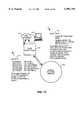
- FIG. 1Ais a block diagram depicting an operational environment according to a preferred embodiment of the present invention.
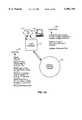
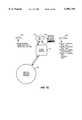
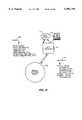
- FIGS. 1B-1Gare block diagrams depicting various functional components according to a preferred embodiment of the present invention.
- FIG. 2is a block diagram depicting a rack, shelves and modules according to a preferred embodiment of the present invention
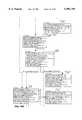
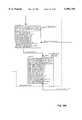
- FIGS. 4A and 4Bis a flowchart depicting a process that can be used for creating a configured shelf, according to a preferred embodiment of the present invention
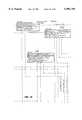
- FIG. 5is a flowchart depicting a process that can be used for creating a configured rack, according to a preferred embodiment of the present invention
- FIG. 7is a flowchart depicting a process that can be used for creating a site hierarchy, according to a preferred embodiment of the present invention.
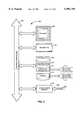
- FIG. 9is a block diagram of a computer useful for implementing components of the present invention.
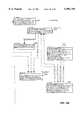
- FIG. 11is a flowchart depicting a process that can be used to replace generic footprints with manufacturer specific footprints, according to a preferred embodiment of the present invention.
- FIG. 12is a flowchart depicting a process that can be used to replace specific footprints, according to a preferred embodiment of the present invention.
- FIG. 13is a flowchart depicting a process that can be used to update footprint placement data, according to a preferred embodiment of the present invention.
- the present inventionis described in terms of a preferred embodiment. Specifically, the present invention is described in terms of an application program that works in combination with a database that is organized according to the principles disclosed herein. Specifically, a preferred embodiement of the present invention works in combination with a system and method for recording, maintaing and viewing information related to the placement and configuration of equipment in field sites. An example of such a system and method can be found in the above referenced U.S. patent application entitled "System and Method for Recording, Maintaining and Viewing Configuration and Placement of Equipment in Field Sites".
- the present inventionprovides a means for defining equipment, including modules, shelves and rails. Such components are stored in a portion of a database that is conceptually referred to herein as the product catalog. Rails are empty or raw racks. Shelves are mounted on rails. Modules are components that are installed in shelves. Examples of modules include circuit cards that are mounted in slots within shelves, and computer terminals that are placed on top of shelves.
- configured equipmentnamely, racks and configured shelves
- the configuration librarystores configured shelves and racks.
- Configured racksinclude generic racks and manufacturer specific racks. Manufacturer specific racks can be monolithic. A monolithic rack lacks detailed information about the shelves comprising the rack.
- a configured shelfcan be monolithic. A monolithic shelf lacks detailed information about the modules comprising the shelf.
- Remote site locationsare defined in terms of a site hierarchy, comprising the following levels: site, structure, floor, zone, planning unit, row and row segment. This information is stored in a portion of a database conceptually referred to herein as the site hierarchy repository.
- FIG. 1Ais a block diagram depicting a typical operational environment according to a preferred embodiment of the present invention.
- a network 102is depicted in the center of the drawing in FIG. 1A.
- the network 102represents any type of computer and/or telecommunications network or combination thereof, that can be used to couple a plurality of workstations 104 with a relational database 108.
- all of the features of the SiteVu toolcan be implemented with a relational database, such as the database 108, that is organized according to the novel principles disclosed herein.
- each workstation 104is a general purpose computer system that executes software (referred to herein as "SiteVu"), that causes the computer system 104 to perform the functions as described herein.
- SiteVusoftware
- file server 107and a storage device comprising architectural drawings 109.
- each computer system 104executes software that performs computer aided drafting and design (CADD) functions.
- the CADD softwareis controlled by the SiteVu program in a system included in the preferred embodiment of the present invention.
- architectural drawingsmay be stored on local storage devices in each of the workstations 104, or in a central file server, such as the file server 107. This aspect of the present invention will be described below.
- relational database 108is coupled with a database server 106.
- the relational databaseis implemented using an Oracle relational database, supplied by Oracle Corporation.
- the database server 106is a DEC Alpha 2100, manufactured by Digital Equipment Corporation.
- Microsoft Windows®manufactured by Microsoft Corporation can be used as the operating system for the computer systems 104 used to execute the SiteVu and the CADD programs.
- the CADD program usedis Microstation CADD, manufactured by Bentley Systems, Inc.
- FIGS. 1B-1Hdepicts an example of an architecture of the SiteVu program, according to a preferred embodiment of the present invention. Specifically, FIGS. 1B-1G describe an example of SiteVu components and their associated inputs and outputs.
- FIG. 1Hdepicts the logical components of the database 108, according to a preferred embodiment of the present invention.
- the database 108comprises: a site hierarchy repository 124; a product catalog 126; a configuration library 128; a placement library 130; user security 132; pick lists 134; connections 136; and power tables 138.
- a site hierarchy repository 124a product catalog 126; a configuration library 128; a placement library 130; user security 132; pick lists 134; connections 136; and power tables 138.
- the SiteVu central database 108is preferably, a relational database management system.
- the SiteVu toolcomprises the following components: the SiteVu Power Pages (SVPP) 110; the SiteVu Rackface tool (SVRF) 112; the SiteVu Administrative tool (SVAD) 114; the SiteVu Placement tool (SVPL) 116, and the SiteVu Report Generator (SVRP) 119.
- the present inventionis represented by the SiteVu Rackface tool (also referred to as rackface tool) 112, which is depicted in FIGS. 1B and 1D.
- the power page 110reads data from and stores data in the database 108.
- the power page 110provides power estimates for remote sites.
- a web browser 111is used to input data into the power page 110 from the workstation 104, and to output data from the power page 110 to the workstation 104.
- the rackface tool 112reads data from and stores data in the database 108. Further, the rackface tool 112 defines components for the product catalog 126. In addition, the rackface tool 112 defines configured shelves using empty shelves and modules from the product catalog 126, and stores the configured shelves in the configuration library 128. In addition, the rackface tool 112 defines configured racks from rails and configured shelves from the product catalog 126 and the configuration library 128, respectively. Such configured racks (also referred to as racks), are stored in the configuration library.
- footprintsare racks that have been placed in remote sites, via the placement tool 116 (described below).
- the rackface tool 112is used to display information about footprints and to replace one footprint with another footprint, as described below.
- the rackface tool 112is implemented using Windows® operating system, provided by Microsoft, Inc.
- Windows® operating systemprovided by Microsoft, Inc.
- Window's® Application Programming Interface 113is used to implement the functions provided by the rackface tool 112 on the workstation 104.
- the placement tool 116reads data from and stores data in the database 108. Specifically, the Placement tool 116 is used to create footprints by placing racks in remote sites. Such data is stored in the placement library 130. In a system included in the preferred embodiment, the placement tool 116 is implemented using a high level language provided by a the Mircrostation CADD program 117, as previously described.
- the report generator 119reads data from the database 108 to generate reports.
- the report generatoris implemented using Access 121, provided by Microsoft, Inc. Reports are printed on the printer 123.
- FIG. 1Cdepicts the power page tool 110 in greater detail.
- the power page tool 110receives power data, including power supply and site load data from a user at the workstation 104. As indicated by the data-in list 117, the power page tool 110 sends data to the database 108 for storage. Such data includes site data, battery plant data, rectifier data, battery data, generator data and inverter data.
- the power pages tool 110is can be implemented as a stand-alone system including a database (not shown) which is separate from the database 108.
- users at the workstations 104can interface with the power page tool 110, via a web browser program 111.
- web browser programsinclude Internet Explorer by Microsoft Corporation and Netscape Navigator by Netscape Incorporated.
- userscan add, delete or edit power data stored in database 108.
- Usersmay also instruct the power pages tool 110 to calculate the adequacy of power supplies for a particular site load.
- the power pages tool 110can calculate a reserve time for which a particular battery plant can sustain a specified site load.
- the power pages tool 110preferably determines whether additional rectifiers are required for a battery plant.
- FIG. 1Ddepicts various types of data used by rackface tool 112, according to a preferred embodiment of the present invention.
- the rackface tool 112reads pick lists 134 from the database 108.
- a pick listis a database table that comprises a list of valid values for particular data fields within the database 108.
- pick list tablesare used during a data entry process to provide users with a drop-down list box, or the like, comprising textual representations of pre-defined values that can be specified for particular data fields.
- pick listis used herein to describe a pick list table in the database 108.
- the termis also used herein to describe the drop-down list box that is associated with a pick list table and used during a data entry process, as described above.
- the rackface tool 112reads data from the product catalog 126 to create shelf configurations that are stored in the configuration library 128. Further, configured shelf data from the configuration library 128 is used to create rack configurations that are also stored in the configuration library 128.
- Site hierarchy datais read from the site hierarchy repository 124, and is used to replace generic footprints with manufacturer specific footprints. Further, placement data is read from the placement library and used to display footprint information, and replace generic and manufacturer specific footprints, as described below.
- Examples of data output from the rackface tool 112, as indicated by the data-out list 122,includes product catalog data, configured shelves data and configured rack data.
- the rackface tool 112is used to create components for the product catalog 126.
- An example of a process that can be used to create components in the product catalog 126is subsequently described herein with reference to FIG. 6.
- the rackface tool 112is used to create entries in the configuration library 128.
- An example of a process that can be used to create data entries for the configuration library 128is subsequently described herein with reference to FIGS. 4A, 4B and 6.
- data output from the rackface tool 112includes data used to update the placement library 130.
- the placement library 130is updated when a generic footprint is replaced with a manufacturer specific footprint, as described below.
- FIG. 1Edepicts various types of data used by administrative tool 114, according to a preferred embodiment of the present invention. As indicated by the data-in list 120, the administrative tool 114 reads pick lists 114 and user security data 132 from the database 108.
- the administrative tool 114creates and updates pick lists 134 and user security data 132.
- this toolis used to create part of the site hierarchy that is stored in the site hierarchy repository 124, as described below. Specifically, the sites, buildings (or structures) and the non-graphical portion of the floor level hierarchies are created by the administrative tool 114.
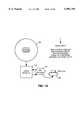
- FIG. 2is an illustration depicting a typical equipment rack 202.
- the equipment rack 202comprises a plurality of shelves 204a-204f (generally 204).
- the shelf 204acomprises a plurality of vertically positioned slots 208a-208o (generally 208).
- circuit cardssuch as the circuit card 214, are installed in the slots 208.
- the circuit card 214is an example of a type of module that is preferably represented in the product catalog 126.
- Other examples of types of modulescan be represented in the product catalog 126 are the workstation 210 and the modem 206. As shown in FIG. 2, such modules 206, 210 and 214 are used to configure shelves 208, according to a preferred embodiment of the present invention.
- FIG. 1Fdepicts the various types of data used by placement tool 116, according to a preferred embodiment of the present invention.
- the placement toolreads pick lists 134, user and security data 132, site hierarchy data 124, placement data 130, configured rack data 128, and power plant definition data 138 from the database 108.
- the placement tool 116stores data in the site hierarchy repository 124 from the floor level of the site hierarchy down to the row segment level. This data is stored in response to the function of creating site hierarchy levels as described below, with reference to FIG. 7.
- FIG. 1Gdepicts the report generator 119 coupled between the database 108, the workstation 104 and a local or temporary relational database and report organizer 121.
- Users at workstation 104are presented with a suite of pre-defined reports.
- the report generator 119Upon selection of a report, the report generator 119 generates an appropriate query to database 108. Query results are placed in local relational database and report organizer 121 where the data is rearranged into relational tables, as necessary.
- the report generator 119instructs the local relational database and report organizer 121 how to process the locally stored data and how to organize the results into a tabular format. Reports are then output to printer device 123 or the workstation 104.
- the report generatoremploys a report generator application such as, for example, Microsoft Access or Crystal Reports.
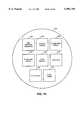
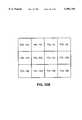
- FIG. 3is a block diagram that graphically illustrates an example of a site hierarchy, as previously described.
- the site hierarchy shown in FIG. 3comprises a floor 302, 3 zones 304, 4 planning units 306 and a plurality of row segments 308 within each planning unit 306.
- each site hierarchy level shown in FIG. 3is represented by a polygonal shape that completely encloses the lower site hierarchy level that are contained therein.
- zonestypically represent physical locations in which equipment of a particular class are placed.
- rackscannot be placed unless the equipment class of the rack matches the equipment class of the zone in which the rack is being placed. In one embodiment, this function is supported by the placement tool 112.
- planning units 306are specified so that multiple users can define row segments 308, in the same zone 304, at the same time.
- the database 108is shared by multiple users.
- certain precautionsmust be taken.
- a userwhen a user is in the process of defining rows and placing row segments 308, via the placement tool, as described below, other users are prevented from accessing certain portions of site hierarchy repository 124.
- the site hierarchy level just above the row levelmust be locked.
- a site hierarchy level of planning unit 306is used between the row level 308 and zone level 304. Accordingly, planning unit 306 is locked from other users instead of the zone level 304. In this manner, several users can work simultaneously to define row segments 308 within the same zone 304.
- a physical row in a sitemay comprise one or more row segments 308.
- a site hierarchy level called a row segment 308is used in a system included in the preferred embodiment of the present invention, to prevent users from placing racks in areas that have physical obstructions. For example, suppose a physical obstruction, such as a building support column, is present within a particular row in a field site. In this case, the physical row is represented by two row segments, that are placed to avoid the obstruction. In this fashion, since racks can only be placed within row segments 308, a user cannot inadvertently place a rack in the same position as the obstruction.
- an implementation of the present inventionprovides a means for defining components, including modules, shelves and racks, that are stored in the product catalog 126.
- componentsincluding modules, shelves and racks, that are stored in the product catalog 126.
- detailed information pertaining to each component within the product catalog 126is defined during a data entry process.
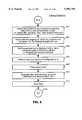
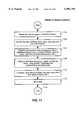
- FIG. 6is a flowchart depicting an example of a data entry process that can be used to create components for the product catalog 126, according to a preferred embodiment of the present invention. Specifically, in a preferred embodiment, this process is performed by an implementation of the present invention referred to herein as the rackface tool 112.
- the processbegins with step 602.
- a userselects the component type.
- component typesinclude modules, shelves and racks.
- controlpasses to step 604.
- the userspecifies values for each attribute presented from a pre-defined list of attributes, that are applicable to the selected component type. Preferably, a different pre-defined list of attributes is presented for each component type.
- values for attributesare specified by either typing data directly into data entry fields, or by selecting one or more pre-defined items from a pick list associated with the data attribute.
- bar code identifier attributecan be used as a link between an embodiment of the present invention and an equipment tracking and registration system.
- An example of such a systemcan be found in the above referenced U.S. patent application entitled "System and Method for Registering and Maintaining Field Equipment Inventory Based on Individualized Equipment and Location Information".
- Physical attributesgenerally include height, width, depth, and weight.
- Typical electrical attributesinclude voltage type, a voltage quantity, current and current quantity. Further, in a preferred embodiment, additional data fields are included that indicate whether or not the attributes have been completely specified.
- step 606the user specifies a unique identifier for the newly created component.
- step 608indicates the component is stored in the product catalog 126. The process ends with step 610.
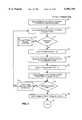
- FIG. 4Ais a flowchart depicting a process that can be used to create a shelf configuration, according to a preferred embodiment of the present invention. Specifically, this process is performed by an implementation of the present invention referred to as the rackface tool 122.
- the processbegins with step 404.
- step 404the user specifies a unique name for the new shelf configuration. Typically, this name must be unique in the database 108.
- valuesare specified for required fields.
- required fieldsinclude a manufacture, an equipment class and an equipment subclass. Note that in a preferred embodiment, a value for manufacturer or ⁇ generic ⁇ is used for generic racks as previously described.
- step 406a pick list is displayed to the user comprising a list of pre-defined components from the product catalog 126. Thus, components that have been created according to the process depicted in FIG. 6 are listed in step 406.
- a list of shelf componentsare presented to the user.
- sort, find and filter optionsare provided to assist the user in finding a particular component listed in the product catalog 126.
- the useris prompted to select a particular shelf from the pick list presented in step 406.
- step 408indicates, if a desired shelf cannot be found in the product catalog 126, control passes to step 410. This can occur for example, if a user desires to use a particular shelf that has not yet been created, via the data entry process depicted in FIG. 6. Accordingly, the user has the option to create a new product catalog 126 component as indicated by step 410. Process steps that can be used to create a product catalog component 410 is presented in FIG. 6, as previously described.
- step 408if the pick list in step 406 contains the desired shelf component, the user selects the shelf component in step 412. Control then passes to step 418.
- step 418the user adds modules to the selected shelf A process that can be used to add modules to a selected shelf is presented in FIG. 4B. This process is performed by the rackface tool 122, according to a preferred embodiment of the present invention.
- step 420the process begins with step 420.
- step 420the user is presented with pick list that contains a list of pre-defined modules from the product catalog 126.
- sort, find and filter optionsare provided to assist the user in finding a particular module from product catalog 126.
- pre-defined module typesinclude circuit cards 214, computer terminals 210, and other equipment, such as the modem 206.
- Modulesare components that are generally installed on shelves, such as the shelf 208.
- step 422indicates, if the desired module is included in the list presented in step 420 control passes to step 424, where the user selects the module. If not, once again the user has the option to create a product catalog component, as indicated by step 410.
- step 426After a module has been selected in step 424, control passes to step 426.
- step 426the selected module is placed in the first available slot 208 on the configured shelf 204.
- step 428indicates the user is presented with a graphical representation of the shelf and the module as selected from steps 412 and 424, respectively. Control then passes to step 430.
- step 430the user has the option to modify the shelf.
- step 434indicates, this includes for example, adding, moving and deleting modules.
- the usercan list information about the configured shelf.
- step 434if the user chooses to add more modules to the shelf, control passes to step 420, and steps 420-430 are repeated, as described above.
- usersedit a configured shelf in step 434, by directly manipulating graphical representations of the selected modules, from step 428. For example, in one implementation, users "drag" graphical representations of the selected modules to particular locations within the graphical representation of the selected shelf. Preferably, a mouse or other pointing device is used to accomplish this task.
- step 438the configured shelf is stored in the configuration library 128 and the process ends as indicated by step 440.
- the useralso has the option to store the shelf as a "work-in-progress" to be completed later.
- other statussuch as "pending approval", "standard” or "special” can be specified.
- only configured shelves with a status of approved standardi.e. standard configured shelves that have been approved), or special can be used in a configured rack.
- the configured shelvescan be used to create configured racks.
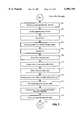
- FIG. 5is a flowchart illustrating a process which can be used to create a configured rack, according to a preferred embodiment of the present invention.
- the processbegins with step 501.
- step 501the user specifies a name for the configured rack.
- required fieldssuch as a description, a manufacture, a class and a subclass are preferably specified in step 501.
- step 502a list of pre-defined rails from the product catalog 126 is presented to the user.
- sort, find and filter optionsare provided to assist the user in finding a particular rail from product catalog 126.
- the useris prompted to select a rail from the pick list presented in step 502.
- step 504indicates, if the desired rail is included in the list presented in step 504, control passes to step 506, where the user selects the rail. If not, once again the user has the option to create a rail for the product catalog 126 as indicated by step 410.
- step 508the user is presented with a list of the available configured shelves from the configuration library 128. In a preferred embodiment, only shelves that are compatible with the selected rail are presented. Further, as previously noted, in a preferred embodiment, only configured shelves having a status of approved standard or special will be presented in the list in step 508. Note that the configured shelves presented in the pick list in step 508 are shelves that have been configured according to the process depicted by the flowchart in FIGS. 4A and 4B, as previously described. In step 510, the user selects a configured shelf from the pick list presented in step 508.
- step 512a graphical representation of the selected shelf and rail are presented to the user.
- This graphical representationis presented to the user so that the user can directly manipulate it to modify the configured rack as described below with reference to step 518.
- step 514the user has the option to modify the rack. As step 518 indicates, this includes for example, adding, moving and deleting shelves.
- the usercan list information about the configured rack. As indicated by step 518, if the user wishes to add additional shelves to the rack, control passes to step 508, and steps 508-514 are repeated, as described above.
- usersmodify a configured rack in step 518, by directly manipulating the graphical representations of the selected shelves from step 512. For example, in one implementation, users "drag" graphical representations of the selected shelves to particular locations within the graphical representation of the selected rail.
- FIG. 7is a flowchart illustrating a process that can be used to define the graphical portions of a site hierarchy, according to a system included in the preferred embodiment of the present invention.
- This processis performed by the placement tool 116.
- the processbegins with step 702.
- a userspecifies a pre-defined site. This is preferably accomplished by selecting a site from a pick list of sites that have been defined via the administrative tool 114.
- the data related to the siteis stored by the administrative tool 114 in the site hierarchy repository 124.
- controlpasses to step 704.
- step 704the user specifies a particular building. Again, this is preferably accomplished by having the user select a particular building that corresponds with the particular site selected from step 702, according to the site hierarchy repository 124. After a building is selected in step 704, control passes to step 705. In step 705, the user selects a particular floor corresponding to the building selected in step 704. Control then passes to step 706.
- step 706the user is presented with a graphical display of an architectural drawing of the floor that is selected in step 705.
- architectural drawingsare used as a guide to assist users with the creation of the site hierarchy as described below.
- a CADD programsuch as Microstation's CADD is used to display the architectural drawing of the floor plan, and the graphical representations of the site hierarchy.
- SiteVureads the name of the architectural drawing from the database 108.
- SiteVuthen directs the CADD program to display the architectural drawing corresponding with the name fetched from the database 108.
- a preferred embodiment of the present inventioninterfaces with a CADD program for the rendering of graphical data representing the site hierarchy.
- CADD programsprovide a published interface that can be used for this very purpose.
- Microstation CADDprovides program developers with a high level host language called Microstation Development Language (MDL).
- MDLMicrostation Development Language
- an implementation of the present inventionuses MDL to direct the CADD program to perform CADD functions, such as rendering graphical representations of the site hierarchy on the display screen.
- MDLMicrostation Development Language
- step 708the user creates a floor hierarchy level of the site hierarchy.
- thisis accomplished with the assistance of graphical tools that allow the user to specify the shape and size of the desired floor hierarchy level.
- graphical toolsare provided by an implementation of the present invention.
- the graphical tools provided by the present inventioninterface with the CADD program in order to render the results on the display screen.
- a floor hierarchy levelis defined, it is stored in step 709.
- step 710the user creates one or more zones 304 within the floor hierarchy level defined in step 708. Again, in a system included in the preferred embodiment, the same graphical tools are used to define such zones, which are in turn, rendered by the CADD program.
- step 711indicates.
- step 712one or more planning units 306 are defined within each zone 304.
- step 713indicates.
- step 714indicates, one or more row segments 308 are defined within each planning unit 306.
- step 716indicates.
- the site hierarchy levelsare stored in the site hierarchy repository in the database 108. The process ends with step 718.
- rackscan only be placed within row segment hierarchy levels 308. Accordingly, once a site hierarchy is defined as described above with reference to FIG. 7, footprints can be created within the areas defined as a row segment hierarchy level 308.
- FIG. 8is a flowchart illustrating a process that can be used for creating footprints, according to a system included in the preferred embodiment of the present invention. This process is implemented with the placement tool 116.
- the processbegins with step 802.
- the userselects a location for the footprint by selecting items from a site hierarchy list. For example, a user first selects a site, followed by a building (or structure), followed by a floor 302, followed by a zone 304, and followed by a planning unit 306.
- step 804the user selects a particular row segment in which the footprint is to be created.
- the selection of the site, building and floor in step 802is accomplished with the use of pick lists, as previously described.
- a graphical representation of the site hierarchy levelsis preferably presented to the user. Note, this may or may not include the architectural drawing, as described above.
- the useris provided with an option to display particular site hierarchy levels, or all site hierarchy levels that are defined for a particular floor.
- site hierarchy levelsor all site hierarchy levels that are defined for a particular floor.
- the usercan directly zoom-in a particular portion of the graphical representation and select a particular row segment therein. Accordingly, the steps of selecting a zone and planning unit, as specified by step 802 are effectively bypassed using this method.
- many other methodscan also be used without departing from the spirit and principle of the present invention.
- step 806a build equipment pick list presented to the user.
- This pick listcomprises a list of configured racks 202, as described above with reference to FIG. 5.
- only racks that have the same equipment class as the zone associated with the selected row segment from step 804is presented in the pick list in step 806.
- generic rackscan also be displayed in the equipment pick list.
- step 808the user selects a rack from the list of configured racks presented in step 806.
- step 809the user places the selected rack from step 808 in a particular location within the row segment selected in step 804. Again, this is preferably accomplished by directly manipulating a graphical representation of the rack on top of the graphical representation of the selected row segment.
- step 810the user specifies particular values for attributes that are associated with footprints. For example, such attributes include a planned installation date and a planned removal date. Control then passes to step 812 where the footprint is saved in the database 108. The process ends with step 814.
- planned installation and removal datesallow planners to view the placement and configuration of equipment in a time dependant manner.
- the present inventioncan be used to see how the site will look five years into the future, for planning purposes and the like.
- the rackface tool 112is preferably used to operate on footprints. Specifically, in a preferred embodiment, the rackface tool 112 is used to display and update information about footprints, and to replace footprints generic and specific footprints, as described below.
- facility planning groupsgenerally reserve floor space for particular types of equipment by placing generic racks therein, as described above.
- the generic racksall have a particular equipment class and sub-class associated with them.
- such generic racksare typically replaced with manufacturer specific racks by engineering groups.
- an implementation of the present inventionassures that the manufacturer specific racks are of the same equipment class and subclass as the generic racks they are replacing.
- FIG. 11A process that can be used to replace generic footprints with manufacturer specific footprints, according to a preferred embodiment of the present invention is depicted in FIG. 11.
- the processbegins with step 1102.
- a userselects a function to replace a generic footprint.
- the userselects a particular footprint to replace. This is typically accomplished by presenting a series of textual pick lists each representing a level of the site hierarchy according to the site hierarchy repository 124. Accordingly, the user selects a particular zone, planning unit, row and footprint.
- an eligible replacement rack configuration listis presented to the user.
- the eligible replacement rack configuration listis preferably a list of configured racks from the configuration library 128, which is filtered based on pre-defined criteria. For example, in a preferred embodiment, only racks that are of the same class and sub-class as the generic rack being replaced are presented. Further, because of physical space constraints, only racks that are of the same or smaller dimensions as the generic rack are included in the list. Other criteria that may be appropriate for each specific implementation of the present invention is also used to filter the list presented in step 1106.
- step 1108the user selects a rack from the list presented in step 1104.
- details of each eligible replacement rack list itemis available to assist the user in selecting a particular replacement rack.
- the usercan view configuration information such as details pertaining to the configured shelves that comprise the configured rack.
- details pertaining to the modules that are specified for each configured shelfcan also be presented.
- Preferably such informationis presented in the form of a expandable and collapsible cascading list.
- a plus buttonis displayed next to each rack item in the list. Accordingly, in the event that a user wishes to view detailed information about a particular rack configuration, the plus button is selected.
- the list item representing the selected rackis expanded such that a new list comprising a list of configured shelves associated with the rack item is displayed.
- a plus buttonis displayed for each configured shelf in the list.
- the plus buttonis again selected. This causes that list to be expanded such that a list of modules associated with the configured shelf is displayed.
- the plus button that was used to expand the listbecomes a minus button. The minus button can be used to contract the expanded list.
- step 1110the rack is selected in step 1108.
- Controlpasses to step 1110.
- the userspecifies particular values for attributes are associated with the placement of footprints.
- placement data attributesthat are stored in the placement library 130 are specified in step 1110.
- attributesinclude planned and actual dates for installation, activation, decommission and removal of the placed components.
- datescan be specified for each of the components that comprise the footprint, including the rack itself, each shelf, and each module that comprises each shelf.
- expandable and collapsible cascaded listsare used to assist the user in completing such attributes, as described above.
- this level of detailallows for future planning of remote sites down to the card level.
- This unique feature of the present inventionallows facility planners and other groups to accurately view detailed information about the placement and configuration of equipment in remote sites in a time dependent manner.
- step 112the footprint data is saved in the placement library 130.
- the processends with step 1114.
- FIG. 12is a flowchart depicting a process that can be used to replace specific footprints, according to a preferred embodiment of the present invention. Specifically, this process is used to replace one manufacturer specific footprint with another. Generally, this is used to correct errors having to do with the configuration of manufacturer specific configured racks that have been placed in remote sites.
- the update footprint placement data process as depicted in FIG. 14should be used. However, if such placement data needs to be updated on a global basis for all footprints associated with a particular configured rack, the process depicted in FIG. 12 is preferably used.
- step 1202.the user selects the function to replace a specific footprint.
- the useralso specifies either a "global” or “swap" replacement. If a global replacement is specified, the process replaces all footprints within the database 108, that have the same associated configured rack as the footprint that is being replaced.
- step 1204the user selects a particular footprint to replace. This is typically accomplished by presenting a series of textual pick lists each representing a level of the site hierarchy according to the site hierarchy repository 124. Accordingly, the user selects a particular zone, planning unit, row and footprint.
- step 1206an eligible replacement rack configuration list is presented to the user.
- the eligible rack configuration listis preferably a list of configured racks from the configuration library 128 that is filtered based on pre-defined criteria. For example, in a preferred embodiment, only racks that are of the same class and sub-class as the rack being replaced are presented. Further, because of physical space constraints, only racks that are of the same or smaller dimensions as rack being replaced are included in the list. Other criteria that may be appropriate for each specific implementation of the present invention is also used to filter the list presented in step 1206.
- step 1208the user selects a rack from the list presented in step 1204.
- details of each eligible replacement rack list itemis available so that the user can select a specific replacement rack.
- the usercan view configuration information such as details pertaining to the configured shelves and modules that comprise the configured rack, as described above.
- step 1210the rack is selected in step 1208 and control passes to step 1210.
- the userspecifies particular values for attributes associated with the placement footprints.
- placement data attributesthat are stored in the placement library 130 are specified in step 1210.
- attributesinclude planned and actual dates for installation, activation, decommission and removal of components.
- datescan be specified for each of the components that comprise the footprint, including the rack, each shelf, and each module that comprises each shelf.
- expandable and collapsible cascaded listsare used to assist the user, as described above.
- step 1212the footprint data is saved in the placement library 130, and the process ends as indicated by step 1214.
- FIG. 13is a flowchart depicting a process that can be used to update footprint placement data, according to a preferred embodiment of the present invention. Specifically, this process is used to update information in the placement library 130. Such information includes planned and actual installation, activation, decommission and removal dates for particular footprints.
- step 1302the user selects the function to update footprint placement information.
- step 1304the user selects a particular footprint. This is typically accomplished by presenting a series of textual pick lists each representing a level of the site hierarchy according to the site hierarchy repository 124. Accordingly, the user selects a particular zone, planning unit, row and footprint.
- step 1306user updates values for placement data attributes. Such attributes include planned and actual dates for installation, activation, decommission and removal of components. Preferably, such dates can be specified for each of the components that comprise the footprint, including the rack, each shelf, and each module that comprises each shelf. In a preferred embodiment, expandable and collapsible cascaded lists are used to assist the user, as described above.
- step 1308the footprint data is saved in the placement library 130, and the process ends as indicated by step 1310.
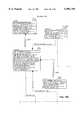
- FIG. 10Ais a block diagram illustrating a plurality of database tables that can be used to implement the database 108, according to a preferred embodiment of the present invention.
- a relational databaseis used to implement the database 108.
- FIGS. 10C-10NAn expanded version of the block diagram depicted in FIG. 10A is also depicted in the FIGS. 10C-10N.
- FIG. 10Bshows how the FIGS. 10C-10N are related to each other to form the block diagram depicted in FIG. 10A.
- the table 1004represents remote sites in a portion of the database 108, referred to above as the site hierarchy repository.
- Each box, such as the box 1004represents a specific database table.
- each database tablecomprises the names of specific data fields that are defined for each table according to a preferred embodiment of the present invention.
- the names for each data fieldare descriptive of the type of data they represent.
- the first three data fields in the site table 1004are named "SITE -- ID",SITE -- CD and SITE -- TYP -- CD", respectively. These three data fields hold information related to a site identification number, a site code and a site-type code, for each site stored in the site table 1004. As such, for the most part, by reading the descriptive names of the data fields illustrated in FIGS. 10C-10N, their function and purpose would be apparent to those skilled in the relevant arts.
- data fields in a relational database 108are conceptualized as columns in a database table.
- the data entries that are stored thereinare conceptualized as rows in a database table.
- rowis used herein to describe a single data entry within a database table. Accordingly, the term row and the term entry are synonymous.
- a single row (or entry) in the site database table 1004represents data describing the details of a single remote site.
- a complete description of the remote sitecomprises specific values for each of the data fields associated with the database table 1004.
- FIGS. 10C-10NThe lines interconnecting database tables shown in FIGS. 10C-10N represent relationships among tables. It should be noted that for the most part, the database tables shown in FIGS. 10C-10N are self-explanatory to those skilled in the relevant art(s). Accordingly, after reading the brief description below and examining FIGS. 10C-10N, it would be apparent to those skilled in the relevant art(s) how to implement the database 108, according to a preferred embodiment of the present invention.
- interconnecting database tables shown in FIGS. 10C-10Nrepresent relationships among the tables in the database 108.
- a line 1003is shown connecting the site table 1004 to the plant table 1006.
- the plant table 1002represents power plants that are installed in each site.
- the circle at the end of the line 1003represents a one to many relationship between the rows in the site table 1004 and the rows in the plant table 1006. Accordingly, each entry in the site table 1004 may be associated with more than one entry in the plant table 1006. In other words, each site may have more than one plant installed therein.
- the tables 1006 and 1008represents pick list tables for specific data fields within the site table 1004. Specifically, the pick list tables 1006 are associated with data fields used to define a responsible department and a geographical state for a particular site listed in the table 1004.
- pick list tablescomprise a list of valid values that are used to fill-in particular data fields.
- a pick list tablesuch as the pick list table 1008, is used to assist in the data entry process.
- a pick list tableis associated with one or more data fields.
- the pick list table 1008is associated with a data field "STATE-CD" within the table 1004 (as depiced by the dotted line 1005).
- pick list tablesare used during data entry to provide users with a drop-down list box, or the like, comprising textual representations of pre-defined values that can be specified for the row or rows, associated with the pick list table.
- a pick listcomprising states containing remote sites is presented to the user during a data entry phase.
- the associated valueis automatically entered stored in the associated row within the database table.
- usersare restricted to values contained in the pick list tables. That is, for such data fields that have pick lists associated with them, values other than those contained in the pick list may be considered invalid.
- this choicedepends on particular implementations of the present invention.
- table 1009is a pick list table associated with the site table 1004 for providing valid values for the data field used to store site types.
- Table 1010represents structures or buildings within sites. Typically, each site (represented by a single entry or row in the site table 1004), comprises multiple buildings that are each represented by a single entry in the building table 1010. Therefore, typically the building table 1010 comprises multiple rows for each row in the site table 1004.
- the table 1011represents floors within structures represented by table 1010.
- the floor table 1011comprises multiple entries for each entry in the structure table 1010.
- the table 1012represents floor points for the floors represented by the floor table 1010. This information is used in a system included in the preferred embodiment of the present invention for rendering graphical representations of floors, as described above.
- each entry in the floor point table 1012contains x-y coordinates for a portion of a polygon that is used to graphically represent the associated floor.
- the floor point table 1012comprises multiple rows for each entry in the floor table 1011.
- the table 1013represents zones within floors represented by the floor table 1011.
- the zone table 1012comprises multiple entries for each entry in the floor table 1011 .
- the table 1014represents zone points for the zones represented by the zone table 1013. This information is used in a system included in the preferred embodiment of the present invention for rendering graphical representations of zones.
- each row in the zone point table 1014contains x-y coordinates for a portion of a polygon that is used to graphically represent the associated zone.
- the zone point table 1014comprises multiple entries for each entry in the zone table 1013.
- the table 1015represents planning units within zones represented by the zone table 1013.
- the planning unit table 1015comprises multiple entries for each entry in the zone table 1013.
- the table 1016represents points for planning unit table 1015. This information is typically used for rendering graphical representations of planning units.
- each row in the planning unit point table 1016contains x-y coordinates for a portion of a polygon that is used to graphically represent the associated planning unit.
- the planning unit point table 1016comprises multiple entries for each entry in the planning unit table 1015.
- the table 1017represents rows within planning units. Typically, the row table 1017 comprises multiple entries for each entry in the planning unit table 1015.
- the table 1018represents row segments within rows. Typically, the row segment table 1018 comprises multiple entries for each entry in the row table 1017. As will be shown below, configured racks are placed within row segments.
- the tables 1019-1023is a portion of the database 108 referred to herein as the product catalog 126.
- table 1019represents components, such as modules, shelves and racks, as previously described.
- Data fields within the product catalog table 1019preferably comprises detailed information about each component stored therein, such as a part number, a classification, and physical dimensions of the component.
- information common to all types of componentsis stored in the product catalog table 1019, and information specific to pre-defined component types are stored in the database tables 1020-1023.
- the shelf table 1020represents additional information particular to shelf components.
- informationsuch as the quantity of wire, coaxial and fiber connectors are stored in the shelf table 1020.
- the card table 1021represents additional information particular to cards or module components.
- informationsuch as actual and nominal electrical and power input and output requirements are stored in the shelf table 1020.
- configured racks and configured shelves table 1022 and 1026are related to the product catalog table 1019.
- configured racks and configured shelvesare comprised of components (i.e. modules, shelves and racks), from the product catalog 1019, that have been interrelated.
- the interrelationships for configured racks and shelvesare defined with the use of a rackface tool 112.
- the configured rack item table 1025(FIG. 10K) represents individual rack positions that are used to hold shelves, for each rack defined in the configured rack table 1022.
- configured shelves that are installed in particular rack positionsare defined by the configured shelves table 1026.
- each entry in the configured shelves table 1026can correspond with a single entry in the configured rack item table 1025.
- entries within the configured shelves table 1026can be associated with multiple entries in the configured rack item table 1025. This would be the case for example, if the same configured shelf is used in multiple rack positions in a single rack, or used in multiple racks.
- the configured shelves item table 1027(FIG. 10K) represents individual shelf positions that are used to hold modules for each shelf defined in the configured shelves table 1026.
- modules that are installed in particular shelf positionsare defined by the product catalog table 1019. Accordingly, each entry in the product catalog table 1019 can correspond with an entry in the configured shelf item table 1027. It should be noted however, that in a preferred embodiment, each entry within the product catalog 1019 is typically associated with multiple entries in the configured shelf item table 1027.
- the placement library 130comprises the placement data for racks table 1061 (FIG. 10G), the placement data for cards table 1024 (FIG. 10H) and the placement data for shelves table 1063 (FIG. 10H)1063.
- the placement data for racks table 1061is used to place configured racks from the configured racks table 1062 in particular row segments within the row segment table 1018. In this example, one or more racks can be placed in a particular row segment. This feature is preferably implemented by creating a footprint using a placement tool as previously described above.
- specific data fields within the placement data for racks table 1061are used for planning purposes.
- Such data fieldsare used to define specific time-related events such as planned and actual installation, activation, decommission and removal dates. This allows site planners to view data related to the configuration and placement of equipment in remote sites on a time dependent basis.
- site plannersto view data related to the configuration and placement of equipment in remote sites on a time dependent basis.
- a preferred embodiment of the present inventionsuch information is provided at the rack, shelf and module level.
- the placement data for rack tables 1061provides such time dependant data for field equipment at the rack level.
- the placement data for shelves table 1063provides such time dependant data for field equipment at the shelf level.
- the placement data for modules table 1024provides such time dependant data for field equipment at the module level.
- site planners and other groupscan view data related to field sites on a time-dependant basis.
- each card (or module), shelf and rack that is placed within a remote sitewill have planned and actual installation, activation, decommission and removal dates associated with it.
- users for examplecan view the configuration and placement of equipment within remote field sites at a particular past, present or further date.
- FIG. 10Icomprises additional pick list tables from the pick list 134 portion of the database 108.
- the vendor information pick list table 1028comprises valid values used to describe pre-defined manufactures.
- the vender information pick list table 1028is associated with the product catalog table 1019, the configuration racks table 1022 and the configuration shelves table 1026.
- the class pick list table 1030is used to store pre-defined values used to describe equipment classes.
- the class pick list table 1030is associated with the zone table 1013, the configuration shelves table 1022 and configuration racks table 1026.
- the sub-class pick list table 1029comprises pre-defined valid values used to describe equipment sub-classes.
- the sub-class pick list table 1029is associated with the product catalog 1019, the configuration shelves table 1022 and configuration racks table 1026.
- the pick list tables 1028, 1029 and 1030are associated with the connection tables as described below with reference to FIG. 10L.
- FIG. 10Lcomprises the connection portion 136 of the database 108.
- the connection tables 1031-1035are used to logically or physically connect one database entity with another database entity, without providing the details of the connection.
- the connection 136 portion of the database 108can be used to provide a logical connection between a power plant site hierarchy level and a particular footprint that draws power therefrom.
- the connection 136 portion of the database 108can be used to provide a physical connection between a main power distribution bay and a particular footprint.
- the connection tables 1031-1035are used in a system included in the preferred embodiment to define rules for connecting objects within the database 108 to one another.
- the connection rules table 1032defines what types of objects can be connected together.
- the connection rules sub-class table 1036defines what sub-classes of equipment can be connected together.
- the connection table 1034is used to define what objects are connected together.
- FIG. 10Mcomprises user security tables 1037-1043, that form the user security 132 portion of the database 108.
- These tables 1037-1043are preferably used to control database access and the access to specific functions within SiteVu based on user identification.
- the tables 1037-1043describe which functions are allowed to be performed by which users. For example, in one embodiment, only users with a transmission rating are permitted to place transmission equipment in remote sites. Accordingly, such control may be implemented with the use of the user security tables 1037-1043 shown in FIG. 10M.
- the power tables 138 portion of the database 108comprises the tables 1044-1052 shown in FIG. 10N are used for power planing as described below.
- the present inventionmay be implemented using hardware, software or a combination thereof and may be implemented in a computer system or other processing system.
- the inventionis directed toward a computer system capable of carrying out the functionality described herein.
- An example computer system 901is shown in FIG. 9.
- the computer system 901includes one or more processors, such as processor 904.
- the processor 904is connected to a communication bus 902.
- Various software embodimentsare described in terms of this example computer system. After reading this description, it will become apparent to a person skilled in the relevant art how to implement the invention using other computer systems and/or computer architectures.
- Computer system 902also includes a main memory 906, preferably random access memory (RAM), and can also include a secondary memory 908.
- the secondary memory 908can include, for example, a hard disk drive 910 and/or a removable storage drive 912, representing a floppy disk drive, a magnetic tape drive, an optical disk drive, etc.
- the removable storage drive 912reads from and/or writes to a removable storage unit 914 in a well known manner.
- Removable storage unit 914represents a floppy disk, magnetic tape, optical disk, etc. which is read by and written to by removable storage drive 912.
- the removable storage unit 914includes a computer usable storage medium having stored therein computer software and/or data.
- secondary memory 908may include other similar means for allowing computer programs or other instructions to be loaded into computer system 901.
- Such meanscan include, for example, a removable storage unit 922 and an interface 920. Examples of such can include a program cartridge and cartridge interface (such as that found in video game devices), a removable memory chip (such as an EPROM, or PROM) and associated socket, and other removable storage units 922 and interfaces 920 which allow software and data to be transferred from the removable storage unit 922 to computer system 901.
- computer program mediumand “computer usable medium” are used to generally refer to media such as removable storage device 912, a hard disk installed in hard disk drive 910, and signals 926. These computer program products are means for providing software to computer system 901.
- the softwaremay be stored in a computer program product and loaded into computer system 901 using removable storage drive 912, hard drive 910 or communications interface 924.
- the control logicwhen executed by the processor 904, causes the processor 904 to perform the functions of the invention as described herein.
- the inventionis implemented using a combination of both hardware and software.
Landscapes
- Engineering & Computer Science (AREA)
- Databases & Information Systems (AREA)
- Computer Networks & Wireless Communication (AREA)
- Warehouses Or Storage Devices (AREA)
Abstract
Description
Claims (23)
Priority Applications (1)
| Application Number | Priority Date | Filing Date | Title |
|---|---|---|---|
| US08/823,556US5991759A (en) | 1997-03-25 | 1997-03-25 | Method and system for defining equipment in a telecommunication network down to the rackface level |
Applications Claiming Priority (1)
| Application Number | Priority Date | Filing Date | Title |
|---|---|---|---|
| US08/823,556US5991759A (en) | 1997-03-25 | 1997-03-25 | Method and system for defining equipment in a telecommunication network down to the rackface level |
Publications (1)
| Publication Number | Publication Date |
|---|---|
| US5991759Atrue US5991759A (en) | 1999-11-23 |
Family
ID=25239087
Family Applications (1)
| Application Number | Title | Priority Date | Filing Date |
|---|---|---|---|
| US08/823,556Expired - LifetimeUS5991759A (en) | 1997-03-25 | 1997-03-25 | Method and system for defining equipment in a telecommunication network down to the rackface level |
Country Status (1)
| Country | Link |
|---|---|
| US (1) | US5991759A (en) |
Cited By (38)
| Publication number | Priority date | Publication date | Assignee | Title |
|---|---|---|---|---|
| US6169987B1 (en)* | 1997-03-25 | 2001-01-02 | Mci Communications Corporation | System and method to automate equipment placement at remote sites |
| US6366919B2 (en) | 1999-03-23 | 2002-04-02 | Lexent Inc. | System for managing telecommunication sites |
| US6384842B1 (en)* | 1999-05-13 | 2002-05-07 | Lsi Logic Corporation | User interface to provide a physical view of movable physical entities |
| US6393425B1 (en)* | 1999-05-05 | 2002-05-21 | Microsoft Corporation | Diagramming real-world models based on the integration of a database, such as models of a computer network |
| US20020070971A1 (en)* | 2000-10-10 | 2002-06-13 | Terrence A. Brown | System and methods for tracking central office equipment and inventory records |
| US6477486B1 (en)* | 1998-09-10 | 2002-11-05 | Dell Usa, L.P. | Automatic location determination of devices under test |
| US20030006999A1 (en)* | 2001-06-13 | 2003-01-09 | Worldcom, Inc. | Method, system and program product for generating scenarios utilizing graphical objects representing hierarchically arranged elements of a modeled environment |
| WO2003046771A1 (en)* | 2001-11-27 | 2003-06-05 | Worldcom, Inc. | A hierarchical conceptual framework used to model an environment containing a collection of items |
| US6577325B1 (en)* | 1998-04-10 | 2003-06-10 | Sony Corporation | Recording medium library apparatus and method for operating the same |
| US6597773B2 (en) | 2001-01-11 | 2003-07-22 | Lexent Inc. | System for managing telecommunications infrastructure |
| US20030212783A1 (en)* | 2002-05-08 | 2003-11-13 | Canon Kabushiki Kaisha | Network device administration apparatus and method, computer program, and computer-readable storage medium |
| US20030212769A1 (en)* | 2002-05-09 | 2003-11-13 | International Business Machines Corporation | Technical solution architect power distribution tool |
| US20040073854A1 (en)* | 2000-11-08 | 2004-04-15 | Siemens Ag | Software tool for monitoring faults in an automation device |
| US20040088145A1 (en)* | 2002-11-06 | 2004-05-06 | Rosenthal Richard Edwin | Methods and apparatus for designing the racking and wiring configurations for pieces of hardware |
| US6785540B1 (en)* | 1999-11-30 | 2004-08-31 | Agilent Technologies, Inc. | Monitoring system and method implementing test configuration logic |
| US20040178270A1 (en)* | 2003-03-10 | 2004-09-16 | Pradhan Salil V. | Tracking electronic devices |
| US20040178269A1 (en)* | 2003-03-10 | 2004-09-16 | Pradhan Salil V. | Tracking electronic devices |
| US20040267879A1 (en)* | 2003-06-27 | 2004-12-30 | Smith Marc A. | Wireless programmable user interaction system with machine-readable tags for physical objects |
| US20050075937A1 (en)* | 2003-10-03 | 2005-04-07 | Bresniker Kirk Michael | Rack equipment management information coordination system and method |
| US20050102668A1 (en)* | 2002-03-18 | 2005-05-12 | Siemens Aktiengesellschaft | Method and device for representing the dependencies of components of a technical installation |
| US20050283410A1 (en)* | 2000-06-13 | 2005-12-22 | Dell Products L.P. | Automated configuration catalog |
| US7043539B1 (en)* | 2002-03-29 | 2006-05-09 | Terraspring, Inc. | Generating a description of a configuration for a virtual network system |
| US20060097863A1 (en)* | 2004-10-21 | 2006-05-11 | Eric Horowitz | Tracking equipment |
| US20060100889A1 (en)* | 2000-06-13 | 2006-05-11 | Gosko Theresa M | Customer-hosted automated configuration catalog |
| US20060146810A1 (en)* | 2004-12-30 | 2006-07-06 | Thanh Bui | Multiple subscriber port architecture and methods of operation |
| US20060164245A1 (en)* | 2005-01-15 | 2006-07-27 | The Aerospace Corporation | Equipment configuration visualization tools, systems and methods |
| US20060178864A1 (en)* | 2005-02-08 | 2006-08-10 | Madhavi Khanijo | Automated system and method for configuring a rack assembly |
| US20060219771A1 (en)* | 2005-03-31 | 2006-10-05 | Inventec Corporation | Position searching system for electronic devices and method using the same |
| US20070221730A1 (en)* | 2006-03-27 | 2007-09-27 | Mcreynolds Alan | RFID enabled cable tracking |
| US20070276975A1 (en)* | 1997-05-13 | 2007-11-29 | Chari Srikumar N | Systems and methods for performing a hot input function |
| US7686229B2 (en) | 2003-01-30 | 2010-03-30 | Hewlett-Packard Development Company, L.P. | RFID reader device having closely packed antennas |
| US7806333B1 (en) | 2006-03-27 | 2010-10-05 | Hewlett-Packard Development Company, L.P. | Tracking RFID tags with overlapping antennas |
| US20110191454A1 (en)* | 2010-02-02 | 2011-08-04 | International Business Machines Corporation | Discovering physical server location by correlating external and internal server information |
| US8044804B1 (en) | 2007-06-01 | 2011-10-25 | Hewlett-Packard Development Company, L. P. | Localizing a tag using variable signal range |
| US20150026076A1 (en)* | 2013-07-18 | 2015-01-22 | Netapp, Inc. | System and Method for Providing Customer Guidance in Deploying a Computing System |
| US9754055B1 (en)* | 2009-05-06 | 2017-09-05 | Amdocs Software Systems Limited | System, method, and computer program product for managing an area for positioning resources, based on parameters of the resources |
| US10010021B2 (en) | 2016-05-03 | 2018-07-03 | Cnh Industrial America Llc | Equipment library for command and control software |
| US11669804B2 (en) | 2016-05-03 | 2023-06-06 | Cnh Industrial America Llc | Equipment library with link to manufacturer database |
Citations (11)
| Publication number | Priority date | Publication date | Assignee | Title |
|---|---|---|---|---|
| US5426674A (en)* | 1990-02-06 | 1995-06-20 | Nemirovsky; Paul | Method and computer system for selecting and evaluating data routes and arranging a distributed data communication network |
| US5513171A (en)* | 1994-07-26 | 1996-04-30 | At&T Corp. | Arrangement for dynamically deriving a telephone network management database from telephone network data |
| US5515524A (en)* | 1993-03-29 | 1996-05-07 | Trilogy Development Group | Method and apparatus for configuring systems |
| US5630072A (en)* | 1994-08-30 | 1997-05-13 | Dobbins; Larry D. | Relia process: integrated relational object unit identification and location addressing processes |
| US5630025A (en)* | 1994-07-13 | 1997-05-13 | Unisys Corporation | Generalized configurator using a declaratively constructed two-level bi-partite graph as a knowledge representation |
| US5664170A (en)* | 1990-05-07 | 1997-09-02 | Next Computer, Inc. | Flexible distributed network database containing configuration information for a network divided into domains |
| US5758351A (en)* | 1995-03-01 | 1998-05-26 | Sterling Software, Inc. | System and method for the creation and use of surrogate information system objects |
| US5764955A (en)* | 1995-10-19 | 1998-06-09 | Oasys Group, Inc. | Gateway for using legacy telecommunications network element equipment with a common management information protocol |
| US5774689A (en)* | 1995-09-22 | 1998-06-30 | Bell Atlantic Network Services, Inc. | Network configuration management system for digital communication networks |
| US5786998A (en)* | 1995-05-22 | 1998-07-28 | Automated Monitoring And Control International, Inc. | Apparatus and method for tracking reporting and recording equipment inventory on a locomotive |
| US5802144A (en)* | 1996-04-15 | 1998-09-01 | Mci Corporation | Minimum common span network outage detection and isolation |
- 1997
- 1997-03-25USUS08/823,556patent/US5991759A/ennot_activeExpired - Lifetime
Patent Citations (11)
| Publication number | Priority date | Publication date | Assignee | Title |
|---|---|---|---|---|
| US5426674A (en)* | 1990-02-06 | 1995-06-20 | Nemirovsky; Paul | Method and computer system for selecting and evaluating data routes and arranging a distributed data communication network |
| US5664170A (en)* | 1990-05-07 | 1997-09-02 | Next Computer, Inc. | Flexible distributed network database containing configuration information for a network divided into domains |
| US5515524A (en)* | 1993-03-29 | 1996-05-07 | Trilogy Development Group | Method and apparatus for configuring systems |
| US5630025A (en)* | 1994-07-13 | 1997-05-13 | Unisys Corporation | Generalized configurator using a declaratively constructed two-level bi-partite graph as a knowledge representation |
| US5513171A (en)* | 1994-07-26 | 1996-04-30 | At&T Corp. | Arrangement for dynamically deriving a telephone network management database from telephone network data |
| US5630072A (en)* | 1994-08-30 | 1997-05-13 | Dobbins; Larry D. | Relia process: integrated relational object unit identification and location addressing processes |
| US5758351A (en)* | 1995-03-01 | 1998-05-26 | Sterling Software, Inc. | System and method for the creation and use of surrogate information system objects |
| US5786998A (en)* | 1995-05-22 | 1998-07-28 | Automated Monitoring And Control International, Inc. | Apparatus and method for tracking reporting and recording equipment inventory on a locomotive |
| US5774689A (en)* | 1995-09-22 | 1998-06-30 | Bell Atlantic Network Services, Inc. | Network configuration management system for digital communication networks |
| US5764955A (en)* | 1995-10-19 | 1998-06-09 | Oasys Group, Inc. | Gateway for using legacy telecommunications network element equipment with a common management information protocol |
| US5802144A (en)* | 1996-04-15 | 1998-09-01 | Mci Corporation | Minimum common span network outage detection and isolation |
Non-Patent Citations (2)
| Title |
|---|
| Don Burgio, MCI Telecommunications Corporation, MCI SIteVu , copyright 1996, made available to the public Apr. 96.* |
| Don Burgio, MCI Telecommunications Corporation, MCI SIteVu, copyright 1996, made available to the public Apr. '96. |
Cited By (56)
| Publication number | Priority date | Publication date | Assignee | Title |
|---|---|---|---|---|
| US6473762B1 (en)* | 1997-03-25 | 2002-10-29 | Mci Communications Corporation | System and method to automatic equipment placement at remote sites |
| US20050240605A1 (en)* | 1997-03-25 | 2005-10-27 | Mci, Inc. | Method, system and program product that utilize a hierarchical conceptual framework to model an environment containing a collection of items |
| US6952705B2 (en) | 1997-03-25 | 2005-10-04 | Mci, Inc. | Method, system and program product that utilize a hierarchical conceptual framework to model an environment containing a collection of items |
| US8010571B2 (en) | 1997-03-25 | 2011-08-30 | Verizon Business Global Llc | Method, system and program product that utilize a hierarchical conceptual framework to model an environment containing a collection of items |
| US6169987B1 (en)* | 1997-03-25 | 2001-01-02 | Mci Communications Corporation | System and method to automate equipment placement at remote sites |
| US8205027B2 (en) | 1997-05-13 | 2012-06-19 | Round Rock Research, Llc | Systems and methods for performing a hot input function |
| US20090100208A1 (en)* | 1997-05-13 | 2009-04-16 | Micron Technology, Inc. | Systems and methods for performing a hot input function |
| US7937515B2 (en) | 1997-05-13 | 2011-05-03 | Round Rock Research, Llc | Systems and methods for performing a hot input function |
| US8782316B2 (en) | 1997-05-13 | 2014-07-15 | Round Rock Research Llc | Systems and methods for performing a hot input function |
| US7454549B2 (en)* | 1997-05-13 | 2008-11-18 | Micron Technology, Inc. | Systems and methods for performing a hot input function |
| US20070276975A1 (en)* | 1997-05-13 | 2007-11-29 | Chari Srikumar N | Systems and methods for performing a hot input function |
| US6577325B1 (en)* | 1998-04-10 | 2003-06-10 | Sony Corporation | Recording medium library apparatus and method for operating the same |
| US6477486B1 (en)* | 1998-09-10 | 2002-11-05 | Dell Usa, L.P. | Automatic location determination of devices under test |
| US6366919B2 (en) | 1999-03-23 | 2002-04-02 | Lexent Inc. | System for managing telecommunication sites |
| US6393425B1 (en)* | 1999-05-05 | 2002-05-21 | Microsoft Corporation | Diagramming real-world models based on the integration of a database, such as models of a computer network |
| US6384842B1 (en)* | 1999-05-13 | 2002-05-07 | Lsi Logic Corporation | User interface to provide a physical view of movable physical entities |
| US6785540B1 (en)* | 1999-11-30 | 2004-08-31 | Agilent Technologies, Inc. | Monitoring system and method implementing test configuration logic |
| US20060100889A1 (en)* | 2000-06-13 | 2006-05-11 | Gosko Theresa M | Customer-hosted automated configuration catalog |
| US20050283410A1 (en)* | 2000-06-13 | 2005-12-22 | Dell Products L.P. | Automated configuration catalog |
| US20020070971A1 (en)* | 2000-10-10 | 2002-06-13 | Terrence A. Brown | System and methods for tracking central office equipment and inventory records |
| US20040073854A1 (en)* | 2000-11-08 | 2004-04-15 | Siemens Ag | Software tool for monitoring faults in an automation device |
| US7290182B2 (en)* | 2000-11-08 | 2007-10-30 | Siemens Ag | Software tool for monitoring faults in an automation device |
| US6597773B2 (en) | 2001-01-11 | 2003-07-22 | Lexent Inc. | System for managing telecommunications infrastructure |
| US7318015B2 (en)* | 2001-06-13 | 2008-01-08 | Verizon Business Global Llc | Method, system and program product for generating scenarios utilizing graphical objects representing hierarchically arranged elements of a modeled environment |
| US20030006999A1 (en)* | 2001-06-13 | 2003-01-09 | Worldcom, Inc. | Method, system and program product for generating scenarios utilizing graphical objects representing hierarchically arranged elements of a modeled environment |
| US7143100B2 (en) | 2001-06-13 | 2006-11-28 | Mci, Llc | Method, system and program product for viewing and manipulating graphical objects representing hierarchically arranged elements of a modeled environment |
| WO2003046771A1 (en)* | 2001-11-27 | 2003-06-05 | Worldcom, Inc. | A hierarchical conceptual framework used to model an environment containing a collection of items |
| US20050102668A1 (en)* | 2002-03-18 | 2005-05-12 | Siemens Aktiengesellschaft | Method and device for representing the dependencies of components of a technical installation |
| US7043539B1 (en)* | 2002-03-29 | 2006-05-09 | Terraspring, Inc. | Generating a description of a configuration for a virtual network system |
| US20030212783A1 (en)* | 2002-05-08 | 2003-11-13 | Canon Kabushiki Kaisha | Network device administration apparatus and method, computer program, and computer-readable storage medium |
| US20030212769A1 (en)* | 2002-05-09 | 2003-11-13 | International Business Machines Corporation | Technical solution architect power distribution tool |
| US8798964B2 (en)* | 2002-11-06 | 2014-08-05 | Hewlett-Packard Development Company, L. P. | Methods and apparatus for designing the racking and wiring configurations for pieces of hardware |
| US20040088145A1 (en)* | 2002-11-06 | 2004-05-06 | Rosenthal Richard Edwin | Methods and apparatus for designing the racking and wiring configurations for pieces of hardware |
| US7686229B2 (en) | 2003-01-30 | 2010-03-30 | Hewlett-Packard Development Company, L.P. | RFID reader device having closely packed antennas |
| US6796506B1 (en) | 2003-03-10 | 2004-09-28 | Hewlett-Packard Development Company, L.P. | Tracking electronic devices |
| US7350715B2 (en) | 2003-03-10 | 2008-04-01 | Hewlett-Packard Development Company, L.P. | Tracking electronic devices |
| US20040178269A1 (en)* | 2003-03-10 | 2004-09-16 | Pradhan Salil V. | Tracking electronic devices |
| US20040178270A1 (en)* | 2003-03-10 | 2004-09-16 | Pradhan Salil V. | Tracking electronic devices |
| US7519682B2 (en)* | 2003-06-27 | 2009-04-14 | Microsoft Corp. | Wireless programmable user interaction system with machine-readable tags for physical objects |
| US20040267879A1 (en)* | 2003-06-27 | 2004-12-30 | Smith Marc A. | Wireless programmable user interaction system with machine-readable tags for physical objects |
| US20050075937A1 (en)* | 2003-10-03 | 2005-04-07 | Bresniker Kirk Michael | Rack equipment management information coordination system and method |
| US20060097863A1 (en)* | 2004-10-21 | 2006-05-11 | Eric Horowitz | Tracking equipment |
| US20060146810A1 (en)* | 2004-12-30 | 2006-07-06 | Thanh Bui | Multiple subscriber port architecture and methods of operation |
| US20060164245A1 (en)* | 2005-01-15 | 2006-07-27 | The Aerospace Corporation | Equipment configuration visualization tools, systems and methods |
| US20060178864A1 (en)* | 2005-02-08 | 2006-08-10 | Madhavi Khanijo | Automated system and method for configuring a rack assembly |
| US20060219771A1 (en)* | 2005-03-31 | 2006-10-05 | Inventec Corporation | Position searching system for electronic devices and method using the same |
| US7806333B1 (en) | 2006-03-27 | 2010-10-05 | Hewlett-Packard Development Company, L.P. | Tracking RFID tags with overlapping antennas |
| US20070221730A1 (en)* | 2006-03-27 | 2007-09-27 | Mcreynolds Alan | RFID enabled cable tracking |
| US8044804B1 (en) | 2007-06-01 | 2011-10-25 | Hewlett-Packard Development Company, L. P. | Localizing a tag using variable signal range |
| US9754055B1 (en)* | 2009-05-06 | 2017-09-05 | Amdocs Software Systems Limited | System, method, and computer program product for managing an area for positioning resources, based on parameters of the resources |
| US20110191454A1 (en)* | 2010-02-02 | 2011-08-04 | International Business Machines Corporation | Discovering physical server location by correlating external and internal server information |
| US8499067B2 (en)* | 2010-02-02 | 2013-07-30 | International Business Machines Corporation | Discovering physical server location by correlating external and internal server information |
| US8271639B2 (en)* | 2010-02-02 | 2012-09-18 | International Business Machines Corporation | Discovering physical server location by correlating external and internal server information |
| US20150026076A1 (en)* | 2013-07-18 | 2015-01-22 | Netapp, Inc. | System and Method for Providing Customer Guidance in Deploying a Computing System |
| US10010021B2 (en) | 2016-05-03 | 2018-07-03 | Cnh Industrial America Llc | Equipment library for command and control software |
| US11669804B2 (en) | 2016-05-03 | 2023-06-06 | Cnh Industrial America Llc | Equipment library with link to manufacturer database |
Similar Documents
| Publication | Publication Date | Title |
|---|---|---|
| US6023699A (en) | Method for organizing a relational database used for storing data related to the configuration and placement of equipment in field sites | |
| US5991759A (en) | Method and system for defining equipment in a telecommunication network down to the rackface level | |
| US6098050A (en) | System and method for recording, maintaining and viewing configuration and placement of equipment in field sites | |
| US6473762B1 (en) | System and method to automatic equipment placement at remote sites | |
| US5930779A (en) | Web based system and method to automate storage of power plant data and calculation of battery reserves | |
| WO1998043155A9 (en) | System and method to automate equipment placement at remote sites | |
| US8010571B2 (en) | Method, system and program product that utilize a hierarchical conceptual framework to model an environment containing a collection of items | |
| US7143100B2 (en) | Method, system and program product for viewing and manipulating graphical objects representing hierarchically arranged elements of a modeled environment | |
| US7113789B1 (en) | Method and system for tracking facilities related information | |
| US9384174B1 (en) | Automated system for assisting the architectural process | |
| GB2381614A (en) | A method for inventory and layout management of a facility | |
| EP1512087A1 (en) | Systems and methods for representing and editing multi-dimensional data | |
| US20020183982A1 (en) | Design and estimating tools for the design of communication infrastructure in a structure | |
| CN101706818A (en) | Report dynamic filtering method and device | |
| US20060010081A1 (en) | Automated system for assisting the architectural process | |
| JPH10240787A (en) | BOM generation apparatus and BOM generation method | |
| JP3003869B2 (en) | Electronic package manufacturing equipment | |
| US7107181B2 (en) | Methods, systems, and storage mediums for maintaining timing supplies and assignments | |
| Lindeman et al. | PDM: an enabling technology for integrated product development | |
| Scholten | Smart Control of Data that Drives Production | |
| RAJ SINGH | Product Structures with Attribute Management for future PLM systems: A study for Ericsson BOM Management | |
| US7076319B2 (en) | Method and database structure for managing technology files for semiconductor manufacturing operations | |
| WO2000008574A1 (en) | Computer aided engineering system and methods of operation therefore | |
| JP2003022120A (en) | Material requirements planning processing method, material requirements planning processing system, material requirements planning processing program and recording medium of the program | |
| Chelotti et al. | Design automation at a large architect-engineer |
Legal Events
| Date | Code | Title | Description |
|---|---|---|---|
| AS | Assignment | Owner name:MCI COMMUNICATIONS CORPORATION, DISTRICT OF COLUMB Free format text:ASSIGNMENT OF ASSIGNORS INTEREST;ASSIGNORS:KNOBLOCK, TERRY;CARLSON, GREGORY G.;GOLOBAY, PAUL MICHAEL;REEL/FRAME:008485/0008 Effective date:19970321 | |
| STCF | Information on status: patent grant | Free format text:PATENTED CASE | |
| FPAY | Fee payment | Year of fee payment:4 | |
| FPAY | Fee payment | Year of fee payment:8 | |
| FPAY | Fee payment | Year of fee payment:12 | |
| AS | Assignment | Owner name:VERIZON PATENT AND LICENSING INC., NEW JERSEY Free format text:ASSIGNMENT OF ASSIGNORS INTEREST;ASSIGNOR:MCI COMMUNICATIONS CORPORATION;REEL/FRAME:032725/0001 Effective date:20140409 | |
| AS | Assignment | Owner name:VERIZON PATENT AND LICENSING INC., NEW JERSEY Free format text:CORRECTIVE ASSIGNMENT TO REMOVE THE PATENT NUMBER 5,835,907 PREVIOUSLY RECORDED ON REEL 032725 FRAME 0001. ASSIGNOR(S) HEREBY CONFIRMS THE ASSIGNMENT;ASSIGNOR:MCI COMMUNICATIONS CORPORATION;REEL/FRAME:033408/0235 Effective date:20140409 |