US10191634B2 - Methods and devices for displaying document on touch screen display - Google Patents
Methods and devices for displaying document on touch screen displayDownload PDFInfo
- Publication number
- US10191634B2 US10191634B2US14/980,986US201514980986AUS10191634B2US 10191634 B2US10191634 B2US 10191634B2US 201514980986 AUS201514980986 AUS 201514980986AUS 10191634 B2US10191634 B2US 10191634B2
- Authority
- US
- United States
- Prior art keywords
- display
- edge
- touch screen
- electronic document
- screen display
- Prior art date
- Legal status (The legal status is an assumption and is not a legal conclusion. Google has not performed a legal analysis and makes no representation as to the accuracy of the status listed.)
- Active, expires
Links
Images

Classifications
- G—PHYSICS
- G06—COMPUTING OR CALCULATING; COUNTING
- G06F—ELECTRIC DIGITAL DATA PROCESSING
- G06F3/00—Input arrangements for transferring data to be processed into a form capable of being handled by the computer; Output arrangements for transferring data from processing unit to output unit, e.g. interface arrangements
- G06F3/01—Input arrangements or combined input and output arrangements for interaction between user and computer
- G06F3/048—Interaction techniques based on graphical user interfaces [GUI]
- G06F3/0484—Interaction techniques based on graphical user interfaces [GUI] for the control of specific functions or operations, e.g. selecting or manipulating an object, an image or a displayed text element, setting a parameter value or selecting a range
- G06F3/04845—Interaction techniques based on graphical user interfaces [GUI] for the control of specific functions or operations, e.g. selecting or manipulating an object, an image or a displayed text element, setting a parameter value or selecting a range for image manipulation, e.g. dragging, rotation, expansion or change of colour
- G—PHYSICS
- G06—COMPUTING OR CALCULATING; COUNTING
- G06F—ELECTRIC DIGITAL DATA PROCESSING
- G06F3/00—Input arrangements for transferring data to be processed into a form capable of being handled by the computer; Output arrangements for transferring data from processing unit to output unit, e.g. interface arrangements
- G06F3/01—Input arrangements or combined input and output arrangements for interaction between user and computer
- G06F3/048—Interaction techniques based on graphical user interfaces [GUI]
- G06F3/0481—Interaction techniques based on graphical user interfaces [GUI] based on specific properties of the displayed interaction object or a metaphor-based environment, e.g. interaction with desktop elements like windows or icons, or assisted by a cursor's changing behaviour or appearance
- G06F3/0482—Interaction with lists of selectable items, e.g. menus
- G—PHYSICS
- G06—COMPUTING OR CALCULATING; COUNTING
- G06F—ELECTRIC DIGITAL DATA PROCESSING
- G06F3/00—Input arrangements for transferring data to be processed into a form capable of being handled by the computer; Output arrangements for transferring data from processing unit to output unit, e.g. interface arrangements
- G06F3/01—Input arrangements or combined input and output arrangements for interaction between user and computer
- G06F3/048—Interaction techniques based on graphical user interfaces [GUI]
- G06F3/0484—Interaction techniques based on graphical user interfaces [GUI] for the control of specific functions or operations, e.g. selecting or manipulating an object, an image or a displayed text element, setting a parameter value or selecting a range
- G06F3/0485—Scrolling or panning
- G—PHYSICS
- G06—COMPUTING OR CALCULATING; COUNTING
- G06F—ELECTRIC DIGITAL DATA PROCESSING
- G06F3/00—Input arrangements for transferring data to be processed into a form capable of being handled by the computer; Output arrangements for transferring data from processing unit to output unit, e.g. interface arrangements
- G06F3/01—Input arrangements or combined input and output arrangements for interaction between user and computer
- G06F3/048—Interaction techniques based on graphical user interfaces [GUI]
- G06F3/0487—Interaction techniques based on graphical user interfaces [GUI] using specific features provided by the input device, e.g. functions controlled by the rotation of a mouse with dual sensing arrangements, or of the nature of the input device, e.g. tap gestures based on pressure sensed by a digitiser
- G06F3/0488—Interaction techniques based on graphical user interfaces [GUI] using specific features provided by the input device, e.g. functions controlled by the rotation of a mouse with dual sensing arrangements, or of the nature of the input device, e.g. tap gestures based on pressure sensed by a digitiser using a touch-screen or digitiser, e.g. input of commands through traced gestures
- G—PHYSICS
- G06—COMPUTING OR CALCULATING; COUNTING
- G06F—ELECTRIC DIGITAL DATA PROCESSING
- G06F3/00—Input arrangements for transferring data to be processed into a form capable of being handled by the computer; Output arrangements for transferring data from processing unit to output unit, e.g. interface arrangements
- G06F3/01—Input arrangements or combined input and output arrangements for interaction between user and computer
- G06F3/048—Interaction techniques based on graphical user interfaces [GUI]
- G06F3/0487—Interaction techniques based on graphical user interfaces [GUI] using specific features provided by the input device, e.g. functions controlled by the rotation of a mouse with dual sensing arrangements, or of the nature of the input device, e.g. tap gestures based on pressure sensed by a digitiser
- G06F3/0488—Interaction techniques based on graphical user interfaces [GUI] using specific features provided by the input device, e.g. functions controlled by the rotation of a mouse with dual sensing arrangements, or of the nature of the input device, e.g. tap gestures based on pressure sensed by a digitiser using a touch-screen or digitiser, e.g. input of commands through traced gestures
- G06F3/04883—Interaction techniques based on graphical user interfaces [GUI] using specific features provided by the input device, e.g. functions controlled by the rotation of a mouse with dual sensing arrangements, or of the nature of the input device, e.g. tap gestures based on pressure sensed by a digitiser using a touch-screen or digitiser, e.g. input of commands through traced gestures for inputting data by handwriting, e.g. gesture or text
Definitions
- the present disclosuregenerally relates to the field of human computer interaction, and more particularly, to methods and devices for displaying a document on a touch screen display.
- the mobile terminalhas a relatively small screen size and an electronic document has a relatively large screen size
- only a part of the electronic documentcan be displayed on the screen at a time. Then, a user needs to move the electronic document on the screen for display, so as to display other parts of the electronic document. For example, the user can move the electronic document upward or downward for display.
- a method for displaying a document on a touch screen displayincluding: displaying an edge region of an electronic document on the touch screen display, the edge region containing an edge of the electronic document and one or more display elements, each corresponding to a sub-region of an electronic document detecting a movement of an object acting on the touch screen display, and in response to the movement of the object, stretching, for display, the one or more display elements in a direction away from the edge, the one or more display elements not being stretched in a direction perpendicular to the direction away from the edge.
- a method for displaying a document on a touch screen displayincluding: displaying a first region of an electronic document on the touch screen display, detecting a movement of an object acting on the touch screen display, in response to the movement of the object, moving for display the first region of the electronic document as a second region, when it is detected that the object is no longer on the touch screen display, keeping moving for display the second region of the electronic document, if the moving for display reaches an edge region of the electronic document, stretching, for display, one or more display elements in the edge region in a direction away from an edge of the electronic document, the one or more display elements not being stretched in a direction perpendicular the direction away from the edge, and the edge region containing the edge and the one or more display elements, and recovering the display elements that have been stretched for display to display states before the stretch.
- a device for displaying a document on a touch screen displayincluding: a processor, memory for storing instructions executable by the processor; and a touch screen display electrically connected to the processor.
- the processoris configured to perform displaying an edge region of an electronic document on the touch screen display, the edge region containing an edge of the electronic document and one or more display elements, detecting a movement of an object acting on the touch screen display, and in response to the movement of the object, stretching, for display, the one or more display elements in a direction away from the edge, the one or more display elements not being stretched in a direction perpendicular to the direction away from the edge.
- a device for displaying a document on a touch screen displayincluding a processor, a memory for storing instructions executable by the processor, and a touch screen display electrically connected to the processor.
- the processoris configured to perform displaying a first region of an electronic document on the touch screen display, detecting a movement of an object acting on the touch screen display, in response to the movement of the object, moving for display the first region of the electronic document as a second region, when it is detected that the object is no longer on the touch screen display, keeping moving for display the second region of the electronic document, if the moving for display reaches an edge region of the electronic document, stretching, for display, one or more display elements in the edge region in a direction away from an edge of the electronic document, the one or more display elements not being stretched in a direction perpendicular the direction away from the edge, and the edge region containing the edge and the one or more display elements, and recovering the display elements that have been stretched for display to display states before the stretch.
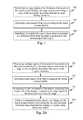
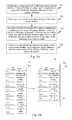
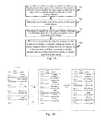
- FIG. 1is a flow chart of a method for displaying a document on a touch screen display according to an exemplary embodiment
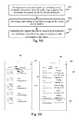
- FIG. 2Ais a flow chart of a method for displaying a document on a touch screen display according to another exemplary embodiment
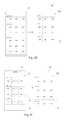
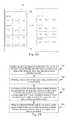
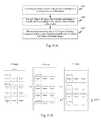
- FIGS. 2B to 2Eare schematic interfaces of the exemplary embodiment shown in FIG. 2A in implementation
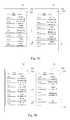
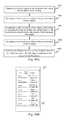
- FIG. 3Ais a flow chart of a method for displaying a document on a touch screen display according to another exemplary embodiment
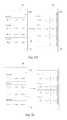
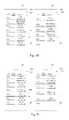
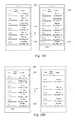
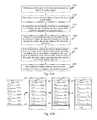
- FIGS. 3B to 3Eare schematic interfaces of the exemplary embodiment shown in FIG. 3A in implementation
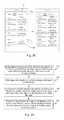
- FIG. 4Ais a flow chart of a method for displaying a document on a touch screen display according to another exemplary embodiment
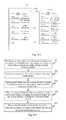
- FIGS. 4B to 4Dare schematic interfaces of the exemplary embodiment shown in FIG. 4A in implementation
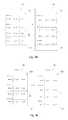
- FIG. 5Ais a flow chart of a method for displaying a document on a touch screen display according to another exemplary embodiment
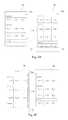
- FIGS. 5B to 5Dare schematic interfaces of the exemplary embodiment shown in FIG. 5A in implementation
- FIG. 6Ais a flow chart of a method for displaying a document on a touch screen display according to another exemplary embodiment
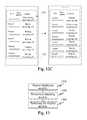
- FIGS. 6B to 6Care schematic interfaces of the exemplary embodiment shown in FIG. 6A in implementation
- FIG. 7Ais a flow chart of a method for displaying a document on a touch screen display according to another exemplary embodiment
- FIG. 7Bis a schematic interface of the exemplary embodiment shown in FIG. 7A in implementation.
- FIG. 8Ais a flow chart of a method for displaying a document on a touch screen display according to another exemplary embodiment
- FIG. 8Bis a schematic interface of the exemplary embodiment shown in FIG. 8A in implementation.
- FIG. 9Ais a flow chart of a method for displaying a document on a touch screen display according to another exemplary embodiment
- FIG. 9Bis a schematic interface of the exemplary embodiment shown in FIG. 9A in implementation.
- FIG. 10Ais a flow chart of a method for displaying a document on a touch screen display according to another exemplary embodiment
- FIGS. 10B to 10Dare schematic interfaces of the exemplary embodiment shown in FIG. 10A in implementation
- FIG. 11Ais a flow chart of a method for displaying a document on a touch screen display according to another exemplary embodiment
- FIG. 11Bis a schematic interface of the exemplary embodiment shown in FIG. 11A in implementation.
- FIG. 12Ais a flow chart of a method for displaying a document on a touch screen display according to another exemplary embodiment
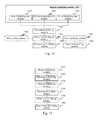
- FIGS. 12B and 12Care schematic interfaces of the exemplary embodiment shown in FIG. 12A in implementation
- FIG. 13is a block diagram of a device for displaying a document on a touch screen display according to an exemplary embodiment
- FIG. 14is a block diagram of a device for displaying a document on a touch screen display according to another exemplary embodiment
- FIG. 15is a block diagram of a device for displaying a document on a touch screen display according to another exemplary embodiment.
- FIG. 16is a block diagram of a device for displaying a document on a touch screen display according to another exemplary embodiment.
- An electronic documentrefers to a subset or a superset of a web page, a digital image, an electronic file, an electronic table, an application interaction interface and an operating system interaction interface.
- an electronic documentrequires a display region larger than a display region of a single screen of a touch screen display.
- a display elementrefers to a subset or a superset of an icon, a head portrait, an image, a text, a cell and an interactive widget.
- a display elementoccupies a sub-region of an electronic document.
- Various display elementscan be adjacent to each other, or be separated.
- An edge regionrefers to a part of a region of an electronic document.
- a size of an edge regionis equal to or smaller than a display region of a single screen of a touch screen display.
- An edge regioncontains an edge of an electronic document and one or more display elements.
- FIG. 1is a flow chart of a method for displaying a document on a touch screen display according to an exemplary embodiment.
- the method for displaying a documentis described as applied in a terminal having a touch screen display, for example.
- the method for displaying a documentcan include the following steps.
- step 101an edge region of an electronic document is displayed on the touch screen display.
- the edge regioncontains an edge of the electronic document and one or more display elements.
- step 102a movement of an object acting on the touch screen display is detected.
- step 103the one or more display elements are stretched for display in a direction away from the edge, in response to the movement of the object.
- the method for displaying a documentprovided by the present embodiment, when display reaches an edge region of an electronic document, one or more display elements are stretched for display in a direction away from the edge of the electronic document, as a response to a move operation of the user. Thereby, it reminds the user that the display has reached the edge of the electronic document, prevents the user from repeating move operation which is practically inapplicable, and thus improves efficiency of user operation.
- FIG. 2Ais a flow chart of a method for displaying a document on a touch screen display according to another exemplary embodiment.
- the method for displaying a documentis described as applied in a terminal having a touch screen display, for example.
- the method for displaying a documentcan include the following steps.
- step 201an edge region of an electronic document is displayed on the touch screen display.
- the edge regioncontains an edge of the electronic document and one or more display elements.
- the edge of the electronic documentcan overlap with the edge of display region of the touch screen display, and is not clearly indicated as an edge in the display region of the touch screen display.
- step 202a movement of an object acting on the touch screen display is detected.
- the objectrefers to a control object such as a finger of a user, a touch pen or other objects which can be detected by the touch screen display.
- the objectis required to directly act on the touch screen display.
- the objectcan directly act on the touch screen display, or the object can hover with a space interval to act on the touch screen display.
- the terminaldetects the movement of the object through the touch screen display.
- the movementcan be a movement away from an edge in an edge region.
- step 203all of the display elements in the edge region are stretched for display in the direction away from the edge, in response to the movement of the object.
- the terminalstretches for display all of the display elements in the edge region in the direction away from the edge. Stretching for display refers to a display manner of enlarging a display element in a direction away from the edge.
- the edgerefers to the edge away from which the object moves.
- a stretch ratio for each of the display elementsmay be the same.
- the stretch ratio for each of the display elementspositively correlates to a first distance which is a distance between the display element and the edge.
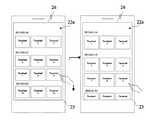
- an electronic documentis an interaction interface 22 of a picture application.
- the interaction interface 22contains 18 thumbnails arranged successively in six rows and three columns.
- the 18 thumbnailsare respectively numbered as 1-18.
- the touch screen display 23has a relatively small display region, only an edge region 22 a of the interaction interface 22 can be displayed.
- the edge region 22 acontains an upper edge 26 of the interaction interface 22 and thumbnails numbered 1-12 arranged successively in four rows and three columns. Wherein, the upper edge 26 of the interaction interface 22 overlaps with the upper edge of the touch screen display 23 , and is not clearly indicated as an edge in FIG. 2B .
- the terminaldetects the movement of the finger through the touch screen display 23 .
- the terminalstretches for display the 12 thumbnails in the edge region 22 a in a direction away from the upper edge 26 . Widths of the thumbnails remain unchanged after the stretch, while heights thereof are increased.
- a part of the thumbnails 10 , 11 and 12 in the last roware moved out of the display region of the touch screen display 23 and are no longer displayed.
- An interval between every two rows of stretched thumbnailscan be generally kept unchanged, or an interval between every two rows of stretched thumbnails can also be stretched for display.
- the stretch ratio for each of the thumbnailsis the same. That is, each of the thumbnails has the same height after the stretch.
- the stretch ratiopositively correlates to a moving distance of the finger. That is, the longer the moving distance of the finger on the touch screen display 23 is, the larger the stretch ratio is; and the shorter the moving distance of the finger on the touch screen display 23 is, the smaller the stretch ratio is.
- the stretch ratio for each of the thumbnailsis different from each other, and the stretch ratio for each of the thumbnails positively correlates to a first distance, and the first distance is a distance between a thumbnail and the upper edge 26 . That is, the larger a distance between a stretched thumbnail and the upper edge 26 is, the larger a stretch ratio for the thumbnail is; and the smaller a distance between a stretched thumbnail and the upper edge 26 is, the smaller a stretch ratio for the thumbnail is.
- the thumbnails 7 , 8 and 9are stretched with a first stretch ratio
- the thumbnails 4 , 5 and 6are stretched with a second stretch ratio
- the first stretch ratiois larger than the second stretch ratio.
- step 204when it is detected that the object is no longer on the touch screen display, the display elements that have been stretched for display are recovered to display states before the stretch.
- the terminalWhen it is detected that the object is no longer on the touch screen display, the terminal recovers the display elements that have been stretched for display to display states before the stretch.
- the recovering processcan be regarded as an inverse process of step 203 . However, unlike step 203 in which the stretch follows the movement of the object, in step 204 , the recovering process is performed at a preset rate or in a preset time.
- the terminalcan recover the display elements that have been stretched for display to display states before the stretch at a preset rate.
- the preset ratecan be a uniform rate, a uniform deceleration rate, a uniform acceleration rate, a rate positively correlating to the stretch rate, or the like.
- the present embodimentdoes not limit the preset rate.
- the terminalcan recover the display elements that have been stretched for display to display states before the stretch in a preset time.
- the preset timecan be 0.2 second.
- the terminalwhen it is detected that the finger is no longer on the touch screen display 23 , the terminal recovers the 12 thumbnails that have been stretched for display to display states before the stretch in 0.2 second.
- the terminalmaintains the display state of the edge of the electronic document unchanged.
- step 204if it is detected that the object is still on the touch screen display and the object remains still and no longer moves, the terminal maintains the current display state unchanged.
- the method for displaying a documentprovided by the present embodiment, when display reaches an edge region of an electronic document, one or more display elements are stretched for display in a direction away from the edge of the electronic document, as a response to a move operation of the user. Thereby, it reminds the user that the display has reached the edge of the electronic document, prevents the user from repeating move operation which is practically inapplicable, and thus improves efficiency of user operation.
- the display elements that have been stretched for displayare recovered to display states before the stretch. Thereby, after the user is reminded that the display has reached the edge of the electronic document, the display state can be recovered to the state before the stretch, to facilitate other operations of the user.
- FIG. 3Ais a flow chart of a method for displaying a document on a touch screen display according to another exemplary embodiment.
- the method for displaying a documentis described as applied in a terminal having a touch screen display, for example.
- the method for displaying a documentcan include the following steps.
- step 301an edge region of an electronic document is displayed on the touch screen display, the edge region containing an edge of the electronic document and one or more display elements.
- the edge of the electronic documentcan overlap with the edge of display region of the touch screen display, and is not clearly indicated as an edge in the display region of the touch screen display.
- step 302a movement of an object acting on the touch screen display is detected.
- the objectrefers to a control object such as a finger of a user, a touch pen or other objects which can be detected by the touch screen display.
- the objectis required to directly act on the touch screen display.
- the objectcan directly act on the touch screen display, or the object can hover with a space interval to act on the touch screen display.
- the terminaldetects the movement of the object through the touch screen display.
- the movementcan be a movement away from an edge in an edge region.
- step 303in response to the movement of the object, display states of n rows of display elements which are closest to the edge are maintained unchanged, and remaining rows of display elements apart from the n rows of display elements which are closest to the edge are stretched for display in the direction away from the edge, wherein n is a positive integer.
- Stretching for displayrefers to a display manner of enlarging a display element in a direction away from the edge.
- the edgerefers to the edge away from which the object moves.
- a stretch ratio for each of the display elementsmay be the same.
- the stretch ratio for each of the display elementspositively correlates to a first distance which is a distance between the display element and the edge.
- an electronic documentis an interaction interface 32 of a contact list application.
- the interaction interface 32contains a title row 322 and ten rows of calling records.
- the touch screen display 33has a relatively small display region, only an edge region 32 a of the interaction interface 32 can be displayed.
- the edge region 32 acontains an upper edge 36 of the interaction interface 32 and former seven rows of calling records.
- the upper edge 36 of the interaction interface 32overlaps with the upper edge of the touch screen display 33 , and not clearly indicated as an edge in FIG. 3B .
- the terminaldetects the movement of the finger through the touch screen display 33 .
- the terminalmaintains the display state of the display elements in the row (i.e. the title row 322 ) closest to the upper edge 36 unchanged, and stretches for display the seven rows of calling records in the edge region 32 a in the direction away from the upper edge 36 . After the stretch, the widths of the rows of calling records are kept unchanged, and the heights thereof are increased.
- the stretch ratio for each of the rows of calling recordsis the same. That is, each of the rows of calling records has the same height after the stretch.
- the stretch ratiopositively correlates to a moving distance of the finger. That is, the longer the moving distance of the finger on the touch screen display 33 is, the larger the stretch ratio is; and the shorter the moving distance of the finger on the touch screen display 33 is, the smaller the stretch ratio is.
- a part of the lowest row (the 7 th row) of calling recordsare moved out of the display region of the touch screen display 33 and are no longer displayed.
- the stretch ratio for each of the rows of calling recordsis different from each other, and the stretch ratio for each of the rows of calling records positively correlates to a first distance, and the first distance is a distance between a row of calling records and the upper edge 36 . That is, the larger a distance between a stretched row of calling records and the upper edge 36 is, the larger a stretch ratio for the row of calling records is; and the smaller a distance between a stretched row of calling records and the upper edge 36 is, the smaller a stretch ratio for the row of calling records is.
- the stretch ratio for the 6 th row of calling recordsis larger than the stretch ratio of the 5 th row of calling records
- the stretch ratio for the 5 th row of calling recordsis larger than the stretch ratio of the 4 th row of calling records
- the stretch ratio for the 4 th row of calling recordsis larger than the stretch ratio of the 3 th row of calling records.
- a part of the calling records in the lowest row (the 6 th row) and all of calling records in the 7 th roware moved out of the display region of the touch screen display 33 and are no longer displayed.
- step 304when it is detected that the object is no longer on the touch screen display, the display elements that have been stretched for display are recovered to display states before the stretch.
- the terminalWhen it is detected that the object is no longer on the touch screen display, the terminal recovers the display elements that have been stretched for display to display states before the stretch.
- the recovering processcan be regarded as an inverse process of step 303 . However, unlike step 303 in which the stretch follows the movement of the object, in step 304 , the recovering process is performed at a preset rate or in a preset time.
- the terminalcan recover the display elements that have been stretched for display to display states before the stretch at a preset rate.
- the preset ratecan be a uniform rate, a uniform deceleration rate, a uniform acceleration rate, a rate positively correlating to the stretch rate, or the like.
- the present embodimentdoes not limit the preset rate.
- the terminalcan recover the display elements that have been stretched for display to display states before the stretch in a preset time.
- the preset timecan be 0.3 second.
- the terminalwhen it is detected that the finger is no longer on the touch screen display 33 , the terminal recovers the seven rows of calling records that have been stretched for display to display states before the stretch in 0.3 second.
- the terminalmaintains the display state of the edge of the electronic document unchanged.
- step 304if it is detected that the object is still on the touch screen display and the object remains still and no longer moves, the terminal maintains the current display state unchanged.
- the method for displaying a documentprovided by the present embodiment, when display reaches an edge region of an electronic document, one or more display elements are stretched for display in a direction away from the edge of the electronic document, as a response to a move operation of the user. Thereby, it reminds the user that the display has reached the edge of the electronic document, prevents the user from repeating move operation which is practically inapplicable, and thus improves efficiency of user operation.
- the display elements that have been stretched for displayare recovered to display states before the stretch. Thereby, other operations can be performed on the electronic document that is recovered to the display state before the stretch, so as not to influence subsequent normal use of the electronic document.
- FIG. 4Ais a flow chart of a method for displaying a document on a touch screen display according to another exemplary embodiment.
- the method for displaying a documentis described as applied in a terminal having a touch screen display, for example.
- the method for displaying a documentcan include the following steps.
- step 401an edge region of an electronic document is displayed on the touch screen display, the edge region containing an edge of the electronic document and one or more display elements.
- the edge of the electronic documentcan overlap with the edge of display region of the touch screen display, and is not clearly indicated as an edge in the display region of the touch screen display.
- step 402a movement of an object acting on the touch screen display is detected.
- the objectrefers to a control object such as a finger of a user, a touch pen or other objects which can be detected by the touch screen display.
- the objectis required to directly act on the touch screen display.
- the objectcan directly act on the touch screen display, or the object can hover with a space interval to act on the touch screen display.
- the terminaldetects the movement of the object through the touch screen display.
- the movementcan be a movement away from an edge in an edge region.
- step 403in response to the movement of the object, the display elements located between the edge and a position of the object are stretched for display in the direction away from the edge.
- the terminalstretches for display the display elements located between the edge and a position of the object in the direction away from the edge.
- the edgerefers to the edge away from which the object moves.
- Stretching for displayrefers to a display manner of enlarging a display element in a direction away from the edge.
- the position of the objectis the corresponding position where the object acts on the touch screen display.
- a stretch ratio for each of the display elementsis the same.
- the stretch ratio for each of the display elementspositively correlates to a first distance which is a distance between the display element and the edge.
- the electronic documentis also the interaction interface 22 of the picture application and the object is also the finger of the user, for example.
- the terminaldetects the movement of the finger through the touch screen display 23 .
- the terminalstretches for display the six thumbnails between the position of the finger and the upper edge 26 in the edge region 22 a in the direction away from the upper edge 26 . Widths of the thumbnails remain unchanged after the stretch, while heights thereof are increased.
- an interval between every two rows of stretched thumbnailscan be generally kept unchanged, or an interval between every two rows of stretched thumbnails can also be stretched for display.
- thumbnails 7 to 12 at the other side of the position of the fingerare not stretched for display, and a part of the thumbnails 10 , 11 and 12 are moved out of the display region of the touch screen display 23 and are no longer displayed.
- the stretch ratio for each of the thumbnailsis the same. That is, each of the thumbnails has the same height after the stretch.
- the stretch ratiopositively correlates to a moving distance of the finger. That is, the longer the moving distance of the finger on the touch screen display 23 is, the larger the stretch ratio is; and the shorter the moving distance of the finger on the touch screen display 23 is, the smaller the stretch ratio is.
- the stretch ratio for each of the thumbnailsis different from each other, and the stretch ratio for each of the thumbnails positively correlates to a first distance, and the first distance is a distance between a thumbnail and the upper edge 26 . That is, the larger a distance between a stretched thumbnail and the upper edge 26 is, the larger a stretch ratio for the thumbnail is; and the smaller a distance between a stretched thumbnail and the upper edge 26 is, the smaller a stretch ratio for the thumbnail is.
- the thumbnails 4 , 5 and 6are stretched with a first stretch ratio
- the thumbnails 1 , 2 and 3are stretched with a second stretch ratio
- the first stretch ratiois larger than the second stretch ratio.
- step 404when it is detected that the object is no longer on the touch screen display, the display elements that have been stretched for display are recovered to display states before the stretch.
- the terminalWhen it is detected that the object is no longer on the touch screen display, the terminal recovers the display elements that have been stretched for display to display states before the stretch.
- the recovering processcan be regarded as an inverse process of step 403 . However, unlike step 403 in which the stretch follows the movement of the object, in step 404 , the recovering process is performed at a preset rate or in a preset time.
- the terminalcan recover the display elements that have been stretched for display to display states before the stretch at a preset rate.
- the preset ratecan be a uniform rate, a uniform deceleration rate, a uniform acceleration rate, a rate positively correlating to the stretch rate, or the like.
- the present embodimentdoes not limit the preset rate.
- the terminalcan recover the display elements that have been stretched for display to display states before the stretch in a preset time.
- the preset timecan be 0.4 second.
- the terminalwhen it is detected that the finger is no longer on the touch screen display 23 , the terminal recovers the six thumbnails that have been stretched for display to display states before the stretch in 0.4 second.
- the terminalmaintains the display state of the edge of the electronic document unchanged.
- step 404if it is detected that the object is still on the touch screen display and the object remains still and no longer moves, the terminal maintains the current display state unchanged.
- the method for displaying a documentprovided by the present embodiment, when display reaches an edge region of an electronic document, one or more display elements are stretched for display in a direction away from the edge of the electronic document, as a response to a move operation of the user. Thereby, it reminds the user that the display has reached the edge of the electronic document, prevents the user from repeating move operation which is practically inapplicable, and thus improves efficiency of user operation.
- the display elements that have been stretched for displayare recovered to display states before the stretch. Thereby, after the user is reminded that the display has reached the edge of the electronic document, the display state can be recovered to the state before the stretch, to facilitate other operations of the user.
- FIG. 5Ais a flow chart of a method for displaying a document on a touch screen display according to another exemplary embodiment.
- the method for displaying a documentis described as applied in a terminal having a touch screen display, for example.
- the method for displaying a documentcan include the following steps.
- step 501an edge region of an electronic document is displayed on the touch screen display, the edge region containing an edge of the electronic document and one or more display elements.
- the edge of the electronic documentcan overlap with the edge of display region of the touch screen display, and is not clearly indicated as an edge in the display region of the touch screen display.
- step 502a movement of an object acting on the touch screen display is detected.
- the objectrefers to a control object such as a finger of a user, a touch pen or other objects which can be detected by the touch screen display.
- the objectis required to directly act on the touch screen display.
- the objectcan directly act on the touch screen display, or the object can hover with a space interval to act on the touch screen display.
- the terminaldetects the movement of the object through the touch screen display.
- the movementcan be a movement away from an edge in an edge region.
- step 503in response to the movement of the object, among display elements located between the edge and a position of the object, remaining rows of display elements apart from n rows of display elements which are closest to the edge are, stretched for display in a direction away from the edge, wherein n is a positive integer.
- Stretching for displayrefers to a display manner by enlarging a display element in a direction away from the edge.
- the edgerefers to the edge away from which the object moves.
- a stretch ratio for each of the display elementsis the same.
- the stretch ratio for each of the display elementspositively correlates to a first distance which is a distance between the display element and the edge.
- the electronic documentis the interaction interface 32 of the contact list application
- the objectis the finger of the user
- n1.
- the terminaldetects the movement of the finger through the touch screen display 33 .
- the terminalmaintains the display state of the display elements in the row (i.e. the title row 322 ) closest to the upper edge 36 unchanged, and stretches for display the 1 st to the 4 th row of calling records in the direction away from the upper edge 36 . After the stretch, the widths of the rows of calling records are kept unchanged, and the heights thereof are increased.
- the stretch ratio for each of the 1 st to the 4 th row of calling recordsis the same. That is, each of the rows of calling records has the same height after the stretch.
- the stretch ratiopositively correlates to a moving distance of the finger. That is, the longer the moving distance of the finger on the touch screen display 33 is, the larger the stretch ratio is; and the shorter the moving distance of the finger on the touch screen display 33 is, the smaller the stretch ratio is.
- a part of the calling records in the 6 th row and all of the calling records in the lowest row (the 7 th row)are moved out of the display region of the touch screen display 33 and are no longer displayed.
- the stretch ratio for each of the rows of calling recordsis different from each other, and the stretch ratio for each of the rows of calling records positively correlates to a first distance, and the first distance is a distance between a row of calling records and the upper edge 36 . That is, the larger a distance between a stretched row of calling records and the upper edge 36 is, the larger a stretch ratio for the row of calling records is; and the smaller a distance between a stretched row of calling records and the upper edge 36 is, the smaller a stretch ratio for the row of calling records is.
- the stretch ratio for the 4 th row of calling recordsis larger than the stretch ratio of the 3 th row of calling records
- the stretch ratio for the 3 th row of calling recordsis larger than the stretch ratio of the 2 nd row of calling records
- the stretch ratio for the 2 nd row of calling recordsis larger than the stretch ratio of the 1 St row of calling records.
- a part of the calling records in the lowest row (the 6 th row) of and all of the calling records in the 7 th roware moved out of the display region of the touch screen display 33 and are no longer displayed.
- step 504when it is detected that the object is no longer on the touch screen display, the display elements that have been stretched for display are recovered to display states before the stretch.
- the terminalWhen it is detected that the object is no longer on the touch screen display, the terminal recovers the display elements that have been stretched for display to display states before the stretch.
- the recovering processcan be regarded as an inverse process of step 503 . However, unlike step 503 in which the stretch follows the movement of the object, in step 504 , the recovering process is performed at a preset rate or in a preset time.
- the terminalcan recover the display elements that have been stretched for display to display states before the stretch at a preset rate.
- the preset ratecan be a uniform rate, a uniform deceleration rate, a uniform acceleration rate, a rate positively correlating to the stretch rate, or the like.
- the present embodimentdoes not limit the preset rate.
- the terminalcan recover the display elements that have been stretched for display to display states before the stretch in a preset time.
- the preset timecan be 0.4 second.
- the terminalwhen it is detected that the finger is no longer on the touch screen display 33 , the terminal recovers the seven rows of calling records that have been stretched for display to display states before the stretch in 0.4 second.
- the terminalmaintains the display state of the edge of the electronic document unchanged.
- step 504if it is detected that the object is still on the touch screen display and the object remains still and no longer moves, the terminal maintains the current display state unchanged.
- the method for displaying a documentprovided by the present embodiment, when display reaches an edge region of an electronic document, one or more display elements are stretched for display in a direction away from the edge of the electronic document, as a response to a move operation of the user. Thereby, it reminds the user that the display has reached the edge of the electronic document, prevents the user from repeating move operation which is practically inapplicable, and thus improves efficiency of user operation.
- the display elements that have been stretched for displayare recovered to display states before the stretch. Thereby, after the user is reminded that the display has reached the edge of the electronic document, the display state can be recovered to the state before the stretch, to facilitate other operations of the user.
- FIG. 6Ais a flow chart of a method for displaying a document on a touch screen display according to another exemplary embodiment.
- the method for displaying a documentis described as applied in a terminal having a touch screen display, for example.
- the method for displaying a documentcan include the following steps.
- step 601an edge region of an electronic document is displayed on the touch screen display, the edge region containing an edge of the electronic document and one or more display elements.
- a movement of an object acting on the touch screen displayis detected.
- the movementcan be a movement away from an edge in an edge region.
- step 603the one or more display elements are stretched for display in a direction away from the edge, in response to the movement of the object.
- the step 603can be implemented as any one of steps 203 , 303 , 403 and 503 .
- step 604when it is detected that the object is no longer on the touch screen display, the one or more display elements are kept to be stretched for display for a first preset time period.
- the stretch rateis related to the moving rate of the object.
- the terminalWhen it is detected that the object is no longer on the touch screen display, the terminal keeps stretching, for display, the one or more display elements for a first preset time period.
- the first preset time periodcan be 0.2 second.
- the electronic documentis also the interaction interface of the picture application and the object is also the finger of the user, for example.
- the terminaldetects the movement of the finger through the touch screen display 23 .
- the terminalstretches for display stretches the six thumbnails between the position of the finger and the upper edge 26 in the edge region 22 a in the direction away from the upper edge 26 .
- the terminalkeeps stretching, for display, the six thumbnails in the direction away from the upper edge 26 in 0.2 second.
- step 605the display elements that have been stretched for display are recovered to display states before the stretch in a second preset time period.
- the terminalcan recover the display elements that have been stretched for display to display states before the stretch in a second preset time period.
- the second preset time periodcan be 0.4 second.
- the terminalrecovers the display elements that have been stretched for display to display states before the stretch in 0.4 second.
- step 604if it is detected that the object is still on the touch screen display and the object remains still and no longer moves, the terminal maintains the current display state unchanged.
- the one or more display elementsare kept to be stretched for display.
- the terminalcan also perform the following steps:
- step 604Second, if it exceeds the preset threshold, performing step 604 .
- step 504if it does not exceed the preset threshold, performing step 504 .
- FIG. 7Ais a flow chart of a method for displaying a document on a touch screen display according to another exemplary embodiment.
- the method for displaying a documentis described as applied in a terminal having a touch screen display, for example.
- the method for displaying a documentcan include the following steps.
- step 701an edge region of an electronic document is displayed on the touch screen display, the edge region containing an edge of the electronic document and one or more display elements.
- a movement of an object acting on the touch screen displayis detected.
- the movementcan be a movement away from an edge in an edge region.
- step 703the one or more display elements are stretched for display in a direction away from the edge, in response to the movement of the object.
- the step 703can be implemented as any one of steps 203 , 303 , 403 and 503 .
- step 704when it is detected that the object is no longer on the touch screen display, the display elements that have been stretched for display are elastically scaled for display for at least one time, and then the display elements that have been stretched for display are recovered to display states before the stretch.
- the one time elastic scaling for displayis an animation display effect combined by successive scaling display and stretching display.
- the terminalcan elastically scale for display the display elements that have been stretched for display for one time, and then recover them to the display state before the stretch.
- the terminalcan also elastically scale for display the display elements that have been stretched for display for more than one time, and then recover them to the display state before the stretch.
- the scaling ratio for the former elastic scalingis larger than the scaling ratio for the latter elastic scaling.
- a terminalperforms elastic scaling for display for one time.
- the terminalscales for display the seven rows of calling records that have been stretched for display in 0.2 second.
- the widths of the rows of the calling recordsremain unchanged, while the heights thereof are smaller than the original heights.
- the terminalstretches for display the seven rows of calling records that have been scaled for display in 0.4 second, and resumes the display state before the stretch display following the movement of the object, i.e. the original display state. From the view of the user, after the finger leaves, the seven rows of calling records are elastically scaled for one time, and then recovered to the original display state.
- the terminalcan also perform elastic scaling display for more than one time, and then recover the display elements to the original display state.
- the scaling ratio for each time of elastic scaling for displaycan be different.
- the display effects of the elastic scaling displaycan be various, which will not be repeated herein, and it does not limit the form of the elastic scaling display.
- the terminal displaying an edge region of an electronic documentcan refer to it initially displaying an edge region of an electronic document, or can also refer to it displaying an edge region of an electronic document during a movement.
- thisis described with reference to three distinct embodiments.
- FIG. 8Ais a flow chart of a method for displaying a document on a touch screen display according to another exemplary embodiment.
- the method for displaying a documentis described as applied in a terminal having a touch screen display, for example.
- the method for displaying a documentcan include the following steps.
- step 801in response to a first signal for opening the electronic document, the edge region of the electronic document is displayed on the touch screen display, the edge region containing an edge of the electronic document and one or more display elements.
- a terminalWhen it displays a user interface, a terminal can receive a first signal for opening the electronic document triggered by a user, and the first signal can be a signal of clicking a shortcut or an icon corresponding to the electronic document.
- the terminaldisplays the edge region of the electronic document on the touch screen display, the edge region containing an edge of the electronic document and one or more display elements.
- the edgetypically includes an upper edge, a left edge of the electronic document or both of them.
- the terminalfirstly displays a shortcut interface 82 .
- the shortcut interface 82contains twelve application icons arranged in four rows and three columns.
- a first signalis triggered.
- the terminalcancels display of the shortcut interface 82 on the touch screen display 83 , and displays an electronic document which is an interaction interface 86 of the contact list application.
- the interaction interface 86includes a left edge 87 , an upper edge 88 and a right edge 89 . However, since the interaction interface 86 has a length greater than a height of the touch screen display 83 , the lower edge is not displayed.
- a movement of an object acting on the touch screen displayis detected.
- the movementcan be a movement away from an edge in an edge region.
- step 803the one or more display elements are stretched for display in a direction away from the edge, in response to the movement of the object.
- This stepcan be implemented as any one of steps 203 , 303 , 403 and 503 .
- FIG. 9Ais a flow chart of a method for displaying a document on a touch screen display according to another exemplary embodiment.
- the method for displaying a documentis described as applied in a terminal having a touch screen display, for example.
- the method for displaying a documentcan include the following steps.
- step 901in response to a second signal for switching to the electronic document, the edge region of the electronic document is displayed on the touch screen display.
- a terminalWhen it is displaying an electronic document A, a terminal can receive a second signal for switching to an electronic document B, the second signal can be a signal of clicking a shortcut or an icon corresponding to the electronic document B.
- the terminaldisplays the edge region of the electronic document B on the touch screen display.
- the edge regioncontains an edge of the electronic document B and one or more display elements.
- the edgetypically includes an upper edge, a left edge of the electronic document or both of them.
- the electronic document Ais an interface of a contact list
- the electronic document Bis an interface of calling records.
- the terminalfirstly displays the interface 92 of a contact list for the contact list application.
- the userclicks a widget 96 corresponding to the interface 94 of calling records in the upper of the interface 92 of a contact list with his finger.
- the terminalswitches from the interface 92 of a contact list to the interface 94 of calling records on the touch screen display 93 .
- the interface 94 of calling recordsincludes a left edge 97 , an upper edge 98 and a right edge 99 .
- the lower edgeis not displayed.
- step 902a movement of an object acting on the touch screen display is detected.
- the movementcan be a movement away from an edge in an edge region.
- step 903the one or more display elements are stretched for display in a direction away from the edge, in response to the movement of the object.
- This stepcan be implemented as any one of steps 203 , 303 , 403 and 503 .
- FIG. 10Ais a flow chart of a method for displaying a document on a touch screen display according to another exemplary embodiment.
- the method for displaying a documentis described as applied in a terminal having a touch screen display, for example.
- the method for displaying a documentcan include the following steps.
- step 1001a partial region of the electronic document is displayed on the touch screen display.
- the terminalcan display a partial region of the electronic document.
- the partial regionincludes a part of the display elements of the electronic document.
- the electronic documentis an interface 102 of calling records
- a partial region of the interface 102 of calling recordsis displayed on the touch screen display 103 .
- the partial regionincludes the 2 nd to 8 th rows of calling records.
- step 1002a movement of an object acting on the touch screen display is detected.
- the objectrefers to a control object such as a finger of a user, a touch pen or other objects which can be detected by the touch screen display.
- the terminaldetects the movement of the object through the touch screen display.
- the movementcan be a movement away from an edge in an edge region.
- step 1003in response to the movement of the object, the partial region of the electronic document is moved for display as the edge region of the electronic document.
- the terminalmoves the electronic document for display.
- the objectis a finger of a user.
- the terminaldetects the movement of the finger through the touch screen display 103 .
- the terminalmoves the partial region of electronic document upward for display, as an edge region 104 .
- the edge region 104includes the 3 rd to 9 th rows of calling records and a lower edge 106 of the interface of calling records.
- step 1004a movement of an object acting on the touch screen display is detected.
- the terminalcontinues to detect the movement of the object.
- the movementcan be a movement following the movement in step 1002 without a stop, or can be another movement independent of the movement in step 1002 .
- the movementcan be a movement away from the lower edge 106 in the edge region 104 .
- step 1005the one or more display elements are stretched for display in a direction away from the edge, in response to the movement of the object.
- the one or more display elementsare stretched for display in a direction away from the lower edge 106 .
- This stepcan be implemented as any one of steps 203 , 303 , 403 and 503 .
- the terminalstretches for display the 3 rd to 9 th rows of calling records in the edge region 104 in the direction away from the lower edge 106 .
- the method for displaying a document described in the above method embodimentscan be implemented in various operating systems, and underlying implementations in various operating systems can be different.
- the methodcan include the following steps, as shown in FIG. 12A .
- step 1101an elastic inertia value inertia is updated according to a moving distance of the object.
- the elastic inertia value inertiaindicates an elasticity degree when a display element is stretched for display.
- the initial value of the elastic inertia value inertiacan be 0.
- the elastic inertia value inertiapositively correlates to a moving distance of an object on the touch screen display. That is, the larger the moving distance of the object on the touch screen display is, the larger the elastic inertia value inertia is.
- the terminalupdates the elastic inertia value inertia according to the moving distance of the object at a predetermined time interval.
- the predetermined time intervalcan be smaller than or equal to a time interval for display between two frames of display images.
- step 1102for a n th frame of display image, the terminal calculates a stretch ratio according to the current elastic inertia value inertia.
- the terminalcalculates a stretch ratio according to the current elastic inertia value inertia.
- the stretch ratioincreases from a frame to another frame at a rate negatively correlating to the elastic inertia value inertia. That is, the larger the elastic inertia value inertia is, the smaller the rate at which the stretch ratio increases from a frame to another frame is; and the smaller the elastic inertia value inertia is, the larger the rate at which the stretch ratio increases from a frame to another frame is.
- step 1103the terminal stretches the 1 st frame of display image according to the calculated stretch ratio, to obtain a n th frame of display image.
- the terminalcan put display elements to be stretched for display into a container. For example, all of the display elements of an entire electronic document are put into a container. Then, the terminal stretches the 1 st frame of display image according to the calculated stretch ratio, to obtain a n th frame of display image, wherein n>2.
- the terminalcalculates the stretch ratio of the 2 nd frame of display image being longitudinally stretching to 104% according to the elastic inertia value inertia of A1.
- the terminalstretches the entire container where the twelve thumbnails are accommodated longitudinally to 104%, to obtain the 2 nd frame of display image.
- the terminalcalculates the stretch ratio of the 3 rd frame of display image being longitudinally stretching to 107% according to the elastic inertia value inertia of A2.
- the terminalstretches the entire container where the twelve thumbnails are accommodated longitudinally to 107%, to obtain the 3 rd frame of display image.
- FIG. 12Ais a flow chart of a method for displaying a document on a touch screen display according to another exemplary embodiment.
- the method for displaying a documentis described as applied in a terminal having a touch screen display, for example.
- the method for displaying a documentcan include the following steps.
- step 1201a first region of an electronic document is displayed on the touch screen display.
- a terminalWhen it is to display an electronic document, a terminal can display a first region of the electronic document, the first region containing a part of the display elements of the electronic document.
- step 1202a movement of an object acting on the touch screen display is detected.
- the terminaldetects the movement of the object through the touch screen display.
- the movementcan be a movement away from an edge in an edge region.
- step 1203in response to the movement of the object, the first region of the electronic document is moved for display as a second region.
- the terminalmoves the electronic document for display.
- the moving rate of the movingcan be the same as the moving rate of the object.
- the electronic documentis an interface 122 of calling records.
- a first region of the interface 122 of calling recordsis displayed on the touch screen display 123 .
- the first regioncontains the 1 st to 7th rows of calling records.
- the objectis a finger of the user.
- the terminaldetects the movement of the finger through the touch screen display 123 .
- the terminalmoves the first region of the electronic document upward for display as a second region 124 .
- the second region 124contains the 2 nd to 8 th rows of calling records.
- the terminalcan nevertheless set the elastic inertia value inertia as positively correlating to the moving rate of the object.
- the elastic inertia value inertiacan be set as, for two adjacent frames display images, an object position corresponding to a latter frame of display image minus an object position corresponding to a former frame of display image.
- the object positionrefers to an object position detected on the touch screen display.
- step 1204when it is detected that the object is no longer on the touch screen display, the second region of the electronic document is kept to be moved for display.
- the moving ratecan be related to the moving rate of the object.
- the terminalWhen it is detected that the object is no longer on the touch screen display, the terminal keeps the second region of the electronic document to be moved for display at an ever decreasing moving rate.
- the moving ratecan be gradually decreased to a preset threshold in a preset decreasing manner.
- the preset thresholdcan be 0, and the preset decreasing manner can be decreasing at a uniform deceleration rate.
- an “inertia” sliding effectcan be presented to the user.
- the terminalwhen it is detected that the finger is no longer on the touch screen display 123 , the terminal can keep the second region 124 to be moved for display at an ever decreasing moving rate.
- the terminalwhen it detects that the object is no longer on the touch screen display, the terminal can also decrease the saved elastic inertia value at a preset decreasing rate.
- step 1205if the moving for display reaches the edge region of the electronic document, the one or more display elements in the edge region are stretched for display in a direction away from the edge of the electronic document, the edge region containing the edge and the one or more display elements.
- the terminalstretches for display the one or more display elements in the edge region in the direction away from the edge of the electronic document for the first preset time.
- the terminalmoves for display the second region 124 in the interface 122 of calling records at a decreased moving rate.
- the moving for displayreaches the edge region 125 of the interface 122 of calling records, and the moving rate has not yet be decreased to 0, the terminal stretches for display the 3 rd to 9 th rows of calling records in the edge region 125 in the direction away from the lower edge 126 .
- the process of stretch for displaycan be implemented through an easing interpolation algorithm. Then, the process of stretch for display can last for a first preset time period, such as 0.2 second. Before the stretch for display, the terminal can calculate the stretch ratio for the process of stretch for display according to the saved elastic inertia value through an input easing interpolation algorithm.
- the easing interpolation algorithmhas various forms, which is not limited in the embodiments of the present disclosure.
- step 1206the display elements that have been stretched for display are recovered to display states before the stretch.
- the terminalcan recover the display elements that have been stretched for display to display states before the stretch in a second preset time period.
- the process of the recover displaycan also be implemented through an easing interpolation algorithm.
- the process of the recover displaycan last for a preset time period, such as 0.4 second.
- the process of the recover displaycan be regarded as an inverse process of the above process of the stretch display.
- the terminalrecovers the seven rows of calling records that have been stretched for display to the display states before the stretch.
- the terminalkeeps moving for display and stretch for display, such that after the user's finger leaves the touch screen display, the user can clearly observe that the process of moving for display the electronic document has reached the edge region of the electronic document.
- step 704 in the embodiment of FIG. 7Acan also be implemented through an easing interpolation algorithm.
- FIG. 13is a block diagram of a device for displaying a document on a touch screen display according to an exemplary embodiment.
- the device for displaying a documentcan be implemented with software, hardware or a combination of the both into a part of or whole of an electronic device containing a touch screen display.
- the device for displaying a documentcan include: a region displaying module 1320 configured to display an edge region of an electronic document on the touch screen display, the edge region containing an edge of the electronic document and one or more display elements, a movement detecting module 1340 configured to detect a movement of an object acting on the touch screen display, and a stretching for display module 1360 configured to, in response to the movement of the object, stretch, for display, the one or more display elements in a direction away from the edge.
- the device for displaying a documentprovided by the present embodiment, when display reaches an edge region of an electronic document, one or more display elements are stretched for display in a direction away from the edge of the electronic document, as a response to a move operation of the user. Thereby, it reminds the user that the display has reached the edge of the electronic document, prevents the user from repeating move operation which is practically inapplicable, and thus improves efficiency of user operation.
- FIG. 14is a block diagram of a device for displaying a document on a touch screen display according to an exemplary embodiment.
- the device for displaying a documentcan be implemented with software, hardware or a combination of the both into a part of or whole of an electronic device containing a touch screen display.
- the device for displaying a documentcan include: a region displaying module 1320 configured to display an edge region of an electronic document on the touch screen display, the edge region containing an edge of the electronic document and one or more display elements, a movement detecting module 1340 configured to detect a movement of an object acting on the touch screen display, and a stretching for display module 1360 configured to, in response to the movement of the object, stretch, for display, the one or more display elements in a direction away from the edge.
- the stretching for display module 1360is configured to stretch, for display, all of the display elements in the edge region in the direction away from the edge.
- the stretching for display module 1360is configured to maintain display states of n rows of display elements which are closest to the edge unchanged, where n is a positive integer, and stretch, for display, remaining rows of display elements apart from the n rows of display elements which are closest to the edge, in the direction away from the edge.
- a stretch ratio for each of the display elementsis the same, or, the stretch ratio for each of the display elements positively correlates to a first distance which is a distance between the display element and the edge.
- the stretching for display module 1360is configured to stretch, for display, the display elements located between the edge and a position of the object, in the direction away from the edge.
- the position of the objectis the corresponding position where the object acts on the touch screen display.
- the stretching for display module 1360is configured to, among display elements located between the edge and a position of the object, stretch, for display, remaining rows of display elements apart from n rows of display elements which are closest to the edge, in a direction away from the edge, n being a positive integer.
- the position of the objectis the corresponding position where the object acts on the touch screen display.
- a stretch ratio for each of the display elementsis the same, or, the stretch ratio for each of the display elements positively correlates to a first distance which is a distance between the display element and the edge.
- the stretch ratio for each of the display elementspositively correlates to a second distance which is a distance between the display elements and the position of the object projected on a straight line perpendicular to the edge.
- the devicefurther includes a maintaining module 1350 configured to maintain display states of the edge of the electronic document unchanged.
- the devicefurther includes a recovering for display module 1380 configured to, when it is detected that the object is no longer on the touch screen display, recover the display elements that have been stretched for display to display states before the stretch.
- the recovering for display module 1380is configured to, when it is detected that the object is no longer on the touch screen display, elastically scale for display the display elements that have been stretched for display for at least one time, and then recover the display elements that have been stretched for display to display states before the stretch.
- the devicefurther includes a first stretching module 1392 configured to, when it is detected that the object is no longer on the touch screen display, keep stretching, for display, the one or more display elements for a first preset time period, and a second recovering module 1394 configured to recover the display elements that have been stretched for display to display states before the stretch in a second preset time period.
- a first stretching module 1392configured to, when it is detected that the object is no longer on the touch screen display, keep stretching, for display, the one or more display elements for a first preset time period
- a second recovering module 1394configured to recover the display elements that have been stretched for display to display states before the stretch in a second preset time period.
- the region displaying module 1320includes a first displaying sub-module 1322 configured to, in response to a first signal for opening the electronic document, display the edge region of the electronic document on the touch screen display, or second displaying sub-module 1324 configured to, in response to a second signal for switching to the electronic document, display the edge region of the electronic document on the touch screen display, or a third displaying sub-module 1326 configured to display a partial region of the electronic document on the touch screen display, detect a movement of an object acting on the touch screen display, and in response to the movement of the object, move for display the partial region of the electronic document as the edge region of the electronic document.
- the device for displaying a documentprovided by the present embodiment, when display reaches an edge region of an electronic document, one or more display elements are stretched for display in a direction away from the edge of the electronic document, as a response to a move operation of the user. Thereby, it reminds the user that the display has reached the edge of the electronic document, prevents the user from repeating move operation which is practically inapplicable, and thus improves efficiency of user operation.
- the display elements that have been stretched for displayare recovered to display states before the stretch. Thereby, after the user is reminded that the display has reached the edge of the electronic document, the display state can be recovered to the state before the stretch, to facilitate other operations of the user.
- FIG. 15is a block diagram of a device for displaying a document on a touch screen display according to an exemplary embodiment.
- the device for displaying a documentcan be implemented with software, hardware or a combination of the both into a part of or whole of an electronic device containing a touch screen display.
- the device for displaying a documentcan include a region displaying module 1510 configured to display a first region of an electronic document on the touch screen display, a movement detecting module 1520 configured to detect a movement of an object acting on the touch screen display, a second displaying module 1530 configured to, in response to the movement of the object, move for display the first region of the electronic document as a second region, a moving for display module 1540 configured to, when it is detected that the object is no longer on the touch screen display, keep moving for display the second region of the electronic document, a stretching for display module 1550 configured to, when the moving for display reaches an edge region of the electronic document, stretch, for display, one or more display elements in the edge region in a direction away from an edge of the electronic document, the edge region containing the edge and the one or more display elements, and a recovering for display module 1560 configured to recover the display elements that have been stretched for display to display states before the stretch.
- a region displaying module 1510configured to display a first region of an electronic document on the touch
- the device for display a documentprovided by the present embodiment, when the object is no longer detected, by keeping moving for display and stretching for display, after the user's finger leaves the touch screen display, the user can clearly observe that the process of moving for display the electronic document has reached the edge region of the electronic document.
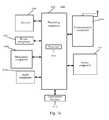
- FIG. 16is a block diagram of a device 1600 for displaying a document on a touch screen display according to an exemplary embodiment.
- the device 1600may be a mobile phone, a computer, a digital broadcast terminal, a messaging device, a gaming console, a tablet, a medical device, exercise equipment, a personal digital assistant, and the like.
- the device 1600may include one or more of the following components: a processing component 1602 , a memory 1604 , a power component 1606 , a multimedia component 1608 , an audio component 1610 , an input/output (I/O) interface 1612 , a sensor component 1614 , and a communication component 1616 .
- the processing component 1602typically controls overall operations of the device 1600 , such as the operations associated with display, telephone calls, data communications, camera operations, and recording operations.
- the processing component 1602may include one or more processors 1620 to execute instructions to perform all or part of the steps in the above described methods.
- the processing component 1602may include one or more modules which facilitate the interaction between the processing component 1602 and other components.
- the processing component 1602may include a multimedia module to facilitate the interaction between the multimedia component 1608 and the processing component 1602 .
- the memory 1604is configured to store various types of data to support the operation of the device 1600 . Examples of such data include instructions for any applications or methods operated on the device 1600 , contact data, phonebook data, messages, pictures, video, etc.
- the memory 1604may be implemented using any type of volatile or non-volatile memory devices, or a combination thereof, such as a static random access memory (SRAM), an electrically erasable programmable read-only memory (EEPROM), an erasable programmable read-only memory (EPROM), a programmable read-only memory (PROM), a read-only memory (ROM), a magnetic memory, a flash memory, a magnetic or optical disk.
- SRAMstatic random access memory
- EEPROMelectrically erasable programmable read-only memory
- EPROMerasable programmable read-only memory
- PROMprogrammable read-only memory
- ROMread-only memory
- magnetic memorya magnetic memory
- flash memorya flash memory
- magnetic or optical diska magnetic
- the power component 1606provides power to various components of the device 1600 .
- the power component 1606may include a power management system, one or more power sources, and any other components associated with the generation, management, and distribution of power in the device 1600 .
- the multimedia component 1608includes a touch screen display providing an output interface between the device 1600 and the user.
- the touch screen displaymay include a liquid crystal display (LCD) and a touch panel (TP).
- the touch panelincludes one or more touch sensors to sense touches, swipes, and gestures on the touch panel.
- the touch sensorsmay not only sense a boundary of a touch or swipe action, but also sense a period of time and a pressure associated with the touch or swipe action.
- the multimedia component 1608includes a front camera and/or a rear camera.
- the front camera and the rear cameramay receive an external multimedia datum while the device 1600 is in an operation mode, such as a photographing mode or a video mode.
- Each of the front camera and the rear cameramay be a fixed optical lens system or have focus and optical zoom capability.
- the audio component 1610is configured to output and/or input audio signals.
- the audio component 1610includes a microphone (“MIC”) configured to receive an external audio signal when the device 1600 is in an operation mode, such as a call mode, a recording mode, and a voice recognition mode.
- the received audio signalmay be further stored in the memory 1604 or transmitted via the communication component 1616 .
- the audio component 1610further includes a speaker to output audio signals.
- the I/O interface 1612provides an interface between the processing component 1602 and peripheral interface modules, such as a keyboard, a click wheel, buttons, and the like.
- the buttonsmay include, but are not limited to, a home button, a volume button, a starting button, and a locking button.
- the sensor component 1614includes one or more sensors to provide status assessments of various aspects of the device 1600 .
- the sensor component 1614may detect an open/closed status of the device 1600 , relative positioning of components, e.g., the display and the keypad, of the device 1600 , a change in position of the device 1600 or a component of the device 1600 , a presence or absence of user contact with the device 1600 , an orientation or an acceleration/deceleration of the device 1600 , and a change in temperature of the device 1600 .
- the sensor component 1614may include a proximity sensor configured to detect the presence of nearby objects without any physical contact.
- the sensor component 1614may also include a light sensor, such as a CMOS or CCD image sensor, for use in imaging applications.
- the sensor component 1614may also include an accelerometer sensor, a gyroscope sensor, a magnetic sensor, a pressure sensor, or a temperature sensor.
- the communication component 1616is configured to facilitate communication, wired or wirelessly, between the device 1600 and other devices.
- the device 1600can access a wireless network based on a communication standard, such as WiFi, 2G, or 3G, or a combination thereof.
- the communication component 1616receives a broadcast signal or broadcast associated information from an external broadcast management system via a broadcast channel.
- the communication component 1616further includes a near field communication (NFC) module to facilitate short-range communications.
- the NFC modulemay be implemented based on a radio frequency identification (RFID) technology, an infrared data association (IrDA) technology, an ultra-wideband (UWB) technology, a Bluetooth (BT) technology, and other technologies.
- RFIDradio frequency identification
- IrDAinfrared data association
- UWBultra-wideband
- BTBluetooth
- the device 1600may be implemented with one or more application specific integrated circuits (ASICs), digital signal processors (DSPs), digital signal processing devices (DSPDs), programmable logic devices (PLDs), field programmable gate arrays (FPGAs), controllers, micro-controllers, microprocessors, or other electronic components, for performing the above methods for displaying a document.
- ASICsapplication specific integrated circuits
- DSPsdigital signal processors
- DSPDsdigital signal processing devices
- PLDsprogrammable logic devices
- FPGAsfield programmable gate arrays
- controllersmicro-controllers, microprocessors, or other electronic components, for performing the above methods for displaying a document.
- non-transitory computer-readable storage mediumincluding instructions, such as included in the memory 1604 , executable by the processor 1620 in the device 1600 , for performing the above-described methods.
- the non-transitory computer-readable storage mediummay be a ROM, a RAM, a CD-ROM, a magnetic tape, a floppy disc, an optical data storage device, and the like.
- a non-transitory computer readable storage mediumwhen instructions in the storage medium are executed by a processor of the device 1600 , the device 1600 is enabled to perform the methods for displaying a document.
Landscapes
- Engineering & Computer Science (AREA)
- General Engineering & Computer Science (AREA)
- Theoretical Computer Science (AREA)
- Human Computer Interaction (AREA)
- Physics & Mathematics (AREA)
- General Physics & Mathematics (AREA)
- User Interface Of Digital Computer (AREA)
- Electrically Operated Instructional Devices (AREA)
- Controls And Circuits For Display Device (AREA)
- Position Input By Displaying (AREA)
Abstract
Description
The present application claims priority to Chinese Patent Application No. 201510050331.0, filed Jan. 30, 2015, the entire contents of which are incorporated herein by reference.
The present disclosure generally relates to the field of human computer interaction, and more particularly, to methods and devices for displaying a document on a touch screen display.
With functionality of mobile terminals becomes increasingly powerful, contents to be displayed on a user interface of a mobile terminal become increasingly numerous. In this case, easiness to use of the user interface becomes especially important. In particular, when a mobile terminal has a relatively small screen size, easiness to use of the user interface is even more important.
In case where the mobile terminal has a relatively small screen size and an electronic document has a relatively large screen size, only a part of the electronic document can be displayed on the screen at a time. Then, a user needs to move the electronic document on the screen for display, so as to display other parts of the electronic document. For example, the user can move the electronic document upward or downward for display.
However, when the mobile terminal is displaying one side of the electronic document, a request triggered by the user for moving the electronic documents to another side for display, is typically not responded by the mobile terminal. At this time, it is often appreciated by the user as if the mobile terminal might be stuck or crashed.
According to a first aspect of embodiments of the present disclosure, there is provided a method for displaying a document on a touch screen display, including: displaying an edge region of an electronic document on the touch screen display, the edge region containing an edge of the electronic document and one or more display elements, each corresponding to a sub-region of an electronic document detecting a movement of an object acting on the touch screen display, and in response to the movement of the object, stretching, for display, the one or more display elements in a direction away from the edge, the one or more display elements not being stretched in a direction perpendicular to the direction away from the edge.
According to a second aspect of embodiments of the present disclosure, there is provided a method for displaying a document on a touch screen display, including: displaying a first region of an electronic document on the touch screen display, detecting a movement of an object acting on the touch screen display, in response to the movement of the object, moving for display the first region of the electronic document as a second region, when it is detected that the object is no longer on the touch screen display, keeping moving for display the second region of the electronic document, if the moving for display reaches an edge region of the electronic document, stretching, for display, one or more display elements in the edge region in a direction away from an edge of the electronic document, the one or more display elements not being stretched in a direction perpendicular the direction away from the edge, and the edge region containing the edge and the one or more display elements, and recovering the display elements that have been stretched for display to display states before the stretch.
According to a third aspect of embodiments of the present disclosure, there is provided a device for displaying a document on a touch screen display, including: a processor, memory for storing instructions executable by the processor; and a touch screen display electrically connected to the processor. The processor is configured to perform displaying an edge region of an electronic document on the touch screen display, the edge region containing an edge of the electronic document and one or more display elements, detecting a movement of an object acting on the touch screen display, and in response to the movement of the object, stretching, for display, the one or more display elements in a direction away from the edge, the one or more display elements not being stretched in a direction perpendicular to the direction away from the edge.
According to a fourth aspect of embodiments of the present disclosure, there is provided a device for displaying a document on a touch screen display, including a processor, a memory for storing instructions executable by the processor, and a touch screen display electrically connected to the processor. The processor is configured to perform displaying a first region of an electronic document on the touch screen display, detecting a movement of an object acting on the touch screen display, in response to the movement of the object, moving for display the first region of the electronic document as a second region, when it is detected that the object is no longer on the touch screen display, keeping moving for display the second region of the electronic document, if the moving for display reaches an edge region of the electronic document, stretching, for display, one or more display elements in the edge region in a direction away from an edge of the electronic document, the one or more display elements not being stretched in a direction perpendicular the direction away from the edge, and the edge region containing the edge and the one or more display elements, and recovering the display elements that have been stretched for display to display states before the stretch.
It is to be understood that both the foregoing general description and the following detailed description are exemplary and explanatory only and are not restrictive of the invention, as claimed.
The accompanying drawings, which are incorporated in and constitute a part of this specification, illustrate embodiments consistent with the invention and, together with the description, serve to explain the principles of the invention.
Through the above accompany drawings, the specific embodiments of the disclosure have been shown, for which a more detailed description will be given as below. These drawings and textual description are not intended to limit the scope of the concept of the disclosure in any manner, but to explain the concept of the disclosure to those skilled in the art through particular embodiments.
Reference will now be made in detail to exemplary embodiments, examples of which are illustrated in the accompanying drawings. The following description refers to the accompanying drawings in which the same numbers in different drawings represent the same or similar elements unless otherwise represented. The implementations set forth in the following description of exemplary embodiments do not represent all implementations consistent with the invention. Instead, they are merely examples of devices and methods consistent with aspects related to the invention as recited in the appended claims.
First of all, some terms involved in the embodiments of the present disclosure are explained as follows.
An electronic document refers to a subset or a superset of a web page, a digital image, an electronic file, an electronic table, an application interaction interface and an operating system interaction interface. Typically, an electronic document requires a display region larger than a display region of a single screen of a touch screen display.
A display element refers to a subset or a superset of an icon, a head portrait, an image, a text, a cell and an interactive widget. Typically, a display element occupies a sub-region of an electronic document. Various display elements can be adjacent to each other, or be separated.
An edge region refers to a part of a region of an electronic document. A size of an edge region is equal to or smaller than a display region of a single screen of a touch screen display. An edge region contains an edge of an electronic document and one or more display elements.
Instep 101, an edge region of an electronic document is displayed on the touch screen display. The edge region contains an edge of the electronic document and one or more display elements.
Instep 102, a movement of an object acting on the touch screen display is detected.
Instep 103, the one or more display elements are stretched for display in a direction away from the edge, in response to the movement of the object.
Accordingly, in the method for displaying a document provided by the present embodiment, when display reaches an edge region of an electronic document, one or more display elements are stretched for display in a direction away from the edge of the electronic document, as a response to a move operation of the user. Thereby, it reminds the user that the display has reached the edge of the electronic document, prevents the user from repeating move operation which is practically inapplicable, and thus improves efficiency of user operation.
Instep 201, an edge region of an electronic document is displayed on the touch screen display. The edge region contains an edge of the electronic document and one or more display elements.
The edge of the electronic document can overlap with the edge of display region of the touch screen display, and is not clearly indicated as an edge in the display region of the touch screen display.
Instep 202, a movement of an object acting on the touch screen display is detected.
The object refers to a control object such as a finger of a user, a touch pen or other objects which can be detected by the touch screen display.
If the touch screen display does not support hovering touch, the object is required to directly act on the touch screen display.
If the touch screen display supports hovering touch, the object can directly act on the touch screen display, or the object can hover with a space interval to act on the touch screen display.
When the object moves, the terminal detects the movement of the object through the touch screen display. For example, the movement can be a movement away from an edge in an edge region.
Instep 203, all of the display elements in the edge region are stretched for display in the direction away from the edge, in response to the movement of the object.
As a response to the movement of the object, the terminal stretches for display all of the display elements in the edge region in the direction away from the edge. Stretching for display refers to a display manner of enlarging a display element in a direction away from the edge. The edge refers to the edge away from which the object moves.
A stretch ratio for each of the display elements may be the same. Alternatively, the stretch ratio for each of the display elements positively correlates to a first distance which is a distance between the display element and the edge.
As an example, referring toFIG. 2B , an electronic document is aninteraction interface 22 of a picture application. Theinteraction interface 22 contains 18 thumbnails arranged successively in six rows and three columns. The 18 thumbnails are respectively numbered as 1-18. However, since thetouch screen display 23 has a relatively small display region, only anedge region 22aof theinteraction interface 22 can be displayed. Theedge region 22acontains anupper edge 26 of theinteraction interface 22 and thumbnails numbered 1-12 arranged successively in four rows and three columns. Wherein, theupper edge 26 of theinteraction interface 22 overlaps with the upper edge of thetouch screen display 23, and is not clearly indicated as an edge inFIG. 2B .
Referring toFIGS. 2C and 2D , when an object (for example a finger of a user) moves downward on thetouch screen display 23, the terminal detects the movement of the finger through thetouch screen display 23. In response to the movement of the finger, the terminal stretches for display the 12 thumbnails in theedge region 22ain a direction away from theupper edge 26. Widths of the thumbnails remain unchanged after the stretch, while heights thereof are increased. Moreover, a part of thethumbnails touch screen display 23 and are no longer displayed. An interval between every two rows of stretched thumbnails can be generally kept unchanged, or an interval between every two rows of stretched thumbnails can also be stretched for display.
Wherein, as shown in the example ofFIG. 2C , the stretch ratio for each of the thumbnails is the same. That is, each of the thumbnails has the same height after the stretch. The stretch ratio positively correlates to a moving distance of the finger. That is, the longer the moving distance of the finger on thetouch screen display 23 is, the larger the stretch ratio is; and the shorter the moving distance of the finger on thetouch screen display 23 is, the smaller the stretch ratio is.
In the example ofFIG. 2D , the stretch ratio for each of the thumbnails is different from each other, and the stretch ratio for each of the thumbnails positively correlates to a first distance, and the first distance is a distance between a thumbnail and theupper edge 26. That is, the larger a distance between a stretched thumbnail and theupper edge 26 is, the larger a stretch ratio for the thumbnail is; and the smaller a distance between a stretched thumbnail and theupper edge 26 is, the smaller a stretch ratio for the thumbnail is. For example, thethumbnails thumbnails
Instep 204, when it is detected that the object is no longer on the touch screen display, the display elements that have been stretched for display are recovered to display states before the stretch.
When it is detected that the object is no longer on the touch screen display, the terminal recovers the display elements that have been stretched for display to display states before the stretch. The recovering process can be regarded as an inverse process ofstep 203. However, unlikestep 203 in which the stretch follows the movement of the object, instep 204, the recovering process is performed at a preset rate or in a preset time.
In other words, the terminal can recover the display elements that have been stretched for display to display states before the stretch at a preset rate. The preset rate can be a uniform rate, a uniform deceleration rate, a uniform acceleration rate, a rate positively correlating to the stretch rate, or the like. The present embodiment does not limit the preset rate.
Alternatively, the terminal can recover the display elements that have been stretched for display to display states before the stretch in a preset time. The preset time can be 0.2 second.
As an example, as shown inFIG. 2E , when it is detected that the finger is no longer on thetouch screen display 23, the terminal recovers the 12 thumbnails that have been stretched for display to display states before the stretch in 0.2 second.
It should be noted that, in both of the stretch for display process and the recovering for display process as described above, the terminal maintains the display state of the edge of the electronic document unchanged.
As another possibility ofstep 204, if it is detected that the object is still on the touch screen display and the object remains still and no longer moves, the terminal maintains the current display state unchanged.
Accordingly, in the method for displaying a document provided by the present embodiment, when display reaches an edge region of an electronic document, one or more display elements are stretched for display in a direction away from the edge of the electronic document, as a response to a move operation of the user. Thereby, it reminds the user that the display has reached the edge of the electronic document, prevents the user from repeating move operation which is practically inapplicable, and thus improves efficiency of user operation.
Further, in the method for displaying a document provided by the present embodiment, the display elements that have been stretched for display are recovered to display states before the stretch. Thereby, after the user is reminded that the display has reached the edge of the electronic document, the display state can be recovered to the state before the stretch, to facilitate other operations of the user.
Instep 301, an edge region of an electronic document is displayed on the touch screen display, the edge region containing an edge of the electronic document and one or more display elements.
The edge of the electronic document can overlap with the edge of display region of the touch screen display, and is not clearly indicated as an edge in the display region of the touch screen display.
Instep 302, a movement of an object acting on the touch screen display is detected.
The object refers to a control object such as a finger of a user, a touch pen or other objects which can be detected by the touch screen display.
If the touch screen display does not support hovering touch, the object is required to directly act on the touch screen display.
If the touch screen display supports hovering touch, the object can directly act on the touch screen display, or the object can hover with a space interval to act on the touch screen display.
When the object moves, the terminal detects the movement of the object through the touch screen display. For example, the movement can be a movement away from an edge in an edge region.
Instep 303, in response to the movement of the object, display states of n rows of display elements which are closest to the edge are maintained unchanged, and remaining rows of display elements apart from the n rows of display elements which are closest to the edge are stretched for display in the direction away from the edge, wherein n is a positive integer.
Stretching for display refers to a display manner of enlarging a display element in a direction away from the edge. The edge refers to the edge away from which the object moves.
A stretch ratio for each of the display elements may be the same. Alternatively, the stretch ratio for each of the display elements positively correlates to a first distance which is a distance between the display element and the edge.
As an example, referring toFIG. 3B , an electronic document is aninteraction interface 32 of a contact list application. Theinteraction interface 32 contains atitle row 322 and ten rows of calling records. However, since thetouch screen display 33 has a relatively small display region, only anedge region 32aof theinteraction interface 32 can be displayed. Theedge region 32acontains anupper edge 36 of theinteraction interface 32 and former seven rows of calling records. Wherein, theupper edge 36 of theinteraction interface 32 overlaps with the upper edge of thetouch screen display 33, and not clearly indicated as an edge inFIG. 3B .
Referring toFIGS. 3C and 3D , when an object (for example a finger of a user) moves downward on thetouch screen display 33, the terminal detects the movement of the finger through thetouch screen display 33. In response to the movement of the finger, the terminal maintains the display state of the display elements in the row (i.e. the title row322) closest to theupper edge 36 unchanged, and stretches for display the seven rows of calling records in theedge region 32ain the direction away from theupper edge 36. After the stretch, the widths of the rows of calling records are kept unchanged, and the heights thereof are increased.
As shown in the example ofFIG. 3C , the stretch ratio for each of the rows of calling records is the same. That is, each of the rows of calling records has the same height after the stretch. The stretch ratio positively correlates to a moving distance of the finger. That is, the longer the moving distance of the finger on thetouch screen display 33 is, the larger the stretch ratio is; and the shorter the moving distance of the finger on thetouch screen display 33 is, the smaller the stretch ratio is. In addition, a part of the lowest row (the 7throw) of calling records are moved out of the display region of thetouch screen display 33 and are no longer displayed.
In the example ofFIG. 3D , the stretch ratio for each of the rows of calling records is different from each other, and the stretch ratio for each of the rows of calling records positively correlates to a first distance, and the first distance is a distance between a row of calling records and theupper edge 36. That is, the larger a distance between a stretched row of calling records and theupper edge 36 is, the larger a stretch ratio for the row of calling records is; and the smaller a distance between a stretched row of calling records and theupper edge 36 is, the smaller a stretch ratio for the row of calling records is. For example, the stretch ratio for the 6throw of calling records is larger than the stretch ratio of the 5throw of calling records, the stretch ratio for the 5throw of calling records is larger than the stretch ratio of the 4throw of calling records, and the stretch ratio for the 4throw of calling records is larger than the stretch ratio of the 3throw of calling records. In addition, a part of the calling records in the lowest row (the 6throw) and all of calling records in the 7throw are moved out of the display region of thetouch screen display 33 and are no longer displayed.
Instep 304, when it is detected that the object is no longer on the touch screen display, the display elements that have been stretched for display are recovered to display states before the stretch.
When it is detected that the object is no longer on the touch screen display, the terminal recovers the display elements that have been stretched for display to display states before the stretch. The recovering process can be regarded as an inverse process ofstep 303. However, unlikestep 303 in which the stretch follows the movement of the object, instep 304, the recovering process is performed at a preset rate or in a preset time.
In other words, the terminal can recover the display elements that have been stretched for display to display states before the stretch at a preset rate. The preset rate can be a uniform rate, a uniform deceleration rate, a uniform acceleration rate, a rate positively correlating to the stretch rate, or the like. The present embodiment does not limit the preset rate.
Alternatively, the terminal can recover the display elements that have been stretched for display to display states before the stretch in a preset time. The preset time can be 0.3 second.
As an example, as shown inFIG. 3E , when it is detected that the finger is no longer on thetouch screen display 33, the terminal recovers the seven rows of calling records that have been stretched for display to display states before the stretch in 0.3 second.
It should be noted that, in both of the stretch for display process and the recovering for display process as described above, the terminal maintains the display state of the edge of the electronic document unchanged.
As another possibility ofstep 304, if it is detected that the object is still on the touch screen display and the object remains still and no longer moves, the terminal maintains the current display state unchanged.
Accordingly, in the method for displaying a document provided by the present embodiment, when display reaches an edge region of an electronic document, one or more display elements are stretched for display in a direction away from the edge of the electronic document, as a response to a move operation of the user. Thereby, it reminds the user that the display has reached the edge of the electronic document, prevents the user from repeating move operation which is practically inapplicable, and thus improves efficiency of user operation.
Further, in the method for displaying a document provided by the present embodiment, the display elements that have been stretched for display are recovered to display states before the stretch. Thereby, other operations can be performed on the electronic document that is recovered to the display state before the stretch, so as not to influence subsequent normal use of the electronic document.
Instep 401, an edge region of an electronic document is displayed on the touch screen display, the edge region containing an edge of the electronic document and one or more display elements.
The edge of the electronic document can overlap with the edge of display region of the touch screen display, and is not clearly indicated as an edge in the display region of the touch screen display.
Instep 402, a movement of an object acting on the touch screen display is detected.
The object refers to a control object such as a finger of a user, a touch pen or other objects which can be detected by the touch screen display.
If the touch screen display does not support hovering touch, the object is required to directly act on the touch screen display.
If the touch screen display supports hovering touch, the object can directly act on the touch screen display, or the object can hover with a space interval to act on the touch screen display.
When the object moves, the terminal detects the movement of the object through the touch screen display. For example, the movement can be a movement away from an edge in an edge region.
Instep 403, in response to the movement of the object, the display elements located between the edge and a position of the object are stretched for display in the direction away from the edge.
As a response to the movement of the object, the terminal stretches for display the display elements located between the edge and a position of the object in the direction away from the edge. The edge refers to the edge away from which the object moves.
Stretching for display refers to a display manner of enlarging a display element in a direction away from the edge. The position of the object is the corresponding position where the object acts on the touch screen display.
Wherein, a stretch ratio for each of the display elements is the same. Alternatively, the stretch ratio for each of the display elements positively correlates to a first distance which is a distance between the display element and the edge.
As an example, referring toFIGS. 4B and 4C , the electronic document is also theinteraction interface 22 of the picture application and the object is also the finger of the user, for example. When the finger moves downward on thetouch screen display 23, the terminal detects the movement of the finger through thetouch screen display 23. In response to the movement of the finger, the terminal stretches for display the six thumbnails between the position of the finger and theupper edge 26 in theedge region 22ain the direction away from theupper edge 26. Widths of the thumbnails remain unchanged after the stretch, while heights thereof are increased. Moreover, an interval between every two rows of stretched thumbnails can be generally kept unchanged, or an interval between every two rows of stretched thumbnails can also be stretched for display.
Thethumbnails 7 to12 at the other side of the position of the finger are not stretched for display, and a part of thethumbnails touch screen display 23 and are no longer displayed.
As shown in the example ofFIG. 4B , the stretch ratio for each of the thumbnails is the same. That is, each of the thumbnails has the same height after the stretch. The stretch ratio positively correlates to a moving distance of the finger. That is, the longer the moving distance of the finger on thetouch screen display 23 is, the larger the stretch ratio is; and the shorter the moving distance of the finger on thetouch screen display 23 is, the smaller the stretch ratio is.
In the example ofFIG. 4C , the stretch ratio for each of the thumbnails is different from each other, and the stretch ratio for each of the thumbnails positively correlates to a first distance, and the first distance is a distance between a thumbnail and theupper edge 26. That is, the larger a distance between a stretched thumbnail and theupper edge 26 is, the larger a stretch ratio for the thumbnail is; and the smaller a distance between a stretched thumbnail and theupper edge 26 is, the smaller a stretch ratio for the thumbnail is. For example, thethumbnails thumbnails
Instep 404, when it is detected that the object is no longer on the touch screen display, the display elements that have been stretched for display are recovered to display states before the stretch.
When it is detected that the object is no longer on the touch screen display, the terminal recovers the display elements that have been stretched for display to display states before the stretch. The recovering process can be regarded as an inverse process ofstep 403. However, unlikestep 403 in which the stretch follows the movement of the object, instep 404, the recovering process is performed at a preset rate or in a preset time.
In other words, the terminal can recover the display elements that have been stretched for display to display states before the stretch at a preset rate. The preset rate can be a uniform rate, a uniform deceleration rate, a uniform acceleration rate, a rate positively correlating to the stretch rate, or the like. The present embodiment does not limit the preset rate.
Alternatively, the terminal can recover the display elements that have been stretched for display to display states before the stretch in a preset time. The preset time can be 0.4 second.
As an example, as shown inFIG. 4D , when it is detected that the finger is no longer on thetouch screen display 23, the terminal recovers the six thumbnails that have been stretched for display to display states before the stretch in 0.4 second.
It should be noted that, in both of the stretch for display process and the recovering for display process as described above, the terminal maintains the display state of the edge of the electronic document unchanged.
As another possibility ofstep 404, if it is detected that the object is still on the touch screen display and the object remains still and no longer moves, the terminal maintains the current display state unchanged.
Accordingly, in the method for displaying a document provided by the present embodiment, when display reaches an edge region of an electronic document, one or more display elements are stretched for display in a direction away from the edge of the electronic document, as a response to a move operation of the user. Thereby, it reminds the user that the display has reached the edge of the electronic document, prevents the user from repeating move operation which is practically inapplicable, and thus improves efficiency of user operation.
Further, in the method for displaying a document provided by the present embodiment, the display elements that have been stretched for display are recovered to display states before the stretch. Thereby, after the user is reminded that the display has reached the edge of the electronic document, the display state can be recovered to the state before the stretch, to facilitate other operations of the user.
Instep 501, an edge region of an electronic document is displayed on the touch screen display, the edge region containing an edge of the electronic document and one or more display elements.
The edge of the electronic document can overlap with the edge of display region of the touch screen display, and is not clearly indicated as an edge in the display region of the touch screen display.
Instep 502, a movement of an object acting on the touch screen display is detected.
The object refers to a control object such as a finger of a user, a touch pen or other objects which can be detected by the touch screen display.
If the touch screen display does not support hovering touch, the object is required to directly act on the touch screen display.
If the touch screen display supports hovering touch, the object can directly act on the touch screen display, or the object can hover with a space interval to act on the touch screen display.
When the object moves, the terminal detects the movement of the object through the touch screen display. For example, the movement can be a movement away from an edge in an edge region.
Instep 503, in response to the movement of the object, among display elements located between the edge and a position of the object, remaining rows of display elements apart from n rows of display elements which are closest to the edge are, stretched for display in a direction away from the edge, wherein n is a positive integer.
Stretching for display refers to a display manner by enlarging a display element in a direction away from the edge. The edge refers to the edge away from which the object moves.
A stretch ratio for each of the display elements is the same. Alternatively, the stretch ratio for each of the display elements positively correlates to a first distance which is a distance between the display element and the edge.
As an example, referring toFIGS. 5B and 5C , for example, the electronic document is theinteraction interface 32 of the contact list application, the object is the finger of the user, and n=1. When the finger moves downward on thetouch screen display 33, the terminal detects the movement of the finger through thetouch screen display 33. In response to the movement of the finger, among the display elements located between theupper edge 36 and the position of the finger, the terminal maintains the display state of the display elements in the row (i.e. the title row322) closest to theupper edge 36 unchanged, and stretches for display the 1stto the 4throw of calling records in the direction away from theupper edge 36. After the stretch, the widths of the rows of calling records are kept unchanged, and the heights thereof are increased.
Wherein, as shown in the example ofFIG. 5B , the stretch ratio for each of the 1stto the 4throw of calling records is the same. That is, each of the rows of calling records has the same height after the stretch. The stretch ratio positively correlates to a moving distance of the finger. That is, the longer the moving distance of the finger on thetouch screen display 33 is, the larger the stretch ratio is; and the shorter the moving distance of the finger on thetouch screen display 33 is, the smaller the stretch ratio is. In addition, a part of the calling records in the 6throw and all of the calling records in the lowest row (the 7throw) are moved out of the display region of thetouch screen display 33 and are no longer displayed.
In the example ofFIG. 5C , the stretch ratio for each of the rows of calling records is different from each other, and the stretch ratio for each of the rows of calling records positively correlates to a first distance, and the first distance is a distance between a row of calling records and theupper edge 36. That is, the larger a distance between a stretched row of calling records and theupper edge 36 is, the larger a stretch ratio for the row of calling records is; and the smaller a distance between a stretched row of calling records and theupper edge 36 is, the smaller a stretch ratio for the row of calling records is. For example, the stretch ratio for the 4throw of calling records is larger than the stretch ratio of the 3throw of calling records, the stretch ratio for the 3throw of calling records is larger than the stretch ratio of the 2ndrow of calling records, and the stretch ratio for the 2ndrow of calling records is larger than the stretch ratio of the 1Strow of calling records. In addition, a part of the calling records in the lowest row (the 6throw) of and all of the calling records in the 7throw are moved out of the display region of thetouch screen display 33 and are no longer displayed.
Instep 504, when it is detected that the object is no longer on the touch screen display, the display elements that have been stretched for display are recovered to display states before the stretch.
When it is detected that the object is no longer on the touch screen display, the terminal recovers the display elements that have been stretched for display to display states before the stretch. The recovering process can be regarded as an inverse process ofstep 503. However, unlikestep 503 in which the stretch follows the movement of the object, instep 504, the recovering process is performed at a preset rate or in a preset time.
In other words, the terminal can recover the display elements that have been stretched for display to display states before the stretch at a preset rate. The preset rate can be a uniform rate, a uniform deceleration rate, a uniform acceleration rate, a rate positively correlating to the stretch rate, or the like. The present embodiment does not limit the preset rate.
Alternatively, the terminal can recover the display elements that have been stretched for display to display states before the stretch in a preset time. The preset time can be 0.4 second.
As an example, as shown inFIG. 5D , when it is detected that the finger is no longer on thetouch screen display 33, the terminal recovers the seven rows of calling records that have been stretched for display to display states before the stretch in 0.4 second.
It should be noted that, in both of the stretch for display process and the recovering for display process as described above, the terminal maintains the display state of the edge of the electronic document unchanged.
As another possibility ofstep 504, if it is detected that the object is still on the touch screen display and the object remains still and no longer moves, the terminal maintains the current display state unchanged.
Accordingly, in the method for displaying a document provided by the present embodiment, when display reaches an edge region of an electronic document, one or more display elements are stretched for display in a direction away from the edge of the electronic document, as a response to a move operation of the user. Thereby, it reminds the user that the display has reached the edge of the electronic document, prevents the user from repeating move operation which is practically inapplicable, and thus improves efficiency of user operation.
Further, in the method for displaying a document provided by the present embodiment, the display elements that have been stretched for display are recovered to display states before the stretch. Thereby, after the user is reminded that the display has reached the edge of the electronic document, the display state can be recovered to the state before the stretch, to facilitate other operations of the user.
Instep 601, an edge region of an electronic document is displayed on the touch screen display, the edge region containing an edge of the electronic document and one or more display elements.
Instep 602, a movement of an object acting on the touch screen display is detected. The movement can be a movement away from an edge in an edge region.
Instep 603, the one or more display elements are stretched for display in a direction away from the edge, in response to the movement of the object.
Thestep 603 can be implemented as any one ofsteps
Instep 604, when it is detected that the object is no longer on the touch screen display, the one or more display elements are kept to be stretched for display for a first preset time period.
During the process of, stretching for display, the stretch rate is related to the moving rate of the object.
When it is detected that the object is no longer on the touch screen display, the terminal keeps stretching, for display, the one or more display elements for a first preset time period. The first preset time period can be 0.2 second.
As an example, referring toFIG. 6B , for example, the electronic document is also the interaction interface of the picture application and the object is also the finger of the user, for example. When the finger moves downward on thetouch screen display 23, the terminal detects the movement of the finger through thetouch screen display 23. In response to the movement of the finger, the terminal stretches for display stretches the six thumbnails between the position of the finger and theupper edge 26 in theedge region 22ain the direction away from theupper edge 26. When it is detected that the finger is no longer on thetouch screen display 23, the terminal keeps stretching, for display, the six thumbnails in the direction away from theupper edge 26 in 0.2 second.
Instep 605, the display elements that have been stretched for display are recovered to display states before the stretch in a second preset time period.
After it stops the stretch, the terminal can recover the display elements that have been stretched for display to display states before the stretch in a second preset time period. The second preset time period can be 0.4 second.
As an example, referring toFIG. 6C , after it keeps stretching, for display, the 6 thumbnails in the direction away from theupper edge 26, the terminal recovers the display elements that have been stretched for display to display states before the stretch in 0.4 second.
As another possibility ofstep 604, if it is detected that the object is still on the touch screen display and the object remains still and no longer moves, the terminal maintains the current display state unchanged.
Accordingly, further in the method for displaying a document provided by the present embodiment, when it is detected that the object is no longer on the touch screen display, the one or more display elements are kept to be stretched for display. Thereby, after the finger of the user leaves the touch screen display, without obstruction of the finger, the user can clearly observe the display elements that have been stretched for display, so as to clearly learn that the display has reached the edge of the electronic document.
It should be noted that, prior to step604, the terminal can also perform the following steps:
First, detecting whether a moving speed of the object exceeds a preset threshold before it is detected that the object is no longer on the touch screen display.
Second, if it exceeds the preset threshold, performingstep 604.
Third, if it does not exceed the preset threshold, performingstep 504.
Instep 701, an edge region of an electronic document is displayed on the touch screen display, the edge region containing an edge of the electronic document and one or more display elements.
Instep 702, a movement of an object acting on the touch screen display is detected. The movement can be a movement away from an edge in an edge region.
Instep 703, the one or more display elements are stretched for display in a direction away from the edge, in response to the movement of the object.
Thestep 703 can be implemented as any one ofsteps
Instep 704, when it is detected that the object is no longer on the touch screen display, the display elements that have been stretched for display are elastically scaled for display for at least one time, and then the display elements that have been stretched for display are recovered to display states before the stretch.
The one time elastic scaling for display is an animation display effect combined by successive scaling display and stretching display. The terminal can elastically scale for display the display elements that have been stretched for display for one time, and then recover them to the display state before the stretch. The terminal can also elastically scale for display the display elements that have been stretched for display for more than one time, and then recover them to the display state before the stretch. Between every twice of elastic scaling for display, the scaling ratio for the former elastic scaling is larger than the scaling ratio for the latter elastic scaling.
For example, as shown inFIG. 7B , a terminal performs elastic scaling for display for one time. When it is detected that the finger is no longer on thetouch screen display 33, the terminal scales for display the seven rows of calling records that have been stretched for display in 0.2 second. After the scaling for display, the widths of the rows of the calling records remain unchanged, while the heights thereof are smaller than the original heights. Then, the terminal stretches for display the seven rows of calling records that have been scaled for display in 0.4 second, and resumes the display state before the stretch display following the movement of the object, i.e. the original display state. From the view of the user, after the finger leaves, the seven rows of calling records are elastically scaled for one time, and then recovered to the original display state.
However, the terminal can also perform elastic scaling display for more than one time, and then recover the display elements to the original display state.
It should be noted that, depending on the times of the elastic scaling for display, the scaling ratio for each time of elastic scaling for display can be different. The display effects of the elastic scaling display can be various, which will not be repeated herein, and it does not limit the form of the elastic scaling display.
In the above several embodiments, the terminal displaying an edge region of an electronic document can refer to it initially displaying an edge region of an electronic document, or can also refer to it displaying an edge region of an electronic document during a movement. Hereinafter, this is described with reference to three distinct embodiments.
First Implementation
Instep 801, in response to a first signal for opening the electronic document, the edge region of the electronic document is displayed on the touch screen display, the edge region containing an edge of the electronic document and one or more display elements.
When it displays a user interface, a terminal can receive a first signal for opening the electronic document triggered by a user, and the first signal can be a signal of clicking a shortcut or an icon corresponding to the electronic document.
Then, in response to the first signal, the terminal displays the edge region of the electronic document on the touch screen display, the edge region containing an edge of the electronic document and one or more display elements. The edge typically includes an upper edge, a left edge of the electronic document or both of them.
As an example, referring toFIG. 8B , the terminal firstly displays ashortcut interface 82. Theshortcut interface 82 contains twelve application icons arranged in four rows and three columns. When the user clicks anicon 84 of a contact list application with his finger, a first signal is triggered. In response to the first signal, the terminal cancels display of theshortcut interface 82 on thetouch screen display 83, and displays an electronic document which is aninteraction interface 86 of the contact list application. Theinteraction interface 86 includes aleft edge 87, anupper edge 88 and aright edge 89. However, since theinteraction interface 86 has a length greater than a height of thetouch screen display 83, the lower edge is not displayed.
Instep 802, a movement of an object acting on the touch screen display is detected. The movement can be a movement away from an edge in an edge region.
Instep 803, the one or more display elements are stretched for display in a direction away from the edge, in response to the movement of the object.
This step can be implemented as any one ofsteps
Second Implementation
Instep 901, in response to a second signal for switching to the electronic document, the edge region of the electronic document is displayed on the touch screen display.
When it is displaying an electronic document A, a terminal can receive a second signal for switching to an electronic document B, the second signal can be a signal of clicking a shortcut or an icon corresponding to the electronic document B.
Then, in response to the second signal, the terminal displays the edge region of the electronic document B on the touch screen display. The edge region contains an edge of the electronic document B and one or more display elements. The edge typically includes an upper edge, a left edge of the electronic document or both of them.
As an example, referring toFIG. 9B , it is assumed that the electronic document A is an interface of a contact list, and the electronic document B is an interface of calling records. The terminal firstly displays theinterface 92 of a contact list for the contact list application. When the user clicks awidget 96 corresponding to theinterface 94 of calling records in the upper of theinterface 92 of a contact list with his finger. In response to the second signal, the terminal switches from theinterface 92 of a contact list to theinterface 94 of calling records on thetouch screen display 93. Theinterface 94 of calling records includes aleft edge 97, anupper edge 98 and aright edge 99. However, since theinterface 94 of calling records has a length greater than a height of thetouch screen display 93, the lower edge is not displayed.
Instep 902, a movement of an object acting on the touch screen display is detected.
The movement can be a movement away from an edge in an edge region.
Instep 903, the one or more display elements are stretched for display in a direction away from the edge, in response to the movement of the object.
This step can be implemented as any one ofsteps
Third Implementation
Instep 1001, a partial region of the electronic document is displayed on the touch screen display.
When it is displaying an electronic document, the terminal can display a partial region of the electronic document. The partial region includes a part of the display elements of the electronic document.
As an example, referring toFIG. 10B , it is assumed that the electronic document is aninterface 102 of calling records, and a partial region of theinterface 102 of calling records is displayed on thetouch screen display 103. The partial region includes the 2ndto 8throws of calling records.
Instep 1002, a movement of an object acting on the touch screen display is detected.
The object refers to a control object such as a finger of a user, a touch pen or other objects which can be detected by the touch screen display.
When the object moves, the terminal detects the movement of the object through the touch screen display. For example, the movement can be a movement away from an edge in an edge region.
Instep 1003, in response to the movement of the object, the partial region of the electronic document is moved for display as the edge region of the electronic document.
In response to the movement of the object, the terminal moves the electronic document for display.
As an example, referring toFIG. 10C , for example, the object is a finger of a user. When the finger moves upward on thetouch screen display 103, the terminal detects the movement of the finger through thetouch screen display 103. In response to the movement, the terminal moves the partial region of electronic document upward for display, as anedge region 104. Theedge region 104 includes the 3rdto 9throws of calling records and alower edge 106 of the interface of calling records.
Instep 1004, a movement of an object acting on the touch screen display is detected.
The terminal continues to detect the movement of the object. The movement can be a movement following the movement instep 1002 without a stop, or can be another movement independent of the movement instep 1002.
The movement can be a movement away from thelower edge 106 in theedge region 104.
Instep 1005, the one or more display elements are stretched for display in a direction away from the edge, in response to the movement of the object.
In response to the movement of the object, the one or more display elements are stretched for display in a direction away from thelower edge 106.
This step can be implemented as any one ofsteps
As an example, referring toFIG. 10D , after theedge region 104 is displayed, if the finger still moves upward on thetouch screen display 103, in response to the movement of the finger, the terminal stretches for display the 3rdto 9throws of calling records in theedge region 104 in the direction away from thelower edge 106.
It should be noted that, the method for displaying a document described in the above method embodiments, can be implemented in various operating systems, and underlying implementations in various operating systems can be different.
For example, if the stretch effect as shown inFIG. 2C , that is, the effect that all of the display elements are stretched for display with the same stretch ratio, is to be implemented in Android operating system, the method can include the following steps, as shown inFIG. 12A .
Instep 1101, an elastic inertia value inertia is updated according to a moving distance of the object.
The elastic inertia value inertia indicates an elasticity degree when a display element is stretched for display. The initial value of the elastic inertia value inertia can be 0.
When an electronic document is stretched for display, the elastic inertia value inertia positively correlates to a moving distance of an object on the touch screen display. That is, the larger the moving distance of the object on the touch screen display is, the larger the elastic inertia value inertia is.
The terminal updates the elastic inertia value inertia according to the moving distance of the object at a predetermined time interval. The predetermined time interval can be smaller than or equal to a time interval for display between two frames of display images.
Instep 1102, for a nthframe of display image, the terminal calculates a stretch ratio according to the current elastic inertia value inertia.
Since the images are displayed frame by frame, for a nthframe of display image, the terminal calculates a stretch ratio according to the current elastic inertia value inertia. The stretch ratio increases from a frame to another frame at a rate negatively correlating to the elastic inertia value inertia. That is, the larger the elastic inertia value inertia is, the smaller the rate at which the stretch ratio increases from a frame to another frame is; and the smaller the elastic inertia value inertia is, the larger the rate at which the stretch ratio increases from a frame to another frame is.
Instep 1103, the terminal stretches the 1stframe of display image according to the calculated stretch ratio, to obtain a nthframe of display image.
The terminal can put display elements to be stretched for display into a container. For example, all of the display elements of an entire electronic document are put into a container. Then, the terminal stretches the 1stframe of display image according to the calculated stretch ratio, to obtain a nthframe of display image, wherein n>2.
As an example, referring toFIG. 11B , in the 1stframe of display image, the 12 thumbnails are not stretched, and the moving for display has reached the edge region of the electronic at this time. It is assumed that a finger moves for a distance of a cm on thetouch screen display 23, and at this time the elastic inertia value inertia is A1. Then, the terminal calculates the stretch ratio of the 2ndframe of display image being longitudinally stretching to 104% according to the elastic inertia value inertia of A1. The terminal stretches the entire container where the twelve thumbnails are accommodated longitudinally to 104%, to obtain the 2ndframe of display image. The stretch ratio of the 2ndframe of display image in relative to the 1stframe of display image increases at a rate of: (104%−100%)/t=4%/t, where t is a difference of display time between two adjacent frames.
Afterwards, for the 3rdframe of display image, it is assumed that the finger moves for a distance of a+0.2 cm on thetouch screen display 23. At this time, the elastic inertia value inertia is A2. Since A2>A1, the terminal calculates the stretch ratio of the 3rdframe of display image being longitudinally stretching to 107% according to the elastic inertia value inertia of A2. The terminal stretches the entire container where the twelve thumbnails are accommodated longitudinally to 107%, to obtain the 3rdframe of display image. It can be seen that, since the moving distance of the finger increases, the elastic inertia value increases, the stretch ratio of the 3rdframe of display image in relative to the 2ndframe of display image increases at a rate of: (107%−104%)/t=3%/t, therefore, the increasing rate of the stretch ratio decreases.
However, for the same frame of display image, the stretch ratio of each of the thumbnails is the same.
In addition, the embodiments of the present disclosure provide the following embodiment.
Instep 1201, a first region of an electronic document is displayed on the touch screen display.
When it is to display an electronic document, a terminal can display a first region of the electronic document, the first region containing a part of the display elements of the electronic document.
Instep 1202, a movement of an object acting on the touch screen display is detected.
When the object moves, the terminal detects the movement of the object through the touch screen display. For example, the movement can be a movement away from an edge in an edge region.
Instep 1203, in response to the movement of the object, the first region of the electronic document is moved for display as a second region.
In response to the movement of the object, the terminal moves the electronic document for display. The moving rate of the moving can be the same as the moving rate of the object.
As an example, referring toFIG. 12B , it is assumed that the electronic document is aninterface 122 of calling records. A first region of theinterface 122 of calling records is displayed on thetouch screen display 123. The first region contains the 1stto 7th rows of calling records.
For example, the object is a finger of the user. When the finger moves upward on thetouch screen display 123, the terminal detects the movement of the finger through thetouch screen display 123. In response to the movement of the finger, the terminal moves the first region of the electronic document upward for display as asecond region 124. Thesecond region 124 contains the 2ndto 8throws of calling records.
If this method is implemented in an Android operating system, during the moving for display, rather than stretch for display, the terminal can nevertheless set the elastic inertia value inertia as positively correlating to the moving rate of the object. For example, the elastic inertia value inertia can be set as, for two adjacent frames display images, an object position corresponding to a latter frame of display image minus an object position corresponding to a former frame of display image. The object position refers to an object position detected on the touch screen display.
Instep 1204, when it is detected that the object is no longer on the touch screen display, the second region of the electronic document is kept to be moved for display.
During the moving for display, the moving rate can be related to the moving rate of the object.
When it is detected that the object is no longer on the touch screen display, the terminal keeps the second region of the electronic document to be moved for display at an ever decreasing moving rate. The moving rate can be gradually decreased to a preset threshold in a preset decreasing manner. The preset threshold can be 0, and the preset decreasing manner can be decreasing at a uniform deceleration rate.
During the process that the second region of the electronic document is kept to be moved for display at an ever decreasing moving rate, an “inertia” sliding effect can be presented to the user.
As an example, still referring toFIG. 12B , when it is detected that the finger is no longer on thetouch screen display 123, the terminal can keep thesecond region 124 to be moved for display at an ever decreasing moving rate.
If this method is implemented in an Android operating system, when it detects that the object is no longer on the touch screen display, the terminal can also decrease the saved elastic inertia value at a preset decreasing rate.
Instep 1205, if the moving for display reaches the edge region of the electronic document, the one or more display elements in the edge region are stretched for display in a direction away from the edge of the electronic document, the edge region containing the edge and the one or more display elements.
If thesecond region 124 is kept to be moved for display at an ever decreasing rate, the display has reached the edge region of the electronic document, and at this time the moving rate has not yet been decreased to 0, the terminal stretches for display the one or more display elements in the edge region in the direction away from the edge of the electronic document for the first preset time.
As an example, still referring toFIG. 12B , the terminal moves for display thesecond region 124 in theinterface 122 of calling records at a decreased moving rate. When the moving for display reaches theedge region 125 of theinterface 122 of calling records, and the moving rate has not yet be decreased to 0, the terminal stretches for display the 3rdto 9throws of calling records in theedge region 125 in the direction away from thelower edge 126.
The process of stretch for display can be implemented through an easing interpolation algorithm. Then, the process of stretch for display can last for a first preset time period, such as 0.2 second. Before the stretch for display, the terminal can calculate the stretch ratio for the process of stretch for display according to the saved elastic inertia value through an input easing interpolation algorithm. The easing interpolation algorithm has various forms, which is not limited in the embodiments of the present disclosure.
Instep 1206, the display elements that have been stretched for display are recovered to display states before the stretch.
After it stops the stretch for display, the terminal can recover the display elements that have been stretched for display to display states before the stretch in a second preset time period.
The process of the recover display can also be implemented through an easing interpolation algorithm. The process of the recover display can last for a preset time period, such as 0.4 second. The process of the recover display can be regarded as an inverse process of the above process of the stretch display.
As an example, as shown inFIG. 12C , the terminal recovers the seven rows of calling records that have been stretched for display to the display states before the stretch.
Accordingly, in the method for display a document provided by the present embodiment, when the object is no longer detected, the terminal keeps moving for display and stretch for display, such that after the user's finger leaves the touch screen display, the user can clearly observe that the process of moving for display the electronic document has reached the edge region of the electronic document.
Based on the same principle,step 704 in the embodiment ofFIG. 7A can also be implemented through an easing interpolation algorithm.
The following are device embodiments of the present disclosure, which can be configured to perform the method embodiments of the present disclosure. For details that are not disclosed in the device embodiments of the present disclosure, reference can be made to the method embodiments of the present disclosure.
Accordingly, in the device for displaying a document provided by the present embodiment, when display reaches an edge region of an electronic document, one or more display elements are stretched for display in a direction away from the edge of the electronic document, as a response to a move operation of the user. Thereby, it reminds the user that the display has reached the edge of the electronic document, prevents the user from repeating move operation which is practically inapplicable, and thus improves efficiency of user operation.
In a first possible implementation, the stretching fordisplay module 1360 is configured to stretch, for display, all of the display elements in the edge region in the direction away from the edge.
In a second possible implementation, the stretching fordisplay module 1360 is configured to maintain display states of n rows of display elements which are closest to the edge unchanged, where n is a positive integer, and stretch, for display, remaining rows of display elements apart from the n rows of display elements which are closest to the edge, in the direction away from the edge.
In the first and the second possible implementations, a stretch ratio for each of the display elements is the same, or, the stretch ratio for each of the display elements positively correlates to a first distance which is a distance between the display element and the edge.
In a third possible implementation, the stretching fordisplay module 1360 is configured to stretch, for display, the display elements located between the edge and a position of the object, in the direction away from the edge. The position of the object is the corresponding position where the object acts on the touch screen display.
In a fourth possible implementation, the stretching fordisplay module 1360 is configured to, among display elements located between the edge and a position of the object, stretch, for display, remaining rows of display elements apart from n rows of display elements which are closest to the edge, in a direction away from the edge, n being a positive integer. The position of the object is the corresponding position where the object acts on the touch screen display.
In the third and the fourth possible implementations, a stretch ratio for each of the display elements is the same, or, the stretch ratio for each of the display elements positively correlates to a first distance which is a distance between the display element and the edge. Alternatively, the stretch ratio for each of the display elements positively correlates to a second distance which is a distance between the display elements and the position of the object projected on a straight line perpendicular to the edge.
Optionally, the device further includes a maintainingmodule 1350 configured to maintain display states of the edge of the electronic document unchanged. Optionally, the device further includes a recovering fordisplay module 1380 configured to, when it is detected that the object is no longer on the touch screen display, recover the display elements that have been stretched for display to display states before the stretch.
Alternatively, the recovering fordisplay module 1380 is configured to, when it is detected that the object is no longer on the touch screen display, elastically scale for display the display elements that have been stretched for display for at least one time, and then recover the display elements that have been stretched for display to display states before the stretch.
Optionally, the device further includes afirst stretching module 1392 configured to, when it is detected that the object is no longer on the touch screen display, keep stretching, for display, the one or more display elements for a first preset time period, and asecond recovering module 1394 configured to recover the display elements that have been stretched for display to display states before the stretch in a second preset time period.
Optionally, theregion displaying module 1320 includes a first displaying sub-module1322 configured to, in response to a first signal for opening the electronic document, display the edge region of the electronic document on the touch screen display, or second displaying sub-module1324 configured to, in response to a second signal for switching to the electronic document, display the edge region of the electronic document on the touch screen display, or a third displaying sub-module1326 configured to display a partial region of the electronic document on the touch screen display, detect a movement of an object acting on the touch screen display, and in response to the movement of the object, move for display the partial region of the electronic document as the edge region of the electronic document.
Accordingly, in the device for displaying a document provided by the present embodiment, when display reaches an edge region of an electronic document, one or more display elements are stretched for display in a direction away from the edge of the electronic document, as a response to a move operation of the user. Thereby, it reminds the user that the display has reached the edge of the electronic document, prevents the user from repeating move operation which is practically inapplicable, and thus improves efficiency of user operation.
Further, in the device for displaying a document provided by the present embodiment, the display elements that have been stretched for display are recovered to display states before the stretch. Thereby, after the user is reminded that the display has reached the edge of the electronic document, the display state can be recovered to the state before the stretch, to facilitate other operations of the user.
Accordingly, in the device for display a document provided by the present embodiment, when the object is no longer detected, by keeping moving for display and stretching for display, after the user's finger leaves the touch screen display, the user can clearly observe that the process of moving for display the electronic document has reached the edge region of the electronic document.
With respect to the devices in the above embodiments, the specific manners for performing operations for individual modules therein have been described in detail in the embodiments regarding the methods, which will not be elaborated herein.
Referring toFIG. 16 , thedevice 1600 may include one or more of the following components: aprocessing component 1602, amemory 1604, apower component 1606, amultimedia component 1608, anaudio component 1610, an input/output (I/O)interface 1612, asensor component 1614, and acommunication component 1616.
Theprocessing component 1602 typically controls overall operations of thedevice 1600, such as the operations associated with display, telephone calls, data communications, camera operations, and recording operations. Theprocessing component 1602 may include one ormore processors 1620 to execute instructions to perform all or part of the steps in the above described methods. Moreover, theprocessing component 1602 may include one or more modules which facilitate the interaction between theprocessing component 1602 and other components. For instance, theprocessing component 1602 may include a multimedia module to facilitate the interaction between themultimedia component 1608 and theprocessing component 1602.
Thememory 1604 is configured to store various types of data to support the operation of thedevice 1600. Examples of such data include instructions for any applications or methods operated on thedevice 1600, contact data, phonebook data, messages, pictures, video, etc. Thememory 1604 may be implemented using any type of volatile or non-volatile memory devices, or a combination thereof, such as a static random access memory (SRAM), an electrically erasable programmable read-only memory (EEPROM), an erasable programmable read-only memory (EPROM), a programmable read-only memory (PROM), a read-only memory (ROM), a magnetic memory, a flash memory, a magnetic or optical disk.
Thepower component 1606 provides power to various components of thedevice 1600. Thepower component 1606 may include a power management system, one or more power sources, and any other components associated with the generation, management, and distribution of power in thedevice 1600.
Themultimedia component 1608 includes a touch screen display providing an output interface between thedevice 1600 and the user. In some embodiments, the touch screen display may include a liquid crystal display (LCD) and a touch panel (TP). The touch panel includes one or more touch sensors to sense touches, swipes, and gestures on the touch panel. The touch sensors may not only sense a boundary of a touch or swipe action, but also sense a period of time and a pressure associated with the touch or swipe action. In some embodiments, themultimedia component 1608 includes a front camera and/or a rear camera. The front camera and the rear camera may receive an external multimedia datum while thedevice 1600 is in an operation mode, such as a photographing mode or a video mode. Each of the front camera and the rear camera may be a fixed optical lens system or have focus and optical zoom capability.
Theaudio component 1610 is configured to output and/or input audio signals. For example, theaudio component 1610 includes a microphone (“MIC”) configured to receive an external audio signal when thedevice 1600 is in an operation mode, such as a call mode, a recording mode, and a voice recognition mode. The received audio signal may be further stored in thememory 1604 or transmitted via thecommunication component 1616. In some embodiments, theaudio component 1610 further includes a speaker to output audio signals.
The I/O interface 1612 provides an interface between theprocessing component 1602 and peripheral interface modules, such as a keyboard, a click wheel, buttons, and the like. The buttons may include, but are not limited to, a home button, a volume button, a starting button, and a locking button.
Thesensor component 1614 includes one or more sensors to provide status assessments of various aspects of thedevice 1600. For instance, thesensor component 1614 may detect an open/closed status of thedevice 1600, relative positioning of components, e.g., the display and the keypad, of thedevice 1600, a change in position of thedevice 1600 or a component of thedevice 1600, a presence or absence of user contact with thedevice 1600, an orientation or an acceleration/deceleration of thedevice 1600, and a change in temperature of thedevice 1600. Thesensor component 1614 may include a proximity sensor configured to detect the presence of nearby objects without any physical contact. Thesensor component 1614 may also include a light sensor, such as a CMOS or CCD image sensor, for use in imaging applications. In some embodiments, thesensor component 1614 may also include an accelerometer sensor, a gyroscope sensor, a magnetic sensor, a pressure sensor, or a temperature sensor.
Thecommunication component 1616 is configured to facilitate communication, wired or wirelessly, between thedevice 1600 and other devices. Thedevice 1600 can access a wireless network based on a communication standard, such as WiFi, 2G, or 3G, or a combination thereof. In one exemplary embodiment, thecommunication component 1616 receives a broadcast signal or broadcast associated information from an external broadcast management system via a broadcast channel. In one exemplary embodiment, thecommunication component 1616 further includes a near field communication (NFC) module to facilitate short-range communications. For example, the NFC module may be implemented based on a radio frequency identification (RFID) technology, an infrared data association (IrDA) technology, an ultra-wideband (UWB) technology, a Bluetooth (BT) technology, and other technologies.
In exemplary embodiments, thedevice 1600 may be implemented with one or more application specific integrated circuits (ASICs), digital signal processors (DSPs), digital signal processing devices (DSPDs), programmable logic devices (PLDs), field programmable gate arrays (FPGAs), controllers, micro-controllers, microprocessors, or other electronic components, for performing the above methods for displaying a document.
In exemplary embodiments, there is also provided a non-transitory computer-readable storage medium including instructions, such as included in thememory 1604, executable by theprocessor 1620 in thedevice 1600, for performing the above-described methods. For example, the non-transitory computer-readable storage medium may be a ROM, a RAM, a CD-ROM, a magnetic tape, a floppy disc, an optical data storage device, and the like.
A non-transitory computer readable storage medium, when instructions in the storage medium are executed by a processor of thedevice 1600, thedevice 1600 is enabled to perform the methods for displaying a document.
Other embodiments of the invention will be apparent to those skilled in the art from consideration of the specification and practice of the invention disclosed here. This application is intended to cover any variations, uses, or adaptations of the invention following the general principles thereof and including such departures from the present disclosure as come within known or customary practice in the art. It is intended that the specification and examples be considered as exemplary only, with a true scope and spirit of the invention being indicated by the following claims.
It will be appreciated that the present invention is not limited to the exact construction that has been described above and illustrated in the accompanying drawings, and that various modifications and changes can be made without departing from the scope thereof. It is intended that the scope of the invention only be limited by the appended claims.
Claims (17)
1. A method for displaying a document on a touch screen display of a terminal, comprising:
displaying, by the terminal, an edge region of an electronic document on the touch screen display, the edge region containing an edge of the electronic document and one or more display elements each corresponding to a sub-region of an electronic document, wherein one or more display elements comprise a plurality rows of thumbnails and two adjacent rows of thumbnails are separated by an interval with a preset width;
detecting, by the terminal, a movement of an object acting on the touch screen display along a moving direction; and
in response to detecting the movement of the object in the moving direction, stretching, for display, at least one row of thumbnails in the moving direction away from the edge while maintaining the interval with the preset width unchanged between stretched rows of thumbnails and maintaining display states of remaining consecutive rows of thumbnails including a row of display elements which are closest to the edge unchanged, the one or more display elements not being stretched in a direction perpendicular to the direction away from the edge,
wherein a stretch ratio for each of the thumbnails positively correlates to a distance between a stretched thumbnail and the edge, the larger the distance between the stretched thumbnail and the edge is, the larger a stretch ratio for the stretched thumbnail is, and wherein two different rows of thumbnails have two different stretch ratios based on the difference distances.
2. The method according toclaim 1 , wherein stretching, for display, the one or more display elements in a direction away from the edge comprises:
stretching, for display, all of the display elements in the edge region in the direction away from the edge.
3. The method according toclaim 1 , wherein stretching, for display, at least one of the one or more display elements in a direction away from the edge comprises:
stretching, for display, the display elements located between the edge and a position of the object, in the direction away from the edge,
wherein the position of the object is a corresponding position where the object acts on the touch screen display.
4. The method according toclaim 3 , wherein
the stretch ratio for each of the display elements positively correlates to a first distance, the first distance being a distance between each of the display elements and the edge, or
the stretch ratio for each of the display elements positively correlates to a second distance, the second distance being a distance between each of the display elements and the position of the object projected on a straight line perpendicular to the edge.
5. The method according toclaim 1 , wherein stretching, for display, at least one of the one or more display elements in a direction away from the edge comprises:
among the display elements located between the edge and a position of the object, stretching, for display, remaining rows of display elements apart from n rows of display elements including a row of display elements which are closest to the edge, in a direction away from the edge, n being a positive integer;
wherein the position of the object is a corresponding position where the object acts on the touch screen display.
6. The method according toclaim 1 , wherein the method further comprises:
maintaining display states of the edge of the electronic document unchanged.
7. The method according toclaim 1 , wherein the method further comprises:
when it is determined that the object is no longer on the touch screen display, recovering the display elements that have been stretched for display to display states before the stretch.
8. The method according toclaim 7 , wherein when it is determined that the object is no longer on the touch screen display, recovering the display elements that have been stretched for display to display states before the stretch, comprises:
when it is detected that the object is no longer on the touch screen display, elastically scaling for display the display elements that have been stretched for display for at least one time, and then recovering the display elements that have been stretched for display to display states before the stretch.
9. The method according toclaim 7 , further comprising:
maintaining display margin of the edge of the electronic document unchanged in both the stretching of the display elements and the recovering of the display elements.
10. The method according toclaim 1 , wherein the method further comprises:
when it is determined that the object is no longer on the touch screen display, maintaining the stretched display of the one or more display elements for a first preset time period; and
recovering the display elements that have been stretched for display to display states before the stretch in a second preset time period.
11. The method according toclaim 1 , wherein displaying an edge region of an electronic document on the touch screen display comprises:
in response to a first signal for opening the electronic document, displaying the edge region of the electronic document on the touch screen display; or
in response to a second signal for switching to the electronic document, displaying the edge region of the electronic document on the touch screen display; or
displaying a partial region of the electronic document on the touch screen display, detecting a movement of an object acting on the touch screen display; and in response to the movement, moving the partial region of the electronic document to display the edge region of the electronic document on the touch screen display.
12. A method for displaying a document on a touch screen display, comprising:
displaying a first region of an electronic document on the touch screen display, wherein the first region comprises one or more display elements comprising a plurality rows of thumbnails and two adjacent rows of thumbnails are separated by an interval with a preset width;
detecting a movement of an object acting on the touch screen display along a moving direction;
in response to the movement of the object in the moving direction, moving for display the first region of the electronic document as a second region;
when it is detected that the object is no longer on the touch screen display, keeping moving for display the second region of the electronic document;
when detecting the moving for display in the moving direction reaches an edge region of the electronic document, stretching, for display, at least one of one or more display elements in the edge region in a direction away from an edge of the electronic document while maintaining the interval with the preset width unchanged between stretched rows of thumbnails and maintaining display states of remaining consecutive rows of thumbnails including a row of display elements which are closest to the edge unchanged, the one or more display elements not being stretched in a direction perpendicular the direction away from the edge, and the edge region containing the edge and the one or more display elements; and
recovering the display elements that have been stretched for display to display states before the stretch,
wherein a stretch ratio for each of the thumbnails positively correlates to a distance between a stretched thumbnail and the edge, the larger the distance between the stretched thumbnail and the edge is, the larger a stretch ratio for the stretched thumbnail is, and wherein two different rows of thumbnails have two different stretch ratios based on the difference distances.
13. A device for displaying a document on a touch screen display, comprising:
a processor;
a memory for storing instructions executable by the processor; and
a touch screen display electrically connected to the processor,
wherein the processor is configured to perform:
displaying an edge region of an electronic document on the touch screen display, the edge region containing an edge of the electronic document and one or more display elements, each corresponding to a sub-region of an electronic document, wherein one or more display elements comprise a plurality rows of thumbnails and two adjacent rows of thumbnails are separated by an interval with a preset width;
detecting a movement of an object acting on the touch screen display along a moving direction; and
in response to detecting the movement of the object in the moving direction, stretching, for display, at least one row of thumbnails in the moving direction away from the edge while maintaining the interval with the preset width unchanged between stretched rows of thumbnails and maintaining display states of remaining consecutive rows of thumbnails including a row of display elements which are closest to the edge unchanged, the one or more display elements not being stretched in a direction perpendicular the direction away from the edge,
wherein a stretch ratio for each of the thumbnails positively correlates to a distance between a stretched thumbnail and the edge, the larger the distance between the stretched thumbnail and the edge is, the larger a stretch ratio for the stretched thumbnail is, and wherein two different rows of thumbnails have two different stretch ratios based on the difference distances.
14. The device according toclaim 13 , wherein stretching, for display, at least one of the one or more display elements in a direction away from the edge comprises:
stretching, for display, the display elements located between the edge and a position of the object, in the direction away from the edge;
wherein the position of the object is a corresponding position where the object acts on the touch screen display.
15. The device according toclaim 13 , wherein stretching, for display, at least one of the one or more display elements in a direction away from the edge comprises:
among the display elements located between the edge and a position of the object, stretching, for display, remaining rows of display elements apart from n rows of display elements including a row of display elements which are closest to the edge, in a direction away from the edge, n being a positive integer;
wherein the position of the object is a corresponding position where the object acts on the touch screen display.
16. The device according toclaim 13 , wherein displaying an edge region of an electronic document on the touch screen display comprises:
in response to a first signal for opening the electronic document, displaying the edge region of the electronic document on the touch screen display; or
in response to a second signal for switching to the electronic document, displaying the edge region of the electronic document on the touch screen display; or
displaying a partial region of the electronic document on the touch screen display, detecting a movement of an object acting on the touch screen display; and in response to the movement, moving the partial region of the electronic document to display the edge region of the electronic document on the touch screen display.
17. A non-transitory computer-readable storage medium comprising instructions that, when executed by a processor in a device, causes the device to perform a method for displaying a document on a touch screen display, the method comprising:
displaying an edge region of an electronic document on the touch screen display, the edge region containing an edge of the electronic document and one or more display elements each corresponding to a sub-region of an electronic document, wherein one or more display elements comprise a plurality rows of thumbnails and two adjacent rows of thumbnails are separated by an interval with a preset width;
detecting a movement of an object acting on the touch screen display along a moving direction; and
in response to detecting the movement of the object in the moving direction, stretching, for display, at least one row of thumbnails in the moving direction away from the edge while maintaining the interval with the preset width unchanged between stretched rows of thumbnails and maintaining display states of remaining consecutive rows of thumbnails including a row of display elements which are closest to the edge unchanged, the one or more display elements not being stretched in a direction perpendicular to the direction away from the edge,
wherein a stretch ratio for each of the thumbnails positively correlates to a distance between a stretched thumbnail and the edge, the larger the distance between the stretched thumbnail and the edge is, the larger a stretch ratio for the stretched thumbnail is, and wherein two different rows of thumbnails have two different stretch ratios based on the difference distances.
Applications Claiming Priority (3)
| Application Number | Priority Date | Filing Date | Title |
|---|---|---|---|
| CN201510050331.0ACN104850340B (en) | 2015-01-30 | 2015-01-30 | Document display method and device on touching display screen |
| CN201510050331 | 2015-01-30 | ||
| CN201510050331.0 | 2015-01-30 |
Publications (2)
| Publication Number | Publication Date |
|---|---|
| US20160224223A1 US20160224223A1 (en) | 2016-08-04 |
| US10191634B2true US10191634B2 (en) | 2019-01-29 |
Family
ID=53850017
Family Applications (1)
| Application Number | Title | Priority Date | Filing Date |
|---|---|---|---|
| US14/980,986Active2037-02-26US10191634B2 (en) | 2015-01-30 | 2015-12-28 | Methods and devices for displaying document on touch screen display |
Country Status (9)
| Country | Link |
|---|---|
| US (1) | US10191634B2 (en) |
| EP (1) | EP3051403A1 (en) |
| JP (1) | JP6220087B2 (en) |
| KR (1) | KR101728460B1 (en) |
| CN (1) | CN104850340B (en) |
| BR (1) | BR112016001296B1 (en) |
| MX (1) | MX352128B (en) |
| RU (1) | RU2635241C2 (en) |
| WO (1) | WO2016119459A1 (en) |
Families Citing this family (6)
| Publication number | Priority date | Publication date | Assignee | Title |
|---|---|---|---|---|
| CN104850340B (en)* | 2015-01-30 | 2018-11-30 | 小米科技有限责任公司 | Document display method and device on touching display screen |
| US10121515B2 (en) | 2016-06-06 | 2018-11-06 | Avigilon Corporation | Method, system and computer program product for interactively identifying same individuals or objects present in video recordings |
| CN111459383B (en)* | 2020-03-31 | 2021-07-27 | 维沃移动通信有限公司 | A key response method and electronic device |
| CN120029514A (en)* | 2020-08-31 | 2025-05-23 | 华为终端有限公司 | A page sliding processing method and related device |
| DE112021007469T5 (en)* | 2021-04-05 | 2024-01-25 | Google Llc | STRETCHING CONTENT TO INDICATE SCROLLING BEYOND THE END OF THE CONTENT |
| US12045449B2 (en)* | 2021-06-04 | 2024-07-23 | Apple Inc. | Activity stream foundations |
Citations (26)
| Publication number | Priority date | Publication date | Assignee | Title |
|---|---|---|---|---|
| US20080063456A1 (en)* | 2004-02-26 | 2008-03-13 | Rast Associates | Deployable Keyboard Device Including Displaceable Keybutton Positions for Portable Miniature Electronic Devices |
| US20080168384A1 (en)* | 2007-01-07 | 2008-07-10 | Andrew Platzer | Application Programming Interfaces for Scrolling Operations |
| US20100251167A1 (en)* | 2009-03-28 | 2010-09-30 | International Business Machines Corporation | Scrollbar user interface for multitouch devices |
| US20110010659A1 (en)* | 2009-07-13 | 2011-01-13 | Samsung Electronics Co., Ltd. | Scrolling method of mobile terminal and apparatus for performing the same |
| US20110078622A1 (en)* | 2009-09-25 | 2011-03-31 | Julian Missig | Device, Method, and Graphical User Interface for Moving a Calendar Entry in a Calendar Application |
| US20110093812A1 (en)* | 2009-10-21 | 2011-04-21 | Microsoft Corporation | Displaying lists as reacting against barriers |
| US20110090255A1 (en)* | 2009-10-16 | 2011-04-21 | Wilson Diego A | Content boundary signaling techniques |
| US20110107264A1 (en)* | 2009-10-30 | 2011-05-05 | Motorola, Inc. | Method and Device for Enhancing Scrolling Operations in a Display Device |
| US20110202834A1 (en)* | 2010-02-12 | 2011-08-18 | Microsoft Corporation | Visual motion feedback for user interface |
| US20110225545A1 (en) | 2010-03-09 | 2011-09-15 | Horodezky Samuel J | System and method of displaying graphical user interface objects |
| RU2439653C2 (en) | 2006-08-08 | 2012-01-10 | Майкрософт Корпорейшн | Virtual controller for display images |
| US20120017177A1 (en)* | 2010-07-16 | 2012-01-19 | Jungwoo Kim | Mobile terminal and method of organizing a menu screen therein |
| US20120023509A1 (en)* | 2007-01-07 | 2012-01-26 | Christopher Blumenberg | Application programming interfaces for gesture operations |
| JP2012083878A (en) | 2010-10-08 | 2012-04-26 | Sony Corp | Information processor, information processing method and program |
| CN102486713A (en) | 2010-12-02 | 2012-06-06 | 联想(北京)有限公司 | Display method and electronic device |
| US20120272181A1 (en)* | 2011-04-22 | 2012-10-25 | Rogers Sean S | Method and apparatus for intuitive wrapping of lists in a user interface |
| US20120278755A1 (en)* | 2011-04-29 | 2012-11-01 | Google Inc. | Elastic over-scroll |
| CN102855078A (en) | 2012-05-07 | 2013-01-02 | 禹芙蓉 | Multimedia device and positioning method of display list of multimedia device |
| US20130002707A1 (en)* | 2011-06-30 | 2013-01-03 | Motorola Mobility, Inc. | Method and Device for Enhancing Scrolling and Other Operations on a Display |
| US20140002502A1 (en)* | 2012-06-27 | 2014-01-02 | Samsung Electronics Co., Ltd. | Method and apparatus for outputting graphics to a display |
| WO2014013752A1 (en) | 2012-07-18 | 2014-01-23 | Necカシオモバイルコミュニケーションズ株式会社 | Display device, control method therefor, and program |
| US20140169765A1 (en)* | 2012-12-19 | 2014-06-19 | Apple Inc. | User Interface for Retiming in a Media Authoring Tool |
| US20140215310A1 (en)* | 2013-01-30 | 2014-07-31 | Samsung Electronics Co., Ltd. | Method and apparatus for adjusting attribute of specific object in web page in electronic device |
| US20140232754A1 (en) | 2013-02-20 | 2014-08-21 | Phoenix Technologies Ltd. | Indicating an edge of an electronic document |
| CN104850340A (en) | 2015-01-30 | 2015-08-19 | 小米科技有限责任公司 | Method and device for displaying file on touch display screen |
| US20150324376A1 (en)* | 2014-05-08 | 2015-11-12 | Naver Corporation | Apparatus and method for displaying web page |
- 2015
- 2015-01-30CNCN201510050331.0Apatent/CN104850340B/enactiveActive
- 2015-09-01MXMX2015016617Apatent/MX352128B/enactiveIP Right Grant
- 2015-09-01RURU2016102344Apatent/RU2635241C2/enactive
- 2015-09-01JPJP2016571461Apatent/JP6220087B2/enactiveActive
- 2015-09-01BRBR112016001296-8Apatent/BR112016001296B1/enactiveIP Right Grant
- 2015-09-01KRKR1020157030813Apatent/KR101728460B1/enactiveActive
- 2015-09-01WOPCT/CN2015/088703patent/WO2016119459A1/enactiveApplication Filing
- 2015-12-28USUS14/980,986patent/US10191634B2/enactiveActive
- 2016
- 2016-01-06EPEP16150314.9Apatent/EP3051403A1/ennot_activeCeased
Patent Citations (35)
| Publication number | Priority date | Publication date | Assignee | Title |
|---|---|---|---|---|
| US20080063456A1 (en)* | 2004-02-26 | 2008-03-13 | Rast Associates | Deployable Keyboard Device Including Displaceable Keybutton Positions for Portable Miniature Electronic Devices |
| RU2439653C2 (en) | 2006-08-08 | 2012-01-10 | Майкрософт Корпорейшн | Virtual controller for display images |
| US20080168384A1 (en)* | 2007-01-07 | 2008-07-10 | Andrew Platzer | Application Programming Interfaces for Scrolling Operations |
| US20120023509A1 (en)* | 2007-01-07 | 2012-01-26 | Christopher Blumenberg | Application programming interfaces for gesture operations |
| US20100251167A1 (en)* | 2009-03-28 | 2010-09-30 | International Business Machines Corporation | Scrollbar user interface for multitouch devices |
| US20150052474A1 (en) | 2009-07-13 | 2015-02-19 | Samsung Electronics Co., Ltd. | Scrolling method of mobile terminal and apparatus for performing the same |
| KR20110006021A (en) | 2009-07-13 | 2011-01-20 | 삼성전자주식회사 | Method and device for scrolling a mobile terminal |
| US20110010659A1 (en)* | 2009-07-13 | 2011-01-13 | Samsung Electronics Co., Ltd. | Scrolling method of mobile terminal and apparatus for performing the same |
| US20110078622A1 (en)* | 2009-09-25 | 2011-03-31 | Julian Missig | Device, Method, and Graphical User Interface for Moving a Calendar Entry in a Calendar Application |
| US20110090255A1 (en)* | 2009-10-16 | 2011-04-21 | Wilson Diego A | Content boundary signaling techniques |
| JP2013508812A (en) | 2009-10-16 | 2013-03-07 | クアルコム,インコーポレイテッド | Content boundary signaling technique |
| CN102597944A (en) | 2009-10-16 | 2012-07-18 | 高通股份有限公司 | Content boundary signaling techniques |
| US20110093812A1 (en)* | 2009-10-21 | 2011-04-21 | Microsoft Corporation | Displaying lists as reacting against barriers |
| US20110107264A1 (en)* | 2009-10-30 | 2011-05-05 | Motorola, Inc. | Method and Device for Enhancing Scrolling Operations in a Display Device |
| US20140325445A1 (en) | 2009-10-30 | 2014-10-30 | Motorola Mobility Llc | Visual indication for facilitating scrolling |
| US20110202859A1 (en)* | 2010-02-12 | 2011-08-18 | Microsoft Corporation | Distortion effects to indicate location in a movable data collection |
| US20110202834A1 (en)* | 2010-02-12 | 2011-08-18 | Microsoft Corporation | Visual motion feedback for user interface |
| US20110225545A1 (en) | 2010-03-09 | 2011-09-15 | Horodezky Samuel J | System and method of displaying graphical user interface objects |
| US20120017177A1 (en)* | 2010-07-16 | 2012-01-19 | Jungwoo Kim | Mobile terminal and method of organizing a menu screen therein |
| JP2012083878A (en) | 2010-10-08 | 2012-04-26 | Sony Corp | Information processor, information processing method and program |
| CN102566888A (en) | 2010-10-08 | 2012-07-11 | 索尼公司 | Information processing apparatus, information processing method, and program |
| CN102486713A (en) | 2010-12-02 | 2012-06-06 | 联想(北京)有限公司 | Display method and electronic device |
| US20120272181A1 (en)* | 2011-04-22 | 2012-10-25 | Rogers Sean S | Method and apparatus for intuitive wrapping of lists in a user interface |
| US20120278754A1 (en)* | 2011-04-29 | 2012-11-01 | Google Inc. | Elastic Over-Scroll |
| US20120278755A1 (en)* | 2011-04-29 | 2012-11-01 | Google Inc. | Elastic over-scroll |
| US20130002707A1 (en)* | 2011-06-30 | 2013-01-03 | Motorola Mobility, Inc. | Method and Device for Enhancing Scrolling and Other Operations on a Display |
| CN102855078A (en) | 2012-05-07 | 2013-01-02 | 禹芙蓉 | Multimedia device and positioning method of display list of multimedia device |
| US20140002502A1 (en)* | 2012-06-27 | 2014-01-02 | Samsung Electronics Co., Ltd. | Method and apparatus for outputting graphics to a display |
| WO2014013752A1 (en) | 2012-07-18 | 2014-01-23 | Necカシオモバイルコミュニケーションズ株式会社 | Display device, control method therefor, and program |
| US20140169765A1 (en)* | 2012-12-19 | 2014-06-19 | Apple Inc. | User Interface for Retiming in a Media Authoring Tool |
| US20140215310A1 (en)* | 2013-01-30 | 2014-07-31 | Samsung Electronics Co., Ltd. | Method and apparatus for adjusting attribute of specific object in web page in electronic device |
| US20140232754A1 (en) | 2013-02-20 | 2014-08-21 | Phoenix Technologies Ltd. | Indicating an edge of an electronic document |
| US20150324376A1 (en)* | 2014-05-08 | 2015-11-12 | Naver Corporation | Apparatus and method for displaying web page |
| CN104850340A (en) | 2015-01-30 | 2015-08-19 | 小米科技有限责任公司 | Method and device for displaying file on touch display screen |
| KR101728460B1 (en) | 2015-01-30 | 2017-05-02 | 시아오미 아이엔씨. | Methods, devices, program and recording medium for displaying document on touch screen display |
Non-Patent Citations (7)
| Title |
|---|
| Extended European search report issued in corresponding European Application No. 16150314.9, dated May 31, 2016, 9 pages. |
| First Substantive Requirement IPL PCT (including English translation) issued in corresponding Mexican Patent Application No. MX/a/2015/016617, dated Jun. 21, 2017, 4 pages. |
| International Search Report (including English translation) issued in corresponding International Application No. PCT/CN2015/088703, dated Dec. 16, 2015, 4 pages. |
| Notification of Reason for Refusal (including English translation) issued in corresponding Korean Patent Application No. 10-2015-7030813, dated Aug. 17, 2016, 15 pages. |
| Notification of Reasons for Refusal (including English translation) issued in corresponding Japanese Patent Application No. 2016-571461, dated Mar. 28, 2017, 10 pages. |
| Notification of the results of examination of patentability (including English translation) issued in corresponding Russian Patent Application No. 2016102344/08(003357), dated Mar. 14, 2017, 14 pages. |
| Search Report issued in corresponding application PCT/CN2015/088703, dated Dec. 16, 2015, pp. 1-5. |
Also Published As
| Publication number | Publication date |
|---|---|
| BR112016001296B1 (en) | 2022-11-01 |
| KR20160104545A (en) | 2016-09-05 |
| BR112016001296A2 (en) | 2017-07-25 |
| KR101728460B1 (en) | 2017-05-02 |
| MX352128B (en) | 2017-11-08 |
| CN104850340B (en) | 2018-11-30 |
| JP2017510918A (en) | 2017-04-13 |
| MX2015016617A (en) | 2016-10-06 |
| RU2635241C2 (en) | 2017-11-09 |
| CN104850340A (en) | 2015-08-19 |
| JP6220087B2 (en) | 2017-10-25 |
| US20160224223A1 (en) | 2016-08-04 |
| WO2016119459A1 (en) | 2016-08-04 |
| EP3051403A1 (en) | 2016-08-03 |
| RU2016102344A (en) | 2017-07-31 |
Similar Documents
| Publication | Publication Date | Title |
|---|---|---|
| US10191634B2 (en) | Methods and devices for displaying document on touch screen display | |
| JP6553719B2 (en) | Screen split display method and apparatus | |
| US10642476B2 (en) | Method and apparatus for single-hand operation on full screen | |
| US11334225B2 (en) | Application icon moving method and apparatus, terminal and storage medium | |
| EP3099040B1 (en) | Button operation processing method in single-hand mode, apparatus and electronic device | |
| CN106249997B (en) | Desktop page display methods and device | |
| US20150113475A1 (en) | Method and device for providing an image preview | |
| EP2983081B1 (en) | Method and device for list updating | |
| US20180039403A1 (en) | Terminal control method, terminal, and storage medium | |
| EP3416055A1 (en) | Method, device, electric device and computer-readable storage medium for updating page | |
| KR20130115174A (en) | Apparatus and method for providing a digital bezel | |
| CN103927080A (en) | Method and device for controlling control operation | |
| RU2648616C2 (en) | Font addition method and apparatus | |
| US20170153754A1 (en) | Method and device for operating object | |
| US20170052693A1 (en) | Method and device for displaying a target object | |
| CN103995841A (en) | Method and device for locating pictures | |
| WO2016026297A1 (en) | Cursor positioning method and device | |
| EP3640789A1 (en) | Method and apparatus for switching display mode, mobile terminal and storage medium | |
| CN106095313A (en) | The method and device that touch panel device event triggers | |
| CN112269525A (en) | Small screen window display method and device and storage medium | |
| CN104636066B (en) | Document display method and device on touching display screen | |
| CN120010969A (en) | Application display method, device and storage medium | |
| CN104898968A (en) | Method and device for displaying document on touch control display screen |
Legal Events
| Date | Code | Title | Description |
|---|---|---|---|
| AS | Assignment | Owner name:XIAOMI INC., CHINA Free format text:ASSIGNMENT OF ASSIGNORS INTEREST;ASSIGNORS:REN, TIAN;ZHU, YIN;CHU, YUEYUE;AND OTHERS;SIGNING DATES FROM 20151217 TO 20151222;REEL/FRAME:037437/0169 | |
| STCF | Information on status: patent grant | Free format text:PATENTED CASE | |
| MAFP | Maintenance fee payment | Free format text:PAYMENT OF MAINTENANCE FEE, 4TH YEAR, LARGE ENTITY (ORIGINAL EVENT CODE: M1551); ENTITY STATUS OF PATENT OWNER: LARGE ENTITY Year of fee payment:4 |